Blog

  • C++ continue Statement

    The continue Statement

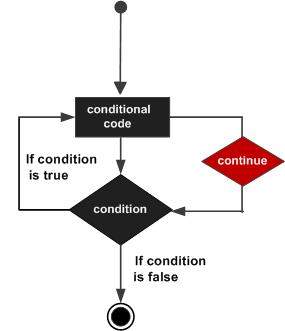
    The continue statement works somewhat like the break statement. Instead of forcing termination, however, continue forces the next iteration of the loop to take place, skipping any code in between.

    For the for loop, continue causes the conditional test and increment portions of the loop to execute. For the while and do…while loops, program control passes to the conditional tests.

    Syntax

    The syntax of a continue statement in C++ is −

    continue;

    Flow Diagram

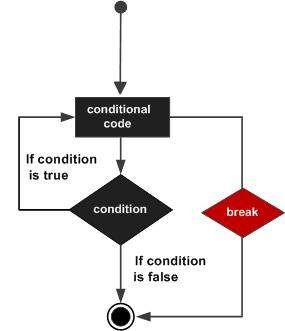
    Here is the following flow diagram showcasing a continuation statement in C++:

    C++ continue statement

    Example

    Here is the following example of a continue statement in C++:

    #include <iostream>usingnamespace std;intmain(){// Local variable declaration:int a =10;// do loop executiondo{if( a ==15){// skip the iteration.
             a = a +1;continue;}
          cout <<"value of a: "<< a << endl;
          a = a +1;}while( a <20);return0;}

    Output

    When the above code is compiled and executed, it produces the following result −

    value of a: 10
    value of a: 11
    value of a: 12
    value of a: 13
    value of a: 14
    value of a: 16
    value of a: 17
    value of a: 18
    value of a: 19
    

    Explanation

    1. Firstly, the do-while loop will ensure that the block of code inside the do section executes at least once and then it will check the condition a < 20, and the loop will continue til it satisfies the condition.
    2. In the if statement, if a == 15, then a = a + 1 will increment the value by 1, and the continue statement will skip the 15; therefore, 15 will not be printed.

    The continue Vs break Statements

    The continue statement skips the remaining part of the current iteration and moves to the next iteration of the loop. This is basically used when a user wants to skip specific iterations based on a condition. It does not terminate the loop, it just transfers the execution to the next iteration. Whereas the break statement terminates the loop completely based on any specific condition given and stops the further execution of the loop.

    Use Cases of Continue Statement

    • Filtering Data: The continue statement is useful when you filter data by skipping invalid or unwanted data in a dataset.
    • Skipping Unnecessary Calculations and Invalid User Input: By using the continue statement, you can avoid redundant computations when the result for certain cases is predetermined.
    • Performance optimization: It will optimize overall performance by avoiding unnecessary processing.
    • Beneficial for Complex Loop Structure: As a complex loop structure requires selective execution of iterations, using a continue statement would be beneficial for such cases.
  • C++ break statement

    The break statement has the following two usages in C++ −

    • When the break statement is encountered inside a loop, the loop is immediately terminated and program control resumes at the next statement following the loop.
    • It can be used to terminate a case in the switch statement (covered in the next chapter).

    If you are using nested loops (i.e., one loop inside another loop), the break statement will stop the execution of the innermost loop and start executing the next line of code after the block.

    Syntax

    The syntax of a break statement in C++ is −

    break;

    Flow Diagram

    C++ break statement

    Example

    #include <iostream>usingnamespace std;intmain(){// Local variable declaration:int a =10;// do loop executiondo{
          cout <<"value of a: "<< a << endl;
          a = a +1;if( a >15){// terminate the loopbreak;}}while( a <20);return0;}

    When the above code is compiled and executed, it produces the following result −

    value of a: 10
    value of a: 11
    value of a: 12
    value of a: 13
    value of a: 14
    value of a: 15
  • C++ Nested Loops

    loop can be nested inside of another loop. C++ allows at least 256 levels of nesting. When a loop is created inside another loop, forming multiple levels of loops then it is said to be a nested loop. Where the inner loop executes completely for each iteration of the outer loop. These are mainly useful for multi-dimensional data structures like matrices or grids, or to solve problems requiring repeated nested iterations.

    Nested for Loops

    When a for loop is nested inside another for loop is known to be a nested for loop. This is the most common form used for nesting.

    Syntax

    The syntax for a nested for loop statement in C++ is as follows −

    for( init; condition; increment ){for( init; condition; increment ){statement(s);}statement(s);// you can put more statements.}

    Example

    #include <iostream>usingnamespace std;intmain(){for(int i =1; i <=3; i++){// Outer loopfor(int j =1; j <=2; j++){// Inner loop
                cout <<"Outer: "<< i <<", Inner: "<< j << endl;}}return0;}

    This would produce the following result −

    Outer: 1, Inner: 1
    Outer: 1, Inner: 2
    Outer: 2, Inner: 1
    Outer: 2, Inner: 2
    Outer: 3, Inner: 1
    Outer: 3, Inner: 2
    

    Nested while Loops

    When a while loop is nested inside another while loop then its said to be nested while loop. This is mainly used when needed to determine the number of iterations dynamically.

    Syntax

    The syntax for a nested while loop statement in C++ is as follows −

    while(condition){while(condition){statement(s);}statement(s);// you can put more statements.}

    Example

    #include <iostream>usingnamespace std;intmain(){int i =1;while(i <=3){int j =1;while(j <=2){
                cout <<"Outer: "<< i <<", Inner: "<< j << endl;
                j++;}
            i++;}return0;}

    This would produce the following result −

    Outer: 1, Inner: 1
    Outer: 1, Inner: 2
    Outer: 2, Inner: 1
    Outer: 2, Inner: 2
    Outer: 3, Inner: 1
    Outer: 3, Inner: 2
    

    Nested do-while Loops

    When a do-while loop is nested inside another do-while loop then its said to be a nested do-while loop. This ensures the loop is executed at least once before checking the condition.

    Syntax

    The syntax for a nested do…while loop statement in C++ is as follows −

    do{statement(s);// you can put more statements.do{statement(s);}while( condition );}while( condition );

    Example

    #include <iostream>usingnamespace std;intmain(){int i =1;do{int j =1;do{
                cout <<"Outer: "<< i <<", Inner: "<< j << endl;
                j++;}while(j <=2);
            i++;}while(i <=3);return0;}

    This would produce the following result −

    Outer: 1, Inner: 1
    Outer: 1, Inner: 2
    Outer: 2, Inner: 1
    Outer: 2, Inner: 2
    Outer: 3, Inner: 1
    Outer: 3, Inner: 2
    

    Nested Loops Example

    The following program uses a nested for loop to find the prime numbers from 2 to 100 −

    #include <iostream>usingnamespace std;intmain(){int i, j;for(i =2; i<100; i++){for(j =2; j <=(i/j); j++)if(!(i%j))break;// if factor found, not primeif(j >(i/j)) cout << i <<" is prime\n";}return0;}

    This would produce the following result −

    2 is prime
    3 is prime
    5 is prime
    7 is prime
    11 is prime
    13 is prime
    17 is prime
    19 is prime
    23 is prime
    29 is prime
    31 is prime
    37 is prime
    41 is prime
    43 is prime
    47 is prime
    53 is prime
    59 is prime
    61 is prime
    67 is prime
    71 is prime
    73 is prime
    79 is prime
    83 is prime
    89 is prime
    97 is prime
    

    How Nested Loops Affect Computational Complexity

    Nested loops directly impact the computational complexity of a program because they increase the number of operations performed as the nesting depth increases.

    If the Outer loop executes n times and the inner loop executes m times for each iteration of the outer loop, then the total iterations equals n*m, So time complexity equals O(mn), and if both loops have a similar range nm, then the complexity is approximately O(n^k), where k is the depth of nesting.

    Example (O(n^2)) multi-dimensional arrays like matrix and pairs, (O(n^3)) triplets, (O(n^4)) etc.

    1. Increased Execution Time:
      Each additional nested loop increases the total number of iterations exponentially, therefore Large input sizes n affect performance for higher time complexity (O(n^k)).
    2. Scalability Issues:
      Nested loop may lead to poor performance in large datasets, for example processing a matrix of size 1000 * 1000 with O(n^2) results in 1,000,000 operations, which makes it less scalable.

    Optimizing Nested Loops

    As the nested loop is an important concept while dealing with a few problems, optimizing it will further improve the performance of your algorithms, especially when dealing with large data sets.
    Nested loops often lead to exponential time complexities(e.g., O(n), O(n)), so optimizing it will make differences in execution time. Below are a few techniques to optimize it.

    1. Avoid unnecessary nesting

    The more loops you have, the slower the program becomes. So try to avoid any unnecessary nesting, sometimes rearranging the loops or changing its order can reduce the need for nested loops.

    2. Use efficient data structures

    Depending on the problem, you can use heaps, queues, and stacks to optimize access patterns. use hash sets or hash maps, which allows for constant time complexity for insertions and deletions. This is often used for a large array or list to avoid complex iteration over it.

    3. Break Early (Exit Conditions)

    You can break out the loop early if needed or can continue to reduce unnecessary work.

    4. Use Divide and Conquer or Dynamic Programming

    Divide and conquer algorithms help in reducing nesting by breaking the problem into smaller subproblems, which are further solved independently and combined later. By dynamic programming, you can transform an exponential time complexity problem into a polynomial one.

    5. Parallelization

    You can use multithreading or multiprocessing if your nested loops are independent and can be computed parallel, this can speed up your program.

    6. Applying Mathematical Optimizations and Built-in Functions or Libraries

    Mathematical optimizations can help in reducing the need for nested loops for some problems.
  • Foreach Loop in C++

    Foreach loop is also known as range-based for loop, it’s a way to iterate over elements through a container (like array, vector, list) in a simple and readable manner without performing any extra performance like initialization, increment/decrement, and loop termination or exit condition.

    Syntax

    The following is the syntax of for each loop −

    for( data_type  element_variable__name : container_name ){// code to be executed}

    Here,

    • element_variable_name is the variable name given to the elements stored in a container.
    • container_name is the variable name of a container of any type such as an array, vector, list. etc.

    How Foreach Loop Works?

    • The foreach loop iterates over all elements of the given container. The process starts with the first element, which is assigned to the variable as element_variable_name as shown in the code.
    • The loop then executes the body of the for each loop, allowing you to manipulate or use the elements.
    • After processing the current element, the loop moves to the next element in the container.
    • This process repeats until it reaches the last element of the container.

    Example of Foreach Loop

    In this example, the range-based for loop with a reference (int& num) allows you to directly modify each element of the vector.

    #include <iostream>#include <vector>usingnamespace std;intmain(){
       vector<int> digits ={10,20,30,40,50};// Range-based for loop to modify each elementfor(int& num : digits){
          num *=2;// Double each number}for(int num : digits){
          cout << num <<" ";}
       cout << endl;return0;}

    Output

    20 40 60 80 100
    

    Foreach Loop with Vector

    The foreach loop can be used to iterate the over the vector elements.

    Example

    In this example, we are iterating and printing vector’s element by using foreach loop

    #include <iostream>#include <vector>usingnamespace std;intmain(){
       vector<int> numbers ={1,2,3,4};for(int num : numbers){
          cout << num <<" ";}return0;}

    Output

    1 2 3 4 
    

    Foreach Loop with List

    Similarly, the foreach loop can also be used to iterate over the list elements.

    Example

    Here, in this example we iterating and printing elements of list by using foreach loop

    #include <iostream>#include <list>intmain(){usingnamespace std;
    
       list<int> numbers ={10,20,30,40,50};for(int num : numbers){
          cout << num <<" ";}
       cout << endl;return0;}

    Output

    10 20 30 40 50 
    

    For Loop Vs. Foreach Loop

    The for loop executes the set of statements based on the given condition while the foreach loop (or, range-based for loop) iterates over the collection elements. Consider the following example to understand the difference between for and foreach in C++ −

    Standard Method: for loop

    The following is an example of for loop, where we are printing the elements of an integer array −

    #include<iostream>usingnamespace std;intmain(){// an Arrayint arr[]={1,2,3,4};// Printing array elements using// for loopfor(int i =0; i <=3; i++){
          cout << i<<" ";}return0;}

    Output

    0 1 2 3
    

    Foreach Loop Method

    The following is an example of foreach loop, where we are iterating and printing the elements of an integer array −

    #include<iostream>usingnamespace std;intmain(){int arr[]={1,2,3,4};// Where x is variable name provided to // elements inside containerfor(int x: arr){    
          cout<< x<<" ";}return0;}

    Output

    1 2 3 4
    

    Foreach Loop with Non-container Type

    Generally, foreach loop is used for iteration for container types like Array, vector, List, Deque, Set and Map etc. but its also used for Non-container type, which is iterable, meaning it must have begin() and end() that return iterators.

    Traditional containers like vectors and all the rest mentioned above inherently meet these requirements so we dont need to specifically specify begin() and end() to it.

    Example

    The following example demonstrates the working of foreach loop with a non-container type element −

    #include <iostream>#include <vector>usingnamespace std;classIterable{public:// Constructor with initialization listIterable(const vector<int>& v):values(v){}// Provide begin() and end() methodsautobegin()const-> vector<int>::const_iterator {return values.begin();}autoend()const-> vector<int>::const_iterator {return values.end();}private:
          vector<int> values;};intmain(){
       Iterable myIterable({1,2,3,4,5});for(int num : myIterable){
          cout << num <<" ";}
       cout << endl;return0;}

    Output

    1 2 3 4 5 
    

    Here,

    • In the above code, the begin() method returns an iterator that points to the first element of the container whereas an end() method returns an iterator that points one position beyond the last element of the container.
    • Then loop iterate from iterator using for() over each element/value of vector printing each value to console.

    Advantages of Foreach Loop

    The following are the advantages of using Foreach loop in C++;

    • Simplicity − It reduces boiler plate code.
    • Readability − It has a simple way of writing code in an easy and readable manner compared to old standard traditional loop methods like for, while and do-while loop.
    • Safety − It reduces errors related to index management and edge cases.

    Limitation of Foreach Loop

    The following are some of the limitations of foreach loop −

    • Restricted to forward traversal − It does not give access to iterate in reverse order.
    • Non-interruptible traversal − There is no option to skip any element or break iteration in between before reaching the last index or last element.
    • No direct access of element while Iteration − There is no direct access to index or position of current element while iterating through foreach loop.

    Applications of Foreach Loop

    • Read-only Iteration − The foreach loop is a good choice for read-only iteration, when the user wants to iterate through elements without any modifications, because the foreach loop provides cleaner and simple code.
    • Traversing over Container − The foreach loop is useful when we want to traverse over any kind of container like (Array, List, Vector) because this loop simplifies the process of iteration over elements of the container.
    • Simple Modification − It is useful when we want to perform any simple operation, because it gives simple, easy and readable code compared to the old standard method of writing iteration code.
    • Working with Non-Container Type − It also works with any type that meets the requirements of an iterable. which consist of begin() and end().
  • C++ do…while loop

    Unlike for and while loops, which test the loop condition at the top of the loop, the do…while loop checks its condition at the bottom of the loop.

    do…while loop is similar to a while loop, except that a do…while loop is guaranteed to execute at least one time.

    Syntax

    The syntax of a do…while loop in C++ is −

    do{statement(s);}while( condition );

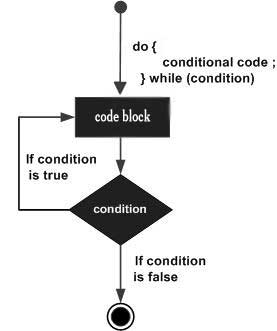
    Notice that the conditional expression appears at the end of the loop, so the statement(s) in the loop execute once before the condition is tested.

    If the condition is true, the flow of control jumps back up to do, and the statement(s) in the loop execute again. This process repeats until the given condition becomes false.

    Flow Diagram

    C++ do...while loop

    Example

    #include <iostream>usingnamespace std;intmain(){// Local variable declaration:int a =10;// do loop executiondo{
          cout <<"value of a: "<< a << endl;
          a = a +1;}while( a <20);return0;}

    When the above code is compiled and executed, it produces the following result −

    value of a: 10
    value of a: 11
    value of a: 12
    value of a: 13
    value of a: 14
    value of a: 15
    value of a: 16
    value of a: 17
    value of a: 18
    value of a: 19

  • C++ for loop

    for loop is a repetition control structure that allows you to efficiently write a loop that needs to execute a specific number of times.

    Syntax

    The syntax of a for loop in C++ is −

    for( init; condition; increment ){statement(s);}

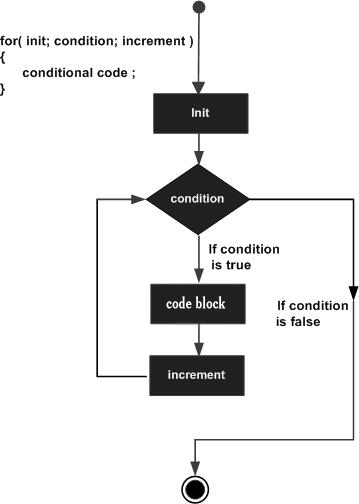
    Here is the flow of control in a for loop −

    • The init step is executed first, and only once. This step allows you to declare and initialize any loop control variables. You are not required to put a statement here, as long as a semicolon appears.
    • Next, the condition is evaluated. If it is true, the body of the loop is executed. If it is false, the body of the loop does not execute and flow of control jumps to the next statement just after the for loop.
    • After the body of the for loop executes, the flow of control jumps back up to the increment statement. This statement can be left blank, as long as a semicolon appears after the condition.
    • The condition is now evaluated again. If it is true, the loop executes and the process repeats itself (body of loop, then increment step, and then again condition). After the condition becomes false, the for loop terminates.

    Flow Diagram

    C++ for loop

    Example

    #include <iostream>usingnamespace std;intmain(){// for loop executionfor(int a =10; a <20; a = a +1){
          cout <<"value of a: "<< a << endl;}return0;}

    When the above code is compiled and executed, it produces the following result −

    value of a: 10
    value of a: 11
    value of a: 12
    value of a: 13
    value of a: 14
    value of a: 15
    value of a: 16
    value of a: 17
    value of a: 18
    value of a: 19
  • C++ while loop

    while loop statement repeatedly executes a target statement as long as a given condition is true.

    Syntax

    The syntax of a while loop in C++ is −

    while(condition){statement(s);}

    Here, statement(s) may be a single statement or a block of statements. The condition may be any expression, and true is any non-zero value. The loop iterates while the condition is true.

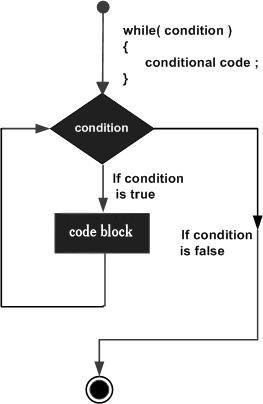
    When the condition becomes false, program control passes to the line immediately following the loop.

    Flow Diagram

    C++ while loop

    Here, key point of the while loop is that the loop might not ever run. When the condition is tested and the result is false, the loop body will be skipped and the first statement after the while loop will be executed.

    Example

    #include <iostream>usingnamespace std;intmain(){// Local variable declaration:int a =10;// while loop executionwhile( a <20){
          cout <<"value of a: "<< a << endl;
          a++;}return0;}

    When the above code is compiled and executed, it produces the following result −

    value of a: 10
    value of a: 11
    value of a: 12
    value of a: 13
    value of a: 14
    value of a: 15
    value of a: 16
    value of a: 17
    value of a: 18
    value of a: 19
  • C++ Loop Types

    There may be a situation, when you need to execute a block of code several number of times. In general, statements are executed sequentially: The first statement in a function is executed first, followed by the second, and so on.

    Programming languages provide various control structures that allow for more complicated execution paths.

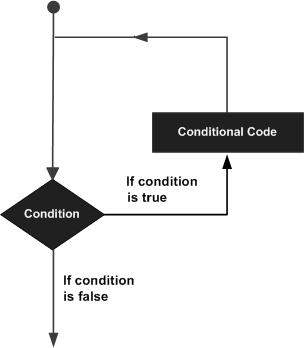
    A loop statement allows us to execute a statement or group of statements multiple times and following is the general from of a loop statement in most of the programming languages −

    Loop Architecture

    C++ programming language provides the following type of loops to handle looping requirements.

    Sr.NoLoop Type & Description
    1while loopRepeats a statement or group of statements while a given condition is true. It tests the condition before executing the loop body.
    2for loopExecute a sequence of statements multiple times and abbreviates the code that manages the loop variable.
    3do…while loopLike a while statement, except that it tests the condition at the end of the loop body.
    4nested loopsYou can use one or more loop inside any another while, for or do..while loop.

    Loop Control Statements

    Loop control statements change execution from its normal sequence. When execution leaves a scope, all automatic objects that were created in that scope are destroyed.

    C++ supports the following control statements.

    Sr.NoControl Statement & Description
    1break statementTerminates the loop or switch statement and transfers execution to the statement immediately following the loop or switch.
    2continue statementCauses the loop to skip the remainder of its body and immediately retest its condition prior to reiterating.
    3goto statementTransfers control to the labeled statement. Though it is not advised to use goto statement in your program.

    The Infinite Loop

    A loop becomes infinite loop if a condition never becomes false. The for loop is traditionally used for this purpose. Since none of the three expressions that form the for loop are required, you can make an endless loop by leaving the conditional expression empty.

    #include <iostream>usingnamespace std;intmain(){for(;;){printf("This loop will run forever.\n");}return0;}

    When the conditional expression is absent, it is assumed to be true. You may have an initialization and increment expression, but C++ programmers more commonly use the for (;;) construct to signify an infinite loop.

    NOTE − You can terminate an infinite loop by pressing Ctrl + C keys.

  • C++ nested switch statements

    It is possible to have a switch as part of the statement sequence of an outer switch. Even if the case constants of the inner and outer switch contain common values, no conflicts will arise.

    C++ specifies that at least 256 levels of nesting be allowed for switch statements.

    Syntax

    The syntax for a nested switch statement is as follows −

    switch(ch1){case'A': 
          cout <<"This A is part of outer switch";switch(ch2){case'A':
                cout <<"This A is part of inner switch";break;case'B':// ...}break;case'B':// ...}

    Example

    #include <iostream>usingnamespace std;intmain(){// local variable declaration:int a =100;int b =200;switch(a){case100: 
             cout <<"This is part of outer switch"<< endl;switch(b){case200:
                   cout <<"This is part of inner switch"<< endl;}}
       cout <<"Exact value of a is : "<< a << endl;
       cout <<"Exact value of b is : "<< b << endl;return0;}

    This would produce the following result −

    This is part of outer switch
    This is part of inner switch
    Exact value of a is : 100
    Exact value of b is : 200
  • C++ switch statement

    switch statement allows a variable to be tested for equality against a list of values. Each value is called a case, and the variable being switched on is checked for each case.

    Syntax

    The syntax for a switch statement in C++ is as follows −

    switch(expression){case constant-expression  :statement(s);break;//optionalcase constant-expression  :statement(s);break;//optional// you can have any number of case statements.default://Optionalstatement(s);}

    The following rules apply to a switch statement −

    • The expression used in a switch statement must have an integral or enumerated type, or be of a class type in which the class has a single conversion function to an integral or enumerated type.
    • You can have any number of case statements within a switch. Each case is followed by the value to be compared to and a colon.
    • The constant-expression for a case must be the same data type as the variable in the switch, and it must be a constant or a literal.
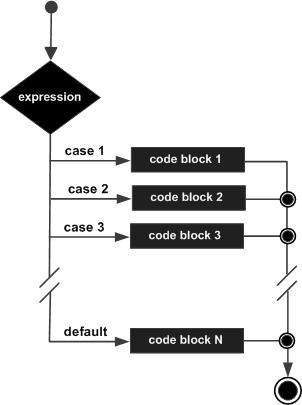
    • When the variable being switched on is equal to a case, the statements following that case will execute until a break statement is reached.
    • When a break statement is reached, the switch terminates, and the flow of control jumps to the next line following the switch statement.
    • Not every case needs to contain a break. If no break appears, the flow of control will fall through to subsequent cases until a break is reached.
    • switch statement can have an optional default case, which must appear at the end of the switch. The default case can be used for performing a task when none of the cases is true. No break is needed in the default case.

    Flow Diagram

    C++ switch statement

    Example

    #include <iostream>usingnamespace std;intmain(){// local variable declaration:char grade ='D';switch(grade){case'A':
             cout <<"Excellent!"<< endl;break;case'B':case'C':
             cout <<"Well done"<< endl;break;case'D':
             cout <<"You passed"<< endl;break;case'F':
             cout <<"Better try again"<< endl;break;default:
             cout <<"Invalid grade"<< endl;}
       cout <<"Your grade is "<< grade << endl;return0;}

    This would produce the following result −

    You passed
    Your grade is D