Blog

  • C++ Recursion (Recursive Function)

    Recursion is a programming technique where a function calls itself over again and again with modified arguments until it reaches its base case, where the recursion stops.

    It breaks a problem down into smaller, more manageable sub-problems, recursion allows for elegant and better solutions to complex problems.

    Recursive Function

    A recursive function is a function which is particularly used for recursion where a function calls itself, either directly or indirectly, to address a problem. It must include at least one base case to terminate the recursion and one recursive case where the function invokes itself.

    • Base Case − Its a case where recursion stops or ends after reaching that particular condition.
    • Recursive Case − Its a case where a function calls itself over again with decremented value until and unless it reaches its base case.

    Creating a Recursive Function

    The following syntax is used to implement a recursive function in C++ −

    function name(param_1, param_2..){<base condition><function body><return statement>}

    Here,

    • Where, function name(param_1, param_2..) is a function declared as “name” passing with multiple parameters in it as per requirement.
    • Now the function body is being divided into three sub-categories : base condition, function body and return statement.
    • In base condition we will define its base case, where recursion has to stop or end.
    • In the function body, a recursive case will be defined, where we need to call the function over again and again as per requirement.
    • At last, the return statement will return the final output of the function.

    Calling a Recursive Function

    Calling a recursive function is just like calling any other function, where you will use the function’s name and provide the necessary parameters in int main() body.

    To call a recursive function, use the following syntax −

    func_name(value);

    Example of Recursion

    Below is an example of a recursion function in C++. Here, we are calculating the factorial of a number using the recursion −

    #include <iostream>usingnamespace std;// Recursive Function to Calculate Factorialintfactorial(int num){// Base caseif(num <=1){return1;}// Recursive caseelse{return num *factorial(num -1);}}intmain(){int positive_number;
       cout <<"Enter a positive integer: ";
       cin >> positive_number;if(positive_number <0){
          cout <<"Wrong Input, Factorial is not Defined for Negative Integer"<< endl;}else{
          cout <<"Factorial of "<< positive_number <<" is "<<factorial(positive_number)<< endl;}return0;}

    Output

    Enter a positive integer: 4 (input)
    Factorial of 4 is 24
    

    Explanation

    If take input int positive_number as 4, It will send integer to function name ‘factorial’ as factorial(4)

    Initial Call: factorial(4)

    This function will check base case (n<=1), as its not satisfying the base case, therefore move forward to recursive case and will compute as “4 * factorial(3)”.

    Second call: factorial(3)

    This function will again check base case, as its not satisfying it, therefor will again move forward to recursive case , and compute as “3 * factorial(2)”.

    Third Call: factorial(2)

    Checks base case and computes “2 * factorial(1)”

    Fourth call: factorial(1)

    Checks base case, now since function satisfying this base case condition thats less than or equal to 1, So it will return 1.

    Unwinding the Stack

    Now, the recursive calls will start returning: After the 4th call now it will again start from back, returning to the Third Call first.

    Return to Third Call: factorial(2)

    We already have factorial(1) = 1, therefor factorial(2) will return, “2 * factorial(1)”, thats “2 * 1” , which returns as factorial(2) equals to 2.

    Return to Second Call: factorial(3)

    Now, factorial(2) is 2, therefore factorial(3) equals to “3 * 2”, thats 6.

    Return to Initial Call: factorial(4)

    We have factoria(3) which returns 6, therefore, factorial(4) returns “4 * 6 = 24”.

    Types of Recursion

    Recursion can be categorized into two main types where each with its own sub-categories −

    1. Direct Recursion

    Direct recursion occurs when a function calls itself directly −

    Simple Direct Recursion

    The function calls itself with a simpler or smaller instance of the problem. It is used for solving problems like factorial calculation, fibonacci sequence generation, etc.

    Tail Recursion

    A form of direct recursion where the recursive call is the last operation in the function. It is used for solving accumulative calculations and list processing problems.

    intfactorial(int n,int result =1){if(n <=1){return result;}else{returnfactorial(n -1, n * result);// Tail recursive call}}

    Head Recursion

    The recursive call is made before any other operation in the function. Processing occurs after the recursive call returns. It is used for tree traversals and output generation.

    voidprintNumbers(int n){if(n >0){printNumbers(n -1);// Recursive call first
          cout << n <<" ";// Processing after recursive call}}

    Linear Recursion

    Each function call generates exactly one recursive call, forming a linear chain of calls. It is used for simple counting or summing.

    intlinearRecursion(int n){if(n <=0){return0;}else{returnlinearRecursion(n -1)+1;// Linear recursive call}}

    2. Indirect Recursion

    Indirect recursion occurs when a function calls another function, which eventually leads to the original function being called. This involves two or more functions calling each other.

    Mutual Recursion

    In mutual recursion, two or more functions call each other in a recursive manner, forming a cyclic dependency. It is used for even and odd number classification and grammar parsing.

    #include <iostream>usingnamespace std;voideven(int n);voidodd(int n);voideven(int n){if(n ==0){
          cout <<"Even"<< endl;}else{odd(n -1);// Calls odd}}voidodd(int n){if(n ==0){
          cout <<"Odd"<< endl;}else{even(n -1);// Calls even}}intmain(){even(4);// Outputs: Evenodd(5);// Outputs: Oddreturn0;}
    Output
    Even
    Even
    

    Nested Recursion

    The nested recursion is a form of indirect recursion where a recursive function makes another recursive call inside its own recursive call. It is used for solving complex mathematical and algorithmic problems.

    #include <iostream>usingnamespace std;intnestedRecursion(int n){if(n >100){return n -10;}else{returnnestedRecursion(nestedRecursion(n +11));// Nested recursive calls}}intmain(){
       cout <<nestedRecursion(95)<< endl;// Outputs: 105return0;}
    Output
    91
    

    Advantages of Recursion

    • Simplicity and reduced boilerplate code − Recursion helps to simplify solving problems which have a built-in recursive structure, like working with trees or solving combinatorial problems by making it easier to understand and implement.
    • Backtracking − Recursion is a great fit for backtracking algorithms, which involve examining all possible solutions to find one which meets certain criteria.
    • Effective solutions for divide-and-conquer problems − Recursion works perfectly for Divide-and-conquer algorithms, where problems are broken down into smaller sub parts and are solved one by one. This makes problem solving more efficient and easy.

    Recursion Vs. Iteration

    Recursion is a method where a function calls itself over again and again with modified arguments until it reaches its base case which stops the recursion. Whereas, an iteration involves using loops (such as for, while or do-while) where it involves repeatedly executing blocks of code until a certain condition is met.

    Recursion or Iteration: When to Use?

    Recursion

    • The problems which can be divided into similar sub-problems or which have natural recursive patterns such as tree traversal or combinational tasks and manageable depth.
    • When a user needs simple, cleaner and readable code as it provides clean proper arranged code.
    • Examples: Tree and graph traversals, divide-and-conquer algorithms like quicksort and mergesort, and problems involving backtracking like solving mazes or puzzles.

    Iteration

    • Iterative solutions are generally more efficient in terms of memory and execution time and which involves simple repetition.
    • For the problems which require simple looping because iteration is usually more straightforward and efficient.
    • Iteration is more stable for problems which require a large number of repetitions, as it doesn’t risk stack overflow.
    • Examples: Looping of Array, Vectors and lists, where require simple mathematical computation and repeated execution of a block of code.

    Comparison between Recursion and Iteration

    RecursionIteration
    Time ComplexityIt can be greater because of its repeated function calls nature.Comparatively less.
    Space ComplexityRecursion often uses more Memory because of the call stack.Uses a fixed amount of Memory.
    Code SizeIn the recursion, the code size is smaller.Comparatively larger code size.
    Execution SpeedThe execution speed is slow when you use recursion.Execution speed is more.

    Limitations of Recursion

    The following are limitations of recursion −

    • Memory Consumption − Each recursive call adds a new frame to the call stack, which can consume a significant amount of memory.
    • Stack Overflow Risk − As recursion relies on call stack to manage function calls, Deep recursion can lead to stack overflow as it exceeds the stack size limit.
    • Performance Overhead − Recursive functions can be less efficient than iterative ones because they involve overhead from multiple function calls and managing the call stack, which can significantly impact performance, especially with deep recursion.
    • Debugging Complexity − Debugging Recursive code can be challenging, especially when dealing with complex recursion or large recursion depths. It needs careful handling of base cases and logic.
    • Space Complexity − Due to the call stack in recursion, it can lead to consuming a lot of memory.
  • Multiple Function Parameters in C++

    C++ multiple function parameters describe the ability of a function to accept more than one argument or can say functions with multiple parameters to perform operations using several inputs, this feature makes a function to execute more complex operations by working with multiple subset of data at once.

    Syntax

    In C++, you can define a function with multiple parameters by listing them in the functions declaration and definition, separated by commas. Here’s the basic syntax −

    return_type function_name(param1_type param1_name, param2_type parame2_name,...);

    Where,

    param1_type and param1_name are parameter type (eg. int, char, bool, string) and its name respectively, similarly param2_type (eg. int, char, bool, string) and param2_name are parameter type and its name respectively and so on.

    Data Types for Multiple Function Parameters

    There are 2 types of passing data to multiple function parameters, as given in the following −

    1. Single Data Type for Multiple Parameters

    Functions where all parameters are of the same data type.

    Example

    #include <iostream>usingnamespace std;// Function taking multiple parameters or arguments of same data type (int)voidsum(int a,int b,int c){
       cout <<"Sum: "<<(a + b + c)<< endl;}intmain(){sum(1,2,3);return0;}
    Output
    Sum: 6
    

    2. Multiple Data Types for Multiple Parameters

    Functions where parameters can have different data types.

    Example

    #include <iostream>usingnamespace std;// Function taking arguments of different data typesvoidgetInfo(string name,int age,double height){
       cout << name <<" is "<< age <<" years old and "<< height <<" meters tall."<< endl;}intmain(){getInfo("Aman",26,1.78);getInfo("Naman",32,1.65);return0;}
    Output
    Aman is 26 years old and 1.78 meters tall.
    Naman is 32 years old and 1.65 meters tall.
    

    Multiple Parameters Passing Techniques

    Multiple parameters (or, single) passing techniques in C++ refer to the methods which are used to pass arguments to functions. These techniques define how the data is transferred and manipulated within the function. Here we will discuss few primary techniques −

    1. Pass by Value

    In pass by value, a copy of the actual parameters value is passed to the function. The changes made to the parameter inside the function do not affect the original argument. It is safe and straightforward but can be inefficient for large data structures due to copying.

    2. Pass by Reference

    This method passes a reference to the actual parameter, allowing the function to modify the original argument. The function works with the original data rather than a copy. It is efficient as it avoids copying, but requires careful handling to avoid unintended modifications.

    3. Mutable vs Immutable Types

    Mutable TypesImmutable Types
    These are types whose instances can be modified after they are created.These are types whose instances cannot be changed after they are created.
    Lists, dictionaries, and sets are common mutable types.Integers, strings, and tuples are common immutable types.

    Types of Multiple Function Parameters

    In C++, functions are capable of accepting multiple parameters, and these parameters can be categorized in various ways. Heres a breakdown for different types of multiple function parameters in C++ −

    1. Fixed Number of Parameters

    A function with a fixed number of parameters where it has a specific and unchanging number of input parameters.

    Example

    #include <iostream>usingnamespace std;// Function with a fixed number of argumentsvoidgetDetails(int age,double height,const string& name){
       cout <<"Name: "<< name <<", Age: "<< age <<", Height: "<< height << endl;}intmain(){getDetails(25,5.6,"Sam");return0;}
    Output
    Name: Sam, Age: 25, Height: 5.6
    

    2. Variable Number of Parameters

    A function that can accept a variable number of parameters or arguments. This is typically implemented using variadic functions or template parameter packs.

    Example

    #include <iostream>usingnamespace std;// Variadic template functiontemplate<typename... Args>voidprintNumbers(Args... args){(cout <<...<< args)<< endl;}intmain(){printNumbers(1,2,3);// Outputs: 123printNumbers(4,5,6,7,8);// Outputs: 45678return0;}
    Output
    123
    45678
    

    3. Default Parameters

    The default parameters are the parameters with default values that can be omitted when calling the function. The function uses the default values if no arguments are provided for those parameters.

    Example

    #include <iostream>usingnamespace std;// Function with default parametersvoidgreet(const string& name ="Guest",int age =0){
       cout <<"Hello, "<< name;if(age >0){
          cout <<". You are "<< age <<" years old.";}
       cout << endl;}intmain(){greet();// Outputs: Hello, Guestgreet("Alice");// Outputs: Hello, Alicegreet("Bob",30);// Outputs: Hello, Bob. You are 30 years old.return0;}
    Output
    Hello, Guest
    Hello, Alice
    Hello, Bob. You are 30 years old.
    

    4. Named Parameters (C++ Specific)

    Though C++ does not support named parameters directly, you can achieve similar functionality using a class or struct to encapsulate parameters.

    Example

    #include <iostream>usingnamespace std;// Structure to encapsulate parametersstructPerson{
       string name;int age;double height;};// Function that takes a parameter objectvoidprintPerson(const Person& p){
       cout <<"Name: "<< p.name <<", Age: "<< p.age <<", Height: "<< p.height << endl;}intmain(){
       Person alice ={"Alice",25,5.9};printPerson(alice);return0;}
    Output
    Name: Alice, Age: 25, Height: 5.9
    

    5. Parameter Objects

    A single parameter that is a complex type like a class or struct, encapsulating multiple related values.

    Example

    #include <iostream>usingnamespace std;// Class to hold multiple parametersclassRectangle{public:int width;int height;Rectangle(int w,int h):width(w),height(h){}};// Function that takes a parameter objectvoidcalculateArea(const Rectangle& rect){
       cout <<"Area: "<<(rect.width * rect.height)<< endl;}intmain(){
       Rectangle rect(10,5);calculateArea(rect);// Outputs: Area: 50return0;}
    Output
    Area: 50
  • C++ Functions

    A function is a group of statements that together perform a task. Every C++ program has at least one function, which is main(), and all the most trivial programs can define additional functions.

    You can divide up your code into separate functions. How you divide up your code among different functions is up to you, but logically the division usually is such that each function performs a specific task.

    A function declaration tells the compiler about a function’s name, return type, and parameters. A function definition provides the actual body of the function.

    The C++ standard library provides numerous built-in functions that your program can call. For example, function strcat() to concatenate two strings, function memcpy() to copy one memory location to another location and many more functions.

    A function is known with various names like a method or a sub-routine or a procedure etc.

    Defining a Function

    The general form of a C++ function definition is as follows −

    return_type function_name( parameter list ){
       body of the function
    }

    A C++ function definition consists of a function header and a function body. Here are all the parts of a function −

    • Return Type − A function may return a value. The return_type is the data type of the value the function returns. Some functions perform the desired operations without returning a value. In this case, the return_type is the keyword void.
    • Function Name − This is the actual name of the function. The function name and the parameter list together constitute the function signature.
    • Parameters − A parameter is like a placeholder. When a function is invoked, you pass a value to the parameter. This value is referred to as actual parameter or argument. The parameter list refers to the type, order, and number of the parameters of a function. Parameters are optional; that is, a function may contain no parameters.
    • Function Body − The function body contains a collection of statements that define what the function does.

    Example

    Following is the source code for a function called max(). This function takes two parameters num1 and num2 and return the biggest of both −

    // function returning the max between two numbersintmax(int num1,int num2){// local variable declarationint result;if(num1 > num2)
          result = num1;else
          result = num2;return result;}

    Function Declarations

    A function declaration tells the compiler about a function name and how to call the function. The actual body of the function can be defined separately.

    A function declaration has the following parts −

    return_type function_name( parameter list );

    For the above defined function max(), following is the function declaration −

    intmax(int num1,int num2);

    Parameter names are not important in function declaration only their type is required, so following is also valid declaration −

    intmax(int,int);

    Function declaration is required when you define a function in one source file and you call that function in another file. In such case, you should declare the function at the top of the file calling the function.

    Calling a Function

    While creating a C++ function, you give a definition of what the function has to do. To use a function, you will have to call or invoke that function.

    When a program calls a function, program control is transferred to the called function. A called function performs defined task and when its return statement is executed or when its function-ending closing brace is reached, it returns program control back to the main program.

    To call a function, you simply need to pass the required parameters along with function name, and if function returns a value, then you can store returned value. For example −

    #include <iostream>usingnamespace std;// function declarationintmax(int num1,int num2);intmain(){// local variable declaration:int a =100;int b =200;int ret;// calling a function to get max value.
       ret =max(a, b);
       cout <<"Max value is : "<< ret << endl;return0;}// function returning the max between two numbersintmax(int num1,int num2){// local variable declarationint result;if(num1 > num2)
          result = num1;else
          result = num2;return result;}

    I kept max() function along with main() function and compiled the source code. While running final executable, it would produce the following result −

    Max value is : 200
    

    Function Arguments

    If a function is to use arguments, it must declare variables that accept the values of the arguments. These variables are called the formal parameters of the function.

    The formal parameters behave like other local variables inside the function and are created upon entry into the function and destroyed upon exit.

    While calling a function, there are two ways that arguments can be passed to a function −

    Sr.NoCall Type & Description
    1Call by ValueThis method copies the actual value of an argument into the formal parameter of the function. In this case, changes made to the parameter inside the function have no effect on the argument.
    2Call by PointerThis method copies the address of an argument into the formal parameter. Inside the function, the address is used to access the actual argument used in the call. This means that changes made to the parameter affect the argument.
    3Call by ReferenceThis method copies the reference of an argument into the formal parameter. Inside the function, the reference is used to access the actual argument used in the call. This means that changes made to the parameter affect the argument.

    By default, C++ uses call by value to pass arguments. In general, this means that code within a function cannot alter the arguments used to call the function and above mentioned example while calling max() function used the same method.

    Default Values for Parameters

    When you define a function, you can specify a default value for each of the last parameters. This value will be used if the corresponding argument is left blank when calling to the function.

    This is done by using the assignment operator and assigning values for the arguments in the function definition. If a value for that parameter is not passed when the function is called, the default given value is used, but if a value is specified, this default value is ignored and the passed value is used instead. Consider the following example −

    #include <iostream>usingnamespace std;intsum(int a,int b =20){int result;
       result = a + b;return(result);}intmain(){// local variable declaration:int a =100;int b =200;int result;// calling a function to add the values.
       result =sum(a, b);
       cout <<"Total value is :"<< result << endl;// calling a function again as follows.
       result =sum(a);
       cout <<"Total value is :"<< result << endl;return0;}

    When the above code is compiled and executed, it produces the following result −

    Total value is :300
    Total value is :120
  • C++ String Comparison

    C++ string comparison refers to the process of evaluating two strings to determine their equality or their order based on lexicographical rules.

    String comparison can be done by using built-in operators such as ==!=<, and > or by the compare() method. But by default these comparisons are case-sensitive, which means “tutorial point” and “Tutorial point” are considered different. String comparison plays an important role in performing tasks like sorting, searching, and input validation.

    Types of String in C++

    Basically there are two primary types of string in C++ −

    • C-style strings − This string in C++ is an array of characters with a null character (‘\0’).
    • std::string − This string is a part of the C++ Standard Library which provides a more robust and user-friendly way to handle strings because it manages memory automatically, allows dynamic resizing, and provides a vast set of member functions for manipulation like concatenation, substring extraction, and searching.

    Comparing C-Style Strings

    Here’s how you can compare C-style strings −

    1. strcmp()

    You can use the strcmp() function from the <cstring> library to compare two strings.

    Example

    Heres a given example showing a comparison between two C-style strings −

    #include <iostream>#include <cstring>intmain(){constchar* str1 ="hello";constchar* str2 ="Tutorialspoint Learner";int result =strcmp(str1, str2);if(result <0){
          std::cout <<"str1 is less than str2\n";}elseif(result >0){
          std::cout <<"str1 is greater than str2\n";}else{
          std::cout <<"str1 is equal to str2\n";}return0;}

    Output

    str1 is greater than str2
    

    Explanation

    • The strcmp function compares the two strings and returns negative (str1 < str2), zero(str1 = str2) and positive(str1 > str2).
    • In this case, “hello” is lexicographically greater than “Tutorialspoint Learner”, so the output is “str1 is greater than str2”.
    • In lexicographical order, strings are compared character by character based on their ASCII values, where ‘h’ (ASCII 104) and ‘T’ (ASCII 84)
    • So 104 > 84 then this comparison resulted in “hello” being greater than “Tutorialspoint Learner”.

    2. strcoll()

    The strcoll() function compares two C-strings according to the current locale, which is useful for internationalization. It behaves similarly to strcmp() but takes into account locale-specific rules.

    Example

    #include <iostream>#include <cstring>#include <locale>intmain(){constchar* str1 ="hello";constchar* str2 ="Tutorialspoint Learner";// Set the locale (optional, depends on your environment)
       std::setlocale(LC_COLLATE,"en_US.UTF-8");int result =strcoll(str1, str2);if(result <0){
          std::cout <<"str1 is less than str2\n";}elseif(result >0){
          std::cout <<"str1 is greater than str2\n";}else{
          std::cout <<"str1 is equal to str2\n";}return0;}

    Output

    str1 is greater than str2
    

    Explanation

    • The std::setlocale() function sets the locale for string collation (comparison) to “en_US.UTF-8”, which is the U.S. English locale.
    • The strcoll() function compares str1 and str2 according to the current locale.
    • It returns a “-ve” value if str1 < str2, 0 if they are equal, and a “+ve” value if str1 > str2.
    • Since ‘h’ (ASCII 104) > ‘T’ (ASCII 84) therefor output is ‘h’ is greater than ‘T’.

    Comparing std::string

    In C++ for comparing std::string objects have various methods that give different ways of accessing their equality or relative order.

    1. Comparison Operators

    Comparison operators give access to compare two std::string objects directly.

    This comparison is also done lexicographically which means characters are compared based on their ASCII values. These are the following −

    • == (Equality)
    • != (Inequality)
    • < (Less than)
    • > (Greater than)
    • <= (Less than or equal to)
    • >= (Greater than or equal to)

    Example

    #include <iostream>#include <string>intmain(){
       std::string str1 ="Allen";
       std::string str2 ="allen";
    
       std::cout <<(str1 == str2)<< std::endl;// false (0)
       std::cout <<(str1 != str2)<< std::endl;// true (1)
       std::cout <<(str1 < str2)<< std::endl;// true (1)
       std::cout <<(str1 > str2)<< std::endl;// false (0)return0;}

    Output

    0
    1
    1
    0
    

    Explanation

    Since the ASCII value of A (65) is less than a (97), So receiving output accordingly.

    2. std::string::compare() Method

    The std::string::compare() method is also used to compare the value of two strings. It returns an integer value based on the lexicographical comparison.

    • 0: if both strings are equal
    • > 0 (+ve) : if the first string is greater
    • < 0 (-ve) : if the first string is lesser

    Example

    #include <iostream>#include <string>intmain(){
       std::string str1 ="apple";
       std::string str2 ="banana";
    
       std::cout << str1.compare(str2)<< std::endl; 
       std::cout << str1.compare("apple")<< std::endl;return0;}

    Output

    -1
    0
    

    Explanation

    • At first, since ‘a’ (ASCII 97) is less than ‘b’ (ASCII 98) so output is a negative number (-1).
    • In the second, the output is 0 as values stored in str1 and “apple” are the same.
  • C++ String Concatenation

    String concatenation is the process of adding an element to an existing element. In this context, string concatenation is the method by which two (or more) strings can be added to one another. Hence, the resultant string is the combination of the initial string and the added string.

    There are several methods to concatenate strings in C++, some of which are given as follows −

    • Using string::append() function
    • Using ‘+’ operator
    • Using strcat() function for C-style strings
    • Using for loop
    • Using while loop
    • Using range based loop
    • Using inheritance
    • Using friend function with OOPS

    These methods are explained in detail in the next few articles of this chapter. So, lets dive into these concepts.

    String Concatenation Using string::append() Function

    String is a class defined in <string> header file, and the append() function is an inherited method of that class. This method is used to append or add a given string to an initial string.

    Syntax

    The following syntax is used to concatenate string using the append() method −

    initial_string.append(new_string);
    initial_string.append(this is new);

    Parameters

    The string::append() function takes a string as a parameter. The string can be passed explicitly or as an object.

    Example of append() function

    The following exemplar code is used to concatenate string using the append() method −

    #include <iostream>usingnamespace std;intmain(){
       string initial_string("I Love TP.");
       string new_string(" I am new here.");//using append function with object parameter 
       initial_string.append(new_string);//using append function with explicit string
       initial_string.append(" Could you help me?");
    
       cout << initial_string << endl;return0;}

    Output

    I Love TP. I am new here. Could you help me?
    

    String Concatenation Using ‘+’ Operator

    One of the easiest way to add strings is to use the ‘+’ operator on two or more strings. This can be done in place (i.e. without creating a new string), or in a new string object. This is one of the newer features of C++ programming language.

    Syntax

    The following syntax is used to concatenate string using the ‘+’ opertaor −

    new_string=initial_string+added_string;
    initial_string+=added_string
    

    Here, the new string can be added in place or by creating a new string object.

    Example

    The following exemplar code is used to concatenate string using the ‘+’ opertaor −

    #include <iostream>usingnamespace std;intmain(){
       string initial_string("I Love TP.");
       string new_string(" I am new here.");
    
       string a="Hey !!! "+ initial_string;//using new string object
    
       a+=new_string;//inplace addition
    
       a+=" Could you help me? ";
    
       cout << a << endl;return0;}

    Output

    Hey !!! I Love TP. I am new here. Could you help me? 
    

    String Concatenation Using for Loop

    We can use a simple for loop from the beginning of the new string to the end of the new string, and for each iteration, we can add that character to the initial string. This can be done in place, or by using a new string object. This type of concatenation is also possible in C-style strings, which are character arrays.

    Syntax

    The following syntax is used to concatenate string using for loop from beginning of the string to the end −

    for(int i=0;i<s.length();i++){
       initial+=s[i];}

    Example

    The following exemplar code is used to concatenate string using for loop from beginning of the string to the end −

    #include <iostream>usingnamespace std;intmain(){
       string initial_string("I Love TP.");
       string new_string(" I am new here.");for(int i=0;i<new_string.size();i++){
          initial_string+=new_string[i];}//using for loop to iterate over new_string
    
       cout << initial_string << endl;return0;}

    Output

    I Love TP. I am new here.
    

    String Length Using while Loop

    We can also use a simple while loop. This loop runs till we reach the end of the string, and at each iteration, we can add the corresponding character to the initial string. This can be done in place, or by using a new string object. This type of concatenation is also possible in C-style strings, which are character arrays.

    Syntax

    The following syntax is used to concatenate string using while loop from beginning of the string to the end −

    for(int i=0;i<s.length();i++){
       initial+=s[i];}

    Example

    The following exemplar code is used to concatenate string using while loop from beginning of the string to the end −

    #include <iostream>usingnamespace std;intmain(){
       string initial_string("I Love TP.");
       string new_string(" I am new here.");int i=0;while(new_string[i]!='\0'){
          initial_string+=new_string[i];
          i++;}//using while loop to iterate over new_string
    
       cout << initial_string << endl;return0;}

    String Concatenation Using range based loop

    We can also use a range based loop, which will automatically iterate over the whole string and we can add each character to the initial string. This can be done in place, or by using a new string object.

    Syntax

    The following syntax is used to concatenate string using range based loop from beginning of the string to the end −

    for(char c: s){
       initial+=c;}

    Example

    The following exemplar code is used to concatenate string using range based loop from beginning of the string to the end −

    #include <iostream>usingnamespace std;intmain(){
       string initial_string("I Love TP.");
       string new_string(" I am new here.");for(char c: new_string){
          initial_string+=c;}//using range based loop for concatentation
    
       cout << initial_string << endl;return0;}

    Output

    I Love TP. I am new here.
    

    String Concatenation Using strcat() Function

    We can use strcat() function to concatenate strings in C++. But, this method does not work for string objects, it only works for C-style strings, i.e. character arrays. This method is defined in the <string.h> header file.

    Syntax

    The following syntax is used to concatenate string using the strcat() method −

    strcat(s1,s2);

    Parameters

    Here, s1 and s2 are two character arrays (i.e. strings) which are passed as parameters to the strcat() method.

    Example

    The following exemplar code is used to concatenate string using the strcat() method −

    #include <bits/stdc++.h>usingnamespace std;intmain(){char s1[]="I love ";char s2[]=" TP. Could you help me? ";//using strcat function to concatenate//result stored in s1strcat(s1,s2);
       cout << s1 << endl;return0;}

    Output

    I love  TP. Could you help me? 
    

    String Concatenation Using Inheritance

    We can use strcat() function to concatenate strings in C++. But, this method does not work for string objects, it only works for C-style strings, i.e. character arrays. This method is defined in the <string.h> header file.

    Syntax

    The following syntax is used to concatenate string using the inheritance method in OOP concepts −

    strcat(s1,s2);

    Example

    The following exemplar code is used to concatenate string using the inheritance method in OOP concepts −

    #include <bits/stdc++.h>usingnamespace std;//parent classclassparent{public:virtual string concatenate(string s1, string s2)=0;//creating a virtual method to inherit};//child classclasschild:parent{public: 
          string concatenate(string s1, string s2){
             s1+=s2;//using + operator to add stringsreturn s1;}};intmain(){ 
       child ch1;
       cout << ch1.concatenate("I love ","TP !!!");return0;}

    Output

    I love TP !!!
    

    String Concatenation Using Friend Function with OOPS

    A friend class can access private and protected members of other classes in which it is declared as a friend. It is sometimes useful to allow a particular class to access private and protected members of other classes.

    Hence, we make use of this friend class to declare a helper method, and then use the strcat() function for C-style strings.

    Syntax

    The following syntax is used to concatenate string using the friend method in C++ −

    Class A {
       string s1=[value];
       string s2=[value];friendvoidhelper(A obj);}helper(A){strcat(obj.s1, obj.s2);};

    Example

    The following exemplar code is used to concatenate string using the friend method in C++ −

    #include <bits/stdc++.h>usingnamespace std;// concatenate class classconcatenate{public:char s1[20]="I love TP !!!";char s2[20]="Hey... ";friendvoidhelper(concatenate par1);};voidhelper(concatenate par1){// Pass parameter to concatenate strcat(par1.s2, par1.s1); 
    
       cout << par1.s2;}intmain(){// Create object of class 
       concatenate par1;//pass this object to helper function helper(par1);return0;}

    Output

    Hey... I love TP !!!
  • C++ String Length

    Length of a string is the number of characters present in the string. These characters can be of the data type char, and these include all alphanumeric elements, symbols and miscellaneous characters. In C++ programming language, there are two types of strings- Character Arrays of C-Style type, and String objects which are built-in objects of <string> class.

    The length of a string also includes white spaces, but in case a string includes a terminating character “\0”, the string ends at that character and the count of length is terminated just before that character.

    There are many ways to find the length of a given string. Some of these methods are iterative, whereas some also use in-built functions and methods. These methods are explained clearly in the following parts of this chapter −

    • Using strlen() Method
    • Using string::length() Method of String Class
    • Using string::size() Method of String Class
    • Using Iterative for Loop
    • Using Iterative while Loop

    String Length Using strlen() Method

    Strings are defined as character arrays which are accessed using the pointer to the first iterator of the array. We can use strlen() method of C Library to calculate the length of C-type arrays.

    Syntax

    The following syntax shows how to use strlen() method to calculate the length of the string −

    strlen(string_name);

    Example

    The following example shows how to calculate the length of the string using strlen() method −

    #include <bits/stdc++.h>usingnamespace std;intmain(){char s[]="I love TP !!!";
       cout<<"Length of string s : "<<strlen(s);return0;}

    Output

    Length of string s : 13
    

    String Length Using string::size() Method

    Most programmers commonly use string::size() method of string class when there is a need to calculate the length of a string in C++ programming language. It is the most basic method, and it is generally used while traversing a string object.

    Syntax

    The following syntax shows how to use size() method to calculate the length of the string −

    string_object.size();

    Example

    The following example shows how to calculate the length of the string using size() method −

    #include <bits/stdc++.h>usingnamespace std;intmain(){
       string s="I love TP !!!\0 and others";
    
       cout<<"Length of string s : "<<s.size();return0;}

    Output

    Length of string s : 13
    

    String Length Using string::length() Method

    We can also use length() method of string class to determine the length of the given string. Both length() and size() methods are part of <string> header file, and these are called as methods to the string object.

    Syntax

    The following syntax shows how to use length() method to calculate the length of the string −

    string_object.length();

    Example

    The following example shows how to calculate the length of the string using length() method −

    #include <bits/stdc++.h>usingnamespace std;intmain(){
       string s="I love TP !!!\0 and others";
    
       cout<<"Length of string s : "<<s.length();return0;}

    Output

    Length of string s : 13
    

    String Length Using while Loop

    We can use a simple while loop to iterate over the string and initialize a variable count to calculate the length of the string until we reach the end of the string. For each iteration, the count increases by one, hence the net result will be the length of the string.

    Syntax

    The following syntax shows how to use a while loop to calculate the length of the string −

    while(s[i]!='\0'){[body]}

    Example

    The following example shows how to calculate the length of the string using a single while loop −

    #include <bits/stdc++.h>usingnamespace std;intmain(){
       string s="I love TP !!!\0 and others";int count=0, i=0;while(s[i]!='\0') 
          count++, i++;
    
       cout<<"Length of string s : "<<count;return0;}

    Output

    Length of string s : 13
    

    String Length Using a for Loop

    We can use a simple for loop to iterate over the string and initialize a variable count to calculate the length of the string until we reach the end of the string. For each iteration, the count increases by one, hence the net result will be the length of the string.

    Syntax

    The following syntax shows how to use a for loop to calculate the length of the string −

    for(int i=0;s[i]!='\0';i++){[body]}

    Example

    The following example shows how to calculate the length of the string using a single for loop −

    #include <bits/stdc++.h>usingnamespace std;intmain(){
       string s="I love TP !!!\0 and others";int count=0;for(int i=0;s[i]!='\0';i++) 
          count++;
    
       cout<<"Length of string s : "<<count;return0;}

    Output

    Length of string s : 13
  • C++ Loop Through a String

    C++ string is an array of characters that can be extracted and manipulated with the help of various member functions. It is much more flexible and advanced than a traditional C-style character array because it supports self-memory management and offers many useful functions for manipulation, such as concatenation, substring extraction, and searching. To create an object of a string, you must use the std::string class from the <string> header.

    Looping Through a String

    A loop over a string is essentially an iteration or traversal process covering each character of a string to perform diversified operations such as access, modification, or analysis of characters. That can be achieved using the different types of looping constructs, including the traditional for loops and while loops or even range-based for loops.

    Using a for-loop

    for loop is a common way to iterate through a string in C++. It allows you to access each character in sequence.

    Example

    #include <iostream>#include <string>intmain(){
       std::string str ="TutorialsPoint";for(size_t i =0; i < str.length();++i){
          std::cout << str[i]<<" ";// Print each character}return0;}

    Output

    T u t o r i a l s P o i n t 
    

    Using a while loop

    while loop is a kind of control flow statement in which a block of code repeats or is executed as long as the given condition stands true, and if that condition becomes false then the loop stops.

    Example

    #include <iostream>#include <string>intmain(){
       std::string str ="TutorialsPoint";
       size_t i =0;while(i < str.length()){
          std::cout << str[i]<<" ";// Print each character++i;}return0;}

    Output

    T u t o r i a l s P o i n t  
    

    Using a range-based for loop

    There is another type of control flow statement called the range-based for loop that allows for iterating over elements in a collection. It differs from the while and for loops because it will allow for iteration over the elements in a collection using a much more direct and intuitive approach.

    Example

    #include <iostream>#include <string>intmain(){
       std::string str ="TutorialsPoint";for(char c : str){
          std::cout << c <<" ";// Print each character}return0;}

    Output

    T u t o r i a l s P o i n t 
  • C++ Strings

    C++ provides following two types of string representations −

    • The C-style character string.
    • The string class type introduced with Standard C++.

    The C-Style Character String

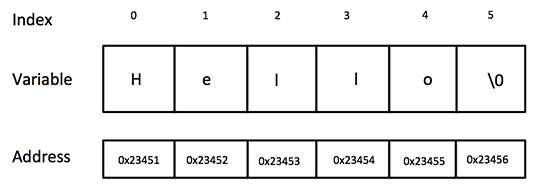
    The C-style character string originated within the C language and continues to be supported within C++. This string is actually a one-dimensional array of characters which is terminated by a null character ‘\0’. Thus a null-terminated string contains the characters that comprise the string followed by a null.

    The following declaration and initialization create a string consisting of the word “Hello”. To hold the null character at the end of the array, the size of the character array containing the string is one more than the number of characters in the word “Hello.”

    char greeting[6] = {'H', 'e', 'l', 'l', 'o', '\0'};
    

    If you follow the rule of array initialization, then you can write the above statement as follows −

    char greeting[] = "Hello";
    

    Following is the memory presentation of above defined string in C/C++ −

    String Presentation in C/C++

    Actually, you do not place the null character at the end of a string constant. The C++ compiler automatically places the ‘\0’ at the end of the string when it initializes the array. Let us try to print above-mentioned string −

    Example

    #include <iostream>usingnamespace std;intmain(){char greeting[6]={'H','e','l','l','o','\0'};
    
       cout <<"Greeting message: ";
       cout << greeting << endl;return0;}

    When the above code is compiled and executed, it produces the following result −

    Greeting message: Hello
    

    C Style String Functions

    C++ supports a wide range of functions that manipulate null-terminated strings. These functions are defined in <string.h> header file.

    Sr.NoFunction & Purpose
    1strcpy(s1, s2);Copies string s2 into string s1.
    2strcat(s1, s2);Concatenates string s2 onto the end of string s1.
    3strlen(s1);Returns the length of string s1.
    4strcmp(s1, s2);Returns 0 if s1 and s2 are the same; less than 0 if s1<s2; greater than 0 if s1>s2.
    5strchr(s1, ch);Returns a pointer to the first occurrence of character ch in string s1.
    6strstr(s1, s2);Returns a pointer to the first occurrence of string s2 in string s1.

    Example

    Following example makes use of few of the above-mentioned functions −

    #include <iostream>#include <cstring>usingnamespace std;intmain(){char str1[10]="Hello";char str2[10]="World";char str3[10];int  len ;// copy str1 into str3strcpy( str3, str1);
       cout <<"strcpy( str3, str1) : "<< str3 << endl;// concatenates str1 and str2strcat( str1, str2);
       cout <<"strcat( str1, str2): "<< str1 << endl;// total lenghth of str1 after concatenation
       len =strlen(str1);
       cout <<"strlen(str1) : "<< len << endl;return0;}

    When the above code is compiled and executed, it produces result something as follows −

    strcpy( str3, str1) : Hello
    strcat( str1, str2): HelloWorld
    strlen(str1) : 10
    

    The String Class in C++

    The standard C++ library provides a string class type that supports all the operations mentioned above, additionally much more functionality.

    Example of String Class

    Let us check the following example −

    #include <iostream>#include <string>usingnamespace std;intmain(){
    
       string str1 ="Hello";
       string str2 ="World";
       string str3;int  len ;// copy str1 into str3
       str3 = str1;
       cout <<"str3 : "<< str3 << endl;// concatenates str1 and str2
       str3 = str1 + str2;
       cout <<"str1 + str2 : "<< str3 << endl;// total length of str3 after concatenation
       len = str3.size();
       cout <<"str3.size() :  "<< len << endl;return0;}

    When the above code is compiled and executed, it produces result something as follows −

    str3 : Hello
    str1 + str2 : HelloWorld
    str3.size() :  10
    

    Creating a String

    We can create string variables in two ways, using either of the following methods −

    Creating String Using Character Arrays

    We can declare strings using the C-type arrays in the format of characters. This is done using the following syntax −

    Syntax

    char variable_name[len_value];

    Here, len_value is the length of the character array.

    Example of Creating String using Character Array

    In the following examples, we are declaring a character array, and assigning values to it.

    #include <iostream>usingnamespace std;intmain(){char s[5]={'h','e','l','l','o'};
       cout<<s<<endl;return0;}
    Output
    hello
    

    Creating String using <string>

    We can declare a String variable using the ‘string’ keyword. This is included in the <string> header file. The syntax of declaring a string is explained as follows −

    Syntax

    string variable_name =[value];

    Here, [value] is an optional and can be used to assign value during the declaration.

    Example

    In the following examples, we are declaring a string variable, assigning a value to it.

    #include <iostream>usingnamespace std;intmain(){ 
       string s="a merry tale";
       cout<<s;return0;}
    Output
    a merry tale
    

    Traversing a String (Iterate Over a String)

    We can iterate over a string in two ways −

    Using looping statements

    We can traverse a string using for loops, while loops and do while loops using a pointer to the first and the last index in the string.

    Using iterators

    Using range based loops, we can iterate over the string using iterators. This is achieved using “:” operator while running a range based loop.

    Example of Iterating a String

    The following example code shows string traversal using both of these methods −

    #include <iostream>usingnamespace std;intmain(){
       string s="Hey, I am at TP.";for(int i=0;i<s.length();i++){
          cout<<s[i]<<" ";}
       cout<<endl;for(char c:s){
          cout<<c<<" ";}return0;}

    Output

    H e y ,   I   a m   a t   T P . 
    H e y ,   I   a m   a t   T P . 
    

    Accessing Characters of String

    We can access the characters of a string using both iterators and pointer to the indices of the string.

    Example

    The following example code shows how we can access the characters in a string −

    #include <iostream>usingnamespace std;intmain(){
       string s="Hey, I am at TP.";
       cout<<s<<endl;for(int i=0;i<s.length();i++){
         s[i]='A';}
       cout<<s<<endl;for(char&c:s){
          c='B';}
       cout<<s<<endl;return0;}

    Output

    Hey, I am at TP.
    AAAAAAAAAAAAAAAA
    BBBBBBBBBBBBBBBB
    

    String Functions

    String is an object of the <string> class, and hence, it has a variety of functions that users can utilize for a variety of operations. Some of these functions are as follows −

    FunctionDescription
    length()This function returns the length of the string.
    swap()This function is used to swap the values of 2 strings.
    size()Used to find the size of string
    resize()This function is used to resize the length of the string up to the given number of characters.
    find()Used to find the string which is passed in parameters
    push_back()This function is used to push the character at the end of the string
    pop_back()This function is used to pop the last character from the string
    clear()This function is used to remove all the elements of the string.
    find()This function is used to search for a certain substring inside a string and returns the position of the first character of the substring.
    replace()This function is used to replace each element in the range [first, last) that is equal to old value with new value.
    substr()This function is used to create a substring from a given string.
    compare()This function is used to compare two strings and returns the result in the form of an integer.
    erase()This function is used to remove a certain part of a string.

    Length of a String

    The length of a string is the number of characters present in the string. Hence, the string “apple” has a length of 5 characters and the string “hello son” has a length of 9 characters (including empty spaces). This can be accessed using the length() method in <string> header file.

    Syntax

    The syntax is explained as follows −

    int len = string_1.length();

    Example

    #include <iostream>#include <string>usingnamespace std;intmain(){
       string x="hey boy";
       cout<<x.length()<<endl;return0;}

    Output

    7
    

    String Concatenation

    String concatenation is a way to add two strings together. This can be done using two ways −

    Addition Operator

    The addition operator is used to add two elements. In case of strings, the addition operator concatenates the two strings. This is clearly explained in the following example −

    Example

    #include <iostream>#include <string>usingnamespace std;intmain(){
       string x ="10";
       string y ="20";
       cout<<x+y<<endl;return0;}
    Output
    1020
    

    This is different from integer addition. When we take two integers and add them using addition operator, we get the sum of the two numbers instead.

    This is clearly explained in the following example −

    Example

    #include <iostream>#include <string>usingnamespace std;intmain(){int x =10;int y =20;
       cout<<x+y<<endl;return0;}
    Output
    30
    

    Using string append() method

    C++ is an object oriented programming language, and hence a string is actually an object, which contain functions that can perform certain operations on strings. We can use string append() method to append one string to another.

    The syntax of this operation is as follows −

    Syntax

    string_1.append(string_2);

    The usage of this method is depicted clearly in the following example −

    Example

    #include <iostream>#include <string>usingnamespace std;intmain(){
       string x="hey boy";
       string y=" now";
       x.append(y);
       cout<<x<<endl;return0;}
    Output
    hey boy now
    

    String Input in C++

    Strings can be taken as an input to the program, and the most common way to do this is by using cin method.

    There are three methods to take a string as an input, and these methods are given as follows −

    • cin
    • getline()
    • stringstream

    Using cin Method

    This is the simplest way to take a string as an input. The syntax is given as follows −

    Syntax

    cin>>string_name;

    Example

    #include <iostream>usingnamespace std;intmain(){
    
       string s;
       cout <<"Enter custom string : "<<endl;//enter the string here
       cin>>s;
       cout<<"The string is : "<<s;}

    Using getline() Method

    The getline() method can be used to read a string from an input stream. This is defined in the <string> header file. The syntax of the above method is given as follows −

    Syntax

    getline(cin, string_name);

    Example

    #include <iostream>usingnamespace std;intmain(){
    
       string s;
       cout <<"Enter String as input : "<< endl;getline(cin, s);//enter the string here
       cout <<"Printed string is : "<< s << endl;return0;}

    Using stringstream

    The stringstream class is used to take multiple strings as input, all at once. The syntax of the above method is given as follows −

    Syntax

    Stringstream object_name(string_name);

    Example

    #include <iostream>#include <sstream>#include <string>usingnamespace std;intmain(){
    
       string s ="Hey, I am at TP";
       stringstream object(s);
       string newstr;// >> operator will read from the stringstream objectwhile(object >> newstr){
          cout << newstr <<" ";}return0;}

    Output

    Hey, I am at TP
  • Return Statement in C++

    The return statement in C++ is used to exit a function and to send a value back to the function’s caller which is optional depending on requirement. It plays a very important role in controlling the flow of a program and making sure that functions will provide results to other parts of the code.

    Syntax

    Below is the syntax of using return statement in C++ −

    return[expression];

    Where, “expression” is optional, specifically used for function. If provided, it specifies the value to be returned to the caller.

    Example of return Statement

    The following is an example of return statement −

    #include <iostream>usingnamespace std;intsum(int a,int b){// Here, returning sum of a and breturn a + b;}intmain(){// Calling the functionint ans =sum(5,2);
       cout <<"The sum of two integers 5 and 2 is:  "<< ans << endl;// Returning from the main (),// 0 represents execution done without any errorreturn0;}

    Output

    The sum of two integers 5 and 2 is:  7
    

    Key Aspects of return Statement

    1. Function Termination

    When a return statement is executed, the function exits immediately, and optionally sends value back to the caller.

    2. Returning Types

    Return by Value

    In this the specified value in return statement is sent back to the caller. This is essential for functions which perform calculations or need to provide results.

    intAdd(int a,int b){return a + b;// Returns the sum of a and b}

    No Return Value (void)

    The functions which are declared with void, the return statement can be used without an expression to exit the function early.

    voidGetMessage(){
       cout <<"Hello, TutorialsPoint Learner!";return;// Exits the function}

    3. Multiple return Statements

    A function may consist of multiple return statements, which we generally get to see within conditional statements.

    intmax(int a,int b){if(a > b)return a;elsereturn b;}

    4. Returning Objects

    Functions can return objects, which can be useful for returning multiple values encapsulated in a class or struct.

    structpoint{int x, y;};
    
    point getOrigin(){return{0,0};}

    5. Early Exit

    The return statement can be used to exit a function early, which is useful for error handling or special conditions.

    intdivideInteger(int a,int b){if(b ==0){
          cer <<"Error: Division by zero!"<< endl;return-1;// Shows an error}return a / b;}

    Return Types and Value Handling in C++

    In C++, the return type of a function determines what kind of value (if any) a function will return to the caller. Proper handling of return types and values is important for making sure that functions behave as expected and integrate smoothly with other parts of the program.

    1. Primitive Data Types

    Primitive data types are the basic built-in types provided by C++. Common examples are like int, float, double, char etc.

    Example

    #include <iostream>usingnamespace std;// created a function which returns an integerintgetSquare(int num){return num * num;}intmain(){int value =5;int result =getSquare(value);// Calling the function and storing its result
       cout <<"The square of "<< value <<" is "<< result << endl;return0;}
    Output
    The square of 5 is 25
    

    2. User-Defined Types

    User-defined types include structs and classes. These types allow you to define complex data structures and customize them as per your specific requirements.

    Example with Struct

    #include <iostream>usingnamespace std;structPoint{int x;int y;};
    Point createPoint(int x,int y){
       Point p;
       p.x = x;
       p.y = y;return p;// will returns a Point object}intmain(){
       Point p =createPoint(10,20);
       cout <<"Point coordinates: ("<< p.x <<", "<< p.y <<")"<< endl;return0;}
    Output
    Point coordinates: (10, 20)
    

    Example with Classes

    #include <iostream>usingnamespace std;classrectangle{public:rectangle(int w,int h):width(w),height(h){}intgetArea()const{return width * height;}private:int width;int height;};
    
    rectangle createRectangle(int width,int height){returnrectangle(width, height);// Returns a Rectangle object}intmain(){
       rectangle rect =createRectangle(10,5);
       cout <<"Area of given Rectangle is: "<< rect.getArea()<< endl;return0;}
    Output
    Area of given Rectangle is: 50
    

    3. References and Pointers

    References and pointers are used to refer to variables or objects without making any copies. Which can be useful for efficiency and and easy to modify the original data when needed.

    Returning by Reference

    #include <iostream>usingnamespace std;int globalValue =100;int&getGlobalValue(){return globalValue;// Returns a reference to the global variable}intmain(){int& ref =getGlobalValue();
       ref =200;// Modifies the global variable
       cout <<"Global Value: "<< globalValue << endl;return0;}
    Output
    Global Value: 200
    

    Returning by Pointer

    #include <iostream>usingnamespace std;int*createArray(int size){int* array =newint[size];// Allocating memory dynamicallyfor(int i =0; i < size;++i){
          array[i]= i *10;}return array;// Returning a pointer to the allocated array}intmain(){int* myArray =createArray(5);for(int i =0; i <5;++i){
          cout << myArray[i]<<" ";}delete[] myArray;// Free dynamically allocated memoryreturn0;}

    Output

    0 10 20 30 40 

  • C++ goto Statement

    The goto Statement

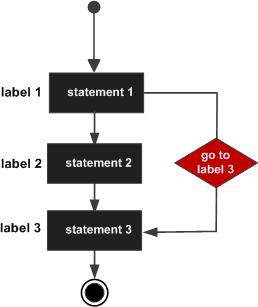
    goto statement provides an unconditional jump from the goto to a labeled statement in the same function.

    NOTE − Use of goto statement is highly discouraged because it makes difficult to trace the control flow of a program, making the program hard to understand and hard to modify. Any program that uses a goto can be rewritten so that it doesn’t need the goto.

    The goto statement in C++ is a kind of control flow construct that lets the program jump directly to a given statement within the same function. The goto statement transfers control to a given label in the function. A label is defined with an identifier followed by a colon (:).

    Syntax

    The syntax of a goto statement in C++ is given as follow −

    goto label;...
    label: statement;

    Where, label is an identifier that identifies a labeled statement.
    A labeled statement is any statement that is preceded by an identifier followed by a colon (:).

    Flow Diagram

    Here is the following flow diagram, showcasing the working of goto statement

    C++ goto statement

    Example

    Here is the following example code:

    #include <iostream>usingnamespace std;intmain(){// Local variable declaration:int a =10;// do loop execution
       LOOP:do{if( a ==15){// skip the iteration.
             a = a +1;goto LOOP;}
          cout <<"value of a: "<< a << endl;
          a = a +1;}while( a <20);return0;}

    Output

    When the above code is compiled and executed, it produces the following result −

    value of a: 10
    value of a: 11
    value of a: 12
    value of a: 13
    value of a: 14
    value of a: 16
    value of a: 17
    value of a: 18
    value of a: 19
    

    One good use of goto is to exit from a deeply nested routine. For example, consider the following code fragment −

    for(...){for(...){while(...){if(...)goto stop;...}}}
    stop:
    cout <<"Error in program.\n";

    Eliminating the goto would force a number of additional tests to be performed. A simple break statement would not work here, because it would only cause the program to exit from the innermost loop.

    When to Use goto?

    The goto statement generally is considered unsatisfactory to modern programming style because it causes code to become unstructured. However, it might be useful in the following cases:

    • Breaking out of deeply nested loops.
    • Handling errors or exceptional cases in legacy code.

    Example: Breaking Out of Nested Loops

    #include <iostream>usingnamespace std;intmain(){for(int i =0; i <3;++i){for(int j =0; j <3;++j){if(i ==1&& j ==1){goto exitLoops;}
          cout <<"i: "<< i <<", j: "<< j << endl;}}
    
      exitLoops:
        cout <<"Exited the nested loops!"<< endl;return0;}

    Output

    i: 0, j: 0  
    i: 0, j: 1  
    i: 0, j: 2  
    i: 1, j: 0  
    Exited the nested loops!