Blog

  • C++ Structures (struct)

    C++ structures are user-defined data types to group related variables of different types together under a single name. Structures are also known as structs.

    Structures are used to represent a record, suppose you want to keep track of your books in a library. You might want to track the following attributes about each book −

    • Title
    • Author
    • Subject
    • Book ID

    Defining a Structure

    To define a structure, you must use the struct statement. The struct statement defines a new data type, with more than one member, for your program.

    Syntax

    The format of the struct statement is this −

    struct[structure tag]{
       member definition;
       member definition;...
       member definition;}[one or more structure variables];

    The structure tag is optional and each member definition is a normal variable definition, such as int i; or float f; or any other valid variable definition. At the end of the structure’s definition, before the final semicolon, you can specify one or more structure variables but it is optional.

    Example

    Here is the way you would declare the Book structure −

    structBooks{char  title[50];char  author[50];char  subject[100];int   book_id;} book;

    Accessing Structure Members

    To access any member of a structure, we use the member access operator (.). The member access operator is coded as a period between the structure variable name and the structure member that we wish to access. You would use struct keyword to define variables of structure type.

    Example

    Following is the example to explain usage of structure −

    #include <iostream>#include <cstring>usingnamespace std;structBooks{char  title[50];char  author[50];char  subject[100];int   book_id;};intmain(){structBooks Book1;// Declare Book1 of type BookstructBooks Book2;// Declare Book2 of type Book// book 1 specificationstrcpy( Book1.title,"Learn C++ Programming");strcpy( Book1.author,"Chand Miyan");strcpy( Book1.subject,"C++ Programming");
       Book1.book_id =6495407;// book 2 specificationstrcpy( Book2.title,"Telecom Billing");strcpy( Book2.author,"Yakit Singha");strcpy( Book2.subject,"Telecom");
       Book2.book_id =6495700;// Print Book1 info
       cout <<"Book 1 title : "<< Book1.title <<endl;
       cout <<"Book 1 author : "<< Book1.author <<endl;
       cout <<"Book 1 subject : "<< Book1.subject <<endl;
       cout <<"Book 1 id : "<< Book1.book_id <<endl;// Print Book2 info
       cout <<"Book 2 title : "<< Book2.title <<endl;
       cout <<"Book 2 author : "<< Book2.author <<endl;
       cout <<"Book 2 subject : "<< Book2.subject <<endl;
       cout <<"Book 2 id : "<< Book2.book_id <<endl;return0;}

    When the above code is compiled and executed, it produces the following result −

    Book 1 title : Learn C++ Programming
    Book 1 author : Chand Miyan
    Book 1 subject : C++ Programming
    Book 1 id : 6495407
    Book 2 title : Telecom Billing
    Book 2 author : Yakit Singha
    Book 2 subject : Telecom
    Book 2 id : 6495700
    

    Structures as Function Arguments

    You can pass a structure as a function argument in very similar way as you pass any other variable or pointer. You would access structure variables in the similar way as you have accessed in the above example −

    Example

    #include <iostream>#include <cstring>usingnamespace std;voidprintBook(structBooks book );structBooks{char  title[50];char  author[50];char  subject[100];int   book_id;};intmain(){structBooks Book1;// Declare Book1 of type BookstructBooks Book2;// Declare Book2 of type Book// book 1 specificationstrcpy( Book1.title,"Learn C++ Programming");strcpy( Book1.author,"Chand Miyan");strcpy( Book1.subject,"C++ Programming");
       Book1.book_id =6495407;// book 2 specificationstrcpy( Book2.title,"Telecom Billing");strcpy( Book2.author,"Yakit Singha");strcpy( Book2.subject,"Telecom");
       Book2.book_id =6495700;// Print Book1 infoprintBook( Book1 );// Print Book2 infoprintBook( Book2 );return0;}voidprintBook(structBooks book ){
       cout <<"Book title : "<< book.title <<endl;
       cout <<"Book author : "<< book.author <<endl;
       cout <<"Book subject : "<< book.subject <<endl;
       cout <<"Book id : "<< book.book_id <<endl;}

    When the above code is compiled and executed, it produces the following result −

    Book title : Learn C++ Programming
    Book author : Chand Miyan
    Book subject : C++ Programming
    Book id : 6495407
    Book title : Telecom Billing
    Book author : Yakit Singha
    Book subject : Telecom
    Book id : 6495700
    

    Pointers to Structures

    You can define pointers to structures in very similar way as you define pointer to any other variable as follows −

    Syntax

    structBooks*struct_pointer;

    Now, you can store the address of a structure variable in the above defined pointer variable. To find the address of a structure variable, place the & operator before the structure’s name as follows −

    Syntax

    struct_pointer =&Book1;

    To access the members of a structure using a pointer to that structure, you must use the -> operator as follows −

    Syntax

    struct_pointer->title;

    Example

    Let us re-write above example using structure pointer, hope this will be easy for you to understand the concept −

    #include <iostream>#include <cstring>usingnamespace std;voidprintBook(structBooks*book );structBooks{char  title[50];char  author[50];char  subject[100];int   book_id;};intmain(){structBooks Book1;// Declare Book1 of type BookstructBooks Book2;// Declare Book2 of type Book// Book 1 specificationstrcpy( Book1.title,"Learn C++ Programming");strcpy( Book1.author,"Chand Miyan");strcpy( Book1.subject,"C++ Programming");
       Book1.book_id =6495407;// Book 2 specificationstrcpy( Book2.title,"Telecom Billing");strcpy( Book2.author,"Yakit Singha");strcpy( Book2.subject,"Telecom");
       Book2.book_id =6495700;// Print Book1 info, passing address of structureprintBook(&Book1 );// Print Book1 info, passing address of structureprintBook(&Book2 );return0;}// This function accept pointer to structure as parameter.voidprintBook(structBooks*book ){
       cout <<"Book title : "<< book->title <<endl;
       cout <<"Book author : "<< book->author <<endl;
       cout <<"Book subject : "<< book->subject <<endl;
       cout <<"Book id : "<< book->book_id <<endl;}

    When the above code is compiled and executed, it produces the following result −

    Book title : Learn C++ Programming
    Book author : Chand Miyan
    Book subject : C++ Programming
    Book id : 6495407
    Book title : Telecom Billing
    Book author : Yakit Singha
    Book subject : Telecom
    Book id : 6495700
    

    The typedef Keyword

    There is an easier way to define structs or you could “alias” types you create.

    Example

    typedefstruct{char  title[50];char  author[50];char  subject[100];int   book_id;} Books;

    Now, you can use Books directly to define variables of Books type without using struct keyword. Following is the example −

    Books Book1, Book2;

    You can use typedef keyword for non-structs as well as follows −

    typedeflongint*pint32;
     
    pint32 x, y, z;

    x, y and z are all pointers to long ints.
  • Array Decay in C++

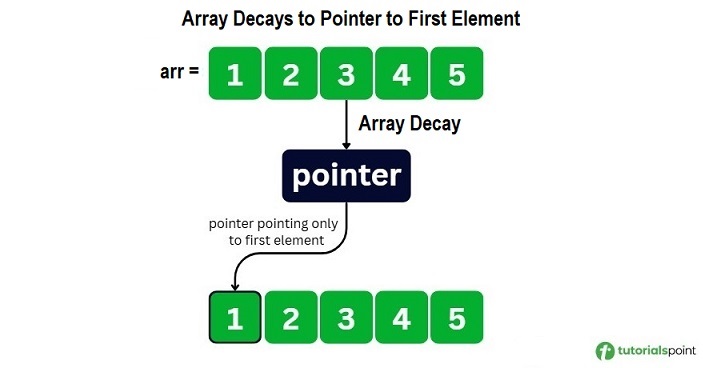
    Array decay refers to the loss of type and dimensions of an array. The array is treated as a pointer to the first element instead of the whole array in some cases, like when we pass an array to a function by pointer or value. As a result, the original array’s size and type information are lost.

    Due to this decay, sizeof operator no longer gives the full size of the array instead it returns the size of the pointer. It causes incorrect behavior in functions that are dependent on knowing the number of elements.

    Array decay to first element

    When Does an Array Decay Occur in C++?

    An array decay can occur in following scenarios −

    Let’s understand these three scenarios in detail and how they can trigger an array decay.

    Passing an Array to a Function

    While passing an array to a function, the array automatically decays into a pointer. After the decay, the function does not receive the size of the array, and only receives a pointer pointing to first element of the array.

    The following example demonstrates how passing an array arr to the printSize() function decays to a pointer that points to first array element.

    #include <iostream>usingnamespace std;voidprintSize(int*arr){
       cout <<"\nSize of array inside function: "<<sizeof(arr)<<" bytes"<< endl;}intmain(){int arr[5]={1,2,3,4,5};
    
       cout <<"Original Size of the array "<<sizeof(arr)<<" bytes"<< endl;
       cout <<"Number of elements: "<<sizeof(arr)/sizeof(arr[0])<< endl;// Array decay occurs hereprintSize(arr);return0;}

    The output of the above code is as follows. You can observe the array size before and after passing it to the function −

    Original Size of the array 20 bytes
    Number of elements: 5
    
    Size of array inside function: 8 bytes
    

    Assigning an Array to a Pointer

    You can assign an array to a pointer in C++. When you assign an array to a pointer, the array automatically decays to a pointer.

    Here is an example demonstrating array decay while assigning the array arr to a pointer ptr.

    #include <iostream>usingnamespace std;intmain(){int arr[5]={10,20,30,40,50};int* ptr = arr;// Array decay occurs here
    
       cout <<"Accessing elements using pointer:"<< endl;for(int i =0; i <5; i++){
          cout <<"*(ptr + "<< i <<") = "<<*(ptr + i)<< endl;}
    
       cout <<"Address of arr[0]: "<<&arr[0]<< endl;
       cout <<"Value of ptr: "<< ptr << endl;return0;}

    The output of the above code is as follows −

    Accessing elements using pointer:
    *(ptr + 0) = 10
    *(ptr + 1) = 20
    *(ptr + 2) = 30
    *(ptr + 3) = 40
    *(ptr + 4) = 50
    Address of arr[0]: 0x7ffd7a353890
    Value of ptr: 0x7ffd7a353890
    

    Using an Array in Pointer Arithmetic

    You can use pointer arithmetic to access array elements using arithmetic operations like addition and subtraction. This leads to array decay as the array loses its size information.

    In this example, we have used *(arr + 2) to access the third element of the array −

    #include <iostream>usingnamespace std;intmain(){int arr[5]={10,20,30,40,50};
    
       cout <<"Array elements: ";for(int i =0; i <5; i++){
          cout << arr[i]<<" ";}
       cout << endl;// Size of array before decay
       cout <<"Array size before decay: "<<sizeof(arr)<<" bytes"<< endl;// Array decay happens here
       cout <<"\n3rd element using pointer arithmetic: *(arr + 2) = "<<*(arr +2)<< endl;// Size after decay
       cout <<"Size of (arr + 2): "<<sizeof(arr +2)<<" bytes "<< endl;return0;}

    The output of the above code is as follows. You can observe the size of element before and after the pointer −

    Array elements: 10 20 30 40 50 
    Array size before decay: 20 bytes
    
    3rd element using pointer arithmetic: *(arr + 2) = 30
    Size of (arr + 2): 8 bytes
    

    Problems Caused by Array Decay in C++

    Array decay can lead to several problems in C++ programming. Some of the problems are mentioned below:

    Cannot Determine Array Size Inside Function

    The array is decayed into a pointer when an array is passed as a function parameter. The pointer only stores the address and has no information about the number of elements in the array, so the sizeof() function gives the size of a pointer and array size can not be determined.

    In the example below, we have passed an array arr as a parameter in the function func. We have calculated the array size in the main function and the func() function. The func() function returns the size of array.

    #include <iostream>usingnamespace std;voidfunc(int arr[]){// array decay occur here as arr[] was passed as a parameterint size =sizeof(arr)/sizeof(arr[0]); 
    
       cout <<"Inside function:"<< endl;
       cout <<"sizeof(arr) = "<<sizeof(arr)<<" bytes (pointer)"<< endl;
       cout <<"sizeof(arr[0]) = "<<sizeof(arr[0])<<" bytes"<< endl;
       cout <<"Calculated size = "<< size <<" (WRONG!)"<< endl;
       cout << endl;}intmain(){int arr[5]={1,2,3,4,5};
    
       cout <<"In main function:"<< endl;
       cout <<"sizeof(arr) = "<<sizeof(arr)<<" bytes"<< endl;
       cout <<"sizeof(arr[0]) = "<<sizeof(arr[0])<<" bytes"<< endl;int size =sizeof(arr)/sizeof(arr[0]);
       cout <<"Calculated size = "<< size <<" (CORRECT!)"<< endl;
       cout << endl;func(arr);return0;}

    The output of the above code is as follows −

    In main function:
    sizeof(arr) = 20 bytes
    sizeof(arr[0]) = 4 bytes
    Calculated size = 5 (CORRECT!)
    
    Inside function:
    sizeof(arr) = 8 bytes (pointer)
    sizeof(arr[0]) = 4 bytes
    Calculated size = 2 (WRONG!)
    
    Warnings/Errors:
    main.cpp: In function 'void func(int*)':
    main.cpp:7:23: warning: 'sizeof' on array function parameter 
    'arr' will return size of 'int*' [-Wsizeof-array-argument]
        7 |     int size = sizeof(arr) / sizeof(arr[0]);
          |                      ~^~~~
    

    Cannot Copy Arrays Using = Operator

    You cannot use the “=” operator to copy one array to another array as the array decays into a pointer. The ‘=’ operator copies the address but we can not reassign the array memory as it is already fixed. So, it will show an error.

    Here is an example to copy one array to another array using “=” operator.

    #include <iostream>usingnamespace std;intmain(){int a[3]={1,2,3};int b[3];// Array decay happens here// 'a' decays to a pointer to first element
       b = a; 
               
       cout <<"b elements: ";for(int i =0; i <3; i++)
          cout << b[i]<<" ";return0;}

    The output of the above code is as follows −

    Warnings/Errors:
    main.cpp: In function 'int main()':
    main.cpp:11:7: error: invalid array assignment
       11 |     b = a;
          |     ~~^~~
    

    Cannot Compare Arrays Directly

    Arrays can not be compared directly using comparison operators(==, !=) because when array names are used they decay to pointers. Even after arrays having same elements, it will return false as the memory address will differ and it will compare the memory address of the pointers.

    Here is an example of comparing two arrays arr1 and arr2 −

    #include <iostream>usingnamespace std;intmain(){int arr1[5]={1,2,3,4,5};int arr2[5]={1,2,3,4,5};
    
       cout <<"Array 1: ";for(int i =0; i <5; i++)
          cout << arr1[i]<<" ";
       cout << endl;
    
       cout <<"Array 2: ";for(int i =0; i <5; i++)
          cout << arr2[i]<<" ";
       cout << endl;
    
       cout <<"Are arr1 and arr2 same?:  ";if(arr1 == arr2)
          cout <<"TRUE"<< endl;else
          cout <<"\nFALSE"<< endl;
    
       cout <<"\nAddress of arr1: "<< arr1 << endl;
       cout <<"Address of arr2: "<< arr2 << endl;return0;}

    The output of the above code is given below. It can be seen that both arrays have same elements but it returns false because the addresses are different −

    Array 1: 1 2 3 4 5 
    Array 2: 1 2 3 4 5 
    Are arr1 and arr2 same?:  
    FALSE
    
    Address of arr1: 0x7ffd8d5843b0
    Address of arr2: 0x7ffd8d584390
    

    Solution of Array Decay Problem

    To avoid problem of array decay, we can follow the given methods −

    Passing Array Size as Separate Parameter

    To avoid array decay, you can pass the array size as a parameter along with the array as the size of the array does not get lost.

    In this example, we have passed the array and its size as the function parameter. Here, array decay occurs but does not cause any problem because of array size.

    #include <iostream>usingnamespace std;voidprintArray(int arr[],int size){
       cout <<"Given array: ";for(int i =0; i < size; i++){
          cout << arr[i]<<" ";}
       cout << endl;}intmain(){int arr[5]={10,20,30,40,50};int size =sizeof(arr)/sizeof(arr[0]);// Passing both array and sizeprintArray(arr, size);return0;}

    The output of the above code is as follows −

    Given array: 10 20 30 40 50 
    

    Using std::array and std::vector

    You can use std::array and std::vector to avoid the array decay as these are objects in C++ and not arrays, so array decay does not occur.

    Below is an example of std::array and std:: vector to avoid array decay −

    Using std::array Using std::vector

    #include <iostream>#include <array>usingnamespace std;voidprintArray(array<int,5> arr){
       cout <<"Array size: "<< arr.size()<< endl;
       cout <<"Elements: ";for(int num : arr){
          cout << num <<" ";}
       cout << endl;}intmain(){
       array<int,5> stdArr ={1,2,3,4,5};printArray(stdArr);return0;}

    The output of the above code is as follows −

    Array size: 5
    Elements: 1 2 3 4 5 
    

    Conclusion

    An array decay in C++ refers to the loss of dimension and type of an array that occurs due to various reasons such as, when an array is passed to a functionan array assigned to a pointer, or used in pointer arithmetic. It may cause various problems that we highlighted in this chapter along with their solutions.

  • Return Array from Functions in C++

    C++ does not allow to return an entire array as an argument to a function. However, you can return a pointer to an array by specifying the array’s name without an index.

    If you want to return a single-dimension array from a function, you would have to declare a function returning a pointer as in the following example −

    int*myFunction(){...}

    Second point to remember is that C++ does not advocate to return the address of a local variable to outside of the function so you would have to define the local variable as static variable.

    Now, consider the following function, which will generate 10 random numbers and return them using an array and call this function as follows −

    #include <iostream>#include <ctime>usingnamespace std;// function to generate and retrun random numbers.int*getRandom(){staticint  r[10];// set the seedsrand((unsigned)time(NULL));for(int i =0; i <10;++i){
          r[i]=rand();
          cout << r[i]<< endl;}return r;}// main function to call above defined function.intmain(){// a pointer to an int.int*p;
    
       p =getRandom();for(int i =0; i <10; i++){
          cout <<"*(p + "<< i <<") : ";
          cout <<*(p + i)<< endl;}return0;}

    When the above code is compiled together and executed, it produces result something as follows −

    624723190
    1468735695
    807113585
    976495677
    613357504
    1377296355
    1530315259
    1778906708
    1820354158
    667126415
    *(p + 0) : 624723190
    *(p + 1) : 1468735695
    *(p + 2) : 807113585
    *(p + 3) : 976495677
    *(p + 4) : 613357504
    *(p + 5) : 1377296355
    *(p + 6) : 1530315259
    *(p + 7) : 1778906708
    *(p + 8) : 1820354158
    *(p + 9) : 667126415
  • C++ Passing Arrays to Functions

    C++ does not allow to pass an entire array as an argument to a function. However, You can pass a pointer to an array by specifying the array’s name without an index.

    If you want to pass a single-dimension array as an argument in a function, you would have to declare function formal parameter in one of following three ways and all three declaration methods produce similar results because each tells the compiler that an integer pointer is going to be received.

    Way-1

    Formal parameters as a pointer as follows −

    voidmyFunction(int*param){...}

    Way-2

    Formal parameters as a sized array as follows −

    voidmyFunction(int param[10]){...}

    Way-3

    Formal parameters as an unsized array as follows −

    voidmyFunction(int param[]){...}

    Now, consider the following function, which will take an array as an argument along with another argument and based on the passed arguments, it will return average of the numbers passed through the array as follows −

    doublegetAverage(int arr[],int size){int i, sum =0;double avg;for(i =0; i < size;++i){
          sum += arr[i];}
       avg =double(sum)/ size;return avg;}

    Now, let us call the above function as follows −

    #include <iostream>usingnamespace std;// function declaration:doublegetAverage(int arr[],int size);intmain(){// an int array with 5 elements.int balance[5]={1000,2,3,17,50};double avg;// pass pointer to the array as an argument.
       avg =getAverage( balance,5);// output the returned value 
       cout <<"Average value is: "<< avg << endl;return0;}

    When the above code is compiled together and executed, it produces the following result −

    Average value is: 214.4
    

    As you can see, the length of the array doesn’t matter as far as the function is concerned because C++ performs no bounds checking for the formal parameters.

  • C++ Pointer to an Array

    It is most likely that you would not understand this chapter until you go through the chapter related C++ Pointers.

    So assuming you have bit understanding on pointers in C++, let us start: An array name is a constant pointer to the first element of the array. Therefore, in the declaration −

    double balance[50];

    balance is a pointer to &balance[0], which is the address of the first element of the array balance. Thus, the following program fragment assigns p the address of the first element of balance −

    double*p;double balance[10];
    
    p = balance;

    It is legal to use array names as constant pointers, and vice versa. Therefore, *(balance + 4) is a legitimate way of accessing the data at balance[4].

    Once you store the address of first element in p, you can access array elements using *p, *(p+1), *(p+2) and so on. Below is the example to show all the concepts discussed above −

    #include <iostream>usingnamespace std;intmain(){// an array with 5 elements.double balance[5]={1000.0,2.0,3.4,17.0,50.0};double*p;
    
       p = balance;// output each array element's value 
       cout <<"Array values using pointer "<< endl;for(int i =0; i <5; i++){
          cout <<"*(p + "<< i <<") : ";
          cout <<*(p + i)<< endl;}
       cout <<"Array values using balance as address "<< endl;for(int i =0; i <5; i++){
          cout <<"*(balance + "<< i <<") : ";
          cout <<*(balance + i)<< endl;}return0;}

    When the above code is compiled and executed, it produces the following result −

    Array values using pointer
    *(p + 0) : 1000
    *(p + 1) : 2
    *(p + 2) : 3.4
    *(p + 3) : 17
    *(p + 4) : 50
    Array values using balance as address
    *(balance + 0) : 1000
    *(balance + 1) : 2
    *(balance + 2) : 3.4
    *(balance + 3) : 17
    *(balance + 4) : 50
    

    In the above example, p is a pointer to double which means it can store address of a variable of double type. Once we have address in p, then *p will give us value available at the address stored in p, as we have shown in the above example.

  • C++ Multi-dimensional Arrays

    Multidimensional Array

    C++ multidimensional array is an array that has more than one dimension and allows you to store data in a grid-like structure. You can create arrays with multiple dimensions, but here we will discuss two-dimensional (2D) and three-dimensional (3D) arrays.

    C++ allows multidimensional arrays. Here is the general form of a multidimensional array declaration −

    Syntax

    Here is the given syntax for a Multidimensional array in C++:

    type name[size1][size2]...[sizeN];

    Example

    For example, the following declaration creates a three dimensional 5 . 10 . 4 integer array −

    int threedim[5][10][4];

    Two-Dimensional Arrays

    The simplest form of the multidimensional array is the two-dimensional array. A two-dimensional array is, in essence, a list of one-dimensional arrays. To declare a two-dimensional integer array of size x, and y, you would write something as follows −

    type arrayName [ x ][ y ];

    Where type can be any valid C++ data type and arrayName will be a valid C++ identifier.

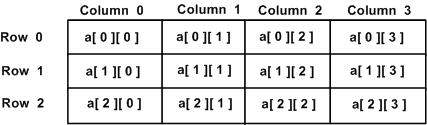
    A two-dimensional array can be thought of as a table, which will have x number of rows and y number of columns. A 2-dimensional array a, which contains three rows and four columns can be shown below −

    Two Dimensional Arrays

    Thus, every element in array a is identified by an element name of the form a[ i ][ j ], where a is the name of the array, and i and j are the subscripts that uniquely identify each element in a.

    Initializing Two-Dimensional Arrays

    Multidimensional arrays may be initialized by specifying bracketed values for each row. Following is an array with 3 rows and each row has 4 columns.

    int a[3][4]={{0,1,2,3},/*  initializers for row indexed by 0 */{4,5,6,7},/*  initializers for row indexed by 1 */{8,9,10,11}/*  initializers for row indexed by 2 */};

    The nested braces, which indicate the intended row, are optional. The following initialization is equivalent to the previous example −

    int a[3][4]={0,1,2,3,4,5,6,7,8,9,10,11};

    Accessing Two-Dimensional Array Elements

    An element in the 2-dimensional array is accessed by using the subscripts, i.e., row index and column index of the array. For example −

    int val = a[2][3];

    The above statement will take the 4th element from the 3rd row of the array. You can verify it in the above diagram.

    #include <iostream>usingnamespace std;intmain(){// an array with 5 rows and 2 columns.int a[5][2]={{0,0},{1,2},{2,4},{3,6},{4,8}};// output each array element's value                      for(int i =0; i <5; i++)for(int j =0; j <2; j++){
          
             cout <<"a["<< i <<"]["<< j <<"]: ";
             cout << a[i][j]<< endl;}return0;}

    When the above code is compiled and executed, it produces the following result −

    a[0][0]: 0
    a[0][1]: 0
    a[1][0]: 1
    a[1][1]: 2
    a[2][0]: 2
    a[2][1]: 4
    a[3][0]: 3
    a[3][1]: 6
    a[4][0]: 4
    a[4][1]: 8
    

    As explained above, you can have arrays with any number of dimensions, although it is likely that most of the arrays you create will be of one or two dimensions.

    Three-Dimensional Arrays

    Similarly, A three-dimensional (3D) array in C++ is an extension of the two-dimensional array concept to add another dimension. Which gives you access to store data in a three-dimensional space. you can visualize it as a cube where each element is identified by three indices which typically denote the dimensions in terms of depth, rows, and columns. To declare a two-dimensional integer array of size x, y and z you would write something as follows −

    type arrayName [ x ][ y ][z];
    

    Where type can be any valid C++ data type and arrayName will be a valid C++ identifier.

    A three-dimensional array can be thought of as a collection of two-dimensional tables stacked on top of each other, forming a cube-like structure.

    Thus, every element in array a is identified by an element name of the form b[ i ][ j ][k], where a is the name of the array, and i, j, and k are the subscripts that uniquely identify each element in b.

    Initializing Three-Dimensional Array

    A three-dimensional array can be initialized by specifying bracketed values for each layer, row, and column. Following is an example of a 3D array with 2 layers, 3 rows, and 4 columns.

    int b[2][3][4]={{{0,1,2,3},/* Initializers for layer 0, row 0 */{4,5,6,7},/* Initializers for layer 0, row 1 */{8,9,10,11}/* Initializers for layer 0, row 2 */},{{12,13,14,15},/* Initializers for layer 1, row 0 */{16,17,18,19},/* Initializers for layer 1, row 1 */{20,21,22,23}/* Initializers for layer 1, row 2 */}};

    In this initialization, the nested braces are used for the intended layer and row for each set of values.

    Flat Initialization

    Alternatively, you can also initialize a three-dimensional array without nested braces. This method involves the array as a single contiguous block of values. This is the following example:

    int b[2][3][4]={0,1,2,3,4,5,6,7,8,9,10,11,12,13,14,15,16,17,18,19,20,21,22,23};

    In this case, the values are listed in a flat format. Both methods of initialization are valid and produce the same array structure.

    Accessing Three-Dimensional Array Elements

    An element in the 3-dimensional array is accessed by using three subscripts, i.e., the layer index, the row index, and the column index. For example −

    int val = b[1][2][3];

    In this above statement, val will take the 4th element from the 3rd row in the 2nd layer of the array b.

    Here’s given how the indexing works:

    • The first index (1) specifies the layer (or depth) of the array.
    • The second index (2) specifies the row within that layer.
    • The third index (3) specifies the column within that row.

    Thus, the element accessed by b[1][2][3] corresponds to the value located in the 1st layer, 2nd row, and 3rd column of the array. You can visualize this by considering how the data is structured in a cube format in which each coordinate points to a specific element within that 3D space.

    Example

    Here’s a given code for this:

    #include <iostream>usingnamespace std;intmain(){// An array with 2 layers, 3 rows, and 4 columns.int b[2][3][4]={{{0,1,2,3},// Layer 0, Row 0{4,5,6,7},// Layer 0, Row 1{8,9,10,11}// Layer 0, Row 2},{{12,13,14,15},// Layer 1, Row 0{16,17,18,19},// Layer 1, Row 1{20,21,22,23}// Layer 1, Row 2}};// Output each array element's valuefor(int i =0; i <2; i++){// Iterating through layersfor(int j =0; j <3; j++){// Iterating through rowsfor(int k =0; k <4; k++){// Iterating through columns
            cout <<"b["<< i <<"]["<< j <<"]["<< k <<"]: ";
            cout << b[i][j][k]<< endl;}}}return0;}

    When the above code is compiled and executed, it produces the following result −

    b[0][0][0]: 0
    b[0][0][1]: 1
    b[0][0][2]: 2
    b[0][0][3]: 3
    b[0][1][0]: 4
    b[0][1][1]: 5
    b[0][1][2]: 6
    b[0][1][3]: 7
    b[0][2][0]: 8
    b[0][2][1]: 9
    b[0][2][2]: 10
    b[0][2][3]: 11
    b[1][0][0]: 12
    b[1][0][1]: 13
    b[1][0][2]: 14
    b[1][0][3]: 15
    b[1][1][0]: 16
    b[1][1][1]: 17
    b[1][1][2]: 18
    b[1][1][3]: 19
    b[1][2][0]: 20
    b[1][2][1]: 21
    b[1][2][2]: 22
    b[1][2][3]: 23
    

    The above code effectively demonstrates how to work with three-dimensional arrays in C++.

  • C++ Arrays

    C++ array stores a fixed-size sequential collection of elements of the same type. An array is used to store a collection of data, but it is often more useful to think of an array as a collection of variables of the same type.

    Instead of declaring individual variables, such as number0, number1, …, and number99, you declare one array variable such as numbers and use numbers[0], numbers[1], and …, numbers[99] to represent individual variables. A specific element in an array is accessed by an index.

    All arrays consist of contiguous memory locations. The lowest address corresponds to the first element and the highest address to the last element.

    Declaring Arrays

    To declare an array in C++, the programmer specifies the type of the elements and the number of elements required by an array as follows −

    type arrayName [ arraySize ];

    This is called a single-dimension array. The arraySize must be an integer constant greater than zero and type can be any valid C++ data type. For example, to declare a 10-element array called balance of type double, use this statement −

    double balance[10];

    Initializing Arrays

    You can initialize C++ array elements either one by one or using a single statement as follows −

    double balance[5]={1000.0,2.0,3.4,17.0,50.0};

    The number of values between braces { } can not be larger than the number of elements that we declare for the array between square brackets [ ]. Following is an example to assign a single element of the array −

    If you omit the size of the array, an array just big enough to hold the initialization is created. Therefore, if you write −

    double balance[] = {1000.0, 2.0, 3.4, 17.0, 50.0};
    

    You will create exactly the same array as you did in the previous example.

    balance[4]=50.0;

    The above statement assigns element number 5th in the array a value of 50.0. Array with 4th index will be 5th, i.e., last element because all arrays have 0 as the index of their first element which is also called base index. Following is the pictorial representaion of the same array we discussed above −

    Array Presentation

    Accessing Array Elements

    An element is accessed by indexing the array name. This is done by placing the index of the element within square brackets after the name of the array. For example −

    double salary = balance[9];

    The above statement will take 10th element from the array and assign the value to salary variable. Following is an example, which will use all the above-mentioned three concepts viz. declaration, assignment and accessing arrays −

    Example

    In the following example, we are declaring an array, assigning values to the array, and then accessing array elements −

    #include <iostream>usingnamespace std;#include <iomanip>using std::setw;intmain(){int n[10];// n is an array of 10 integers// initialize elements of array n to 0          for(int i =0; i <10; i++){
          n[ i ]= i +100;// set element at location i to i + 100}
       cout <<"Element"<<setw(13)<<"Value"<< endl;// output each array element's value                      for(int j =0; j <10; j++){
          cout <<setw(7)<< j <<setw(13)<< n[ j ]<< endl;}return0;}

    This program makes use of setw() function to format the output. When the above code is compiled and executed, it produces the following result −

    Output

    Element        Value
          0          100
          1          101
          2          102
          3          103
          4          104
          5          105
          6          106
          7          107
          8          108
          9          109
    

    Getting Array Length

    To get the length of an array, you can use the sizeof() operator by dividing the size of the array with the size of the array elements.

    Consider the following syntax −

    length =sizeof(arr)/sizeof(arr[0]);

    Example

    In the following example, we are defining an array and finding it’s length −

    #include <iostream>usingnamespace std;intmain(){int arr[]={10,20,30,40,50};int arr_length =sizeof(arr)/sizeof(arr[0]);
    
      cout <<"Array's Length : "<< arr_length;return0;}

    Output

    Array's Length : 5
    

    Changing Array Element

    You can change the value of an array element by specifying its index and assigning a new value.

    Example

    In the following example, we are changing the value at index 2 −

    #include <iostream>usingnamespace std;intmain(){int arr[]={10,20,30,40,50};
    
      cout <<"Before changing, element at index 2: "<< arr[2]<< endl;// changing the value
      arr[2]=108;
    
      cout <<"After changing, element at index 2: "<< arr[2]<< endl;return0;}

    Output

    Before changing, element at index 2: 30
    After changing, element at index 2: 108
    

    More on C++ Arrays

    Arrays are important to C++ and should need lots of more detail. There are following few important concepts, which should be clear to a C++ programmer −

    Sr.NoConcept & Description
    1Multi-dimensional arraysC++ supports multidimensional arrays. The simplest form of the multidimensional array is the two-dimensional array.
    2Pointer to an arrayYou can generate a pointer to the first element of an array by simply specifying the array name, without any index.
    3Passing arrays to functionsYou can pass to the function a pointer to an array by specifying the array’s name without an index.
    4Return array from functionsC++ allows a function to return an array.
  • Default Arguments in C++

    Default Arguments

    Default arguments in C++ are the values that are assigned to function parameters during function declaration. These default values are automatically assigned when the caller does not provide any arguments for those parameters while calling the function. If a value is provided by the caller during a function call, it will override the default value.

    Syntax

    return_type function_name(param1 = v1, param2 = v2,...);

    Here

    • return_type defines the type of returned value e.g., int, float, void.
    • function_name is the name of the function defined by the user
    • param1, and param2 are the names of function parameter.
    • v1, and v2 are default values assigned to those parameters.

    Rules for Default Arguments

    Here are the key rules to follow when defining default arguments in C++ to ensure that your code is both efficient and error-free.

    1. Default Arguments must be specified in Function Declaration, not Definition.

    The first rule says that default arguments must be specified in the function declaration (prototype), not in the function definition (implementation).
    In case the default argument is specified in the definition, or if in both the declaration and definition, then it will throw a compilation error.

    Example

    // Function Declaration with default argumentsvoidgreet(string name ="TutorialsPoint");// Function Definition without default arguments (Correct)voidgreet(string name){
        cout << message <<", "<< name <<"!"<< endl;}

    2. Default Arguments must be assigned from Right to Left

    When assigning the values for default arguments, it must start from the rightmost parameters to the leftmost ones, where the user can’t skip providing parameters in the middle.

    Example

    // ValidvoidfuncA(int x, string y ="TutorialsPoint");// ValidvoidfuncB(int x =2006, string y ="TutorialsPoint");// Invalid, because default arguments must be assigned from right to leftvoidfuncC(int x =2006,int y);

    3. Default Arguments cannot be Changed or Modified

    Once specified default argument in the function declaration, then further it can’t be changed or modified in any other declaration or definition. Else it will throw an error.

    Example

    voidfunc(int x =10);// First Declarationvoidfunc(int x =20);// Second Declaration, causes error

    4. Ambiguity with Function Overloading

    Calling the default arguments from overloaded functions can cause ambiguity, making it difficult for the compiler to decide which version of the function to call if the arguments provided are not unique. So for this ensure that functions with default arguments do not conflict with each other in overloads.

    Example

    voidget(string name ="TutorialsPoint");// function 1voidget(string name ="TutorialsPoint",int num =2016);// function 2get();// Which function should the compiler choose?

    Example of Default Arguments

    Here is a basic simple example showcasing Default arguments in C++.

    #include <iostream>usingnamespace std;intmain(){double price, discount =12.0;// Default discount
    
        cout <<"Enter the price of the item: ";
        cin >> price;double total = price -(price * discount /100);
        cout <<"The total price after a "<< discount <<"% discount is: "<< total << endl;return0;}

    When the above code is compiled and executed, it produces the following result −

    Enter the price of the item: 120
    The total price after a 12% discount is: 105.6
    

    Default Argument as an Expression

    When defining a function, the user can specify the default values for parameters, where these default values can be a constant value or an expression (involving variables, constants, or function calls), which is evaluated when the function is called.

    Example

    Here is the following example for the default function argument.

    #include <iostream>usingnamespace std;doubletotal_price(double price,double discount =12.0){return price -(price * discount /100);}intmain(){double price;
    
        cout <<"Enter the price of the item: ";
        cin >> price;// Calculate the total price with a 12% discount by defaultdouble total =total_price(price);
    
        cout <<"The total price after a 12% discount is: "<< total << endl;return0;}

    When the above code is compiled and executed, it produces the following result −

    Enter the price of the item: 120
    The total price after a 12% discount is: 105.6
    

    Default Argument as a Function Call

    Calling a function to determine the default value is known as default argument as a Function Call. This calculates the default value dynamically based on the function’s logic or other parameters.

    #include <iostream>#include <cmath>  // for value of usingnamespace std;doublegetDefaultWidth(){return5.0;}doublegetDefaultRadius(){return3.0;}doublecuboid_vol(double l,double h,double w =getDefaultWidth()){return l * w * h;}doublecylinder_vol(double h,double r =getDefaultRadius()){return M_PI * r * r * h;}intmain(){double length =10.0;double height =7.0;// Volume of Cuboid with default width
        cout <<"Cuboid volume : "<<cuboid_vol(length, height)<<" cubic units"<< endl;// Volume of a cuboid with a custom width
        cout <<"Cuboid volume (custom width): "<<cuboid_vol(length, height,4.0)<<" cubic units"<< endl;// Volume of cylinder with default radius
        cout <<"Cylinder volume (default radius): "<<cylinder_vol(height)<<" cubic units"<< endl;// Volume of a cylinder with a custom radius
        cout <<"Cylinder volume (custom radius): "<<cylinder_vol(height,6.0)<<" cubic units"<< endl;return0;}

    When the above code is compiled and executed, it produces the following result −

    Cuboid volume : 350 cubic units
    Cuboid volume (custom width): 280 cubic units
    Cylinder volume (default radius): 197.92 cubic units
    Cylinder volume (custom radius): 791.681 cubic units
    

    Advantages of Default Arguments

    1. It simplifies the function calls by reducing the number of overloads, where users don’t need to create multiple overloaded functions when one function can handle different cases by using default values for parameters.
    2. Default arguments help avoid code duplication and reduce redundancy.
    3. It improves code readability and increases flexibility, which makes further easier to modify in the future.
  • Function Overriding in C++

    A function is a collection of code blocks with instructions inside, which is used for specific tasks. It is meant to be reused as per requirement, making the division of complex problems into smaller and manageable pieces.

    What is Function Overriding in C++?

    Function overriding is a concept of object-oriented programming which allows a derived class to redefine a function that is already defined in the base class.

    Here the method’s name and parameters remain the same, but the derived class changes its behavior to suit their specific needs.

    Example

    Lets consider these 2 functions; one is base class (a) and another is derived class (b), and the function (c) is the main(), where we are implementing overriding −

    Function (a)

    classbase{public:voidnotice()
       cout <<"This is my Base Class";}

    Function (b)

    classderived:public base{public:voidnotice()
          cout <<"This is my Derived Class";}

    Function (c)

    voidmain(){// creating an object for base class and calling it
       base b;
       b.notice();// creating an object for derived class and calling it 
       derived d ;
       d.notice();}

    Overriding Explanation

    • Here, we have created an object of base and derived class of ‘function (a) and function(b)’ respectively and called them inside function (c) as shown, “b.notice() and d.notice()” respectively.
    • In this case, for derived class d.notice() will be executed first because it represents the most up-to-date or updated version of the function
    • However, if we create an object of the base class as shown in function(c) “b.msg()” and call it, it will use the original version from the base class.

    In short, function overriding occurs when the functionality of the base class is redefined in the derived class. When an object of the derived class is created, it will call the updated function from the derived class, meaning that the base class function (a) is overridden by the derived class function (b).

    Function overriding is an essential concept in object-oriented programming, enabling polymorphism and dynamic binding.

    Example of Function Overriding

    Below is a simple example illustrating how overriding works

    #include <iostream>usingnamespace std;// Base classclassShape{public:// Virtual method to be overriddenvirtualvoiddraw()const{
             cout <<"Drawing a shape"<< endl;}};// Derived class CircleclassCircle:public Shape{public:// Overriding the base class methodvoiddraw()constoverride{
             cout <<"Drawing a circle"<< endl;}};// Derived class SquareclassSquare:public Shape{public:// Overriding the base class methodvoiddraw()constoverride{
             cout <<"Drawing a square"<< endl;}};// Main functionintmain(){
       Shape* shapePtr;
       Circle circle;
       Square square;// Point to Circle and call draw()
       shapePtr =&circle;
       shapePtr->draw();// Outputs: Drawing a circle// Point to Square and call draw()
       shapePtr =&square;
       shapePtr->draw();// Outputs: Drawing a squarereturn0;}

    Output

    Drawing a circle
    Drawing a square
    

    Function Overriding Vs. Function Overloading

    Although Function Overriding and Function Overloading are essential key-concepts of Object-oriented programming in C++, they both do serve different purposes.

    Function overriding allows derived class to get new implementation of method to its previously defined base class, as having different scopes(base class and derived class) where it resolved at runtime polymorphism(dynamic binding), it only take place in presence of inheritance and can overridden just once, where execution speed relatively slower.

    Whereas, function overloading enables you to create multiple functions with the same name but different parameter lists within the same scope. It is resolved at compile time polymorphism (static binding), where presence of inheritance is not important, These functions can be overloaded multiple times and execution speed tends to be faster comparatively.

    Advanced Overriding Concepts

    Heres a list of additional sub topics covering advanced overriding concepts −

    1. Virtual Destructor

    A virtual destructor makes sure that the destructor of the derived class will be executed when an object is removed through a base class pointer. Function overriding with virtual destructors avoids resource leaks and unpredictable behavior by ensuring proper deletion of objects through base class pointers.

    Example

    #include <iostream>usingnamespace std;classBaseClass{public:virtual~BaseClass(){// Virtual destructor
             cout <<"BaseClass destructor"<< endl;}};classDerivedClass:public BaseClass{public:~DerivedClass()override{// Overriding destructor
             cout <<"DerivedClass destructor"<< endl;}};intmain(){
       BaseClass* a =newDerivedClass();// Calls DerivedClass's destructor followed// by BaseClass's destructordelete a;return0;}

    Output

    DerivedClass destructor
    BaseClass destructor
    

    2. Covariant Return Value Types

    Covariant return types allow derived classes to override a method and return a more specific type than the base class method. This means that a derived class can return a pointer or reference to a more derived type, rather than just the base type. Function overriding improves flexibility and precision in object-oriented programming.

    Note

    In the derived class, the return type must be a pointer or reference to a type that is derived from the return type of the base class.

    Example

    #include <iostream>usingnamespace std;classVehicle{public:// Final methodvirtualvoidhonk()final{
             cout <<"Vehicle honk: Beep beep!"<< endl;}};classSportsCar:public Vehicle{// Cannot override honk() here};intmain(){
       Vehicle* v =newSportsCar();
       v->honk();// Calls Vehicle's honk() methoddelete v;return0;}

    Output

    Vehicle honk: Beep beep!
    

    3. Overriding and final Keyword alternate word

    The `final` keyword stops any further subclassing of a class or overriding of a method.

    Function overriding with the `final` keyword is important because it guarantees that a class or method cannot be further changed or extended.

    Example

    #include <iostream>usingnamespace std;classSubject{public:// Final methodvirtualvoidexamType()final{
             cout <<"This subject has a written exam."<< endl;}};classMath:public Subject{// Cannot override examType() here};intmain(){
       Subject* s =newMath();
       s->examType();// Calls Subject's examType() methoddelete s;return0;}

    Output

    This subject has a written exam.
    

    4. Virtual Inheritance

    Virtual inheritance in C++ tackles problems which arise with multiple inheritance, particularly the diamond problem. It ensures that when a class inherits from several base classes which have a common ancestor, only a single instance of that common base class is created.

    Virtual inheritance makes sure that only one copy of a base class is used when multiple derived classes share that base class in a hierarchy.

    Example

    #include <iostream>usingnamespace std;classBase{public:voidpresent(){ cout <<"Display from Base class"<< endl;}};classA:virtual public Base{};classB:virtual public Base{};classFinal:public A, public B{public:voidget(){ cout <<"Display from Final class"<< endl;}};intmain(){
       Final obj;// Displays: Display from Base class
       obj.present();// Displays: Display from Final class
       obj.get();return0;}

    Output

    Display from Base class
    Display from Final class
    

    Advantages of Function Overriding

    1. Polymorphism

    Overriding enables polymorphism by letting objects of different derived classes be treated as instances of a base class. This allows dynamic method binding at runtime, where the correct method implementation is chosen based on the object type, thus enhancing flexibility and adaptability, making it a fundamental component of polymorphism.

    2. Code Reusability

    Developers can utilize existing code by inheriting methods from a base class and customizing them in derived classes. This approach fosters a more streamlined and organized code structure.

    3. Maintainability

    Overriding promotes a modular design by encapsulating various functionalities within distinct classes. This approach simplifies understanding, maintaining, updating and extending the code.

    4. Design Patterns

    Overriding plays a key role in the Template Method pattern by defining the overall structure of an algorithm in a base class, while permitting subclasses to override specific steps.

    The Strategy pattern leverages overriding to encapsulate various algorithms and enable their interchange at runtime.

    5. Memory Management

    When using inheritance and dynamic memory allocation, virtual destructors are vital for proper memory management. Overriding the destructor in derived classes ensures that resources allocated by the base and derived classes are correctly deallocated, which prevents memory leaks and ensures clean resource release.

  • Function Overloading in C++

    Function overloading in C++ allows you to define multiple functions with the same name but different parameters. Function overloading is used to achieve polymorphism which is an important concept of object-oriented programming systems.

    Syntax for Overloaded Functions

    Consider the following two function declarations having the same name but different parameters −

    return_type function_name(parameter1);
    return_type function_name(parameter2);

    Example of Function Overloading

    In the following example, we are defining three different functions with the same name but different parameters. This example demonstrates the implementation of function overloading −

    #include<iostream>usingnamespace std;// Adding two integers (Function definition 1)intaddition(int a,int b){return a + b;}// Adding three integers (Function definition 2)intaddition(int a,int b,int c){return a + b + c;}// Adding two floating-point numbers (Function definition 3)floataddition(float a,float b){return a + b;}intmain(){
       cout<<addition(10.5f,20.3f)<<endl;
       cout<<addition(10,20,30)<<endl;
       cout<<addition(10,20)<<endl;return0;}

    Output

    30.8
    60
    30
    

    How Function Overloading Works?

    In the case of different functions with the same name (function overloading), when the compiler reaches a specific function call, it checks with the different function definition based on the parameters type, order, or number of arguments, and executes the matched function definition.

    Example

    Let suppose, there are 3 different function definitions to add numbers with different parameters −

    // Adding two integers (Function definition 1)intaddition(int a,int b){return a + b;}// Adding three integers (Function definition 2)intaddition(int a,int b,int c){return a + b + c;}// Adding two floating-point numbers (Function definition 3)floataddition(float a,float b){return a + b;}

    And, you call the function in the following order −

    addition(10.5f, 20.3f); // Function call 1
    addition(10, 20, 30); // Function call 2
    addition(10, 20); // Function call 3
    

    In the above function calls, function definition will be called in the following order −

    • Function call 1 will execute Function definition 3, because here we are passing two float values.
    • Function call 2 will execute Function definition 2, because here we are passing three integer values.
    • Function call 3 will execute Function definition 1, because here we are passing two integer values.

    Function Overloading Based on Number of Parameters

    This method involves defining multiple functions with the same name but a different number of parameters.

    Syntax

    voiddisplay(int a);// takes one parametervoiddisplay(int a,double b);// takes two parameters

    Example

    The following example demonstrates the function overloading based on the number of parameters −

    #include <iostream>usingnamespace std;// Function overloads based on the number of parametersvoiddisplay(int a){
       cout <<"Display with one integer: "<< a << endl;}voiddisplay(int a,double b){
       cout <<"Display with an integer and a double: "<< a <<" and "<< b << endl;}intmain(){// Calls the first overloaddisplay(10);// Calls the second overloaddisplay(10,3.14);double:10and3.14return0;}

    Output

    Display with one integer: 10
    Display with an integer and a double: 10 and 3.14
    

    Function Overloading Based on Different Parameter Types

    This method involves defining multiple functions with the same name but different types of parameters.

    Syntax

    voidshow(int a);// parameter with int type voidshow(double a);// parameter with double type

    Example

    The following example demonstrates the function overloading based on the different parameter types −

    #include <iostream>usingnamespace std;// Function for integer inputvoidshow(int a){
       cout <<"Integer value: "<< a << std::endl;}// Function for double inputvoidshow(double a){
       cout <<"Double value: "<< a << std::endl;}intmain(){show(10);show(3.14);return0;}

    Output

    Integer value: 10
    Double value: 3.14
    

    Function Overloading Based on Different Parameter Order

    This method involves defining multiple functions with the same name but different sequences of parameters.

    Syntax

    // integer followed by a double, // can be any datatype(bool, char etc)voiddisplay(int a,double b){ 
       cout <<"Integer and Double: "<< a <<", "<< b << endl;}// double followed by an integervoiddisplay(double a,int b){  
       cout <<"Double and Integer: "<< a <<", "<< b << endl;}

    Example

    The following example demonstrates the function overloading based on the different parameter order −

    #include <iostream>usingnamespace std;voiddisplay(int a,double b){
       cout <<"Integer and Double: "<< a <<", "<< b << endl;}voiddisplay(double a,int b){
       cout <<"Double and Integer: "<< a <<", "<< b <<endl;}intmain(){display(10,3.14);display(3.14,10);return0;}

    Output

    Integer and Double: 10, 3.14
    Double and Integer: 3.14, 10
    

    Use Cases for Function Overloading

    Function overloading in C++ is a powerful feature that allows you to use the same function name to perform different tasks based on different parameter lists. This can lead to more readable and maintainable code. Here are some common scenarios and examples where function overloading is useful −

    • Different Data Types − Function overloading is useful for handling various data types with a common function name.
    • Different Number of Parameters − Function overloading provides flexibility with functions which have varying numbers of parameters.
    • Parameter Type and Order − Function overloading handles different parameter types or their order.
    • Different Operations − Function overloading supports similar operations for different data types or contexts.
    • Variant Contexts − Function overloading provides variations of a function to suit different requirements or levels of detail.