Blog

  • PHP – Functions

    Like most of the programming languages, a function in PHP is a block of organized, reusable code that is used to perform a single, related action. Functions provide better modularity for your application and a high degree of code reuse.

    PHP supports a structured programming approach by arranging the processing logic by defining blocks of independent reusable functions. The main advantage of this approach is that the code becomes easy to follow, develop and maintain.

    The following figure shows how the process of salary computation is successively broken down to independent and reusable functions.
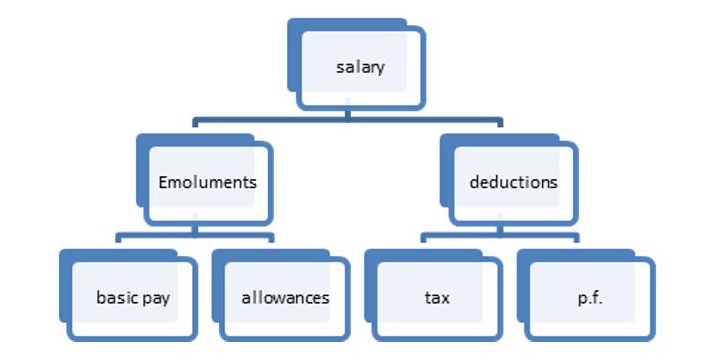
    PHP Functions

    Types of Functions

    You already have seen many functions like fopen() and fread() etc. They are built-in functions but PHP gives you option to create your own functions as well. There are two types of functions in PHP −

    • Built-in functions − PHP’s standard library contains a large number of built-in functions for string processing, file IO, mathematical computations and more.
    • User-defined functions − You can create user-defined functions too, specific to the requirements of the programming logic.

    A function may be invoked from any other function by passing required data (called parameters or arguments). The called function returns its result back to the calling environment.

    There are two parts which should be clear to you −

    • Creating a PHP Function
    • Calling a PHP Function

    In fact you hardly need to create your own PHP function because there are already more than 1000 built-in library functions created for different area and you just need to call them according to your requirement.

    Please refer to PHP Function Reference for a complete set of useful functions.

    Why Use Functions?

    Here are some of the reasons provided to explain why you should use functions −

    • Reusable code is defined as code that can be written once and used repeatedly.
    • Breaking code into smaller parts makes it easier to maintain.
    • Functions clarify and arrange the code.

    Creating a Function in PHP

    Now let’s understand the process in detail. The first step is to write a function and then you can call it as many times as required.

    To create a new function, use the function keyword, followed by the name of the function you may want to use. In front of the name, put a parenthesis, which may or may not contain arguments.

    It is followed by a block of statements delimited by curly brackets. This function block contains the statements to be executed every time the function is called. The general syntax of defining a function is as follows −

    <?php   
       function foo($arg_1, $arg_2, $arg_n) {
          statements;
          return $retval;
       }
    ?>

    If the function is intended to return some result back to the calling environment, there should be a return statement as the last statement in the function block. It is not mandatory to have a return statement, as even without it, the program flow goes back to the caller, albeit without carrying any value with it.

    Any valid PHP code may appear inside a function, even other functions and class definitions. Name of the function must follow the same rules as used to form the name of a variable. It should start with a letter or underscore, followed by any number of letters, numbers, or underscores.

    Here is a simple function in PHP. Whenever called, it is expected to display the message “Hello World”.

    functionsayhello(){echo"Hello World";}

    User-defined Functions in PHP

    Its very easy to create your own PHP function. Let’s start with a simple example after which we will elaborate how it works. Suppose you want to create a PHP function which will simply write a simple message on your browser when you will call it.

    Example

    In this example, we create a function called writeMessage() and then call it to print a simple message −

    <?php
       /* Defining a PHP Function */
       function writeMessage() {
          echo "You are really a nice person, Have a nice time!";
       }
    
       /* Calling a PHP Function */
       writeMessage();
       
    ?>

    Output

    It will produce the following output −

    You are really a nice person, Have a nice time!
    

    Calling a Function in PHP

    Once a function is defined, it can be called any number of times, from anywhere in the PHP code. Note that a function will not be called automatically.

    To call the function, use its name in a statement; the name of the function followed by a semicolon.

    <?php
       # define a function
       function sayhello(){
          echo "Hello World";
       }
       # calling the function
       sayhello();
    ?>

    Output

    It will produce the following output −

    Hello World
    

    Assuming that the above script “hello.php” is present in the document root folder of the PHP server, open the browser and enter the URL as http://localhost/hello.php. You should see the “Hello World” message in the browser window.

    In this example, the function is defined without any arguments or any return value. In the subsequent chapters, we shall learn about how to define and pass arguments, and how to make a function return some value. Also, some advanced features of PHP functions such as recursive functions, calling a function by value vs by reference, etc. will also be explained in detail.

    Additional Key Concepts in PHP Functions

    Here are the key concepts used in php functions −

    • Function Parameters and Arguments: Pass data to functions and specify default values.
    • Return Values: Use return to send the results back to the caller.
    • Variable Scope: Understand local and global variables, as well as the global keyword.
    • Anonymous Functions: Create functions with no names (closures).
    • Built-in Functions: Use PHP’s pre-defined functions (such as strlen() and date()).
    • Recursive Functions: The functions are those that call themselves (for example, factorial calculation).
    • Function Overloading: func_get_args() accepts multiple parameters.
    • Passing by Reference: Use & to modify variables directly.
    • Type declarations: Enforce the argument and return types (int, string).
    • Error Handling: Manage errors with try, catch, and exceptions.
  • PHP – Constant Arrays

    In PHP, an array is a collection of elements that can have several values under a single name. Normally, arrays in PHP are mutable, which means you can add, remove or change elements after they are generated. Constant arrays, on the other hand, are useful when you want an array with values that never change during your program.

    A constant array is one that cannot be altered once defined. You have access to its components, but you cannot modify, add or remove them. Prior to PHP 5.6, it was not possible to declare constant arrays; however, current versions of PHP introduced simple methods to perform this using the const keyword or the define() function.

    Unlike a normal array, its identifier doesn’t start with the “$” sign.

    Syntax of the Constant Arrays

    The syntax for declaring constant array using const is −

    constARRAY_NAME=["val1","val2","val3"];

    The syntax for defining constant array using define() is −

    define('ARRAY_NAME',["val1","val2","val3"]);

    Constant Array with const

    In the below example we have used const to define the constant array and displayed using the var_dump() function.

    <?php
       const FRUITS = array(
          "Watermelon", 
          "Strawberries",
          "Pomegranate",
          "Blackberry",
       );
       var_dump(FRUITS);
    ?>

    Output

    It will generate the following output −

    array(4) {
       [0]=>
       string(10) "Watermelon"
       [1]=>
       string(12) "Strawberries"
       [2]=>
       string(11) "Pomegranate"
       [3]=>
       string(10) "Blackberry"
    }
    

    You can also use the conventional square bracket syntax to declare a constant array in PHP −

    constFRUITS=["Watermelon","Strawberries","Pomegranate","Blackberry",];

    Try to Modify the Constant Array

    It is not possible to modify any element in a constant array. Hence, the following code throws a fatal error −

    <?php
       const FRUITS = [
          "Watermelon", 
          "Strawberries",
          "Pomegranate",
          "Blackberry",
       ];
       FRUITS[1] = "Mango";
    ?>

    Output

    It will produce the following output −

    PHP Fatal error:  Cannot use temporary expression in write context
    

    Constant Arrays PHP 7 Onwards (With define())

    The newer versions of PHP allow you to declare a constant array with define() function.

    <?php
       define ('FRUITS',  [
          "Watermelon", 
          "Strawberries",
          "Pomegranate",
          "Blackberry",
       ]);
       print_r(FRUITS);
    ?>

    Output

    It will produce the following output −

    Array
    (
       [0] => Watermelon
       [1] => Strawberries
       [2] => Pomegranate
       [3] => Blackberry
    )
    

    You can also use the array() function to declare the constant array here.

    define('FRUITS',array("Watermelon","Strawberries","Pomegranate","Blackberry",));

    Associative Constant Array with define()

    It is also possible to declare an associative constant array. Here is an example −

    <?php
       define ('CAPITALS',  array(
          "Maharashtra" => "Mumbai",
          "Telangana" => "Hyderabad",
          "Gujarat" => "Gandhinagar",
          "Bihar" => "Patna"
       ));
       print_r(CAPITALS);
    ?>

    Output

    It will produce the following output −

    Array
    (
       [Maharashtra] => Mumbai
       [Telangana] => Hyderabad
       [Gujarat] => Gandhinagar
       [Bihar] => Patna
    )
  • PHP – Multidimensional Array

    A multidimensional array is an array of arrays. In a PHP array, each element can be another array. If the array consists of values or key-value pairs with values being of singular scalar types, it is a one-dimensional array. If each element in an array is an array of one or more scalar values, it is a two-dimensional array.

    A PHP array may be a two-dimensional associative array also, where each element of the outer array is key-value pair, the value being another associative array.

    Syntax

    Here is the Syntax for one dimensional indexed array −

    # one dimensional indexed array$arr=[10,20,30,40];

    Following is the Syntax for one dimensional associative array −

    # one dimensional associative array$arr=["key1"=>"val1","key2"=>"val2","key3"=>"val3"];

    Here is the Syntax for two dimensional indexed array −

    # two dimensional indexed array$arr=[[1,2,3,4],[10,20,30,40],[100,200,300,400]];

    Below is the Syntax for two dimensional associative array −

    # two dimensional associative array$arr=["row1"=>["key11"=>"val11","key12"=>"val12","key13"=>"val13"],"row2"=>["key21"=>"val21","key22"=>"val22","key23"=>"val23"],"row3"=>["key31"=>"val31","key32"=>"val32","key33"=>"val33"]];

    Iterating over a 2D Array

    Two nested loops will be needed to traverse all the elements in a 2D array. The foreach loop is more suitable for array traversal. A 2D array is like a tabular representation of data in rows and columns.

    Traversing Indexed 2D Array

    The following example shows how you can reproduce a 2D array in a tabular form −

    <?php
       $tbl = [
          [1,2,3,4],
          [10, 20, 30, 40],
          [100, 200, 300, 400]
       ];    
       echo ("\n");
       foreach ($tbl as $row){
          foreach ($row as $elem){
             $val = sprintf("%5d", $elem);
             echo $val;
          }
          echo "\n";
       }
    ?>

    Output

    It will produce the following output −

      1    2    3    4
     10   20   30   40
    100  200  300  400
    

    Traversing Associative 2D Array

    We can also employ two nested foreach loops to traverse a 2D associative array. Unpack each row of the outer array in row-key and row-value variables and traverse each row elements with the inner foreach loop.

    <?php
       $tbl = [
          "row1" => ["key11" => "val11", "key12" => "val12", "key13" => "val13"],
          "row2" => ["key21" => "val21", "key22" => "val22", "key23" => "val23"],
          "row3" => ["key31" => "val31", "key32" => "val32", "key33" => "val33"]
       ];
    
       echo ("\n");
       foreach ($tbl as $rk=>$rv){
          echo "$rk\n";
          foreach ($rv as $k=>$v){
             echo "$k => $v  ";
          }
          echo "\n";
       }
    ?>

    Output

    It will produce the following output −

    row1
    key11 => val11  key12 => val12  key13 => val13
    row2
    key21 => val21  key22 => val22  key23 => val23
    row3
    key31 => val31  key32 => val32  key33 => val33
    

    Accessing the Elements in a 2D Array

    The $arr[$key] syntax of accessing and modifying an element in the array can be extended to a 2D array too. For a 2D indexed array, the jth element in the ith row can be fetched and assigned by using the expression “$arr[$i][$j]“.

    Indexed 2D Array

    <?php
       $tbl = [[1,2,3,4], [10, 20, 30, 40], [100, 200, 300, 400]];    
    
       # prints number in index 2 of the row 2
       print ("Value at [2], [2] :" . $tbl[2][2]);
    ?>

    Output

    It will produce the following output −

    Value at [2], [2] :300
    

    Similarly, the value at ith row and jth column may be set to another value.

    $tbl[2][2]=250;

    Associative 2D Array

    If it is a 2D associative array, we need to use the row key and key-value variables of the desired column to access or modify its value.

    <?php
       $tbl = [
       "row1" => ["key11" => "val11", "key12" => "val12", "key13" => "val13"],
       "row2" => ["key21" => "val21", "key22" => "val22", "key23" => "val23"],
       "row3" => ["key31" => "val31", "key32" => "val32", "key33" => "val33"]
       ];
    
       print "value at row2 - key22 is " . $tbl["row2"]["key22"];
    ?>

    Output

    It will produce the following output −

    value at row2 - key22 is val22
    

    Multi-dimensional Array

    In the above example, we had an array in which the associated value of each key was another collection of key-value pairs, and we call it as a 2D array. The concept can be extended to any number of levels. For example, if each element in the inner array associates its key to another array, it becomes a three-dimensional array.

    Declaring a 3D Array

    Here is an example of a three-dimensional array −

    $arr3D=[[[1,0,9],[0,5,6],[1,0,3]],[[0,4,6],[0,0,1],[1,2,7]],];

    Traversing a 3D Array

    To traverse such a 3D array, we need three nested foreach loops, as shown below −

    <?php
       $arr3D = [ 
          [[1, 0, 9],[0, 5, 6],[1, 0, 3]],
          [[0, 4, 6],[0, 0, 1],[1, 2, 7]],
       ];
    
       foreach ($arr3D as $arr) {
          foreach ($arr as $row) {
             foreach ($row as $element) {
                echo "$element ";
             }
             echo "\n";
          }
          echo "\n";
       }
    ?>

    Output

    It will produce the following output −

    1 0 9
    0 5 6
    1 0 3
    
    0 4 6
    0 0 1
    1 2 7
    

    However, it is entirely possible to declare an array extending upto any number of dimensions. For that we need to have a generalized solution to traverse an array of any dimensions.

    Recurve Traversal of Multidimensional Array

    The following code shows a recursive function that calls itself if the value of a certain key is another array. If we pass any array as an argument to this function, it will be traversed, showing all the k-v pairs in it.

    functionshowarray($arr){foreach($arras$k=>$v){if(is_array($v)){showarray($v);}else{echo"$k => $v  ";}}echo"\n";}

    Example

    Let us pass the above 3D array $arr3D to it and see the result −

    <?php
       $arr3D = [ 
          [[1, 0, 9],[0, 5, 6],[1, 0, 3]],
          [[0, 4, 6],[0, 0, 1],[1, 2, 7]],
       ];
    
       function showarray($arr){
          foreach ($arr as $k=>$v){
             if (is_array($v)){
                showarray($v);
             } else {
                echo "$k => $v  ";
             }
          }
          echo "\n";
       }
       showarray($arr3D);
    ?>

    Output

    It will produce the following output −

    0 => 1  1 => 0  2 => 9
    0 => 0  1 => 5  2 => 6
    0 => 1  1 => 0  2 => 3
    0 => 0  1 => 4  2 => 6
    0 => 0  1 => 0  2 => 1
    0 => 1  1 => 2  2 => 7
    

    This recursive function can be used with any type of array, whether indexed or associative, and of any dimension.

    Example

    Let us use a 2D associative array as argument to showarray() function −

    <?php
       $tbl = [
          "row1" => ["key11" => "val11", "key12" => "val12", "key13" => "val13"],
          "row2" => ["key21" => "val21", "key22" => "val22", "key23" => "val23"],
          "row3" => ["key31" => "val31", "key32" => "val32", "key33" => "val33"]
       ];
    
       function showarray($arr){
          foreach ($arr as $k=>$v){
             if (is_array($v)){
                showarray($v);
             } else {
                echo "$k => $v  ";
             }
          }
          echo "\n";
       }
       showarray($tbl);
    ?>

    Output

    It will produce the following output −

    key11 => val11  key12 => val12  key13 => val13
    key21 => val21  key22 => val22  key23 => val23
    key31 => val31  key32 => val32  key33 => val33
  • PHP – Associative Array

    If each element in a PHP array is a key-value pair, such an array is called an associative array. In this type of array, each value is identified by its associated key and not an index. Associative arrays are used to implement data structures such as dictionary, maps, trees, etc.

    In PHP, the “=>” symbol is used to establish association between a key and its value.

    Syntax of Associative Array in PHP

    Both the approaches of declaring an array – the array() function and the square bracket notation – can be used. The two syntaxes used to declare an associative array is given below.

    Using the array() function −

    $arr1=array("Maharashtra"=>"Mumbai","Telangana"=>"Hyderabad","UP"=>"Lucknow","Tamilnadu"=>"Chennai");

    Using the square bracket notation [] −

    $arr2=["Maharashtra"=>"Mumbai","Telangana"=>"Hyderabad","UP"=>"Lucknow","Tamilnadu"=>"Chennai"];

    Structure of the Associative Array

    If we call the var_dump() function, both the above arrays will show the similar structure −

    array(4){["Maharashtra"]=>string(6)"Mumbai"["Telangana"]=>string(9)"Hyderabad
       ["UP"]=>
       string(7) "Lucknow"
       ["Tamilnadu"]=>
       string(7) "Chennai"
    }

    The key part of each element in an associative array can be any number (integer, float or Boolean), or a string. The value part can be of any type. However, the float key is cast to an integer. So, a Boolean true/false is used as “1” or “0” as the key.

    Basic Example of Associative Array

    Take a look at the following example −

    <?php
       $arr1 = array(
          10=>"hello",
          5.75=>"world",
          -5=>"foo",
          false=>"bar"
       );
       var_dump($arr1);     
    ?>

    Output

    It will produce the following output −

    array(4) {
      [10]=>
      string(5) "hello"
      [5]=>
      string(5) "world"
      [-5]=>
      string(3) "foo"
      [0]=>
      string(3) "bar"
    }
    

    Note that the key 5.75 gets rounded to 5, and the key “true” is reflected as “0”. If the same key appears more than once in an array, the key-value pair that appears last will be retained, discarding the association of the key with earlier value.

    PHP internally treats even an indexed array as an associative array, where the index is actually the key of the value. It means the value at the 0th index has a key equal to “0”, and so on. A var_dump() on an indexed array also brings out this characteristics of a PHP array.

    Iterating an Associative Array

    foreach loop is the easiest and ideal for iterating through an associative array, although any other type of loop can also be used with some maneuver.

    Let us look at the foreach loop implementation, with each key value pair unpacked in two variables.

    <?php
       $capitals = array(
          "Maharashtra"=>"Mumbai", 
          "Telangana"=>"Hyderabad", 
          "UP"=>"Lucknow", 
          "Tamilnadu"=>"Chennai"
       );
    
       foreach ($capitals as $k=>$v) {
          echo "Capital of $k is $v \n";
       }
    ?>

    Output

    It will produce the following output −

    Capital of Maharashtra is Mumbai
    Capital of Telangana is Hyderabad
    Capital of UP is Lucknow
    Capital of Tamilnadu is Chennai
    

    Using foreach with array_search()

    There is another way of using the foreach loop in PHP, where each element is stored in a variable. We can then separate the key and value parts using array_search() and use them in the loop body.

    <?php
       $capitals = array(
          "Maharashtra"=>"Mumbai", 
          "Telangana"=>"Hyderabad", 
          "UP"=>"Lucknow", 
          "Tamilnadu"=>"Chennai"
       );
    
       foreach ($capitals as $pair) {
          $cap = array_search($pair, $capitals);         
          echo "Capital of $cap is $capitals[$cap] \n";
       }
    ?>

    Output

    It will produce the following output −

    Capital of Maharashtra is Mumbai 
    Capital of Telangana is Hyderabad 
    Capital of UP is Lucknow 
    Capital of Tamilnadu is Chennai
    

    To use for, while or do-while loop, we have to first get the array of all the keys (use array_keys()), find the size and use it as the test condition in the loop syntax.

    Using for loop with array_keys()

    Here is how we can use a for loop to traverse an associative array −

    <?php
       $capitals = array(
          "Maharashtra"=>"Mumbai", 
          "Telangana"=>"Hyderabad", 
          "UP"=>"Lucknow",
          "Tamilnadu"=>"Chennai"
       );
       $keys=array_keys($capitals);
    
       for ($i=0; $i<count($keys); $i++){
          $cap = $keys[$i];
          echo "Capital of $cap is $capitals[$cap] \n";
       }
    ?>

    Output

    It will produce the following output −

    Capital of Maharashtra is Mumbai 
    Capital of Telangana is Hyderabad 
    Capital of UP is Lucknow 
    Capital of Tamilnadu is Chennai
    

    Accessing Values Using Keys

    In an associative array, the key is the identifier of value instead of index. Hence, to fetch value associated with a certain key, use $arr[key] syntax. The same can be used to update the value of a certain key.

    In the following code, an associative array $arr1 is declared. Another array $arr2 is created such that it stores each pair from $arr1 with the value of each key being doubled.

    <?php
       $arr1 = array("a"=>10, "b"=>20, "c"=>30, "d"=>40);
       foreach ($arr1 as $k=>$v){
          $arr2[$k] = $v*2;
       }
       print_r($arr2);
    ?>

    Output

    It will produce the following output −

    Array
    (
       [a] => 20
       [b] => 40
       [c] => 60
       [d] => 80
    )
    

    The print_r() function used here displays the data stored in the array in an easy to understand human readable form.

    Check if a Key Exists in an Associative Array

    In the following example, we are showing how you can loop for a key in an associative array. Before accessing a key, verify that it exists by calling array_key_exists() or isset().

    <?php
       $arr = ["a" => 10, "b" => 20];
    
       if (array_key_exists("a", $arr)) {
          echo "Key 'a' exists!";
       }
    ?>

    Output

    Following is the output of the above code −

    Key 'a' exists!
    

    Remove Elements from an Associative Array

    In the following example, we are using unset() function which can remove a specific key-value pair from an associative array.

    <?php
       $arr = ["a" => 10, "b" => 20, "c" => 30];
       unset($arr["b"]);
       print_r($arr);
    ?>

    Output

    Below is the output of the above code −

    Array ( [a] => 10 [c] => 30 )
  • PHP – Indexed Array

    In PHP, the array elements may be a collection of key-value pairs or it may contain values only. If the array consists of values only, it is said to be an indexed array, as each element is identified by an incrementing index, starting with “0”.

    Creating an Indexed Array

    An indexed array in PHP may be created either by using the array() function or with the square bracket syntax.

    $arr1=array("a",10,9.99,true);$arr2=["a",10,9.99,true];

    Structure of an Indexed Array

    Each element in the array has a positional index, the first element being at index “0”. The var_dump() function reveals the structured information of these arrays as −

    array(4){[0]=>string(1)"a"[1]=>int(10)[2]=>float(9.99)[3]=>bool(true)}

    We can use the index to traverse the array, fetch the value at a given index or modify the value of an element in place.

    Traversing an Indexed Array in PHP

    Any type of PHP loop can be employed to traverse an array. If we want to use a for or while loop, we have to find the number of elements in the array with count() function and use its value as the test condition for the counted for or while loop.

    Example

    The following code uses a for loop to list all the elements in an indexed array.

    <?php
       $numbers = array(10, 20, 30, 40, 50);
    
       for ($i=0; $i<count($numbers); $i++){
          echo "numbers[$i] = $numbers[$i] \n";
       }
    ?>

    It will produce the following output −

    numbers[0] = 10
    numbers[1] = 20
    numbers[2] = 30
    numbers[3] = 40
    numbers[4] = 50
    

    You can also use a while or do-while loop to traverse an indexed array. Here too, we need to find the array length with count() function.

    Example

    The following code traverses the given indexed array in reverse order −

    <?php
       $numbers = array(10, 20, 30, 40, 50);
       $i = count($numbers)-1;
       while ($i>=0){
          echo "numbers[$i] = $numbers[$i] \n";
          $i--;
       }
    ?>

    It will produce the following output −

    numbers[4] = 50
    numbers[3] = 40
    numbers[2] = 30
    numbers[1] = 20
    numbers[0] = 10
    

    Accessing the Array Elements Using Index

    You can access any value from an array using the array[index] syntax. The value at a specific index may be assigned with a new value. The array is thus modified in place.

    Example

    The following program fetches the values from an array $arr1 and places them in $arr2 in the reverse order. So the value at 0th position in $arr1 becomes the last value in $arr2.

    <?php
       $arr1 = array(10, 20, 30, 40, 50);
       $size = count($arr1);
    
       for ($i=0; $i<$size; $i++){
          $arr2[$size-$i-1] = $arr1[$i];
       }
    
       for ($i=0; $i<$size; $i++){
          echo "arr1[$i] = $$arr1[$i] arr2[$i] = $$arr2[$i] \n";
       }
    ?>

    It will produce the following output −

    arr1[0] = $10 arr2[0] = $50
    arr1[1] = $20 arr2[1] = $40
    arr1[2] = $30 arr2[2] = $30
    arr1[3] = $40 arr2[3] = $20
    arr1[4] = $50 arr2[4] = $10
    

    Traversing an Indexed Array Using “foreach” Loop

    You can also use the foreach loop to iterate through an indexed array. Take a look at the following example −

    <?php
       $arr1 = [10, 20, 30, 40, 50];
       foreach ($arr1 as $val){
          echo "$val \n";
       } 
    ?>

    It will produce the following output −

    10 
    20 
    30 
    40 
    50
    

    Note that PHP internally treats the indexed array as an associative array, with the index being treated as the key. This fact can be verified by the var_dump() output of the array.

    Example

    We can unpack each element of an indexed array in the key and value variables with foreach syntax −

    <?php
       $arr1 = [10, 20, 30, 40, 50];
       foreach ($arr1 as $key => $val){
          echo "arr1[$key] = $val \n";
       }
    ?>

    It will produce the following output −

    arr1[0] = 10
    arr1[1] = 20
    arr1[2] = 30
    arr1[3] = 40
    arr1[4] = 50
    

    In PHP, an array may be a mix of only values and key-value pairs. PHP assigns the index only to the values without keys.

    Example

    In this example, PHP assigns incrementing index to the numbers, skipping the key-value pair appearing in it.

    <?php
       $arr1 = [10, 20, 
             "vals" => ["ten", "twenty"],
             30, 40, 50];
    
       var_dump($arr1);
    ?>

    It will produce the following output −

    array(6) {
      [0]=>
      int(10)
      [1]=>
      int(20)
      ["vals"]=>
      array(2) {
        [0]=>
        string(3) "ten"
        [1]=>
        string(6) "twenty"
      }
      [2]=>
      int(30)
      [3]=>
      int(40)
      [4]=>
      int(50)
    }
    

    Properties of Indexed Arrays

    Here are some of the properties of the indexed arrays are listed −

    • The initial element has an index of zero and grows sequentially.
    • An indexed array can store a wide range of values, like texts, numbers, floats and booleans.
    • Arrays in PHP can grow and decrease dynamically without being explicitly declared.
    • Indexed arrays can be easily looped using for or foreach loops.
    • PHP has several built-in functions for managing indexed arrays, like count($arr), array_push($arr, “Value”), and array_pop($arr).
  • PHP – Arrays

    An array is a data structure that stores one or more data values having some relation among them, in a single variable. For example, if you want to store the marks of 10 students in a class, then instead of defining 10 different variables, its easy to define an array of 10 length.

    Arrays in PHP behave a little differently than the arrays in C, as PHP is a dynamically typed language as against C which is a statically type language.

    How to Define an Array in PHP?

    In PHP, there are two ways to define an array: first using the array() function and second using the square brackets.

    The array() Function

    The built-in array() function uses the parameters given to it and returns an object of array type. One or more comma-separated parameters are the elements in the array.

    array(mixed...$values):array

    Each value in the parenthesis may be either a singular value (it may be a number, string, any object or even another array), or a key-value pair. The association between the key and its value is denoted by the “=>” symbol.

    Example

    Here is the example to show how you can use array() function in your programs −

    <?php
       $arr1 = array(10, "asd", 1.55, true);
       $arr2 = array("one"=>1, "two"=>2, "three"=>3);
       $arr3 = array(
          array(10, 20, 30),
          array("Ten", "Twenty", "Thirty"),
          array("physics"=>70, "chemistry"=>80, "maths"=>90)
       );
       print_r($arr3);
    ?>

    Output

    Following is the output of the above code −

    Array
    (
       [0] => Array
          (
             [0] => 10
             [1] => 20
             [2] => 30
          )
    
       [1] => Array
          (
             [0] => Ten
             [1] => Twenty
             [2] => Thirty
          )
    
       [2] => Array
          (
             [physics] => 70
             [chemistry] => 80
             [maths] => 90
          )
    )
    

    Using Square Brackets [ ]

    Instead of the array() function, the comma-separated array elements may also be put inside the square brackets to declare an array object. In this case too, the elements may be singular values or a string or another array.

    <?php
       $arr1 = [10, "asd", 1.55, true];
       $arr2 = ["one"=>1, "two"=>2, "three"=>3];
       $arr3 = [ [10, 20, 30],
          ["Ten", "Twenty", "Thirty"],
          ["physics"=>70, "chemistry"=>80, "maths"=>90] ];
    ?>

    Example

    In this example, arr1 is an indexed array. However, var_dump()which displays the structured information of any object, shows that each value is having its index as its key.

    <?php
       $arr1 = [10, "asd", 1.55, true];
       var_dump($arr1);
    ?>

    Output

    It will produce the following result −

    array(4) {
      [0]=>
      int(10)
      [1]=>
      string(3) "asd"
      [2]=>
      float(1.55)
      [3]=>
      bool(true)
    }
    

    Example

    The same principle applies to a multi-dimensional index array, where each value in an array is another array.

    <?php
       $arr1 = [
          [10, 20, 30], 
          ["Ten", "Twenty", "Thirty"],
          [1.1, 2.2, 3.3]
       ];
    
       var_dump($arr1);
    ?>

    Output

    It will produce the following outcome −

    array(3) {
      [0]=>
      array(3) {
        [0]=>
        int(10)
        [1]=>
        int(20)
        [2]=>
        int(30)
      }
      [1]=>
      array(3) {
        [0]=>
        string(3) "Ten"
        [1]=>
        string(6) "Twenty"
        [2]=>
        string(6) "Thirty"
      }
      [2]=>
      array(3) {
        [0]=>
        float(1.1)
        [1]=>
        float(2.2)
        [2]=>
        float(3.3)
      }
    }
    

    Types of Arrays in PHP

    There are three different kind of arrays and each array value is accessed using an ID which is called the array index.

    • Indexed Array: An array which is a collection of values only is called an indexed array. Each value is identified by a positional index staring from “0”. Values are stored and accessed in linear fashion.For example -$fruits=[“Apple”,”Banana”,”Orange”];
    • Associative Array: If the array is a collection of key-value pairs, it is called as an associative array. The key component of the pair can be a number or a string, whereas the value part can be of any type. Associative arrays store the element values in association with key values rather than in a strict linear index order.$marks=[“Ankit”=>85,”Eisha”=>90,”Deepak”=>78];
    • Multi Dimensional Array − If each value in either an indexed array or an associative array is an array itself, it is called a multi dimensional array. Values are accessed using multiple indices.$students=[[“Ankit”,85,”A”],[“Eisha”,90,”A+”],[“Deepak”,78,”B”]];

    NOTE − Built-in array functions is given in function reference PHP Array Functions

    It may be noted that PHP internally considers any of the above types as an associative array itself. In case of an indexed array, where each value has index, the index itself is its key. The var_dump() function reveals this fact.

    Properties of Arrays in PHP

    Here are some properties of array −

    • An array in PHP is an ordered map that associates values to keys.
    • A PHP array can be used to implement different data structures such as a stack, queue, list (vector), hash table, dictionary, etc.
    • The value part of an array element can be other arrays. This fact can be used to implement tree data structure and multidimensional arrays.
    • PHP supports both indexed arrays (numeric keys) and associative arrays (string keys).
    • PHP provides many built-in functions for array manipulation, such as array_push(), array_pop(), array_merge(), etc.

    There are two ways to declare an array in PHP. One is to use the built-in array() function, and the other is to use a shorter syntax where the array elements are put inside square brackets.

    Accessing the Array Elements

    To access any element from a given array, you can use the array[key] syntax.

    Example

    For an indexed array, put the index inside the square bracket, as the index itself is anyway the key.

    <?php
       $arr1 = [10, 20, 30];
       $arr2 = array("one"=>1, "two"=>2, "three"=>3);
    
       var_dump($arr1[1]);
       var_dump($arr2["two"]);
    ?>

    Output

    It will produce the following output −

    int(20)
    int(2)
    

    We shall explore the types of PHP arrays in more details in the subsequent chapters.

  • PHP – Continue Statement

    Like the break statement, continue is another “loop control statement” in PHP. Unlike the break statement, the continue statement skips the current iteration and continues execution at the condition evaluation and then the beginning of the next iteration.

    The continue statement can be used inside any type of looping constructs, i.e., for, for-each, while or do-while loops. Like break, the continue keyword is also normally used conditionally.

    Syntax of Continue Statement

    The syntax of continue statement is as follows −

    while(expr){if(condition){continue;}}

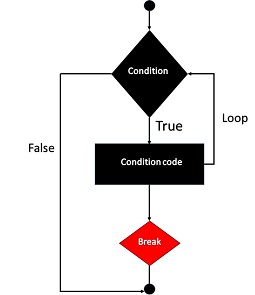
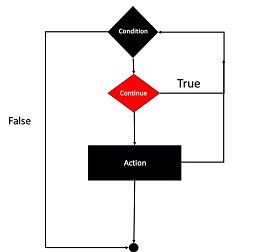
    Flowchart for Continue Statement

    The following flowchart explains how the continue statement works −

    Php Continue Statement

    The program first checks a condition. If the condition is false, the loop terminates. If the condition is True, the program will proceed to the “Continue” statement.

    The “Continue” statement skips the next stages and returns to check the condition again. If there is no “continue” statement, the program will execute the action. When the action is finished, the program returns to check the condition again.

    Using Continue in For Loop

    Given below is a simple example showing the use of continue. The for loop is expected to complete ten iterations. However, the continue statement skips the iteration whenever the counter id is divisible by 2.

    <?php
       for ($x=1; $x<=10; $x++){
          if ($x%2==0){
             continue;
          }
          echo "x = $x \n";
       }
    ?>

    Output

    It will produce the following output −

    x = 1
    x = 3
    x = 5
    x = 7
    x = 9
    

    Using Continue with Multiple Loop

    The continue statement accepts an optional numeric argument which tells it how many levels of enclosing loops it should skip to the end of. The default is 1.

    <?php
       for ($i=1; $i<=3; $i++){
          for ($j=1; $j<=3; $j++){
             for ($k=1; $k<=3; $k++){
                if ($k>1){
                   continue 2;
                }
                print "i: $i  j:$j  k: $k\n";
             }
          }
       }
    ?>

    Output

    It will generate the following result −

    i: 1  j:1  k: 1
    i: 1  j:2  k: 1
    i: 1  j:3  k: 1
    i: 2  j:1  k: 1
    i: 2  j:2  k: 1
    i: 2  j:3  k: 1
    i: 3  j:1  k: 1
    i: 3  j:2  k: 1
    i: 3  j:3  k: 1
    

    The continue statement in the inner for loop skips the iterations 2 and 3 and directly jumps to the middle loop. Hence, the output shows “k” as 1 for all the values of “i” and “k” variables.

    Skip Specific Values in For Loop

    In the code below, we will skip the values set in the for loop. In a loop that prints integers from 1 to 10, we will use the continue statement to skip the 5 number.

    <?php
       for ($i = 1; $i <= 10; $i++) {
          if ($i == 5) {
             // Skip when $i is 5
             continue; 
          }
          echo "Number: $i\n";
       }
    ?>

    Output

    This will create the below output −

    Number: 1
    Number: 2
    Number: 3
    Number: 4
    Number: 6
    Number: 7
    Number: 8
    Number: 9
    Number: 10
    

    Using Continue in a While Loop

    This example shows how to use the continue statement within a while loop to skip odd integers and only print even numbers from 1 to 10.

    <?php
       $num = 1;
       while ($num <= 10) {
          if ($num % 2 != 0) {
             $num++; 
             // Skip odd numbers
             continue; 
          }
          echo "Even Number: $num\n";
          $num++;
       }
    ?>

    Output

    Following is the output of the above code −

    Even Number: 2
    Even Number: 4
    Even Number: 6
    Even Number: 8
    Even Number: 10
    

    Skip Elements in a Foreach Loop

    In the following example, we are showing how to use the continue statement in a foreach loop to skip a specific value from an array.

    <?php
       $fruits = ["Apple", "Banana", "Mango", "Orange", "Grapes"];
          
       foreach ($fruits as $fruit) {
          if ($fruit == "Mango") {
             
             // Skip "Mango"
             continue; 
          }
          echo "Fruit: $fruit\n";
       }
    ?>

    Output

    Below is the output of the following code −

    Fruit: Apple
    Fruit: Banana
    Fruit: Orange
    Fruit: Grapes
  • PHP – Break Statement

    The break statement along with the continue statement in PHP are known as “loop control statements”. Any type of loop (forwhile or do-while) in PHP is designed to run for a certain number of iterations, as per the test condition used. The break statement inside the looping block takes the program flow outside the block, abandoning the rest of iterations that may be remaining.

    The break statement is normally used conditionally. Otherwise, the loop will terminate without completing the first iteration itself.

    Syntax of the Break Statement

    The syntax of break statement is as follows −

    while(expr){if(condition){break;}}

    Flowchart for Break Statement

    The following flowchart explains how the break statement works −

    PHP Break Statement

    The loop starts by checking a condition. If the condition is false, the loop ends. If the condition is satisfied, the program will move to the next phase. If the condition is true, the program runs some code within the loop.

    If a break statement is present, the loop will be ended immediately. If there is no break, the loop resumes. This is a common programming method for ending a loop early when a predefined condition is met.

    Using Break in a While Loop

    The following PHP code is a simple example of using break in a loop. The while loop is expected to perform ten iterations. However, a break statement inside the loop terminates it when the counter exceeds 3.

    <?php
       $i = 1;
    
       while ($i<=10){
          echo "Iteration No. $i \n";
          if ($i>=3){
             break;
          }
          $i++;
       }
    ?>

    Output

    It will generate the following result −

    Iteration No. 1
    Iteration No. 2
    Iteration No. 3
    

    An optional numeric argument can be given in front of break keyword. It is especially useful in nested looping constructs. It tells how many nested enclosing structures are to be broken out of. The default value is 1, only the immediate enclosing structure is broken out of.

    Using Break with Nested Loops

    The following example has three nested loops: a for loop inside which there is a while loop which in turn contains a do-while loop.

    The innermost loop executes the break. The number “2” in front of it takes the control out of the current scope into the for loop instead of the immediate while loop.

    <?php
       for ($x=1; $x<=3; $x++){
          $y=1;
          while ($y<=3){
             $z=1;
             do {
                echo "x:$x y:$y z:$z \n";
                if ($z==2){
                   break 2;
                }
                $z++;
             }
             while ($z<=3);
             $z=1;
             $y++;
          }
       }
    ?>

    Output

    It will produce the below output −

    x:1 y:1 z:1
    x:1 y:1 z:2
    x:2 y:1 z:1
    x:2 y:1 z:2
    x:3 y:1 z:1
    x:3 y:1 z:2
    

    Note that each time the value of “z” becomes 2, the program breaks out of the “y” loop. Hence, the value of “y” is always 1.

    Using Break in a For Loop

    In this example the loop runs from 1 to 10 but the break statement stops execution when $i reaches 5.

    <?php
       for ($i = 1; $i <= 10; $i++){
          echo "Iteration No. $i \n";
          if ($i == 5){
             break;
          }
       }
    ?>

    Output

    It will generate the following output −

    Iteration No. 1  
    Iteration No. 2  
    Iteration No. 3  
    Iteration No. 4  
    Iteration No. 5 
    

    Using Break in a Do-While Loop

    In the following example, we will use a do-while loop with break statement. So the condition is checked after executing the loop body at least once. The loop executes at least once. When $num == 3, the break statement executes and stop the loop.

    <?php
       $num = 1;
    
       do {
          echo "Value: $num \n";
          if ($num == 3){
             break;
          }
          $num++;
       } while ($num <= 5);
    ?>

    Output

    Following is the output of the above code −

    Value: 1  
    Value: 2  
    Value: 3  
  • PHP – DoWhile Loop

    The “dowhile” loop is another looping construct available in PHP. This type of loop is similar to the while loop, except that the test condition is checked at the end of each iteration rather than at the beginning of a new iteration.

    The while loop verifies the truth condition before entering the loop, whereas in “dowhile” loop, the truth condition is verified before re entering the loop. As a result, the “dowhile” loop is guaranteed to have at least one iteration irrespective of the truth condition.

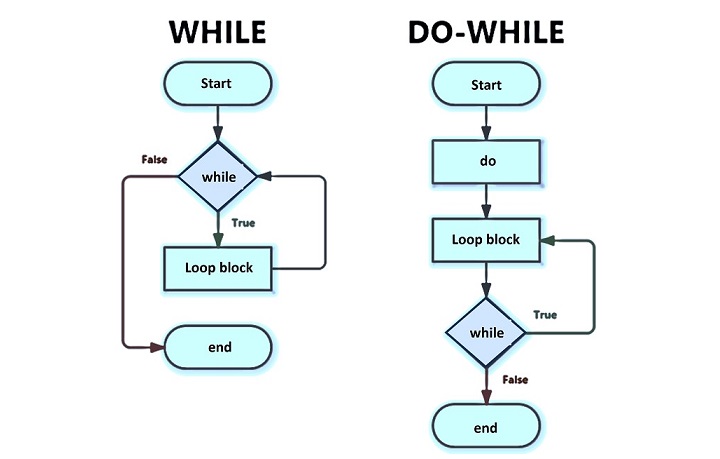
    Flowchart of DoWhile Loop

    The following figure shows the difference in “while” loop and “dowhile” loop by using a comparative flowchart representation of the two.

    PHP Do While Loop

    Syntax of Do…While Statement

    The syntax for constituting a “dowhile” loop is similar to its counterpart in C language.

    do{
       statements;}while(expression);

    Basic Example of DoWhile Loop

    Here is a simple example of “dowhile” loop that prints iteration numbers 1 to 5.

    <?php
       $var=1;
       do{
          echo "Iteration No: $var \n";
          $var++;
       }
       while ($var<=5);
    ?>

    Output

    It will produce the following output −

    Iteration No: 1 
    Iteration No: 2 
    Iteration No: 3 
    Iteration No: 4 
    Iteration No: 5
    

    Using While Loop

    The following code uses a while loop and also generates the same output −

    <?php
       $var=1;
       while ($var<=5){
          echo "<h3>Iteration No: $var</h3>";
          $var++;
       }         
    ?>

    Hence, it can be said that the “dowhile” and “while” loops behave similarly. However, the difference will be evident when the initial value of the counter variable (in this case $var) is set to any value more than the one used in the test expression in the parenthesis in front of the while keyword.

    Using both While and DoWhile Loops

    In the following code, both the loops – while and “dowhile” – are used. The counter variable for the while loop is $var and for “dowhile” loop, it is $j. Both are initialized to 10 (any value greater than 5).

    <?php
       echo "while Loop \n";
       $var=10;
       while ($var<=5){
          echo "Iteration No: $var \n";
          $var++;
       }   
    
       echo "do-while Loop \n"; 
       $j=10;
       do{
          echo "Iteration No: $j \n";
          $j++;
       }
       while ($j<=5);
    ?>

    Output

    It will produce the following output −

    while Loop
    do - while Loop
    Iteration No: 10
    

    The result shows that the while loop doesn’t perform any iterations as the condition is false at the beginning itself ($var is initialized to 10, which is greater than the test condition $var<=5). On the other hand, the “dowhile” loop does undergo the first iteration even though the counter variable $j is initialized to a value greater than the test condition.

    Differences Between while and do…while Loops

    We can thus infer that the “dowhile” loop guarantees at least one iteration because the test condition is verified at the end of looping block. The while loop may not do any iteration as the test condition is verified before entering the looping block.

    Another syntactical difference is that the while statement in “dowhile” terminates with semicolon. In case of while loop, the parenthesis is followed by a curly bracketed looping block.

    Apart from these, there are no differences. One can use both these types of loops interchangeably.

    Decrementing a Dowhile Loop

    To design a “dowhile” with decrementing count, initialize the counter variable to a higher value, use decrement operator (–) inside the loop to reduce the value of the counter on each iteration, and set the test condition in the while parenthesis to run the loop till the counter is greater than the desired last value.

    In the example below, the counter decrements from 5 to 1.

    <?php
       $j=5;
       do{
          echo "Iteration No: $j \n";
          $j--;
       }
       while ($j>=1);
    ?>

    Output

    It will produce the following output −

    Iteration No: 5
    Iteration No: 4
    Iteration No: 3
    Iteration No: 2
    Iteration No: 1
    

    Traverse a String in Reverse Order

    In PHP, a string can be treated as an indexed array of characters. We can extract and display one character at a time from end to beginning by running a decrementing “dowhile” loop as follows −

    <?php
       $string = "TutorialsPoint";
       $j = strlen($string);
    
       do{
          $j--;
          echo "Character at index $j : $string[$j] \n";
       }
       while ($j>=1);
    ?>

    Output

    It will produce the following output −

    Character at index 13 : t
    Character at index 12 : n
    Character at index 11 : i
    Character at index 10 : o
    Character at index 9 : P
    Character at index 8 : s
    Character at index 7 : l
    Character at index 6 : a
    Character at index 5 : i
    Character at index 4 : r
    Character at index 3 : o
    Character at index 2 : t
    Character at index 1 : u
    Character at index 0 : T
    

    Nested Dowhile Loops

    Like the for loop or while loop, you can also write nested “dowhile” loops. In the following example, the upper “dowhile” loop counts the iteration with $var, the inner “dowhile” loop increments $j and each time prints the product of $var*j, thereby printing the tables from 1 to 10.

    <?php
       $var=1;
       $j=1;
    
       do{
          print "\n";
          do{
             $k = sprintf("%4u",$var*$j);
             print "$k";
             $j++;
          } 
          while ($j<=10);
          $j=1;
          $var++;
       }
       while ($var<=10);
    ?>

    Output

    It will produce the following output −

    1   2   3   4   5   6   7   8   9  10
    2   4   6   8  10  12  14  16  18  20
    3   6   9  12  15  18  21  24  27  30
    4   8  12  16  20  24  28  32  36  40
    5  10  15  20  25  30  35  40  45  50
    6  12  18  24  30  36  42  48  54  60
    7  14  21  28  35  42  49  56  63  70
    8  16  24  32  40  48  56  64  72  80
    9  18  27  36  45  54  63  72  81  90
    10  20  30  40  50  60  70  80  90 100
    

    The break Statement

    In the following example, we are using the break statement with the do…while loop. With the break statement, we can terminate the loop even if the condition remains true −

    <?php
       $var = 3;
    
       do {
       if ($var == 6) break;
       echo $var;
       $var++;
       } while ($var < 9);
    ?>

    Output

    Following is the output of the above code −

    345
    

    The continue Statement

    Now, we are using the continue statement with the do-while loop. So using the continue statement we can terminate the running iteration and continue with the next task −

    <?php
       $var = 0;
    
       do {
       $var++;
       if ($var == 6) continue;
       echo $var;
       } while ($var < 9);
    ?>

    Output

    Below is the output of the above code −

    12345789
  • PHP – While Loop

    The easiest way to create a loop in a PHP script is with the while construct. The syntax of while loop in PHP is similar to that in C language. The loop body block will be repeatedly executed as long as the Boolean expression in the while statement is true.

    It allows us to repeat a set of instructions as long as a certain condition is satisfied. It first checks a condition. If the condition is true, the function inside the loop is executed. After running the code, the condition is checked again. If it is still true, the loop is run again. This process continues until the condition becomes false.

    Syntax

    The syntax of while loop can be expressed as follows −

    while(expr){
       statements
    }

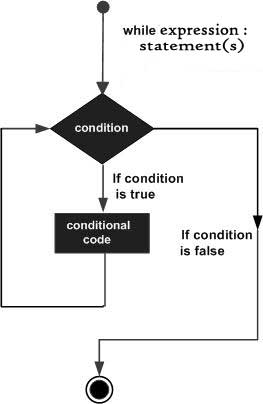
    Flowchart for While Loop

    The following flowchart helps in understanding how the while loop in PHP works −

    PHP While Loop

    The value of the expression is checked each time at the beginning of the loop. If the while expression evaluates to false from the very beginning, the loop won’t even be run once. Even if the expression becomes false during the execution of the block, the execution will not stop until the end of the iteration.

    Simple While Loop Example

    The following code shows a simple example of how the while loop works in PHP. The variable $x is initialized to 1 before the loop begins. The loop body is asked to execute as long as it is less than or equal to 10. The echo statement in the loop body prints the current iteration number, and increments the value of x, so that the condition will turn false eventually.

    <?php
       $x = 1;
    
       while ($x<=10) {
          echo "Iteration No. $x \n";
          $x++;
       }
    ?>

    Output

    It will produce the following output −

    Iteration No. 1
    Iteration No. 2
    Iteration No. 3
    Iteration No. 4
    Iteration No. 5
    Iteration No. 6
    Iteration No. 7
    Iteration No. 8
    Iteration No. 9
    Iteration No. 10
    

    Note that the test condition is checked at the beginning of each iteration. Even if the condition turns false inside the loop, the execution will not stop until the end of the iteration.

    While Loop with Increment

    In the following example, “x” is incremented by 3 in each iteration. On the third iteration, “x” becomes 9. Since the test condition is still true, the next round takes place in which “x” becomes 12. As the condition turns false, the loop stops.

    <?php
       $x = 0;
       while ($x<=10){
          $x+=3;
          echo "Iteration No. $x \n";            
       }
    ?>

    Output

    It will produce the following output −

    Iteration No. 3
    Iteration No. 6
    Iteration No. 9
    Iteration No. 12
    

    While Loop with Decrementing Variable

    It is not always necessary to have the looping variable incrementing. If the initial value of the loop variable is greater than the value at which the loop is supposed to end, then it must be decremented.

    <?php
       $x = 5;
       while ($x>0) {
          echo "Iteration No. $x \n";
          $x--;
       }
    ?>

    Output

    It will produce the following output −

    Iteration No. 5 
    Iteration No. 4 
    Iteration No. 3 
    Iteration No. 2 
    Iteration No. 1
    

    Iterating an Array with While Loop

    An indexed array in PHP is a collection of elements, each of which is identified by an incrementing index starting from 0.

    You can traverse an array by constituting a while loop by repeatedly accessing the element at the xth index till “x” reaches the length of the array. Here, “x” is a counter variable, incremented with each iteration. We also need a count() function that returns the size of the array.

    Take a look at the following example −

    <?php
       $numbers = array(10, 20, 30, 40, 50);
       $size = count($numbers);
       $x=0;
    
       while ($x<$size) {
          echo "Number at index $x is $numbers[$x] \n";
          $x++;
       }
    ?>

    Output

    It will produce the following output −

    Number at index 0 is 10
    Number at index 1 is 20
    Number at index 2 is 30
    Number at index 3 is 40
    Number at index 4 is 50
    

    Nested While Loops

    You may include a while loop inside another while loop. Both the outer and inner while loops are controlled by two separate variables, incremented after each iteration.

    <?php
       $i=1;
       $j=1;
    
       while ($i<=3){
          while ($j<=3){
             echo "i= $i j= $j \n";
             $j++;
          }
          $j=1;
          $i++;
       }
    ?>

    Output

    It will produce the following output −

    i= 1 j= 1
    i= 1 j= 2
    i= 1 j= 3
    i= 2 j= 1
    i= 2 j= 2
    i= 2 j= 3
    i= 3 j= 1
    i= 3 j= 2
    i= 3 j= 3
    

    Note that “j” which is the counter variable for the inner while loop is re-initialized to 1 after it takes all the values so that for the next value of “i”, “j” again starts from 1.

    Traversing Characters Using While Loop

    In PHP, a string can be considered as an indexed collection of characters. Hence, a while loop with a counter variable going from “0” to the length of string can be used to fetch one character at a time.

    The following example counts number of vowels in a given string. We use strlen() to obtain the length and str_contains() to check if the character is one of the vowels.

    <?php
       $line = "PHP is a popular general-purpose scripting language that is especially suited to web development.";
       $vowels="aeiou";
       $size = strlen($line);
       $i=0;
       $count=0;
    
       while ($i<$size){
          if (str_contains($vowels, $line[$i])) {
             $count++;
          }
          $i++;
       }
       echo "Number of vowels = $count";
    ?>

    Output

    It will generate the below result −

    Number of vowels = 32
    

    Using the endwhile Statement in While Loop

    PHP also lets you use an alternative syntax for the while loop. Instead of clubbing more than one statement in curly brackets, the loop body is marked with a “:” (colon) symbol after the condition and the endwhile statement at the end.

    <?php
       $x = 1;
       while ($x<=10):
          echo "Iteration No. $x \n";
          $x++;
       endwhile;
    ?>

    Output

    It will generate the following output −

    Iteration No. 1
    Iteration No. 2
    Iteration No. 3
    Iteration No. 4
    Iteration No. 5
    Iteration No. 6
    Iteration No. 7
    Iteration No. 8
    Iteration No. 9
    Iteration No. 10
    

    Note that the endwhile statement ends with a semicolon.