Blog

  • PHP – $_REQUEST

    PHP uses a special variable called $_REQUEST to collect data from forms. It can save data sent using GET, POST or COOKIE methods. This makes it easy to get user input and removes the need to think about how the data is transmitted. The $_REQUEST operates according to the parameters in the “php.ini” file, including the request_order setting. This parameter controls the order in which PHP looks for GET, POST and COOKIE data.

    If you run a PHP script from the command line, the command line parameters will not be in the $_REQUEST array. However, the arguments are filled by the web server in the $_SERVER array.

    Understanding the $_REQUEST Variable in PHP

    • The settings in your “php.ini” file decides the composition of this variable.
    • One of the directives in “php.ini” is request_order, which decides the order in which PHP registers GET, POST and COOKIE variables.
    • The presence and order of variables listed in this array is defined according to the PHP variables_order.
    • If a PHP script is run from the command line, the argc and argv variables are not included in the $_REQUST array because their values are taken from the $_SERVER array, which in turn is populated by the web server.

    $_REQUEST with GET Method

    Save the following script in the document folder of the Apache server. If you are using XAMPP server on Windows, place the script as “hello.php” in the “c:/xampp/htdocs” folder.

    <html><body><?php
          echo "<h3>First Name: " . $_REQUEST['first_name'] . "<br />" 
          . "Last Name: " . $_REQUEST['last_name'] . "</h3>";
       ?></body></html>

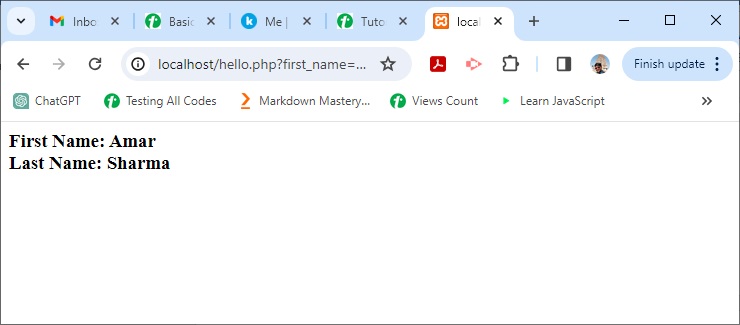
    Start the XAMPP server and enter http://localhost/hello.php?first_name=Amar&last_name=Sharma as the URL in a browser window.

    You should get the output as −
    PHP $ Request 1

    $_REQUEST with POST Method

    Under the document root, save the following script as “hello.html”.

    <html><body><form action="hello.php" method="post">
          First Name: <input type="text" name="first_name" /><br />
          Last Name: <input type="text" name="last_name" /><input type="submit" value="Submit" /></form></body></html>

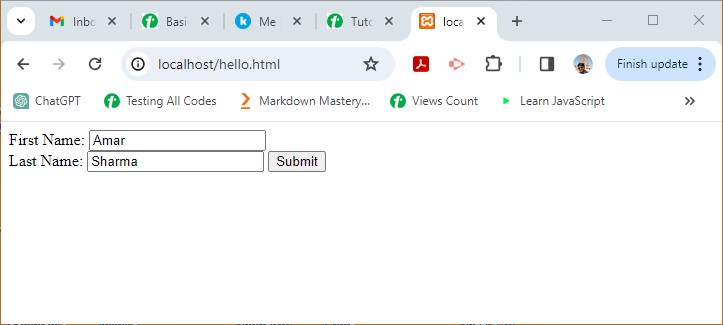
    In your browser, enter the URL “http://localhost/hello.html”. You should get the similar output in the browser window.
    PHP $ Request 2

    You may also embed the PHP code inside the HTML script and POST the form to itself with the PHP_SELF variable −

    <html><body><form action="<?php echo $_SERVER['PHP_SELF'];?>" method="post"><p>First Name: <input type="text" name="first_name" /></p><p>Last Name: <input type="text" name="last_name" /></p><input type="submit" value="Submit" /></form><?php
          if ($_SERVER["REQUEST_METHOD"] == "POST")
          echo "<h3>First Name: " . $_REQUEST['first_name'] . "<br />" 
          . "Last Name: " . $_REQUEST['last_name'] . "</h3>";
       ?></body></html>

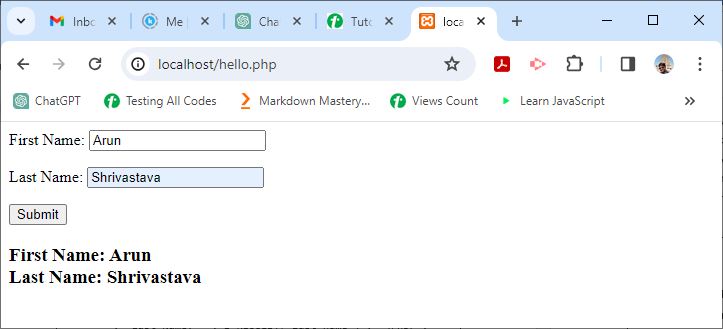
    It will produce the following output −
    PHP $ Request 3

    Security Considerations with $_REQUEST

    As $_REQUEST can collect data from multiple sources (GET, POST, and COOKIE), using it without validation can be unsafe. For example, if you expect form input but someone tampers with cookies, there can be security issues.

    So use $_GET, $_POST or $_COOKIE particularly when you know how data should be sent. Also, to avoid security vulnerabilities like SQL injection and cross-site scripting (XSS), continuously clean and validate user input.
  • PHP – $_SERVER

    The $_SERVER is a superglobal in PHP. It includes information about HTTP headers, path, script location, and other things. It is an associative array that contains information about the execution environment and server.

    The majority of these details are filled in by the web server and each server may have different entries. When running PHP scripts from the command line, some of these entries might not be available.

    PHP also generates additional objects using request headers. The header name, which is in uppercase and has underscores instead of hyphens, is followed by the term “HTTP_” for these items.

    Key Points about the $_SERVER

    $_SERVER is a superglobal in PHP. It holds information regarding HTTP headers, path and script location, etc.

    • $_SERVER is an associative array and it holds all the server and execution environment related information.
    • Most of the entries in this associative array are populated by the web server. The entries may change from one web server to other, as servers may omit some, or provide others.
    • For a PHP script running on the command line, most of these entries will not be available or have any meaning.
    • PHP will also create additional elements with values from request headers. These entries will be named “HTTP_” followed by the header name, capitalized and with underscores instead of hyphens.
    • For example, the “Accept-Language” header would be available as $_SERVER[‘HTTP_ACCEPT_LANGUAGE’].
    • PHP versions prior to 5.4.0 had $HTTP_SERVER_VARS which contained the same information but it has now been removed.

    Server Variables

    The following table lists some of the important server variables of the $_SERVER array followed by the description of their values.

    Sr.NoServer Variables & Description
    1PHP_SELFStores filename of currently executing script.
    2SERVER_ADDRThis property of array returns the IP address of the server under which the current script is executing.
    3SERVER_NAMEName of server host under which the current script is executing. In case of a server running locally, localhost is returned.
    4QUERY_STRINGA query string is the string of key value pairs separated by the “&” symbol and appended to the URL after the “?” symbol.For example, http://localhost/testscript?name=xyz&age=20 URL returns trailing query string
    5REQUEST_METHODHTTP request method used for accessing a URL, such as POST, GET, POST, PUT or DELETE.In the above query string example, a URL attached to query string with the “?” symbol requests the page with GET method
    6DOCUMENT_ROOTReturns the name of the directory on the server that is configured as the document root.On XAMPP apache server, it returns htdocs as the name of document root c:/xampp/htdocs
    7REMOTE_ADDRIP address of the machine from where the user is viewing the current page.
    8SERVER_PORTPort number on which the web server is listening to the incoming request. Default is 80
    9SCRIPT_FILENAMEThe absolute path to the currently executing script.
    10HTTP_HOSTThe contents of the Host header from the current request.
    11SCRIPT_NAMEContains the path of the current script relative to the document root.
    12REQUEST_URIThe URI that was given to access the page, including the query string.
    13HTTPSSet to ‘on’ if the request was made over HTTPS, otherwise not set.
    14SERVER_PROTOCOLThe name and version of the information protocol used, like HTTP/1.1 or HTTP/2.
    15GATEWAY_INTERFACEThe version of the CGI specification that the server uses, like CGI/1.1.

    Example

    The following script invoked from document root of XAMPP server lists all the server variables −

    <?php
       foreach ($_SERVER as $k=>$v)
       echo $k . "=>" . $v . "\n";
    ?>

    It will produce the following output −

    MIBDIRS=>C:/xampp/php/extras/mibs
    MYSQL_HOME=>\xampp\mysql\bin
    OPENSSL_CONF=>C:/xampp/apache/bin/openssl.cnf
    PHP_PEAR_SYSCONF_DIR=>\xampp\php
    PHPRC=>\xampp\php
    TMP=>\xampp\tmp
    HTTP_HOST=>localhost
    HTTP_CONNECTION=>keep-alive
    HTTP_SEC_CH_UA=>"Chromium";v="116", "Not)
    A;Brand";v="24", "Google Chrome";v="116"
    HTTP_SEC_CH_UA_MOBILE=>?0
    HTTP_SEC_CH_UA_PLATFORM=>"Windows"
    HTTP_DNT=>1
    HTTP_UPGRADE_INSECURE_REQUESTS=>1
    HTTP_USER_AGENT=>Mozilla/5.0 (Windows NT 10.0; Win64; x64)
     AppleWebKit/537.36 (KHTML, like Gecko) Chrome/116.0.0.0 Safari/537.36
    HTTP_ACCEPT=>text/html,application/xhtml+xml,application/xml;
    q=0.9,image/avif,image/webp,image/apng,*/*;
    q=0.8,application/signed-exchange;v=b3;q=0.7
    HTTP_SEC_FETCH_SITE=>none
    HTTP_SEC_FETCH_MODE=>navigate
    HTTP_SEC_FETCH_USER=>?1
    HTTP_SEC_FETCH_DEST=>document
    HTTP_ACCEPT_ENCODING=>gzip, deflate, br
    HTTP_ACCEPT_LANGUAGE=>en-US,en;q=0.9,mr;q=0.8
    PATH=>C:\Python311\Scripts\;
    C:\Python311\;C:\WINDOWS\system32;
    C:\WINDOWS;C:\WINDOWS\System32\Wbem;
    C:\WINDOWS\System32\WindowsPowerShell\v1.0\;
    C:\WINDOWS\System32\OpenSSH\;C:\xampp\php;
    C:\Users\user\AppData\Local\Microsoft\WindowsApps;
    C:\VSCode\Microsoft VS Code\bin
    SystemRoot=>C:\WINDOWS
    COMSPEC=>C:\WINDOWS\system32\cmd.exe
    PATHEXT=>.COM;.EXE;.BAT;.CMD;.VBS;.VBE;.JS;.JSE;.WSF;.WSH;.MSC;.PY;.PYW
    WINDIR=>C:\WINDOWS
    SERVER_SIGNATURE=>
    Apache/2.4.56 (Win64) OpenSSL/1.1.1t PHP/8.0.28 Server at localhost Port 80
    
    SERVER_SOFTWARE=>Apache/2.4.56 (Win64) OpenSSL/1.1.1t PHP/8.0.28
    SERVER_NAME=>localhost
    SERVER_ADDR=>::1
    SERVER_PORT=>80
    REMOTE_ADDR=>::1
    DOCUMENT_ROOT=>C:/xampp/htdocs
    REQUEST_SCHEME=>http
    CONTEXT_PREFIX=>
    CONTEXT_DOCUMENT_ROOT=>C:/xampp/htdocs
    SERVER_ADMIN=>postmaster@localhost
    SCRIPT_FILENAME=>C:/xampp/htdocs/hello.php
    REMOTE_PORT=>54148
    GATEWAY_INTERFACE=>CGI/1.1
    SERVER_PROTOCOL=>HTTP/1.1
    REQUEST_METHOD=>GET
    QUERY_STRING=>
    REQUEST_URI=>/hello.php
    SCRIPT_NAME=>/hello.php
    PHP_SELF=>/hello.php
    REQUEST_TIME_FLOAT=>1694802456.9816
    REQUEST_TIME=>1694802456
  • PHP – $GLOBALS

    $GLOBALS is one of the “superglobal” or “automatic global” variables in PHP. It is available in all scopes throughout a script. There is no need to do “global $variable;” to access it within functions or methods.

    $GLOBALS is an associative array of references to all globally defined variables. The names of variables form keys and their contents are the values of an associative array.

    Access Global Variables with $GLOBALS

    This example shows $GLOBALS array containing the name and contents of global variables −

    <?php
       $var1="Hello";
       $var2=100;
       $var3=array(1,2,3);
    
       echo $GLOBALS["var1"] . "\n";
       echo $GLOBALS["var2"] . "\n";
       echo implode($GLOBALS["var3"]) . "\n";
    ?>

    Output

    It will produce the following outcome −

    Hello
    100
    123
    

    Global vs Local Variables Using $GLOBALS

    In the following example, $var1 is defined in the global namespace as well as a local variable inside the function. The global variable is extracted from the $GLOBALS array.

    <?php
       function myfunction() {
          $var1="Hello PHP";
          echo "var1 in global namespace: " . $GLOBALS['var1']. "\n";
          echo "var1 as local variable: ". $var1;
       }
       $var1="Hello World";
       myfunction();
    ?>

    Output

    It will produce the following result −

    var1 in global namespace: Hello World
    var1 as local variable: Hello PHP
    

    Modify Global Variables

    Prior to PHP version 8.1.0, global variables could be modified by a copy of $GLOBALS array.

    <?php
       $a = 1;
       $globals = $GLOBALS; 
       $globals['a'] = 2;
       var_dump($a);
    ?>

    Output

    It will produce the below output −

    int(1)
    

    Here, $globals is a copy of the $GLOBALS superglobal. Changing an element in the copy, with its key as “a” to 2, actually changes the value of $a.

    It will produce the following output −

    int(2)
    

    Read-Only $GLOBALS

    As of PHP 8.1.0, $GLOBALS is a read-only copy of the global symbol table. That is, global variables cannot be modified via their copy. The same operation as above wont change $a to 2.

    <?php
       $a = 1;
       $globals = $GLOBALS; 
       $globals['a'] = 2;
       var_dump($a);
    ?>

    Output

    It will generate the following output −

    int(1)
    

    Update Global Variables Inside a Function

    In the following example, the global variable $counter will be updated directly in the function with the help of $GLOBALS. Each function call increments the value by 1.

    <?php
       $counter = 0;
    
       function incrementCounter() {
          $GLOBALS['counter']++;
       }
    
       incrementCounter();
       incrementCounter();
       incrementCounter();
    
       echo "Counter value: " . $counter;
    ?>

    Output

    Following is the output of the above code −

    Counter value: 3
    

    Use $GLOBALS in Nested Functions

    In the following example, we are using the $GLOBALS inside a nested function. So using this example you can use global variables even inside nested functions.

    <?php
       $var = "Hello";
    
       function outerFunction() {
          function innerFunction() {
             echo $GLOBALS['var'] . " from inner function!";
          }
          innerFunction();
       }
    
       outerFunction();
    ?>

    Output

    Following is the output of the above code −

    Hello from inner function!
    

    Store Arrays in Global Variables

    In the following example, the $GLOBALS lets you directly change arrays stored as global variables. The function mentioned in our example adds new items to the array.

    <?php
       $var = array("Apple", "Banana");
    
       function addFruit($fruit) {
          $GLOBALS['var'][] = $fruit;
       }
    
       addFruit("Orange");
       addFruit("Grapes");
    
       print_r($var);
    ?>

    Output

    Following is the output of the above code −

    Array
    (
       [0] => Apple
       [1] => Banana
       [2] => Orange
       [3] => Grapes
    )
  • PHP – $_SESSION

    One of the superglobal variables in PHP, $_SESSION is an associative array of session variables available in the current script. $HTTP_SESSION_VARS also contains the same information, but it is not a superglobal, and it has now been deprecated.

    What is a Session?

    A Session is an alternative way to make data accessible across the pages of an entire website. It is the time duration between the time a user establishes a connection with a server and the time the connection is terminated. During this interval, the user may navigate to different pages. Many times, it is desired that some data is persistently available across the pages. This is facilitated by session variables.

    A session creates a file in a temporary directory on the server where the registered session variables and their values are stored. This data will be available to all the pages on the site during that visit.

    The server assigns a unique SESSION_ID to each session. Since HTTP is a stateless protocol, data in session variables is automatically deleted when the session is terminated.

    How Sessions Work?

    Here is the way how sessions work −

    • The server assigns a unique SESSION_ID to each user.
    • This ID is stored in a temporary file on the server.
    • The session data is accessible from all pages until the session is terminated.

    Starting a Session

    In order to enable access to session data, the session_start() function must be invoked. session_start() creates a session or resumes the current one based on a session identifier passed via a GET or POST request, or passed via a cookie.

    session_start(array$options=[]):bool

    This function returns true if a session was successfully started, else it returns false.

    Creating and Using Session Variables

    To create a new session variable, add a key-value pair in the $_SESSION array −

    $_SESSION["var"]=value;

    To read back the value of a session variable, you can use echo/print statements, or var_dump() or print_r() functions.

    echo$_SESSION["var"];

    To obtain the list of all the session variables in the current session, you can use a foreach loop to traverse the $_SESSION −

    foreach($_SESSIONas$key=>$val)echo$key."=>".$val;

    Deleting Session Variables

    To manually clear all the session data, there is session_destroy() function. A specific session variable may also be released by calling the unset() function.

    unset($_SESSION["var"]);

    List of Session Functions

    In PHP, there are many built-in functions for managing the session data.

    Session FunctionsDescription
    session_abortDiscard session array changes and finish session
    session_cache_expireReturn current cache expire
    session_cache_limiterGet and/or set the current cache limiter
    session_commitAlias of session_write_close
    session_create_idCreate new session id
    session_decodeDecodes session data from a session encoded string
    session_destroyDestroys all data registered to a session
    session_encodeEncodes the current session data as a session encoded string
    session_gcPerform session data garbage collection
    session_get_cookie_paramsGet the session cookie parameters
    session_idGet and/or set the current session id
    session_is_registeredFind out whether a global variable is registered in a session
    session_module_nameGet and/or set the current session module
    session_nameGet and/or set the current session name
    session_regenerate_idUpdate the current session id with a newly generated one
    session_register_shutdownSession shutdown function
    session_registerRegister one or more global variables with the current session
    session_resetRe-initialize session array with original values
    session_save_pathGet and/or set the current session save path
    session_set_cookie_paramsSet the session cookie parameters
    session_set_save_handlerSets user-level session storage functions
    session_startStart new or resume existing session
    session_statusReturns the current session status
    session_unregisterUnregister a global variable from the current session
    session_unsetFree all session variables
    session_write_closeWrite session data and end session

    Example: Managing User Data with PHP Sessions

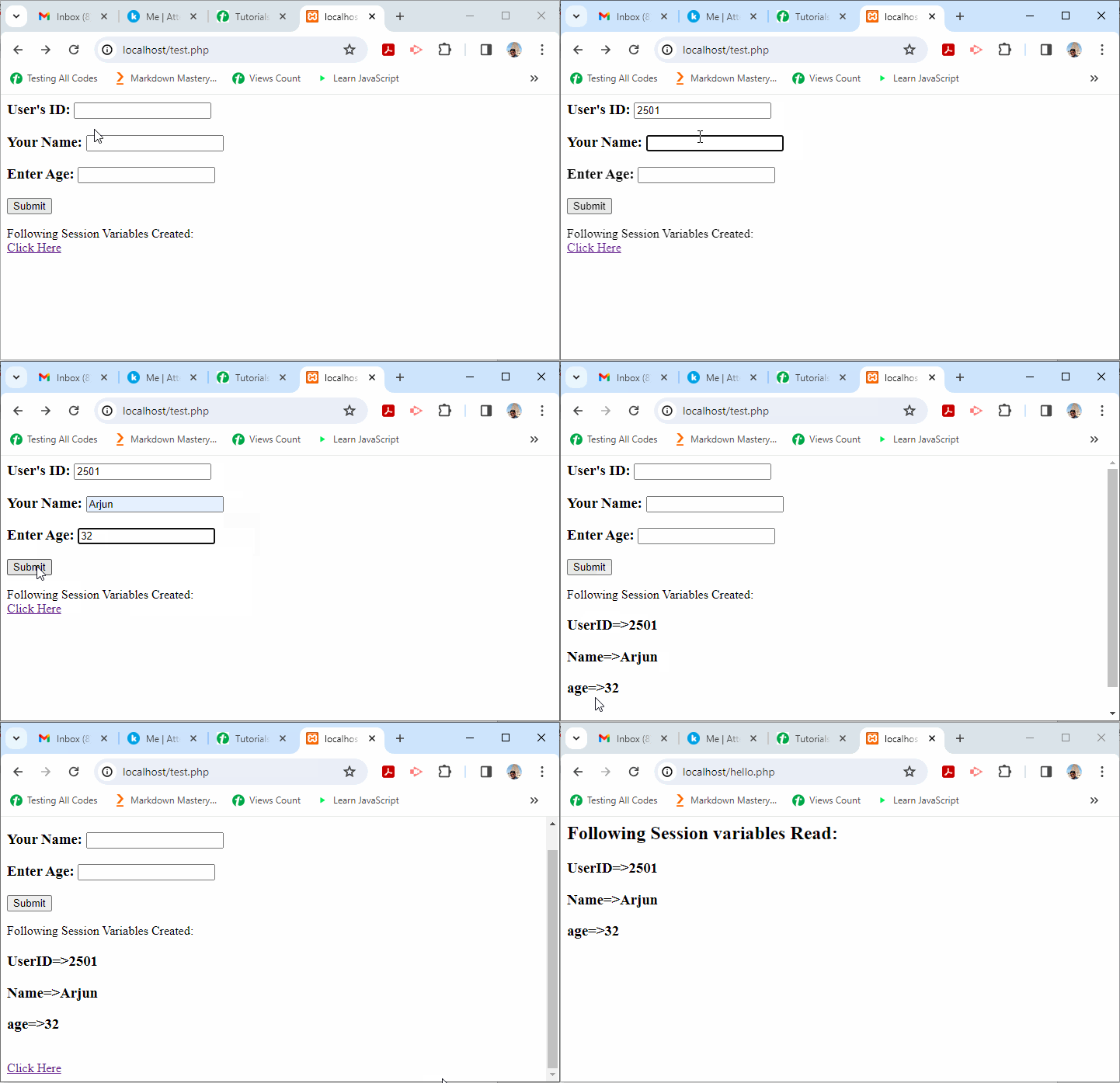
    The following PHP script renders an HTML form. The form data is used to create three session variables. A hyperlink takes the browser to another page, which reads back the session variables.

    Save this code as “test.php” in the document root folder, and open it in a client browser. Enter the data and press the Submit button.

    <html><head><title>PHP Sessions: How to Use $_SESSION to Manage User Data</title><meta name="keywords" content="PHP Sessions, PHP $_SESSION, Manage User Data in PHP, PHP session_start, session variables, PHP session tutorial"></head><body><form action="<?php echo $_SERVER['PHP_SELF'];?>" method="post"><h3>User's ID: <input type="text" name="ID"/></h3><h3>Your Name: <input type="text" name="name"/></h3><h3>Enter Age: <input type="text" name="age"/></h3><input type="submit" value="Submit"/></form><?php
          session_start();
          if ($_SERVER["REQUEST_METHOD"] == "POST") {
             $_SESSION['UserID'] = $_POST['ID'];
             $_SESSION['Name'] = $_POST['name'];
             $_SESSION['age'] = $_POST['age'];
          }
          echo "Following Session Variables Created: \n";
    
          foreach ($_SESSION as $key=>$val)
          echo "<h3>" . $key . "=>" . $val . "</h3>";
          echo "<br/>" . '<a href="hello.php">Click Here</a>';
       ?></body></html>

    When you click the “Submit” button, it will show a list of all the session variables created −

    PHP $ SESSION 1

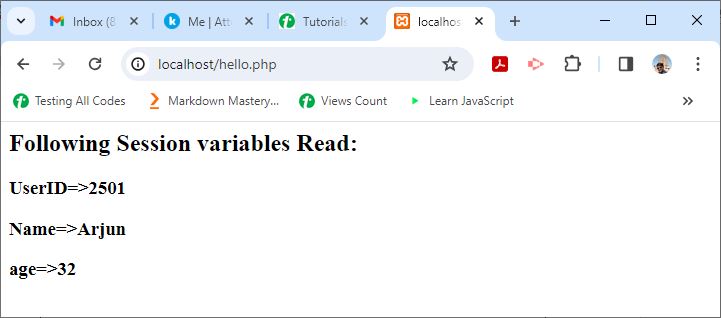
    Next, have the following script in the “hello.php” file and save it.

    <?php
    session_start();
       echo "<h2>Following Session variables Read:</h2>";
       foreach ($_SESSION as $key=>$val)
       echo "<h3>" . $key . "=>" . $val . "</h3>";
    ?>

    Now, follow the link on the “test.php” page to navigate to “hello.php”. It will show the session variables that are read −

    PHP $ SESSION 2
  • PHP – Global Variables

    In PHP, any variable that can be accessed from anywhere in a PHP script is called as a global variable. If the variable is declared outside all the functions or classes in the script, it becomes a global variable.

    While global variables can be accessed directly outside a function, they aren’t automatically available inside a function.

    Key Points About Global Variables

    Here are some key points to keep in mind about global variables −

    • External classes or functions that are defined
    • Accessible globally, but internal operations need particular handling
    • Use the $GLOBALS array or the global keyword to access functions.

    Example

    In the script below, $name is global for the function sayhello().

    <?php
       $name = "Amar";
       function sayhello() {
          echo "Hello " . $name;
       }
       sayhello();
    ?>

    Output

    However, the variable is not accessible inside the function. Hence, you will get an error message “Undefined variable $name”.

    Hello 
    PHP Warning: Undefined variable $name in /home/cg/root/93427/main.php on line 5
    

    Example

    To get access within a function, you need to use the “global” keyword before the variable.

    <?php
       $name = "Amar";
       function sayhello() {
          GLOBAL $name;
          echo "Hello " . $name;
       }
       sayhello();
    ?>

    Output

    It will produce the following output −

    Hello Amar
    

    If a function accesses a global variable and modifies it, the modified value is available everywhere after the function call is completed.

    Let us change the value of $name inside the sayhello() function and check its value after the function is called.

    Example

    Take a look at this following example −

    <?php
       $name = "Amar";
       function sayhello() {
          GLOBAL $name;
          echo "Global variable name: $name" .PHP_EOL;
          $name = "Amarjyot";
          echo "Global variable name changed to: $name" .PHP_EOL;
       }
       sayhello();
       echo "Global variable name after function call: $name" .PHP_EOL;
    ?>

    Output

    It will produce the following output −

    Global variable name: Amar
    Global variable name changed to: Amarjyot
    Global variable name after function call: Amarjyot
    

    The $GLOBALS Array

    PHP maintains an associative array named $GLOBALS that holds all the variables and their values declared in a global scope. The $GLOBALS array also stores many predefined variables called as superglobals, along with the user defined global variables.

    Any of the global variables can also be accessed inside any function with the help of a regular syntax of accessing an arrow element. For example, the value of the global variable $name is given by $GLOBALS[“name”].

    Example

    In the following example, two global variable $x and $y are accessed inside the addition() function.

    <?php
       $x = 10;
       $y = 20;
    
       function addition() {
          $z = $GLOBALS['x']+$GLOBALS['y'];
          echo "Addition: $z" .PHP_EOL;
       }
       addition();
    ?>

    Output

    It will produce the following output −

    Addition: 30
    

    Example

    You can also add any local variable into the global scope by adding it in the $GLOBALS array. Let us add $z in the global scope.

    <?php
       $x = 10;
       $y = 20;
       function addition() {
          $z = $GLOBALS['x']+$GLOBALS['y'];
          $GLOBALS['z'] = $z;
       }
       addition();
       echo "Now z is the global variable. Addition: $z" .PHP_EOL;
    ?>

    Output

    It will produce the following output −

    Now z is the global variable. Addition: 30
    

    Including One PHP Script in Another

    You can include one PHP script in another. Variables declared in the included script are added in the global scope of the PHP script in which it is included.

    Here is “a.php” file −

    <?php
       include 'b.php';
       function addition() {
          $z = $GLOBALS['x']+$GLOBALS['y'];
          echo "Addition: $z" .PHP_EOL;
       }
       addition();
    ?>

    It includes “b.php” that has the $x and $y variables, so they become the global variables for the addition() function in “a.php” script.

    <?php
       $x = 10;
       $y = 20;
    ?>

    Global variables are generally used while implementing singleton patterns, and accessing registers in embedded systems and also when a variable is being used by many functions.

  • PHP – Local Variables

    Scope can be defined as the range of availability a variable has to the program in which it is declared. PHP variables can be one of four scope types −

    • Local Variables
    • Global Variables
    • Static Variables
    • Function Parameters

    Local Variables

    A variable declared in a function is considered local; that is, it can be referenced solely in that function. Any assignment outside of that function will be considered to be an entirely different variable from the one contained in the function. You cannot access them outside of the function.

    Consider local variables as private notes. Only the author (function) can read them.

    How Local Variables Work

    When a function is called, PHP creates local variables. When the function ends, PHP deletes the variables. Local variables exist only during the function’s execution.

    Example 1

    Here is the example to show hwo the local variable work in PHP −

    <?php
       $x = 4;
       
       function assignx () { 
          $x = 0;
          print "\$x inside function is $x. \n";
       }
       
       assignx();
       print "\$x outside of function is $x. \n";
    ?>

    Output

    This will produce the following result −

    $x inside function is 0. 
    $x outside of function is 4. 
    

    Example 2

    You can use local variables inside a loop also. So check how the local variables work in a for loop.

    <?php
       function countToThree() {
          for ($i = 1; $i <= 3; $i++) {
             // Local variable
             echo $i . " "; 
          }
       }
    
       countToThree();
    ?>

    Output

    Following is the output of the above code −

    1 2 3
    

    Example 3

    In this example, $age is a local variable inside the checkAge() function. The variable is only available inside the function you can’t access it from outside.

    <?php
       function checkAge() {
          // Local variable
          $age = 20; 
          if ($age >= 18) {
             echo "You are an adult.";
          } else {
             echo "You are a minor.";
          }
       }
    
       checkAge(); 
    ?>

    Output

    Following is the output of the above code −

    You are an adult.
    

    Why Use Local Variables?

    Here are some of the reasons why you should use local variables −

    • Security: Local variables protect data within functions.
    • Memory Management: After use, local variables are deleted to save memory.
    • Avoid conflict: Local variables with the same name in different functions do not interact with each other.

    Important Points to Keep in Mind

    Understanding local variables is important to write PHP code that is secure, efficient, and clean. Here are some key points of local variables you should keep in mind −

    • Local variables are defined inside a function.
    • Only when the function is operating do they exist.
    • When not in use, they are inaccessible.
    • Many functions can use the same variable names without getting any issues.
  • PHP – Arrow Functions

    Arrow functions were added in PHP 7.4 to make it easier and faster to write anonymous functions. Instead of the regular “function” term, you can now type “fn”. The new version simplifies your code, making it cleaner and more readable. Arrow functions are perfect for short, one-line functions because they automatically return the result without the need for an explicit return statement.

    They also inherit variables from the parent scope, so you do not need to pass them separately. Overall, arrow functions are a fantastic addition to PHP, making it faster and easier to write small inline functions.

    Here is the syntax for using the arrow functions in your code −

    fn(argument_list)=> expr
    

    Key Points About Arrow Functions

    Arrow functions have some key points listed below that make them different from regular functions −

    • There is only one expression after the “=>” symbol, and its value is the return value of the arrow function.
    • The arrow function doesn’t have an explicit return statement.
    • Like in the anonymous function, the arrow function is assigned to a variable for it to be called.

    Basic Addition with Arrow Function

    The following example demonstrates how you can use the arrow function in PHP −

    <?php
       $add = fn ($a, $b) => $a + $b;
    
       $x = 10;
       $y = 20; 
       echo " x: $x y: $y Addition: " . $add($x, $y);
    ?>

    It will produce the following output −

    x: 10 y: 20 Addition: 30
    

    Using the Arrow Function as a Callback Function

    We can also use the arrow function as a callback function. Callback functions are used as one of the arguments of another function. The arrow function is executed on the fly and the value of the expression after “=>” becomes the argument of the parent function, which may be either a built-in or a user-defined function.

    In this example, we use an arrow function inside usort() function, a built_in function that sorts an array by values using a user-defined comparison function.

    <?php
       $arr = [10,3,70,21,54];
       usort ($arr, fn ($x , $y) => $x > $y);
    
       foreach ($arr as $x){
          echo $x . "\n";
       }
    ?>

    It will produce the following output −

    3
    10
    21
    54
    70
    

    Accessing Variables from the Parent Scope

    Arrow functions can automatically access variables from the parent scope. Unlike the anonymous functions, the “use” keyword is not necessary for it to act as a closure. When a variable used in the expression is defined in the parent scope, it will be implicitly captured by-value.

    <?php
       $maxmarks=300;
       $percent=fn ($marks) => $marks*100/$maxmarks;
    
       $m = 250;
       echo "Marks = $m Percentage = ". $percent($m);
    ?>

    It will produce the following output −

    Marks = 250 Percentage = 83.333333333333
    

    Nested Arrow Functions

    Arrow functions capture variables by value automatically, even when nested.

    In the following example, an arrow function is defined in the expression part of another arrow function.

    <?php
       $z = 1;
       $fn = fn($x) => fn($y) => $x * $y + $z;
       $x = 5;
       $y = 10; 
       echo "x:$x y:$y \n";
       echo "Result of nested arrow functions: " . ($fn($x)($y));
    ?>

    It will produce the following output −

    x:5 y:10 
    Result of nested arrow functions: 51
    

    Filtering an Array with Arrow Functions

    You can use arrow functions to filter elements in an array very easily. So here is the example below in which we are filtering out the even numbers and showing them in the output.

    <?php
       $numbers = [1, 2, 3, 4, 5, 6, 7, 8, 9, 10];
       $evenNumbers = array_filter($numbers, fn($n) => $n % 2 === 0);
    
       foreach ($evenNumbers as $num) {
          echo $num . " ";
       }
    ?>

    Output

    Following is the output of the above code −

    2 4 6 8 10
    

    Transform an Array with array_map

    Arrow functions are used to transform an array using array_map. In the following example, we are using array_map() function to change the array into a squared numbers array.

    <?php
       $nums = [1, 2, 3, 4];
       $squared = array_map(fn($n) => $n * $n, $nums);
    
       print_r($squared);
    ?>

    Output

    Following is the output of the above code −

    Array
    (
       [0] => 1
       [1] => 4
       [2] => 9
       [3] => 16
    )
    

    Just like anonymous functions, the arrow function syntax allows arbitrary function signatures, including parameter and return types, default values, variadics, as well as by-reference passing and returning.

  • PHP – Anonymous Functions

    What are Anonymous Functions?

    PHP allows defining anonymous functions. Normally, when we define a function in PHP, we usually provide it a name which is used to call the function whenever required. In contrast, an anonymous function is a function that doesnt have any name specified at the time of definition. Such a function is also called closure or lambda function.

    Sometimes, you may want a function for one time use only. The most common use of anonymous functions is to create an inline callback function.

    Anonymous functions are implemented using the Closure class. Closure is an anonymous function that closes over the environment in which it is defined.

    Syntax

    The syntax for defining an anonymous function is as follows −

    $var=function($arg1,$arg2){return$val;};

    Note that there is no function name between the function keyword and the opening parenthesis, and the fact that there is a semicolon after the function definition. This implies that anonymous function definitions are expressions. When assigned to a variable, the anonymous function can be called later using the variables name.

    Example

    Take a look at the following example −

    <?php
       $add = function ($a, $b) {
          return "a:$a b:$b addition: " . $a+$b; 
       };
       echo $add(5,10);
    ?>

    Output

    It will produce the following output −

    a:5 b:10 addition: 15
    

    Anonymous Function as a Callback

    Anonymous functions are often used as callbacks. Callback functions are used as one of the arguments of another function. An anonymous function is executed on the fly and its return value becomes the argument of the parent function, which may be either a built-in or a user-defined function.

    Example

    In this example, we use an anonymous function inside the usort() function, a built in function that sorts an array by values using a user-defined comparison function.

    <?php
       $arr = [10,3,70,21,54];
       usort ($arr, function ($x , $y) {
          return $x > $y;
       });
       foreach ($arr as $x){
          echo $x . "\n";
       }
    ?>

    Output

    It will produce the following output −

    3
    10
    21
    54
    70
    

    Example

    The following example uses an anonymous function to calculate the cumulative sum after successive numbers in an array. Here, we use the array_walk() function. This function applies a user defined function to each element in the array.

    <?php
       $arr=array(1,2,3,4,5);
       array_walk($arr, function($n){
          $s=0;
          for($i=1;$i<=$n;$i++){
             $s+=$i;
          }
          echo "Number: $n Sum: $s". PHP_EOL;
       });
    ?>

    Output

    It will produce the following output −

    Number: 1 Sum: 1
    Number: 2 Sum: 3
    Number: 3 Sum: 6
    Number: 4 Sum: 10
    Number: 5 Sum: 15
    

    Anonymous Function as Closure

    Closure is also an anonymous function that can access the variables outside its scope with the help of the “use” keyword.

    Example

    Take a look a the following example −

    <?php
       $maxmarks=300;
       $percent=function ($marks) use ($maxmarks) {
          return $marks*100/$maxmarks;
       };
       $m = 250;
       echo "Marks = $m Percentage = ". $percent($m);
    ?>

    Output

    It will produce the following output −

    Marks = 250 Percentage = 83.333333333333
    

    Static Anonymous Functions

    Anonymous functions can be declared statically. This stops the current class from being automatically connected to them. Objects may not be bound to them during runtime.

    Example

    Here in the below example we are trying to use $this inside a static anonymous function −

    <?php
       class MyClass
       {
          function sayHello()
          {
             $myFunction = static function($name) {
                   echo "Hello " . $name . "!";
             };
    
             $myFunction("Aryan");
          }
       }
    
       $obj = new MyClass();
       $obj->sayHello();
    
    ?>

    Output

    Following is the output of the above code −

    Hello Aryan!
  • PHP – Strict Typing

    PHP is widely regarded as a weakly typed language. In PHP, you need not declare the type of a variable before assigning it any value. The PHP parser tries to cast the variables into compatible type as far as possible.

    For example, if one of the values passed is a string representation of a number, and the second is a numeric variable, PHP casts the string variable to numeric in order to perform the addition operation.

    Automatic Type Casting in Addition

    PHP converts the string to a number to perform the addition operation. Take a look at the following example −

    <?php
       function addition($x, $y) {
          echo "First number: $x Second number: $y Addition: " . $x+$y;
       }
    
       $x="10";
       $y=20;
       addition($x, $y);
    ?>

    It will produce the following output −

    First number: 10 Second number: 20 Addition: 30
    

    Error by Adding Non-Numeric String to a Number

    However, if $x in the above example is a string that doesn’t hold a valid numeric representation, then you will encounter an error.

    <?php
       function addition($x, $y) {
          echo "First number: $x Second number: $y Addition: " . $x+$y;
       }
       $x="Hello";
       $y=20;
       addition($x, $y);
    ?>

    It will produce the following output −

    PHP Fatal error:  Uncaught TypeError: Unsupported operand 
    types: string + int in hello.php:5
    

    Type Hints

    Type-hinting is supported from PHP 5.6 version onwards. It means you can explicitly state the expected type of a variable declared in your code. PHP allows you to type-hint function arguments, return values, and class properties. With this, it is possible to write more robust code.

    Let us incorporate type-hinting in the addition function in the above program −

    functionaddition(int$x,int$y){echo"First number: $x Second number: $y Addition: ".$x+$y;}

    Note that by merely using the data types in the variable declarations doesn’t prevent the unmatched type exception raised, as PHP is a dynamically typed language. In other words, $x=”10″ and $y=20 will still result in the addition as 30, whereas $x=”Hello” makes the parser raise the error.

    Example

    <?php
       function addition($x, $y) {
          echo "First number: $x \n";
          echo "Second number: $y \n";
          echo "Addition: " . $x+$y . "\n\n";
       }
    
       $x=10;
       $y=20;
       addition($x, $y);
    
       $x="10";
       $y=20;
       addition($x, $y);
    
       $x="Hello";
       $y=20;
       addition($x, $y);
    ?>

    It will produce the following output −

    First number: 10 
    Second number: 20 
    Addition: 30
    
    First number: 10 
    Second number: 20 
    Addition: 30
    
    First number: Hello 
    Second number: 20
    PHP Fatal error:  Uncaught TypeError: Unsupported operand 
    types: string + int in hello.php:5
    

    Using strict_types

    PHP can be made to impose stricter rules for type conversion, so that “10” is not implicitly converted to 10. This can be enforced by setting strict_types directive to 1 in a declare() statement.

    The declare() statement must be the first statement in the PHP code, just after the “<?php” tag.

    Example

    Take a look at the following example −

    <?php
       declare (strict_types=1);
       function addition(int $x, int $y) {
          echo "First number: $x Second number: $y Addition: " . $x+$y;
       }
    
       $x=10;
       $y=20;
       addition($x, $y);
    ?>

    It will produce the following output −

    First number: 10 Second number: 20 Addition: 30
    

    Now, if $x is set to “10”, the implicit conversion won’t take place, resulting in the following error −

    PHP Fatal error:  Uncaught TypeError: addition(): Argument #1 
    ($x) must be of type int, string given
    

    From PHP 7 onwards, type-hinting support has been extended for function returns to prevent unexpected return values. You can type-hint the return values by adding the intended type after the parameter list prefixed with a colon (:) symbol.

    Example

    Let us add a type hint to the return value of the division() function below.

    <?php
       declare (strict_types=1);
       function division(int $x, int $y) : int {
          return $x/$y;
       }
    
       $x=10;
       $y=20;
       $result = division($x, $y);
       echo "First number: $x Second number: $y Addition: " . $result;
    ?>

    Because the function returns 0.5, which is not of int type (that is, the type hint used for the return value of the function), the following error is displayed −

    Fatal error: Uncaught TypeError: division(): Return value must be 
    of type int, float returned in hello.php:5
    

    Benefits of PHP Strict Typing

    Here are the benefits of using the strict typing in your code −

    • Strict typing improves code reliability to ensure type safety, reducing the risk of runtime errors due by incorrect data types.
    • Explicit type definitions improve code readability by making it self-explanatory and understandable.
    • When developers understand the different sorts of variables, it is easier to change and update the code without creating new errors.
  • PHP – Variable Scope

    In PHP, the scope of a variable is the context within which it is defined and accessible to the extent in which it is accessible. Generally, a simple sequential PHP script that doesnt have any loop or a function etc., has a single scope. Any variable declared inside the “<?php” and “?>” tag is available throughout the program from the point of definition onwards.

    Variable Scope Types

    Based on the scope, a PHP variable can be any of these types −

    A variable in a main script is also made available to any other script incorporated with include or require statements.

    Using Local Variables

    In the following example, a “test.php” script is included in the main script.

    main.php

    <?php
       $var=100;
       include "test.php";
    ?>

    test.php

    <?php
       echo "value of \$var in test.php : " . $var;
    ?>

    When the main script is executed, it will display the following output −

    value of $var in test.php : 100
    

    However, when the script has a user defined function, any variable inside has a local scope. As a result, a variable defined inside a function can’t be accessed outside. Variables defined outside (above) the function have a global scope.

    Using Global Variables

    Take a look at the following example −

    <?php
       // global variable   
       $var=100;   
       function myfunction() {
          // local variable
          $var1="Hello"; 	
          echo "var=$var  var1=$var1" . PHP_EOL;
       }
       myfunction();
       echo "var=$var  var1=$var1" . PHP_EOL; 
    ?>

    Output

    It will produce the following output −

    var=  var1=Hello
    var=100  var1=
    
    PHP Warning:  Undefined variable $var in /home/cg/root/64504/main.php on line 5
    PHP Warning:  Undefined variable $var1 in /home/cg/root/64504/main.php on line 8
    

    Note that a global variable is not automatically available within the local scope of a function. Also, the variable inside a function is not accessible outside.

    The ‘global’ Keyword

    To enable access to a global variable inside local scope of a function, it should be explicitly done by using the “global” keyword.

    Example

    The PHP script is as follows −

    <?php
       $a=10; 
       $b=20;
       echo "Global variables before function call: a = $a b = $b" . PHP_EOL;
       function myfunction() {
          global $a, $b;
          $c=($a+$b)/2;
          echo "inside function a = $a b = $b c = $c" . PHP_EOL;
          $a=$a+10;
       }
       myfunction();
       echo "Variables after function call: a = $a b = $b c = $c";
    ?>

    Output

    It will produce the following output −

    Global variables before function call: a = 10 b = 20
    inside function a = 10 b = 20 c = 15
    Variables after function call: a = 20 b = 20 c = 
    PHP Warning:  Undefined variable $c in /home/cg/root/48499/main.php on line 12
    

    Global variables can now be processed inside the function. Moreover, any changes made to the global variables inside the function will be reflected in the global namespace.

    Accessing Global Variables with $GLOBALS Array

    PHP stores all the global variables in an associative array called $GLOBALS. The name and value of the variables form the key-value pair.

    Example

    In the following PHP script, $GLOBALS array is used to access global variables −

    <?php
       $a=10; 
       $b=20;
       echo "Global variables before function call: a = $a b = $b" . PHP_EOL;
    
       function myfunction() {
          $c=($GLOBALS['a']+$GLOBALS['b'])/2;
          echo "c = $c" . PHP_EOL;
          $GLOBALS['a']+=10;
       }
       myfunction();
       echo "Variables after function call: a = $a b = $b c = $c";
    ?>

    Output

    It will produce the following output −

    Global variables before function call: a = 10 b = 20
    c = 15
    PHP Warning:  Undefined variable $c in C:\xampp\htdocs\hello.php on line 12
    Variables after function call: a = 20 b = 20 c =
    

    Static Variable

    A variable defined with static keyword is not initialized at every call to the function. Moreover, it retains its value of the previous call.

    Example

    Take a look at the following example −

    <?php
       function myfunction() {
          static $x=0;
          echo "x = $x" . PHP_EOL;
          $x++;
       }
       for ($i=1; $i<=3; $i++) {
          echo "call to function :$i : ";
          myfunction();
       }
    ?>

    Output

    It will produce the following output −

    call to function :1 : x = 0
    call to function :2 : x = 1
    call to function :3 : x = 2