Blog

  • PHP – Foreach Loop

    The foreach construct in PHP is specially meant for iterating over arrays. If you try to use it on a variable with a different data type, PHP raises an error.

    The foreach loop in PHP can be used with indexed array as well as associative array. There are two types of usage syntaxes available −

    Syntax for Indexed Arrays

    Here is the syntax below −

    foreach(arrayas$value){
       statements
    }

    The above method is useful when you want to iterate an indexed array. The syntax below is more suitable for associative arrays.

    Syntax for Associative Arrays

    See the syntax below −

    foreach(arrayas$key=>$value){
       statements
    }

    However, both these approaches work well with indexed array, because the index of an item in the array also acts as the key.

    Key Features of foreach Loop

    Below are some key features of foreach loop you should see before using the loop −

    • Created mainly for arrays (using it with other data types results in an error).
    • Works with both indexed and associative arrays.
    • Each array element is automatically assigned to a variable in iteration.
    • When compared to standard loops, this syntax is easier to learn.

    Using Foreach Loop with an Indexed Array

    The first type of syntax above shows a parenthesis in front of the foreach keyword. The name of the array to be traversed is then followed by the “as” keyword and then a variable.

    When the fist iteration starts, the first element in the array is assigned to the variable. After the looping block is over, the variable takes the value of the next element and repeats the statements in the loop body till the elements in the array are exhausted.

    A typical use of foreach loop is as follows −

    <?php
       $arr = array(10, 20, 30, 40, 50);
       foreach ($arr as $val) {
          echo "$val \n";
       }
    ?>

    Example 1

    PHP provides a very useful function in array_search() which returns the key of a given value. Since the index itself is the key in an indexed array, the array_search() for each $val returns the zero based index of each value. The following code demonstrates how it works −

    <?php
       $arr = array(10, 20, 30, 40, 50);
    
       foreach ($arr as $val) {
          $index = array_search($val, $arr);
          echo "Element at index $index is $val \n";
       }
    ?>

    Output

    It will produce the following output −

    Element at index 0 is 10
    Element at index 1 is 20
    Element at index 2 is 30
    Element at index 3 is 40
    Element at index 4 is 50
    

    Example 2

    The second variation of foreach syntax unpacks each element in the array into two variables: one for the key and one for value.

    Since the index itself acts as the key in case of an indexed array, the $k variable successively takes the incrementing index of each element in the array.

    <?php
       $arr = array(10, 20, 30, 40, 50);
       foreach ($arr as $k=>$v) {
          echo "Key: $k => Val: $v \n";
       }
    ?>

    Output

    It will produce the following output −

    Key: 0 => Val: 10
    Key: 1 => Val: 20
    Key: 2 => Val: 30
    Key: 3 => Val: 40
    Key: 4 => Val: 50
    

    Iterating an Associative Array using Foreach Loop

    An associative array is a collection of key-value pairs. To iterate through an associative array, the second variation of foreach syntax is suitable. Each element in the array is unpacked in two variables each taking up the value of key and its value.

    Example 1

    Here is an example in which an array of states and their respective capitals is traversed using the foreach loop.

    <?php
       $capitals = array(
          "Maharashtra"=>"Mumbai", "Telangana"=>"Hyderabad", 
          "UP"=>"Lucknow", "Tamilnadu"=>"Chennai"
       );
    
       foreach ($capitals as $k=>$v) {
          echo "Capital of $k is $v \n";
       }
    ?>

    Output

    It will produce the following output −

    Capital of Maharashtra is Mumbai
    Capital of Telangana is Hyderabad
    Capital of UP is Lucknow
    Capital of Tamilnadu is Chennai
    

    Example 2

    However, you can still use the first version of foreach statement, where only the value from each key-value pair in the array is stored in the variable. We then obtain the key corresponding to the value using the array_search() function that we had used before.

    <?php
       $capitals = array(
          "Maharashtra"=>"Mumbai", "Telangana"=>"Hyderabad", 
          "UP"=>"Lucknow", "Tamilnadu"=>"Chennai"
       );
    
       foreach ($capitals as $pair) {
          $cap = array_search($pair, $capitals);         
          echo "Capital of $cap is $capitals[$cap] \n";
       }
    ?>

    Iterating a 2D Array using Foreach Loop

    It is possible to declare a multi-dimensional array in PHP, wherein each element in an array is another array itself. Note that both the outer array as well as the sub-arry may be an indexed array or an associative array.

    Example

    In the example below, we have a two-dimensional array, which can be called as an array or arrays. We need nested loops to traverse the nested array structure as follows −

    <?php
       $twoD = array(
          array(1,2,3,4),
          array("one", "two", "three", "four"),
          array("one"=>1, "two"=>2, "three"=>3)
       );
    
       foreach ($twoD as $idx=>$arr) {
          echo "Array no $idx \n";
          foreach ($arr as $k=>$v) {
             echo "$k => $v" . "\n";
          }
          echo "\n";
       }
    ?>

    Output

    It will produce the following output −

    Array no 0
    0 => 1
    1 => 2
    2 => 3
    3 => 4
    
    Array no 1
    0 => one
    1 => two
    2 => three
    3 => four
    
    Array no 2
    one => 1
    two => 2
    three => 3
  • PHP – For Loop

    A program by default follows a sequential execution of statements. If the program flow is directed towards any of earlier statements in the program, it constitutes a loop. The for statement in PHP is a convenient tool to constitute a loop in a PHP script. In this chapter, we will discuss PHPs for statement.

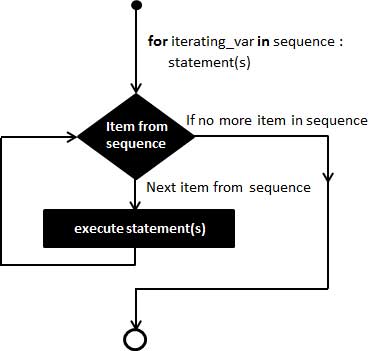
    Flowchart of a For Loop

    The following flowchart explains how a for loop works −

    PHP For Loop

    When to Use a For Loop?

    The for statement is used when you know how many times you want to execute a statement or a block of statements.

    Syntax

    The syntax of for statement in PHP is similar to the for statement in C language.

    for(expr1; expr2; expr3){
       code to be executed;}

    Components of a For Loop

    The for keyword is followed by a parenthesis containing three expressions separated by a semicolon. Each of them may be empty or may contain multiple expressions separated by commas. The parenthesis is followed by one or more statements put inside curly brackets. It forms the body of the loop.

    The first expression in the parenthesis is executed only at the start of the loop. It generally acts as the initializer used to set the start value for the counter of the number of loop iterations.

    In the beginning of each iteration, expr2 is evaluated. If it evaluates to true, the loop continues and the statements in the body block are executed. If it evaluates to false, the execution of the loop ends. Generally, the expr2 specifies the final value of the counter.

    The expr3 is executed at the end of each iteration. In most cases, this expression increments the counter variable.

    Example: Simple For Loop

    The most general example of a for loop is as follows −

    <?php
       for ($i=1; $i<=10; $i++){
          echo "Iteration No: $i \n";
       }
    ?>

    Output

    Here is its output −

    Iteration No: 1
    Iteration No: 2
    Iteration No: 3
    Iteration No: 4
    Iteration No: 5
    Iteration No: 6
    Iteration No: 7
    Iteration No: 8
    Iteration No: 9
    Iteration No: 10
    

    Creating an Infinite For Loop

    Note that all the three expressions in the parenthesis are optional. A for statement with only two semicolons constitutes an infinite loop.

    for(;;){
       Loop body
    }

    To stop the infinite iteration, you need to use a break statement inside the body of the loop.

    Decrementing For Loop

    You can also form a decrementing for loop. To have a for loop that goes from 10 to 1, initialize the looping variable with 10, the expression in the middle that is evaluated at the beginning of each iteration checks whether it is greater than 1. The last expression to be executed at the end of each iteration should decrement it by 1.

    <?php
       for ($i=10; $i>=1; $i--){
          echo "Iteration No: $i \n";
       }
    ?>

    Output

    It will produce the following output −

    Iteration No: 10 
    Iteration No: 9 
    Iteration No: 8 
    Iteration No: 7 
    Iteration No: 6 
    Iteration No: 5 
    Iteration No: 4 
    Iteration No: 3 
    Iteration No: 2 
    Iteration No: 1
    

    Using forendfor Construct

    You can also use the “:” (colon) symbol to start the looping block and put endfor statement at the end of the block.

    <?php
       for ($i=1; $i<=10; $i++):
          echo "Iteration No: $i \n";
       endfor;
    ?>

    Iterating Over Arrays Using For Loop

    Each element in the array is identified by an incrementing index starting with “0”. If an array of 5 elements is present, its lower bound is 0 and is upper bound is 4 (size of array -1).

    To obtain the number of elements in an array, there is a count() function. Hence, we can iterate over an indexed array by using the following for statement −

    <?php
       $numbers = array(10, 20, 30, 40, 50);
    
       for ($i=0; $i<count($numbers); $i++){
          echo "numbers[$i] = $numbers[$i] \n";
       }
    ?>

    Output

    It will produce the following output −

    numbers[0] = 10
    numbers[1] = 20
    numbers[2] = 30
    numbers[3] = 40
    numbers[4] = 50
    

    Iterating an Associative Array

    An associative array in PHP is a collection of key-value pairs. An arrow symbol (=>) is used to show the association between the key and its value. We use the array_keys() function to obtain array of keys.

    The following for loop prints the capital of each state from an associative array $capitals defined in the code −

    <?php
       $capitals = array(
          "Maharashtra"=>"Mumbai", 
          "Telangana"=>"Hyderabad", 
          "UP"=>"Lucknow", 
          "Tamilnadu"=>"Chennai"
       );
       $keys=array_keys($capitals);
    
       for ($i=0; $i<count($keys); $i++){
          $cap = $keys[$i];
          echo "Capital of $cap is $capitals[$cap] \n";
       }
    ?>

    Output

    Here is its output −

    Capital of Maharashtra is Mumbai
    Capital of Telangana is Hyderabad
    Capital of UP is Lucknow
    Capital of Tamilnadu is Chennai
    

    Using Nested For Loops in PHP

    If another for loop is used inside the body of an existing loop, the two loops are said to have been nested.

    For each value of counter variable of the outer loop, all the iterations of inner loop are completed.

    <?php
       for ($i=1; $i<=3; $i++){
          for ($j=1; $j<=3; $j++){
             echo "i= $i j= $j \n";
          }
       }
    ?>

    Output

    It will produce the following output −

    i= 1 j= 1
    i= 1 j= 2
    i= 1 j= 3
    i= 2 j= 1
    i= 2 j= 2
    i= 2 j= 3
    i= 3 j= 1
    i= 3 j= 2
    i= 3 j= 3
    

    Note that a string is a form of an array. The strlen() function gives the number of characters in a string.

    Using a For Loop with Strings

    The following PHP script uses two nested loops to print incrementing number of characters from a string in each line.

    <?php
       $str = "TutorialsPoint";
       for ($i=0; $i<strlen($str); $i++){
          for ($j=0; $j<=$i; $j++){
             echo "$str[$j]";
          }
          echo "\n";
       }
    ?>

    Output

    It will produce the following output −

    T
    Tu
    Tut
    Tuto
    Tutor
    Tutori
    Tutoria
    Tutorial
    Tutorials
    TutorialsP
    TutorialsPo
    TutorialsPoi
    TutorialsPoin
    TutorialsPoint
  • PHP – Loop Types

    PHP uses different types of of loops to execute the same code continuously. Loops help to decrease code repetition and optimize programs. Loops allow programmers to save time and effort by writing less code. We use loops to avoid writing the same code repeatedly.

    Loops are important in web applications for showing numbers, processing data and carrying out repetitive tasks. The proper execution of loops allows programs to run faster.

    Types of Loop

    PHP supports following four loop types.

    • For Loop: Loops through a block of code a specified number of times.
    • Foreach Loop: Loops through a block of code for each element in an array.
    • While Loop: Loops through a block of code if and as long as a specified condition is true.
    • Do-while Loop: Loops through a block of code once, and then repeats the loop as long as a special condition is true.
    • Break statement: It is used to terminate the execution of a loop prematurely.
    • Continue Statement: It is used to halt the current iteration of a loop.

    In addition, we will also explain how the continue and break statements are used in PHP to control the execution of loops.

    PHP for Loop

    The for statement is used when you know how many times you want to execute a statement or a block of statements.

    for loop in Php

    Syntax

    for(initialization; condition; increment){
       code to be executed;}

    The initializer is used to set the start value for the counter of the number of loop iterations. A variable may be declared here for this purpose and it is traditional to name it $i.

    Example

    The following example makes five iterations and changes the assigned value of two variables on each pass of the loop −

    <?php
       $a = 0;
       $b = 0;
    
       for( $i = 0; $i<5; $i++ ) {
          $a += 10;
          $b += 5;
       }
    
       echo ("At the end of the loop a = $a and b = $b" );
    ?>

    It will produce the following output −

    At the end of the loop a = 50 and b = 25
    

    PHP foreach Loop

    The foreach statement is used to loop through arrays. For each pass the value of the current array element is assigned to $value and the array pointer is moved by one and in the next pass next element will be processed.

    Syntax

    foreach(arrayas value){
       code to be executed;}

    Example

    Try out following example to list out the values of an array.

    <?php
       $array = array( 1, 2, 3, 4, 5);
    
       foreach( $array as $value ) {
          echo "Value is $value \n";
       }
    ?>

    It will produce the following output −

    Value is 1
    Value is 2
    Value is 3
    Value is 4
    Value is 5
    

    PHP while Loop

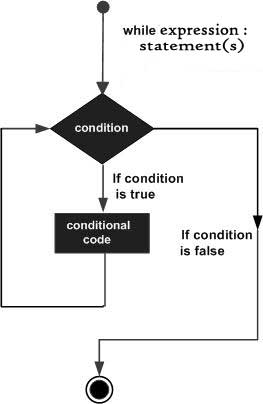
    The while statement will execute a block of code if and as long as a test expression is true.

    If the test expression is true then the code block will be executed. After the code has executed the test expression will again be evaluated and the loop will continue until the test expression is found to be false.

    for loop in PHP

    Syntax

    while(condition){
       code to be executed;}

    Example

    This example decrements a variable value on each iteration of the loop and the counter increments until it reaches 10 when the evaluation is false and the loop ends.

    <?php
       $i = 0;
       $num = 50;
    
       while($i < 10) {
          $num--;
          $i++;
       }
    
       echo ("Loop stopped at i = $i and num = $num" );
    ?>

    It will produce the following output −

    Loop stopped at i = 10 and num = 40 
    

    PHP do-while Loop

    The do-while statement will execute a block of code at least once – it then will repeat the loop as long as a condition is true.

    Syntax

    do{
       code to be executed;}while(condition);

    Example

    The following example will increment the value of i at least once, and it will continue incrementing the variable i as long as it has a value of less than 10 −

    <?php
       $i = 0;
       $num = 0;
    
       do {
          $i++;
       }
    
       while( $i < 10 );
       echo ("Loop stopped at i = $i" );
    ?>

    It will produce the following output −

    Loop stopped at i = 10
    

    PHP break Statement

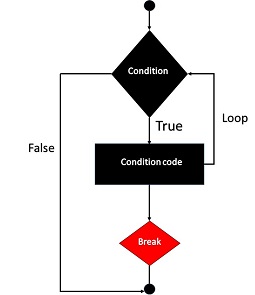
    The PHP break keyword is used to terminate the execution of a loop prematurely.

    The break statement is situated inside the statement block. It gives you full control and whenever you want to exit from the loop you can come out. After coming out of a loop immediate statement to the loop will be executed.

    PHP Break Statement

    Example

    In the following example condition test becomes true when the counter value reaches 3 and loop terminates.

    <?php
       $i = 0;
    
       while( $i < 10) {
          $i++;
          if( $i == 3 )break;
       }
       echo ("Loop stopped at i = $i" );
    ?>

    It will produce the following output −

    Loop stopped at i = 3
    

    PHP continue Statement

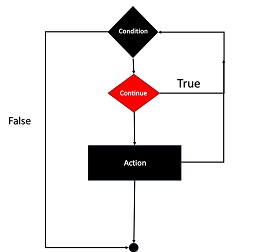
    The PHP continue keyword is used to halt the current iteration of a loop but it does not terminate the loop.

    Just like the break statement the continue statement is situated inside the statement block containing the code that the loop executes, preceded by a conditional test. For the pass encountering continue statement, rest of the loop code is skipped and next pass starts.

    PHP Continue Statement

    Example

    In the following example loop prints the value of array but for which condition becomes true it just skip the code and next value is printed.

    <?php
       $array = array( 1, 2, 3, 4, 5);
    
       foreach( $array as $value ) {
          if( $value == 3 )continue;
          echo "Value is $value \n";
       }
    ?>

    It will produce the following output −

    Value is 1
    Value is 2
    Value is 4
    Value is 5
  • PHP – Switch Statement

    In PHP, the switch statement allows many if-else conditions for a single variable. Sometimes you need to compare a variable to multiple values and run separate code for each one. In general, you would write if elseifelse.

    An excessive number of if-else statements can result in long, difficult-to-read code.Using a switch statement instead of many if-else statements can reduce code complexity and improve readability.

    Using ifelseifelse Statements

    The following PHP script uses if elseif statements −

    if($x==0){echo"x equals 0";}elseif($x==1){echo"i equals 1";}elseif($x==2){echo"x equals 2";}

    Using switch Statement

    You can get the same result by using the switch case statements as shown below −

    switch($x){case0:echo"x equals 0";break;case1:echo"x equals 1";break;case2:echo"x equals 2";break;}

    The switch statement is followed by an expression, which is successively compared with value in each case clause. If it is found that the expression matches with any of the cases, the corresponding block of statements is executed.

    • The switch statement executes the statements inside the curly brackets line by line.
    • If and when a case statement is found whose expression evaluates to a value that matches the value of the switch expression, PHP starts to execute the statements until the end of the switch block, or the first time it encounters a break statement.
    • If you don’t write a break statement at the end of a case’s statement list, PHP will go on executing the statements of the following case.

    Without Break Statements

    Try to run the above code by removing the breaks. If the value of x is 0, you will find that the output includes “x equals 1” as well as “x equals 2” lines.

    <?php
       $x=0;
       switch ($x) {
          case 0:
             echo "x equals 0 \n";
          case 1:
             echo "x equals 1 \n";
          case 2:
             echo "x equals 2";
       }
    ?>

    Output

    It will produce the following output −

    x equals 0
    x equals 1
    x equals 2
    

    Thus, it is important make sure to end each case block with a break statement.

    Using default Case in Switch

    A special case is the default case. This case matches anything that wasn’t matched by the other cases. Using default is optional, but if used, it must be the last case inside the curly brackets.

    You can club more than one cases to simulate multiple logical expressions combined with the or operator.

    <?php
       $x=10;
       switch ($x) {
          case 0:
          case 1:
          case 2:
             echo "x between 0 and 2 \n";
          break;
          default:
             echo "x is less than 0 or greater than 2";
       }
    ?>

    The values to be compared against are given in the case clause. The value can be a number, a string, or even a function. However you cannot use comparison operators (<, > == or !=) as a value in the case clause.

    You can choose to use semicolon instead of colon in the case clause. If no matching case found, and there is no default branch either, then no code will be executed, just as if no if statement was true.

    Using switch-endswitch Statement

    PHP allows the usage of alternative syntax by delimiting the switch construct with switch-endswitch statements. The following version of switch case is acceptable.

    <?php
       $x=0;
       switch ($x) :
          case 0:
             echo "x equals 0";
          break;
          case 1:
             echo "x equals 1 \n";
          break;
          case 2:
             echo "x equals 2 \n";
          break;
          default:
             echo "None of the above";
       endswitch
    ?>

    Using switch to Display the Current Day

    Obviously, you needn’t write a break to terminate the default case, it being the last case in the switch construct.

    Example

    Take a look at the following example −

    <?php
       $d = date("D");
    
       switch ($d){
          case "Mon":
             echo "Today is Monday";
          break;
    
          case "Tue":
             echo "Today is Tuesday";
          break;
    	  
          case "Wed":
             echo "Today is Wednesday";
          break;
    
          case "Thu":
             echo "Today is Thursday";
          break;
    
          case "Fri":
             echo "Today is Friday";
          break;
    
          case "Sat":
             echo "Today is Saturday";
          break;
    
          case "Sun":
             echo "Today is Sunday";
          break;
    
          default:
             echo "Wonder which day is this ?";
       }
    ?>

    Output

    It will generate the following output −

    Today is Monday
    

    Switch with Strings

    Now we will use a switch statement with string values to find the user roles. So here is the program showing the usage of strings in a switch case −

    <?php
       $role = "admin";
    
       switch ($role) {
          case "admin":
             echo "Welcome, Admin! You have full access.";
          break;
    
          case "editor":
             echo "Hello, Editor! You can edit content.";
          break;
    
          case "subscriber":
             echo "Hi, Subscriber! You can read articles.";
          break;
    
          default:
             echo "Unknown role. Please contact support.";
       }
    ?>

    Output

    Here is the outcome of the following code −

    Welcome, Admin! You have full access.
    

    Switch with Arithmetic Operations

    In the below PHP code we will try to perform calculations as per the user input. Check the below program for the demonstration of switch case with arithmetic operations −

    <?php
       $operation = "+";
       $a = 10;
       $b = 5;
    
       switch ($operation) {
          case "+":
             echo "Addition: " . ($a + $b);
          break;
    
          case "-":
             echo "Subtraction: " . ($a - $b);
          break;
    
          case "*":
             echo "Multiplication: " . ($a * $b);
          break;
    
          case "/":
             echo "Division: " . ($a / $b);
          break;
    
          default:
             echo "Invalid operation";
       }
    ?>

    Output

    This will generate the below output −

    Addition: 15
    

    Nested Switch (Switch Inside Another Switch)

    A switch can be used inside another switch to make multi-level decisions. Now the below code show how you can use nested switch statements and see the outcome.

    <?php
       $continent = "Asia";
       $country = "India";
    
       switch ($continent) {
          case "Asia":
             switch ($country) {
                case "India":
                   echo "You are in India!";
                break;
                case "Japan":
                   echo "You are in Japan!";
                break;
                default:
                   echo "Country not listed in Asia.";
             }
          break;
    
          case "Europe":
             switch ($country) {
                case "Germany":
                   echo "You are in Germany!";
                break;
                case "France":
                   echo "You are in France!";
                break;
                default:
                   echo "Country not listed in Europe.";
             }
          break;
    
          default:
             echo "Continent not recognized.";
       }
    ?>

    Output

    This will create the below output −

    You are in India!
  • PHP – IfElse Statement

    The ability to implement conditional logic is the fundamental requirement of any programming language (PHP included). PHP has three keywords (also called as language constructs) – if, elseif and else – are used to take decision based on the different conditions.

    The if keyword is the basic construct for the conditional execution of code fragments. More often than not, the if keyword is used in conjunction with else keyword, although it is not always mandatory.

    If you want to execute some code if a condition is true and another code if the sme condition is false, then use the “if….else” statement.

    Syntax

    The usage and syntax of the if statement in PHP is similar to that of the C language. Here is the syntax of if statement in PHP −

    if(expression)
       code to be executed if expression is true;else
       code to be executed if expression is false;

    The if statement is always followed by a Boolean expression.

    • PHP will execute the statement following the Boolean expression if it evaluates to true.
    • If the Boolean expression evaluates to false, the statement is ignored.
    • If the algorithm needs to execute another statement when the expression is false, it is written after the else keyword.

    Example

    Here is a simple PHP code that demonstrates the usage of if else statements. There are two variables $a and $b. The code identifies which one of them is bigger.

    <?php
       $a=10;
       $b=20;
       if ($a > $b)
          echo "a is bigger than b";
       else
          echo "a is not bigger than b";
    ?>

    When the above code is run, it displays the following output −

    a is not bigger than b
    

    Interchange the values of “a” and “b” and run again. Now, you will get the following output −

    a is bigger than b
    

    Example

    The following example will output “Have a nice weekend!” if the current day is Friday, else it will output “Have a nice day!” −

    <?php
       $d = date("D");
    
       if ($d == "Fri")
          echo "Have a nice weekend!"; 
       else
          echo "Have a nice day!"; 
    ?>

    It will produce the following output −

    Have a nice weekend!
    

    Using endif in PHP

    PHP code is usually intermixed with HTML script. We can insert HTML code in the if part as well as the else part in PHP code. PHP offers an alternative syntax for if and else statements. Change the opening brace to a colon (:) and the closing brace to endif; so that a HTML block can be added to the if and else part.

    <?php
       $d = date("D");
    
       if ($d == "Fri"): ?><h2>Have a nice weekend!</h2><?php else: ?><h2>Have a nice day!</h2><?php endif ?>

    Make sure that the above script is in the document root of PHP server. Visit the URL http://localhost/hello.php. Following output should be displayed in the browser, if the current day is not a Friday −

    Have a nice day!
    

    Using elseif in PHP

    If you want to execute some code if one of the several conditions are true, then use the elseif statement. The elseif language construct in PHP is a combination of if and else.

    • Similar to else, it specifies an alternative statement to be executed in case the original if expression evaluates to false.
    • However, unlike else, it will execute that alternative expression only if the elseif conditional expression evaluates to true.
    if(expr1)
       code to be executed if expr1 is true;elseif(expr2)
       code to be executed if expr2 is true;else
       code to be executed if expr2 is false;

    Example

    Let us modify the above code to display a different message on Sunday, Friday and other days.

    <?php
       $d = date("D");
       if ($d == "Fri")
          echo "<h3>Have a nice weekend!</h3>";
    
       elseif ($d == "Sun")
          echo "<h3>Have a nice Sunday!</h3>"; 
    
       else
          echo "<h3>Have a nice day!</h3>"; 
    ?>

    On a Sunday, the browser shall display the following output −

    Have a nice Sunday!
    

    Example

    Here is another example to show the use of if-elselif-else statements −

    <?php
       $x=13;
       if ($x%2==0) {
          if ($x%3==0) 
             echo "<h3>$x is divisible by 2 and 3</h3>";
          else
             echo "<h3>$x is divisible by 2 but not divisible by 3</h3>";
       }
    
       elseif ($x%3==0)
          echo "<h3>$x is divisible by 3 but not divisible by 2</h3>"; 
    
       else
          echo "<h3>$x is not divisible by 3 and not divisible by 2</h3>"; 
    ?>

    The above code also uses nestedif statements.

    For the values of x as 13, 12 and 10, the output will be as follows −

    13 is not divisible by 3 and not divisible by 2
    12 is divisible by 2 and 3
    10 is divisible by 2 but not divisible by 3
  • PHP – Decision Making

    A computer program by default follows a simple input-process-output path sequentially. This sequential flow can be altered with the decision control statements offered by all the computer programming languages including PHP.

    Decision Making in a Computer Program

    Decision-making is the anticipation of conditions occurring during the execution of a program and specified actions taken according to the conditions.

    You can use conditional statements in your code to make your decisions. The ability to implement conditional logic is one of the fundamental requirements of a programming language.

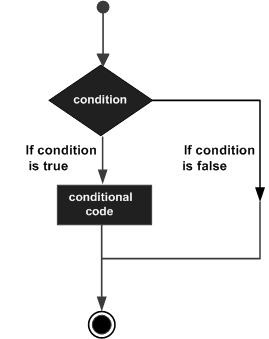
    A Typical Decision Making Structure

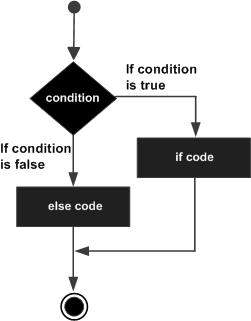
    Following is the general form of a typical decision making structure found in most of the programming languages −

    Decision Making

    Decision Making Statements in PHP

    PHP supports the following three decision making statements −

    • if…else statement: Use this statement if you want to execute a set of code when a condition is true and another if the condition is not true.
    • elseif statement: Use this statement with the if…else statement to execute a set of code if one of the several conditions is true
    • switch statement: If you want to select one of many blocks of code to be executed, use the Switch statement. The switch statement is used to avoid long blocks of if..elseif..else code.

    Almost all the programming languages (including PHP) define the if-else statements. It allows for conditional execution of code fragments. The syntax for using the if-else statement in PHP is similar to that of C −

    if(expr)
       statement1
    else
       statement2
    

    The expression here is a Boolean expression, evaluating to true or false

    • Any expression involving Boolean operators such as <, >, <=, >=, !=, etc. is a Boolean expression.
    • If the expression results in true, the subsequent statement it may be a simple or a compound statement i.e., a group of statements included in pair of braces will be executed.
    • If the expression is false, the subsequent statement is ignored, and the program flow continues from next statement onwards.
    • The use of else statement is optional. If the program logic requires another statement or a set of statements to be executed in case the expression (after the if keyword) evaluates to false.
    Decision Making

    The elseif statement is a combination of if and else. It allows you to check multiple expressions for TRUE and execute a block of code as soon as one of the conditions evaluates to TRUE. Just like the else statement, the elseif statement is optional.

    The switch statement is similar to a series of if statements on the same expression. We shall learn about these statements in detail in the subsequent chapters of this tutorial.

    Nested if Statement

    You can use an if statement within another if statement to verify multiple conditions in a logical way.

    <?php
       $age = 20;
       if ($age >= 18) {
          if ($age < 60) {
             echo "You are an adult.";
          } else {
             echo "You are a senior citizen.";
          }
       } else {
          echo "You are a minor.";
       }
    ?>

    Output

    Here is the outcome of the following code −

    You are an adult.
    

    Break and Continue in Decision Making

    Here we will show you the usage of break and continue keywords in decision making. So break is used to stop execution in a loop. And continue is used to skip the current iteration and moves to the next iteration in a loop.

    <?php
       $day = "Monday";
       switch ($day) {
          case "Monday":
             echo "Start of the week!";
             break;
          case "Friday":
             echo "Weekend is near!";
             break;
          default:
             echo "Have a nice day!";
       }
    ?>

    Output

    Here is the outcome of the following code −

    Start of the week!
  • PHP – Spaceship Operator

    The Spaceship operator is one of the many new features introduced in PHP with its 7.0 version. It is a three-way comparison operator.

    The conventional comparison operators (<, >, !=, ==, etc.) return true or false (equivalent to 1 or 0). On the other hand, the spaceship operator has three possible return values: -1,0,or 1. This operator can be used with integers, floats, strings, arrays, objects, etc.

    Syntax of the Spaceship Operator

    The symbol used for spaceship operator is “<=>”.

    $retval= operand1 <=> operand2
    

    Here, $retval is -1 if operand1 is less than operand2, 0 if both the operands are equal, and 1 if operand1 is greater than operand2.

    The spaceship operator is implemented as a combined comparison operator. Conventional comparison operators could be considered mere shorthands for <=> as the following table shows −

    Operator<=> equivalent
    $a < $b($a <=> $b) === -1
    $a <= $b($a <=> $b) === -1 || ($a <=> $b) === 0
    $a == $b($a <=> $b) === 0
    $a != $b($a <=> $b) !== 0
    $a >= $b($a <=> $b) === 1 || ($a <=> $b) === 0
    $a > $b($a <=> $b) === 1

    Example 1

    The following example shows how you can use the spaceship operator in PHP. We will compare 5 with 10/2. As both values are equal so the result will be 0 −

    <?php
       $x = 5;
       $y = 10;
       $z = $x <=> $y/2;
    
       echo "$x <=> $y/2 = $z";
    ?>

    Output

    It will create the following output −

    5 <=> 10/2 = 0
    

    Example 2

    Now we change $x=4 and check the result. As 4 is less than 10/2 so the spaceship operator will return -1 −

    <?php
       $x = 4;
       $y = 10;
       $z = $x <=> $y/2;
    
       echo "$x <=> $y/2 = $z";
    ?>

    Output

    It will produce the following output −

    4 <=> 10/2 = -1
    

    Example 3

    Now let us change $y=7 and check the result again. Now 7 is greater than 10/2 so the spaceship operator will return 1 −

    <?php
       $x = 7;
       $y = 10;
       $z = $x <=> $y/2;
    
       echo "$x <=> $y/2 = $z";
    ?>

    Output

    It will produce the following result −

    7 <=> 10/2 = 1
    

    Example 4

    The spaceship operator, like the strcmp() method, works on strings. In this program, we will compare the phrases “bat” and “ball”. Since “bat” comes after “ball” in alphabetical order so the result is 1.

    <?php
       $x = "bat";
       $y = "ball";
       $z = $x <=> $y;
    
       echo "$x <=> $y = $z";
    ?>

    Output

    It will generate the following outcome −

    bat <=> ball = 1
    

    Example 5

    Change $y = “baz” and check the result −

    <?php
       $x = "bat";
       $y = "baz";
       $z = $x <=> $y;
    
       echo "$x <=> $y = $z";
    ?>

    Output

    It will produce the below output −

    bat <=> baz = -1
    

    Spaceship Operator with Boolean Operands

    The spaceship operator also works with Boolean operands −

    true<=>false returns 1false<=>true returns -1true<=>trueas well asfalse<=>false returns 0
  • PHP – Null Coalescing Operator

    The Null Coalescing operator is one of the many new features introduced in PHP 7. The word “coalescing” means uniting many things into one. This operator is used to replace the ternary operation in conjunction with the isset() function.

    Ternary Operator in PHP

    PHP has a ternary operator represented by the “?” symbol. The ternary operator compares a Boolean expression and executes the first operand if it is true, otherwise it executes the second operand.

    Syntax

    Here is the syntax for using the ternary operator −

    expr ? statement1 : statement2;

    Example: Variable is Set

    Let us use the ternary operator to check if a certain variable is set or not with the help of the isset() function, which returns true if declared and false if not.

    <?php
       $x = 1;
       $var = isset($x) ? $x : "not set";
       echo "The value of x is $var";
    ?>

    It will produce the following output −

    The value of x is 1
    

    Example: Variable is Not Set

    Now, let’s remove the declaration of “x” and rerun the code −

    <?php
       # $x = 1;
       $var = isset($x) ? $x : "not set";
       echo "The value of x is $var";
    ?>

    The code will now produce the following output −

    The value of x is not set
    

    The Null Coalescing Operator

    The Null Coalescing Operator is represented by the “??” symbol. It acts as a convenient shortcut to use a ternary in conjunction with isset(). It returns its first operand if it exists and is not null; otherwise it returns its second operand.

    Syntax

    Below is the syntax for using the null coalescing operator −

    $Var=$operand1??$operand2;

    The first operand checks whether a certain variable is null or not (or is set or not). If it is not null, the first operand is returned, else the second operand is returned.

    Example: Variable is Not Set

    Take a look at the following example −

    <?php
       # $num = 10;
       $val = $num ?? 0;
       echo "The number is $val";
    ?>

    It will produce the following output −

    The number is 0
    

    Example: Variable is Set

    Now uncomment the first statement that sets $num to 10 and rerun the code −

    <?php
       $num = 10;
       $val = $num ?? 0;
       echo "The number is $val";
    ?>

    It will now produce the following output −

    The number is 10
    

    A useful application of Null Coalescing operator is while checking whether a username has been provided by the client browser.

    Checking for a Username in URL

    The following code reads the name variable from the URL. If indeed there is a value for the name parameter in the URL, a Welcome message for him is displayed. However, if not, the user is called Guest.

    <?php
       $username = $_GET['name'] ?? 'Guest';
       echo "Welcome $username";
    ?>

    Assuming that this script “hello.php” is in the htdocs folder of the PHP server, enter http://localhost/hello.php?name=Amar in the URL, the browser will show the following message −

    Welcome Amar
    

    If http://localhost/hello.php is the URL, the browser will show the following message −

    Welcome Guest
    

    Using isset() and Ternary Operator

    The Null coalescing operator is used as a replacement for the ternary operators specific case of checking isset() function. Hence, the following statements give similar results −

    <?php
       $username = isset($_GET['name']) ? $_GET['name'] : 'Guest';
       echo "Welcome $username";
    ?>

    It will now produce the following output −

    Welcome Guest
    

    Chaining Null Coalescing Operator (??)

    You can chain the “??” operators as shown below −

    <?php
       $username = $_GET['name'] ?? $_POST['name'] ?? 'Guest';
       echo "Welcome $username";
    ?>

    It will now produce the following output −

    Welcome Guest
    

    This will set the username to Guest if the variable $name is not set either by GET or by POST method.

  • PHP – Spread Operator

    PHP recognizes the three dots symbol (…) as the spread operator. The spread operator is also sometimes called the splat operator. This operator was first introduced in PHP version 7.4. It can be effectively used in many cases such as unpacking arrays.

    The spread operator increases the readability of arrays and function parameters. It is a simple but useful feature for modern PHP development.

    So here is the list concepts with example, we will cover in this chapter −

    Syntax

    Below is the syntax of the PHP spread operator −

    // Expanding an array$newArray=[...$existingArray];// Using in a functionfunctionmyFunction(...$args){// Function body}

    Expanding an Array with Spread Operator

    In the example below, the elements in $arr1 are inserted in $arr2 after a list of its own elements.

    <?php
       $arr1 = [4,5];
       $arr2 = [1,2,3, ...$arr1];
    
       print_r($arr2);
    ?>

    Output

    This will produce the following result −

    Array
    (
       [0] => 1
       [1] => 2
       [2] => 3
       [3] => 4
       [4] => 5
    )
    

    Using Spread Operator Multiple Times

    The Spread operator can be used more than once in an expression. For example, in the following code, a third array is created by expanding the elements of two arrays.

    <?php
       $arr1 = [1,2,3];
       $arr2 = [4,5,6];
       $arr3 = [...$arr1, ...$arr2];
    
       print_r($arr3);
    ?>

    Output

    This will generate the below result −

    Array
    (
       [0] => 1
       [1] => 2
       [2] => 3
       [3] => 4
       [4] => 5
       [5] => 6
    )
    

    Spread Operator vs array_merge()

    Note that the same result can be obtained with the use of array_merge() function, as shown below −

    <?php
       $arr1 = [1,2,3];
       $arr2 = [4,5,6];
       $arr3 = array_merge($arr1, $arr2);
    
       print_r($arr3);
    ?>

    Output

    This will create the below outcome −

    Array
    (
       [0] => 1
       [1] => 2
       [2] => 3
       [3] => 4
       [4] => 5
       [5] => 6
    )
    

    However, the use of (…) operator is much more efficient as it avoids the overhead a function call.

    Named Arguments with Spread Operator

    PHP 8.1.0 also introduced another feature that allows using named arguments after unpacking the arguments. Instead of providing a value to each of the arguments individually, the values from an array will be unpacked into the corresponding arguments, using … (three dots) before the array.

    <?php  
       function  myfunction($x, $y, $z=30) {
          echo "x = $x  y = $y  z = $z";
       }
    
       myfunction(...[10, 20], z:30);
    ?>

    Output

    This will lead to the following outcome −

    x = 10  y = 20  z = 30
    

    Using Spread Operator with Function Return Value

    In the following example, the return value of a function is an array. The array elements are then spread and unpacked.

    <?php
       function get_squares() {
          for ($i = 0; $i < 5; $i++) {
             $arr[] = $i**2;
          }
          return $arr;
       }
       $squares = [...get_squares()];
       print_r($squares);
    ?>

    Output

    The result of this PHP code is −

    Array
    (
       [0] => 0
       [1] => 1
       [2] => 4
       [3] => 9
       [4] => 16
    )
  • PHP – Conditional Operators Examples

    You would use conditional operators in PHP when there is a need to set a value depending on conditions. It is also known as ternary operator. It first evaluates an expression for a true or false value and then executes one of the two given statements depending upon the result of the evaluation.

    Ternary operators offer a concise way to write conditional expressions. They consist of three parts: the condition, the value to be returned if the condition evaluates to true, and the value to be returned if the condition evaluates to false.

    OperatorDescriptionExample
    ? :Conditional ExpressionIf Condition is true ? Then value X : Otherwise value Y

    Syntax of the Conditional Operator

    The syntax to use the conditional operator is as follows −

    condition ? value_if_true : value_if_false
    

    Ternary operators are especially useful for shortening if-else statements into a single line. You can use a ternary operator to assign different values to a variable based on a condition without needing multiple lines of code. It can improve the readability of the code.

    However, you should use ternary operators judiciously, else you will end up making the code too complex for others to understand.

    Example – Basic Usage of Conditional Operator

    Try the following example to understand how the conditional operator works in PHP. Copy and paste the following PHP program in test.php file and keep it in your PHP Server’s document root and browse it using any browser.

    <?php
       $a = 10;
       $b = 20;
    
       /* If condition is true then assign a to result otherwise b */
       $result = ($a > $b ) ? $a :$b;
    
       echo "TEST1 : Value of result is $result \n";
    
       /* If condition is true then assign a to result otherwise b */
       $result = ($a < $b ) ? $a :$b;
    
       echo "TEST2 : Value of result is $result";
    ?>

    Output

    It will produce the following output −

    TEST1 : Value of result is 20
    TEST2 : Value of result is 10
    

    Example: Check Even or Odd Number

    Here we will use the conditional operator to check the even and odd numbers. And print the result as per the condition.

    <?php
       $num = 15;
       $result = ($num % 2 == 0) ? "Even" : "Odd";
       echo "Number $num is $result";
    ?>

    Output

    This will generate the below output −

    Number 15 is Odd
    

    Example 2: Check Positive, Negative or Zero

    Now the below code checks the positive, negative and zero values by using the nested conditional operator. See the code below −

    <?php
       $num = -5;
       $result = ($num > 0) ? "Positive" : (($num < 0) ? "Negative" : "Zero");
       echo "Number $num is $result";
    ?>

    Output

    This will create the below output −

    Number -5 is Negative
    

    Example 3: Find the Maximum of Three Numbers

    In the following example, we are showing that you can use the conditional operator for finding the maximum of three different numbers. See the example below −

    <?php
       $x = 50;
       $y = 30;
       $z = 80;
    
       $max = ($x > $y) ? (($x > $z) ? $x : $z) : (($y > $z) ? $y : $z);
    
       echo "The maximum number is $max";
    ?>

    Output

    Following is the output of the above code −

    The maximum number is 80