Blog

  • Data Preparation in Machine Learning

    Data preparation is a critical step in the machine learning process, and can have a significant impact on the accuracy and effectiveness of the final model. It requires careful attention to detail and a thorough understanding of the data and the problem at hand.

    Let’s discuss how data should be prepared in order to fit right with the model for better accuracy and outcome.

    What is Data Preparation?

    Data preparation is the process of dealing with raw data i.e, cleaning, organizing and transforming it to align with the machine learning algorithms. Data preparation is a continuous process, and has a huge impact on the performance of machine learning model. Clean and structured data would result in better outcomes.

    Importance of Data Preparation

    In Machine learning, the model learns from the data that is fed. So, the algorithm can learn efficiently only if the data is organized and perfect. The quality of the data you use for your model can have a significant impact on the performance of the model.

    Few aspects that define the importance of data preparation in machine learning are −

    • Improves model accuracy − Machine learning algorithms reply completely on data. When you provide clean and structured data to models, the outcomes are accurate.
    • Facilitates Feature Engineering − Data preparation often includes the process of selecting or creating new features to train the model. Hence, data preparation would make feature engineering easy.
    • Data Quality − Collected data most often would contain inconsistencies, errors and irrelevant information. Hence when tasks like data cleaning, transformation are applied, the data is formatted and neat. This can be used for gaining insights and patterns.
    • Enables rate of prediction − Prepared data makes it easier to analyze results and would yield accurate outcomes.

    Data Preparation Process Steps

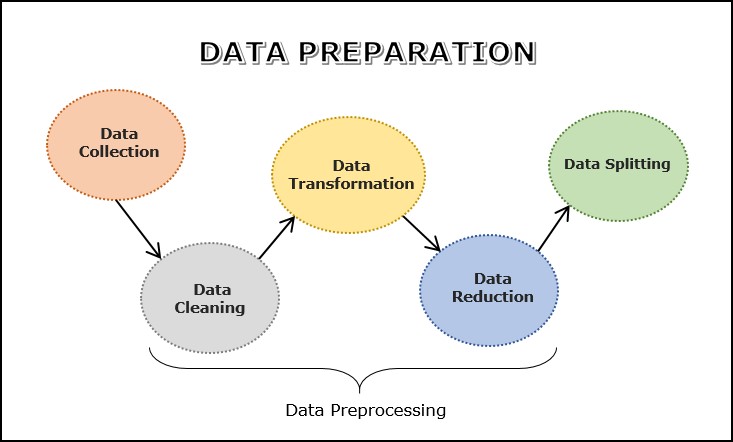
    Data preparation process involves a sequence of steps that is required to make data suitable for analysis and modeling. The goal of data preparation is to make sure that the data is accurate, complete, and relevant for the analysis.

    The following are some of the key steps involved in data preparation −

    • Data Collection
    • Data Cleaning
    • Data Transformation
    • Data Reduction
    • Data Splitting
    ML Data Preparation Steps

    The process shown is not always sequential. You might, for example, split your data before you transform it. You might need to collect more data.

    Let’s understand each of the above steps in detail −

    Data Collection

    Data collection is the first step in the process of machine learning, where data from different sources is gathered to make decisions, answer research questions and statistical planning. Different sources such as databases, text files, pictures, sound files, or web scraping may be used for data collection. Once the data is selected, the data has to be preprocessed in order to gain insights. This process is carried out to put the data in an appropriate format that would be useful for problem solving. Some time data collection follows the data integration step.

    Data integration involves combining data from multiple sources into a single dataset for analysis. This may involve matching or linking records across different datasets, or merging datasets based on common variables.

    After selecting the raw data, the most important task is data preprocessing. In broad sense, data preprocessing will convert the selected data into a form we can work with or can feed to ML algorithms. We always need to preprocess our data so that it can be as per the expectation of machine learning algorithm. The data preprocessing includes data cleaning, transformation and reduction. Let’s discuss each of these three in detail.

    Data Cleaning

    Data cleaning is the process of identifying and correcting errors, missing values, duplicate values and outliers, etc. in the data. This step is crucial in the process of machine learning as it ensures that the data is accurate, relevant and error free.

    Common techniques used for data cleaning include imputation, outlier detection and removal, etc. The following is a sequence of steps for data cleaning −

    1. Handling duplicate values

    Duplicates in the dataset means that there is repeated data, which might occur due to data entry errors or issues while collecting data. The technique used to remove duplicates is first they are identified and then deleted using drop_duplicates function in Pandas.

    2. Fixing syntax errors

    In this step, structural errors like inconsistencies in data format or naming conventions should be addressed. Standardizing formats and fixing errors would ensure data consistence and accurate analysis.

    3. Dealing outliers

    Outliers are values that are unusual and differ greatly with the data. The techniques used to detect outliers include statistical methods like z-score or IQR method and machine learning methods like clustering and SVM’s.

    4. Handling Missing Values

    Missing values are the values or data that is not stored for some values in the dataset. There are several ways to handle missing data like:

    • Imputation − In this process the missing values are substituted with different value, which can be a central tendency measure like mean, median or mode for numeric values and most frequency category for categorical data. Some other methods in imputation include regression imputation and multiple imputation.
    • Deletion − In this process the entire instances with missing values are removed. Well, this is not a reliable method since there is loss of data.

    5. Validating the data

    Data Validation is another stage that makes sure that the data aligns perfectly with the requirements so that the predicted outcome is accurate. Some common data validation procedures it the correctness of data before storing them in databases are:

    • Data type check
    • Code Check
    • Format check
    • Range check

    Data Transformation

    Data transformation is the process of converting the data from its original format into a format that is suitable for analysis and modeling. This could include defining the structure, aligning the data, extracting data from source, and then storing it in an appropriate form.

    There are many techniques available to transorm data into a sutable format. Some commonly used data transformation techniques are as follows −

    • Scaling
    • Normalization − L1 & L2 Normalizations
    • Standardization
    • Binarization
    • Encoding
    • Log Transformation

    Lets discuss each of the above data transformation techniques in detail −

    1. Scaling

    In most cases, the data we collected consists of attributes with varying scale, but we cannot provide such data to ML algorithm hence it requires rescaling. Data scaling makes sure that attributes are at the same scale i.e, usually range of 0 to 1.

    We can rescale the data with the help of MinMaxScaler class of scikit-learn Python library.

    Example

    In this example we will rescale the data of Pima Indians Diabetes dataset which we used earlier. First, the CSV data will be loaded (as done in the previous chapters) and then with the help of MinMaxScaler class, it will be rescaled in the range of 0 and 1.

    The first few lines of the following script are same as we have written in previous chapters while loading CSV data.

    from pandas import read_csv
    from numpy import set_printoptions
    from sklearn import preprocessing
    path =r'C:\pima-indians-diabetes.csv'
    names =['preg','plas','pres','skin','test','mass','pedi','age','class']
    dataframe = read_csv(path, names=names)
    array = dataframe.values
    

    Now, we can use MinMaxScaler class to rescale the data in the range of 0 and 1.

    data_scaler = preprocessing.MinMaxScaler(feature_range=(0,1))
    data_rescaled = data_scaler.fit_transform(array)

    We can also summarize the data for output as per our choice. Here, we are setting the precision to 1 and showing the first 10 rows in the output.

    set_printoptions(precision=1)print("\nScaled data:\n", data_rescaled[0:10])
    Output
    Scaled data:
    [
       [0.4 0.7 0.6 0.4 0.  0.5 0.2 0.5 1. ]
       [0.1 0.4 0.5 0.3 0.  0.4 0.1 0.2 0. ]
       [0.5 0.9 0.5 0.  0.  0.3 0.3 0.2 1. ]
       [0.1 0.4 0.5 0.2 0.1 0.4 0.  0.  0. ]
       [0.  0.7 0.3 0.4 0.2 0.6 0.9 0.2 1. ]
       [0.3 0.6 0.6 0.  0.  0.4 0.1 0.2 0. ]
       [0.2 0.4 0.4 0.3 0.1 0.5 0.1 0.1 1. ]
       [0.6 0.6 0.  0.  0.  0.5 0.  0.1 0. ]
       [0.1 1.  0.6 0.5 0.6 0.5 0.  0.5 1. ]
       [0.5 0.6 0.8 0.  0.  0.  0.1 0.6 1. ]
    ]
    

    From the above output, all the data got rescaled into the range of 0 and 1.

    2. Normalization

    Normalization is used to rescale the data with a distribution value between 0 and 1. For every feature, the minimum value is set to 0 and the maximum value is set to 1.

    This is used to rescale each row of data to have a length of 1. It is mainly useful in Sparse dataset where we have lots of zeros. We can rescale the data with the help of Normalizer class of scikit-learn Python library.

    In machine learning, there are two types of normalization preprocessing techniques as follows −

    L1 Normalization

    It may be defined as the normalization technique that modifies the dataset values in a way that in each row the sum of the absolute values will always be up to 1. It is also called Least Absolute Deviations.

    Example

    In this example, we use L1 Normalize technique to normalize the data of Pima Indians Diabetes dataset which we used earlier. First, the CSV data will be loaded and then with the help of Normalizer class it will be normalized.

    The first few lines of following script are same as we have written in previous chapters while loading CSV data.

    from pandas import read_csv
    from numpy import set_printoptions
    from sklearn.preprocessing import Normalizer
    path =r'C:\pima-indians-diabetes.csv'
    names =['preg','plas','pres','skin','test','mass','pedi','age','class']
    dataframe = read_csv (path, names=names)
    array = dataframe.values
    

    Now, we can use Normalizer class with L1 to normalize the data.

    Data_normalizer = Normalizer(norm='l1').fit(array)
    Data_normalized = Data_normalizer.transform(array)

    We can also summarize the data for output as per our choice. Here, we are setting the precision to 2 and showing the first 3 rows in the output.

    set_printoptions(precision=2)print("\nNormalized data:\n", Data_normalized [0:3])
    Output
    Normalized data:
    [
       [0.02 0.43 0.21 0.1  0. 0.1  0. 0.14 0. ]
       [0.   0.36 0.28 0.12 0. 0.11 0. 0.13 0. ]
       [0.03 0.59 0.21 0.   0. 0.07 0. 0.1  0. ]
    ]
    

    L2 Normalization

    It may be defined as the normalization technique that modifies the dataset values in a way that in each row the sum of the squares will always be up to 1. It is also called least squares.

    Example

    In this example, we use L2 Normalization technique to normalize the data of Pima Indians Diabetes dataset which we used earlier. First, the CSV data will be loaded (as done in previous chapters) and then with the help of Normalizer class it will be normalized.

    The first few lines of following script are same as we have written in previous chapters while loading CSV data.

    from pandas import read_csv
    from numpy import set_printoptions
    from sklearn.preprocessing import Normalizer
    path =r'C:\pima-indians-diabetes.csv'
    names =['preg','plas','pres','skin','test','mass','pedi','age','class']
    dataframe = read_csv (path, names=names)
    array = dataframe.values
    

    Now, we can use Normalizer class with L1 to normalize the data.

    Data_normalizer = Normalizer(norm='l2').fit(array)
    Data_normalized = Data_normalizer.transform(array)

    We can also summarize the data for output as per our choice. Here, we are setting the precision to 2 and showing the first 3 rows in the output.

    set_printoptions(precision=2)print("\nNormalized data:\n", Data_normalized [0:3])
    Output
    Normalized data:
    [
       [0.03 0.83 0.4  0.2  0. 0.19 0. 0.28 0.01]
       [0.01 0.72 0.56 0.24 0. 0.22 0. 0.26 0.  ]
       [0.04 0.92 0.32 0.   0. 0.12 0. 0.16 0.01]
    ]
    

    3. Standardization

    Standardization is used to transform data attributes to a standard Gaussian distribution with a mean of 0 and a standard deviation of 1. This technique is useful in ML algorithms like linear regression, logistic regression that assumes a Gaussian distribution in input dataset and produce better results with rescaled data.

    We can standardize the data (mean = 0 and SD =1) with the help of StandardScaler class of scikit-learn Python library.

    Example

    In this example, we will rescale the data of Pima Indians Diabetes dataset which we used earlier. First, the CSV data will be loaded and then with the help of StandardScaler class it will be converted into Gaussian Distribution with mean = 0 and SD = 1.

    The first few lines of following script are same as we have written in previous chapters while loading CSV data.

    from sklearn.preprocessing import StandardScaler
    from pandas import read_csv
    from numpy import set_printoptions
    path =r'C:\pima-indians-diabetes.csv'
    names =['preg','plas','pres','skin','test','mass','pedi','age','class']
    dataframe = read_csv(path, names=names)
    array = dataframe.values
    

    Now, we can use StandardScaler class to rescale the data.

    data_scaler = StandardScaler().fit(array)
    data_rescaled = data_scaler.transform(array)

    We can also summarize the data for output as per our choice. Here, we are setting the precision to 2 and showing the first 5 rows in the output.

    set_printoptions(precision=2)print("\nRescaled data:\n", data_rescaled [0:5])
    Output
    Rescaled data:
    [
       [ 0.64  0.85  0.15  0.91 -0.69  0.2   0.47  1.43  1.37]
       [-0.84 -1.12 -0.16  0.53 -0.69 -0.68 -0.37 -0.19 -0.73]
       [ 1.23  1.94 -0.26 -1.29 -0.69 -1.1   0.6  -0.11  1.37]
       [-0.84 -1.   -0.16  0.15  0.12 -0.49 -0.92 -1.04 -0.73]
       [-1.14  0.5  -1.5   0.91  0.77  1.41  5.48 -0.02  1.37]
    ]
    

    4. Binarization

    As the name suggests, this is the technique with the help of which we can make our data binary. We can use a binary threshold for making our data binary. The values above that threshold value will be converted to 1 and below that threshold will be converted to 0. For example, if we choose threshold value = 0.5, then the dataset value above it will become 1 and below this will become 0. That is why we can call it binarizing the data or thresholding the data. This technique is useful when we have probabilities in our dataset and want to convert them into crisp values.

    We can binarize the data with the help of Binarizer class of scikit-learn Python library.

    Example

    In this example, we will rescale the data of Pima Indians Diabetes dataset which we used earlier. First, the CSV data will be loaded and then with the help of Binarizer class it will be converted into binary values i.e. 0 and 1 depending upon the threshold value. We are taking 0.5 as threshold value.

    The first few lines of following script are same as we have written in previous chapters while loading CSV data.

    from pandas import read_csv
    from sklearn.preprocessing import Binarizer
    path =r'C:\pima-indians-diabetes.csv'
    names =['preg','plas','pres','skin','test','mass','pedi','age','class']
    dataframe = read_csv(path, names=names)
    array = dataframe.values
    

    Now, we can use Binarize class to convert the data into binary values.

    binarizer = Binarizer(threshold=0.5).fit(array)
    Data_binarized = binarizer.transform(array)

    Here, we are showing the first 5 rows in the output.

    print("\nBinary data:\n", Data_binarized [0:5])
    Output
    Binary data:
    [
       [1. 1. 1. 1. 0. 1. 1. 1. 1.]
       [1. 1. 1. 1. 0. 1. 0. 1. 0.]
       [1. 1. 1. 0. 0. 1. 1. 1. 1.]
       [1. 1. 1. 1. 1. 1. 0. 1. 0.]
       [0. 1. 1. 1. 1. 1. 1. 1. 1.]
    ]
    

    5. Encoding

    This technique is used to convert categorical variables into numerical representations. Some common encoding techniques include one-hot encodinglabel encoding and target encoding.

    Label Encoding

    Most of the sklearn functions expect that the data with number labels rather than word labels. Hence, we need to convert such labels into number labels. This process is called label encoding. We can perform label encoding of data with the help of LabelEncoder() function of scikit-learn Python library.

    Example

    In the following example, Python script will perform the label encoding.

    First, import the required Python libraries as follows −

    import numpy as np
    from sklearn import preprocessing
    

    Now, we need to provide the input labels as follows −

    input_labels =['red','black','red','green','black','yellow','white']

    The next line of code will create the label encoder and train it.

    encoder = preprocessing.LabelEncoder()
    encoder.fit(input_labels)

    The next lines of script will check the performance by encoding the random ordered list −

    test_labels =['green','red','black']
    encoded_values = encoder.transform(test_labels)print("\nLabels =", test_labels)print("Encoded values =",list(encoded_values))
    encoded_values =[3,0,4,1]
    decoded_list = encoder.inverse_transform(encoded_values)

    We can get the list of encoded values with the help of following python script −

    print("\nEncoded values =", encoded_values)print("\nDecoded labels =",list(decoded_list))
    Output
    Labels = ['green', 'red', 'black']
    Encoded values = [1, 2, 0]
    Encoded values = [3, 0, 4, 1]
    Decoded labels = ['white', 'black', 'yellow', 'green']
    

    6. Log Transformation

    This technique is usually used in handling skewed data. It involves apply natural logarithmic function for all values in the dataset to modify the scale of numeric values.

    Data Reduction

    Data Reduction is a technique to reduce the size of the dataset by selecting a subset of features or observations that are most relevant for the analysis. This can help to reduce noise and improve the accuracy of the model.

    This is useful when the dataset is very large or when a dataset contains large amount of irrelevant data.

    One of the most common technique used is Dimensionality Reduction, which reduces the size of the dataset without loosing the important information. Other method is the Discretization, where continuous values like time and temperature are converted to discrete categories which simplifies the data.

    Data Splitting

    Data Splitting is the last step in the preparation of data for machine learning, where the data is split into different sets –

    • Training − subset which is used by the machine learning model for learning patterns.
    • Validation − subset used to evaluate the performance of machine learning model while training.
    • Testing − subset used to evaluate the performance and efficiency of the trained model.

    Python Example

    Let’s check an example of data preparation using the breast cancer dataset −

    from sklearn.datasets import load_breast_cancer
    from sklearn.model_selection import train_test_split
    from sklearn.preprocessing import StandardScaler
    
    # load the dataset
    data = load_breast_cancer()# separate the features and target
    X = data.data
    y = data.target
    
    # split the data into training and testing sets
    X_train, X_test, y_train, y_test = train_test_split(X, y, test_size=0.2, random_state=42)# normalize the data using StandardScaler
    scaler = StandardScaler()
    X_train = scaler.fit_transform(X_train)
    X_test = scaler.transform(X_test)

    In this example, we first load the breast cancer dataset using load_breast_cancer function from scikit-learn. Then we separate the features and target, and split the data into training and testing sets using train_test_split function.

    Finally, we normalize the data using StandardScaler from scikit-learn, which subtracts the mean and scales the data to unit variance. This helps to bring all the features to a similar scale, which is particularly important for models like SVM and neural networks.

    Data Preparation and Feature Engineering

    Feature engineering involves creating new features from the existing data that may be more informative or useful for the analysis. It can involve combining or transforming existing features, or creating new features based on domain knowledge or insights. Both data preparation and feature engineering go hand-in-hand in the overall data preprocessing pipeline.
  • Machine Learning – Data Understanding

    While working with machine learning projects, usually we ignore two most important parts called mathematics and data. What makes data understanding a critical step in ML is its data driven approach. Our ML model will produce only as good or as bad results as the data we provided to it.

    Data understanding basically involves analyzing and exploring the data to identify any patterns or trends that may be present.

    The data understanding phase typically involves the following steps −

    • Data Collection − This involves gathering the relevant data that you will be using for your analysis. The data can be collected from various sources such as databases, websites, and APIs.
    • Data Cleaning − This involves cleaning the data by removing any irrelevant or duplicate data, and dealing with missing data values. The data should be formatted in a way that makes it easy to analyze.
    • Data Exploration − This involves exploring the data to identify any patterns or trends that may be present. This can be done using various statistical techniques such as histograms, scatter plots, and correlation analysis.
    • Data Visualization − This involves creating visual representations of the data to help you understand it better. This can be done using tools such as graphs, charts, and maps.
    • Data Preprocessing − This involves transforming the data to make it suitable for use in machine learning algorithms. This can include scaling the data, transforming it into a different format, or reducing its dimensionality.

    Understand the Data before Uploading It in ML Projects

    Understanding our data before uploading it into our ML project is important for several reasons −

    Identify Data Quality Issues

    By understanding your data, you can identify data quality issues such as missing values, outliers, incorrect data types, and inconsistencies that can affect the performance of your ML model. By addressing these issues, you can improve the quality and accuracy of your model.

    Determine Data Relevance

    You can determine if the data you have collected is relevant to the problem you are trying to solve. By understanding your data, you can determine which features are important for your model and which ones can be ignored.

    Select Appropriate ML Techniques

    Depending on the characteristics of your data, you may need to choose a particular ML technique or algorithm. For example, if your data is categorical, you may need to use classification techniques, while if your data is continuous, you may need to use regression techniques. Understanding your data can help you select the appropriate ML technique for your problem.

    Improve Model Performance

    By understanding your data, you can engineer new features, preprocess your data, and select the appropriate ML technique to improve the performance of your model. This can result in better accuracy, precision, recall, and F1 score.

    Data Understanding with Statistics

    In the previous chapter, we discussed how we can upload CSV data into our ML project, but it would be good to understand the data before uploading it. We can understand the data by two ways, with statistics and with visualization.

    In this chapter, with the help of following Python recipes, we are going to understand ML data with statistics.

    Looking at Raw Data

    The very first recipe is for looking at your raw data. It is important to look at raw data because the insight we will get after looking at raw data will boost our chances to better pre-processing as well as handling of data for ML projects.

    Following is a Python script implemented by using head() function of Pandas DataFrame on Pima Indians diabetes dataset to look at the first 10 rows to get better understanding of it −

    Example

    from pandas import read_csv
    path =r"C:\pima-indians-diabetes.csv"
    headernames =['preg','plas','pres','skin','test','mass','pedi','age','class']
    data = read_csv(path, names=headernames)print(data.head(10))

    Output

    preg   plas  pres    skin  test  mass   pedi    age      class
    0      6      148     72     35   0     33.6    0.627    50    1
    1      1       85     66     29   0     26.6    0.351    31    0
    2      8      183     64      0   0     23.3    0.672    32    1
    3      1       89     66     23  94     28.1    0.167    21    0
    4      0      137     40     35  168    43.1    2.288    33    1
    5      5      116     74      0   0     25.6    0.201    30    0
    6      3       78     50     32   88    31.0    0.248    26    1
    7     10      115      0      0   0     35.3    0.134    29    0
    8      2      197     70     45  543    30.5    0.158    53    1
    9      8      125     96      0   0     0.0     0.232    54    1
    10     4      110     92      0   0     37.6    0.191    30    0
    

    We can observe from the above output that first column gives the row number which can be very useful for referencing a specific observation.

    Checking Dimensions of Data

    It is always a good practice to know how much data, in terms of rows and columns, we are having for our ML project. The reasons behind are −

    • Suppose if we have too many rows and columns then it would take long time to run the algorithm and train the model.
    • Suppose if we have too less rows and columns then it we would not have enough data to well train the model.

    Following is a Python script implemented by printing the shape property on Pandas Data Frame. We are going to implement it on iris data set for getting the total number of rows and columns in it.

    Example

    from pandas import read_csv
    path =r"C:\iris.csv"
    data = read_csv(path)print(data.shape)

    Output

    (150, 4)
    

    We can easily observe from the output that iris data set, we are going to use, is having 150 rows and 4 columns.

    Getting Each Attributes Data Type

    It is another good practice to know data type of each attribute. The reason behind is that, as per to the requirement, sometimes we may need to convert one data type to another. For example, we may need to convert string into floating point or int for representing categorial or ordinal values. We can have an idea about the attributes data type by looking at the raw data, but another way is to use dtypes property of Pandas DataFrame. With the help of dtypes property we can categorize each attributes data type. It can be understood with the help of following Python script −

    Example

    from pandas import read_csv
    path =r"C:\iris.csv"
    data = read_csv(path)print(data.dtypes)

    Output

    sepal_length  float64
    sepal_width   float64
    petal_length  float64
    petal_width   float64
    dtype: object
    

    From the above output, we can easily get the datatypes of each attribute.

    Statistical Summary of Data

    We have discussed Python recipe to get the shape i.e. number of rows and columns, of data but many times we need to review the summaries out of that shape of data. It can be done with the help of describe() function of Pandas DataFrame that further provide the following 8 statistical properties of each & every data attribute −

    • Count
    • Mean
    • Standard Deviation
    • Minimum Value
    • Maximum value
    • 25%
    • Median i.e. 50%
    • 75%

    Example

    from pandas import read_csv
    from pandas import set_option
    path =r"C:\pima-indians-diabetes.csv"
    names =['preg','plas','pres','skin','test','mass','pedi','age','class']
    data = read_csv(path, names=names)
    set_option('display.width',100)
    set_option('precision',2)print(data.shape)print(data.describe())

    Output

    (768, 9)
             preg      plas       pres      skin      test        mass       pedi      age      class
    count 768.00      768.00    768.00     768.00    768.00     768.00     768.00    768.00    768.00
    mean    3.85      120.89     69.11      20.54     79.80      31.99       0.47     33.24      0.35
    std     3.37       31.97     19.36      15.95    115.24       7.88       0.33     11.76      0.48
    min     0.00        0.00      0.00       0.00      0.00       0.00       0.08     21.00      0.00
    25%     1.00       99.00     62.00       0.00      0.00      27.30       0.24     24.00      0.00
    50%     3.00      117.00     72.00      23.00     30.50      32.00       0.37     29.00      0.00
    75%     6.00      140.25     80.00      32.00    127.25      36.60       0.63     41.00      1.00
    max    17.00      199.00    122.00      99.00    846.00      67.10       2.42     81.00      1.00
    

    From the above output, we can observe the statistical summary of the data of Pima Indian Diabetes dataset along with shape of data.

    Reviewing Class Distribution

    Class distribution statistics is useful in classification problems where we need to know the balance of class values. It is important to know class value distribution because if we have highly imbalanced class distribution i.e. one class is having lots more observations than other class, then it may need special handling at data preparation stage of our ML project. We can easily get class distribution in Python with the help of Pandas DataFrame.

    Example

    from pandas import read_csv
    path =r"C:\pima-indians-diabetes.csv"
    names =['preg','plas','pres','skin','test','mass','pedi','age','class']
    data = read_csv(path, names=names)
    count_class = data.groupby('class').size()print(count_class)

    Output

    Class
    0  500
    1  268
    dtype: int64
    

    From the above output, it can be clearly seen that the number of observations with class 0 are almost double than number of observations with class 1.

    Reviewing Correlation between Attributes

    The relationship between two variables is called correlation. In statistics, the most common method for calculating correlation is Pearsons Correlation Coefficient. It can have three values as follows −

    • Coefficient value = 1 − It represents full positive correlation between variables.
    • Coefficient value = -1 − It represents full negative correlation between variables.
    • Coefficient value = 0 − It represents no correlation at all between variables.

    It is always good for us to review the pairwise correlations of the attributes in our dataset before using it into ML project because some machine learning algorithms such as linear regression and logistic regression will perform poorly if we have highly correlated attributes. In Python, we can easily calculate a correlation matrix of dataset attributes with the help of corr() function on Pandas DataFrame.

    Example

    from pandas import read_csv
    from pandas import set_option
    path =r"C:\pima-indians-diabetes.csv"
    names =['preg','plas','pres','skin','test','mass','pedi','age','class']
    data = read_csv(path, names=names)
    set_option('display.width',100)
    set_option('precision',2)
    correlations = data.corr(method='pearson')print(correlations)

    Output

    preg     plas     pres     skin     test      mass     pedi       age      class
    preg     1.00     0.13     0.14     -0.08     -0.07   0.02     -0.03       0.54   0.22
    plas     0.13     1.00     0.15     0.06       0.33   0.22      0.14       0.26   0.47
    pres     0.14     0.15     1.00     0.21       0.09   0.28      0.04       0.24   0.07
    skin    -0.08     0.06     0.21     1.00       0.44   0.39      0.18      -0.11   0.07
    test    -0.07     0.33     0.09     0.44       1.00   0.20      0.19      -0.04   0.13
    mass     0.02     0.22     0.28     0.39       0.20   1.00      0.14       0.04   0.29
    pedi    -0.03     0.14     0.04     0.18       0.19   0.14      1.00       0.03   0.17
    age      0.54     0.26     0.24     -0.11     -0.04   0.04      0.03       1.00   0.24
    class    0.22     0.47     0.07     0.07       0.13   0.29      0.17       0.24   1.00
    

    The matrix in above output gives the correlation between all the pairs of the attribute in dataset.

    Reviewing Skew of Attribute Distribution

    Skewness may be defined as the distribution that is assumed to be Gaussian but appears distorted or shifted in one direction or another, or either to the left or right. Reviewing the skewness of attributes is one of the important tasks due to following reasons −

    • Presence of skewness in data requires the correction at data preparation stage so that we can get more accuracy from our model.
    • Most of the ML algorithms assumes that data has a Gaussian distribution i.e. either normal of bell curved data.

    In Python, we can easily calculate the skew of each attribute by using skew() function on Pandas DataFrame.

    Example

    from pandas import read_csv
    path =r"C:\pima-indians-diabetes.csv"
    names =['preg','plas','pres','skin','test','mass','pedi','age','class']
    data = read_csv(path, names=names)print(data.skew())

    Output

    preg   0.90
    plas   0.17
    pres  -1.84
    skin   0.11
    test   2.27
    mass  -0.43
    pedi   1.92
    age    1.13
    class  0.64
    dtype: float64
    

    From the above output, positive or negative skew can be observed. If the value is closer to zero, then it shows less skew.

  • Machine Learning – Data Loading

    Suppose if you want to start a ML project then what is the first and most important thing you would require? It is the data that we need to load for starting any of the ML project.

    In machine learning, data loading refers to the process of importing or reading data from external sources and converting it into a format that can be used by the machine learning algorithm. The data is then preprocessed to remove any inconsistencies, missing values, or outliers. Once the data is preprocessed, it is split into training and testing sets, which are then used for model training and evaluation.

    The data can come from various sources such as CSV files, databases, web APIs, cloud storage, etc. The most common file formats for machine learning projects is CSV (Comma Separated Values).

    Consideration While Loading CSV data

    CSV is a plain text format that stores tabular data, where each row represents a record, and each column represents a field or attribute. It is widely used because it is simple, lightweight, and can be easily read and processed by programming languages such as Python, R, and Java.

    In Python, we can load CSV data into ML projects with different ways but before loading CSV data we must have to take care about some considerations.

    In this chapter, let’s understand the main parts of a CSV file, how they might affect the loading and analysis of data, and some consideration we should take care before loading CSV data into ML projects.

    File Header

    This is the first row of the CSV file, and it typically contains the names of the columns in the table. When loading CSV data into an ML project, the file header (also known as column headers or variable names) can play an important role in data analysis and model training. Here are some considerations to keep in mind regarding the file header −

    • Consistency − The header row should be consistent across the entire CSV file. This means that the number of columns and their names should be the same for each row. Inconsistencies can cause issues with parsing and analysis.
    • Meaningful names − Column names should be meaningful and descriptive. This can help with understanding the data and building more accurate models. Avoid using generic names like “column1”, “column2”, etc.
    • Case sensitivity − Depending on the tool or library being used to load the CSV file, the column names may be case sensitive. It’s important to ensure that the case of the header row matches the expected case sensitivity of the tool or library being used.
    • Special characters − Column names should not contain any special characters, such as spaces, commas, or quotation marks. These characters can cause issues with parsing and analysis. Instead, use underscores or camelCase to separate words.
    • Missing header − If the CSV file does not have a header row, it’s important to specify the column names manually or provide a separate file or documentation that includes the column names.
    • Encoding − The encoding of the header row can affect its interpretation when loading the CSV file. It’s important to ensure that the encoding of the header row is compatible with the tool or library being used to read the file.

    Comments

    These are optional lines that begin with a specified character, such as “#” or “//”, and are ignored by most programs that read CSV files. They can be used to provide additional information or context about the data in the file.

    Comments in a CSV file are not typically used to represent data that would be used in a machine learning project. However, if comments are present in a CSV file, it’s important to consider how they might affect the loading and analysis of the data. Here are some considerations −

    • Comment markers − In a CSV file, comments can be indicated using a specific marker, such as “#” or “//”. It’s important to know what marker is being used, so that the loading process can ignore comments properly.
    • Placement − Comments should be placed in a separate line from the actual data. If a comment is included in a line with actual data, it may cause issues with parsing and analysis.
    • Consistency − If comments are used in a CSV file, it’s important to ensure that the comment marker is used consistently throughout the entire file. Inconsistencies can cause issues with parsing and analysis.
    • Handling comments − Depending on the tool or library being used to load the CSV file, comments may be ignored by default or may require a specific parameter to be set. It’s important to understand how comments are handled by the tool or library being used.
    • Effect on analysis − If comments contain important information about the data, it may be necessary to process them separately from the data itself. This can add complexity to the loading and analysis process.

    Delimiter

    This is the character that separates the fields in each row. While the name suggests that a comma is used as the delimiter, other characters such as tabs, semicolons, or pipes can also be used depending on the file.

    The delimiter used in a CSV file can significantly affect the accuracy and performance of a machine learning model, so it is important to consider the following while loading data into an ML project −

    • Delimiter choice − The delimiter used in a CSV file should be carefully chosen based on the data being used. For example, if the data contains commas within the values (e.g. “New York, NY”), then using a comma as a delimiter may cause issues.In this case, a different delimiter, such as a tab or semicolon, may be more appropriate.
    • Consistency − The delimiter used in the CSV file should be consistent throughout the entire file. Mixing different delimiters or using whitespace inconsistently can lead to errors and make it difficult to parse the data accurately.
    • Encoding − The delimiter can also be affected by the encoding of the CSV file. For example, if the CSV file uses a non-ASCII delimiter and is encoded in UTF-8, it may not be correctly read by some machine learning libraries or tools. It is important to ensure that the encoding and delimiter are compatible with the machine learning tools being used.
    • Other considerations − In some cases, the delimiter may need to be customized based on the machine learning tool being used. For example, some libraries may require a specific delimiter or may not support certain delimiters. It is important to check the documentation of the machine learning tool being used and customize the delimiter as needed.

    Quotes

    These are optional characters that can be used to enclose fields that contain the delimiter character or newlines. For example, if a field contains a comma, enclosing the field in quotes ensures that the comma is treated as part of the field and not as a delimiter. When loading CSV data into an ML project, there are several considerations to keep in mind regarding the use of quotes −

    • Quote character − The quote character used in a CSV file should be consistent throughout the file. The most commonly used quote character is the double quote (“) but some files may use single quotes or other characters. It’s important to make sure that the quote character used is consistent with the tool or library being used to read the CSV file.
    • Quoted values − In some cases, values in a CSV file may be enclosed in quotes to differentiate them from other values. For example, if a field contains a comma, it may be enclosed in quotes to prevent it from being interpreted as a new field. It’s important to make sure that quoted values are properly handled when loading the data into an ML project.
    • Escaping quotes − If a field contains the quote character used to enclose values, it must be escaped. This is typically done by doubling the quote character. For example, if the quote character is double quote (“) and a field contains the value “John “the Hammer” Smith”, it would be enclosed in quotes and the internal quotes would be escaped like this: “John “”the Hammer”” Smith”.
    • Use of quotes − The use of quotes in CSV files can vary depending on the tool or library being used to generate the file. Some tools may use quotes around every field, while others may only use quotes around fields that contain special characters. It’s important to make sure that the quote usage is consistent with the tool or library being used to read the file.
    • Encoding − The use of quotes can also be affected by the encoding of the CSV file. If the file is encoded in a non-standard way, it may cause issues when loading the data into an ML project. It’s important to make sure that the encoding of the CSV file is compatible with the tool or library being used to read the file.

    Various Methods of Loading a CSV Data File

    While working with ML projects, the most crucial task is to load the data properly into it. As told earlier, the most common data format for ML projects is CSV and it comes in various flavors and varying difficulties to parse.

    In this section, we are going to discuss some common approaches in Python to load CSV data file into machine learning project −

    Using the CSV Module

    This is a built-in module in Python that provides functionality for reading and writing CSV files. You can use it to read a CSV file into a list or dictionary object. Below is its implementation example in Python −

    import csv
    withopen('mydata.csv','r')asfile:
       reader = csv.reader(file)for row in reader:print(row)

    This code reads a CSV file called mydata.csv and prints each row in the file.

    Using the Pandas Library

    This is a popular data manipulation library in Python that provides a read_csv() function for reading CSV files into a pandas DataFrame object. This is a very convenient way to load data and perform various data manipulation tasks. Below is its implementation example in Python −

    import pandas as pd
    
    data = pd.read_csv('mydata.csv')

    This code reads a CSV file called mydata.csv and loads it into a pandas DataFrame object called data.

    Using the Numpy Library

    This is a numerical computing library in Python that provides a genfromtxt() function for loading CSV files into a numpy array. Below is its implementation example in Python −

    import numpy as np
    
    data = np.genfromtxt('mydata.csv', delimiter=',')

    This code reads a CSV file called mydata.csv and loads it into a numpy array called ‘data’.

    Using the Scipy Library

    This is a scientific computing library in Python that provides a loadtxt() function for loading text files, including CSV files, into a numpy array. Below is its implementation example in Python −

    import numpy as np
    
    from scipy import loadtxt
    data = loadtxt('mydata.csv', delimiter=',')

    This code reads a CSV file called mydata.csv and loads it into a numpy array called ‘data’.

    Using the Sklearn Library

    This is a popular machine learning library in Python that provides a load_iris() function for loading the iris dataset, which is a commonly used dataset for classification tasks. Below is its implementation example in Python −

    from sklearn.datasets import load_iris
    
    data = load_iris().data
    

    This code loads the iris dataset, which is included in the sklearn library, and loads it into a numpy array called data.

  • Categorical Data in Machine Learning

    What is Categorical Data?

    Categorical data in Machine Learning refers to data that consists of categories or labels, rather than numerical values. These categories may be nominal, meaning that there is no inherent order or ranking between them (e.g., color, gender), or ordinal, meaning that there is a natural ordering between the categories (e.g., education level, income bracket).

    Categorical data is often represented using discrete values, such as integers or strings, and is frequently encoded as one-hot vectors before being used as input to machine learning models. One-hot encoding involves creating a binary vector for each category, where the vector has a 1 in the position corresponding to the category and 0s in all other positions.

    Techniques for Handling Categorical Data

    Handling categorical data is an important part of machine learning preprocessing, as many algorithms require numerical input. Depending on the algorithm and the nature of the categorical data, different encoding techniques may be used, such as label encoding, ordinal encoding, or binary encoding etc.

    In the subsequent sections of this chapter, we will discuss the following different techniques for handling categorical data in machine learning along with their implementations in Python.

    • One-Hot Encoding
    • Label Encoding
    • Frequency Encoding
    • Target Encoding
    • Binary Encoding

    Let’s understand the each of the above mentioned techniques to handle categorical data in machine learning.

    1. One-Hot Encoding

    One-hot encoding is a popular technique for handling categorical data in machine learning. It involves creating a binary vector for each category, where each element of the vector represents the presence or absence of the category. For example, if we have a categorical variable for color with values red, blue, and green, one-hot encoding would create three binary vectors: [1, 0, 0], [0, 1, 0], and [0, 0, 1] respectively.

    Example

    Below is an example of how to perform one-hot encoding in Python using the Pandas library −

    import pandas as pd
    
    # Creating a sample dataset with a categorical variable
    data ={'color':['red','green','blue','red','green']}
    df = pd.DataFrame(data)# Performing one-hot encoding
    one_hot_encoded = pd.get_dummies(df['color'], prefix='color')# Combining the encoded data with the original data
    df = pd.concat([df, one_hot_encoded], axis=1)# Drop the original categorical variable
    df = df.drop('color', axis=1)# Print the encoded dataprint(df)

    Output

    This will create a one-hot encoded dataframe with three binary variables (“color_blue,” “color_green,” and “color_red”) that take the value 1 if the corresponding color is present and 0 if it is not. This encoded data, output given below, can then be used for machine learning tasks such as classification and regression.

          color_blue    color_green    color_red
    0        0              0              1
    1        0              1              0
    2        1              0              0
    3        0              0              1
    4        0              1              0
    

    One-Hot Encoding technique works well for small and finite categorical variables but can be problematic for large categorical variables as it can lead to a high number of input features.

    2. Label Encoding

    Label Encoding is another technique for handling categorical data in machine learning. It involves assigning a unique numerical value to each category in a categorical variable, with the order of the values based on the order of the categories.

    For example, suppose we have a categorical variable “Size” with three categories: “small,” “medium,” and “large.” Using label encoding, we would assign the values 0, 1, and 2 to these categories, respectively.

    Example

    Below is an example of how to perform label encoding in Python using the scikit-learn library −

    from sklearn.preprocessing import LabelEncoder
    
    # create a sample dataset with a categorical variable
    data =['small','medium','large','small','large']# create a label encoder object
    label_encoder = LabelEncoder()# fit and transform the data using the label encoder
    encoded_data = label_encoder.fit_transform(data)# print the encoded dataprint(encoded_data)

    This will create an encoded array with the values [0, 1, 2, 0, 2], which correspond to the encoded categories “small,” “medium,” and “large.” Note that the encoding is based on the alphabetical order of the categories by default, but you can change the order by passing a custom list to the LabelEncoder object.

    Output

    [2 1 0 2 0]
    

    Label encoding can be useful when there is a natural ordering between the categories, such as in the case of ordinal categorical variables. However, it should be used with caution for nominal categorical variables because the numerical values may imply an order that does not actually exist. In these cases, one-hot encoding is a safer option.

    3. Frequency Encoding

    Frequency Encoding is another technique for handling categorical data in machine learning. It involves replacing each category in a categorical variable with its frequency (or count) in the dataset. The idea behind frequency encoding is that categories that appear more frequently may be more important or informative for the machine learning algorithm.

    Example

    Below is an example of how to perform frequency encoding in Python −

    import pandas as pd
    
    # create a sample dataset with a categorical variable
    data ={'color':['red','green','blue','red','green']}
    df = pd.DataFrame(data)# calculate the frequency of each category in the categorical variable
    freq = df['color'].value_counts(normalize=True)# replace each category with its frequency
    df['color_freq']= df['color'].map(freq)# drop the original categorical variable
    df = df.drop('color', axis=1)# print the encoded dataprint(df)

    This will create an encoded dataframe with one variable (“color_freq”) that represents the frequency of each category in the original categorical variable. For example, if the original variable had two occurrences of “red” and three occurrences of “green,” then the corresponding frequencies would be 0.4 and 0.6, respectively.

    Output

          color_freq
    0        0.4
    1        0.4
    2        0.2
    3        0.4
    4        0.4
    

    Frequency encoding can be a useful alternative to one-hot encoding or label encoding, especially when dealing with high-cardinality categorical variables (i.e., variables with a large number of categories). However, it may not always be effective, and its performance can depend on the particular dataset and machine learning algorithm being used.

    4. Target Encoding

    Target Encoding is another technique for handling categorical data in machine learning. It involves replacing each category in a categorical variable with the mean (or other aggregation) of the target variable (i.e., the variable you want to predict) for that category. The idea behind target encoding is that it can capture the relationship between the categorical variable and the target variable, and therefore improve the predictive performance of the machine learning model.

    Example

    Below is an example of how to perform target encoding in Python with the Scikit-learn library by using a combination of a label encoder and a mean encoder −

    import pandas as pd
    from sklearn.preprocessing import LabelEncoder
    
    # create a sample dataset with a categorical variable and a target variable
    data ={'color':['red','green','blue','red','green'],'target':[1,0,1,0,1]}
    df = pd.DataFrame(data)# create a label encoder object and fit it to the data
    label_encoder = LabelEncoder()
    label_encoder.fit(df['color'])# transform the categorical variable using the label encoder
    df['color_encoded']= label_encoder.transform(df['color'])# create a mean encoder object and fit it to the transformed data
    mean_encoder = df.groupby('color_encoded')['target'].mean().to_dict()# map the mean encoded values to the categorical variable
    df['color_encoded']= df['color_encoded'].map(mean_encoder)# print the encoded dataprint(df)

    In this example, we first create a Pandas DataFrame df with a categorical variable ‘color’ and a target variable ‘target’. We then create a LabelEncoder object from scikit-learn and fit it to the ‘color’ column of df.

    Next, we transform the categorical variable ‘color’ using the label encoder by calling the transform method on the label encoder object and assigning the resulting encoded values to a new column ‘color_encoded‘ in df.

    Finally, we create a mean encoder object by grouping df by the ‘color_encoded’ column and calculating the mean of the ‘target’ column for each group. We then convert this mean encoder object to a dictionary and map the mean encoded values to the original ‘color’ column of df.

    Output

       color     target     color_encoded
    0  red        1           0.5
    1  green      0           0.5
    2  blue       1           1.0
    3  red        0           0.5
    4  green      1           0.5
    

    Target encoding can be a powerful technique for improving the predictive performance of machine learning models, especially for datasets with high-cardinality categorical variables. However, it is important to avoid overfitting by using cross-validation and regularization techniques.

    5. Binary Encoding

    Binary encoding is another technique used for encoding categorical variables in machine learning. In binary encoding, each category is assigned a binary code, where each digit represents whether the category is present (1) or not (0). The binary codes are typically based on the position of the category in a sorted list of all categories.

    Example

    Here’s an example Python implementation of binary encoding using the category_encoders library −

    import pandas as pd
    import category_encoders as ce
    
    # create a sample dataset with a categorical variable
    data ={'color':['red','green','blue','red','green']}
    df = pd.DataFrame(data)# create a binary encoder object and fit it to the data
    binary_encoder = ce.BinaryEncoder(cols=['color'])
    binary_encoder.fit(df['color'])# transform the categorical variable using the binary encoder
    encoded_data = binary_encoder.transform(df['color'])# merge the encoded variable with the original dataframe
    df = pd.concat([df, encoded_data], axis=1)# print the encoded dataprint(df)

    In this example, we first create a Pandas DataFrame df with a categorical variable ‘color’. We then create a BinaryEncoder object from the category_encoders library and fit it to the ‘color’ column of df.

    Next, we transform the categorical variable ‘color’ using the binary encoder by calling the transform method on the binary encoder object and assigning the resulting encoded values to a new DataFrame encoded_data.

    Finally, we merge the encoded variable with the original DataFrame df using the concat method along the column axis (axis=1). The resulting DataFrame should have the original ‘color’ column along with the encoded binary columns.

    Output

    When you run the code, it will produce the following output −

       color    color_0    color_1
    0   red       0           1
    1   green     1           0
    2   blue      1           1
    3   red       0           1
    4   green     1           0
    

    The binary encoding works best for categorical variables with a moderate number of categories, as it can quickly become inefficient for variables with a large number of categories.

  • Machine Learning – Getting Datasets

    Machine learning models are only as good as the data they are trained on. Therefore, obtaining good quality and relevant datasets is a critical step in the machine learning process. There are many open-source repositories, like Kaggle, from where you can download datasets. You can even purchase data, scrap a website, or collect data independently. Let’s see some different sources of datasets for machine learning and how to obtain them.

    What is a dataset?

    Dataset is a collection of data in a structured and organized manner. It is typically used to simplify tasks like analysis, storage or processing, machine learning model training, etc. Datasets can be stored in multiple formats like CSV, JSON, zip files, Excel, etc.

    Types of Datasets

    Datasets are generally categorized based on the information they consist of. Some common types of datasets are:

    • Tabular Datasets: They are structured collections of data organized into rows and columns, similar to a table.
    • Time Series Datasets: These include data between a period, for example, stock price analysis, climatic information and many more.
    • Image datasets: These include images as the data, which are used for computer vision tasks such as image classification, object detection and image segmentation.
    • Text datasets: These include textual information like numeric, characters and alphabets. They are used in NLP techniques like sentiment analysis and text classification.

    Getting Datasets for Machine Learning

    Getting a dataset is a very important step while developing a solution for a machine learning problem. Data is the key necessity in training a machine learning model. The quality, quantity and diversity of the data collected would highly impact the performance of machine learning models.

    There are different ways or sources to get datasets for machine learning. Some of them are listed as below −

    • Open Source Datasets
    • Data Scraping
    • Data Purchase
    • Data Collection

    Let’s discuss each of the above sources of dataset for machine learning in detail −

    Popular Open Source/ Public Datasets

    There are many publicly available open-source datasets that you can use for machine learning. Some popular sources of public datasets include Kaggle, UCI Machine Learning Repository, Google Dataset Search, and AWS Public Datasets. These datasets are often used for research and are open to the public.

    Some of the most popular sources where structured and valuable data is available are −

    • Kaggle Datasets
    • AWS Datasets
    • Google Dataset Search Engine
    • UCI Machine learning Repository
    • Microsoft Datasets
    • Scikit-learn Dataset
    • HuggingFace Datasets Hub
    • Government Datasets

    Kaggle Datasets

    Kaggle is a popular online community for data science and machine learning. It hosts more than 23,000 public datasets. It is the most chosen platform for getting datasets as it allows users to search, download, and publish data easily. It provides high-quality pre-processed dataset which fits right for almost all machine learning models based on the user’s requirement.

    Kaggle also provides notebooks with the algorithms and different types of pre-trained models.

    AWS Datasets

    You can search, download and share the datasets that are publicly available in the registry of open data on AWS. Though they are accessed through AWS, the datasets are maintained and updated by government organizations, businesses and researchers.

    Google Dataset Search Engine

    Google Dataset Search is a tool developed by Google that allows users to search for datasets from different sources across the web. It is a search engine specially designed for datasets.

    UCI Machine learning Repository

    The UCI machine learning repository is a dataset repository developed by the University of California, Irvine exclusively for machine learning. It covers 100s of datasets from a wide range of domains. You can find datasets related to time series, classification, regression, or recommendation systems.

    Microsoft Dataset

    Microsoft Research Open Data, launched by Microsoft in 1918, provides a data repository in the cloud.

    Scikit-learn Dataset

    Scikit-learn is a popular Python library that provides a few datasets like the Iris dataset, Boston housing dataset, etc., for trial and error. These datasets are open and can be used to learn and experiment with machine learning models.

    Syntax to use Scikit-learn dataset −

    from sklearn.datasets import load_iris
    iris = load_iris()

    In the above code snippet, we loaded the iris dataset to our Python script.

    HuggingFace Datasets hub

    HuggingFace datasets hub provides major public datasets such as image datasets, audio datasets, text datasets, etc. You can access these datasets by installing “datasets” using the following command −

    pip install datasets
    

    You can use the following simple syntax to get any dataset to use in you program −

    from datasets import load_dataset
    ds = load_dataset(dataset_name)

    For exmaple you can use the following command to load iris dataset −

    from datasets import load_dataset
    ds = load_dataset("scikit-learn/iris")

    Government Datasets

    Each country has a source where government related data is available for public use, which is collected from various departments. The goal of these sources is to increase the transparency of government and to use them for productive research work.

    Followings are some government dataset links −

    • Indian Government Public Datasets
    • U.S. Government’s Open Data
    • World Bank Data Catalog
    • European Union Open Data
    • U.K. Open Data

    Data Scraping

    Data scraping involves automatically extracting data from websites or other sources. It can be a useful way to obtain data that is not available as a pre-packaged dataset. However, it is important to ensure that the data is being scraped ethically and legally, and that the source is reliable and accurate.

    Data Purchase

    In some cases, it may be necessary to purchase a dataset for machine learning. Many companies sell pre-packaged datasets that are tailored to specific industries or use cases. Before purchasing a dataset, it is important to evaluate its quality and relevance to your machine learning project.

    Data Collection

    Data collection involves manually collecting data from various sources. This can be time-consuming and requires careful planning to ensure that the data is accurate and relevant to your machine learning project. It may involve surveys, interviews, or other forms of data collection.

    Strategies for Acquiring High Quality Datasets

    Once you have identified the source of your dataset, it is important to ensure that the data is of good quality and relevant to your machine learning project. Below are some Strategies for obtaining good quality datasets −

    Identify the Problem You Want to Solve

    Before obtaining a dataset, it is important to identify the problem you want to solve with machine learning. This will help you determine the type of data you need and where to obtain it.

    Determine the Size of the Dataset

    The size of the dataset depends on the complexity of the problem you are trying to solve. Generally, the more data you have, the better your machine learning model will perform. However, it is important to ensure that the dataset is not too large and contains irrelevant or duplicate data.

    Ensure the Data is Relevant and Accurate

    It is important to ensure that the data is relevant and accurate to the problem you are trying to solve. Ensure that the data is from a reliable source and that it has been verified.

    Preprocess the Data

    Preprocessing the data involves cleaning, normalizing, and transforming the data to prepare it for machine learning. This step is critical to ensure that the machine learning model can understand and use the data effectively.

  • Machine Learning Vs. Deep Learning

    In the world of artificial intelligence, two terms that are often used interchangeably are machine learning and deep learning. While both of these technologies are used to create intelligent systems, they are not the same thing. Machine learning is a subset of artificial intelligence (AI) that enables machines to learn without being explicitly programmed while deep learning is a subset of machine learning that uses neural networks to process complex data. In this chapter, we will explore the differences between machine learning and deep learning and how they are related.

    Let us first understand both the terms and then their differences in detail.

    What is Machine Learning?

    Machine learning, abbreviated as ML, is a subfield of artificial intelligence that automatically enables machines to learn from experience. In machine learning, algorithm development is core work. These algorithms are trained on data to learn the hidden patterns and make predictions based on what they learned. The whole process of training the algorithms is sometimes termed model building.

    When we say “machine learning enables the machine to learn from experience,” what does it mean by experience? We often hear about training machine learning algorithms with data. This training of algorithms with data is termed as experience. Like we humans learn from experience, machines learn from data when we train them.

    In other words, machine learning is a technique to implement solutions for artificial intelligence related problems.

    There are many ways to implement solutions for AI problems. One of the ways is machine learning.

    There are mainly four approaches to making a machine learn from data: supervised learning, unsupervised learning, semi-supervised learning and reinforcement learning.

    Supervised learning is one of the most important approaches to making machines learn from labeled data. Supervised learning is best suited for tasks related to classification and regression. Again, there are different methods or algorithms to implement supervised learning in machine learning. Among these algorithms, linear regression, k-nearest neighbors, random forests, etc., are well known.

    With neural networks, machine learning has reached its highest accuracy. Neural networks can be classified as a complex supervised learning approach. Deep learning is another approach to implementing machine learning solutions. Deep learning uses neural networks to learn the complex relations in data. Let’s learn more in detail about deep learning in the next section.

    What is Deep Learning?

    Deep learning is a type of machine learning that uses neural networks to process complex data. In other words, deep learning is a process by which computers can automatically learn patterns and relationships in data using multiple layers of interconnected nodes or artificial neurons. Deep learning algorithms are designed to detect and learn from patterns in data to make predictions or decisions.

    Deep learning is particularly well-suited to tasks that involve processing complex data, such as image and speech recognition, natural language processing, and self-driving cars. Deep learning algorithms are able to process vast amounts of data and can learn to recognize complex patterns and relationships in that data.

    Examples of deep learning include facial recognition, voice recognition, and self-driving cars.

    Difference between Machine Learning and Deep Learning

    The following table highlights the significant differences between machine learning and deep learning −

    BasisMachine LearningDeep Learning
    DefinitionMachine learning is a subfield of AI that allows machines to learn without being explicitly programmed. ML uses algorithms to learn hidden patterns from data and make decisions and predictions based on new data.Deep learning is a subfield of machine learning that uses neural networks to process complex data.
    ComplexityMachine learning uses simpler methods such as decision trees or linear regression to learn hidden patterns from data and make decisions and predictions based on new data.Deep learning uses complex methods found in neural networks.
    Amount of DataMachine learning needs a large amount of data. It is also useful for small amounts of data.Deep learning requires larger data than ML requires. The accuracy increases with the increase of the amount of data.
    Training MethodsMachine learning has four training methods: supervised learning, unsupervised learning, semi-supervised learning, and reinforcement learning.Deep learning has complex training methods such as convolutional neural networks, recurrent neural networks, generative adversarial networks, etc.
    Hardware DependenciesAs machine learning uses simpler methods, it needs less storage and computational power.Because deep learning is more complex and larger data, deep learning models require more storage and computational power.
    Feature EngineeringIn machine learning, you need to perform feature engineering manually.In Deep learning, deep learning models are capable to of performing feature engineering tasks.
    Problem Solving ApproachMachine learning follows a standard approach, and uses statistics and mathematics to solve a problem.Deep learning models use statistics and mathematics with neural network architecture.
    Execution TimeMachine learning algorithms require less execution time than deep learning models.Deep learning requires a lot of time to train models as it has a lot of parameters to be trained on more complex data.
    Best Suited ForMachine learning is best suited for structured data.Deep learning is also best for complex and unstructured data.

    Machine Learning Vs. Deep Learning: Key Comparisons

    Now that we have a basic understanding of what machine learning and deep learning are, let’s dive deeper into the differences between the two.

    • Firstly, machine learning is a broad category that encompasses many different types of algorithms, including deep learning. Deep learning is a specific type of machine learning algorithm that uses neural networks to process complex data.
    • Secondly, while machine learning algorithms are designed to learn from data and improve their accuracy over time, deep learning algorithms are designed to process complex data and recognize patterns and relationships in that data. Deep learning algorithms are able to recognize complex patterns and relationships that other machine learning algorithms may not be able to detect.
    • Thirdly, deep learning algorithms require a lot of data and processing power to train. Deep learning algorithms typically require large datasets and powerful hardware, such as graphics processing units (GPUs), to train effectively. Machine learning algorithms, on the other hand, can be trained on smaller datasets and less powerful hardware.
    • Finally, deep learning algorithms can provide highly accurate predictions and decisions, but they can be more challenging to understand and interpret than other machine learning algorithms. Deep learning algorithms can process vast amounts of data and recognize complex patterns and relationships in that data, but it can be difficult to understand how the algorithm arrived at its conclusion.

    Machine learning and deep learning are both techniques to solve artificial intelligence-related problems. Without using machine learning or deep learning, we can implement artificial intelligence in real words. When we are not using machine learning to implement AI, we will be using rule-based algorithms to implement it.

    When discussing machine and deep learning methods, all deep learning methods fall under machine learning but not vice versa.

  • Machine Learning vs. Neural Networks

    Machine learning and neural networks are two important technologies in the field of artificial intelligence (AI). While they are often used together, they are not the same thing. Here, we will explore the differences between machine learning and neural networks and how they are related.

    Let us first understand both the terms in detail and then their differences.

    What is Machine Learning?

    Machine Learning is that field of computer science with the help of which computer systems can provide sense to data in much the same way as human beings do.

    In simple words, ML is a type of artificial intelligence that extracts patterns out of raw data by using an algorithm or method.

    Machine learning can be classified into three different categories on the basis of human supervision. These categories are supervised learning, unsupervised learning, and reinforcement learning.

    In supervised learning, machine learning algorithms are trained with labeled data sets to perform tasks related to classification and regression. Some of the used supervised learning algorithms are linear regression, K-nearest neighbors, decision trees, random forest, etc.

    In unsupervised learning, the models are trained on unlabeled datasets. Unsupervised learning is mainly used for tasks related to clustering, association rule mining, and dimensionality reduction. Some of the most used unsupervised algorithms include K-means clustering, apriori algorithm, etc.

    Reinforcement learning is somehow similar to supervised learning where an agent (algorithm or software entity) learns to interact environment by performing actions and monitoring results. Learning is based on rewards and penalties. There are various algorithms used in reinforcement learning, such as Q-learning, policy gradient methods, the Monte Carlo method, and many more.

    What are Neural Networks?

    Neural networks are a type of machine learning algorithm that is inspired by the structure of the human brain. They are designed to simulate how the brain works by using layers of interconnected nodes, or artificial neurons. Each neuron takes in input from the neurons in the previous layer and uses that input to produce an output. This process is repeated for each layer until a final output is produced.

    Neural networks can be used for a wide range of tasks, including image recognition, speech recognition, natural language processing, and prediction. They are particularly well-suited to tasks that involve processing complex data or recognizing patterns in data.

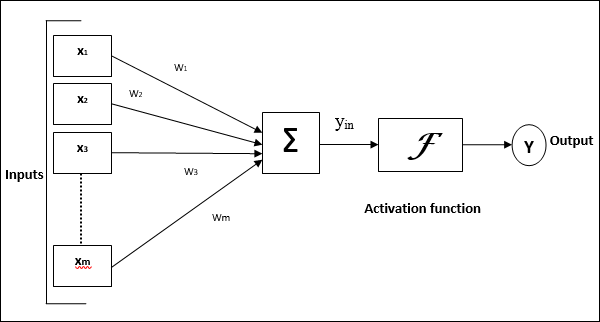
    The following diagram represents the general model of ANN followed by its processing.

    Artificial Neural Network Model

    Machine Learning vs. Neural Networks

    Now that we have a basic understanding of what machine learning and neural networks are. Let’s dive deeper into the differences between the two.

    • Firstly, machine learning is a broad category that encompasses many different types of algorithms, including neural networks. Neural networks are a specific type of machine learning algorithm that is designed to simulate the way the brain works.
    • Secondly, while machine learning algorithms can be used for a wide range of tasks, neural networks are particularly well-suited to tasks that involve processing complex data or recognizing patterns in data. Neural networks can recognize complex patterns and relationships in data that other machine learning algorithms may not be able to detect.
    • Thirdly, neural networks require a lot of data and processing power to train. Neural networks typically require large datasets and powerful hardware, such as graphics processing units (GPUs), to train effectively. Machine learning algorithms, on the other hand, can be trained on smaller datasets and less powerful hardware.
    • Finally, neural networks can provide highly accurate predictions and decisions, but they can be more difficult to understand and interpret than other machine learning algorithms. The way that neural networks make decisions is not always transparent, which can make it difficult to understand how they arrived at their conclusions.
  • Difference Between AI and ML

    Artificial Intelligence and Machine Learning are two buzzwords that are commonly used in the world of technology. Although they are often used interchangeably, they are not the same thing. Artificial intelligence (AI) and machine learning (ML) are related concepts, but they have different definitions, applications, and implications. In this article, we will explore the differences between machine learning and artificial intelligence and how they are related.

    What is Artificial Intelligence?

    Artificial intelligence is a broad field that encompasses the development of intelligent machines that can perform tasks that typically require human intelligence, such as perception, reasoning, learning, and decision-making. In simple terms, AI is the ability of machines to perform tasks that normally require human intervention or intelligence.

    There are two types of AI: narrow or weak AI and general or strong AI. Narrow AI is designed to perform specific tasks, such as speech recognition or image recognition, while general AI is designed to be able to perform any intellectual task that a human can do. Currently, we only have narrow AI in use, but the goal is to develop general AI that can be applied to a wide range of tasks.

    Branches of AI

    AI is like a basket containing several branches, the important ones being Machine Learning (ML), Robotics, Expert Systems, Fuzzy Logic, Neural Networks, Computer Vision, and Natural Language Processing (NLP).

    Data Visualization Techniques

    Here is a brief overview of the other important branches of AI:

    • Robotics Robots are primarily designed to perform repetitive and tedious tasks. Robotics is an important branch of AI that deals with designing, developing and controlling the application of robots.
    • Computer Vision It is an exciting field of AI that helps computers, robots, and other digital devices to process and understand digital images and videos, and extract vital information. With the power of AI, Computer Vision develops algorithms that can extract, analyze and comprehend useful information from digital images.
    • Expert Systems Expert systems are applications specifically designed to solve complex problems in a specific domain, with humanlike intelligence, precision, and expertise. Just like human experts, Expert Systems excel in a specific domain in which they are trained.
    • Fuzzy Logic We know computers take precise digital inputs like True (Yes) or False (No), but Fuzzy Logic is a method of reasoning that helps machines to reason like human beings before taking a decision. With Fuzzy Logic, machines can analyze all intermediate possibilities between a YES or NO, for example, “Possibly Yes”, “Maybe No”, etc.
    • Neural Networks Inspired by the natural neural networks of the human brain, Artificial Neural Networks (ANN) can be considered as a group of highly interconnected group of processing elements (nodes) that can process information by their dynamic state response to external inputs. ANNs use training data to improve their efficiency and accuracy.
    • Natural Language Processing (NLP) NLP is a field of AI that empowers intelligent systems to communicate with humans using a natural language like English. With the power of NLP, one can easily interact with a robot and instruct it in plain English to perform a task. NLP can also process text data and comprehend its full meaning. It is heavily used these days in virtual chatbots and sentiment analysis.

    Examples of AI include virtual assistants, autonomous vehicles, facial recognition, natural language processing, and decision-making systems.

    What is Machine Learning?

    Machine learning is a subset of artificial intelligence that focuses on teaching machines how to learn from data. In other words, machine learning is a process by which computers can automatically learn patterns and relationships in data without being explicitly programmed to do so. Machine learning algorithms are designed to detect and learn from patterns in data to make predictions or decisions.

    There are three main types of machine learning: supervised learning, unsupervised learning, and reinforcement learning. Supervised learning is when the machine is trained on labeled data with known outcomes. Unsupervised learning is when the machine is trained on unlabeled data and is asked to find patterns or similarities. Reinforcement learning is when the machine learns by trial and error through interactions with the environment.

    Examples of machine learning include image recognition, speech recognition, recommendation systems, fraud detection, and natural language processing.

    Artificial Intelligence Vs. Machine Learning Overview

    Now that we have a basic understanding of what machine learning and artificial intelligence are, let’s dive deeper into the differences between the two.

    Firstly, machine learning is a subset of artificial intelligence, meaning that machine learning is a part of the larger field of AI. Machine learning is a technique used to implement artificial intelligence.

    Secondly, while machine learning focuses on developing algorithms that can learn from data, artificial intelligence focuses on developing intelligent machines that can perform tasks that normally require human intelligence. In other words, machine learning is more focused on the process of learning from data, while AI is more focused on the end goal of creating machines that can perform intelligent tasks.

    Thirdly, machine learning algorithms are designed to learn from data and improve their accuracy over time, while artificial intelligence systems are designed to learn and adapt to new situations and environments. Machine learning algorithms require a lot of data to be trained effectively, while AI systems can adapt and learn from new data in real-time.

    Finally, machine learning is more limited in its capabilities compared to AI. Machine learning algorithms can only learn from the data they are trained on, while AI systems can learn and adapt to new situations and environments. Machine learning is great for solving specific problems that can be solved through pattern recognition, while AI is better suited for complex, real-world problems that require reasoning and decision-making.

    Difference Between Artificial Intelligence and Machine Learning

    The following table highlights the important differences between Machine Learning and Artificial Intelligence

    KeyArtificial IntelligenceMachine Learning
    DefinitionArtificial Intelligence refers to the ability of a machine or a computer system to perform tasks that would normally require human intelligence, such as understanding language, recognizing images, and making decisions.Machine Learning is a type of Artificial Intelligence that allows a system to learn and improve from experience without being explicitly programmed. It articulates how a machine can learn and apply its knowledge to improve its decisions.
    ConceptArtificial Intelligence revolves around making smart and intelligent devices.Machine Learning revolves around making a machine learn/decide and improve its results.
    GoalThe goal of Artificial Intelligence is to simulate human intelligence to solve complex problems.The goal of Machine Learning is to learn from data provided and make improvements in machine’s performance.
    IncludesArtificial Intelligence has several important branches including Artificial Neural Networks, Natural Language Processing, Fuzzy Logic, Robotics, Expert Systems, Computer Vision, and Machine Learning.Machine Learning training methods include supervised learning, unsupervised learning, and reinforcement learning.
    DevelopmentArtificial Intelligence is leading to the development of such machines which can mimic human behavior.Machine Learning is helping in the development of self-learning algorithms.
  • ML – Mathematics

    Machine learning is an interdisciplinary field that involves computer science, statistics, and mathematics. In particular, mathematics plays a critical role in developing and understanding machine learning algorithms. In this chapter, we will discuss the mathematical concepts that are essential for machine learning, including linear algebra, calculus, probability, and statistics.

    Linear Algebra

    Linear algebra is the branch of mathematics that deals with linear equations and their representation in vector spaces. In machine learning, linear algebra is used to represent and manipulate data. In particular, vectors and matrices are used to represent and manipulate data points, features, and weights in machine learning models.

    A vector is an ordered list of numbers, while a matrix is a rectangular array of numbers. For example, a vector can represent a single data point, and a matrix can represent a dataset. Linear algebra operations, such as matrix multiplication and inversion, can be used to transform and analyze data.

    Followings are some of the important linear algebra concepts highlighting their importance in machine learning −

    • Vectors and matrix − Vectors and matrices are used to represent datasets, features, target values, weights, etc.
    • Matrix operations − operations such as addition, multiplication, subtraction, and transpose are used in all ML algorithms.
    • Eigenvalues and eigenvectors − These are very useful in dimensionality reduction related algorithms such principal component analysis (PCA).
    • Projection − Concept of hyperplane and projection onto a plane is essential to understand support vector machine (SVM).
    • Factorization − Matrix factorization and singular value decomposition (SVD) are used to extract important information in the dataset.
    • Tensors − Tensors are used in deep learning to represent multidimensional data. A tensor can represent a scalar, vector or matrix.
    • Gradients − Gradients are used to find optimal values of the model parameters.
    • Jacobian Matrix − Jacobian matrix is used to analyze the relationship between input and output variables in ML model
    • Orthogonality − This is a core concept used in algorithms like principal component analysis (PCA), support vector machines (SVM)

    Calculus

    Calculus is the branch of mathematics that deals with rates of change and accumulation. In machine learning, calculus is used to optimize models by finding the minimum or maximum of a function. In particular, gradient descent, a widely used optimization algorithm, is based on calculus.

    Gradient descent is an iterative optimization algorithm that updates the weights of a model based on the gradient of the loss function. The gradient is the vector of partial derivatives of the loss function with respect to each weight. By iteratively updating the weights in the direction of the negative gradient, gradient descent tries to minimize the loss function.

    Followings are some of the important calculus concepts essential for machine learning −

    • Functions − Functions are core of machine learning. In machine learning, model learns a function between inputs and outputs during the training phase. You should learn basics of functions, continuous and discrete functions.
    • Derivative, Gradient and Slope − These are the core concepts to understand how optimization algorithms, like gradient descent, work.
    • Partial Derivatives − These are used to find maxima or minima of a function. Generally used in optimization algorithms.
    • Chain Rules − Chain rules are used to calculate the derivatives of loss functions with multiple variables. You can see the application of chain rules mainly in neural networks.
    • Optimization Methods − These methods are used to find the optimal values of parameters that minimizes cost function. Gradient Descent is one of the most used optimization methods.

    Probability Theory

    Probability is the branch of mathematics that deals with uncertainty and randomness. In machine learning, probability is used to model and analyze data that are uncertain or variable. In particular, probability distributions, such as Gaussian and Poisson distributions, are used to model the probability of data points or events.

    Bayesian inference, a probabilistic modeling technique, is also widely used in machine learning. Bayesian inference is based on Bayes’ theorem, which states that the probability of a hypothesis given the data is proportional to the probability of the data given the hypothesis multiplied by the prior probability of the hypothesis. By updating the prior probability based on the observed data, Bayesian inference can make probabilistic predictions or classifications.

    Followings are some of the important probability theory concepts essential for machine learning −

    • Simple probability − It’s a fundamental concept in machine learning. All classification problems use probability concepts. SoftMax function uses simple probability in artificial neural networks.
    • Conditional probability − Classification algorithms like the Naive Bayes classifier are based on conditional probability.
    • Random Variables − Random variables are used to assign the initial values to the model parameters. Parameter initialization is considered as the starting of the training process.
    • Probability distribution − These are used in finding loss functions for classification problems.
    • Continuous and Discrete distribution − These distributions are used to model different types of data in ML.
    • Distribution functions − These functions are often used to model the distribution of error terms in linear regression and other statistical models.
    • Maximum likelihood estimation − It is a base of some machine learning and deep learning approaches used for classification problems.

    Statistics

    Statistics is the branch of mathematics that deals with the collection, analysis, interpretation, and presentation of data. In machine learning, statistics is used to evaluate and compare models, estimate model parameters, and test hypotheses.

    For example, cross-validation is a statistical technique that is used to evaluate the performance of a model on new, unseen data. In cross-validation, the dataset is split into multiple subsets, and the model is trained and evaluated on each subset. This allows us to estimate the model’s performance on new data and compare different models.

    Followings are some of the important statistics concepts essential for machine learning −

    • Mean, Median, Mode − These measures are used to understand the distribution of data and identify outliers.
    • Standard deviation, Variance − These are used to understand the variability of a dataset and to detect outliers.
    • Percentiles − These are used to summarize the distribution of a dataset and identify outliers.
    • Data Distribution − It is how data points are distributed or spread out across a dataset.
    • Skewness and Kurtosis − These are two important measures of the shape of a probability distribution in machine learning.
    • Bias and Variance − They describe the sources of error in a model’s predictions.
    • Hypothesis Testing − It is a tentative assumption or idea that can be tested and validated using data.
    • Linear Regression − It is the most used regression algorithm in supervised machine learning.
    • Logistic Regression − It’s also an important supervised learning algorithm mostly used in machine learning.
    • Principal Component Analysis − It is used mainly in dimensionality reduction in machine learning.
  • ML – Data Structure

    Data structure plays a critical role in machine learning as it facilitates the organization, manipulation, and analysis of data. Data is the foundation of machine learning models, and the data structure used can significantly impact the model’s performance and accuracy.

    Data structures help to build and understand various complex problems in Machine learning. A careful choice of data structures can help to enhance the performance and optimize the machine learning models.

    What is Data Structure?

    Data structures are ways of organizing and storing data to use it efficiently. They include structures like arrays, linked lists, stacks, and others, which are designed to support specific operations. They play a crucial role in machine learning, especially in tasks such as data preprocessing, algorithm implementation, and optimization.

    Here we will discuss some commonly used data structures and how they are used in Machine Learning.

    Commonly Used Data Structure for Machine Learning

    Data structure is an essential component of machine learning, and the right data structure can help in achieving faster processing, easier access to data, and more efficient storage. Here are some commonly used data structures for machine learning −

    1. Arrays

    Array is a fundamental data structure used for storing and manipulating data in machine learning. Array elements can be accessed using the indexes. They allow fast data retrieval as the data is stored in contiguous memory locations and can be accessed easily.

    As we can perform vectorized operations on arrays, it is a good choice to represent the input data as arrays.

    Some machine learning tasks that use arrays are:

    • The raw data is usually represented in the form of arrays.
    • To convert pandas data frame into list, because pandas series require all the elements to be the same type, which Python list contains combination of data types.
    • Used for data preprocessing techniques like normalization, scaling and reshaping.
    • Used in word embedding, while creating multi-dimensional matrices.

    Arrays are easy to use and offer fast indexing, but their size is fixed, which can be a limitation when working with large datasets.

    2. Lists

    Lists are collections of heterogeneous data types that can be accessed using an iterator. They are commonly used in machine learning for storing complex data structures, such as nested lists, dictionaries, and tuples. Lists offer flexibility and can handle varying data sizes, but they are slower than arrays due to the need for iteration.

    3. Dictionaries

    Dictionaries are a collection of key-value pairs that can be accessed using the keys. They are commonly used in machine learning for storing metadata or labels associated with data. Dictionaries offer fast access to data and are useful for creating lookup tables, but they can be memory-intensive when dealing with large datasets.

    4. Linked Lists

    Linked lists are collections of nodes, each containing a data element and a reference to the next node in the list. They are commonly used in machine learning for storing and manipulating sequential data, such as time-series data. Linked lists offer efficient insertion and deletion operations, but they are slower than arrays and lists when it comes to accessing data.

    Linked lists are commonly used for managing dynamic data where elements are frequently added and removed. They are less common compared to arrays, which are more efficient for the data retrieval process.

    5. Stack and Queue

    Stack is based on the LIFO(Last In First Out). Stacking classifier approach can efficiently be implemented in solving multi-classification problems by dividing it into several binary classification problems. This is done by stacking all the outputs from binary classification and passing it as input to the meta classifier.

    Queue follows FIFO(First In First Out) structure which is similar to people waiting in a line. This data structure is used in Multi threading, which is used to optimize and coordinate data flow between threads in multi threaded environment. It is usually used to handle large amounts of data, to feed batches of data for the training process. To make sure that the training process is continuous and efficient.

    6. Trees

    Trees are hierarchical data structures that are commonly used in machine learning for decision-making algorithms, such as decision trees and random forests. Trees offer efficient searching and sorting algorithms, but they can be complex to implement and can suffer from overfitting.

    Binary trees are hierarchical data structures that are commonly used in machine learning for decision-making algorithms, such as decision trees and random forests. Trees offer efficient searching and sorting algorithms, but they can be complex to implement and can suffer from overfitting.

    7. Graphs

    Graphs are collections of nodes and edges that are commonly used in machine learning for representing complex relationships between data points. Data structures such as adjacency matrices and linked lists are used to create and manipulate graphs. Graphs offer powerful algorithms for clustering, classification, and prediction, but they can be complex to implement and can suffer from scalability issues.

    Graphs are widely used in recommendation systemlink prediction, and social media analysis.

    8. Hash Maps

    Hash maps are predominantly used in machine learning due to its key-value storage and retrieval capabilities. They are commonly used in machine learning for storing metadata or labels associated with data. Dictionaries offer fast access to data and are useful for creating lookup tables, but they can be memory-intensive when dealing with large datasets.

    In addition to the above-mentioned data structures, many machine learning libraries and frameworks provide specialized data structures for specific use cases, such as matrices and tensors for deep learning. It is important to choose the right data structure for the task at hand, considering factors such as data size, processing speed, and memory usage.

    How Data Structure is Used in Machine Learning?

    Below are some ways data structures are used in machine learning −

    Storing and Accessing Data

    Machine learning algorithms require large amounts of data for training and testing. Data structures such as arrays, lists, and dictionaries are used to store and access data efficiently. For example, an array can be used to store a set of numerical values, while a dictionary can be used to store metadata or labels associated with data.

    Pre-processing Data

    Before training a machine learning model, it is necessary to pre-process the data to clean, transform, and normalize it. Data structures such as lists and arrays can be used to store and manipulate the data during pre-processing. For example, a list can be used to filter out missing values, while an array can be used to normalize the data.

    Creating Feature Vectors

    Feature vectors are a critical component of machine learning models as they represent the features that are used to make predictions. Data structures such as arrays and matrices are commonly used to create feature vectors. For example, an array can be used to store the pixel values of an image, while a matrix can be used to store the frequency distribution of words in a text document.

    Building Decision Trees

    Decision trees are a common machine learning algorithm that uses a tree data structure to make decisions based on a set of input features. Decision trees are useful for classification and regression problems. They are created by recursively splitting the data based on the most informative features. The tree data structure makes it easy to traverse the decision-making process and make predictions.

    Building Graphs

    Graphs are used in machine learning to represent complex relationships between data points. Data structures such as adjacency matrices and linked lists are used to create and manipulate graphs. Graphs are used for clustering, classification, and prediction tasks.