Python bitwise operators are normally used to perform bitwise operations on integer-type objects. However, instead of treating the object as a whole, it is treated as a string of bits. Different operations are done on each bit in the string.
Python has six bitwise operators – &, |, ^, ~, << and >>. All these operators (except ~) are binary in nature, in the sense they operate on two operands. Each operand is a binary digit (bit) 1 or 0.
The following are the bitwise operators in Python –
Bitwise AND Operator
Bitwise OR Operator
Bitwise XOR Operator
Bitwise NOT Operator
Bitwise Left Shift Operator
Biwtise Right Shift Operator
Python Bitwise AND Operator (&)
Bitwise AND operator is somewhat similar to logical and operator. It returns True only if both the bit operands are 1 (i.e. True). All the combinations are −
0 & 0 is 0
1 & 0 is 0
0 & 1 is 0
1 & 1 is 1
When you use integers as the operands, both are converted in equivalent binary, the & operation is done on corresponding bit from each number, starting from the least significant bit and going towards most significant bit.
Example of Bitwise AND Operator in Python
Let us take two integers 60 and 13, and assign them to variables a and b respectively.
a=60
b=13print("a:",a,"b:",b,"a&b:",a&b)
It will produce the following output −
a: 60 b: 13 a&b: 12
To understand how Python performs the operation, obtain the binary equivalent of each variable.
print("a:",bin(a))print("b:",bin(b))
It will produce the following output −
a: 0b111100
b: 0b1101
For the sake of convenience, use the standard 8-bit format for each number, so that “a” is 00111100 and “b” is 00001101. Let us manually perform and operation on each corresponding bits of these two numbers.
0011 1100
&
0000 1101
-------------
0000 1100
Convert the resultant binary back to integer. You’ll get 12, which was the result obtained earlier.
>>>int('00001100',2)12
Python Bitwise OR Operator (|)
The “|” symbol (called pipe) is the bitwise OR operator. If any bit operand is 1, the result is 1 otherwise it is 0.
0 | 0 is 0
0 | 1 is 1
1 | 0 is 1
1 | 1 is 1
Example of Bitwise OR Operator in Python
Take the same values of a=60, b=13. The “|” operation results in 61. Obtain their binary equivalents.
To perform the “|” operation manually, use the 8-bit format.
0011 1100
    |
0000 1101
-------------
0011 1101
Convert the binary number back to integer to tally the result −
>>>int('00111101',2)61
Python Bitwise XOR Operator (^)
The term XOR stands for exclusive OR. It means that the result of OR operation on two bits will be 1 if only one of the bits is 1.
0^0is00^1is11^0is11^1is0
Example of Bitwise XOR Operator in Python
Let us perform XOR operation on a=60 and b=13.
a=60
b=13print("a:",a,"b:",b,"a^b:",a^b)
It will produce the following output −
a: 60 b: 13 a^b: 49
We now perform the bitwise XOR manually.
0011 1100
    ^
0000 1101
-------------
0011 0001
The int() function shows 00110001 to be 49.
>>>int('00110001',2)49
Python Bitwise NOT Operator (~)
This operator is the binary equivalent of logical NOT operator. It flips each bit so that 1 is replaced by 0, and 0 by 1, and returns the complement of the original number. Python uses 2’s complement method. For positive integers, it is obtained simply by reversing the bits. For negative number, -x, it is written using the bit pattern for (x-1) with all of the bits complemented (switched from 1 to 0 or 0 to 1). Hence: (for 8 bit representation)
Left shift operator shifts most significant bits to right by the number on the right side of the “<<” symbol. Hence, “x << 2” causes two bits of the binary representation of to right.
Example of Bitwise Left Shift Operator in Python
Let us perform left shift on 60.
a=60print("a:",a,"a<<2:", a<<2)
It will produce the following output −
a: 60 a<<2: 240
How does this take place? Let us use the binary equivalent of 60, and perform the left shift by 2.
00111100<<2-------------11110000
Convert the binary to integer. It is 240.
>>>int('11110000',2)240
Python Bitwise Right Shift Operator (>>)
Right shift operator shifts least significant bits to left by the number on the right side of the “>>” symbol. Hence, “x >> 2” causes two bits of the binary representation of to left.
Example of Bitwise Right Shift Operator in Python
Let us perform right shift on 60.
a=60print("a:",a,"a>>2:", a>>2)
It will produce the following output −
a: 60 a>>2: 15
Manual right shift operation on 60 is shown below −
00111100>>2-------------00001111
Use int() function to covert the above binary number to integer. It is 15.
Python logical operators are used to form compound Boolean expressions. Each operand for these logical operators is itself a Boolean expression. For example,
Example
age >16and marks >80
percentage <50or attendance <75
Along with the keyword False, Python interprets None, numeric zero of all types, and empty sequences (strings, tuples, lists), empty dictionaries, and empty sets as False. All other values are treated as True.
There are three logical operators in Python. They are “and“, “or” and “not“. They must be in lowercase.
Logical “and” Operator
For the compound Boolean expression to be True, both the operands must be True. If any or both operands evaluate to False, the expression returns False.
Logical “and” Operator Truth Table
The following table shows the scenarios.
a
b
a and b
F
F
F
F
T
F
T
F
F
T
T
T
Logical “or” Operator
In contrast, the or operator returns True if any of the operands is True. For the compound Boolean expression to be False, both the operands have to be False.
Logical “or” Operator Truth Table
The following tables shows the result of the “or” operator with different conditions:
a
b
a or b
F
F
F
F
T
T
T
F
T
T
T
T
Logical “not” Operator
This is a unary operator. The state of Boolean operand that follows, is reversed. As a result, not True becomes False and not False becomes True.
Logical “not” Operator Truth Table
a
not (a)
F
T
T
F
How the Python interpreter evaluates the logical operators?
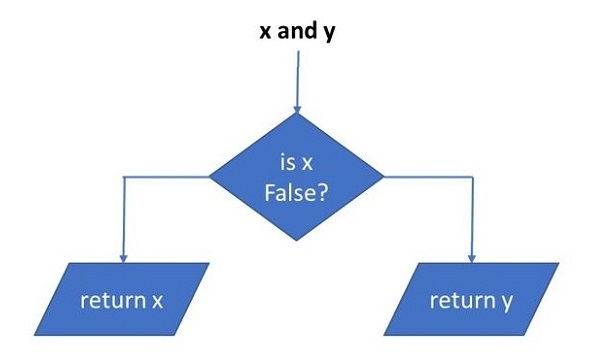
The expression “x and y” first evaluates “x”. If “x” is false, its value is returned; otherwise, “y” is evaluated and the resulting value is returned.
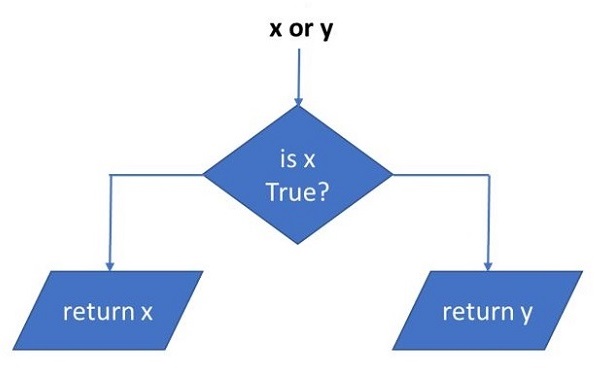
The expression “x or y” first evaluates “x”; if “x” is true, its value is returned; otherwise, “y” is evaluated and the resulting value is returned.
Python Logical Operators Examples
Some use cases of logical operators are given below −
Example 1: Logical Operators With Boolean Conditions
x =10
y =20print("x > 0 and x < 10:",x >0and x <10)print("x > 0 and y > 10:",x >0and y >10)print("x > 10 or y > 10:",x >10or y >10)print("x%2 == 0 and y%2 == 0:",x%2==0and y%2==0)print("not (x+y>15):",not(x+y)>15)
It will produce the following output −
x > 0 and x < 10: False
x > 0 and y > 10: True
x > 10 or y > 10: True
x%2 == 0 and y%2 == 0: True
not (x+y>15): False
Example 2: Logical Operators With Non- Boolean Conditions
We can use non-boolean operands with logical operators. Here, we need to not that any non-zero numbers, and non-empty sequences evaluate to True. Hence, the same truth tables of logical operators apply.
In the following example, numeric operands are used for logical operators. The variables “x”, “y” evaluate to True, “z” is False
x =10
y =20
z =0print("x and y:",x and y)print("x or y:",x or y)print("z or x:",z or x)print("y or z:", y or z)
It will produce the following output −
x and y: 20
x or y: 10
z or x: 10
y or z: 20
Example 3: Logical Operators With Strings and Tuples
The string variable is treated as True and an empty tuple as False in the following example −
a="Hello"
b=tuple()print("a and b:",a and b)print("b or a:",b or a)
It will produce the following output −
a and b: ()
b or a: Hello
Example 4: Logical Operators To Compare Sequences (Lists)
Finally, two list objects below are non-empty. Hence x and y returns the latter, and x or y returns the former.
x=[1,2,3]
y=[10,20,30]print("x and y:",x and y)print("x or y:",x or y)
The = (equal to) symbol is defined as assignment operator in Python. The value of Python expression on its right is assigned to a single variable on its left. The = symbol as in programming in general (and Python in particular) should not be confused with its usage in Mathematics, where it states that the expressions on the either side of the symbol are equal.
Example of Assignment Operator in Python
Consider following Python statements −
a =10
b =5
a = a + b
print(a)
At the first instance, at least for somebody new to programming but who knows maths, the statement “a=a+b” looks strange. How could a be equal to “a+b”? However, it needs to be reemphasized that the = symbol is an assignment operator here and not used to show the equality of LHS and RHS.
Because it is an assignment, the expression on right evaluates to 15, the value is assigned to a.
In the statement “a+=b”, the two operators “+” and “=” can be combined in a “+=” operator. It is called as add and assign operator. In a single statement, it performs addition of two operands “a” and “b”, and result is assigned to operand on left, i.e., “a”.
Augmented Assignment Operators in Python
In addition to the simple assignment operator, Python provides few more assignment operators for advanced use. They are called cumulative or augmented assignment operators. In this chapter, we shall learn to use augmented assignment operators defined in Python.
Python has the augmented assignment operators for all arithmetic and comparison operators.
Python augmented assignment operators combines addition and assignment in one statement. Since Python supports mixed arithmetic, the two operands may be of different types. However, the type of left operand changes to the operand of on right, if it is wider.
Example
The += operator is an augmented operator. It is also called cumulative addition operator, as it adds “b” in “a” and assigns the result back to a variable.
The following are the augmented assignment operators in Python:
Augmented Addition Operator
Augmented Subtraction Operator
Augmented Multiplication Operator
Augmented Division Operator
Augmented Modulus Operator
Augmented Exponent Operator
Augmented Floor division Operator
Augmented Addition Operator (+=)
Following examples will help in understanding how the “+=” operator works −
a=10
b=5print("Augmented addition of int and int")
a+=b # equivalent to a=a+bprint("a=",a,"type(a):",type(a))

a=10
b=5.5print("Augmented addition of int and float")
a+=b  # equivalent to a=a+bprint("a=",a,"type(a):",type(a))

a=10.50
b=5+6jprint("Augmented addition of float and complex")
a+=b #equivalent to a=a+bprint("a=",a,"type(a):",type(a))
It will produce the following output −
Augmented addition of int and int
a= 15 type(a): <class 'int'>
Augmented addition of int and float
a= 15.5 type(a): <class 'float'>
Augmented addition of float and complex
a= (15.5+6j) type(a): <class 'complex'>
Augmented Subtraction Operator (-=)
Use -= symbol to perform subtract and assign operations in a single statement. The “a-=b” statement performs “a=a-b” assignment. Operands may be of any number type. Python performs implicit type casting on the object which is narrower in size.
a=10
b=5print("Augmented subtraction of int and int")
a-=b #equivalent to a=a-bprint("a=",a,"type(a):",type(a))

a=10
b=5.5print("Augmented subtraction of int and float")
a-=b #equivalent to a=a-bprint("a=",a,"type(a):",type(a))

a=10.50
b=5+6jprint("Augmented subtraction of float and complex")
a-=b #equivalent to a=a-bprint("a=",a,"type(a):",type(a))
It will produce the following output −
Augmented subtraction of int and int
a= 5 type(a): <class 'int'>
Augmented subtraction of int and float
a= 4.5 type(a): <class 'float'>
Augmented subtraction of float and complex
a= (5.5-6j) type(a): <class 'complex'>
Augmented Multiplication Operator (*=)
The “*=” operator works on similar principle. “a*=b” performs multiply and assign operations, and is equivalent to “a=a*b”. In case of augmented multiplication of two complex numbers, the rule of multiplication as discussed in the previous chapter is applicable.
a=10
b=5print("Augmented multiplication of int and int")
a*=b #equivalent to a=a*bprint("a=",a,"type(a):",type(a))

a=10
b=5.5print("Augmented multiplication of int and float")
a*=b #equivalent to a=a*bprint("a=",a,"type(a):",type(a))

a=6+4j
b=3+2jprint("Augmented multiplication of complex and complex")
a*=b #equivalent to a=a*bprint("a=",a,"type(a):",type(a))
It will produce the following output −
Augmented multiplication of int and int
a= 50 type(a): <class 'int'>
Augmented multiplication of int and float
a= 55.0 type(a): <class 'float'>
Augmented multiplication of complex and complex
a= (10+24j) type(a): <class 'complex'>
Augmented Division Operator (/=)
The combination symbol “/=” acts as divide and assignment operator, hence “a/=b” is equivalent to “a=a/b”. The division operation of int or float operands is float. Division of two complex numbers returns a complex number. Given below are examples of augmented division operator.
a=10
b=5print("Augmented division of int and int")
a/=b #equivalent to a=a/bprint("a=",a,"type(a):",type(a))

a=10
b=5.5print("Augmented division of int and float")
a/=b #equivalent to a=a/bprint("a=",a,"type(a):",type(a))

a=6+4j
b=3+2jprint("Augmented division of complex and complex")
a/=b #equivalent to a=a/bprint("a=",a,"type(a):",type(a))
It will produce the following output −
Augmented division of int and int
a= 2.0 type(a): <class 'float'>
Augmented division of int and float
a= 1.8181818181818181 type(a): <class 'float'>
Augmented division of complex and complex
a= (2+0j) type(a): <class 'complex'>
Augmented Modulus Operator (%=)
To perform modulus and assignment operation in a single statement, use the %= operator. Like the mod operator, its augmented version also is not supported for complex number.
a=10
b=5print("Augmented modulus operator with int and int")
a%=b #equivalent to a=a%bprint("a=",a,"type(a):",type(a))

a=10
b=5.5print("Augmented modulus operator with int and float")
a%=b #equivalent to a=a%bprint("a=",a,"type(a):",type(a))
It will produce the following output −
Augmented modulus operator with int and int
a= 0 type(a): <class 'int'>
Augmented modulus operator with int and float
a= 4.5 type(a): <class 'float'>
Augmented Exponent Operator (**=)
The “**=” operator results in computation of “a” raised to “b”, and assigning the value back to “a”. Given below are some examples −
a=10
b=5print("Augmented exponent operator with int and int")
a**=b #equivalent to a=a**bprint("a=",a,"type(a):",type(a))

a=10
b=5.5print("Augmented exponent operator with int and float")
a**=b #equivalent to a=a**bprint("a=",a,"type(a):",type(a))

a=6+4j
b=3+2jprint("Augmented exponent operator with complex and complex")
a**=b #equivalent to a=a**bprint("a=",a,"type(a):",type(a))
It will produce the following output −
Augmented exponent operator with int and int
a= 100000 type(a): <class 'int'>
Augmented exponent operator with int and float
a= 316227.7660168379 type(a): <class 'float'>
Augmented exponent operator with complex and complex
a= (97.52306038414744-62.22529992036203j) type(a): <class 'complex'>
Augmented Floor division Operator (//=)
For performing floor division and assignment in a single statement, use the “//=” operator. “a//=b” is equivalent to “a=a//b”. This operator cannot be used with complex numbers.
a=10
b=5print("Augmented floor division operator with int and int")
a//=b #equivalent to a=a//bprint("a=",a,"type(a):",type(a))

a=10
b=5.5print("Augmented floor division operator with int and float")
a//=b #equivalent to a=a//bprint("a=",a,"type(a):",type(a))
It will produce the following output −
Augmented floor division operator with int and int
a= 2 type(a): <class 'int'>
Augmented floor division operator with int and float
a= 1.0 type(a): <class 'float'>
Python uses two more operators, combining “=” symbol with these two. The “<=” symbol is for less than or equal to operator and the “>=” symbol is for greater than or equal to operator.
Different Comparison Operators in Python
Python has two more comparison operators in the form of “==” and “!=”. They are for is equal to and is not equal to operators. Hence, there are six comparison operators in Python and they are listed below in this table:
<
Less than
a<b
>
Greater than
a>b
<=
Less than or equal to
a<=b
>=
Greater than or equal to
a>=b
==
Is equal to
a==b
!=
Is not equal to
a!=b
Comparison operators are binary in nature, requiring two operands. An expression involving a comparison operator is called a Boolean expression, and always returns either True or False.
Example
a=5
b=7print(a>b)print(a<b)
It will produce the following output −
False
True
Both the operands may be Python literals, variables or expressions. Since Python supports mixed arithmetic, you can have any number type operands.
Example
The following code demonstrates the use of Python’s comparison operators with integer numbers −
Both operands are integer
a= 5 b= 7 a>b is False
a= 5 b= 7 a<b is True
a= 5 b= 7 a==b is False
a= 5 b= 7 a!=b is True
Comparison of Float Number
In the following example, an integer and a float operand are compared.
Example
print("comparison of int and float")
a=10
b=10.0print("a=",a,"b=",b,"a>b is", a>b)print("a=",a,"b=",b,"a<b is",a<b)print("a=",a,"b=",b,"a==b is",a==b)print("a=",a,"b=",b,"a!=b is",a!=b)
It will produce the following output −
comparison of int and float
a= 10 b= 10.0 a>b is False
a= 10 b= 10.0 a<b is False
a= 10 b= 10.0 a==b is True
a= 10 b= 10.0 a!=b is False
Comparison of Complex umbers
Although complex object is a number data type in Python, its behavior is different from others. Python doesn’t support < and > operators, however it does support equality (==) and inequality (!=) operators.
Example
print("comparison of complex numbers")
a=10+1j
b=10.-1jprint("a=",a,"b=",b,"a==b is",a==b)print("a=",a,"b=",b,"a!=b is",a!=b)
It will produce the following output −
comparison of complex numbers
a= (10+1j) b= (10-1j) a==b is False
a= (10+1j) b= (10-1j) a!=b is True
You get a TypeError with less than or greater than operators.
Example
print("comparison of complex numbers")
a=10+1j
b=10.-1jprint("a=",a,"b=",b,"a<b is",a<b)print("a=",a,"b=",b,"a>b is",a>b)
It will produce the following output −
comparison of complex numbers
Traceback (most recent call last):
  File "C:\Users\mlath\examples\example.py", line 5, in <module>
    print ("a=",a, "b=",b,"a<b is",a<b)
                                      ^^^
TypeError: '<' not supported between instances of 'complex' and
'complex
Comparison of Booleans
Boolean objects in Python are really integers: True is 1 and False is 0. In fact, Python treats any non-zero number as True. In Python, comparison of Boolean objects is possible. “False < True” is True!
Example
print("comparison of Booleans")
a=True
b=Falseprint("a=",a,"b=",b,"a<b is",a<b)print("a=",a,"b=",b,"a>b is",a>b)print("a=",a,"b=",b,"a==b is",a==b)print("a=",a,"b=",b,"a!=b is",a!=b)
It will produce the following output −
comparison of Booleans
a= True b= False a<b is False
a= True b= False a>b is True
a= True b= False a==b is False
a= True b= False a!=b is True
Comparison of Sequence Types
In Python, comparison of only similar sequence objects can be performed. A string object is comparable with another string only. A list cannot be compared with a tuple, even if both have same items.
Example
print("comparison of different sequence types")
a=(1,2,3)
b=[1,2,3]print("a=",a,"b=",b,"a<b is",a<b)
It will produce the following output −
comparison of different sequence types
Traceback (most recent call last):
  File "C:\Users\mlath\examples\example.py", line 5, in <module>
    print ("a=",a, "b=",b,"a<b is",a<b)
                                       ^^^
TypeError: '<' not supported between instances of 'tuple' and 'list'
Sequence objects are compared by lexicographical ordering mechanism. The comparison starts from item at 0th index. If they are equal, comparison moves to next index till the items at certain index happen to be not equal, or one of the sequences is exhausted. If one sequence is an initial sub-sequence of the other, the shorter sequence is the smaller (lesser) one.
Which of the operands is greater depends on the difference in values of items at the index where they are unequal. For example, ‘BAT’>’BAR’ is True, as T comes after R in Unicode order.
If all items of two sequences compare equal, the sequences are considered equal.
Example
print("comparison of strings")
a='BAT'
b='BALL'print("a=",a,"b=",b,"a<b is",a<b)print("a=",a,"b=",b,"a>b is",a>b)print("a=",a,"b=",b,"a==b is",a==b)print("a=",a,"b=",b,"a!=b is",a!=b)
It will produce the following output −
comparison of strings
a= BAT b= BALL a<b is False
a= BAT b= BALL a>b is True
a= BAT b= BALL a==b is False
a= BAT b= BALL a!=b is True
In the following example, two tuple objects are compared −
Example
print("comparison of tuples")
a=(1,2,4)
b=(1,2,3)print("a=",a,"b=",b,"a<b is",a<b)print("a=",a,"b=",b,"a>b is",a>b)print("a=",a,"b=",b,"a==b is",a==b)print("a=",a,"b=",b,"a!=b is",a!=b)
The use of “<” and “>” operators for Python’s dictionary is not defined. In case of these operands, TypeError: ‘<‘ not supported between instances of ‘dict’ and ‘dict’ is reported.
Equality comparison checks if the length of both the dict items is same. Length of dictionary is the number of key-value pairs in it.
Python dictionaries are simply compared by length. The dictionary with fewer elements is considered less than a dictionary with more elements.
Example
print("comparison of dictionary objects")
a={1:1,2:2}
b={2:2,1:1,3:3}print("a=",a,"b=",b,"a==b is",a==b)print("a=",a,"b=",b,"a!=b is",a!=b)
Python arithmetic operators are used to perform mathematical operations such as addition, subtraction, multiplication, division, and more on numbers. Arithmetic operators are binary operators in the sense they operate on two operands. Python fully supports mixed arithmetic. That is, the two operands can be of two different number types. In such a situation.
Types of Arithmetic Operators
Following is the table which lists down all the arithmetic operators available in Python:
Operator
Name
Example
+
Addition
a + b = 30
–
Subtraction
a b = -10
*
Multiplication
a * b = 200
/
Division
b / a = 2
%
Modulus
b % a = 0
**
Exponent
a**b =10**20
//
Floor Division
9//2 = 4
Let us study these operators with examples.
Addition Operator
The addition operator represents by + symbol. It is a basic arithmetic operator. It adds the two numeric operands on the either side and returns the addition result.
Example to add two integer numbers
In the following example, the two integer variables are the operands for the “+” operator.
a=10
b=20print("Addition of two integers")print("a =",a,"b =",b,"addition =",a+b)
It will produce the following output −
Addition of two integers
a = 10 b = 20 addition = 30
Example to add integer and float numbers
Addition of integer and float results in a float.
a=10
b=20.5print("Addition of integer and float")print("a =",a,"b =",b,"addition =",a+b)
It will produce the following output −
Addition of integer and float
a = 10 b = 20.5 addition = 30.5
Example to add two complex numbers
The result of adding float to complex is a complex number.
a=10+5j
b=20.5print("Addition of complex and float")print("a=",a,"b=",b,"addition=",a+b)
It will produce the following output −
Addition of complex and float
a= (10+5j) b= 20.5 addition= (30.5+5j)
Subtraction Operator
The subtraction operator represents by – symbol. It subtracts the second operand from the first. The resultant number is negative if the second operand is larger.
Example to subtract two integer numbers
First example shows subtraction of two integers.
a=10
b=20print("Subtraction of two integers:")print("a =",a,"b =",b,"a-b =",a-b)print("a =",a,"b =",b,"b-a =",b-a)
Result −
Subtraction of two integers
a = 10 b = 20 a-b = -10
a = 10 b = 20 b-a = 10
Example to subtract integer and float numbers
Subtraction of an integer and a float follows the same principle.
a=10
b=20.5print("subtraction of integer and float")print("a=",a,"b=",b,"a-b=",a-b)print("a=",a,"b=",b,"b-a=",b-a)
It will produce the following output −
subtraction of integer and float
a= 10 b= 20.5 a-b= -10.5
a= 10 b= 20.5 b-a= 10.5
Example to subtract complex numbers
In the subtraction involving a complex and a float, real component is involved in the operation.
a=10+5j
b=20.5print("subtraction of complex and float")print("a=",a,"b=",b,"a-b=",a-b)print("a=",a,"b=",b,"b-a=",b-a)
It will produce the following output −
subtraction of complex and float
a= (10+5j) b= 20.5 a-b= (-10.5+5j)
a= (10+5j) b= 20.5 b-a= (10.5-5j)
Multiplication Operator
The * (asterisk) symbol is defined as a multiplication operator in Python (as in many languages). It returns the product of the two operands on its either side. If any of the operands negative, the result is also negative. If both are negative, the result is positive. Changing the order of operands doesn’t change the result
Example to multiply two integers
a=10
b=20print("Multiplication of two integers")print("a =",a,"b =",b,"a*b =",a*b)
It will produce the following output −
Multiplication of two integers
a = 10 b = 20 a*b = 200
Example to multiply integer and float numbers
In multiplication, a float operand may have a standard decimal point notation, or a scientific notation.
a=10
b=20.5print("Multiplication of integer and float")print("a=",a,"b=",b,"a*b=",a*b)

a=-5.55
b=6.75E-3print("Multiplication of float and float")print("a =",a,"b =",b,"a*b =",a*b)
It will produce the following output −
Multiplication of integer and float
a = 10 b = 20.5 a-b = -10.5
Multiplication of float and float
a = -5.55 b = 0.00675 a*b = -0.037462499999999996
Example to multiply complex numbers
For the multiplication operation involving one complex operand, the other operand multiplies both the real part and imaginary part.
a=10+5j
b=20.5print("Multiplication of complex and float")print("a =",a,"b =",b,"a*b =",a*b)
It will produce the following output −
Multiplication of complex and float
a = (10+5j) b = 20.5 a*b = (205+102.5j)
Division Operator
The “/” symbol is usually called as forward slash. The result of division operator is numerator (left operand) divided by denominator (right operand). The resultant number is negative if any of the operands is negative. Since infinity cannot be stored in the memory, Python raises ZeroDivisionError if the denominator is 0.
The result of division operator in Python is always a float, even if both operands are integers.
Example to divide two numbers
a=10
b=20print("Division of two integers")print("a=",a,"b=",b,"a/b=",a/b)print("a=",a,"b=",b,"b/a=",b/a)
It will produce the following output −
Division of two integers
a= 10 b= 20 a/b= 0.5
a= 10 b= 20 b/a= 2.0
Example to divide two float numbers
In Division, a float operand may have a standard decimal point notation, or a scientific notation.
a=10
b=-20.5print("Division of integer and float")print("a=",a,"b=",b,"a/b=",a/b)
a=-2.50
b=1.25E2print("Division of float and float")print("a=",a,"b=",b,"a/b=",a/b)
It will produce the following output −
Division of integer and float
a= 10 b= -20.5 a/b= -0.4878048780487805
Division of float and float
a= -2.5 b= 125.0 a/b= -0.02
Example to divide complex numbers
When one of the operands is a complex number, division between the other operand and both parts of complex number (real and imaginary) object takes place.
a=7.5+7.5j
b=2.5print("Division of complex and float")print("a =",a,"b =",b,"a/b =",a/b)print("a =",a,"b =",b,"b/a =",b/a)
It will produce the following output −
Division of complex and float
a = (7.5+7.5j) b = 2.5 a/b = (3+3j)
a = (7.5+7.5j) b = 2.5 b/a = (0.16666666666666666-0.16666666666666666j)
If the numerator is 0, the result of division is always 0 except when denominator is 0, in which case, Python raises ZeroDivisionError wirh Division by Zero error message.
a= 0 b= 2.5 a/b= 0.0
Traceback (most recent call last):
  File "C:\Users\mlath\examples\example.py", line 20, in <module>
     print ("a=",a,"b=",b,"b/a=",b/a)
                                 ~^~
ZeroDivisionError: float division by zero
Modulus Operator
Python defines the “%” symbol, which is known aa Percent symbol, as Modulus (or modulo) operator. It returns the remainder after the denominator divides the numerator. It can also be called Remainder operator. The result of the modulus operator is the number that remains after the integer quotient. To give an example, when 10 is divided by 3, the quotient is 3 and remainder is 1. Hence, 10%3 (normally pronounced as 10 mod 3) results in 1.
Example for modulus operation on integers
If both the operands are integer, the modulus value is an integer. If numerator is completely divisible, remainder is 0. If numerator is smaller than denominator, modulus is equal to the numerator. If denominator is 0, Python raises ZeroDivisionError.
Python doesn’t accept complex numbers to be used as operand in modulus operation. It throws TypeError: unsupported operand type(s) for %.
Exponent Operator
Python uses ** (double asterisk) as the exponent operator (sometimes called raised to operator). So, for a**b, you say a raised to b, or even bth power of a.
If in the exponentiation expression, both operands are integer, result is also an integer. In case either one is a float, the result is float. Similarly, if either one operand is complex number, exponent operator returns a complex number.
If the base is 0, the result is 0, and if the index is 0 then the result is always 1.
Floor division is also called as integer division. Python uses // (double forward slash) symbol for the purpose. Unlike the modulus or modulo which returns the remainder, the floor division gives the quotient of the division of operands involved.
If both operands are positive, floor operator returns a number with fractional part removed from it. For example, the floor division of 9.8 by 2 returns 4 (pure division is 4.9, strip the fractional part, result is 4).
But if one of the operands is negative, the result is rounded away from zero (towards negative infinity). Floor division of -9.8 by 2 returns 5 (pure division is -4.9, rounded away from 0).
Multiplication of complex numbers is similar to multiplication of two binomials in algebra. If “a+bj” and “x+yj” are two complex numbers, then their multiplication is given by this formula −
(a+bj)*(x+yj)= ax+ayj+xbj+byj2 =(ax-by)+(ay+xb)j
For example,
a=6+4j
b=3+2j
c=a*b
c=(18-8)+(12+12)j
c=10+24j
The following program confirms the result −
a=6+4j
b=3+2jprint("Multplication of complex numbers - a=",a,"b=",b,"a*b=", a*b)
To understand the how the division of two complex numbers takes place, we should use the conjugate of a complex number. Python’s complex object has a conjugate() method that returns a complex number with the sign of imaginary part reversed.
>>> a=5+6j>>> a.conjugate()(5-6j)
Division of complex numbers
To divide two complex numbers, divide and multiply the numerator as well as the denominator with the conjugate of denominator.
Python operators are special symbols used to perform specific operations on one or more operands. The variables, values, or expressions can be used as operands. For example, Python’s addition operator (+) is used to perform addition operations on two variables, values, or expressions.
The following are some of the terms related to Python operators:
Unary operators: Python operators that require one operand to perform a specific operation are known as unary operators.
Binary operators: Python operators that require two operands to perform a specific operation are known as binary operators.
Operands: Variables, values, or expressions that are used with the operator to perform a specific operation.
Types of Python Operators
Python operators are categorized in the following categories −
Let us have a look at all the operators one by one.
Python Arithmetic Operators
Python Arithmetic operators are used to perform basic mathematical operations such as addition, subtraction, multiplication, etc.
The following table contains all arithmetic operators with their symbols, names, and examples (assume that the values of a and b are 10 and 20, respectively) −
Operator
Name
Example
+
Addition
a + b = 30
–
Subtraction
a b = -10
*
Multiplication
a * b = 200
/
Division
b / a = 2
%
Modulus
b % a = 0
**
Exponent
a**b =10**20
//
Floor Division
9//2 = 4
Example of Python Arithmetic Operators
a =21
b =10
c =0

c = a + b
print("a: {} b: {} a+b: {}".format(a,b,c))

c = a - b
print("a: {} b: {} a-b: {}".format(a,b,c))

c = a * b
print("a: {} b: {} a*b: {}".format(a,b,c))

c = a / b
print("a: {} b: {} a/b: {}".format(a,b,c))

c = a % b
print("a: {} b: {} a%b: {}".format(a,b,c))

a =2
b =3
c = a**b
print("a: {} b: {} a**b: {}".format(a,b,c))

a =10
b =5
c = a//b
print("a: {} b: {} a//b: {}".format(a,b,c))
Python Comparison operators compare the values on either side of them and decide the relation among them. They are also called Relational operators.
The following table contains all comparison operators with their symbols, names, and examples (assume that the values of a and b are 10 and 20, respectively) −
Operator
Name
Example
==
Equal
(a == b) is not true.
!=
Not equal
(a != b) is true.
>
Greater than
(a > b) is not true.
<
Less than
(a < b) is true.
>=
Greater than or equal to
(a >= b) is not true.
<=
Less than or equal to
(a <= b) is true.
Example of Python Comparison Operators
a =21
b =10if( a == b ):print("Line 1 - a is equal to b")else:print("Line 1 - a is not equal to b")if( a != b ):print("Line 2 - a is not equal to b")else:print("Line 2 - a is equal to b")if( a < b ):print("Line 3 - a is less than b")else:print("Line 3 - a is not less than b")if( a > b ):print("Line 4 - a is greater than b")else:print("Line 4 - a is not greater than b")

a,b=b,a #values of a and b swapped. a becomes 10, b becomes 21if( a <= b ):print("Line 5 - a is either less than or equal to  b")else:print("Line 5 - a is neither less than nor equal to  b")if( b >= a ):print("Line 6 - b is either greater than  or equal to b")else:print("Line 6 - b is neither greater than  nor equal to b")
Output
Line 1 - a is not equal to b
Line 2 - a is not equal to b
Line 3 - a is not less than b
Line 4 - a is greater than b
Line 5 - a is either less than or equal to  b
Line 6 - b is either greater than  or equal to b
Python Assignment Operators
Python Assignment operators are used to assign values to variables. Following is a table which shows all Python assignment operators.
The following table contains all assignment operators with their symbols, names, and examples −
Operator
Example
Same As
=
a = 10
a = 10
+=
a += 30
a = a + 30
-=
a -= 15
a = a – 15
*=
a *= 10
a = a * 10
/=
a /= 5
a = a / 5
%=
a %= 5
a = a % 5
**=
a **= 4
a = a ** 4
//=
a //= 5
a = a // 5
&=
a &= 5
a = a & 5
|=
a |= 5
a = a | 5
^=
a ^= 5
a = a ^ 5
>>=
a >>= 5
a = a >> 5
<<=
a <<= 5
a = a << 5
Example of Python Assignment Operators
a =21
b =10
c =0print("a: {} b: {} c : {}".format(a,b,c))
c = a + b
print("a: {}  c = a + b: {}".format(a,c))

c += a
print("a: {} c += a: {}".format(a,c))

c *= a
print("a: {} c *= a: {}".format(a,c))

c /= a
print("a: {} c /= a : {}".format(a,c))

c  =2print("a: {} b: {} c : {}".format(a,b,c))
c %= a
print("a: {} c %= a: {}".format(a,c))

c **= a
print("a: {} c **= a: {}".format(a,c))

c //= a
print("a: {} c //= a: {}".format(a,c))
Output
a: 21 b: 10 c : 0
a: 21  c = a + b: 31
a: 21 c += a: 52
a: 21 c *= a: 1092
a: 21 c /= a : 52.0
a: 21 b: 10 c : 2
a: 21 c %= a: 2
a: 21 c **= a: 2097152
a: 21 c //= a: 99864
Python Bitwise Operators
Python Bitwise operator works on bits and performs bit by bit operation. These operators are used to compare binary numbers.
The following table contains all bitwise operators with their symbols, names, and examples −
Operator
Name
Example
&
AND
a & b
|
OR
a | b
^
XOR
a ^ b
~
NOT
~a
<<
Zero fill left shift
a << 3
>>
Signed right shift
a >> 3
Example of Python Bitwise Operators
a =20
b =10print('a=',a,':',bin(a),'b=',b,':',bin(b))
c =0

c = a & b;print("result of AND is ", c,':',bin(c))

c = a | b;print("result of OR is ", c,':',bin(c))

c = a ^ b;print("result of EXOR is ", c,':',bin(c))

c =~a;print("result of COMPLEMENT is ", c,':',bin(c))

c = a <<2;print("result of LEFT SHIFT is ", c,':',bin(c))

c = a >>2;print("result of RIGHT SHIFT is ", c,':',bin(c))
Output
a= 20 : 0b10100 b= 10 : 0b1010
result of AND is  0 : 0b0
result of OR is  30 : 0b11110
result of EXOR is  30 : 0b11110
result of COMPLEMENT is  -21 : -0b10101
result of LEFT SHIFT is  80 : 0b1010000
result of RIGHT SHIFT is  5 : 0b101
Python Logical Operators
Python logical operators are used to combile two or more conditions and check the final result. There are following logical operators supported by Python language. Assume variable a holds 10 and variable b holds 20 then
The following table contains all logical operators with their symbols, names, and examples −
Operator
Name
Example
and
AND
a and b
or
OR
a or b
not
NOT
not(a)
Example of Python Logical Operators
var =5print(var >3and var <10)print(var >3or var <4)print(not(var >3and var <10))
Output
True
True
False
Python Membership Operators
Python’s membership operators test for membership in a sequence, such as strings, lists, or tuples.
There are two membership operators as explained below −
Operator
Description
Example
in
Returns True if it finds a variable in the specified sequence, false otherwise.
a in b
not in
returns True if it does not finds a variable in the specified sequence and false otherwise.
a not in b
Example of Python Membership Operators
a =10
b =20list=[1,2,3,4,5]print("a:", a,"b:", b,"list:",list)if( a inlist):print("a is present in the given list")else:print("a is not present in the given list")if( b notinlist):print("b is not present in the given list")else:print("b is present in the given list")

c=b/a
print("c:", c,"list:",list)if( c inlist):print("c is available in the given list")else:print("c is not available in the given list")
Output
a: 10 b: 20 list: [1, 2, 3, 4, 5]
a is not present in the given list
b is not present in the given list
c: 2.0 list: [1, 2, 3, 4, 5]
c is available in the given list
There are two Identity operators explained below −
Operator
Description
Example
is
Returns True if both variables are the same object and false otherwise.
a is b
is not
Returns True if both variables are not the same object and false otherwise.
a is not b
Example of Python Identity Operators
a =[1,2,3,4,5]
b =[1,2,3,4,5]
c = a

print(a is c)print(a is b)print(a isnot c)print(a isnot b)
Output
True
False
False
True
Python Operators Precedence
Operators precedence decides the order of the evaluation in which an operator is evaluated. Python operators have different levels of precedence. The following table contains the list of operators having highest to lowest precedence −
The following table lists all operators from highest precedence to lowest.
Sr.No.
Operator & Description
1
**Exponentiation (raise to the power)
2
~ + –Complement, unary plus and minus (method names for the last two are +@ and -@)
3
* / % //Multiply, divide, modulo and floor division
Python literals or constants are the notation for representing a fixed value in source code. In contrast to variables, literals (123, 4.3, “Hello”) are static values or you can say constants which do not change throughout the operation of the program or application. For example, in the following assignment statement.
x =10
Here 10 is a literal as numeric value representing 10, which is directly stored in memory. However,
y = x*2
Here, even if the expression evaluates to 20, it is not literally included in source code. You can also declare an int object with built-in int() function. However, this is also an indirect way of instantiation and not with literal.
x =int(10)
Different Types of Python Literals
Python provides following literals which will be explained this tutorial:
Any representation involving only the digit symbols (0 to 9) creates an object of int type. The object so declared may be referred by a variable using an assignment operator.
Integer literals consist three different types of different literal values decimal, octal, and hexadecimal literals.
1. Decimal Literal
Decimal literals represent the signed or unsigned numbers. Digitals from 0 to 9 are used to create a decimal literal value.
Look at the below statement assigning decimal literal to the variable −
x =10
y =-25
z =0
2. Octal Literal
Python allows an integer to be represented as an octal number or a hexadecimal number. A numeric representation with only eight digit symbols (0 to 7) but prefixed by 0o or 0O is an octal number in Python.
Look at the below statement assigning octal literal to the variable −
x =0O34
3. Hexadecimal Literal
Similarly, a series of hexadecimal symbols (0 to 9 and a to f), prefixed by 0x or 0X represents an integer in Hexedecimal form in Python.
Look at the below statement assigning hexadecimal literal to the variable −
x =0X1C
However, it may be noted that, even if you use octal or hexadecimal literal notation, Python internally treats them as of int type.
Example
# Using Octal notation
x =0O34print("0O34 in octal is", x,type(x))# Using Hexadecimal notation
x =0X1cprint("0X1c in Hexadecimal is", x,type(x))
When you run this code, it will produce the following output −
0O34 in octal is 28 <class 'int'>
0X1c in Hexadecimal is 28 <class 'int'>
Python Float Literal
A floating point number consists of an integral part and a fractional part. Conventionally, a decimal point symbol (.) separates these two parts in a literal representation of a float. For example,
Example of Float Literal
x =25.55
y =0.05
z =-12.2345
For a floating point number which is too large or too small, where number of digits before or after decimal point is more, a scientific notation is used for a compact literal representation. The symbol E or e followed by positive or negative integer, follows after the integer part.
Example of Float Scientific Notation Literal
For example, a number 1.23E05 is equivalent to 123000.00. Similarly, 1.23e-2 is equivalent to 0.0123
# Using normal floating point notation
x =1.23print("1.23 in normal float literal is", x,type(x))# Using Scientific notation
x =1.23E5print("1.23E5 in scientific notation is", x,type(x))
x =1.23E-2print("1.23E-2 in scientific notation is", x,type(x))
Here, you will get the following output −
1.23 in normal float literal is 1.23 <class 'float'>
1.23E5 in scientific notation is 123000.0 <class 'float''>
1.23E-2 in scientific notation is 0.0123 <class 'float''>
Python Complex Literal
A complex number comprises of a real and imaginary component. The imaginary component is any number (integer or floating point) multiplied by square root of “-1”
(√ −1). In literal representation (\sqrt{−1}) is representation by “j” or “J”. Hence, a literal representation of a complex number takes a form x+yj.
Example of Complex Type Literal
#Using literal notation of complex number
x =2+3jprint("2+3j complex literal is", x,type(x))
y =2.5+4.6jprint("2.5+4.6j complex literal is", x,type(x))
This code will produce the following output −
2+3j complex literal is (2+3j) <class 'complex'>
2.5+4.6j complex literal is (2+3j) <class 'complex'>
Python String Literal
A string object is one of the sequence data types in Python. It is an immutable sequence of Unicode code points. Code point is a number corresponding to a character according to Unicode standard. Strings are objects of Python’s built-in class ‘str’.
String literals are written by enclosing a sequence of characters in single quotes (‘hello’), double quotes (“hello”) or triple quotes (”’hello”’ or “””hello”””).
Example of String Literal
var1='hello'print("'hello' in single quotes is:", var1,type(var1))
var2="hello"print('"hello" in double quotes is:', var1,type(var1))
var3='''hello'''print("''''hello'''' in triple quotes is:", var1,type(var1))
var4="""hello"""print('"""hello""" in triple quotes is:', var1,type(var1))
Here, you will get the following output −
'hello' in single quotes is: hello <class 'str'>
"hello" in double quotes is: hello <class 'str'>
''''hello'''' in triple quotes is: hello <class 'str'>
"""hello""" in triple quotes is: hello <class 'str'>
Example of String Literal With Double Quoted Inside String
If it is required to embed double quotes as a part of string, the string itself should be put in single quotes. On the other hand, if single quoted text is to be embedded, string should be written in double quotes.
var1='Welcome to "Python Tutorial" from TutorialsPoint'print(var1)
var2="Welcome to 'Python Tutorial' from TutorialsPoint"print(var2)
It will produce the following output −
Welcome to "Python Tutorial" from TutorialsPoint
Welcome to 'Python Tutorial' from TutorialsPoint
Python List Literal
List object in Python is a collection of objects of other data type. List is an ordered collection of items not necessarily of same type. Individual object in the collection is accessed by index starting with zero.
Literal representation of a list object is done with one or more items which are separated by comma and enclosed in square brackets [].
Example of List Type Literal
L1=[1,"Ravi",75.50,True]print(L1,type(L1))
It will produce the following output −
[1, 'Ravi', 75.5, True] <class 'list'>
Python Tuple Literal
Tuple object in Python is a collection of objects of other data type. Tuple is an ordered collection of items not necessarily of same type. Individual object in the collection is accessed by index starting with zero.
Literal representation of a tuple object is done with one or more items which are separated by comma and enclosed in parentheses ().
Example of Tuple Type Literal
T1=(1,"Ravi",75.50,True)print(T1,type(T1))
It will produce the following output −
[1, 'Ravi', 75.5, True] <class tuple>
Example of Tuple Type Literal Without Parenthesis
Default delimiter for Python sequence is parentheses, which means a comma separated sequence without parentheses also amounts to declaration of a tuple.
T1=1,"Ravi",75.50,Trueprint(T1,type(T1))
Here too, you will get the same output −
[1, 'Ravi', 75.5, True] <class tuple>
Python Dictionary Literal
Like list or tuple, dictionary is also a collection data type. However, it is not a sequence. It is an unordered collection of items, each of which is a key-value pair. Value is bound to key by the “:” symbol. One or more key:value pairs separated by comma are put inside curly brackets to form a dictionary object.
Key should be an immutable object. Number, string or tuple can be used as key. Key cannot appear more than once in one collection. If a key appears more than once, only the last one will be retained. Values can be of any data type. One value can be assigned to more than one keys. For example,
Software applications often require to display messages output in a variety in different languages such as in English, French, Japanese, Hebrew, or Hindi. Python’s string type uses the Unicode Standard for representing characters. It makes the program possible to work with all these different possible characters.
A character is the smallest possible component of a text. ‘A’, ‘B’, ‘C’, etc., are all different characters. So are ” and ”. A unicode string is a sequence of code points, which are numbers from 0 through 0x10FFFF (1,114,111 decimal). This sequence of code points needs to be represented in memory as a set of code units, and code units are then mapped to 8-bit bytes.
Character Encoding
A sequence of code points is represented in memory as a set of code units, mapped to 8-bit bytes. The rules for translating a Unicode string into a sequence of bytes are called a character encoding.
Three types of encodings are present, UTF-8, UTF-16 and UTF-32. UTF stands for Unicode Transformation Format.
Python’s Unicode Support
Python 3.0 onwards has built-in support for Unicode. The str type contains Unicode characters, hence any string created using single, double or the triple-quoted string syntax is stored as Unicode. The default encoding for Python source code is UTF-8.
Hence, string may contain literal representation of a Unicode character (3/4) or its Unicode value (\u00BE).
Example
var ="3/4"print(var)
var ="\u00BE"print(var)
This above code will produce the following output −
3/4
Example
In the following example, a string ’10’ is stored using the Unicode values of 1 and 0 which are \u0031 and u0030 respectively.
var ="\u0031\u0030"print(var)
It will produce the following output −
10
Strings display the text in a human-readable format, and bytes store the characters as binary data. Encoding converts data from a character string to a series of bytes. Decoding translates the bytes back to human-readable characters and symbols. It is important not
to confuse these two methods. encode is a string method, while decode is a method of the Python byte object.
Example
In the following example, we have a string variable that consists of ASCII characters. ASCII is a subset of Unicode character set. The encode() method is used to convert it into a bytes object.
From a programming point of view, a type casting refers to converting an object of one type into another. Here, we shall learn about type casting in Python Programming.
Python Type Casting is a process in which we convert a literal of one data type to another data type. Python supports two types of casting − implicit and explicit.
In Python there are different data types, such as numbers, sequences, mappings etc. There may be a situation where, you have the available data of one type but you want to use it in another form. For example, the user has input a string but you want to use it as a number. Python’s type casting mechanism let you do that.
Python Implicit Casting
When any language compiler/interpreter automatically converts object of one type into other, it is called automatic or implicit casting. Python is a strongly typed language. It doesn’t allow automatic type conversion between unrelated data types. For example, a string cannot be converted to any number type. However, an integer can be cast into a float. Other languages such as JavaScript is a weakly typed language, where an integer is coerced into a string for concatenation.
Note that memory requirement of each data type is different. For example, an integer object in Python occupies 4 bytes of memory, while a float object needs 8 bytes because of its fractional part. Hence, Python interpreter doesn’t automatically convert a float to int, because it will result in loss of data. On the other hand, int can be easily converted into float by setting its fractional part to 0.
Implicit int to float casting takes place when any arithmetic operation on int and float operands is done.
Consider we have an ,int and one float variable
<<< a=10# int object<<< b=10.5# float object
To perform their addition, 10 − the integer object is upgraded to 10.0. It is a float, but equivalent to its earlier numeric value. Now we can perform addition of two floats.
<<< c=a+b
<<<print(c)20.5
In implicit type casting, a Python object with lesser byte size is upgraded to match the bigger byte size of other object in the operation. For example, a Boolean object is first upgraded to int and then to float, before the addition with a floating point object. In the following example, we try to add a Boolean object in a float, pleae note that True is equal to 1, and False is equal to 0.
a=True;
b=10.5;
c=a+b;print(c);
This will produce the following result:
11.5
Python Explicit Casting
Although automatic or implicit casting is limited to int to float conversion, you can use Python’s built-in functions int(), float() and str() to perform the explicit conversions such as string to integer.
Python int() Function
Python’s built-in int() function converts an integer literal to an integer object, a float to integer, and a string to integer if the string itself has a valid integer literal representation.
Using int() with an int object as argument is equivalent to declaring an int object directly.
<<< a =int(10)<<< a
10
is same as −
<<< a =10<<< a
10<<<type(a)<class 'int>
If the argument to int() function is a float object or floating point expression, it returns an int object. For example −
<<< a =int(10.5)#converts a float object to int<<< a
10<<< a =int(2*3.14)#expression results float, is converted to int<<< a
6<<<type(a)<class'int'>
The int() function also returns integer 1 if a Boolean object is given as argument.
<<< a=int(True)<<< a
1<<<type(a)<class'int'>
String to Integer
The int() function returns an integer from a string object, only if it contains a valid integer representation.
<<< a =int("100")<<< a
100<<<type(a)<class'int'><<< a =("10"+"01")<<< a =int("10"+"01")<<< a
1001<<<type(a)<class'int'>
However, if the string contains a non-integer representation, Python raises ValueError.
<<< a =int("10.5")
Traceback (most recent call last):
   File "<stdin>", line 1,in<module>
ValueError: invalid literal forint()with base 10:'10.5'<<< a =int("Hello World")
Traceback (most recent call last):
   File "<stdin>", line 1,in<module>
ValueError: invalid literal forint()with base 10:'Hello World'
The int() function also returns integer from binary, octal and hexa-decimal string. For this, the function needs a base parameter which must be 2, 8 or 16 respectively. The string should have a valid binary/octal/Hexa-decimal representation.
Binary String to Integer
The string should be made up of 1 and 0 only, and the base should be 2.
<<< a =int("110011",2)<<< a
51
The Decimal equivalent of binary number 110011 is 51.
Octal String to Integer
The string should only contain 0 to 7 digits, and the base should be 8.
<<< a =int("20",8)<<< a
16
The Decimal equivalent of octal 20 is 16.
Hexa-Decimal String to Integer
The string should contain only the Hexadecimal symbols i.e., 0-9 and A, B, C, D, E or F. Base should be 16.
<<< a =int("2A9",16)<<< a
681
Decimal equivalent of Hexadecimal 2A9 is 681. You can easily verify these conversions with calculator app in Windows, Ubuntu or Smartphones.
Following is an example to convert number, float and string into integer data type:
a =int(1)# a will be 1
b =int(2.2)# b will be 2
c =int("3")# c will be 3print(a)print(b)print(c)
This produce the following result −
1
2
3
Python float() Function
The float() is a built-in function in Python. It returns a float object if the argument is a float literal, integer or a string with valid floating point representation.
Using float() with an float object as argument is equivalent to declaring a float object directly
<<< a =float(9.99)<<< a
9.99<<<type(a)<class'float'>
is same as −
<<< a =9.99<<< a
9.99<<<type(a)<class'float'>
If the argument to float() function is an integer, the returned value is a floating point with fractional part set to 0.
<<< a =float(100)<<< a
100.0<<<type(a)<class'float'>
The float() function returns float object from a string, if the string contains a valid floating point number, otherwise ValueError is raised.
<<< a =float("9.99")<<< a
9.99<<<type(a)<class'float'><<< a =float("1,234.50")
Traceback (most recent call last):
   File "<stdin>", line 1,in<module>
ValueError: could not convert string to float:'1,234.50'
The reason of ValueError here is the presence of comma in the string.
For the purpose of string to float conversion, the sceientific notation of floating point is also considered valid.
<<< a =float("1.00E4")<<< a
10000.0<<<type(a)<class'float'><<< a =float("1.00E-4")<<< a
0.0001<<<type(a)<class'float'>
Following is an example to convert number, float and string into float data type:
a =float(1)# a will be 1.0
b =float(2.2)# b will be 2.2
c =float("3.3")# c will be 3.3print(a)print(b)print(c)
This produce the following result −
1.0
2.2
3.3
Python str() Function
We saw how a Python obtains integer or float number from corresponding string representation. The str() function works the opposite. It surrounds an integer or a float object with quotes (‘) to return a str object. The str() function returns the string representation of any Python object. In this section, we shall see different examples of str() function in Python.
The str() function has three parameters. First required parameter (or argument) is the object whose string representation we want. Other two operators, encoding and errors, are optional.
We shall execute str() function in Python console to easily verify that the returned object is a string, with the enclosing quotation marks (‘).
Integer to string
You can convert any integer number into a string as follows:
<<< a =str(10)<<< a
'10'<<<type(a)<class'str'>
Float to String
str() function converts floating point objects with both the notations of floating point, standard notation with a decimal point separating integer and fractional part, and the scientific notation to string object.
<<< a=str(11.10)<<< a
'11.1'<<<type(a)<class'str'><<< a =str(2/5)<<< a
'0.4'<<<type(a)<class'str'>
In the second case, a division expression is given as argument to str() function. Note that the expression is evaluated first and then result is converted to string.
Floating points in scientific notations using E or e and with positive or negative power are converted to string with str() function.
<<< a=str(10E4)<<< a
'100000.0'<<<type(a)<class'str'><<< a=str(1.23e-4)<<< a
'0.000123'<<<type(a)<class'str'>
When Boolean constant is entered as argument, it is surrounded by (‘) so that True becomes ‘True’. List and Tuple objects can also be given argument to str() function. The resultant string is the list/tuple surrounded by (‘).
<<< a=str('True')<<< a
'True'<<< a=str([1,2,3])<<< a
'[1, 2, 3]'<<< a=str((1,2,3))<<< a
'(1, 2, 3)'<<< a=str({1:100,2:200,3:300})<<< a
'{1: 100, 2: 200, 3: 300}'
Following is an example to convert number, float and string into string data type:
a =str(1)# a will be "1"
b =str(2.2)# b will be "2.2"
c =str("3.3")# c will be "3.3"print(a)print(b)print(c)
This produce the following result −
1
2.2
3.3
Conversion of Sequence Types
List, Tuple and String are Python’s sequence types. They are ordered or indexed collection of items.
A string and tuple can be converted into a list object by using the list() function. Similarly, the tuple() function converts a string or list to a tuple.
We shall take an object each of these three sequence types and study their inter-conversion.
<<< a=[1,2,3,4,5]# List Object<<< b=(1,2,3,4,5)# Tupple Object<<< c="Hello"# String Object### list() separates each character in the string and builds the list<<< obj=list(c)<<< obj
['H','e','l','l','o']### The parentheses of tuple are replaced by square brackets<<< obj=list(b)<<< obj
[1,2,3,4,5]### tuple() separates each character from string and builds a tuple of characters<<< obj=tuple(c)<<< obj
('H','e','l','l','o')### square brackets of list are replaced by parentheses.<<< obj=tuple(a)<<< obj
(1,2,3,4,5)### str() function puts the list and tuple inside the quote symbols.<<< obj=str(a)<<< obj
'[1, 2, 3, 4, 5]'<<< obj=str(b)<<< obj
'(1, 2, 3, 4, 5)'
Thus Python’s explicit type casting feature allows conversion of one data type to other with the help of its built-in functions.
Data Type Conversion Functions
There are several built-in functions to perform conversion from one data type to another. These functions return a new object representing the converted value.
Sr.No.
Function & Description
1
Python int() functionConverts x to an integer. base specifies the base if x is a string.
2
Python long() functionConverts x to a long integer. base specifies the base if x is a string.
Python data types are actually classes, and the defined variables are their instances or objects. Since Python is dynamically typed, the data type of a variable is determined at runtime based on the assigned value.
In general, the data types are used to define the type of a variable. It represents the type of data we are going to store in a variable and determines what operations can be done on it.
Each programming language has its own classification of data items.With these datatypes, we can store different types of data values.
Types of Data Types in Python
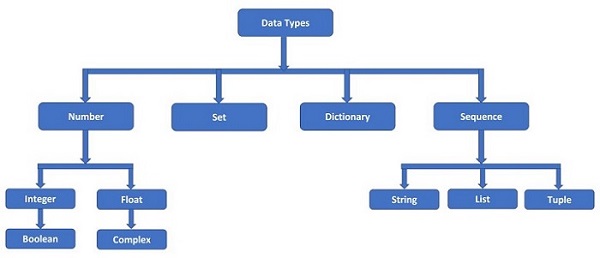
Python supports the following built-in data types −
Python numeric data types store numeric values. Number objects are created when you assign a value to them. For example −
var1 =1# int data type
var2 =True# bool data type
var3 =10.023# float data type
var4 =10+3j# complex data type
Python supports four different numerical types and each of them have built-in classes in Python library, called int, bool, float and complex respectively −
int (signed integers)
float (floating point real values)
complex (complex numbers)
A complex number is made up of two parts – real and imaginary. They are separated by ‘+’ or ‘-‘ signs. The imaginary part is suffixed by ‘j’ which is the imaginary number. The square root of -1 (\sqrt{-1}), is defined as imaginary number. Complex number in Python is represented as x+yj, where x is the real part, and y is the imaginary part. So, 5+6j is a complex number.
>>>type(5+6j)<class'complex'>
Here are some examples of numbers −
int
float
complex
10
0.0
3.14j
0O777
15.20
45.j
-786
-21.9
9.322e-36j
080
32.3+e18
.876j
0x17
-90.
-.6545+0J
-0x260
-32.54e100
3e+26J
0x69
70.2-E12
4.53e-7j
Example of Numeric Data Types
Following is an example to show the usage of Integer, Float and Complex numbers:
# integer variable.
a=100print("The type of variable having value", a," is ",type(a))# float variable.
c=20.345print("The type of variable having value", c," is ",type(c))# complex variable.
d=10+3jprint("The type of variable having value", d," is ",type(d))
2. Python String Data Type
Python string is a sequence of one or more Unicode characters, enclosed in single, double or triple quotation marks (also called inverted commas). Python strings are immutable which means when you perform an operation on strings, you always produce a new string object of the same type, rather than mutating an existing string.
As long as the same sequence of characters is enclosed, single or double or triple quotes don’t matter. Hence, following string representations are equivalent.
A string in Python is an object of str class. It can be verified with type() function.
>>>type("Welcome To TutorialsPoint")<class'str'>
A string is a non-numeric data type. Obviously, we cannot perform arithmetic operations on it. However, operations such as slicing and concatenation can be done. Python’s str class defines a number of useful methods for string processing. Subsets of strings can be taken using the slice operator ([ ] and [:] ) with indexes starting at 0 in the beginning of the string and working their way from -1 at the end.
The plus (+) sign is the string concatenation operator and the asterisk (*) is the repetition operator in Python.
Example of String Data Type
str='Hello World!'print(str)# Prints complete stringprint(str[0])# Prints first character of the stringprint(str[2:5])# Prints characters starting from 3rd to 5thprint(str[2:])# Prints string starting from 3rd characterprint(str*2)# Prints string two timesprint(str+"TEST")# Prints concatenated string
Sequence is a collection data type. It is an ordered collection of items. Items in the sequence have a positional index starting with 0. It is conceptually similar to an array in C or C++. There are following three sequence data types defined in Python.
List Data Type
Tuple Data Type
Range Data Type
Python sequences are bounded and iterable – Whenever we say an iterable in Python, it means a sequence data type (for example, a list).
(a) Python List Data Type
Python Lists are the most versatile compound data types. A Python list contains items separated by commas and enclosed within square brackets ([]). To some extent, Python lists are similar to arrays in C. One difference between them is that all the items belonging to a Python list can be of different data type where as C array can store elements related to a particular data type.
>>>[2023,"Python",3.11,5+6j,1.23E-4]
A list in Python is an object of list class. We can check it with type() function.
As mentioned, an item in the list may be of any data type. It means that a list object can also be an item in another list. In that case, it becomes a nested list.
>>>[['One','Two','Three'],[1,2,3],[1.0,2.0,3.0]]
A list can have items which are simple numbers, strings, tuple, dictionary, set or object of user defined class also.
The values stored in a Python list can be accessed using the slice operator ([ ] and [:]) with indexes starting at 0 in the beginning of the list and working their way to end -1. The plus (+) sign is the list concatenation operator, and the asterisk (*) is the repetition operator.
Example of List Data Type
list=['abcd',786,2.23,'john',70.2]
tinylist =[123,'john']print(list)# Prints complete listprint(list[0])# Prints first element of the listprint(list[1:3])# Prints elements starting from 2nd till 3rd print(list[2:])# Prints elements starting from 3rd elementprint(tinylist *2)# Prints list two timesprint(list+ tinylist)# Prints concatenated lists
Python tuple is another sequence data type that is similar to a list. A Python tuple consists of a number of values separated by commas. Unlike lists, however, tuples are enclosed within parentheses (…).
A tuple is also a sequence, hence each item in the tuple has an index referring to its position in the collection. The index starts from 0.
>>>(2023,"Python",3.11,5+6j,1.23E-4)
In Python, a tuple is an object of tuple class. We can check it with the type() function.
tuple=('abcd',786,2.23,'john',70.2)
tinytuple =(123,'john')print(tuple)# Prints the complete tupleprint(tuple[0])# Prints first element of the tupleprint(tuple[1:3])# Prints elements of the tuple starting from 2nd till 3rd print(tuple[2:])# Prints elements of the tuple starting from 3rd elementprint(tinytuple *2)# Prints the contents of the tuple twiceprint(tuple+ tinytuple)# Prints concatenated tuples
The main differences between lists and tuples are: Lists are enclosed in brackets ( [ ] ) and their elements and size can be changed i.e. lists are mutable, while tuples are enclosed in parentheses ( ( ) ) and cannot be updated (immutable). Tuples can be thought of as read-only lists.
The following code is invalid with tuple, because we attempted to update a tuple, which is not allowed. Similar case is possible with lists −
tuple=('abcd',786,2.23,'john',70.2)list=['abcd',786,2.23,'john',70.2]tuple[2]=1000# Invalid syntax with tuplelist[2]=1000# Valid syntax with list
(c) Python Range Data Type
A Python range is an immutable sequence of numbers which is typically used to iterate through a specific number of items.
It is represented by the Range class. The constructor of this class accepts a sequence of numbers starting from 0 and increments to 1 until it reaches a specified number. Following is the syntax of the function −
range(start, stop, step)
Here is the description of the parameters used −
start: Integer number to specify starting position, (Its optional, Default: 0)
stop: Integer number to specify ending position (It’s mandatory)
step: Integer number to specify increment, (Its optional, Default: 1)
Example of Range Data Type
Following is a program which uses for loop to print number from 0 to 4 −
for i inrange(5):print(i)
This produce the following result −
0
1
2
3
4
Now let’s modify above program to print the number starting from 2 instead of 0 −
for i inrange(2,5):print(i)
This produce the following result −
2
3
4
Again, let’s modify the program to print the number starting from 1 but with an increment of 2 instead of 1:
for i inrange(1,5,2):print(i)
This produce the following result −
1
3
4. Python Binary Data Types
A binary data type in Python is a way to represent data as a series of binary digits, which are 0’s and 1’s. It is like a special language computers understand to store and process information efficiently.
This type of data is commonly used when dealing with things like files, images, or anything that can be represented using just two possible values. So, instead of using regular numbers or letters, binary sequence data types use a combination of 0s and 1s to represent information.
Python provides three different ways to represent binary data. They are as follows −
bytes
bytearray
memoryview
Let us discuss each of these data types individually −
(a) Python Bytes Data Type
The byte data type in Python represents a sequence of bytes. Each byte is an integer value between 0 and 255. It is commonly used to store binary data, such as images, files, or network packets.
We can create bytes in Python using the built-in bytes() function or by prefixing a sequence of numbers with b.
Example of Bytes Data Type
In the following example, we are using the built-in bytes() function to explicitly specify a sequence of numbers representing ASCII values −
# Using bytes() function to create bytes
b1 =bytes([65,66,67,68,69])print(b1)
The result obtained is as follows −
b'ABCDE'
In here, we are using the “b” prefix before a string to automatically create a bytes object −
# Using prefix 'b' to create bytes
b2 =b'Hello'print(b2)
Following is the output of the above code −
b'Hello'
(b) Python Bytearray Data Type
The bytearray data type in Python is quite similar to the bytes data type, but with one key difference: it is mutable, meaning you can modify the values stored in it after it is created.
You can create a bytearray using various methods, including by passing an iterable of integers representing byte values, by encoding a string, or by converting an existing bytes or bytearray object. For this, we use bytearray() function.
Example of Bytearray Data Type
In the example below, we are creating a bytearray by passing an iterable of integers representing byte values −
# Creating a bytearray from an iterable of integers
value =bytearray([72,101,108,108,111])print(value)
The output obtained is as shown below −
bytearray(b'Hello')
Now, we are creating a bytearray by encoding a string using a “UTF-8” encoding −
# Creating a bytearray by encoding a string
val =bytearray("Hello",'utf-8')print(val)
The result produced is as follows −
bytearray(b'Hello')
(c) Python Memoryview Data Type
In Python, a memoryview is a built-in object that provides a view into the memory of the original object, generally objects that support the buffer protocol, such as byte arrays (bytearray) and bytes (bytes). It allows you to access the underlying data of the original object without copying it, providing efficient memory access for large datasets.
You can create a memoryview using various methods. These methods include using the memoryview() constructor, slicing bytes or bytearray objects, extracting from array objects, or using built-in functions like open() when reading from files.
Example of Memoryview Data Type
In the given example, we are creating a memoryview object directly by passing a supported object to the memoryview() constructor. The supported objects generally include byte arrays (bytearray), bytes (bytes), and other objects that support the buffer protocol −
data =bytearray(b'Hello, world!')
view =memoryview(data)print(view)
Following is the output of the above code −
<memory at 0x00000186FFAA3580>
If you have an array object, you can create a memoryview using the buffer interface as shown below −
You can also create a memoryview by slicing a bytes or bytearray object −
data =b'Hello, world!'# Creating a view of the last part of the data
view =memoryview(data[7:])print(view)
The result obtained is as follows −
<memory at 0x00000200D9AA3580>
5. Python Dictionary Data Type
Python dictionaries are kind of hash table type. A dictionary key can be almost any Python type, but are usually numbers or strings. Values, on the other hand, can be any arbitrary Python object.
Python dictionary is like associative arrays or hashes found in Perl and consist of key:value pairs. The pairs are separated by comma and put inside curly brackets {}. To establish mapping between key and value, the semicolon’:’ symbol is put between the two.
>>>{1:'one',2:'two',3:'three'}
In Python, dictionary is an object of the built-in dict class. We can check it with the type() function.
>>>type({1:'one',2:'two',3:'three'})<class'dict'>
Dictionaries are enclosed by curly braces ({ }) and values can be assigned and accessed using square braces ([]).
Example of Dictionary Data Type
dict={}dict['one']="This is one"dict[2]="This is two"

tinydict ={'name':'john','code':6734,'dept':'sales'}print(dict['one'])# Prints value for 'one' keyprint(dict[2])# Prints value for 2 keyprint(tinydict)# Prints complete dictionaryprint(tinydict.keys())# Prints all the keysprint(tinydict.values())# Prints all the values
This produce the following result −
This is one
This is two
{'dept': 'sales', 'code': 6734, 'name': 'john'}
['dept', 'code', 'name']
['sales', 6734, 'john']
Python’s dictionary is not a sequence. It is a collection of items but each item (key:value pair) is not identified by positional index as in string, list or tuple. Hence, slicing operation cannot be done on a dictionary. Dictionary is a mutable object, so it is possible to perform add, modify or delete actions with corresponding functionality defined in dict class. These operations will be explained in a subsequent chapter.
6. Python Set Data Type
Set is a Python implementation of set as defined in Mathematics. A set in Python is a collection, but is not an indexed or ordered collection as string, list or tuple. An object cannot appear more than once in a set, whereas in List and Tuple, same object can appear more than once.
Comma separated items in a set are put inside curly brackets or braces {}. Items in the set collection can be of different data types.
Note that items in the set collection may not follow the same order in which they are entered. The position of items is optimized by Python to perform operations over set as defined in mathematics.
Python’s Set is an object of built-in set class, as can be checked with the type() function.
A set can store only immutable objects such as number (int, float, complex or bool), string or tuple. If you try to put a list or a dictionary in the set collection, Python raises a TypeError.
Hashing is a mechanism in computer science which enables quicker searching of objects in computer’s memory. Only immutable objects are hashable.
Even if a set doesn’t allow mutable items, the set itself is mutable. Hence, add/delete/update operations are permitted on a set object, using the methods in built-in set class. Python also has a set of operators to perform set manipulation. The methods and operators are explained in latter chapters
Python boolean type is one of built-in data types which represents one of the two values either True or False. Python bool() function allows you to evaluate the value of any expression and returns either True or False based on the expression.
A Boolean number has only two possible values, as represented by the keywords, True and False. They correspond to integer 1 and 0 respectively.
Following is a program which prints the value of boolean variables a and b −
a =True# display the value of aprint(a)# display the data type of aprint(type(a))
This will produce the following result −
true
<class 'bool'>
Following is another program which evaluates the expressions and prints the return values −
# Returns false as a is not equal to b
a =2
b =4print(bool(a==b))# Following also prints the sameprint(a==b)# Returns False as a is None
a =Noneprint(bool(a))# Returns false as a is an empty sequence
a =()print(bool(a))# Returns false as a is 0
a =0.0print(bool(a))# Returns false as a is 10
a =10print(bool(a))
This produce the following result −
False
False
False
False
False
True
8. Python None Type
Python’s none type is represented by the “nonetype.” It is an object of its own data type. The nonetype represents the null type of values or absence of a value.
Example of None Type
In the following example, we are assigning None to a variable x and printing its type, which will be nonetyoe −
# Declaring a variable# And, assigning a Null value (None)

x =None# Printing its value and typeprint("x = ", x)print("type of x = ",type(x))
This produce the following result −
x =  None
type of x =  <class 'NoneType'>
Getting Data Type
To get the data types in Python, you can use the type() function. The type() is a built-in function that returns the class of the given object.
Example
In the following example, we are getting the type of the values and variables −
# Getting type of valuesprint(type(123))print(type(9.99))# Getting type of variables
a =10
b =2.12
c ="Hello"
d =(10,20,30)
e =[10,20,30]print(type(a))print(type(b))print(type(c))print(type(d))print(type(e))
In Python, during declaring a variable or an object, you don’t need to set the data types. Data type is set automatically based on the assigned value.
Example
The following example, demonstrating how a variable’s data type is set based on the given value −
# Declaring a variable# And, assigning an integer value

x =10# Printing its value and typeprint("x = ", x)print("type of x = ",type(x))# Now, assigning string value to# the same variable
x ="Hello World!"# Printing its value and typeprint("x = ", x)print("type of x = ",type(x))
This produce the following result −
x =  10
type of x =  <class 'int'>
x =  Hello World!
type of x =  <class 'str'>
Primitive and Non-primitive Data Types
The above-explained data types can also be categorized as primitive and non-primitive.
1. Primitive Types
The primitive data types are the fundamental data types that are used to create complex data types (sometimes called complex data structures). There are mainly four primitive data types, which are −
Integers
Floats
Booleans, and
Strings
2. Non-primitive Types
The non-primitive data types store values or collections of values. There are mainly four types of non-primitive types, which are −
Lists
Tuples
Dictionaries, and
Sets
Python Data Type Conversion
Sometimes, you may need to perform conversions between the built-in data types. To convert data between different Python data types, you simply use the type name as a function.
Following is an example which converts different values to integer, floating point and string values respectively −
print("Conversion to integer data type")
a =int(1)# a will be 1
b =int(2.2)# b will be 2
c =int("3.3")# c will be 3print(a)print(b)print(c)print("Conversion to floating point number")
a =float(1)# a will be 1.0
b =float(2.2)# b will be 2.2
c =float("3.3")# c will be 3.3print(a)print(b)print(c)print("Conversion to string")
a =str(1)# a will be "1"
b =str(2.2)# b will be "2.2"
c =str("3.3")# c will be "3.3"print(a)print(b)print(c)
This produce the following result −
Conversion to integer data type
1
2
3
Conversion to floating point number
1.0
2.2
3.3
Conversion to string
1
2.2
3.3
Data Type Conversion Functions
There are several built-in functions to perform conversion from one data type to another. These functions return a new object representing the converted value.
Sr.No.
Function & Description
1
Python int() functionConverts x to an integer. base specifies the base if x is a string.
2
Python long() functionConverts x to a long integer. base specifies the base if x is a string. This function has been deprecated.