Blog

  • C – Internal and External Linkage

    In C, linkage is a concept that explains whether or not names or identifiers can refer to the same entity throughout the entire program or a single translation unit. It may sound similar to program scope but it is not so. To understand this concept better, let us dig deeper into the compilation process.

    Before learning the concept of linkage in C, we first need to understand what a translation unit is.

    What is a Translation Unit?

    A translation unit is a file that has source code, header files, and other dependencies. All of these sources are grouped together to form a single translation unit which can then be used by the compiler to produce one single executable objects.

    What is Linkage?

    Assume there is a C program with many source code files. Each source file is compiled sequentially. In the compilation process, the last stage is linking, where multiple machine code files are used to produce an executable object code. It is handled by a program called linker.

    Linkage is a property that describes how variables should be linked by the linker.

    Variable Linkage in C

    In C, the linkage can control whether a variable can be used only in the file where it is declared or it can also be used in other files of the program.

    Linkage tells us if a variable’s name is limited to one file or can be shared across multiple files, helping us manage how variables are connected in a program.

    Types of Linkage in C

    There are two types of Linkage in C −

    • Internal Linkage
    • External Linkage

    Let’s understand these two concepts in detail.

    Internal Linkage

    Internal linkage refers to everything only in the scope of a translation unit. An identifier that implements internal linkage is not accessible outside the translation unit in which it is declared. So, an identifier with internal linkage can be accessed only within the same file where it is declared.

    Internal Linkage is implemented using the static keyword, and its value is stored in RAM (either in the initialized or uninitialized).

    Let’s understand it through the following example. Let’s consider a source file items.c (identifier) −

    #include <stdio.h>// Variable with internal linkage
    Static int items =10;

    The above code implements static linkage on identifier items.

    Let’s consider another source file display.c which is located in the same translation unit.

    #include <stdio.h>#include "items.c"intmain(){printf("total item is: %d", items);return0;}

    Following is the output of the above code after executing the display.c −

    total item is: 10
    

    Suppose display.c is located in a different translation unit (meaning we are not including the items.c using #include). Then it gives the error “Each undeclared identifier is reported only once for each function it appears in.”

    External Linkage

    An identifier implementing external linkage exists beyond a particular translation unit and is accessible throughout the entire program, which is the combination of all translation units (or object files). It is the default linkage for globally scoped variables (without static) and functions.

    The extern keyword is used to implement external linkage. When we use the ‘extern’ keyword, we tell the compiler that the variable is defined in another file. Thus, the declaration of an external identifier doesn’t use any memory space.

    Extern identifiers are stored in RAM’s data (initialized/uninitialized) or code (text) segments.

    Let’s take an example to understand the concept better. Consider a source file: items.c (identifier). In the internal linkage we used the static keyword; here we create a source file without the extern keyword.

    #include <stdio.h>// Variable with internal linkageint items =10;

    As the variable items is declared globally, it is accessible to all the translational units. Now, consider the file display.c is in the different translational unit −

    #include <stdio.h>// tells the compiler that the variable// have external linkageexternint items;intmain(){printf("total item is: %d", items);return0;}

    Here is the output of the above code after executing the display.c −

    total item is: 10
    

    Conclusion

    Linkage in C defines whether variables and functions can be accessed only within a single file or across multiple files of a program. By using internal linkage (static) and external linkage (extern), we can control the scope and accessibility of identifiers. It ensures better program structure and modularity.

  • C – Const Qualifier

    The const qualifier in C is used to declare variables whose values should remain fixed throughout the program. It is used to declare a variable as a constant, whose value cannot be changed after initialization. Once a variable is declared as const, it becomes readonly, and the compiler prevents any accidental modifications.

    What is the Use of const Qualifier in C?

    Using the const qualifier, programmers can improve the safety, readability, and maintainability of their program codes. It helps programmers make their intentions clear by signaling which values should stay fixed throughout the program.

    For example, constants like mathematical values (PI, e, etc.), array sizes, or configuration values should not be altered at runtime. By declaring them as const, we protect these values from accidental changes.

    Example of Using const Qualifier in C

    Take a look at the following example. Here, we have used const to ensure the value of PI remains fixed throughout the program.

    #include <stdio.h>intmain(){// Defining a constant variableconstint PI =3.14;printf("Value of PI: %d\n", PI);// Trying to modify PI will cause an error// PI = 10; // Not allowed, PI is read-onlyreturn0;}

    Observe how the const variable (PI) prevents unwanted changes to constants. When we run this code, it will produce the following output –

    Value of PI: 3
    

    Using const Qualifer in Different Contexts

    Apart from defining constant variables, the const qualifier can also be used in different contexts to provide various behaviors. Here are some different scenarios where we can use the const qualifier:

    • Pointer to Constant
    • Constant pointer to variable
    • Constant pointer to constant

    In the subsequent sections of this chapter, we will cover each of these topics in detail.

    Pointer to Constant

    As its name suggests, a “pointer to a constant” points to a constant value which cannot be modified. However, the pointer itself can change because it’s a variable and it can point somewhere else.

    Let’s see its syntax −

    const type* name;

    Or,

    typeconst* name;

    A “pointer to a constant” means the pointer can point to different variables, but the value of the object being pointed to cannot be changed through this pointer.

    • The pointer itself is stored in the read-write area (such as a stack in this case).
    • The object being pointed to may reside either in the read-only area or in the read-write area.
    • Even if the object is stored in the writable location, you cannot alter its value using this pointer, since the pointer treats the object as a constant.

    Example: Pointer to Constant with an Integer

    In this example, we are using a pointer to constant with an integer −

    #include <stdio.h>intmain(){int x =10, y =20;// Pointer to constant integerconstint*ptr =&x;printf("Value pointed by ptr: %d\n",*ptr);// *ptr = 15;  // Not allowed (cannot change value through ptr)
       ptr =&y;// allowed (pointer can point to another variable)printf("Value pointed by ptr: %d\n",*ptr);return0;}

    Notice that we cannot change the value of the variable “x” though the pointer. On executing the code, you will get the following output −

    Value pointed by ptr: 10
    Value pointed by ptr: 20
    

    Example: Pointer to Constant with an Array

    In this example, we are using a pointer to constant with an array −

    #include <stdio.h>intmain(){int arr[]={1,2,3};// Pointer to constant integer (array base address)constint*ptr = arr;printf("First element: %d\n",*ptr);// *ptr = 5;  	// not allowed (cannot change array element via ptr)
       ptr++;// Allowed (can move pointer to next element)printf("Second element: %d\n",*ptr);return0;}

    When we run the above program, it will produce the following output −

    First element: 1
    Second element: 2
    

    Here, we cannot modify an element of the array using a pointer in a regular way. Notice the following commented line in the program −

    // *ptr = 5;

    Constant Pointer to Variable

    A constant pointer means the pointer itself is a constant variable; it means we cannot alter the pointer to point to another variable. Its syntax is as follows −

    int*const ptr;

    Let’s understand this concept using the following example. It demonstrates that the value of the object pointed by the constant pointer can be changed but the pointer cannot point to another variable.

    #include <stdio.h>intmain(void){int i =10;int j =20;/* constant pointer to integer */int*const ptr =&i;printf("ptr: %d\n",*ptr);*ptr =100;// change the pointer valueprintf("ptr: %d\n",*ptr);// ptr = &j; // pointer cannot point to another variablereturn0;}

    Here is the output of the above code −

    ptr: 10
    ptr: 100
    

    Notice the commented line −

    // ptr = &j; 	// pointer cannot point to another variable

    If we uncomment this line and run the code, then it will produce an error. Why? It’s because the constant pointer (ptr) is pointing to “i” and it cannot point to another variable “j”.

    Constant Pointer to Constant

    A “constant pointer to constant” is a type of constant pointer that points to a constant variable, which means we cannot alter the value pointed to by the pointer, also the pointer cannot point to other variables. Let’s see its syntax −

    constint*const ptr;

    The following example shows how you can use a “constant pointer to constant” in a C program −

    #include <stdio.h>intmain(void){int i =10;int j =20;/* constant pointer to constant integer */constint*const ptr =&i;printf("ptr: %d\n",*ptr);
    
       ptr =&j;// error*ptr =50;// errorreturn0;}

    Now, let’s run this code and check its output −

    ERROR!
    main.c: In function 'main':
    main.c:10:9: error: assignment of read-only variable 'ptr'
       10 |     ptr = &j; // error
          |         ^
    ERROR!
    main.c:11:10: error: assignment of read-only location '*(const int *)ptr'
       11 |     *ptr = 50; // error
    

    In the code, observe that we are trying to modify the pointer as well as the value it is point to. And, a “constant pointer to constant” denies both the actions, which is why we are getting an error in both the cases.

    Advantages of Const Qualifier

    Following are the advantages of using a const qualifier in a C program −

    • Helps prevent unintentional changes to variables
    • Reduces the risk of bugs and errors in your code; makes the code more reliable
    • Prevents functions from modifying arguments that should remain unchanged

    By using const qualifiers, we can avoid having to make a copy of their values, which can reduce the memory usage and improve performance.

    Conclusion

    The const qualifier in C is a powerful feature that improves code readability, safety, and reliability. It helps prevent accidental modification by clearly defining which values should not change. It supports compiler optimizations and makes programs error-free and easy to maintain.

  • C – Constants

    constant in C is a user-assigned name to a location in the memory, whose value cannot be modified once declared. This is in contrast to a variable in C, which is also a named memory location, however whose value may be changed during the course of the code.

    Instead of repeatedly using hard-coded values in a program, it is advised to define a constant and use it. Constants in a C program are usually employed to refer to a value which may be error-prone if it is to be used repetitively in the program, at the same time its value is not likely to change.

    For example, the value of mathematical constant PI is a high-precision floating point number 3.14159265359, and if it is likely to appear frequently, it is declared as a constant and used by its name.

    We may consider a constant in C as a read-only variable, as its value can only be used subsequently but cannot be modified.

    You can declare a constant in C program with either of the following two ways −

    • Using the const Keyword
    • Using the #define Directive

    Let’s understand these two ways of declaring a constant in C.

    Defining a Constant Using the const Keyword

    The syntax of declaring a constant is as follows −

    const type NAME = val;

    For example,

    constfloat PI =3.14159265359;

    We can now use PI in any expression, as we would use any variable.

    Example

    Take a look at the following example −

    #include <stdio.h>intmain(){constfloat PI =3.14159265359;float radius =5;float area = PI*radius*radius;printf("area: %f", area);return0;}

    Output

    On running this code, you will get following output −

    area: 78.539818
    

    However, changing the value of a constant is prohibited. The following statement gives a compiler error −

    constfloat PI =3.14159265359;
    PI=22/7;

    Here, you will get the following error message −

    error: assignment of read-only variable 'PI'

    In case of variables, you can declare a variable and assign it a value later on in the program, however you cannot follow the same process in case of a constant.

    You can declare a constant in C without assigning it a value. But when you try to assign it a value afterwords, then the compiler will throw an error.

    constfloat PI;
    PI =3.14159265359;

    Here, you will get this error message −

    error: assignment of read-only variable 'PI'

    Note: “sizeof” returns “size_t”. The type of unsigned integer of “size_t” can vary depending on platform. And, it may not be long unsigned int everywhere. In such cases, we use “%zu” for the format string instead of “%d”.

    This is because the compiler assigns a random garbage value at the time of declaration, which you cannot change afterwards. Hence, you must declare and initialize the constant at once.

    constant in C can be of any of the data types including primary data types such as int, float, char, and derived data types such as struct.

    Defining a Constant Using the #define Directive

    Using the #define preprocessor directive is also an effective method to define a constant. Here is its syntax −

    #define name = value

    Take a look at the following example:

    #define PI = 3.14159265359

    Although the constant so defined can also be used in any expression (just as the one with the const keyword), there is a difference between the two.

    The constants created by the #define directive are not handled by the compiler. Instead, they behave as macros, whose values are substituted at the runtime.

    The other notable difference is that you need not mention the data type of the value to be assigned to the constant when using the #define directive.

    Example: Define a Constant Using the #define

    Given below is another example of a constant defined using the #define directive −

    #include <stdio.h>#define LENGTH 10   #define WIDTH  5#define NEWLINE '\n'intmain(){int area;  
       area = LENGTH * WIDTH;printf("length: %d width: %d", LENGTH, WIDTH);printf("%c", NEWLINE);printf("value of area : %d", area);return0;}

    Output

    Upon running this code, you will get the following output −

    length: 10 width: 5
    value of area : 50
    

    Since a constant is also an identifier in C, it follows all the rules of forming an identifier. Identifiers in C are case-sensitive. Hence the convention followed while defining a constant in C is that it uses uppercase characters, however it is not mandatory.

    Changing the Value of a Constant

    By definition, constants are immutable. Why would you change the value of a constant in the first place? We use constants whose value is supposed to remain unchanged. To be able to change the value, we would define a variable rather than a constant.

    We have seen that it is not possible to assign a new value to an already defined constant. However, there exists a workaround with which a new value can be assigned to a constant.

    The technique uses the concept of pointers in C. A Pointer is a variable that stores the address of another variable. Since it is a variable, its value can be changed. Moreover, this change reflects in the original variable.

    Example: Change the Value of a Constant

    The following code demonstrates how to change the value of a constant with the pointer mechanism −

    #include <stdio.h>intmain(){constint x =10;printf("Initial Value of Constant: %d\n", x);// y is a pointer to constant xint* y =&x;// assign new value*y =100;printf("Value of Constant after change: %d", x);return0;}

    Output

    On executing this code, you will get the following output −

    Initial Value of Constant: 10
    Value of Constant after change: 100
    

    Note that this technique is effective only for those constants which are defined using the const qualifier.

    If you have defined your constant using the #define directive, then you cannot apply this process. This is because the pointer has a data type, and it must be of the same type whose address is to be stored. On the other hand, the constant defined using the #define directive doesn’t really have a data type. It is in fact a macro whose value is substituted during the runtime.

  • C – Variables

    variable is nothing but a name given to a storage area that our programs can manipulate. Each variable in C has a specific type, which determines the size and layout of the variable’s memory; the range of values that can be stored within that memory; and the set of operations that can be applied to the variable.

    Why Do We Use Variables in C?

    A variable in C is a user-assigned name to a certain location in the computer’s memory, which is a collection of a large number of randomly accessible locations capable of holding a single bit. Each location in the memory is identified by a unique address, expressed in binary (or Hexa-decimal for convenience) format.

    Since it is extremely cumbersome to store and process the data in the memory by referring to their locations in binary form, high-level languages such as C let the locations be identified by user-defined names or variables.

    Instead of identifying a free memory location and assigning it a value, you can find a suitable mnemonic identifier and assign it a value. The C compiler will choose an appropriate location and bind it to the identifier specified by you.

    Naming Conventions of C Variables

    The name of the variable must start with an alphabet (upper or lowercase) or an underscore (_). It may consist of alphabets (upper or lowercase), digits, and underscore characters. No other characters can be a part of the name of a variable in C.

    Variable names in C are case-sensitive. For example, “age” is not the same as “AGE”.

    The ANSI standard recognizes a length of 31 characters for a variable name. Although you can choose a name with more characters, only the first 31 will be recognized. Using a descriptive name for a variable, that reflects the value it intends to store is considered to be a good practice. Avoid using very short variable names that might confuse you.

    C is a statically typed language. Hence, the data type of the variable must be mentioned in the declaration before its name. A variable may be declared inside a function (local variable) or globally. More than one variable of the same type may be declared in a single statement.

    Example

    Based on the above set of rules and conventions, here are some valid and invalid variable names:

    int _num =5;// valid integer variablefloat marks =55.50;// valid float variablechar choice ='0';// valid char variable// invalid variable name// cannot use "-"int sub-1=35;//invalid; must have data type
    avg =50;// invalid; name can be used for // declaration only once in a functionint choice =0;// Valid integer nameint sal_of_employee =20000;// Valid because all are of same typeint phy, che, maths;// error because variables of // different types in same statementint sal,float tax;

    In C, variables can store data belonging to any of the types it recognizes. Hence there are as many number of types of variables as the number of data types in C.

    Sr.NoType & Description
    1charTypically a single octet(one byte). It is an integer type.
    2intThe most natural size of integer for the machine.
    3floatA single-precision floating point value.
    4doubleA double-precision floating point value.
    5voidRepresents the absence of type.

    C programming language also allows to define various other types of variables such as Enumeration type, Pointer type, Array type, Structure type, Union type, etc. For this chapter, let us study only basic variable types.

    Variable Definition in C

    A variable definition tells the compiler where and how much storage to create for the variable. A variable definition specifies a data type and contains a list of one or more variables of that type as follows −

    type variable_list;

    Here, type must be a valid C data type including char, w_char, int, float, double, bool, or any user-defined object; and variable_list may consist of one or more identifier names separated by commas.

    Some valid variable declarations are shown here −

    int    i, j, k;char   c, ch;float  f, salary;double d;

    The line int i, j, k; declares and defines the variables i, j, and k; which instruct the compiler to create variables named i, j and k of type int.

    Variables can be initialized (assigned an initial value) in their declaration. The initializer consists of an equal sign followed by a constant expression as follows −

    type variable_name = value;

    Example: Variable Definition and Initialization

    Take a look at the following examples:

    // declaration of d and f
    extern int d = 3, f = 5;     
    
    // definition and initializing d and f
    int d = 3, f = 5;            
    
    // definition and initializes z 
    byte z = 22;
    
    // the variable x has the value 'x'
    char x = 'x';               
    

    For definition without an initializer: variables with static storage duration are implicitly initialized with NULL (all bytes have the value 0); the initial value of all other variables are undefined.

    Variable Declaration in C

    As per the ANSI C standard, all the variables must be declared in the beginning. Variable declaration after the first processing statement is not allowed. Although the C99 and C11 standard revisions have removed this stipulation, it is still considered a good programming practice. You can declare a variable to be assigned a value later in the code, or you can initialize it at the time of declaration.

    Example: Variable Declaration

    // declaration with initialization
    int x = 10; 
    
    // declare first and assign later       
    int y;             
    y = 20;
    
    // define and initialize two variables
    int d = 3, f = 5;
    
    // the variable x has the value 'x'
    char x = 'x';      
    

    Once a variable of a certain type is declared, it cannot be assigned a value of any other type. In such a case the C compiler reports a type mismatch error.

    A variable declaration provides assurance to the compiler that there exists a variable with the given type and name so that the compiler can proceed with further compilation without requiring complete detail about the variable. A variable definition has its meaning at the time of compilation only, the compiler needs actual variable definition at the time of linking the program.

    A variable declaration is useful when you are using multiple files and you define your variable in one of the files which will be available at the time of linking the program. You will use the keyword “extern” to declare a variable at any place. Though you can declare a variable multiple times in your C program, it can be defined only once in a file, a function, or a block of code.

    Example

    Try the following example, where variables have been declared at the top, but they have been defined and initialized inside the main function −

    #include <stdio.h>// Variable declaration:externint a, b;externint c;externfloat f;intmain(){/* variable definition: */int a, b;int c;float f;/* actual initialization */
       a =10;
       b =20;
      
       c = a + b;printf("value of c : %d \n", c);
    
       f =70.0/3.0;printf("value of f : %f \n", f);return0;}

    Output

    When the above code is compiled and executed, it produces the following result:

    value of c : 30
    value of f : 23.333334
    

    The same concept applies on function declaration where you provide a function name at the time of its declaration and its actual definition can be given anywhere else. For example −

    // function declarationintfunc();intmain(){// function callint i =func();}// function definitionintfunc(){return0;}

    Lvalues and Rvalues in C

    There are two kinds of expressions in C:

    • lvalue expressions
    • rvalue expressions

    Lvalue Expressions in C

    Expressions that refer to a memory location are called “lvalue” expressions. An lvalue may appear as either the left-hand or right-hand side of an assignment.

    Variables in C are lvalues and so they may appear on the left-hand side of an assignment.

    Rvalue Expressions in C

    The term “rvalue” refers to a data value that is stored at some address in memory. An “rvalue” is an expression that cannot have a value assigned to it which means an rvalue may appear on the right-hand side but not on the left-hand side of an assignment.

    Numeric literals are rvalues and so they may not be assigned and cannot appear on the left-hand side.

    Take a look at the following valid and invalid statements:

    // valid statement
    int g = 20; 
    
    // invalid statement 
    // it would generate compile-time error
    10 = 20;    
    

    Variables in C can be classified based on the following parameters:

    • Data types − int, float, char or struct types.
    • Scope − global or local variables.
    • Storage type − automatic, static, register or extern.

    We shall learn about local and global types and storage types later in this tutorial.

  • C – Identifiers

    Identifier in C helps in identifying variablesconstantsfunctions etc., in a C code. C, being a high-level computer language, allows you to refer to a memory location with a name instead of using its address in binary or hexadecimal form.

    C Identifiers

    Identifiers are the user-defined names given to make it easy to refer to the memory. It is also used to define various elements in the program, such as the function, user-defined type, labels, etc. Identifiers are thus the names that help the programmer to use programming elements more conveniently.

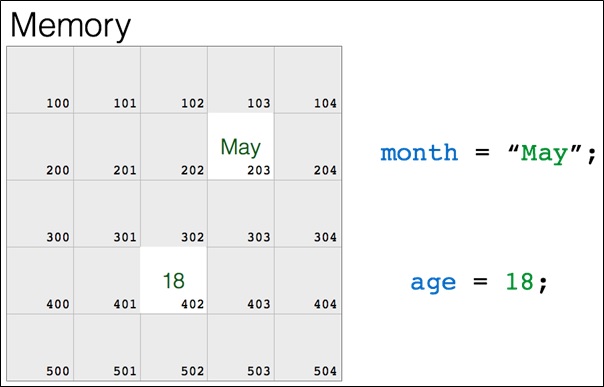
    When a variable or a function is defined with an identifier, the C compiler allocates it the memory and associates the memory location to the identifier. As a result, whenever the identifier is used in the instruction, C compiler can access its associated memory location. For example, when we declare a variable age and assign it a value as shown in the following figure, the compiler assigns a memory location to it.

    Memory

    Even if the programmer can use an identifier of his choice to name a variable or a function etc., there are certain rules to be followed to form a valid identifier.

    Naming Rules of C Identifiers

    Given below are the rules using which an identifier is formed −

    • Keywords can’t be used as identifiers as they are predefined.
    • Out of the character set that C uses, only the alphabets (upper and lowercase) and the underscore symbol (_) are allowed in the identifier. It implies that you can’t use characters like the punctuation symbols etc. as a part of the identifier.
    • The identifier must start either with an alphabet (upper or lowercase) or an underscore. It means, a digit cannot be the first character of the identifier.
    • The subsequent characters may be alphabets or digits or an underscore.
    • Same identifier can’t be used as a name of two entities. An identifier can be used only once in the current scope.

    As per the above rules, some examples of the valid and invalid identifiers are as follows −

    Valid C Identifiers

    age, Age, AGE, average_age, __temp, address1, phone_no_personal, _my_name
    

    Invalid C Identifiers

    Average-age, my name, $age, #phone,1mg, phy+maths
    

    Examples of C Identifiers

    The following program shows an error −

    #include <stdio.h>intmain(){/* variable definition: */int marks =50;float marks =65.50;printf("%d %f", marks, marks);return0;}

    Error

    main.c: In function 'main':
    main.c:7:10: error: conflicting types for 'marks'; have 'float'
        7 |    float marks = 65.50;
          |          ^~~~~
    main.c:6:8: note: previous definition of 'marks' with type 'int'
        6 |    int marks = 50;
          |        ^~~~~
    main.c:8:13: warning: format '%d' expects argument of type 'int', but argument 2 has type 'double' [-Wformat=]
        8 |    printf("%d %f", marks, marks);
          |            ~^      ~~~~~
          |             |      |
          |             int    double
          |            %f  
    
    • Identifiers are case-sensitive, as a result age is not the same as AGE.
    • ANSI standard recognizes a length of 31 characters for an identifier. Although you can choose a name with more characters, only the first 31 will be recognized. Thus you can form a meaningful and descriptive identifier.

    Scope of C Identifiers

    In C language, the scope of identifiers refers to the place where an identifier is declared and can be used/accessed. There are two scopes of an identifier:

    Global Identifiers

    If an identifier has been declared outside before the declaration of any function, it is called as an global (external) identifier.

    Example

    #include <stdio.h>int marks=100;// external identifierintmain(){printf("The value of marks is %d\n", marks);}

    Output

    The value of marks is 100
    

    This is because marks is defined outside of any blocks, so it is an external identifier.

    Local Identifiers

    On the other hand, an identifier inside any function is an local (internal) identifier.

    Example

    #include <stdio.h>intmain(){int marks=100;// internal identifierprintf("The value of marks is %d\n", marks);}

    Output

    The value of marks is 100
    

    This is because marks is defined inside main function, so it is an internal identifier.

    Examples of Different Types of C Identifiers

    Identifiers can also appear in a forward declaration of a function. However, the declaration signature of a function should match with the definition.

    Example of Variable Identifier

    int marks1 =50, marks2 =60;float avg =(float)(marks1+marks2)/2;

    Example of Function Identifier

    intaverage(int marks1,int marks2){return(float)(marks1+marks2)/2;}

    Example of User-defined Type Identifier

    structstudent{int rollno;char*name;int m1,m2,m3;float percent
    };structstudent s1 ={1,"Raju",50,60,70,60.00};

    Example of Typedef Identifier

    structstudent{int rollno;char*name;int m1,m2,m3;float percent
    };typedefstructstudent STUDENT;
    STUDENT s1 ={1,"Raju",50,60,70,60.00};

    Example of Label Identifier

    #include <stdio.h>intmain(){int x=0;
       begin:
       x++;if(x>=10)goto end;printf("%d\n", x);goto begin;
    
       end:return0;}

    Output

    1
    2
    3
    4
    5
    6
    7
    8
    9
    

    Example of Enum Identifier

    #include <stdio.h>enumweek{Mon=10, Tue, Wed, Thur, Fri=10, Sat=16, Sun};intmain(){printf("The value of enum week: %d\n",Mon);return0;}

    Output

    The value of enum week: 10
    

    Thus, the identifiers are found everywhere in the C program. Choosing right identifier for the coding element such as the variable or a function is important for enhancing the readability and debugging and documentation of the program.

  • C – Keywords

    Keywords are those predefined words that have special meaning in the compiler and they cannot be used for any other purpose. As per the C99 standard, C language has 32 keywords. Keywords cannot be used as identifiers.

    The following table has the list of all keywords (reserved words) available in the C language:

    autodoubleintstruct
    breakelselongswitch
    caseenumregistertypedef
    charexternreturnunion
    continueforsignedvoid
    doifstaticwhile
    defaultgotosizeofvolatile
    constfloatshortunsigned

    All the keywords in C have lowercase alphabets, although the keywords that have been newly added in C, do have uppercase alphabets in them. C is a case-sensitive language. Hence, int is a keyword but INT, or Int are not recognized as a keyword. The new keywords introduced from C99 onwards start with an underscore character. The compiler checks the source code for the correctness of the syntax of all the keywords and then translates it into the machine code.

    Example of C Keywords

    In the following program, we are using a keyword as an identifier i.e., as the name of the user-defined function, that will cause a compilation error.

    #include <stdio.h>voidregister(int,int);intmain(){/* variable definition: */int a=5, b=7;register(a,b);return0;}voidregister(int a,int b){printf("%d", a+b);}

    Errors

    main.c:3:15: error: expected identifier or '(' before 'int'
        3 | void register(int, int);
          |               ^~~
    main.c: In function 'main':
    main.c:8:14: error: expected ')' before ',' token
        8 |    register(a,b);
          |              ^
          |              )
    main.c: At top level:
    main.c:12:15: error: expected identifier or '(' before 'int'
       12 | void register(int a, int b)
          |               ^
    

    The reason for the errors is that we are using a keyword register as the name of a user-defined function, which is not allowed.

    The ANSI C version has 32 keywords. These keywords are the basic element of the program logic. These keywords can be broadly classified in following types −

    • Primary Data types
    • User defined types
    • Storage types
    • Conditionals
    • Loops and loop controls
    • Others

    Let us discuss the keywords in each category.

    Primary Types C Keywords

    These keywords are used for variable declaration. C is a statically type language, the variable to be used must be declared. Variables in C are declared with the following keywords:

    intDeclares an integer variable
    longDeclares a long integer variable
    shortDeclares a short integer variable
    signedDeclares a signed variable
    doubleDeclares a double-precision variable
    charDeclares a character variable
    floatDeclares a floating-point variable
    unsignedDeclares an unsigned variable
    voidSpecifies a void return type

    User-defined Types C Keywords

    C language allows you to define new data types as per requirement. The user defined type has one or more elements of primary type.

    The following keywords are provided for user defined data types −

    structDeclares a structure type
    typedefCreates a new data type
    unionDeclares a union type
    enumDeclares an enumeration type

    Storage Types C Keywords

    The following set of keywords are called storage specifiers. They indicate the location where in the memory the variables stored. Default storage type of a variable is auto, although you can ask the compiler to form a variable with specific storage properties.

    autoSpecifies automatic storage class
    externDeclares a variable or function
    staticSpecifies static storage class
    registerSpecifies register storage class

    Conditionals C Keywords

    The following set of keywords help you to put conditional logic in the program. The conditional logic expressed with if and else keywords provides two alternative actions for a condition. For multi-way branching, use switch case construct. In C, the jump operation in an assembler is implemented by the goto keyword.

    gotoJumps to a labeled statement
    ifStarts an if statement
    elseExecutes when the if condition is false
    caseLabels a statement within a switch
    switchStarts a switch statement
    defaultSpecifies default statement in switch

    Loops and Loop Control C Keywords

    Repetition or iteration is an essential aspect of the algorithm. C provides different alternatives for forming a loop, and keywords for controlling the behaviour of the loop. Each of the keywords let you form a loop of different characteristics and usage.

    ForStarts a for-loop
    doStarts a do-while loop
    whilestarts a while loop
    continueSkips an iteration of a loop
    breakTerminates a loop or switch statement

    Other C Keywords

    The following miscellaneous keywords are also extremely important:

    constSpecifies a constant value
    SizeofDetermines the size of a data type
    Volatilecompiler that the value of the variable may change at any time

    In C99 version, five more keywords were added −

    • _Bool
    • _Complex
    • _Imaginary
    • inline

    In C11, seven more keywords have been added

    • _Alignas
    • _Alignof
    • _Atomic
    • _Generic
    • _Noreturn
    • _Static_assert

    When the C23 standard will be released it will introduce 14 more keywords −

    • alignas
    • alignof
    • bool
    • constexpr
    • false
    • nullptr
    • static_assert
    • thread_local
    • true
    • typeof
    • typeof_unqual
    • _Decimal128

    Most of the recently reserved words begin with an underscore followed by a capital letter, Since existing program source code should not have been using these identifiers.

    Following points must be kept in mind when using the keywords:

    • Keywords are reserved by the programming language and have predefined meaning. They cannot be used as name of a variable or function.
    • Each keyword has to be used as per the syntax stipulated for its use. If the syntax is violated, the compiler reports compilation errors.
    • C is one of the smallest computer languages with only 32 keywords in its ANSI C version, although a few more keywords have been added afterwards.
  • Tokens in C

    token is referred to as the smallest unit in the source code of a computer language such as C. The term token is borrowed from the theory of linguistics. Just as a certain piece of text in a language (like English) comprises words (collection of alphabets), digits, and punctuation symbols. A compiler breaks a C program into tokens and then proceeds ahead to the next stages used in the compilation process.

    The first stage in the compilation process is a tokenizer. The tokenizer divides the source code into individual tokens, identifying the token type, and passing tokens one at a time to the next stage of the compiler.

    The parser is the next stage in the compilation. It is capable of understanding the language’s grammar. identifies syntax errors and translates an error-free program into the machine language.

    A C source code also comprises tokens of different types. The tokens in C are of the following types −

    • Character set
    • Keyword tokens
    • Literal tokens
    • Identifier tokens
    • Operator tokens
    • Special symbol tokens

    Let us discuss each of these token types.

    C Character set

    The C language identifies a character set that comprises English alphabets upper and lowercase (A to Z, as well as a to z), digits 0 to 9, and certain other symbols with a special meaning attached to them. In C, certain combinations of characters also have a special meaning attached to them. For example, \n is known as a newline character. Such combinations are called escape sequences.

    Here is the character set of C language −

    • Uppercase: A to Z
    • Lowercase: a to z
    • Digits: 0 to 9
    • Special characters: ! ” # $ % & ‘ ( ) * + – . : , ; ` ~ = < > { } [ ] ^ _ \ /

    A sequence of any of these characters inside a pair of double quote symbols ” and ” are used to represent a string literal. Digits are used to represent numeric literal. Square brackets are used for defining an array. Curly brackets are used to mark code blocks. Back slash is an escape character. Other characters are defined as operators.

    C Keywords

    In C, a predefined sequence of alphabets is called a keyword. Compared to human languages, programming languages have fewer keywords. To start with, C had 32 keywords, later on, few more were added in subsequent revisions of C standards. All keywords are in lowercase. Each keyword has rules of usage (in programming it is called syntax) attached to it.

    The C compiler checks whether a keyword has been used according to the syntax, and translates the source code into the object code.

    C Literals

    In computer programming terminology, the term literal refers to a textual representation of a value to be assigned to a variable, directly hard-coded in the source code.

    A numeric literal contains digits, a decimal symbol, and/or the exponentiation character E or e.

    The string literal is made up of any sequence of characters put inside a pair of double quotation symbols. A character literal is a single character inside a single quote.

    Arrays can also be represented in literal form by putting a comma-separated sequence of literals between square brackets.

    In C, escape sequences are also a type of literal. Two or more characters, the first being a backslash \ character, put inside a single quote form an escape sequence. Each escape sequence has a predefined meaning attached to it.

    C Identifiers

    In contrast to the keywords, the identifiers are the user-defined elements in a program. You need to define various program elements by giving them an appropriate name. For example, variable, constant, label, user-defined type, function, etc.

    There are certain rules prescribed in C, to form an identifier. One of the important restrictions is that a reserved keyword cannot be used as an identifier. For example, for is a keyword in C, and hence it cannot be used as an identifier, i.e., name of a variable, function, etc.

    C Operators

    C is a computational language. Hence a C program consists of expressions that perform arithmetic and comparison operations. The special symbols from the character set of C are mostly defined as operators. For example, the well-known symbols, +* and / are the arithmetic operators in C. Similarly, < and > are used as comparison operators.

    C Special symbols

    Apart from the symbols defined as operators, the other symbols include punctuation symbols like commas, semicolons, and colons. In C, you find them used differently in different contexts.

    Similarly, the parentheses ( and ) are used in arithmetic expressions as well as in function definitions. The curly brackets are employed to mark the scope of functions, code blocks in conditional and looping statements, etc.

  • Format Specifiers in C

    Format specifiers in C are certain special symbols used in the formatted console IO functions such as printf() and scanf(), as well as formatted file IO functions such as fprintf() and fscanf().

    Format specifiers are formed of a predefined sequence of one or more alphanumeric characters followed by the % symbol. For example, %d, %s, %f, %lf, etc. are some of the format specifiers used in C.

    Why Do We Use Format Specifiers in C?

    The CPU performs IO operations with input and output devices in a streaming manner. The data read from a standard input device (for example, a keyboard) through the standard input stream is called stdin. Similarly the data sent to the standard output, which is the computer display screen, through the standard output device is called stdout.

    The computer receives data from the stream in a text form, however you may want to parse it in variables of different data types such as int, float or a string. Similarly, the data stored in int, float or char variables has to be sent to the output stream in a text format. Format specifier symbols are used exactly for this purpose.

    Format Specifiers in printf() Function

    The printf() function is the most commonly used standard output function, defined in the stdio.h header file. The prototype of printf() function is as follows −

    intprintf(format_string, expr1, expr2,..);

    The first argument of this function is a string that is interspersed with one or more format specifiers. There may be one or more expressions as argument after the first. The compiler substitutes each format specifier with the value of its successive expression. The resultant formatted string is then passed to the output stream.

    Example

    In the following code, we have an int variable age and a float variable percent. The printf() function prints the values of both as below −

    #include <stdio.h>intmain(){int age =18;float percent =67.75;printf("Age: %d \nPercent: %f", age, percent);return0;}

    Output

    When you run the code, it will produce the following output −

    Age: 18 
    Percent: 67.750000
    

    The value of the first variable replaces the first format specifier %d. Similarly, %f is substituted by the value of the percent variable.

    Format Specifiers in scanf() Function

    Format specifiers are also used to parse the input stream into the variables of required type. The following example highlights how it’s done.

    Example

    In this example, the program asks the user to input age and percent values. They are stored in the int and float variables, respectively.

    #include <stdio.h>intmain(){int age;float percent;printf("Enter Age and Percent: \n");scanf("%d %f",&age,&percent);printf("Age: %d Percent: %f", age, percent);return0;}

    Output

    Run the code and check its output −

    Enter Age and Percent: 
    Age: 4096 Percent: 0.000000
    

    Types of Format Specifiers

    ANSI C defines a number of format specifiers. The following table lists the different specifiers and their purpose −

    Format SpecifierType
    %cCharacter
    %dSigned integer
    %e or %EScientific notation of floats
    %fFloat values
    %g or %GSimilar as %e or %E
    %hiSigned integer (short)
    %huUnsigned Integer (short)
    %iUnsigned integer
    %l or %ld or %liLong
    %lfDouble
    %LfLong double
    %luUnsigned int or unsigned long
    %lli or %lldLong long
    %lluUnsigned long long
    %oOctal representation
    %pPointer
    %sString
    %uUnsigned int
    %x or %XHexadecimal representation
    • A minus symbol () tells left alignment.
    • A number after % specifies the minimum field width. If a string is less than the width, it will be filled with spaces.
    • A period (.) is used to separate field width and precision.

    Integer Format Specifiers

    C uses %d for signed integer, %i for unsigned integer, %ld or %li for long integer, %o or %O for octal representation, and %x or %X for hexadecimal representation of an integer.

    Example

    The following example highlights how integer format specifiers are used in C −

    #include <stdio.h>intmain(){int num =20;printf("Signed integer: %d\n", num);printf("Unsigned integer: %i\n", num);printf("Long integer: %ld\n", num);printf("Octal integer: %o\n", num);printf("Hexadecimal integer: %x\n", num);return0;}

    Output

    When you run this code, it will produce the following output −

    Signed integer: 20
    Unsigned integer: 20
    Long integer: 20
    Octal integer: 24
    Hexadecimal integer: 14
    

    Floating-point Formats

    C uses the %f format specifier for single precision float number, %lf for double precision, %Lf for long double number. To represent a floating point number in scientific notation, C uses the %e or %E specifier symbol.

    You can specify the width and the precision in the form of number of places after the decimal point. For example, to state the width of number to 4 digits with 2 digits after the decimal point, use the form %4.2f.

    Example

    Take a look at the following example −

    #include <stdio.h>intmain(){float num =5.347;printf("float: %f\n", num);printf("double: %lf\n", num);printf("Scientific notation: %e\n", num);printf("width and precision: %4.2f\n", num);return0;}

    Output

    On running this code, you will get the following output −

    float: 5.347000
    double: 5.347000
    Scientific notation: 5.347000e+000
    width and precision: 5.35
    

    String Formats

    The char data type in C is actually a subset of int data type. Hence, a char variable with %c format specifier corresponds to the character in single quotes. On the other hand, if you use the %d specifier, then the char variable will be formatted to its ASCII value.

    In C, a string is an array of char data. To display an array of chars, C uses the %s specifier.

    Example

    Take a look at the following example −

    #include <stdio.h>intmain(){char ch ='D';char word[]="Hello World";printf("As character: %c\n", ch);printf("As its ASCII value: %d\n", ch);printf("String format: %s", word);return0;}

    Output

    When you run this code, it will produce the following output −

    As character: D
    As its ASCII value: 68
    String format: Hello World
    

    Format Specifiers in File IO Functions

    The stdio.h library defines the functions fscanf() and fprintf() for formatted IO with disk files, instead of standard input/output streams.

    Example 1

    The following code opens a file in write mode and saves the values of three variables in it.

    #include <stdio.h>intmain(){int x,y,z;
    
       FILE *fp =fopen("test.txt","w");
       
       x =10; y =20; z =30;fprintf(fp,"%d, %d, %d", x,y,z);fclose(fp);return0;}

    Output

    The fprintf() function uses the file represented by the file pointer fp to write the data.
    

    The next example shows how you can open the same file in read mode to read the formatted data.

    Example 2

    The following program reads back the data from the file by opening it in read mode.

    #include <stdio.h>intmain(){int x,y,z;
    
       FILE *fp =fopen("test.txt","r");fscanf(fp,"%d, %d, %d",&x,&y,&z);printf("%d, %d, %d", x,y,z);fclose(fp);return0;}

    Output

    The fscanf() function reads the formatted input from fp which is the pointer to the file opened. Here, you will get the following output −

    10, 20, 30
  • printf() Function in C

    In C, the printf() function is used to display the output on the screen and it is defined in the standard I/O library (<stdio.h>), so we need to include this header file at the start of every program to use printf() properly. For example,

    #include <stdio.h>intmain(){// code goes herereturn0;}

    In this chapter, we’ll cover the printf() function in C and how it works. Below are the topics which we are going to cover −

    printf() in C

    The printf() function in C is a built-in function used for displaying the output on the screen. It can print text, numbers, characters, variables and even formattted data. For example, writing “Hello, World!” inside the printf() function will display exactly that on the screen.

    Syntax of printf()

    Following is the syntax of printf() function in C −

    printf("format_string", args...);
    

    Parameters of printf()

    The printf() function takes the following two parameters −

    • format_string: It is the message or text we want to display on the screen, and it can include format specifiers (like %d%f%c%s) as placeholders for variables.
    • args…: It is the actual values that will replace these placeholders when the program runs.

    Return Type of printf()

    The return type of printf() function is int. It returns the number of characters printed on the screen or returns a negative value if an error occurred.

    Example of printf() in C

    Here’s an example of printf() function in C. We define an age variable and assign a value to it. Then we use the printf() function to display a message, where the format string contains %d, which will be replaced by the value of the age variable.

    #include <stdio.h>intmain(){int age =20;printf("Hello! I am %d years old.\n", age);return0;}

    Here is the output of the above program, which prints the message and the age.

    Hello! I am 20 years old.
    

    Format specifiers in printf()

    Format specifiers in printf() are the placeholders that start with % and we use them inside the printf() function to specify what type of data we want to print. Listed below is a list of common format specifiers –

    • %d or %i: Prints an integer (decimal).
    • %f: Prints a floating-point number.
    • %.2f: Prints a floating-point number with 2 digits after the decimal point.
    • %c: Prints a single character.
    • %s: Prints a string.
    • %u: Prints an unsigned integer.
    • %x: Prints a hexadecimal number (lowercase).
    • %X: Prints a hexadecimal number (uppercase).
    • %p: Prints a pointer (memory address).
    • %%: Prints the symbol itself.

    Now let’s look at each of these format specifiers in detail.

    Example: Printing an Integer

    We use %d or %i to print integers in C, and both specifiers give the same result for decimal values. In the program below, we define a variable num with the value 42 and use both specifiers to print it.

    #include <stdio.h>intmain(){int num =42;printf("Using %%d: The number is %d\n", num);printf("Using %%i: The number is %i\n", num);return0;}

    When we run this program, the output will be −

    Using %d: The number is 42
    Using %i: The number is 42
    

    Example: Printing a Floating-point Number

    The %f specifier is used to print floating-point numbers, and it displays values with six digits after the decimal point by default. In the program below, we define a variable pi with the value 3.14159 and use printf() to display it.

    #include <stdio.h>intmain(){float pi =3.14159;printf("The value of pi is %f", pi);return0;}

    The output of this program will be-

    The value of pi is 3.141590
    

    Example: Printing a Character

    The %c specifier is used to display the single character. In the below program, we define a variable grade and assign it the character ‘A’ and display it using printf().

    #include <stdio.h>intmain(){char grade ='A';printf("Your grade is %c", grade);return0;}

    Below is the output of the above program using %c specifier −

    Your grade is A
    

    Example: Printing a String

    We use %s to print a string, which is a collection of characters. In the program below, we define a string variable message and display it in the printf() function.

    #include <stdio.h>intmain(){char message[]="Welcome to Tutorialspoint";printf("Using %%s specifier: %s\n", message);return0;}

    Below is the output of the above program, which displays a message.

    Using %s specifier: Welcome to Tutorialspoint
    

    Example: Printing an Unsigned Integer

    We use %u to print an unsigned integer, which is a number that cannot be negative. In this program, we create an unsigned integer variable age and display it in the printf() function.

    #include <stdio.h>intmain(){unsignedint age =25;printf("Using %%u specifier: Age is %u\n", age);return0;}

    Following is the output of the above program, which displays the unsigned integer.

    Using %u specifier: Age is 25
    

    Example: Printing a Pointer Address

    The %p specifier prints the memory address of a variable. In this program, we create an integer variable num and in the printf() funtion we display its address. The output shows the memory location, which can change each time the program runs.

    #include <stdio.h>intmain(){int num =10;printf("Using %%p specifier, Address of num: %p\n",&num);return0;}

    Here’s the output of the above program, which displays the memory address where the num variable is stored.

    Using %p specifier, Address of num: 0x7ffd54cce62c
    

    Example: Printing a Percent Sign

    To print the % symbol itself, we use %% inside printf(). In this program, we define an integer variable marks and display it along with the percent sign.

    #include <stdio.h>intmain(){int marks =90;printf("You scored %d%% in the exam.\n", marks);return0;}

    Here is the output of the program, showing the use of %% in printf() to display % −

    You scored 90% in the exam.
    

    Format String Structure in printf()

    format string in the printf() function tells the program how to format data in input/output operations. It can include text and placeholders, and it follows a specific structure starting with %.

    Below is the general structure of a format specifier −

    %[flags][width][.precision][length]specifier
    

    Each part of the specifier controls how the value is displayed. We will see flagswidthprecision, and length in detail with examples below.

    Format Flags in printf()

    In the printf() function, flags are optional characters that we place right after % in a format specifier. They help control how our output looks by adjusting alignment, padding, signs, and prefixes. Here are the main flags −

    • – (Minus): Left-aligns the output within the specified width.
    • + (Plus): Always prints the sign of a number (+ or ).
    • 0 (Zero): Pads the number with leading zeros.
    • (Space): Adds a space before positive numbers.
    • # (Hash): Adds a prefix (like 0x for hexadecimal or 0 for octal).

    We will look at examples of each flag below to see how they actually change the output.

    Example: Left Align Using (-) Flag

    We will use the – flag to left-align a number within a field of width 5. In the example below, we first print the number without the flag, and then with – flag to see how the alignment changes.

    #include <stdio.h>intmain(){int num =2314;printf("Without flag: |%5d|\n", num);printf("With left-justify: |%-5d|\n", num);return0;}

    Here is the output of the above program −

    Without flag: | 2314|
    With left-justify: |2314 |
    

    Example: Show Sign Using (+) Flag

    Below is a compelte C program where we use the + flag to display the sign for both positive and negative numbers.

    #include <stdio.h>intmain(){int pos =1423;int neg =-1423;printf("Without flag: %d, %d\n", pos, neg);printf("With plus flag: %+d, %+d\n", pos, neg);return0;}

    Below is the output of the above program.

    Without flag: 1423, -1423
    With plus flag: +1423, -1423
    

    Example: Pad Numbers With Zeros Using (0) Flag

    We will use the 0 flag to pad numbers with leading zeros instead of spaces. We define a number in a field of width 7, then print it first without the flag and then with the 0 flag to see the difference.

    #include <stdio.h>intmain(){int num =14;printf("Without flag: |%7d|\n", num);printf("With zero padding: |%07d|\n", num);return0;}

    Following is the output of the above program.

    Without flag: |     14|
    With zero padding: |0000014|
    

    Example: Add Space Before Positive Numbers ( ) Flag

    We use the ( )space flag to add a space before positive numbers and keep negative numbers as they are. In the example below, we’ll see how it changes the alignment of numbers.

    #include <stdio.h>intmain(){int pos =23;int neg =-23;printf("Without space: |%d| |%d|\n", pos, neg);printf("With space flag: |% d| |% d|\n", pos, neg);return0;}

    Below is the output of the above program.

    Without space: |23| |-23|
    With space flag: | 23| |-23|
    

    Example: Alternate Form (#) Flag for Octal and Hex

    We will use the # flag to add prefixes to numbers. In the example below, we will use the # flag to display each number in octal and hexadecimal form. The # flag adds before octal numbers, 0x before lowercase hexadecimal, and 0X before uppercase hexadecimal.

    #include <stdio.h>intmain(){int num =2314;printf("Octal without #: %o\n", num);printf("Octal with #: %#o\n", num);printf("Hex lowercase without #: %x\n", num);printf("Hex lowercase with #: %#x\n", num);printf("Hex uppercase without #: %X\n", num);printf("Hex uppercase with #: %#X\n", num);return0;}

    Following is the output of the above program −

    Octal without #: 4412
    Octal with #: 04412
    Hex lowercase without #: 90a
    Hex lowercase with #: 0x90a
    Hex uppercase without #: 90A
    Hex uppercase with #: 0X90A
    

    Width in printf()

    Width in printf() function sets the minimum space for a value. It adds extra spaces if the value is shorter, and by default, the value is right-aligned. If the value is longer than the width, it prints the full value without adding any space.

    Example: Using Width with Integers

    Here, we print two integers in a field of width using printf(). The first number has fewer digits, so extra spaces are added, and the second number fits the width, so it prints as it is.

    #include <stdio.h>intmain(){int num1 =23;int num2 =231423;printf("Number 1 with width 5: |%5d|\n", num1);printf("Number 2 with width 5: |%5d|\n", num2);return0;}

    Here is the output of the above program −

    Number 1 with width 5: |   23|
    Number 2 with width 5: |231423|
    

    Precision in printf()

    Precision in printf() controls how much of a value is displayed.

    • For floating-point numbers, it sets the number of digits after the decimal point.
    • For strings, it limits the maximum number of characters to print.

    Example: Precision with Float and String

    We use %.2f to print a floating-point number with 2 decimal places, and %.5s to print only the first 5 characters of a string. In the following program, we store both a number and a string, then print them using the printf() function.

    #include <stdio.h>intmain(){float pi =3.14159;char str[]="Tutorialspoint";printf("Pi with 2 decimals: %.2f\n", pi);printf("String with 5 characters: %.5s\n", str);return0;}

    When you run this code, it will produce the following output –

    Pi with 2 decimals: 3.14
    String with 5 characters: Tutor
    

    Length Modifiers in printf() Function

    Length modifiers in printf() function are used to specify the size or type of the data we want to print. They are used with format specifiers like %d or %f, and their main purpose is to ensure that numbers of different sizes are handled correctly.

    Here are the common length modifiers −

    • h: for short numbers.
    • l: for long numbers.
    • ll: for long long numbers.
    • L: for long double numbers

    Example: Printing Short and Long Integers

    We will use h and to print short and long integers. In the below example, we define a short integer and a long integer, then print them using %hd and %ld in printf() function.

    #include <stdio.h>intmain(){short s =32000;long l =1234567890;printf("Short number: %hd\n", s);printf("Long number: %ld\n", l);return0;}

    Following is the output of the above program −

    Short number: 32000
    Long number: 1234567890
    

    Example: Printing Long Long and Long Double

    We will use ll and L to print long long integers and long doubles. In the below example, we define a long long integer and a long double, then print them using %lld and %Lf in printf() function.

    #include <stdio.h>intmain(){longlong ll =123456789012345;longdouble ld =3.141592653589793238;printf("Long long number: %lld\n", ll);printf("Long double: %.15Lf\n", ld);return0;}

    Here you can see the output of the above program −

    Long long number: 123456789012345
    Long double: 3.141592653589793
    

    Escape sequences in printf()

    Escape sequences are special characters that start with a backslash (\). We use them to control the output format, like moving to a new line or adding tabs. Escape sequences in C are case-sensitive, so \n is different from \N.

    Some commonly used escape sequences are:

    • \n :moves the cursor to the next line.
    • \t :adds a horizontal tab.
    • \\ :prints a backslash.
    • \” :prints a double quote.

    Let’s look at examples to understand how we can use these escape sequences with printf() function.

    Printing a New Line

    We use \n to move text to the next line. In the example below, we print “Welcome to Tutorialspoint” on two lines using \n in printf().

    #include <stdio.h>intmain(){printf("Welcome to\nTutorialspoint");return0;}

    In the output below, we can see that the message is printed in two lines −

    Welcome to
    Tutorialspoint
    

    Example: Using Tab and Quotes

    We use \t to add a tab space and \” to print quotes in the output. In the example below, we format a list of items with their prices using tabs and quotes.

    #include <stdio.h>intmain(){printf("Item\tPrice\n");printf("\"Book\"\t$12\n");printf("\"Pen\"\t$2\n");return0;}

    Here’s the output of the above program −

    Item	Price
    "Book"	$12
    "Pen"	$2
    

    Example: Using Multiple Specifiers with Escape Sequences

    We will use multiple format specifiers along with escape sequences to print numbers, floats and characters. In the example below, we print age, GPA, and grade in a single line using %d%.2f, and %c. We also use \n to move to the next line and \t to add a tab for better formatting.

    #include <stdio.h>intmain(){int age =20;float gpa =8.75;char grade ='A';printf("Age:\t%d\nGPA:\t%.2f\nGrade:\t%c\n", age, gpa, grade);return0;}

    Below you can see the output displayed with proper formatting −

    Age:	20
    GPA:	8.75
    Grade:	A
    

    Conclusion

    In this chapter, we explained in detail the printf() function in C, which is used to display the output on the screen. We highlighted how to use format specifiers to print different types of data. Additionally, we covered features like flagswidthprecisionlength modifiers, and escape sequences to format the output using the printf() function.
  • C – User Input

    Need for User Input in C

    Every computer application accepts certain data from the user, performs a predefined process on the same to produce the output. There are no keywords in C that can read user inputs.

    The standard library that is bundled with the C compiler includes stdio.h header file, whose library function scanf() is most commonly used to accept user input from the standard input stream. In addition, the stdio.h library also provides other functions for accepting input.

    Example

    To understand the need for user input, consider the following C program −

    #include <stdio.h>intmain(){int price, qty, ttl;
    
       price =100;
       qty =5;
       ttl = price*qty;printf("Total: %d", ttl);return0;}

    Output

    The above program calculates the total purchase amount by multiplying the price and quantity of an item purchased by a customer. Run the code and check its output −

    Total: 500
    

    For another transaction with different values of price and quantity, you need to edit the program, put the values, then compile and run again. To do this every time is a tedious activity. Instead, there must be a provision to assign values to a variable after the program is run. The scanf() function reads the user input during the runtime, and assigns the value to a variable.

    C User Input Function: The scanf()

    The C language recognizes the standard input stream as stdin and is represented by the standard input device such as a keyboard. C always reads the data from the input stream in the form of characters.

    The scanf() function converts the input to a desired data type with appropriate format specifiers.

    Syntax of Scanf()

    This is how you would use the scanf() function in C −

    intscanf(constchar*format,&var1,&var2,...);

    The first argument to the scanf() function is a format string. It indicates the data type of the variable in which the user input is to be parsed. It is followed by one or more pointers to the variables. The variable names prefixed by & gives the address of the variable.

    User Input Format Specifiers

    Following format specifiers are used in the format string −

    Format SpecifierType
    %cCharacter
    %dSigned integer
    %fFloat values
    %iUnsigned integer
    %l or %ld or %liLong
    %lfDouble
    %LfLong double
    %luUnsigned int or unsigned long
    %lli or %lldLong long
    %lluUnsigned long long

    Example: User Inputs in C

    Going back to the previous example, we shall use the scanf() function to accept the value for “price” and “qty”, instead of assigning them any fixed value.

    #include <stdio.h>intmain(){int price, qty, ttl;printf("Enter price and quantity: ");scanf("%d %d",&price,&qty);
    
       ttl = price * qty;printf("Total : %d", ttl);return0;}

    Output

    When the above program is run, C waits for the user to enter the values −

    Enter price and quantity:
    

    When the values are entered and you press Enter, the program proceeds to the subsequent steps.

    Enter price and quantity: 100 5
    Total : 500
    

    What is more important is that, for another set of values, you don’t need to edit and compile again. Just run the code and the program again waits for the user input. In this way, the program can be run any number of times with different inputs.

    Enter price and quantity: 150 10
    Total : 1500
    

    Integer Input

    The %d format specifier has been defined for signed integer. The following program reads the user input and stores it in the integer variable num.

    Example: Integer Input in C

    Take a look at the following program code −

    #include <stdio.h>intmain(){int num;printf("Enter an integer: ");scanf("%d",&num);printf("You entered an integer: %d", num);return0;}

    Output

    Run the code and check its output −

    Enter an integer: 234
    You entered an integer: 234
    

    If you enter a non-numeric value, the output will be “0”.

    The scanf() function can read values to one or more variables. While providing the input values, you must separate the consecutive values by a whitespace, a tab or an Enter.

    Example: Multiple Integer Inputs in C

    #include <stdio.h>intmain(){int num1, num2;printf("Enter two integers: ");scanf("%d %d",&num1,&num2);printf("You entered two integers : %d and %d", num1, num2);return0;}

    Output

    Run the code and check its output −

    Enter two integers: 45 57
    You entered two integers : 45 and 57
    

    or

    Enter two integers: 45
    57
    

    Float Input

    For floating point input, you need to use the %f format specifier.

    Example: Float Input in C

    #include <stdio.h>intmain(){float num1;printf("Enter a number: ");scanf("%f",&num1);printf("You entered a floating-point number: %f", num1);return0;}

    Output

    Run the code and check its output −

    Enter a number: 34.56
    You entered a floating-point number: 34.560001
    

    Example: Integer and Float Inputs in C

    The scanf() function may read inputs for different types of variables. In the following program, user input is stored in an integer and a float variable −

    #include <stdio.h>intmain(){int num1;float num2;printf("Enter two numbers: ");scanf("%d %f",&num1,&num2);printf("You entered an integer: %d a floating-point number: %6.2f", num1, num2);return0;}

    Output

    Run the code and check its output −

    Enter two numbers: 65 34.5678
    You entered an integer: 65 a floating-point number:  34.57
    

    Character Input

    The %c format specifier reads a single character from the keyboard. However, we must give a blank space before %c in the format string. This is because the %c conversion specifier won’t automatically skip any leading whitespaces.

    If there is a stray newline in the input stream (from a previous entry, for example) the scanf() call will consume it immediately.

    scanf(" %c",&c);

    The blank space in the format string tells scanf to skip the leading whitespace, and the first non-whitespace character will be read with the %c conversion specifier.

    Example: Character Input in C

    Take a look at the following example −

    #include <stdio.h>intmain(){char ch;printf("Enter a single character: ");scanf(" %c",&ch);printf("You entered character : %c", ch);return0;}

    Output

    Run the code and check its output −

    Enter a single character: x
    You entered character : x
    

    Example: Multiple Character Inputs in C

    The following program reads two characters separated by a whitespace in two char variables.

    #include <stdio.h>intmain(){char ch1, ch2;printf("Enter two characters: ");scanf("%c %c",&ch1,&ch2);printf("You entered characters: %c and %c", ch1, ch2);return0;}

    Output

    Run the code and check its output −

    Enter two characters: x y
    You entered characters: x and y
    

    The stdio.h header file also provides the getchar() function. Unlike scanf(), getchar() doesn’t have a format string. Also, it reads a single key stroke without the Enter key.

    Example: Character Input Using gets()

    The following program reads a single key into a char variable −

    #include <stdio.h>intmain(){char ch;printf("Enter a character: ");
       ch =getchar();puts("You entered: ");putchar(ch);printf("\nYou entered character: %c", ch);return0;}

    Output

    Run the code and check its output −

    Enter a character: W
    You entered:
    W
    You entered character: W
    

    You can also use the unformatted putchar() function to print a single character.

    Example: Reading a Character Sequence

    The following program shows how you can read a series of characters till the user presses the Enter key −

    #include <stdio.h>intmain(){char ch;char word[10];int i =0;printf("Enter characters. End by pressing the Enter key: ");while(1){
          ch =getchar();
          word[i]= ch;if(ch =='\n')break;
          i++;}printf("\nYou entered the word: %s", word);return0;}

    Output

    Run the code and check its output −

    Enter characters. End by pressing the Enter key: Hello
    
    You entered the word: Hello
    

    String Input

    There is also a %s format specifier that reads a series of characters into a char array.

    Example: String Input Using scanf()

    The following program accepts a string input from the keyboard −

    #include <stdio.h>intmain(){char name[20];printf("Enter your name: ");scanf("%s", name);printf("You entered the name: %s", name);return0;}

    Output

    Run the code and check its output −

    Enter your name: Ravikant
    You entered the name: Ravikant
    

    C uses the whitespace as the delimiter character. Hence, if you try to input a string that contains a blank space, only the characters before the space are stored as the value.

    Enter your name: Ravikant Soni
    You entered the name: Ravikant
    

    The gets() function overcomes this limitation. It is an unformatted string input function. All the characters till you press Enter are stored in the variable.

    Example: String Input Using gets()

    Take a look at the following example −

    #include <stdio.h>#include <stdlib.h>intmain(){char name[20];printf("Enter your name: ");gets(name);printf("You entered the name: %s", name);return0;}

    Output

    Run the code and check its output −

    Enter your name: Ravikant Soni
    You entered the name: Ravikant Soni
    

    User input is an important aspect of an application in C programming. In this chapter, we explained the usage of formatted and unformatted console input functions, scanf()getchar(), and gets() with different examples.