Blog

  • File Handling in C

    File Handling in C

    File handling in C is the process of handling file operations such as creating, opening, writing data, reading data, renaming, and deleting using the C language functions. With the help of these functions, we can perform file operations to store and retrieve the data in/from the file in our program.

    Need of File Handling in C

    If we perform input and output operations using the C program, the data exists as long as the program is running, when the program is terminated, we cannot use that data again. File handling is required to work with files stored in the external memory i.e., to store and access the information to/from the computer’s external memory. You can keep the data permanently using file handling.

    Types of Files

    A file represents a sequence of bytes. There are two types of files: text files and binary files −

    1. Text file − A text file contains data in the form of ASCII characters and is generally used to store a stream of characters. Each line in a text file ends with a new line character (“\n”), and generally has a “.txt” extension.
    2. Binary file − A binary file contains data in raw bits (0 and 1). Different application programs have different ways to represent bits and bytes and use different file formats. The image files (.png, .jpg), the executable files (.exe, .com), etc. are the examples of binary files.

    FILE Pointer (File*)

    While working with file handling, you need a file pointer to store the reference of the FILE structure returned by the fopen() function. The file pointer is required for all file-handling operations.

    The fopen() function returns a pointer of the FILE type. FILE is a predefined struct type in stdio.h and contains attributes such as the file descriptor, size, and position, etc.

    typedefstruct{int fd;/* File descriptor */unsignedchar*buf;/* Buffer */size_t size;/* Size of the file */size_t pos;/* Current position in the file */} FILE;

    Declaring a File Pointer (FILE*)

    Below is the syntax to declare a file pointer −

    FILE* file_pointer;

    Opening (Creating) a File

    A file must be opened to perform any operation. The fopen() function is used to create a new file or open an existing file. You need to specify the mode in which you want to open. There are various file opening modes explained below, any one of them can be used during creating/opening a file.

    The fopen() function returns a FILE pointer which will be used for other operations such as reading, writing, and closing the files.

    Syntax

    Below is the syntax to open a file −

    FILE *fopen(constchar*filename,constchar*mode);

    Here, filename is the name of the file to be opened, and mode defines the file’s opening mode.

    File Opening Modes

    The file access modes by default open the file in the text or ASCII mode. If you are going to handle binary files, then you will use the following access modes instead of the above-mentioned ones:

    "rb","wb","ab","rb+","r+b","wb+","w+b","ab+","a+b"

    There are various modes in which a file can be opened. The following are the different file opening modes −

    ModeDescription
    rOpens an existing text file for reading purposes.
    wOpens a text file for writing. If it does not exist, then a new file is created. Here your program will start writing content from the beginning of the file.
    aOpens a text file for writing in appending mode. If it does not exist, then a new file is created. Here your program will start appending content in the existing file content.
    r+Opens a text file for both reading and writing.
    Opens a text file for both reading and writing. It first truncates the file to zero length if it exists, otherwise creates a file if it does not exist.
    a+Opens a text file for both reading and writing. It creates the file if it does not exist. The reading will start from the beginning but writing can only be appended.

    Example of Creating a File

    In the following example, we are creating a new file. The file mode to create a new file will be “w” (write-mode).

    #include <stdio.h>intmain(){
      FILE * file;// Creating a file
      file =fopen("file1.txt","w");// Checking whether file is // created or notif(file ==NULL){printf("Error in creating file");return1;}printf("File created.");return0;}

    Output

    File created.
    

    Example of Opening a File

    In the following example, we are opening an existing file. The file mode to open an existing file will be “r” (read-only). You may also use other file opening mode options explained above.

    Note: There must be a file to be opened.

    #include <stdio.h>intmain(){
      FILE * file;// Opening a file
      file =fopen("file1.txt","r");// Checking whether file is // opened or not if(file ==NULL){printf("Error in opening file");return1;}printf("File opened.");return0;}

    Output

    File opened.
    

    Closing a File

    Each file must be closed after performing operations on it. The fclose() function closes an opened file.

    Syntax

    Below is the syntax of fclose() function −

    intfclose(FILE *fp);

    The fclose() function returns zero on success, or EOF if there is an error in closing the file.

    The fclose() function actually flushes any data still pending in the buffer to the file, closes the file, and releases any memory used for the file. The EOF is a constant defined in the header file stdio.h.

    Example of Closing a File

    In the following example, we are closing an opened file −

    #include <stdio.h>intmain(){
      FILE * file;// Opening a file
      file =fopen("file1.txt","w");// Checking whether file is // opened or not if(file ==NULL){printf("Error in opening file");return1;}printf("File opened.");// Closing the filefclose(file);printf("\nFile closed.");return0;}

    Output

    File opened.
    File closed.
    

    Writing to a Text File

    The following library functions are provided to write data in a file opened in writeable mode −

    • fputc() : Writes a single character to a file.
    • fputs(): Writes a string to a file.
    • fprintf(): Writes a formatted string (data) to a file.

    Writing Single Character to a File

    The fputc() function is an unformatted function that writes a single character value of the argument “c” to the output stream referenced by “fp“.

    intfputc(int c, FILE *fp);

    Example

    In the following code, one character from a given char array is written into a file opened in the “w” mode:

    #include <stdio.h>intmain(){
    
       FILE *fp;char* string ="C Programming tutorial from TutorialsPoint";int i;char ch;
    
       fp =fopen("file1.txt","w");for(i =0; i <strlen(string); i++){
          ch = string[i];if(ch ==EOF)break;fputc(ch, fp);}printf("\n");fclose(fp);return0;}

    Output

    After executing the program, "file1.txt" will be created in the current folder and the string is written to it.
    

    Writing String to a File

    The fputs() function writes the string “s” to the output stream referenced by “fp”. It returns a non-negative value on success, else EOF is returned in case of any error.

    intfputs(constchar*s, FILE *fp);

    Example

    The following program writes strings from the given two-dimensional char array to a file −

    #include <stdio.h>intmain(){
    
       FILE *fp;char*sub[]={"C Programming Tutorial\n","C++ Tutorial\n","Python Tutorial\n","Java Tutorial\n"};
       fp =fopen("file2.txt","w");for(int i =0; i <4; i++){fputs(sub[i], fp);}fclose(fp);return0;}

    Output

    When the program is run, a file named “file2.txt” is created in the current folder and save the following lines −

    C Programming Tutorial
    C++ Tutorial
    Python Tutorial
    Java Tutorial
    

    Writing Formatted String to a File

    The fprintf() function sends a formatted stream of data to the disk file represented by the FILE pointer.

    intfprintf(FILE *stream,constchar*format [, argument,...])

    Example

    In the following program, we have an array of struct type called “employee“. The structure has a string, an integer, and a float element. Using the fprintf() function, the data is written to a file.

    #include <stdio.h>structemployee{int age;float percent;char*name;};intmain(){
    
       FILE *fp;structemployee emp[]={{25,65.5,"Ravi"},{21,75.5,"Roshan"},{24,60.5,"Reena"}};char*string;
       fp =fopen("file3.txt","w");for(int i =0; i <3; i++){fprintf(fp,"%d %f %s\n", emp[i].age, emp[i].percent, emp[i].name);}fclose(fp);return0;}

    Output

    When the above program is executed, a text file is created with the name "file3.txt" that stores the employee data from the struct array.
    

    Reading from a Text File

    The following library functions are provided to read data from a file that is opened in read mode −

    • fgetc(): Reads a single character from a file.
    • fgets(): Reads a string from a file.
    • fscanf(): Reads a formatted string from a file.

    Reading Single Character from a File

    The fgetc() function reads a character from the input file referenced by “fp“. The return value is the character read, or in case of any error, it returns EOF.

    intfgetc(FILE * fp);

    Example

    The following example reads the given file in a character by character manner till it reaches the end of file.

    #include <stdio.h>intmain(){
    
       FILE *fp ;char ch ;
       fp =fopen("file1.txt","r");while(1){
          ch =fgetc(fp);if(ch ==EOF)break;printf("%c", ch);}printf("\n");fclose(fp);}

    Output

    Run the code and check its output −

    C Programming tutorial from TutorialsPoint
    

    Reading String from a File

    The fgets() function reads up to “n 1” characters from the input stream referenced by “fp”. It copies the read string into the buffer “buf“, appending a null character to terminate the string.

    Example

    This following program reads each line in the given file till the end of the file is detected −

    # include <stdio.h>intmain(){
    
       FILE *fp;char*string;
       fp =fopen("file2.txt","r");while(!feof(fp)){fgets(string,256, fp);printf("%s", string);}fclose(fp);}

    Output

    Run the code and check its output −

    C Programming Tutorial
    C++ Tutorial
    Python Tutorial
    Java Tutorial
    

    Reading Formatted String from a File

    The fscanf() function in C programming language is used to read formatted input from a file.

    intfscanf(FILE *stream,constchar*format,...)

    Example

    In the following program, we use the fscanf() function to read the formatted data in different types of variables. Usual format specifiers are used to indicate the field types (%d, %f, %s, etc.)

    #include <stdio.h>intmain(){
    
       FILE *fp;char*s;int i, a;float p;
    
       fp =fopen("file3.txt","r");if(fp ==NULL){puts("Cannot open file");return0;}while(fscanf(fp,"%d %f %s",&a,&p, s)!=EOF)printf("Name: %s Age: %d Percent: %f\n", s, a, p);fclose(fp);return0;}

    Output

    When the above program is executed, it opens the text file “file3.txt” and prints its contents on the screen. After running the code, you will get an output like this −

    Name: Ravi Age: 25 Percent: 65.500000
    Name: Roshan Age: 21 Percent: 75.500000
    Name: Reena Age: 24 Percent: 60.500000
    

    File Handing Binary Read and Write Functions

    The read/write operations are done in a binary form in the case of a binary file. You need to include the character “b” in the access mode (“wb” for writing a binary file, “rb” for reading a binary file).

    There are two functions that can be used for binary input and output: the fread() function and the fwrite() function. Both of these functions should be used to read or write blocks of memories, usually arrays or structures.

    Writing to Binary File

    The fwrite() function writes a specified chunk of bytes from a buffer to a file opened in binary write mode. Here is the prototype to use this function:

    fwrite(*buffer, size, no, FILE);

    Example

    In the following program, an array of a struct type called “employee” has been declared. We use the fwrite() function to write one block of byte, equivalent to the size of one employee data, in a file that is opened in “wb” mode.

    #include <stdio.h>structemployee{int age;float percent;char name[10];};intmain(){
    
       FILE *fp;structemployee e[]={{25,65.5,"Ravi"},{21,75.5,"Roshan"},{24,60.5,"Reena"}};char*string;
    
       fp =fopen("file4.dat","wb");for(int i =0; i <3; i++){fwrite(&e[i],sizeof(structemployee),1, fp);}fclose(fp);return0;}

    Output

    When the above program is run, the given file will be created in the current folder. It will not show the actual data, because the file is in binary mode.
    

    Reading from Binary File

    The fread() function reads a specified chunk of bytes from a file opened in binary read mode to a buffer of the specified size. Here is the prototype to use this function:

    fread(*buffer, size, no, FILE);

    Example

    In the following program, an array of a struct type called “employee” has been declared. We use the fread() function to read one block of byte, equivalent to the size of one employee data, in a file that is opened in “rb” mode.

    #include <stdio.h>structemployee{int age;float percent;char name[10];};intmain(){
    
       FILE *fp;structemployee e;
    
       fp =fopen("file4.dat","rb");if(fp ==NULL){puts("Cannot open file");return0;}while(fread(&e,sizeof(structemployee),1, fp)==1)printf("Name: %s Age: %d Percent: %f\n", e.name, e.age, e.percent);fclose(fp);return0;}

    Output

    When the above program is executed, it opens the file “file4.dat” and prints its contents on the screen. After running the code, you will get an output like this −

    Name: Ravi Age: 25 Percent: 65.500000
    Name: Roshan Age: 21 Percent: 75.500000
    Name: Reena Age: 24 Percent: 60.500000
    

    Renaming a File

    The rename() function is used to rename an existing file from an old file name to a new file name.

    Syntax

    Below is the syntax to rename a file −

    intrename(constchar*old_filename,constchar*new_filename)

    Example

    #include <stdio.h>intmain(){// old and new file nameschar* file_name1 ="file1.txt";char* file_name2 ="file2.txt";// Renaming old file name to new oneif(rename(file_name1, file_name2)==0){printf("File renamed successfully.\n");}else{perror("There is an error.");}return0;}

    Output

    If there is a file (file1.txt) available, the following will be the output −

    Name: Ravi Age: 25 Percent: 65.500000
    Name: Roshan Age: 21 Percent: 75.500000
    Name: Reena Age: 24 Percent: 60.500000
  • Memory Leaks in C

    Memory leaks take place when the memory allocated to variables is not deallocated after their use. The allocated memory is no longer in use by the program, but the space remains reserved for no reason. That’s why it is called a memory leak.

    In a memory leak, some blocks of memory may be wasted. Memory leaks can slow down the system performance, even when the system has enough memory.

    In C programming, memory is allocated using the malloc() / calloc() methods and released using the free() method. Let us understand by example how memory leaks occur −

    Example: Memory Leak in C

    In this example, we are allocating the size of the variable but not deallocating the space after its use, so it may cause a memory leak −

    #include <stdio.h>#include <stdlib.h>	intmain(){// allocate memoryint*ptr =(int*)malloc(sizeof(int));*ptr =100;printf("%d\n",*ptr);// we are just allocating the memory// not deallocatingreturn0;}

    The code will work as expected, but without freeing the allocated memory, it causes a memory leak. Given below is the output of the code −

    100
    

    Causes of Memory Leaks

    C allows programmers to allocate memory during program execution using functions from the stdlib.h library, such as malloc() (allocate a block of memory), calloc() (allocate zero-initialized memory), and realloc() (resize an allocated block). This memory is allocated on the heap. If the allocated memory is not released when no longer needed, it remains reserved unnecessarily, even after the program has finished using it.

    Following are the prime causes that can result in memory leaks −

    • Memory is allocated but not released or deallocated.
    • If a pointer to allocated memory is overwritten or goes out of scope without being freed, the memory it points to becomes unreachable.
    • In long-running programs, even small memory leaks can accumulate over time, gradually consuming system memory and eventually slowing down or crashing the program.

    Example: Memory Leak in C Using calloc()

    In this example, we are allocating memory using the calloc() function, but we are not freeing the memory, which causes a memory leak −

    #include <stdio.h>#include <stdlib.h>intmain(){int*ptr;// Allocate memory for 5 integers using calloc
       ptr =(int*)calloc(5,sizeof(int));if(ptr ==NULL){printf("Memory allocation failed.\n");return1;}// Use the allocated memoryfor(int i =0; i <5; i++){
          ptr[i]= i +1;printf("%d ", ptr[i]);}printf("\n");// This line is intentionally commented to // create a memory leak// free(ptr);     return0;}

    When you run this code, it will produce the following output −

    1 2 3 4 5
    

    How to Prevent Memory Leaks

    Following are the ways to prevent memory leaks −

    • Always free/deallocate the memory after use.
    • Do not overwrite the pointer before freeing its old memory.
    • Unlike C++, C does not have smart pointers, so memory must be explicitly freed using the free() function.
    • We can use tools like Valgrind in C to detect memory leaks during testing.

    To prevent memory leaks, we use the free() function. It deallocates the allocated memory and helps avoid memory leaks.

    Example: Preventing Memory Leaks

    In this example, we use the free() function to prevent memory leak −

    #include <stdio.h>#include <stdlib.h>intmain(){// allocate memoryint*ptr =(int*)malloc(sizeof(int));*ptr =100;printf("%d\n",*ptr);// free allocated memoryfree(ptr);return0;}

    Following is the output of the above code −

    100
    

    Conclusion

    Memory leaks take place when a program allocates memory to its variables and fuctions but does not free/deallocate the memory after its use. Over time, unused memory occupies space and becomes wasted, which can slow down the program or even cause it to crash. Proper memory management is important to prevent these issues.

  • Dynamic Array Resizing in C

    Dynamic arrays are arrays whose size can change during runtime. To manage dynamic arrays in C, memory is allocated at runtime using pointers and functions from the <stdlib.h> header file. Specifically, malloc() and calloc() are the two primary functions used to allocate memory for dynamic arrays.

    • malloc() (memory allocation) allocates a specified number of bytes of memory but does not initialize them.
    • calloc() (contiguous allocation) allocates memory for an array of elements and initializes all the bytes to zero.

    In this chapter, we will see how we can resize this allocated memory for dynamic arrays.

    Dynamic Array Resizing

    We can resize dynamic arrays by increasing or decreasing the dynamically allocated memory using the realloc() function. If more elements need to be stored, we can increase the size or if fewer elements are required, we can decrease it.

    We will look at how to resize memory using the realloc() function, and then how to free the allocated memory in C using −

    We will also look at −

    Next, we will go through each function in detail and see how it allocates and frees memory with examples.

    Dynamic Memory Using realloc() Function

    The realloc() funciton in C is used to resize a previously allocated memory block. It can increase or decrease the size of a dynamic array while preserving the existing data.

    Following is the syntax for reallocating memory using the realloc() function in C −

    ptr =(castType*)realloc(pointer, new_size_in_bytes);

    Here, ptr is the pointer to the previously allocated memory, castType is the type of the pointer (like int* or float*), and new_size_in_bytes is the new size of the memory block.

    Example of realloc() Function

    In this example, we first allocate memory for an array of three integers using malloc() funciton. Then, we resize the array to five integers using realloc() function, assign values, and print the array elements.

    #include <stdio.h>#include <stdlib.h>intmain(){int*numbersArray;int index;// Allocate memory for 3 integers
        numbersArray =(int*)malloc(3*sizeof(int));// Check if memory allocation was successfulif(numbersArray ==NULL){printf("Memory allocation failed\n");return1;}else{printf("Memory successfully allocated for 3 elements.\n");}// Assign values to the arrayfor(index =0; index <3; index++){
            numbersArray[index]=(index +1)*10;// Store 10, 20, 30}// Resize memory to hold 5 integers
        numbersArray =(int*)realloc(numbersArray,5*sizeof(int));// Check if memory reallocation was successfulif(numbersArray ==NULL){printf("Memory reallocation failed\n");return1;}else{printf("Memory successfully reallocated for 5 elements.\n");}// Assign values to the new elementsfor(index =3; index <5; index++){
            numbersArray[index]=(index +1)*10;// Store 40, 50}// Print all valuesprintf("Array elements after realloc: ");for(index =0; index <5; index++){printf("%d ", numbersArray[index]);}return0;}

    Following is the output of the above program where we reallocate the previously allocated array and display its elements.

    Memory successfully allocated for 3 elements.
    Memory successfully reallocated for 5 elements.
    Array elements after realloc: 10 20 30 40 50 
    

    free() Function

    The free() function in C is used to deallocate/release memory that was previously allocated dynamically using malloc()calloc(), or realloc(). This gives the memory back to the system and helps prevent memory leaks. After freeing, the pointer still exists, but the memory it points to is no longer valid, so don’t use the pointer after freeing it.

    The syntax for using free() function is −

    free(pointer);

    Here, pointer is the pointer to the memory block we want to deallocate.

    Example of free() Function

    In this example, we use malloc() fucntion to allocate memory for an array of five integers. We store values in the array, display them, and then free the allocated memory using the free() funciton.

    #include <stdio.h>#include <stdlib.h>intmain(){int*numbersArray;// Pointer for dynamic arrayint index;// Allocate memory for 5 integers
        numbersArray =(int*)malloc(5*sizeof(int));// Check if memory allocation was successfulif(numbersArray ==NULL){printf("Memory allocation failed\n");return1;}else{printf("Memory successfully allocated for the array.\n");}// Assign values to the arrayfor(index =0; index <5; index++){
            numbersArray[index]=(index +1)*10;// Store 10, 20, 30, 40, 50}// Print the valuesprintf("Array elements: ");for(index =0; index <5; index++){printf("%d ", numbersArray[index]);}printf("\n");// Free the allocated memoryfree(numbersArray);printf("Memory has been freed.\n");return0;}

    Following is the output of the program showing the array allocation, its elements, and successful memory deallocation.

    Memory successfully allocated for the array.
    Array elements: 10 20 30 40 50 
    Memory has been freed.
    

    Variable-Length Arrays (VLAs)

    Variable-Length Arrays (VLAs) in C are arrays whose size is decided at runtime. Unlike dynamic arrays that are created on the heap using functions like malloc(), variable-length arrays are created on the stack, which means they are automatically freed when the function ends.

    Variable-Length Arrays are supported only in C99 and later standards, and their size must always be a positive value. It cannot be zero.

    Following is the syntax for declaring a variable length array in C −

    data_type arrayName[size];

    Here, data_type is the type of elements (like int or float), arrayName is the name of the array, and size is a value that is decided at runtime.

    Example of Variable-Length Array

    In this example, we decide the array size at runtime using a variable. The VLA numbers[size] is created on the stack. We store values in a loop and print them. The memory is automatically freed when the program ends.

    #include <stdio.h>intmain(){int size =5;// Size decided at runtimeint index;// Create a Variable-Length Arrayint numbers[size];// Store values in the arrayfor(index =0; index < size; index++){
            numbers[index]=(index +1)*10;// Store 10, 20, 30, 40, 50}// Print the arrayprintf("Array elements: ");for(index =0; index < size; index++){printf("%d ", numbers[index]);}return0;}

    Following is the output of the above program that displays the elements of the variable length array.

    Array elements: 10 20 30 40 50
    

    Array Members in Structures

    Arrays can be members of structures in C. They can have a fixed size, which is allocated along with the structure, or be pointer-based, which requires dynamic memory allocation using malloc() or calloc() functions.

    Following is the syntax for a fixed-size array inside a structure in C −

    structStructName{
        data_type arrayName[size];// other members};

    Here, data_type is the type of elements, arrayName is the name of the array, and size is determined at compile time.

    Following is the syntax for a pointer-based dynamic array inside a structure in C −

    structStructName{
        data_type *arrayName;int size;// store the array size// other members};

    Here, data_type *arrayName is a pointer to the array elements, and size stores the number of elements.

    Some important points to know −

    • Fixed-size arrays inside structures have memory allocated along with the structure.
    • Pointer-based arrays require dynamic memory allocation using malloc() or calloc() functions.
    • Always free dynamically allocated memory after use to prevent memory leaks.

    Example of Array as Structure Member

    In this example, we create a structure Student with a pointer to an array of marks. Memory is dynamically allocated for 3 subjects. Then, we store the values in the array and print them. Finally, we free the allocated memory.

    #include <stdio.h>#include <stdlib.h>structStudent{int*marks;// Pointer for dynamic arrayint subjects;};intmain(){structStudent s1;int i;
        s1.subjects =3;// Allocate memory for marks
        s1.marks =(int*)malloc(s1.subjects *sizeof(int));if(s1.marks ==NULL){printf("Memory allocation failed\n");return1;}// Store values in the arrayfor(i =0; i < s1.subjects; i++){
            s1.marks[i]=(i +1)*10;// 10, 20, 30}// Print the marksprintf("Marks of student: ");for(i =0; i < s1.subjects; i++){printf("%d ", s1.marks[i]);}// Free allocated memoryfree(s1.marks);return0;}

    Following is the output that displays the marks of the student −

    Marks of student: 10 20 30
    

    In this chapter, we learned how to resize arrays in C using realloc() function and free memory using free() function. We also covered variable-length arrays, arrays in structures, and overall memory management in C. We can also create a two-dimensional dynamic array in C, and there are different functions for this.

  • Storage Classes in C

    C storage classes define the scope (visibility) and lifetime of variables and/or functions within a C Program. They precede the type that they modify.

    We have four different storage classes in a C program −

    • auto
    • register
    • static
    • extern

    The auto Storage Class

    The auto is a default storage class for all variables that are declared inside a function or a block. The keyword “auto“, which is optional, can be used to define local variables.

    The scope and lifetime of auto variables are within the same block in which they are declared.

    Example of auto Storage Class

    The following code statements demonstrate the declaration of an automatic (auto) variable −

    {int mount;autoint month;}

    The example above defines two variables with in the same storage class. ‘auto’ can only be used within functions, i.e., local variables.

    The register Storage Class

    The register storage class is used to define local variables that should be stored in a register instead of RAM. This means that the variable has a maximum size equal to the register size (usually one word) and can’t have the unary ‘&’ operator applied to it (as it does not have a memory location).

    The register should only be used for variables that require quick access such as counters. It should also be noted that defining ‘register’ does not mean that the variable will be stored in a register. It means that it MIGHT be stored in a register depending on hardware and implementation restrictions.

    Example of register Storage Class

    The following code statement demonstrates the declaration of a register variable −

    {registerint  miles;}

    The static Storage Class

    The static storage class instructs the compiler to keep a local variable in existence during the life-time of the program instead of creating and destroying it each time it comes into and goes out of scope. Therefore, making local variables static allows them to maintain their values between function calls.

    The static modifier may also be applied to global variables. When this is done, it causes that variable’s scope to be restricted to the file in which it is declared.

    In C programming, when static is used on a global variable, it causes only one copy of that member to be shared by all the objects of its class.

    Example of static Storage Class

    The following example demonstrates the use of a static storage class in a C program −

    #include <stdio.h>/* function declaration */voidfunc(void);staticint count =5;/* global variable */main(){while(count--){func();}return0;}/* function definition */voidfunc(void){staticint i =5;/* local static variable */
       i++;printf("i is %d and count is %d\n", i, count);}

    Output

    When the above code is compiled and executed, it produces the following result −

    i is 6 and count is 4
    i is 7 and count is 3
    i is 8 and count is 2
    i is 9 and count is 1
    i is 10 and count is 0
    

    The extern Storage Class

    The extern storage class is used to give a reference of a global variable that is visible to ALL the program files. When you use ‘extern’, the variable cannot be initialized however, it points the variable name at a storage location that has been previously defined.

    When you have multiple files and you define a global variable or function, which will also be used in other files, then extern will be used in another file to provide the reference of defined variable or function. Just for understanding, extern is used to declare a global variable or function in another file.

    The extern modifier is most commonly used when there are two or more files sharing the same global variables or functions as explained below.

    Example of extern Storage Class

    The example of an extern storage class may contain two or more files. Here is an example demonstrating the use of an extern storage class in C language −

    First File: main.c

    #include <stdio.h>int count;externvoidwrite_extern();main(){
       count =5;write_extern();}

    Second File: support.c

    #include <stdio.h>externint count;voidwrite_extern(void){printf("Count is %d\n", count);}

    Here, extern is being used to declare count in the second file, whereas it has its definition in the first file (main.c). Now, compile these two files as follows −

    $gcc main.c support.c
    

    It will produce the executable program a.out. When this program is executed, it will produce the following output −

    Count is 5
    

    Use of storage classes

    Storage classes are used to define the scope, visibility, lifetime, and initial (default) value of a variable.

    Summary of Storage Classes

    The following table provides a summary of the scope, default value, and lifetime of variables having different storage classes −

    Storage ClassNameMemoryScope, Default ValueLifetime
    autoAutomaticInternal MemoryLocal Scope, Garbage ValueWithin the same function or block in which they are declared.
    registerRegisterRegisterLocal Scope, 0Within the same function or block in which they are declared.
    staticStaticInternal MemoryLocal Scope, 0Within the program i.e., as long as program is running.
    externExternalInternal MemoryGlobal Scope, 0Within the program i.e., as long as program is running.
  • Memory Address in C

    Memory Address in C

    The memory address is assigned to a variable when a variable is declared in C language. C compiler stores the value of the variable in the different segments of the memory.

    Segments of Memory

    Different elements of a C program are stored in different segments of the computers memory, which has the following segments −

    • Text segment − A text segment, also known as a code segment or simply as text, is one of the sections of a progris used to store the object version of the C program.
    • Initialized data segment − The global variables and static variables that are initialized by the programmer are allocated the memory in the initialized data segment.
    • Uninitialized data segment − An uninitialized data segment also called as bss (stands for block started by symbol). The program allocates memory for this segment when it loads. Every data in bss is initialized to arithmetic “0” and pointers to null pointer by the kernel before the C program executes.
    • Stack − Stack is a LIFO (last in first out) data structure. Stack segment stores the value of local variables and values of parameters passed to a function. It also maintains the pointer to which a function call returns.
    • Heap − Heap is used for allocating memory during the runtime. All the functions that perform dynamic memory allocation deal with heap.

    Accessing Memory Address

    The memory addresses in C can be accessed or specified through the Address of (&) operator. To print a memory address using the printf() function, you need to use %p format specifier.

    Syntax

    Below is the syntax to access memory address −

    &variable_name
    

    Example

    In the following example, we are declaring two variables and printing their memory addresses −

    #include <stdio.h>intmain(){// Declaring two variablesint a;int b;// Accessing their memory// addresses and print themprintf("Memory address of a is %p\n",&a);printf("Memory address of b is %p\n",&b);return0;}

    How Does C Compiler Allocate Memory?

    Memory can be considered of as an array of bytes where each address is on index in the array and holds 1 byte.

    When you declare a variable in a C program, the C compiler allocates a random memory location to it, depending on the size requirement, which depends on the type.

    When an int variable is declared −

    int x =10;

    The compiler assigns the value in a random byte address. Since an int type needs 4 bytes, the next four addresses are earmarked for it.

    C allows you to find out which address has been allocated to a variable. You can use the %p format specifier to print the hexadecimal address of the memory location.

    char x ='A';printf("address of x: %p\n",&x);

    This prints the address of “x” in hexadecimal format −

    Address of x:000000000061FE1F
    

    Example

    Arrays in C are contiguous memory areas that hold a number of values of the same data type (int, long, *char, etc.).

    #include <stdio.h>intmain(){// initialize an array of intsint numbers[5]={1,2,3,4,5};int i =0;// print the address of the array variableprintf("numbers = %p\n", numbers);// print addresses of each array indexdo{printf("numbers[%u] = %p\n", i,(void*)(&numbers[i]));
          i++;}while(i <5);// print the size of the arrayprintf("sizeof(numbers) = %lu\n",sizeof(numbers));}

    Output

    When you run this code, it will produce the following output −

    numbers = 0x7fff0815c0e0
    numbers[0] = 0x7fff0815c0e0
    numbers[1] = 0x7fff0815c0e4
    numbers[2] = 0x7fff0815c0e8
    numbers[3] = 0x7fff0815c0ec
    numbers[4] = 0x7fff0815c0f0
    sizeof(numbers) = 20
  • Memory Management in C

    One of the important characteristics of C is that the compiler manages how the memory is allocated to the variables declared in the code. Once the compiler allocates the required bytes of memory, it cannot be changed during the runtime.

    The compiler employs static memory allocation approach. However, there are times where you may need to allocate the memory on demand, during the runtime. Read this chapter to understand how dynamic memory management works in C.

    Functions for Dynamic Memory Management in C

    The C programming language provides several functions for dynamic memory allocation and management. These functions can be found in the <stdlib.h> header file.

    FunctionDescription
    void *calloc(int num, int size);This function allocates an array of num elements each of which size in bytes will be size.
    void free(void *address);This function releases a block of memory block specified by address.
    void *malloc(size_t size);This function allocates an array of num bytes and leave them uninitialized.
    void *realloc(void *address, int newsize);This function re-allocates memory extending it up to newsize.

    Allocating Memory Dynamically

    If you are aware of the size of an array, then it is easy and you can define it as an array. For example, if you need to store the name of a person, then you can safely define an array to hold a maximum of 100 characters (assuming that a name wouldn’t contain more than 100 characters). So, you can define an array as follows −

    char name[100];

    This is an example of static memory allocation. Now let us consider a situation where you have no idea about the length of the text you need to store, for example, you want to store a detailed description about a topic. In such a case, if the content is less than the allocated size, the allocated memory is wasted during the programs execution.

    On the other hand, if the size required is more than the allocated memory size, it may lead to unpredictable behaviour, including causing the data to be corrupted, as the size of the array cannot be dynamically altered.

    It is in these kind of situations you need to use the dynamic memory allocation methods as described in this chapter.

    The malloc() Function

    This function is defined in the stdlib.h header file. It allocates a block memory of the required size and returns a void pointer.

    void*malloc(size)

    The size parameter refers to the block of memory in bytes. To allocate a memory required for a specified data type, you need to use the typecasting operator.

    For example, the following snippet allocates the memory required to store an int type −

    int*ptr;
    ptr =(int*)malloc(sizeof(int));

    Here we need to define a pointer to character without defining how much memory is required and later, based on requirement, we can allocate memory.

    Example

    The following example uses the malloc() function to allocate the required memory to store a string (instead of declaring a char array of a fixed size) −

    #include <stdio.h>#include <stdlib.h>#include <string.h>intmain(){char*name;
       name =(char*)malloc(strlen("TutorialsPoint"));strcpy(name,"TutorialsPoint");if(name  ==NULL){fprintf(stderr,"Error - unable to allocate required memory\n");}else{printf("Name = %s\n", name);}}

    Output

    When the above code is compiled and executed, it produces the following output −

    Name = TutorialsPoint
    

    The calloc() Function

    The calloc() function (stands for contiguous allocation) allocates the requested memory and returns a pointer to it.

    void*calloc(n, size);

    Here, “n” is the number of elements to be allocated and “size” is the byte-size of each element.

    The following snippet allocates the memory required to store 10 int types −

    int*ptr;
    ptr =(int*)calloc(25,sizeof(int));

    Example

    Let’s rewrite the above program using the calloc() function. All that you need to do is replace malloc with calloc −

    #include <stdio.h>#include <stdlib.h>#include <string.h>intmain(){char*name;
       name =(char*)calloc(strlen("TutorialsPoint"),sizeof(char));strcpy(name,"TutorialsPoint");if(name  ==NULL){fprintf(stderr,"Error - unable to allocate required memory\n");}else{printf("Name = %s\n", name);}}

    So you have complete control and you can pass any size value while allocating memory, unlike arrays where once the size is defined, you cannot change it.

    Resizing and Releasing the Memory

    When your program comes out, the operating system automatically releases all the memory allocated by your program. However, it is a good practice to release the allocated memory explicitly by calling the free() function, when you are not in need of using the allocated memory anymore.

    In this section, we will highlight the use of two functions, realloc() and free(), that you can use to resize and release the allocated memory.

    The realloc() Function

    The realloc() (re-allocation) function in C is used to dynamically change the memory allocation of a previously allocated memory. You can increase or decrease the size of an allocated memory block by calling the realloc() function.

    The prototype of using the realloc() function is like this −

    void*realloc(*ptr, size);

    Here, the first parameter “ptr” is the pointer to a memory block previously allocated with malloc, calloc or realloc to be reallocated. If this is NULL, a new block is allocated and a pointer to it is returned by the function.

    The second parameter “size” is the new size for the memory block, in bytes. If it is “0” and ptr points to an existing block of memory, the memory block pointed by ptr is deallocated and a NULL pointer is returned.

    Example

    The following example demonstrates how you can use the realloc() function in a C program −

    #include <stdio.h>#include <stdlib.h>#include <string.h>intmain(){char*name;
       name =(char*)calloc(strlen("TutorialsPoint"),sizeof(char));strcpy(name,"TutorialsPoint");
    
       name =(char*)realloc(name,strlen(" India Private Limited"));strcat(name," India Private Limited");if(name ==NULL){fprintf(stderr,"Error - unable to allocate required memory\n");}else{printf("Name = %s\n", name);}}

    Output

    When the above code is compiled and executed, it produces the following output −

    Name = TutorialsPoint India Private Limited
    

    The free() Function

    The free() function in C is used to dynamically de-allocate the memory allocated using functions such as malloc() and calloc(), since it is not freed on their own.

    In C programming, any reference to unused memory creates a garbage deposition, which may lead to problems like program crashing. Hence, it is wise to use the free() function to perform a manual cleaning operation of the allocated memory.

    Here is the prototype to use the free() function −

    voidfree(void*ptr);

    Where ptr is the pointer to the block of memory previously allocated.

    Example

    The following example demonstrates how you can use the free() function in a C program −

    #include <stdio.h>#include <stdlib.h>#include <string.h>intmain(){char*name;
       name =(char*)calloc(strlen("TutorialsPoint"),sizeof(char));strcpy(name,"TutorialsPoint");if(name  ==NULL){fprintf(stderr,"Error - unable to allocate required memory\n");}else{printf("Name = %s\n", name);free(name);}}

    Output

    At the end of the code, the memory allocated to the char * pointer is de-allocated.

    Name = TutorialsPoint India Private Limited
  • Memory Layout in C

    The memory layout of a C program refers to how the program’s memory is organized during its execution. Understanding the memory layout helps developers manage memory more effectively, debug programs, and avoid common memory-related errors.

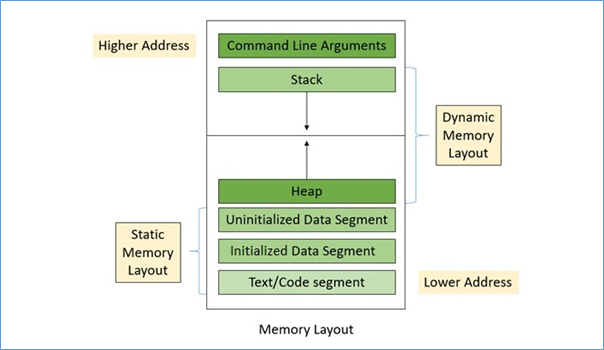
    The memory is typically divided into the following distinct memory segments −

    • Text segment
    • Initialized data segment
    • Uninitialized data segment
    • Heap
    • Stack

    Efficiently managing these memory segments in RAM, which is faster but limited in capacity as compared to the secondary storage, is crucial for preventing segmentation faults and optimizing C program execution.

    The following illustration shows how the memory layout is organized, and also depicts how the RAM loads a C program into its different memory segments −

    Memory Layout in C

    Let us discuss each of these memory segments in detail.

    Text Segment

    The text segment is also known as the code segment, which generates a binary file after compiling the program. This binary file is then used to execute the program by loading it into the RAM. This binary file contains instructions that get stored in the text segment of the memory.

    • The text segment is usually read-only and stored in the lower part of the memory to prevent accidental modification of the code while the program is running.
    • The size of the text segment determines the number of instructions and the complexity of the program.

    Initialized Data Segment

    The initialized data segment is a type of data segment that stores the global and static variables created by the programmer. This segment is placed just above the text segment of the program.

    The initialized data segment contains global and static variables that have been explicitly initialized by the programmer. For example,

    // Global variableint a =10;// Static variablestaticint b =20;

    This memory segment has read-write permission because the value of a variable can change during program execution.

    Example: Initialized Data Segment

    The following C program shows how the initialized data segment works −

    #include<stdio.h>int globalVar1 =50;char* greet ="Hello World";constint globalVar2 =30;intmain(){// static variable stored in initialized data segmentstaticint n =10;// ...printf("Global variables are stored in Initialize Data Segment");return0;}

    In this code, the variables globalVar1 and the pointer greet are declared outside the scope of the main() function, and therefore they are stored in the read-write section of the initialized data segment. However, the global variable globalVar2 is declared with the keyword const, and hence it is stored in the readonly section of the initialized data segment. Static variables like a are also stored in this part of the memory.

    When you run this code, it will produce the following output −

    Global variables are stored in Initialize Data Segment
    

    Uninitialized Data Segment

    The uninitialized data segment, also known as the BSS (Block Started by Symbol) segment, is a part of a C program’s memory layout. When a program is loaded into the memory, space for the BSS segment is allocated by the operating system. Before the execution of the C program begins, the kernel automatically initializes all variables in the BSS segment: arithmetic data types are set to 0, and pointers are set to a null pointer.

    The BSS segment contains all the global and static variables that are not explicitly initialized by the programmer (or initialized with 0). Since the values of these variables can be modified during program execution, the BSS segment has read-write permission.

    Example: Uninitialized Data Segment

    Let’s understand the role of uninitialized data segment through the following C program −

    #include <stdio.h>// Uninitialized global variable stored in the bss segmentint globalVaraible;intmain(){// Uninitialized static variable stored in bssstaticint staticVariable;printf("Global Variable = %d\n", globalVaraible);printf("Static Variable = %d\n", staticVariable);return0;}

    When you run this code, it will produce the following output −

    Global Variable = 0
    Static Variable = 0
    

    In this C program, both the static and global variables are uninitialized, so they are stored in the BSS segment of the memory layout. Before the program execution begins, the kernel initializes these variables with the value 0.

    Heap Segment

    The heap area begins at the end of the BSS segment and grows upward toward higher memory addresses. It is the memory segment used for dynamic memory allocation during program execution. Whenever additional memory is required, functions like malloc() and calloc() allocate space from the heap, causing it to grow upward.

    • The heap is managed by functions such as malloc(), calloc(), and free(), which internally may use system calls like brk and sbrk to adjust its size.
    • Since the heap is a shared region, it is also used by all shared libraries and dynamically loaded modules within a process.

    Example: Heap Segment

    In this C program, we have created a variable of data type char, which allocates 1 byte of memory (the size of a char in C) at the time of program execution. Since this variable is created dynamically, it is allocated in the heap segment of the memory.

    #include <stdio.h>#include <stdlib.h>intmain(){// Allocate memory for a single charchar*var =(char*)malloc(sizeof(char));*var ='A';// Print the value and the size of the allocated memoryprintf("Value of dynamically allocated char: %c\n",*var);printf("Size of dynamically allocated char: %zu bytes\n",sizeof(*var));// Free the dynamically allocated memoryfree(var);return0;}

    Run the code and check its output −

    Value of dynamically allocated char: A
    Size of dynamically allocated char: 1 bytes
    

    Stack Segment

    The stack segment follows a LIFO (Last In, First Out) structure and usually grows downward toward lower memory addresses (though the exact behavior depends on the computer architecture). It grows in the direction opposite to the heap.

    The stack is used to manage function calls and local variables. Each time a function is called, a stack frame is created, which stores the function’s local variables, parameters, and return address. When the function finishes, its stack frame is removed, following the LIFO principle.

    Example: Stack Segment

    The following example shows how the variables are stored in the stack memory segment −

    #include <stdio.h>voiddisplay(int x){int y =20;printf("Parameter x = %d\n", x);printf("Local variable y = %d\n", y);}intmain(){int mainVar =10;// function call creates new stack framedisplay(mainVar);return0;}

    Run the code and check its output −

    Parameter x = 10
    Local variable y = 20
    

    When the main function starts, its stack frame is created storing mainVar and the return address.
    When the display function is called, a new stack frame is pushed storing x and y, and removed once the function ends (LIFO order).

    Command-line Arguments

    When a C program is executed, any command-line arguments passed to it are also stored in the memory. These arguments are placed in the special memory segment, typically above the stack in the process memory layout.

    The command-line arguments are passed to the main() function in the form of −

    intmain(int argc,char*argv[])

    Here,

    • argc (argument count): Stores the total number of argument passed, includes the program name.
    • argv (argument vector): It is an array of character pointer (strings), where each element point to a command-line arguments.

    Example: argc and argv

    Let’s understand both arguments (argc and argv) through a C program:

    #include <stdio.h>intmain(int argc,char*argv[]){printf("Total arguments: %d\n", argc);for(int i =0; i < argc; i++){printf("Argument %d: %s\n", i, argv[i]);}return0;}

    Following is the output of the above code −

    Total arguments: 1
    Argument 0: /tmp/HqDVg7xJye/main.o
    

    Example: Program to get the Size of Memory Segment

    In this example, we create a simple C program layout and use the command below to get the size of each memory segment. To run this, you need a Linux environment. On Windows, you can download and install MinGW to use GCC and related commands.

    #include<stdio.h>intmain(){return0;}

    Use the following command to get the size −

    gcc file_name.c -o file_name
    size file_name
    

    Output: Following is the size −

    ~$ gcc program.c -o program
    ~$ size program
       text    data     bss     dec     hex filename
       1418     544      8    1970     7b0 program
    

    Example: Inserting an Uninitialized Global Variable

    Inserting an uninitialized global variable increases the size of the Data segment −

    #include <stdio.h>int global;intmain(){return0;}

    Run the code and check its output −

    ~$ gcc program.c -o program
    ~$ size program
       text    data     bss     dec     hex filename
       1418     548      8    1970     7b0 program
    

    Example: Inserting an Uninitialized Static Variable

    If you insert an uninitialized static variable, it increases the occupied space in the BSS segment.

    #include <stdio.h>int globalVar =10;intmain(){staticint staticVar;return0;}

    Run the code and check its output −

    ~$ gcc program.c -o program
    ~$ size program
       text    data     bss     dec     hex filename
       1418     548      12    1970     7b0 program
    

    Example: Inserting a Static Variable with Initialized Value

    If you insert a static variable with an initialized value, it will be stored in the data segment.

    #include <stdio.h>int globalVar =10;intmain(){staticint staticVar;staticint a =5;return0;}

    Run the code and check its output −

    ~$ gcc program.c -o program
    ~$ size program
       text    data     bss     dec     hex filename
       1418     552      8    1970     7b0 program
    

    Example: Inserting an Uninitialized Global Variable

    As we saw in the above programs, if we insert a global variable without initialization, it will be stored in the BSS segment.

    #include <stdio.h>int globalVar =10;int x;intmain(){staticint staticVar;staticint a =5;return0;}

    Run the code and check its output −

    ~$ gcc program.c -o program
    ~$ size program
       text    data     bss     dec     hex filename
       1418     552      16    1970     7b0 program
    

    Conclusion

    The memory layout of a C program is divided into distinct segments: text segment, data segment, BSS, heap, and stack. Each segment has a specific role in program execution. The text segment stores code, while the data and BSS segments handle global and static variables. The heap manages dynamic memory, and the stack is used for function calls and local variables.

  • Structures vs Unions in C

    Structures and unions in C programming are user-defined data types that are used for storing different types of data together in a single block defined with curly braces {}. The main difference between a structure and a union is in the way they store and manage memory for their members.

    In this chapter, we will see how structures and unions work in C and how their memory is allocated. Let’s move forward and learn about −

    Structure in C

    structure in C is a user-defined data type that groups variables of different data types under one name. A structure is defined using the struct keyword, and when defining a structure no memory is allocated. Memory is allocated only when we declare variables of that structure type, and each member gets its own separate memory location.

    Members of a structure are accessed using the dot (.) operator when working with structure variables, and the arrow (->) operator when working with pointers to a structure. Structures are useful for storing records like a student’s details, an address, etc.

    Syntax of Structure

    Following is the syntax for declaring a structure in C −

    structstructure_name{
        data_type member1;
        data_type member2;...
        data_type memberN;};

    Here, struct is the keyword used to define a structure. structure_name is the name of the structure and member1member2, etc., are the data members of different data types.

    Example of a Structure

    Below is a C program where we define a structure Student with three members: roll_noname, and marks. We create a variable s1, assign values to its members, and then print them. Each member has its own memory, so changing one does not affect the others.

    #include <stdio.h>#include <string.h>// Define a structure to store student detailsstructStudent{int roll_no;char name[50];float marks;};intmain(){structStudent s1;// Create a structure variable
    
        s1.roll_no =101;// Assign roll numberstrcpy(s1.name,"Amit");// Assign name
        s1.marks =89.5;// Assign marks// Print student detailsprintf("Roll No: %d\n", s1.roll_no);printf("Name: %s\n", s1.name);printf("Marks: %.2f\n", s1.marks);return0;}

    Following is the output of the program. It displays the student details stored in the structure −

    Roll No: 101
    Name: Amit
    Marks: 89.50
    

    Example of a Structure Holding Pointers to Another Structure

    In this example, we have two structures: Student and Address. The Student structure has a pointer addr to an Address structure. First, we create an Address variable and assign its address to a Student variable s1. Then, we display the student’s details along with the city and state from Address structure.

    #include <stdio.h>#include <stdlib.h>#include <string.h>// Structure for AddressstructAddress{char city[50];char state[50];};// Structure for StudentstructStudent{char name[50];int roll_no;structAddress*addr;// Pointer to Address structure};intmain(){// Create an Address dynamicallystructAddress*a1 =malloc(sizeof(structAddress));strcpy(a1->city,"Mumbai");strcpy(a1->state,"Maharashtra");// Create a Student and assign Address pointerstructStudent s1;strcpy(s1.name,"jony");
        s1.roll_no =101;
        s1.addr = a1;// Assign address pointer// Display Student information along with Addressprintf("Name: %s\n", s1.name);printf("Roll No: %d\n", s1.roll_no);printf("City: %s\n", s1.addr->city);printf("State: %s\n", s1.addr->state);// Free dynamically allocated memoryfree(a1);return0;}

    The output displays the student’s details along with the city and state from the associated Address structure using the pointer.

    Name: Jony
    Roll No: 101
    City: Mumbai
    State: Maharashtra
    

    Union in C

    union in C is a user-defined data type that stores different types of data in the same memory location. It is defined using the union keyword, and all members share the same memory, so updating one member changes the content of the others.

    The size of a union equals the size of its largest member. At any given time, only one member contains valid data because all members share the same memory, so initializing another member will overwrite the current value.

    We access union members using the dot (.) operator for union variables or the arrow (->) operator for union pointers. Unions are useful when memory is limited and only one value is needed at a time.

    Syntax of a Union

    Following is the syntax for declaring a union in C −

    union union_name {
       data_type member1;
       data_type member2;...
       data_type memberN;};

    Here, union is the keyword to define the union. union_name is the name of union and and member1member2etc., are the data members of different data types.

    Example of a Union

    Below is an example where we created a union Data with three members: an integer, a float, and a character, and then a variable d. Since all members share the same memory, assigning a new value replaces the previous one. So assigning d.f overwrites d.i, and assigning d.c overwrites d.f, as shown below.

    #include <stdio.h>union Data {int i;float f;char c;};intmain(){union Data d;// create a union variable
    
        d.i =10;// assign an integerprintf("i = %d\n", d.i);
    
        d.f =22.5;// assign a float (replaces integer)printf("f = %.2f\n", d.f);
    
        d.c ='X';// assign a character (replaces float)printf("c = %c\n", d.c);return0;}

    Following is the output of the program, which shows that each new assignment overwrites the earlier one.

    i = 10
    f = 22.50
    c = X    
    

    Memory Allocation Difference

    This is the most important difference between a structure and a union. The way memory is allocated to their members is different, and this affects the total size they take.

    • In a structure, every member has its own memory, so the total size is the sum of all members plus any padding added by the compiler for alignment.
    • In a union, all members share the same memory, so the total size is equal to the largest member only.

    Example of Memory Allocation

    In the example below, we define both a structure and a union with the same members, then calculate their sizes and display them. This clearly shows how memory is allocated differently for each.

    #include <stdio.h>structExampleStruct{int a;// 4 bytesfloat b;// 4 byteschar c;// 1 byte (plus padding)};union ExampleUnion {int a;// 4 bytesfloat b;// 4 byteschar c;// 1 byte};intmain(){printf("Size of Structure: %lu\n",sizeof(structExampleStruct));printf("Size of Union: %lu\n",sizeof(union ExampleUnion));return0;}

    The program prints the memory used by the structure and the union. The output may vary slightly on different systems or compilers.

    Size of Structure: 12
    Size of Union: 4
    

    Key Differences between Structures and Unions

    The following table compares and contrasts the most important features structures and unions in C −

    FeatureStructureUnion
    Memory allocationEach member gets its own memory, so all members exist independentlyAll members share the same memory, so only one member holds a valid value at a time
    SizeTotal size = sum of all members (plus padding if needed)Total size = size of the largest member only
    Member accessYou can access all members simultaneouslyOnly one member can be reliably used at a time
    InitializationYou can initialize all members at the time of declarationOnly the first member can be initialized during declaration
    Data storageCan hold multiple values at the same timeCan hold only one value at a time
    Best used whenAll properties are needed togetherMemory saving is important and only one value is needed at a time

    Conclusion

    In this chapter, we learned about structures and unions in C. Structures help us store and access multiple values together, while unions are useful when memory is limited and only one value is needed at a time.

  • C – Flexible Array Members in Structures

    Flexible Array Members is used to handle arrays inside structures without defining their size. These arrays get their size at runtime. A structure in C is a user-defined data type where we define multiple members of different data types together under one name.

    Below is the syntax for declaring a structure in C −

    structStructName{
        data_type member1;
        data_type member2;// ...};

    Here, each member can have a different data type.

    Flexible array members extend structures by holding a dynamically sized array at the end of their fixed-size members and all together stored in one block of memory. In this chapter, we’ll see how they work inside the structures.

    Flexible Array Members in Structure

    flexible array member is an array inside a structure without a fixed size, and its memory is allocated dynamically at runtime using malloc()calloc(), or similar functions and it is declared using empty square brackets [].

    The flexible array member must be declared at the end of the structure, and there must be at least one other member before declaring it.

    Following is the syntax for declaring a flexible array member inside a structure −

    structStructName{
        data_type member1;
        data_type flexible_array[];// flexible array member};

    Here, data_type is the data type of the array, and arrayName[] is the flexible array with no fixed size.

    Memory Allocation for Flexible Array Member

    flexible array member does not have a fixed size, so the compiler does not allocate any memory for it inside the structure. The sizeof operator only calculates the size of the fixed members of the structure without including the flexible array member. That’s why we need to allocate memory manually when creating such structures.

    The total memory required is calculated as −

    Total Memory =sizeof(structure)+(number of elements x sizeof(element type))

    Here, sizeof(structure) gives the memory for the fixed members, and (number of elements x sizeof(element type)) gives the memory for the flexible array. Adding them gives the total memory to allocate.

    Example 1: Allocating Memory for a Flexible Array Member

    Below is an example where we define a structure with one fixed member and a flexible array, and allocate memory for the flexible array.

    #include <stdio.h>#include <stdlib.h>structExample{int id;int arr[];// flexible array member };intmain(){int size =5;// Allocate memory for structure + flexible arraystructExample*e =malloc(sizeof(structExample)+ size *sizeof(int));if(e !=NULL){printf("Total allocated memory: %zu bytes\n",sizeof(structExample)+ size *sizeof(int));free(e);}return0;}

    Here, sizeof(struct Example) gives 4 bytes for the id member. Then, we calculate the memory for the flexible array: 5 x sizeof(int) = 20 bytes. The total memory allocated is 4 + 20 = 24 bytes. The output is −

    Total allocated memory: 24 bytes
    

    Example 2: Accessing a Flexible Array in a Structure

    In this example, we define a Student structure with one fixed member (id) and a flexible array member (marks). We allocate memory dynamically for the flexible array and access its elements. If we access elements beyond the allocated size it will cause undefined behavior, so we only access marks[0] to marks[2].

    #include <stdio.h>#include <stdlib.h>structStudent{int id;int marks[];// flexible array member};intmain(){int subjects =3;// Allocate memory for structure + flexible arraystructStudent*s =malloc(sizeof(structStudent)+ subjects *sizeof(int));if(s !=NULL){
            s->id =102;
            s->marks[0]=80;
            s->marks[1]=75;
            s->marks[2]=88;printf("Student ID: %d\n", s->id);printf("Marks: %d, %d, %d\n", s->marks[0], s->marks[1], s->marks[2]);printf("Total allocated memory: %zu bytes\n",sizeof(structStudent)+ subjects *sizeof(int));free(s);}return0;}

    Following is the output of the above program −

    Student ID: 102
    Marks: 80, 75, 88
    Total allocated memory: 16 bytes
    

    Dynamic Resizing of Flexible Array Members

    Flexible arrays can be resized using the realloc() function. This function either expands the existing memory block or allocates a new block and copies the existing data automatically.

    To resize a flexible array, we call realloc() function with the new total memory size using the formula −

    sizeof(structure)+(new_number_of_elements x sizeof(element_type))

    Note: Always store the result of realloc() function in a temporary pointer. If it fails, your original pointer remains safe. Also, update the size counter after resizing and initialize only the newly added elements.

    Example 3: Dynamic Resizing of Flexible Array Members

    In this example, we create a Student structure to hold 3 marks initially. Later, we resize the flexible array to hold 6 marks using realloc(). The marks we already stored in remain unchanged, so we don’t need to copy them manually.

    #include <stdio.h>#include <stdlib.h>structStudent{int id;int count;// This field helps track current array sizeint marks[];// Flexible array member};intmain(){// Step 1: Initial allocation for 3 marksint initial_elements =3;structStudent*s =malloc(sizeof(structStudent)+ initial_elements *sizeof(int));if(s !=NULL){
            s->id =101;
            s->count = initial_elements;// Store current array size// Display initial sizesprintf("Structure size: %zu bytes\n",sizeof(structStudent));// Output: 8 bytes (id + count)printf("Initial array elements: %d\n", s->count);// Output: 3printf("Initial total memory: %zu bytes\n",sizeof(structStudent)+ initial_elements *sizeof(int));// Output: 20 bytes// Step 2: Resize to hold 6 marksint new_elements =6;structStudent*temp =realloc(s,sizeof(structStudent)+ new_elements *sizeof(int));if(temp !=NULL){
                s = temp;
                s->count = new_elements;// Update array size tracker// Display new sizesprintf("\nAfter resizing:\n");printf("Structure size: %zu bytes\n",sizeof(structStudent));// Still 8 bytesprintf("New array elements: %d\n", s->count);// Output: 6printf("New total memory: %zu bytes\n",sizeof(structStudent)+ new_elements *sizeof(int));// Output: 32 bytes}free(s);}return0;}

    Below is the output showing the structure size and the total memory for both the initial and resized flexible array.

    Structure size: 8 bytes
    Initial array elements: 3
    Initial total memory: 20 bytes
    
    After resizing:
    Structure size: 8 bytes
    New array elements: 6
    New total memory: 32 bytes
    

    In this chapter, we learned about flexible array members in C structures. They are declared at the end of a structure and handle variable-length data, save memory, and adapt to different data sizes easily. We also saw how to allocate, access, and resize them.

  • Typedef in C

    C typedef

    The C programming language provides a keyword called typedef to set an alternate name to an existing data type. The typedef keyword in C is very useful in assigning a convenient alias to a built-in data type as well as any derived data type such as a struct, a union or a pointer.

    Sometimes it becomes clumsy to use a data type with a longer name (such as “struct structname” or “unsigned int“) every time a variable is declared. In such cases, we can assign a handy shortcut to make the code more readable.

    typedef Syntax

    In general, the typedef keyword is used as follows −

    typedef existing_type new_type;

    typedef Examples

    In this chapter, let us have a look at some of the use-cases of typedef.

    Example 1

    In C language, the keyword “unsigned” is used to declare unsigned integer variables that can store only non-negative values.

    C also has a keyword called “short” that declares an integer data type that occupies 2 bytes of memory. If you want to declare a variable that is short and can have only non-negative values, then you can combine both these keywords (unsigned and short):

    shortunsignedint x;

    If there are going to be many variables to be declared of this type, it will not be very convenient to use these three keywords every time. Instead, you can define an alias or a shortcut with the typedef keyword as follows −

    typedefshortunsignedint USHORT;

    This tells the compiler that the identifier USHORT corresponds to “short unsigned int” type. Hereafter, you can use USHORT in the variable declaration statement −

    USHORT x;

    Example 2

    C also has the keyword static to indicate that such a variable is initialized only once. The keyword “long” allocates 8 bytes to store an integer on a 64-bit system. We can declare a variable of this type as follows −

    staticunsignedlong x;

    However, we cant use the keyword “static” in a “typedef” statement, however we can use typedef to assign a shortcut alias to this type of declaration −

    typedefsignedlong SLONG;static SLONG x;

    Note: As a convention, the alias names are expressed in uppercase, just to differentiate between the built-in type and the aliases used.

    Example 3

    The following example demonstrates how you can use alias names in a C program −

    #include <stdio.h>intmain(){typedefshortunsignedint USHORT;typedefsignedlongint SLONG;static SLONG x =100;
       USHORT y =200;printf("Size of SLONG: %d \nSize of USHORT: %d",sizeof(SLONG),sizeof(USHORT));return0;}

    Output

    When you run this code, it will produce the following ouput −

    Size of SLONG: 8 
    Size of USHORT: 2
    

    Defining a Structure using Typedef

    Normally, we need to declare a struct variable by prefixing the name of struct_type in the declaration statement as −

    structstruct_type var;

    If writing the type name in this manner feels cumbersome, then you can use typedef to assign an alias −

    typedefstructstruct_type ALIAS;

    Example

    In this example, we define a structure type and then use the typedef keyword to set an alias for it −

    #include <stdio.h>intmain(){typedefunsignedlongint ULONG;typedefshortint SHORT;structmystruct{
          ULONG a;
          SHORT b;};typedefstructmystruct STR;
       STR s1 ={10,20};printf("%ld %u", s1.a, s1.b);return0;}

    Output

    Run the code and check its output −

    10 20
    

    There is an alternate approach to use the typedef keyword. We can combine it in the structure definition itself, as given below −

    typedefstructmystruct{
       ULONG a;
       SHORT b;} STR;
    
    STR s1 ={10,20};

    Typedef for Struct Pointer

    The typedef keyword may also be used to assign a new identifier to any pointer type. Normally, we declare a pointer variable as follows −

    structmystruct* x;

    Instead, we can use the typedef keyword as follows −

    typedefstructmystruct{
       ULONG a;
       SHORT b;} STR;typedef STR * strptr;

    It allows you to declare a pointer of this type in a much more concise way −

    strptr ptr;

    We can then assign the address of a corresponding struct variable to the pointer.

    Example

    The following example shows how you can use typedef to create a struct prointer −

    #include <stdio.h>intmain(){typedefunsignedlongint ULONG;typedefshortint SHORT;typedefstructmystruct{
          ULONG a;
          SHORT b;} STR;
    
       STR s1 ={10,20};typedef STR * strptr;
       strptr ptr =&s1;printf("%d %d \n", s1.a, s1.b);printf("%d %d", ptr->a, ptr->b);return0;}

    Output

    When you run this code, it will produce the following output −

    10 20 
    10 20
    

    Typedef for Union

    We can use the typedef keyword to assign a shortcut alias to any union type.

    Example

    The following example illustrates how you can use typedef in creating unions −

    #include <stdio.h>intmain(){typedefunsignedlongint ULONG;typedefshortint SHORT;typedefunion myunion {char a;int b;double c;} UNTYPE;
    
       UNTYPE u1;
       u1.c =65.50;typedef UNTYPE * UNPTR;
       UNPTR ptr =&u1;printf("a:%c b: %d c: %lf \n", u1.a, u1.b, u1.c);printf("a:%c b: %d c: %lf \n", ptr->a, ptr->b, ptr->c);return0;}

    Output

    Run the code and check its output −

    a: b: 0 c: 65.500000
    a: b: 0 c: 65.500000
    

    typedef vs #define in C

    The typedef keyword is often confused with the #define directive. In C language, #define is a preprocessor directive. It is an effective method to define a constant.

    The syntax of using #define is as follows −

    #define name value

    For example −

    #define PI 3.14159265359

    The #define statement can also be used to define a macro −

    #define SQUARE(x) x*x

    A macro works like a function. However, the value is substituted at the preprocessor level when called.

    printf("%d",SQUARE(5));

    #define is a preprocessor directive, while typedef is evaluated at the time of compilation.

    • typedef is limited to giving symbolic names to types only. #define can be used to define alias for values as well. For example, you can define “1” as “ONE”.
    • typedef interpretation is performed by the compiler, whereas #define statements are processed by the pre-processor.

    Example

    In the following code, we use both these features (typedef and #define) −

    #include <stdio.h>#define MAX 10intmain(){typedefunsignedlongint ULONG;typedefshortint SHORT;typedefstructemployee{char name[MAX];int age;} EMP;
    
       EMP e1 ={"Krishna",25};printf("Name: %s \nAge: %d", e1.name, e1.age);return0;}

    Output

    When you run this code, it will produce the following output −

    Name: Krishna 
    Age: 25