Blog

  • JavaScript – Continue Statement

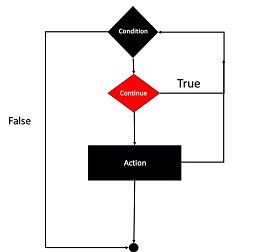
    The continue statement in JavaScript is used to skip the current iteration of a loop and continue with the next iteration. It is often used in conjunction with an if statement to check for a condition and skip the iteration if the condition is met.

    The JavaScript continue statement tells the interpreter to immediately start the next iteration of the loop and skip the remaining code block. When a continue statement is encountered, the program flow moves to the loop check expression immediately and if the condition remains true, then it starts the next iteration, otherwise the control comes out of the loop.

    Syntax

    The syntax of continue statement in JavaScript is as follows −

    continue;ORcontinue label;

    We can use the continue statement inside the loops like for loop, while loop, dowhile loop, etc.

    We will learn to use the continue statement with the label statement in the upcoming chapter.

    Continue statement with for loop

    The example below uses the continue statement with the for loop. In the loop, when the value of the x is 3, it will execute the continue statement to skip the current iteration and move to the next iteration.

    In the output, you can see that the loop doesnt print 3.

    Example

    <html><head><title> JavaScript - Continue statement </title></head><body><p id ="output"></p><script>let output = document.getElementById("output");
          output.innerHTML +="Entering the loop. <br /> ";for(let x =1; x <5; x++){if(x ==3){continue;// skip rest of the loop body}
             output.innerHTML += x +"<br />";}
          output.innerHTML +="Exiting the loop!<br /> ";</script></body></html>

    Output

    Entering the loop.
    1
    2
    4
    Exiting the loop!
    

    Continue statement with while loop

    We used the while loop with the continue statement in the example below. In each iteration of the while loop, we increment the x’s value by 1. If the value of the x is equal to 2 or 3, it skips the current iteration and moves to the next iteration.

    In the output, you can see that the code doesnt print 2 or 3.

    Example

    <html><head><title> JavaScript - Continue statement </title></head><body><p id ="output"></p><script>let output = document.getElementById("output");var x =1;
          output.innerHTML +="Entering the loop. <br /> ";while(x <5){
             x = x +1;if(x ==2|| x ==3){continue;// skip rest of the loop body}
             output.innerHTML += x +"<br />";}
          output.innerHTML +="Exiting the loop!<br /> ";</script></body></html>

    Output

    Entering the loop.
    4
    5
    Exiting the loop!
    

    Continue statement with the nested loop

    You can use the continue statement with nested loops and skip the iteration of the parent loop or child loop.

    Example

    The parent loop traverses the 1 to 5 elements in the code below. In the parent loop, we used the continue statement to skip the iteration when the value of x is 2 or 3. Also, we have defined the nested loop. In the nested loop, we skip the loop iteration when the value of y is 3.

    In the output, you can observe the value of x and y. You wont see 2 or 3 values for x and 3 for y.

    <html><head><title> JavaScript - Continue statement </title></head><body><p id ="output"></p><script>let output = document.getElementById("output");
          output.innerHTML +="Entering the loop. <br /> ";for(let x =1; x <5; x++){if(x ==2|| x ==3){continue;// skip rest of the loop body}for(let y =1; y <5; y++){if(y ==3){continue;}
                output.innerHTML += x +" - "+ y +"<br />";}}
          output.innerHTML +="Exiting the loop!<br /> ";</script></body></html>

    Output

    Entering the loop.
    1 - 1
    1 - 2
    1 - 4
    4 - 1
    4 - 2
    4 - 4
    Exiting the loop!
  • JavaScript – Break Statement

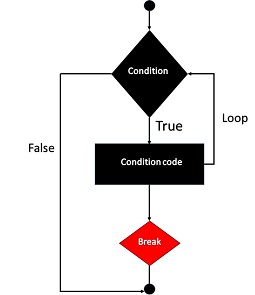
    The break statement in JavaScript terminates the loop or switch case statement. When you use the break statement with the loop, the control flow jumps out of the loop and continues to execute the other code.

    The break statement can also be used to jump a labeled statement when used within that labeled statement. It is a useful tool for controlling the flow of execution in your JavaScript code.

    Syntax

    The syntax of break statement in JavaScript is as follows −

    break;ORbreak[label];

    The label is optional with a break statement.Note In the next chapter, we will learn to use the break statement with the label inside the loop.

    Flow Chart

    The flow chart of a break statement would look as follows −

    Break Statement

    Example (break statement with for loop)

    In the example below, we used the for loop to make iterations. We added the conditional expression in the loop using the ‘if’ statement. When the value of ‘x’ is 5, it will ‘break’ the loop using the break statement.

    The below code prints only 1 to 4 values in the output.

    <html><head><title> JavaScript - Break statement </title></head><body><p id ="output"></p><script>const output = document.getElementById("output");
          output.innerHTML +="Entering the loop. <br /> ";for(let x =1; x <10; x++){if(x ==5){break;// breaks out of loop completely}
                output.innerHTML += x +"<br />";}
          output.innerHTML +="Exiting the loop!<br /> ";</script></body></html>

    Output

    Entering the loop.
    1
    2
    3
    4
    Exiting the loop!
    

    Example (break statement with the while loop)

    The code below demonstrates the while loop with the ‘break’ statement. In the while loop, whenever the value of x is either 3 or 7, it will terminate the loop using the ‘break’ statement.

    In the code, we update the value after checking the condition. So, it will print 3 first and then terminate the loop in the next iteration.

    <html><head><title> JavaScript - Break statement </title></head><body><p id ="output"></p><script>let output = document.getElementById("output");var x =1;
          output.innerHTML +="Entering the loop. <br /> ";while(x <10){if(x ==3|| x ==7){break;// breaks out of loop completely}
             x = x +1;
             output.innerHTML += x +"<br />";}
          output.innerHTML +="Exiting the loop!<br /> ";</script></body></html>

    Output

    Entering the loop.
    2
    3
    Exiting the loop!
    

    Break statement with nested loops

    You can use the ‘break’ statement to jump out of any loop when you have nested loops. For example, if you use the ‘break’ statement with the parent loop, the code will also terminate all iterations of the nested loop. Using the ‘break’ statement with the nested loop will terminate only the nested loop.

    Example

    In the example below, x is a looping variable for the parent loop, and y is a looping variable for a child loop.

    In the nested loop, whenever y becomes 3, it will break the loop; in the outer loop, whenever x becomes 3, it will break the loop. You won’t see x > 3 or y > 2 in the output.

    <html><head><title> JavaScript - Break statement </title></head><body><p id ="output"></p><script>const output = document.getElementById("output");
          output.innerHTML +="Entering the loop. <br /> ";for(let x =1; x <10; x++){for(let y =1; y <10; y++){if(y ==3){break;// breaks inner loop}
                output.innerHTML += x +" "+ y +"<br />";}if(x ==3){break;// break outer loop}}
          output.innerHTML +="Exiting the loop!<br /> ";</script></body></html>

    Output

    Entering the loop.
    1 1
    1 2
    2 1
    2 2
    3 1
    3 2
    Exiting the loop!
    

    Break statement with switch case statement

    The switch case statement executes one of the code blocks from multiple based on the conditional expression. The ‘break’ statement terminates the switch case statement after matching one or more cases with the conditional expression’s value.

    Example

    In the below code, we used the ‘break’ statement with each case. Here, the value of variable p works as a conditional expression for the switch case statement. It matches with ‘case 10’. So, the code will execute that particular code block and terminate the switch case statement using the ‘break’ statement.

    <html><head><title> JavaScript - Break statement </title></head><body><p id ="output"></p><script>const output = document.getElementById("output");var p =10;switch(p){case10:
                output.innerHTML ="p is 10";break;case20:
                output.innerHTML ="p is 20";break;case30:
                output.innerHTML ="p is 30";break;default:
                output.innerHTML ="p is not 10, 20 or 30";}</script></body></html>

    Output

    p is 10
  • JavaScript – Loop Control

    JavaScript Loop Control

    JavaScript provides full control to handle loops and switch statements. There may be a situation when you need to come out of a loop without reaching its bottom. There may also be a situation when you want to skip a part of your code block and start the next iteration of the loop.

    To handle all such situations, JavaScript provides break and continue statements. These statements are used to immediately come out of any loop or to start the next iteration of any loop respectively. Also, JavaScript allows developers to use labels to name the loop.

    We have explained the keywords in the below table, which can be used to control the loop.

    KeywordExplanation
    breakThe ‘break’ keyword is used to come out of the loop.
    continueThe ‘continue’ keyword is used to skip the current iteration of the loop.
    labelThe ‘label’ is not a keyword, but you can use any identifier followed by a colon (:) to give a label to the loop. After that, you can use the label to target the particular loop with the break and continue keyword.

    In the upcoming chapters, we will learn in detail about the break, continue and label statements.

    The break Statement

    The JavaScript break statement, which was briefly introduced with the switch statement, is used to exit a loop early, breaking out of the enclosing curly braces.

    Flow Chart

    The flow chart of a break statement would look as follows −

    Break Statement

    Example

    The following example illustrates the use of a break statement with a while loop. Notice how the loop breaks out early once x reaches 5 and reaches −

    <html><body><div id ="output"></div><script>const coutput = document.getElementById("output");let x =1;
          coutput.innerHTML ="Entering the loop<br> ";while(x <20){if(x ==5){break;// breaks out of loop completely}
             x = x +1;
             coutput.innerHTML +=  x +"<br>";}         
          coutput.innerHTML +="Exiting the loop!<br> ";</script><p>Set the variable to different value and then try...</p></body></html>

    Output

    Entering the loop
    2
    3
    4
    5
    Exiting the loop!
    Set the variable to different value and then try...
    

    The continue Statement

    The JavaScript continue statement tells the interpreter to immediately start the next iteration of the loop and skip the remaining code block. When a continue statement is encountered, the program flow moves to the loop check expression immediately and if the condition remains true, then it starts the next iteration, otherwise the control comes out of the loop.

    Example

    This example illustrates the use of a continue statement with a while loop. Notice how the continue statement is used to skip printing when the index held in variable x reaches 5 −

    <html><body><div id ="output"></div><script>const coutput = document.getElementById("output");let x =1;
          coutput.innerHTML ="Entering the loop<br> ";while(x <10){
             x = x +1;if(x ==5){continue;// skip rest of the loop body}
             coutput.innerHTML +=  x +"<br>";}         
          coutput.innerHTML +="Exiting the loop!<br> ";</script><p>Set the variable to different value and then try...</p></body></html>

    Output

    Entering the loop
    2
    3
    4
    6
    7
    8
    9
    10
    Exiting the loop!
    Set the variable to different value and then try...
    

    Using Labels to Control the Flow

    Starting from JavaScript 1.2, a label can be used with break and continue to control the flow more precisely. A label is simply an identifier followed by a colon (:) that is applied to a statement or a block of code. We will see two different examples to understand how to use labels with break and continue.

    Line breaks are not allowed between the ‘continue’ or ‘break’ statement and its label name. Also, there should not be any other statement in between a label name and associated loop.

    Try the following two examples for a better understanding of Labels.

    Example 1

    The following example shows how to implement Label with a break statement.

    In the example below, we have given the ‘outerloop’ and ‘innerloop’ labels to the loop.

    We used the ‘break’ statement in the nested loop with the label. In the output, you can see that it breaks the outer loop from the inner loop.

    <html><body><div id ="output"></div><script>const coutput = document.getElementById("output");
          output.innerHTML ="Entering the loop!<br /> ";
          outerloop:// This is the label name         for(let i =0; i <5; i++){
             output.innerHTML +="Outerloop: "+ i +"<br />";
             innerloop:for(let j =0; j <5; j++){if(j >3)break;// Quit the innermost loopif(i ==2)break innerloop;// Do the same thingif(i ==4)break outerloop;// Quit the outer loop
                output.innerHTML +="Innerloop: "+ j +" <br />";}}        
          output.innerHTML +="Exiting the loop!<br /> ";</script></body></html>

    Output

    Entering the loop!
    Outerloop: 0
    Innerloop: 0
    Innerloop: 1
    Innerloop: 2
    Innerloop: 3
    Outerloop: 1
    Innerloop: 0
    Innerloop: 1
    Innerloop: 2
    Innerloop: 3
    Outerloop: 2
    Outerloop: 3
    Innerloop: 0
    Innerloop: 1
    Innerloop: 2
    Innerloop: 3
    Outerloop: 4
    Exiting the loop!
    

    Example 2

    In the below code, we use the continue statement with a label inside the nested loop to skip the current iteration of the outer loop. Whenever the value of q becomes 3, it skips the execution of the remaining code of the current iteration and starts a new iteration.

    <html><head><title> JavaScript - Label statement </title></head><body><p id ="output"></p><script>let output = document.getElementById("output");
          output.innerHTML +="Entering the loop!<br /> ";
          outerloop:// This is the label namefor(let p =0; p <3; p++){
             output.innerHTML +="Outerloop: "+ p +"<br />";for(let q =0; q <5; q++){if(q ==3){continue outerloop;}
                output.innerHTML +="Innerloop: "+ q +"<br />";}}
          output.innerHTML +="Exiting the loop!<br /> ";</script></body></html>

    Output

    Entering the loop!
    Outerloop: 0
    Innerloop: 0
    Innerloop: 1
    Innerloop: 2
    Outerloop: 1
    Innerloop: 0
    Innerloop: 1
    Innerloop: 2
    Outerloop: 2
    Innerloop: 0
    Innerloop: 1
    Innerloop: 2
    Exiting the loop!
  • JavaScript – For…of Loop

    JavaScript for…of Loop

    The for…of loop in JavaScript is used to traverse elements of the iterable object. In each iteration, it gives an element of the iterable object. Iterable objects include arrays, strings, maps, sets, and generators.

    The JavaScript for…of loop is a much more efficient way to iterate over iterables than using a for…in loop. The for…of loop iterates over the property value while the for…in loop is used to iterate through the keys (property name) of an object.

    Syntax

    The syntax of ‘for…of’ loop in JavaScript in as follows −

    for(ele of iterable){// loop body}

    Parameters

    • ele − It is a current element of the iterable.
    • of − It is a JavaScript operator.
    • iterable − It is iterable like an object, array, string, etc.

    Examples

    Example: For…of Loop with Arrays

    In the example below, the array contains various strings. After that, we used the for…of loop to traverse each array element. In the output, we can see that it prints each array element.

    <html><head><title> JavaScript -for...of loop </title></head><body><p id="output"></p><script>const output = document.getElementById("output");const arr =["JavaScript","Python","C","C++","HTML","CSS"];for(let ele of arr){
                output.innerHTML += ele +"<br>";}</script></body></html>

    Output

    JavaScript
    Python
    C
    C++
    HTML
    CSS
    

    Example: For…of Loop with Strings

    In JavaScript, the string is also iterable as we can traverse through each character of the string. In the below code, for…of loop is used to traverse through each character of the string.

    <html><head><title> JavaScript -for...of loop </title></head><body><p id="output"></p><script>const output = document.getElementById("output");let str ="JavaScript";for(let char of str){
                output.innerHTML += char +", ";}</script></body></html>

    Output

    J, a, v, a, S, c, r, i, p, t,
    

    Example: For…of Loop with Set

    In JavaScript, the set contains a unique element. Here, we have passed the array containing numbers as a parameter of the Set() constructor to create a set. After that, we used the for…of loop to traverse the set.

    <html><head><title> JavaScript -for...of loop </title></head><body><p id="output"></p><script>const output = document.getElementById("output");const nums =newSet([10,20,30,30,30,40,50,60]);for(let num of nums){
             output.innerHTML += num +", ";}</script></body></html>

    Output

    10, 20, 30, 40, 50, 60,
    

    Example: For…of Loop with Map

    The map contains the key-value pair in JavaScript and is similar to the object. Here, we created a map and inserted 3 key-value pairs in the map. When we use the for…of loop to traverse the map elements in each iteration, we can get the key and value shown in the code below.

    <html><body><p id="output"></p><script>const output = document.getElementById("output");const map =newMap();
          map.set("one",1);
          map.set("second",2);
          map.set("third",3)for(let[k, v]of map){
             output.innerHTML += k +" -> "+ v +"<br/>";}</script></body></html>

    Output

    one -> 1
    second -> 2
    third -> 3
    

    However, you can also use the for…in loop to traverse the iterable like an array, string, map, set, etc.

  • JavaScript – For…in Loop

    The for…in Loop

    The for…in loop in JavaScript is used to loop through an object’s properties. The JavaScript for…in loop is a variant of the for loop. The for loop can’t be used to traverse through the object properties. So, the for…in loop is introduced to traverse through all object properties.

    As we have not discussed Objects yet, you may not feel comfortable with this loop. But once you understand how objects behave in JavaScript, you will find this loop very useful.

    The for…in loop in JavaScript can also be used to iterate through the elements of an array. However, it is not recommended to do this as this is less efficient than using a for…of loop.

    Syntax

    The syntax of for…in loop in JavaScript is as follows −

    for(variableName in object){
       statement or block to execute
    }

    Parameters

    • variableName − It is a property name (key) of the object.
    • in − It is an ‘in’ operator in JavaScript.
    • object − It is the object to traverse.

    In each iteration, one property from object is assigned to variableName and this loop continues till all the properties of the object are exhausted.

    Examples

    Try the following examples to implement ‘for-in’ loop.

    Example: Iterate through object properties

    In the example below, the car object contains various properties. We used the forin loop to traverse through each key of the object.

    In the output, we can see that it prints the key and its value. We use the ‘[]’ (member of) operator to access the value of the key from the object.

    <html><head><title> JavaScript -for...in loop </title></head><body><p id ="output"></p><script>let output = document.getElementById("output");let car ={
             brand:"OD",
             model:"Q7",
             color:"Black",}for(key in car){
             output.innerHTML += key +" -> "+ car[key]+"<br>";}</script></body></html>

    Output

    brand -> OD
    model -> Q7
    color -> Black
    

    Example: Iterating over a string

    In JavaScript, the string is an object. So, we can use the forin loop to traverse through each character of the string. The index of the character is the key, and the character is a value.

    The code prints the index and character in the output.

    <html><head><title> JavaScript -for...in loop </title></head><body><p id ="output"></p><script>let output = document.getElementById("output");let str ="Hello";for(key in str){
             output.innerHTML += key +" -> "+ str[key]+"<br>";}</script></body></html>

    Output

    0 -> H
    1 -> e
    2 -> l
    3 -> l
    4 -> o
    

    Exampl: Iterating over an array

    In JavaScript, the array is also an object. So, the forin loop can be used to traverse through array elements. Like a string, the index is a key, and the array element is a value for the key.

    The below code prints the array index and its value in the output.

    <html><head><title> JavaScript -for...in loop </title></head><body><p id ="output"></p><script>let output = document.getElementById("output");let array =["Hi","Hello",900,23,true,"JavaScript"];for(key in array){
             output.innerHTML += key +" -> "+ array[key]+"<br>";}</script></body></html>

    Output

    0 -> Hi
    1 -> Hello
    2 -> 900
    3 -> 23
    4 -> true
    5 -> JavaScript
    

    Example: Update value of each property of an object

    In the example below, we traverse each key of the object and update its value to null. In the output, the code prints the object keys with null values.

    So, the forin loop can also be used to update all or particular property values of the object.

    <html><head><title> JavaScript -for...in loop </title></head><body><p id ="output"></p><script>let output = document.getElementById("output");let car ={
                brand:"OD",
                model:"Q7",
                color:"Black",}for(key in car){
                car[key]=null;}
            output.innerHTML +="The updated object is - "+JSON.stringify(car);</script></body></html>

    Output

    The updated object is - {"brand":null,"model":null,"color":null}
    

    Example: Iterating the Browser’s Navigator Object

    Try the following example to implement ‘for-in’ loop. It prints the web browsers Navigator object.

    <html><body><div id ="demo"></div><script>const output = document.getElementById("demo");var aProperty;
        output.innerHTML ="Navigator Object Properties<br> ";for(aProperty in navigator){
          output.innerHTML += aProperty;
          output.innerHTML +="<br>";}
        output.innerHTML +="Exiting from the loop!";</script></body></html>

    Output

    Navigator Object Properties
    vendorSub
    productSub
    vendor
    maxTouchPoints
    userActivation
    doNotTrack
    geolocation
    connection
    plugins
    mimeTypes
    pdfViewerEnabled
    webkitTemporaryStorage
    webkitPersistentStorage
    hardwareConcurrency
    cookieEnabled
    appCodeName
    appName
    appVersion
    platform
    product
    userAgent
    language
    languages
    onLine
    webdriver
    getBattery
    getGamepads
    javaEnabled
    sendBeacon
    vibrate
    scheduling
    bluetooth
    clipboard
    credentials
    keyboard
    managed
    mediaDevices
    storage
    serviceWorker
    wakeLock
    deviceMemory
    ink
    hid
    locks
    mediaCapabilities
    mediaSession
    permissions
    presentation
    serial
    virtualKeyboard
    usb
    xr
    userAgentData
    canShare
    share
    clearAppBadge
    setAppBadge
    getInstalledRelatedApps
    getUserMedia
    requestMIDIAccess
    requestMediaKeySystemAccess
    webkitGetUserMedia
    registerProtocolHandler
    unregisterProtocolHandler
    Exiting from the loop!
  • JavaScript – For Loop

    The JavaScript for loop is used to execute a block of code repeteatedly, until a specified condition evaluates to false. It can be used for iteration if the number of iteration is fixed and known.

    The JavaScript loops are used to execute the particular block of code repeatedly. The ‘for’ loop is the most compact form of looping. It includes the following three important parts

    • Initialization − The loop initialization expression is where we initialize our counter to a starting value. The initialization statement is executed before the loop begins.
    • Condition − The condition expression which will test if a given condition is true or not. If the condition is true, then the code given inside the loop will be executed. Otherwise, the control will come out of the loop.
    • Iteration − The iteration expression is where you can increase or decrease your counter.

    You can put all the three parts in a single line separated by semicolons.

    Flow Chart

    The flow chart of a for loop in JavaScript would be as follows −

    For Loop

    Syntax

    The syntax of for loop is JavaScript is as follows −

    for(initialization; condition; iteration){Statement(s) to be executed if condition is true}

    Above all 3 statements are optional.

    Examples

    Try the following examples to learn how a for loop works in JavaScript.

    Example: Executing a code block repeatedly

    In the example below, we used the for loop to print the output’s updated value of the ‘count’ variable. In each iteration of the loop, we increment the value of ‘count’ by 1 and print in the output.

    <html><head><title> JavaScript -for loop </title></head><body><p id ="output"></p><script>const output = document.getElementById("output");
            output.innerHTML ="Starting Loop <br>";let count;for(let count =0; count <10; count++){
                output.innerHTML +="Current Count : "+ count +"<br/>";}
            output.innerHTML +="Loop stopped!";</script></body></html>

    Output

    Starting Loop
    Current Count : 0
    Current Count : 1
    Current Count : 2
    Current Count : 3
    Current Count : 4
    Current Count : 5
    Current Count : 6
    Current Count : 7
    Current Count : 8
    Current Count : 9
    Loop stopped!
    

    Example: Initialization is optional

    The below code demonstrates that the first statement is optional in the for loop. You can also initialize the variable outside the loop and use it with the loop.

    Whenever you need to use the looping variable, even after the execution of the loop is completed, you can initialize a variable in the parent scope of the loop, as we have done in the below code. We also print the value of p outside the loop.

    <html><head><title> Initialization is optional infor loop </title></head><body><p id ="output"></p><script>let output = document.getElementById("output");var p =0;for(; p <5; p++){
                output.innerHTML +="P -> "+ p +"<br/>";}
            output.innerHTML +="Outside the loop! <br>";
            output.innerHTML +="P -> "+ p +"<br/>";</script></body></html>

    Output

    P -> 0
    P -> 1
    P -> 2
    P -> 3
    P -> 4
    Outside the loop!
    P -> 5
    

    Example: Conditional statement is optional

    The below code demonstrates that the conditional statement in the for loop is optional. However, if you don’t write any condition, it will make infinite iterations. So, you can use the ‘break’ keyword with the for loop to stop the execution of the loop, as we have done in the below code.

    <html><head><title> Conditional statement is optional infor loop </title></head><body><p id ="output"></p><script>let output = document.getElementById("output");let arr =[10,3,76,23,890,123,54]var p =0;for(;; p++){if(p >= arr.length){break;}
                output.innerHTML +="arr["+ p +"] -> "+ arr[p]+"<br/>";}</script></body></html>

    Output

    arr[0] -> 10
    arr[1] -> 3
    arr[2] -> 76
    arr[3] -> 23
    arr[4] -> 890
    arr[5] -> 123
    arr[6] -> 54
    

    Example: Iteration statement is optional

    In the for loop, the third statement is also optional and is used to increment the iterative variable. The alternative solution is that we can update the iterative variable inside the loop body.

    <html><head><title> Iteration statement is optional </title></head><body><p id ="output"></p><script>let output = document.getElementById("output");let str ="Tutorialspoint";var p =0;for(;;){if(p >= str.length){break;}
                output.innerHTML +="str["+ p +"]  -> "+ str[p]+"<br/>";
                p++;}</script></body></html>

    Output

    str[0] -> T
    str[1] -> u
    str[2] -> t
    str[3] -> o
    str[4] -> r
    str[5] -> i
    str[6] -> a
    str[7] -> l
    str[8] -> s
    str[9] -> p
    str[10] -> o
    str[11] -> i
    str[12] -> n
    str[13] -> t
  • JavaScript – While Loops

    while statement in JavaScript creates a loop that executes a block of code repeatedly, as long as the specified condition is true. The condition is evaluated before the execution of the block of code.

    While writing a program, you may encounter a situation where you need to perform an action over and over again. In such situations, you would need to write loop statements to reduce the number of lines.

    JavaScript supports all the necessary loops to ease the pressure of programming. In this chapter, we will discuss the while loop.

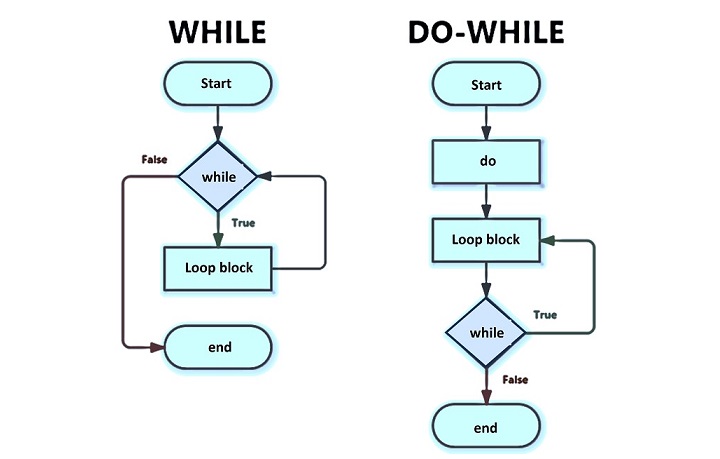
    There are 2 kinds of while loops in JavaScript, as given below.

    • Entry-controlled loops − The loop checks whether the looping condition is valid first and enters into the body of the loop to execute the loop statements.
    • Exit-controlled loops − The loop enters into the body and executes the loop statements without checking the condition. After completing the iteration, it checks the condition.

    JavaScript while Loop

    The most basic loop in JavaScript is the while loop which would be discussed in this chapter. The while loop is an entry-controlled loop.

    The purpose of a while loop is to execute a statement or code block repeatedly as long as an expression is true. Once the expression becomes false, the loop terminates.

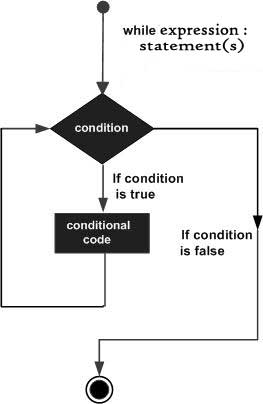
    Flow Chart

    The flow chart of while loop looks as follows −

    While loop

    Syntax

    The syntax of while loop in JavaScript is as follows −

    while(expression){Statement(s) to be executed if expression is true}

    Example

    In the example below, we defined the ‘count’ variable and initialized it with 0. After that, we make iterations using the while loop until the value of the count is less than 10.

    <html><body><div id ='output'></div><script type="text/javascript">let output = document.getElementById("output");var count =0;
            output.innerHTML="Starting Loop <br>";while(count <10){
                output.innerHTML+="Current Count : "+ count +"<br>";
                count++;}
            output.innerHTML+="Loop stopped!";</script><p> Set the variable to a different value and then try...</p></body></html>

    Output

    Starting Loop
    Current Count : 0
    Current Count : 1
    Current Count : 2
    Current Count : 3
    Current Count : 4
    Current Count : 5
    Current Count : 6
    Current Count : 7
    Current Count : 8
    Current Count : 9
    Loop stopped!
    Set the variable to different value and then try... 
    

    JavaScript do…while Loop

    The do…while loop is similar to the while loop except that the condition check happens at the end of the loop. This means that the loop will always be executed at least once, even if the condition is false.

    Flow Chart

    The flow chart of a do-while loop would be as follows −

    Do While Loop

    Syntax

    The syntax for do-while loop in JavaScript is as follows −

    do {
       Statement(s) to be executed;
    } while (expression);
    

    Don’t miss the semicolon used at the end of the do…while loop.

    Example

    In the example below, we used the do…while loop and printed the results in the output until the value of the count variable is less than 5. In the output, we can observe that it always executes for once, even if the condition is false.

    <html><body><div id="output"></div><script type="text/javascript">let output = document.getElementById("output");var count =0;
            output.innerHTML +="Starting Loop"+"<br />";do{
                output.innerHTML +="Current Count : "+ count +"<br />";
                count++;}while(count <5);
            output.innerHTML +="Loop stopped!";</script><p>Set the variable to a different value and then try...</p></body></html>

    Output

    Starting Loop
    Current Count : 0 
    Current Count : 1 
    Current Count : 2 
    Current Count : 3 
    Current Count : 4
    Loop Stopped!
    Set the variable to different value and then try...
    

    JavaScript while vs. for Loops

    The JavaScript while loop is similar to the for loop with the first and third expressions omitted. A for loop is generally used when the number of iteration is fixed and known but we use the while loop whne the number of iterations is not known.

    Example

    Let’s take an example of printing the first five natural numbers using for loop −

    <html><body><p> First five natural numbers:</p><div id ="demo"></div><script>const output = document.getElementById("demo");for(let i =1; i <=5; i++){
          output.innerHTML += i +"<br>";}</script></body></html>

    It will produce the following output −

    First five natural numbers:
    1
    2
    3
    4
    5
    

    Example

    We can now modify the above for loop as follows −

    <html><body><p> First five natural numbers:</p><div id ="demo"></div><script>const output = document.getElementById("demo");let i =1;for(; i <=5;){
          output.innerHTML += i +"<br>";
          i++}</script></body></html>

    Output

    First five natural numbers:
    
    1
    2
    3
    4
    5
    

    Example

    In the above example, we have omitted first and third expression in for loop statement. This is similar to the while loop statement. Look at the below example −

    <html><body><p> First five natural numbers:</p><div id ="demo"></div><script>const output = document.getElementById("demo");let i =1;while(i <=5){
          output.innerHTML += i +"<br>";
          i++}</script></body></html>

    Output

    First five natural numbers:
    
    1
    2
    3
    4
    5
    

    You notice that the for loop without first expression (initialization) and third expression (iteration), is similar to the while loop.

  • JavaScript – if…else Statement

    The JavaScript if…else statement executes a block of code when the specified condition is true. When the condition is false the else block will be executed. The if-else statements can be used to control the flow of execution of a program based on different conditions.

    While writing a program, there may be a situation when you need to adopt one out of a given set of paths. In such cases, you need to use conditional statements that allow your program to make correct decisions and perform the right actions.

    JavaScript supports conditional statements used to perform different actions based on different conditions. Here we will explain the if…else statement.

    Flow Chart of if-else

    The following flow chart shows how the if-else statement works.

    Decision Making

    JavaScript supports the following forms of if…else statement −

    • if statement
    • if…else statement
    • if…else if… statement.

    JavaScript if statement

    The if statement is the fundamental control statement that allows JavaScript to make decisions and execute statements conditionally.

    Syntax

    The syntax for a basic if statement is as follows −

    if(expression){Statement(s) to be executed if expression is true}

    Here a JavaScript expression is evaluated. If the resulting value is true, the given statement(s) are executed. If the expression is false, then no statement would be not executed. Most of the times, you will use comparison operators while making decisions.

    Example

    Try the following example to understand how the if statement works.

    <html><body><div id ='output'></div><script type ="text/javascript">let result;let age =20;if( age >18){
             result ="Qualifies for driving";}
    	  document.getElementById("output").innerHTML = result;</script><p> Set the variable to a different value and then try...</p></body></html>

    Output

    Qualifies for driving
    Set the variable to different value and then try...
    

    JavaScript if…else statement

    The ‘if…else’ statement is the next form of control statement that allows JavaScript to execute statements in a more controlled way.

    Syntax

    if(expression){Statement(s) to be executed if expression is true}else{Statement(s) to be executed if expression is false}

    Here JavaScript expression is evaluated. If the resulting value is true, the given statement(s) in the if block, are executed. If the expression is false, then the given statement(s) in the else block are executed.

    Example

    Try the following code to learn how to implement an if-else statement in JavaScript.

    <html><body><div id ='output'></div><script type ="text/javascript">let result;let age =15;if( age >18){
             result ="Qualifies for driving";}else{
             result ="Does not qualify for driving";}
          document.getElementById("output").innerHTML = result;</script><p> Set the variable to a different value and then try...</p></body></html>

    Output

    Does not qualify for driving
    Set the variable to different value and then try...
    

    JavaScript if…else if… statement

    The if…else if… statement (also called as if…else ladder)is an advanced form of ifelse that allows JavaScript to make a correct decision out of several conditions.

    Syntax

    The syntax of an if-else-if statement is as follows −

    if(expression 1){Statement(s) to be executed if expression 1 is true}elseif(expression 2){Statement(s) to be executed if expression 2 is true}elseif(expression 3){Statement(s) to be executed if expression 3 is true}else{Statement(s) to be executed if no expression is true}

    There is nothing special about this code. It is just a series of if statements, where each if is a part of the else clause of the previous statement. Statement(s) are executed based on the true condition, if none of the conditions is true, then the else block is executed.

    Example

    Try the following code to learn how to implement an if-else-if statement in JavaScript.

    <html><body><div id ="demo"></div><script type="text/javascript">const output = document.getElementById("demo")let book ="maths";if(book =="history"){
             output.innerHTML="<b>History Book</b>";}elseif(book =="maths"){
             output.innerHTML="<b>Maths Book</b>";}elseif(book =="economics"){
             output.innerHTML="<b>Economics Book</b>";}else{
             output.innerHTML="<b>Unknown Book</b>";}</script><p> Set the variable to a different value and then try...</p></body><html>

    Output

    Maths Book
    Set the variable to different value and then try...
  • JavaScript – Operator Precedence

    In JavaScript, operator precedence ensures the priority of the operators to be executed when a single expression contains multiple operators. So, whatever expressions have higher priority, the compiler executes it first over other operators and then executes the operators with the lower precedence.

    Whenever you write any JavaScript expression with only 1 or 2 operators, you can easily understand the output of the expression. But when the expression contains multiple operators, you should know the concept of operator precedence to evaluate the expression correctly.

    The best example of operator precedence is that in traditional mathematics, the multiplication operator has higher precedence over the addition or subtraction operator. So, if any mathematical expression contains the multiplication and addition of both operators, you need to perform the multiplication first.

    Associativity

    The term associativity refers to the direction compiler should follow while evaluating the expression. In many situations, operators have the same precedence. In such cases, ambiguity occurs that which operation the compiler should perform first. So, the compiler takes the help of associativity. It can be from left to right or right to left.

    For example, we need to execute the below expression.

    let res =50/5*2;
    • Considering the above expression as (50/5) * 2 gives 20 as an output.
    • Evaluating the expression like 50/ (5*2) gives the 5 as a resultant value.

    To resolve the above ambiguity, the compiler uses the associativity rule. The associativity for the division and multiplication operator is from left to right. So, it evaluates the expression as (50 / 5) * 2.

    The assignment operator has right-to-left associativity. Consider the below assignment expression.

    P= q =90;

    In the above expression, 90 is assigned to the q, and the value of the q variable is assigned to the p.

    In short, the JavaScript compiler evaluates the expression based on the operator precedence, and when multiple operators have the same precedence, it uses the associativity rule.

    Operator Precedence Table

    The below table contains the operator, its description, associativity direction, and a short example.

    Operator PrecedenceOperatorDescriptionAssociativityExample
    1()GroupingL -> R(expression)
    2.Member of objectL -> RObject_name.property
    2()Function callL -> RDemo()
    2newTo create objectsR -> LNew test()
    2[]Member of objectL -> RObject[“property”]
    3Postfix decrementp–;
    3++Postfix incrementp++
    4Prefix decrementR -> L–p;
    4++Prefix incrementR -> L++p;
    4typeofTo get the variable typeR -> Ltypeof a;
    4!Logical notR -> L!a;
    4~Bitwise notR -> L~p
    4Unary minusR -> L-p
    4+Unary plusR -> L+p
    4deleteTo delete object propertyR -> LDelete arr[0]
    4voidEvaluates voidR -> LVoid(1)
    5**Exponentiation operatorR -> Lp ** q
    6*MultiplicationL -> Rp * q
    6/DivisionL -> Rp / q
    6%moduloL -> Rp % q
    7+Addition or plus operatorL -> Rp + q
    7Subtraction operatorL -> Rp – q
    8<<Left shiftL -> Rp << 2
    8>>Signed right shiftL -> Rp >> 2
    8>>>Unsigned right shiftL -> Rp >>> 2
    9inProperty in objectL -> Rx in y
    9instanceofInstance of objectL -> Rp instanceof Object
    9<Less thanL -> Rp < q
    9<=Less than or equal toL -> Rp <= q
    9>Greater thanL -> Rp > q
    9>=Greater than or equal toL -> Rp >= q
    10==EqualityL -> Rp == q
    10!=InequalityL -> Rp != q
    10===Strict equalityL -> Rp === q
    10!==Strict inequalityL -> Rp !== q
    11&Bitwise ANDL -> Rp & q
    12^Bitwise XORL -> Rp ^ q
    13|Bitwise ORL -> Rp | q
    14&&Logical ANDL -> Rp && q
    15||Logical ORL -> Rp || q
    16??Nullish CoalescingR -> Lp ?? q
    17=AssignmentR -> Lp = q
    17:Colon assignmentR -> Lp : q
    17+=Addition assignmentR -> Lp += q
    17-=Subtraction assignmentR -> Lp -= q
    17*=Multiplication assignmentR -> Lp *= q
    17/=Division assignmentR -> Lp /= q
    17%=Modulo assignmentR -> Lp %= q
    17**=Exponentiation assignmentR -> Lp **= q
    17<<=Left shift assignementR -> Lp <<= q
    17>>=Right shift assignmentR -> Lp >>= q
    17>>>=Unsigned right shift assignmentR -> Lp >>>= q
    17&=Bitwise AND assignmentR -> Lp &= q
    17^=Bitwise XOR assignmentR -> Lp ^= q
    17|=Bitwise OR assignmentR -> Lp |= q
    17&&=Logical AND assignmentR -> Lp &&= q
    17||=Logical OR assignementR -> Lp ||= q
    17=>Arrow operator(a, b )=> { // function code}
    17Spread operator[ arr]
    18yieldPause / ResumeR -> Lyield p;
    19,Comma operatorL -> R(10, 20, 30)

    Examples

    Let’s understand the operator precedence via simple examples.

    Example

    In the example below, the first expression contains the division, modulo, and multiplication operators with the same precedence. So, the compiler will use the associativity rule, which is left to right for multiplication, division, and modulo operator.

    So, it divides the 30 by 15, takes modulo of (30/15) with 3, and multiples the ((30/15)%3) with 2.

    In the second expression, the exponentiation operator has right-to-left associativity. So, it evaluates the expression same as (2 *8 (3 ** 2)).

    <html><body><div id ="output"></div><script>const first =30/15%3*2;const second =2**3**2;
             document.getElementById("output").innerHTML ="The value of first expression is : "+ first +"<br>"+"The value of second expression is : "+ second;</script></body></html>

    Output

    It will produce the following result −

    The value of first expression is : 4
    The value of second expression is : 512
    

    Example

    This code demonstrates that you can use the grouping operator () to change the operator precedence. In the below code, we have taken the same expressions which we have taken in the above code, but we change the operator precedence.

    In the first expression, first, we take modulo and multiply the resultant value with 2. So, we get 0 and divide 30 by 0, returning infinity.

    In the second expression, the first expression evaluates the (2 ** 3) and (8 ** 2), which is equal to 64.

    <html><body><div id ="output"></div><script>const first =30/((15%3)*2);const second =(2**3)**2;
             document.getElementById("output").innerHTML ="The value of first expression is : "+ first +"<br>"+"The value of second expression is : "+ second;</script></body></html>

    Output

    The value of first expression is : Infinity
    The value of second expression is : 64
    

    The grouping operator can change operator precedence for any operator as it has the highest operator precedence.

  • JavaScript – Exponentiation Operator

    Exponentiation Operator

    The exponentiation operator in JavaScript is represented as **. The exponentiation operator takes two operands and returns the power of the first operand raised to the second.

    The exponentiation operator can also accept the variables of the BigInt data type as operands. Also, it follows the property of associativity, which means a**b**c and a**(b**c) expressions give the same result.

    The exponentiation operator evaluates the expression from right to left.

    Syntax

    We should follow the syntax below to use the exponentiation operator.

    let pow = x ** y;

    Return value

    It returns the result of raising the first operand (x) to the power of the second operand (y).

    Examples

    Let’s understand the exponentiation operator in details with the help of some examples.

    Example

    The example below defines the p and q variables containing the 2 and 3 values. After that, we used the exponentiation operator to get the PQ. In the output, you can observe the value of the ‘pow’ variable, which is 23, equal to 8.

    <html><body><div id ="output"></div><script>let p =2;let q =3;let pow = p ** q;
          document.getElementById("output").innerHTML ="The value of p ** q: "+ pow;</script></body></html>

    It will produce the following result −

    The value of p ** q: 8
    

    Example: Associativity of Exponentiation Operator

    This example demonstrates that the exponentiation operator follows the associativity property and evaluates the expression from right to left.

    Both expressions print the 6561 in the output, equal to the 38, where 8 equals the 23.

    <html><body><div id="output"></div><script>let p =3;let q =2;let r =3;let pow1 = p ** q ** r;let pow2 = p **(q ** r);
        
          document.getElementById("output").innerHTML ="pow1 = "+ pow1 +"<br>"+"pow2 = "+ pow2;</script></body></html>

    It will produce the following result −

    pow1 = 6561
    pow2 = 6561
    

    Example: Exponentiation operator with BigInt variables

    The below example demonstrates that the exponentiation operator can also be used with the bigint numbers. It returns the bigint value in the output.

    <html><body><div id ="output"></div><script>let p =10000000000000000000000000000n;let q =2n;let pow = p ** q;
          document.getElementById("output").innerHTML ="pow = "+ pow;</script></body></html>

    It will produce the following result −

    pow = 100000000000000000000000000000000000000000000000000000000
    

    Example: Exponentiation operator with non-numeric values

    When you use the non-numeric value as an operand of the exponentiation operator, it converts the value to numeric and returns the result. If the operand can’t be converted to the numeric value, it returns NaN in the output.

    Here, it converts the ‘[]’ to 0 and gives the correct result. The numeric value for the string ‘2a’ is NaN, so it prints the NaN in the output. If the array contains a single numeric element, it parses the element. Otherwise, it evaluates NaN if the array contains multiple elements.

    <html><body><div id ="output"></div><script>const output = document.getElementById("output");let pow =2**[];// Number([]) = 0
          output .innerHTML ="10 ** [] = "+ pow +"<br>";
          pow =[]**2;// Number([]) = 0
          output.innerHTML +="[] ** 2 = "+ pow +"<br>";
          pow =2**[2];// Number([2]) = 2    
          output.innerHTML +="10 ** [2] = "+ pow +"<br>";
          pow ="2"**2;// Number("2") = 2
          output.innerHTML +="2 ** 2 = "+ pow +"<br>";
          pow ="2a"**2;// Number("2a") = NaN
          output.innerHTML +="2a ** 2 = "+ pow +"<br>";
          pow =[2,3]**2;// Number([2, 3]) = NaN
          output.innerHTML +="[2, 3] ** 2 = "+ pow +"<br>";</script></body></html>

    It will produce the following result −

    10 ** [] = 1
    [] ** 2 = 0
    10 ** [2] = 4
    2 ** 2 = 4
    2a ** 2 = NaN
    [2, 3] ** 2 = NaN
    

    The exponentiation operator is an alternative to the pow() method of the Math() object.