Blog

  • PHP – Coding Standard

    Every company follows its own coding standard based on its best practices. Coding standard is required because there may be many developers working on different modules so if they will start inventing their own standards then source will become very un-manageable and it will become difficult to maintain that source code in future.

    Here are some reasons why one should use coding specifications −

    • Your peer programmers have to understand the code you produce. A coding standard acts as the blueprint for all the team to decipher the code.
    • Simplicity and clarity achieved by consistent coding saves you from common mistakes.
    • If you revise your code after some time then it becomes easy to understand that code.
    • Following a uniform coding standard brings more quality in software.

    There are few guidelines which can be followed while coding in PHP.

    Indenting and Line Length

    Use an indent of 4 spaces and don’t use any tab because different computers use different setting for tab. It is recommended to keep lines at approximately 75-85 characters long for better code readability.

    Control Structures

    These include if, for, while, switch, etc. Control statements should have one space between the control keyword and opening parenthesis, to distinguish them from function calls. You are strongly encouraged to always use curly braces even in situations where they are technically optional.

    Examples

    if((condition1)||(condition2)){
       action1;}elseif((condition3)&&(condition4)){
       action2;}else{default action;}

    You can write the switch statements as follows:

    switch(condition){case1:
          action1;break;case2:
          action2;break;default:
          defaultaction;break;}

    Function Calls

    Functions should be called with no spaces between the function name, the opening parenthesis, and the first parameter; spaces between commas and each parameter, and no space between the last parameter, the closing parenthesis, and the semicolon. Here’s an example −

    $var=foo($bar,$baz,$quux);

    Function Definitions

    Function declarations follow the “BSD/Allman style” −

    functionfooFunction($arg1,$arg2=''){if(condition){
          statement;}return$val;}

    Comments

    C style comments (/* */) and standard C++ comments (//) are both fine. Use of Perl/shell style comments (#) is allowed but discouraged.

    PHP Code Tags

    Always use <?php ?> to delimit PHP code, not the <? ?> shorthand. This is required for PHP compliance and is also the most portable way to include PHP code on differing operating systems and setups.

    Variable Names

    • Use all lower case letters
    • Use ‘_’ as the word separator.
    • Global variables should be prepended with a ‘g’.
    • Global constants should be all caps with ‘_’ separators.
    • Static variables may be prepended with ‘s’.

    Make Functions Reentrant

    Functions should not keep static variables that prevent a function from being reentrant.

    Alignment of Declaration Blocks

    Block of declarations should be aligned.

    One Statement Per Line

    There should be only one statement per line unless the statements are very closely related.

    Short Methods or Functions

    Methods should limit themselves to a single page of code.

    There could be many more points which should be considered while writing your PHP program. Over all intention should be to be consistent throughout of the code programming and it will be possible only when you will follow any coding standard. You can device your own standard if you like something different.

  • PHP – Array Destructuring

    In PHP, the term Array destructuring refers to the mechanism of extracting the array elements into individual variables. It can also be called unpacking of array. PHPs list() construct is used to destrucrure the given array assign its items to a list of variables in one statement.

    list($var1,$var2,$var3,...)=array(val1, val2, val3,...);

    As a result, val1 is assigned to $var1, val2 to $var2 and so on. Even though because of the parentheses, you may think list() is a function, but its not as it doesnt have return value. PHP treats a string as an array, however it cannot be unpacked with list(). Moreover, the parenthesis in list() cannot be empty.

    Instead of list(), you can also use the square brackets [] as a shortcut for destructuring the array.

    [$var1,$var2,$var3,...]=array(val1, val2, val3,...);

    Example

    Take a look at the following example −

    <?php
       $marks = array(50, 56, 70);
       list($p, $c, $m) = $marks;
       echo "Physics: $p  Chemistry: $c  Maths: $m" . PHP_EOL;
    
       # shortcut notation
       [$p, $c, $m] = $marks;
       echo "Physics: $p  Chemistry: $c  Maths: $m" . PHP_EOL;
    ?>

    It will produce the following output −

    Physics: 50  Chemistry: 56  Maths: 70
    Physics: 50  Chemistry: 56  Maths: 70
    

    Destructuring an Associative Array

    Before PHP 7.1.0, list() only worked on numerical arrays with numerical indices start at 0. PHP 7.1, array destructuring works with associative arrays as well.

    Let us try to destructure (or unpack) the following associative array, an array with non-numeric indices.

    $marks=array('p'=>50,'c'=>56,'m'=>70);

    To destructure this array the list() statement associates each array key with a independent variable.

    list('p'=>$p,'c'=>$c,'m'=>$m)=$marks;

    Instead, you can also use the [] alternative destructuring notation.

    ['p'=>$p,'c'=>$c,'m'=>$m]=$marks;

    Try and execute the following PHP script −

    <?php
       $marks = array('p'=>50, 'c'=>56, 'm'=>70);
       list('p'=>$p, 'c'=>$c, 'm'=>$m) = $marks;
       echo "Physics: $p  Chemistry: $c  Maths: $m" . PHP_EOL;
    
       # shortcut notation
       ['p'=>$p, 'c'=>$c, 'm'=>$m] = $marks;
       echo "Physics: $p  Chemistry: $c  Maths: $m" . PHP_EOL;
    ?>

    Skipping Array Elements

    In case of an indexed array, you can skip some of its elements in assign only others to the required variables

    <?php
       $marks = array(50, 56, 70);
       list($p, , $m) = $marks;
       echo "Physics: $p  Maths: $m" . PHP_EOL;
    
       # shortcut notation
       [$p, , $m] = $marks;
       echo "Physics: $p  Maths: $m" . PHP_EOL;
    ?>

    In case of an associative array, since the indices are not incremental starting from 0, it is not necessary to follow the order of elements while assigning.

    <?php
       $marks = array('p'=>50, 'c'=>56, 'm'=>70);
       list('c'=>$c, 'p'=>$p, 'm'=>$m) = $marks;
       echo "Physics: $p  Chemistry: $c  Maths: $m" . PHP_EOL;
    
       ['c'=>$c, 'm'=>$m, 'p'=>$p] = $marks;		# shortcut notation
       echo "Physics: $p  Chemistry: $c  Maths: $m" . PHP_EOL;
    ?>

    Destructuring a Nested Array

    You can extend the concept of array destructuring to nested arrays as well. In the following example, the subarray nested inside is an indexed array.

    <?php
       $marks = ['marks' => [50, 60, 70]];
       ['marks' => [$p, $c, $m]] = $marks;
       echo "Physics: $p  Chemistry: $c  Maths: $m" . PHP_EOL;
    ?>

    Destructuring works well even if the nested array is also an associative array.

    <?php
       $marks = ['marks' => ['p'=>50, 'c'=>60, 'm'=>70]];
       ['marks' => ['p'=>$p, 'c'=>$c, 'm'=>$m]] = $marks;
       echo "Physics: $p  Chemistry: $c  Maths: $m" . PHP_EOL;
    ?>
  • PHP.INI File Configuration

    On installing PHP software on your machine, php.ini is created in the installation directory. In case of XAMPP, php.ini is found in c:\xamm\php folder. It is an important configuration file that controls the performance and sets all the PHP related parameters.

    The phpinfo() function displays a list of different parameters and their current values of PHP, Aache, MySQL and other parts of the web server installation.

    Run the following code to display the settings, one of which shows the path to the “php.ini” file:

    <?php
       echo phpinfo();
    ?>

    Loaded Configuration File

    Locate the Loaded Configuration File setting that displays the location of php.ini file

    C:\xampp\php\php.ini
    

    Different aspects of PHPs behaviour are configured by a large number of parameters (called directives). The “php.ini” file comes with most of the lines starting with semicolon (;) symbol indicating that the line is commented. The uncommented line is actually the effective directive and its value. In other words, to activate and assign a value to a particular directive, remove the leading semicolon.

    directive = value
    

    Directive names are *case sensitive. Directives are variables used to configure PHP or PHP extensions. Note that there is no name validation, so if an expected directive is not found a default value will be used, which can be a string, a number, a PHP constant (e.g. E_ALL or M_PI), one of the INI constants (On, Off, True, False, Yes, No and None).

    Actually, the C:\XAMPP\PHP folder contains two INI files, one to be used in production environment and other in development environment.

    The php.ini-development.ini is very similar to its production variant, except it is much more verbose when it comes to errors. In development stage, copy this as php.ini to be able to trace the bugs in the code. Once the code is ready for deployment, use php.ini-production.ini file as the effective php.ini file, which essentially supress the error messages to a large extent.

    The directives in php.ini are divided in different categories, like Error handling, data handling, path and directories, file uploads, PHP extensions and module settings.

    Here is a list of some of the important directives in “php.ini” file:

    short_open_tag = Off

    Short open tags look like this: <? ?>. This option must be set to Off if you want to use XML functions.

    safe_mode = Off

    If this is set to On, you probably compiled PHP with the –enable-safe-mode flag. Safe mode is most relevant to CGI use. See the explanation in the section “CGI compile-time options”. earlier in this chapter.

    safe_mode_exec_dir = [DIR]

    This option is relevant only if safe mode is on; it can also be set with the –with-exec-dir flag during the Unix build process. PHP in safe mode only executes external binaries out of this directory. The default is /usr/local/bin. This has nothing to do with serving up a normal PHP/HTML Web page.

    safe_mode_allowed_env_vars = [PHP_]

    This option sets which environment variables users can change in safe mode. The default is only those variables prepended with “PHP_”. If this directive is empty, most variables are alterable.

    safe_mode_protected_env_vars = [LD_LIBRARY_PATH]

    This option sets which environment variables users can’t change in safe mode, even if safe_mode_allowed_env_vars is set permissively

    disable_functions = [function1, function2…]

    A welcome addition to PHP4 configuration and one perpetuated in PHP5 is the ability to disable selected functions for security reasons. Previously, this necessitated hand-editing the C code from which PHP was made. Filesystem, system, and network functions should probably be the first to go because allowing the capability to write files and alter the system over HTTP is never such a safe idea.

    max_execution_time = 30

    The function set_time_limit() won.t work in safe mode, so this is the main way to make a script time out in safe mode. In Windows, you have to abort based on maximum memory consumed rather than time. You can also use the Apache timeout setting to timeout if you use Apache, but that will apply to non-PHP files on the site too.

    error_reporting = E_ALL & ~E_NOTICE

    The default value is E_ALL & ~E_NOTICE, all errors except notices. Development servers should be set to at least the default; only production servers should even consider a lesser value

    error_prepend_string = [“”]

    With its bookend, error_append_string, this setting allows you to make error messages a different color than other text, or what have you.

    warn_plus_overloading = Off

    This setting issues a warning if the + operator is used with strings, as in a form value.

    variables_order = EGPCS

    This configuration setting supersedes gpc_order. Both are now deprecated along with register_globals. It sets the order of the different variables: Environment, GET, POST, COOKIE, and SERVER (aka Built-in). You can change this order around.

    Variables will be overwritten successively in left-to-right order, with the rightmost one winning the hand every time. This means if you left the default setting and happened to use the same name for an environment variable, a POST variable, and a COOKIE variable, the COOKIE variable would own that name at the end of the process. In real life, this doesn’t happen much.

    register_globals = Off

    This setting allows you to decide whether you wish to register EGPCS variables as global. This is now deprecated, and as of PHP4.2, this flag is set to Off by default. Use superglobal arrays instead. All the major code listings in this book use superglobal arrays.

    magic_quotes_gpc = On

    This setting escapes quotes in incoming GET/POST/COOKIE data. If you use a lot of forms which possibly submit to themselves or other forms and display form values, you may need to set this directive to On or prepare to use addslashes() on string-type data.

    magic_quotes_runtime = Off

    This setting escapes quotes in incoming database and text strings. Remember that SQL adds slashes to single quotes and apostrophes when storing strings and does not strip them off when returning them. If this setting is Off, you will need to use stripslashes() when outputting any type of string data from a SQL database. If magic_quotes_sybase is set to On, this must be Off.

    magic_quotes_sybase = Off

    This setting escapes single quotes in incoming database and text strings with Sybase-style single quotes rather than backslashes. If magic_quotes_runtime is set to On, this must be Off.

    auto-prepend-file = [path/to/file]

    If a path is specified here, PHP must automatically include() it at the beginning of every PHP file. Include path restrictions do apply.

    auto-append-file = [path/to/file]

    If a path is specified here, PHP must automatically include() it at the end of every PHP file.unless you escape by using the exit() function. Include path restrictions do apply.

    include_path = [DIR]

    If you set this value, you will only be allowed to include or require files from these directories. The include directory is generally under your document root; this is mandatory if you.re running in safe mode. Set this to . in order to include files from the same directory your script is in. Multiple directories are separated by colons: .:/usr/local/apache/htdocs:/usr/local/lib.

    doc_root = [DIR]

    If you are using Apache, you have already set a document root for this server or virtual host in httpd.conf. Set this value here if you.re using safe mode or if you want to enable PHP only on a portion of your site (for example, only in one subdirectory of your Web root).

    file_uploads = [on/off]

    Turn on this flag if you will upload files using PHP script.

    upload_tmp_dir = [DIR]

    Do not comment this line unless you understand the implications of HTTP uploads!

    session.save-handler = files

    Except in rare circumstances, you will not want to change this setting. So don’t touch it.

    ignore_user_abort = [On/Off]

    This setting controls what happens if a site visitor clicks the browsers Stop button. The default is On, which means that the script continues to run to completion or timeout. If the setting is changed to Off, the script will abort. This setting only works in module mode, not CGI.

    mysql.default_host = hostname

    The default server host to use when connecting to the database server if no other host is specified.

    mysql.default_user = username

    The default user name to use when connecting to the database server if no other name is specified.

    mysql.default_password = password

    The default password to use when connecting to the database server if no other password is specified.
  • PHP & MySQL

    PHP will work with virtually all database software, including Oracle and Sybase but most commonly used is freely available MySQL database.

    What you should already have ?

    • You have gone through MySQL tutorial to understand MySQL Basics.
    • Downloaded and installed a latest version of MySQL.
    • Created database user guest with password guest123.
    • If you have not created a database then you would need root user and its password to create a database.

    We have divided this chapter in the following sections −

  • PHP – Flash Messages

    Message flashing in a PHP web application refers to the technique that makes certain messages popup on the browser window for the user to receive applications feedback. To be able to give the user a meaningful feedback to his interactions is an important design principle, that gives a better user experience.

    In a PHP web application, we can use the session data to flash messages regarding success or failure of a certain action, notifications or warnings, etc., from time to time to keep the user informed.

    flash message allows you to create a message on one page and display it once on another page. To transfer a message from one page to another, you use the $_SESSION superglobal variable.

    To start with, you add a variable to the $_SESSION array as follows −

    <?php
       session_start();
       $_SESSION['flash_message'] = "Hello World";
    ?>

    Later, navigate to another page, and retrieve the flashed message from the $_SESSION variable and assign it to a variable. Then, you can display the message and then delete the message from the $_SESSION −

    <?php
       session_start();
       if(isset($_SESSION['flash_message'])) {
          $message = $_SESSION['flash_message'];
          unset($_SESSION['flash_message']);
          echo $message;
       }
    ?>

    To generalize the basic idea of handling the flashed messages, we shall write a function that adds a message to the $_SESSION −

    session_start();functioncreate_flash_message(string$name,string$message):void{// remove existing message with the nameif(isset($_SESSION[FLASH][$name])){unset($_SESSION[FLASH][$name]);}// add the message to the session$_SESSION[FLASH][$name]=['message'=>$message];}

    Let us also have another function that reads back a message, flashes it on the browser, and removes it from the $_SESSION.

    functiondisplay_flash_message(string$name):void{if(!isset($_SESSION[FLASH][$name])){return;}// get message from the session$flash_message=$_SESSION[FLASH][$name];// delete the flash messageunset($_SESSION[FLASH][$name]);// display the flash messageechoformat_flash_message($flash_message);}

    The format_flash_message() function applies desired formatting to the obtained string with appropriate CSS rules.

    If there are more than messages that have been flashed by the application, all of them can be retrieved and flashed with the following example −

    functiondisplay_all_flash_messages():void{if(!isset($_SESSION[FLASH])){return;}// get flash messages$flash_messages=$_SESSION[FLASH];// remove all the flash messagesunset($_SESSION[FLASH]);// show all flash messagesforeach($flash_messagesas$flash_message){echoformat_flash_message($flash_message);}}

    Use the following flash() function to create, format and flash the messages

    functionflash(string$name='',string$message=''):void{if($name!==''&&$message!==''){create_flash_message($name,$message);}elseif($name!==''&&$message===''){display_flash_message($name);// display a flash message}elseif($name===''&&$message===''){display_all_flash_messages();// display all flash message}}

    To implement the above method, call the flash() function on the first page.

    flash('first','Hello World');

    Navigate to another page and call the flash() function to retrieve and display the message −

    flash('first');

    Mechanism of using the flash messages is usually employed on a signup page to redirect users to the login page with a welcome message after they sign up.

  • PHP – Post-Redirect-Get (PRG)

    In PHP, PRG stands for “Post/Redirect/Get”. It is a commonly used technique that is designed to prevent the resubmission of a form after it’s been submitted. You can easily implement this technique in PHP to avoid duplicate form submissions.

    Usually a HTML form sends data to the server with the POST method. The server script fetches the data for further processing like adding a new record in a backend database, or running a query to fetch data. If the user accidentally refreshes the browser, there is a possibility of the same form data being resubmitted again, possibly leading to loss of data integrity. The PRG approach in PHP helps you avoid this pitfall.

    Example

    To start with, let us consider the following PHP script that renders a simple HTML form, and submits it back to itself with POST method. When the user fills the data and submits, the backend script fetches the data, renders the result, and comes back to show the blank form again.

    <?php
       if (isset($_POST["submit"])) {
          if ($_SERVER["REQUEST_METHOD"] == "POST")
             echo "First name: " . $_REQUEST['first_name'] . " " . "Last Name: " . $_REQUEST['last_name'] . "";
       }
    ?><html><body><form action="<?php echo $_SERVER['PHP_SELF'];?>" method="post">
          First Name: <input type="text" name="first_name"><br/>
          Last Name: <input type="text" name="last_name" /><button type="submit" name="submit">Submit</button></form></body></html>

    Assuming that the server is running, the above script is placed in the document root folder and visited in the browser.

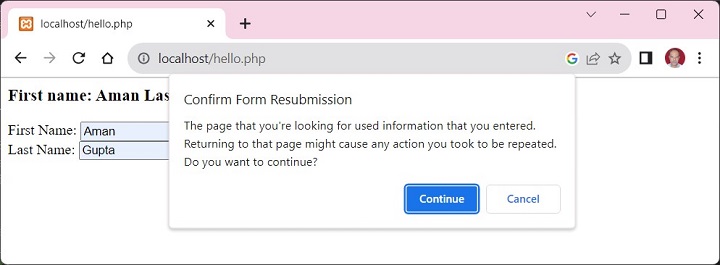
    Fill the data and submit. The browser echoes the result, and re-renders the form. Now if you try to refresh the browser page, a warning pops up as shown below −

    PHP PRG 1

    If you press Continue, the same data is posted again.

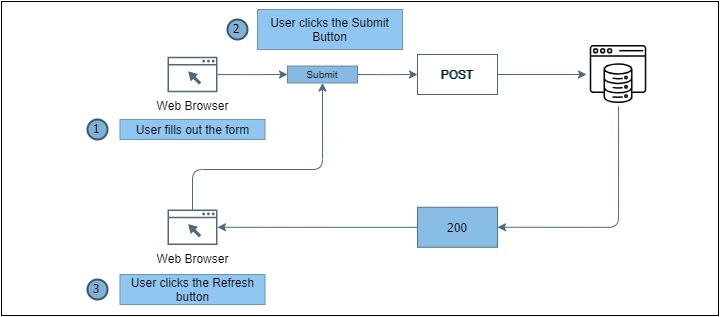
    The problem can be understood with the following figure −

    PHP PRG 2

    Following steps are taken in the PHP script to avoid the problem −

    • The PHP script before the HTML form starts a new session.
    • Check if the form has been submitted with POST method.
    • If so, store the form data in session variables
    • Redirect the browser to a result page. In our case, it is the same page. With the exit command, to terminate this script to make sure no more code gets executed.
    • If PHP finds that the REQUEST method is not POST, it checks if the session variables are set. If so, they are rendered along with the fresh copy of form.
    • Now even if the form is refreshed, you have successfully averted the possibility of resubmission.

    Example

    Here is the PHP code that uses the PRG technique −

    <?php
       session_start();
       if (isset($_POST["submit"])) {
          $_SESSION['fname'] = $_POST['first_name'];
          $_SESSION['lname'] = $_POST['last_name']; 
          header("Location: hello.php");
          exit;
       }
       if (isset($_SESSION["fname"])) {
          echo "First name: " . $_SESSION['fname'] . " " . "Last Name: " . $_SESSION['lname'] . "";
          unset($_SESSION["fname"]); unset($_SESSION["lname"]);
       }
    ?><html><body><form action="<?php echo $_SERVER['PHP_SELF'];?>" method="post">
          First Name: <input type="text" name="first_name"><br />
          Last Name: <input type="text" name="last_name" /><button type="submit" name="submit">Submit</button></form></body></html>