Category: Searching Algorithms

  • Hash Table Data structure

    Hash Table is a data structure which stores data in an associative manner. In a hash table, data is stored in an array format, where each data value has its own unique index value. Access of data becomes very fast if we know the index of the desired data.

    Thus, it becomes a data structure in which insertion and search operations are very fast irrespective of the size of the data. Hash Table uses an array as a storage medium and uses hash technique to generate an index where an element is to be inserted or is to be located from.

    Hashing

    Hashing is a technique to convert a range of key values into a range of indexes of an array. We’re going to use modulo operator to get a range of key values. Consider an example of hash table of size 20, and the following items are to be stored. Item are in the (key,value) format.
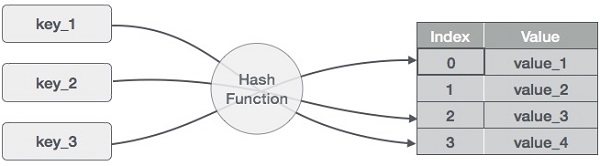
    Hash Function
    • (1,20)
    • (2,70)
    • (42,80)
    • (4,25)
    • (12,44)
    • (14,32)
    • (17,11)
    • (13,78)
    • (37,98)
    Sr.No.KeyHashArray Index
    111 % 20 = 11
    222 % 20 = 22
    34242 % 20 = 22
    444 % 20 = 44
    51212 % 20 = 1212
    61414 % 20 = 1414
    71717 % 20 = 1717
    81313 % 20 = 1313
    93737 % 20 = 1717

    Linear Probing

    As we can see, it may happen that the hashing technique is used to create an already used index of the array. In such a case, we can search the next empty location in the array by looking into the next cell until we find an empty cell. This technique is called linear probing.

    Sr.No.KeyHashArray IndexAfter Linear Probing, Array Index
    111 % 20 = 111
    222 % 20 = 222
    34242 % 20 = 223
    444 % 20 = 444
    51212 % 20 = 121212
    61414 % 20 = 141414
    71717 % 20 = 171717
    81313 % 20 = 131313
    93737 % 20 = 171718

    Basic Operations

    Following are the basic primary operations of a hash table.

    • Search − Searches an element in a hash table.
    • Insert − Inserts an element in a hash table.
    • Delete − Deletes an element from a hash table.

    DataItem

    Define a data item having some data and key, based on which the search is to be conducted in a hash table.

    structDataItem{int data;int key;};

    Hash Method

    Define a hashing method to compute the hash code of the key of the data item.

    inthashCode(int key){return key % SIZE;}

    Whenever an element is to be searched, compute the hash code of the key passed and locate the element using that hash code as index in the array. Use linear probing to get the element ahead if the element is not found at the computed hash code.

    structDataItem*search(int key){//get the hashint hashIndex =hashCode(key);//move in array until an emptywhile(hashArray[hashIndex]!=NULL){if(hashArray[hashIndex]->key == key)return hashArray[hashIndex];//go to next cell++hashIndex;//wrap around the table
          hashIndex %= SIZE;}returnNULL;}

    Example

    Following are the implementations of this operation in various programming language −

    CC++JavaPython

    #include <stdio.h>#define SIZE 10 // Define the size of the hash tablestructDataItem{int key;};structDataItem*hashArray[SIZE];// Define the hash table as an array of DataItem pointersinthashCode(int key){// Return a hash value based on the keyreturn key % SIZE;}structDataItem*search(int key){// get the hashint hashIndex =hashCode(key);// move in array until an empty slot is found or the key is foundwhile(hashArray[hashIndex]!=NULL){// If the key is found, return the corresponding DataItem pointerif(hashArray[hashIndex]->key == key)return hashArray[hashIndex];// go to the next cell++hashIndex;// wrap around the table
            hashIndex %= SIZE;}// If the key is not found, return NULLreturnNULL;}intmain(){// Initializing the hash table with some sample DataItemsstructDataItem item2 ={25};// Assuming the key is 25structDataItem item3 ={64};// Assuming the key is 64structDataItem item4 ={22};// Assuming the key is 22// Calculate the hash index for each item and place them in the hash tableint hashIndex2 =hashCode(item2.key);
        hashArray[hashIndex2]=&item2;int hashIndex3 =hashCode(item3.key);
        hashArray[hashIndex3]=&item3;int hashIndex4 =hashCode(item4.key);
        hashArray[hashIndex4]=&item4;// Call the search function to test itint keyToSearch =64;// The key to search for in the hash tablestructDataItem*result =search(keyToSearch);printf("The element to be searched: %d", keyToSearch);if(result !=NULL){printf("\nElement found");}else{printf("\nElement not found");}return0;}

    Output

    The element to be searched: 64
    Element found
    

    Insert Operation

    Whenever an element is to be inserted, compute the hash code of the key passed and locate the index using that hash code as an index in the array. Use linear probing for empty location, if an element is found at the computed hash code.

    voidinsert(int key,int data){structDataItem*item =(structDataItem*)malloc(sizeof(structDataItem));
       item->data = data;  
       item->key = key;//get the hash int hashIndex =hashCode(key);//move in array until an empty or deleted cellwhile(hashArray[hashIndex]!=NULL&& hashArray[hashIndex]->key !=-1){//go to next cell++hashIndex;//wrap around the table
          hashIndex %= SIZE;}
    	
       hashArray[hashIndex]= item;}

    Example

    Following are the implementations of this operation in various programming languages −

    CC++JavaPython

    #include <stdio.h>#include <stdlib.h>#define SIZE 4 // Define the size of the hash tablestructDataItem{int key;};structDataItem*hashArray[SIZE];// Define the hash table as an array of DataItem pointersinthashCode(int key){// Return a hash value based on the keyreturn key % SIZE;}voidinsert(int key){// Create a new DataItem using mallocstructDataItem*newItem =(structDataItem*)malloc(sizeof(structDataItem));if(newItem ==NULL){// Check if malloc fails to allocate memoryfprintf(stderr,"Memory allocation error\n");return;}
       
       newItem->key = key;// Initialize other data members if needed// Calculate the hash index for the keyint hashIndex =hashCode(key);// Handle collisions (linear probing)while(hashArray[hashIndex]!=NULL){// Move to the next cell++hashIndex;// Wrap around the table if needed
          hashIndex %= SIZE;}// Insert the new DataItem at the calculated index
       hashArray[hashIndex]= newItem;}intmain(){// Call the insert function with different keys to populate the hash tableinsert(42);// Insert an item with key 42insert(25);// Insert an item with key 25insert(64);// Insert an item with key 64insert(22);// Insert an item with key 22// Output the populated hash tablefor(int i =0; i < SIZE; i++){if(hashArray[i]!=NULL){printf("Index %d: Key %d\n", i, hashArray[i]->key);}else{printf("Index %d: Empty\n", i);}}return0;}

    Output

    Index 0: Key 64
    Index 1: Key 25
    Index 2: Key 42
    Index 3: Key 22
    

    Delete Operation

    Whenever an element is to be deleted, compute the hash code of the key passed and locate the index using that hash code as an index in the array. Use linear probing to get the element ahead if an element is not found at the computed hash code. When found, store a dummy item there to keep the performance of the hash table intact.

    structDataItem*delete(structDataItem* item){int key = item->key;//get the hash int hashIndex =hashCode(key);//move in array until an empty while(hashArray[hashIndex]!=NULL){if(hashArray[hashIndex]->key == key){structDataItem* temp = hashArray[hashIndex];//assign a dummy item at deleted position
             hashArray[hashIndex]= dummyItem;return temp;}//go to next cell++hashIndex;//wrap around the table
          hashIndex %= SIZE;}returnNULL;}

    Example

    Following are the implementations of the deletion operation for Hash Table in various programming languages −

    CC++JavaPython

    #include <stdio.h>#include <stdlib.h>#define SIZE 5 // Define the size of the hash tablestructDataItem{int key;};structDataItem*hashArray[SIZE];// Define the hash table as an array of DataItem pointersinthashCode(int key){// Implement your hash function here// Return a hash value based on the key}voidinsert(int key){// Create a new DataItem using mallocstructDataItem*newItem =(structDataItem*)malloc(sizeof(structDataItem));if(newItem ==NULL){// Check if malloc fails to allocate memoryfprintf(stderr,"Memory allocation error\n");return;}
       
       newItem->key = key;// Initialize other data members if needed// Calculate the hash index for the keyint hashIndex =hashCode(key);// Handle collisions (linear probing)while(hashArray[hashIndex]!=NULL){// Move to the next cell++hashIndex;// Wrap around the table if needed
          hashIndex %= SIZE;}// Insert the new DataItem at the calculated index
       hashArray[hashIndex]= newItem;// Print the inserted item's key and hash indexprintf("Inserted key %d at index %d\n", newItem->key, hashIndex);}voiddelete(int key){// Find the item in the hash tableint hashIndex =hashCode(key);while(hashArray[hashIndex]!=NULL){if(hashArray[hashIndex]->key == key){// Mark the item as deleted (optional: free memory)free(hashArray[hashIndex]);
             hashArray[hashIndex]=NULL;return;}// Move to the next cell++hashIndex;// Wrap around the table if needed
          hashIndex %= SIZE;}// If the key is not found, print a messageprintf("Item with key %d not found.\n", key);}intmain(){// Call the insert function with different keys to populate the hash tableprintf("Hash Table Contents before deletion:\n");insert(1);// Insert an item with key 42insert(2);// Insert an item with key 25insert(3);// Insert an item with key 64insert(4);// Insert an item with key 22int ele1 =2;int ele2 =4;printf("The key to be deleted: %d and %d", ele1, ele2);delete(ele1);// Delete an item with key 42delete(ele2);// Delete an item with key 25// Print the hash table's contents after delete operationsprintf("\nHash Table Contents after deletion:\n");for(int i =1; i < SIZE; i++){if(hashArray[i]!=NULL){printf("Index %d: Key %d\n", i, hashArray[i]->key);}else{printf("Index %d: Empty\n", i);}}return0;}

    Output

    Hash Table Contents before deletion:
    Inserted key 1 at index 1
    Inserted key 2 at index 2
    Inserted key 3 at index 3
    Inserted key 4 at index 4
    The key to be deleted: 2 and 4
    Hash Table Contents after deletion:
    Index 1: Key 1
    Index 2: Empty
    Index 3: Key 3
    Index 4: Empty
    

    Complete implementation

    Following are the complete implementations of the above operations in various programming languages −

    CC++JavaPython

    #include <stdio.h>#include <string.h>#include <stdlib.h>#include <stdbool.h>#define SIZE 20structDataItem{int data;int key;};structDataItem* hashArray[SIZE];structDataItem* dummyItem;structDataItem* item;inthashCode(int key){return key % SIZE;}structDataItem*search(int key){//get the hash int hashIndex =hashCode(key);//move in array until an empty while(hashArray[hashIndex]!=NULL){if(hashArray[hashIndex]->key == key)return hashArray[hashIndex];//go to next cell++hashIndex;//wrap around the table
          hashIndex %= SIZE;}returnNULL;}voidinsert(int key,int data){structDataItem*item =(structDataItem*)malloc(sizeof(structDataItem));
       item->data = data;  
       item->key = key;//get the hash int hashIndex =hashCode(key);//move in array until an empty or deleted cellwhile(hashArray[hashIndex]!=NULL&& hashArray[hashIndex]->key !=-1){//go to next cell++hashIndex;//wrap around the table
          hashIndex %= SIZE;}
       hashArray[hashIndex]= item;}structDataItem*delete(structDataItem* item){int key = item->key;//get the hash int hashIndex =hashCode(key);//move in array until an emptywhile(hashArray[hashIndex]!=NULL){if(hashArray[hashIndex]->key == key){structDataItem* temp = hashArray[hashIndex];//assign a dummy item at deleted position
             hashArray[hashIndex]= dummyItem;return temp;}//go to next cell++hashIndex;//wrap around the table
          hashIndex %= SIZE;}returnNULL;}voiddisplay(){int i =0;for(i =0; i<SIZE; i++){if(hashArray[i]!=NULL)printf("(%d,%d) ",hashArray[i]->key,hashArray[i]->data);}printf("\n");}intmain(){
       dummyItem =(structDataItem*)malloc(sizeof(structDataItem));
       dummyItem->data =-1;  
       dummyItem->key =-1;insert(1,20);insert(2,70);insert(42,80);insert(4,25);insert(12,44);insert(14,32);insert(17,11);insert(13,78);insert(37,97);printf("Insertion done: \n");printf("Contents of Hash Table: ");display();int ele =37;printf("The element to be searched: %d", ele);
       item =search(ele);if(item !=NULL){printf("\nElement found: %d\n", item->key);}else{printf("\nElement not found\n");}delete(item);printf("Hash Table contents after deletion: ");display();}

    Output

    Insertion done: 
    Contents of Hash Table: (1,20) (2,70) (42,80) (4,25) (12,44) (13,78) (14,32) (17,11) (37,97) 
    The element to be searched: 37
    Element found: 37
    Hash Table contents after deletion: (1,20) (2,70) (42,80) (4,25) (12,44) (13,78) (14,32) (17,11) (-1,-1) 
  • Sublist Search Algorithm

    Until now, in this tutorial, we have only seen how to search for one element in a sequential order of elements. But the sublist search algorithm provides a procedure to search for a linked list in another linked list. It works like any simple pattern matching algorithm where the aim is to determine whether one list is present in the other list or not.

    The algorithm walks through the linked list where the first element of one list is compared with the first element of the second list; if a match is not found, the second element of the first list is compared with the first element of the second list. This process continues until a match is found or it reaches the end of a list.

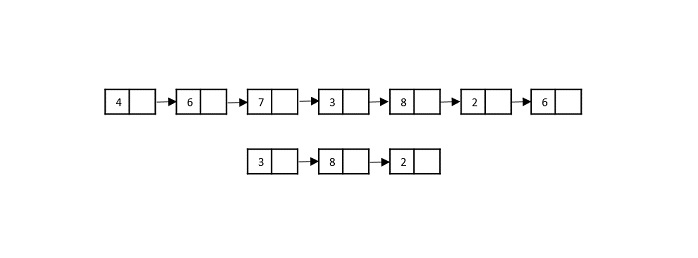
    For example, consider two linked lists with values {4, 6, 7, 3, 8, 2, 6} and {3, 8, 2}. Sublist search checks whether the values of second list are present in the first linked list. The output is obtained in Boolean values {True, False}. It cannot return the position of the sub-list as the linked list is not an ordered data structure.

    Sublist_Search

    Note − The output is returned true only if the second linked list is present in the exact same order in the first list.

    Sublist Search Algorithm

    The main aim of this algorithm is to prove that one linked list is a sub-list of another list. Searching in this process is done linearly, checking each element of the linked list one by one; if the output returns true, then it is proven that the second list is a sub-list of the first linked list.

    Procedure for the sublist search algorithm is as follows −

    Step 1 − Maintain two pointers, each pointing to one list. These pointers are used to traverse through the linked lists.

    Step 2 − Check for the base cases of the linked lists −

    • If both linked lists are empty, the output returns true.
    • If the second list is not empty but the first list is empty, we return false.
    • If the first list is not empty but the second list is empty, we return false.

    Step 3 − Once it is established that both the lists are not empty, use the pointers to traverse through the lists element by element.

    Step 4 − Compare the first element of the first linked list and the first element of the second linked list; if it is a match both the pointers are pointed to the next values in both lists respectively.

    Step 5 − If it is not a match, keep the pointer in second list at the first element but move the pointer in first list forward. Compare the elements again.

    Step 6 − Repeat Steps 4 and 5 until we reach the end of the lists.

    Step 7 − If the output is found, TRUE is returned and if not, FALSE.

    Pseudocode

    Begin Sublist Search
       list_ptr -> points to the first list
       sub_ptr -> points to the second list
       ptr1 = list_ptr
       ptr2 = sub_ptr
       if list_ptr := NULL and sub_ptr := NULL then:
          return TRUE
       end
       else if sub_ptr := NULL or sub_ptr != NULL and list_ptr := NULL then:
          return FALSE
       end
       while list_ptr != NULL do:
          ptr1 = list_ptr
          while ptr2 != NULL do:
             if ptr1 := NULL then:
                return false
             else if ptr2->data := ptr1->data then:
                ptr2 = ptr2->next
                ptr1 = ptr1->next
             else break
          done
          if ptr2 := NULL
             return TRUE
             ptr2 := sub_ptr
             list_ptr := list.ptr->next
       done
       return FALSE
    end
    

    Analysis

    The time complexity of the sublist search depends on the number of elements present in both linked lists involved. The worst case time taken by the algorithm to be executed is O(m*n) where m is the number of elements present in the first linked list and n is the number of elements present in the second linked list.

    Example

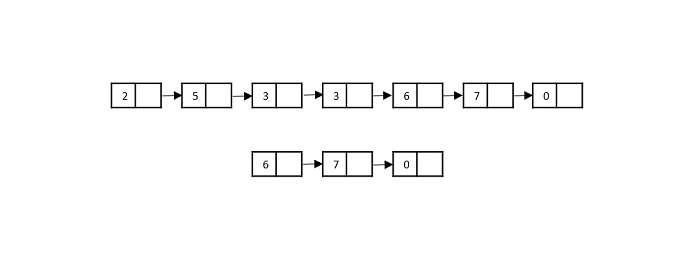
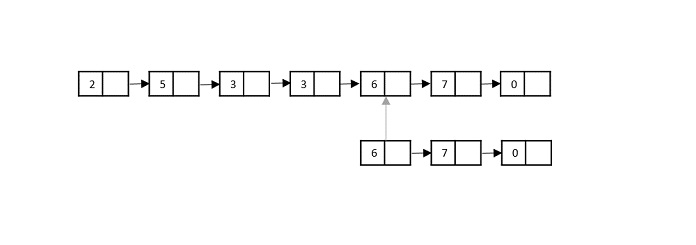
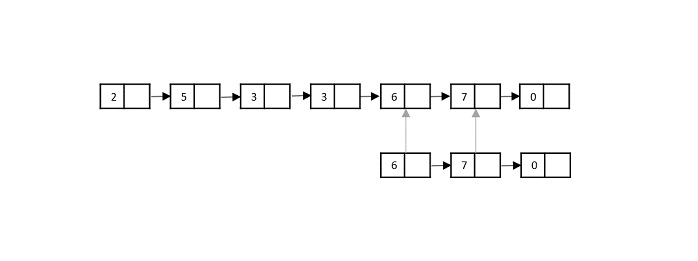
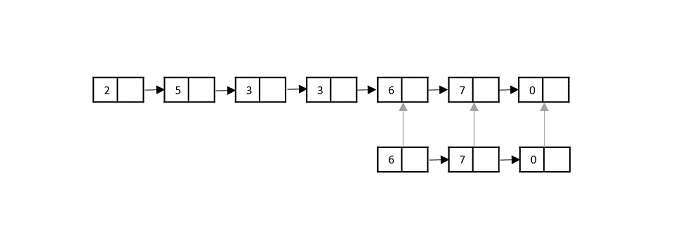
    Suppose we have two linked lists with elements given as −

    List 1 = {2, 5, 3, 3, 6, 7, 0}
    List 2 = {6, 7, 0}
    

    Using sublist search, we need to find out if List 2 is present in List 1.

    sublist_search_diagram

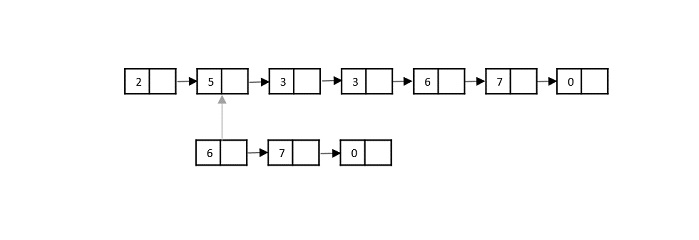
    Step 1

    Compare the first element of the List 2 with the first element of List 1. It is not a match, so the pointer in List 1 moves to the next memory address in it.

    Step 2

    In this step, the second element of the List 1 is compared with the first element of the List 2. It is not a match so the pointer in List 1 moves to next memory address.

    moves_next_memory_address

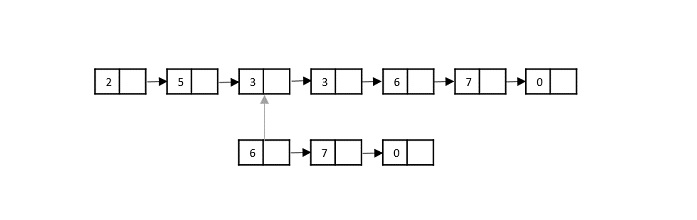
    Step 3

    Now the third element in List 1 is compared with the first element in the List 2. Since it is not a match, the pointer in List 1 moves forward.

    List_1_moves_forward

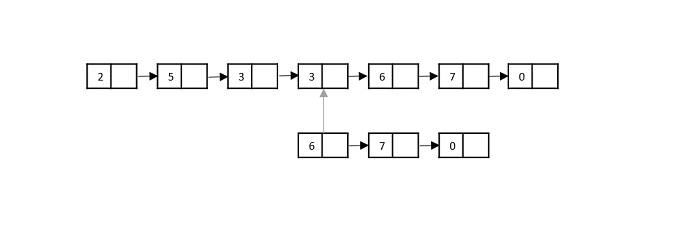
    Step 4

    Now the fourth element in List 1 is compared with the first element in the List 2. Since it is not a match, the pointer in List 1 moves forward.

    pointer_moved_forward

    Step 5

    Now the fifth element in List 1 is compared with the first element in the List 2. Since it is a match, the pointers in both List 1 and List 2 move forward.

    List1_List2_move_forward

    Step 6

    The sixth element in List 1 is compared with the second element in the List 2. Since it is also a match, the pointers in both List 1 and List 2 move forward.

    sixth_element_compare

    Step 7

    The seventh element in List 1 is compared with the third element in the List 2. Since it is also a match, it is proven that List 2 is a sub-list of List 1.

    seventh_element_compare

    The output is returned TRUE.

    Implementation

    In the sublist search implementation, linked lists are created first using struct keyword in the C language and as an object in C++, JAVA and Python languages. These linked lists are checked whether they are not empty; and then the elements are compared one by one linearly to find a match. If the second linked list is present in the first linked list in the same order, then the output is returned TRUE; otherwise the output is printed FALSE.

    The sublist search is executed in four different programming languages in this tutorial C, C++, JAVA and Python.

    CC++JavaPython

    #include <stdio.h>#include <stdlib.h>#include <stdbool.h>structNode{int data;structNode* next;};structNode*newNode(int key){structNode*val =(structNode*)malloc(sizeof(structNode));;
       val-> data= key;
       val->next =NULL;return val;}
    bool sublist_search(structNode* list_ptr,structNode* sub_ptr){structNode* ptr1 = list_ptr,*ptr2 = sub_ptr;if(list_ptr ==NULL&& sub_ptr ==NULL)return true;if( sub_ptr ==NULL||(sub_ptr !=NULL&& list_ptr ==NULL))return false;while(list_ptr !=NULL){
          ptr1 = list_ptr;while(ptr2 !=NULL){if(ptr1 ==NULL)return false;elseif(ptr2->data == ptr1->data){
                ptr2 = ptr2->next;
                ptr1 = ptr1->next;}elsebreak;}if(ptr2 ==NULL)return true;
          ptr2 = sub_ptr;
          list_ptr = list_ptr->next;}return false;}intmain(){structNode*list =newNode(2);
       list->next =newNode(5);
       list->next->next =newNode(3);
       list->next->next->next =newNode(3);
       list->next->next->next->next =newNode(6);
       list->next->next->next->next->next =newNode(7);
       list->next->next->next->next->next->next =newNode(0);structNode*sub_list =newNode(3);
       sub_list->next =newNode(6);
       sub_list->next->next =newNode(7);
       bool res =sublist_search(list, sub_list);if(res)printf("Is the sublist present in the list? %d", res);}

    Output

    Is the sublist present in the list? 1
  • Fibonacci Search Algorithm

    As the name suggests, the Fibonacci Search Algorithm uses Fibonacci numbers to search for an element in a sorted input array.

    But first, let us revise our knowledge on Fibonacci numbers −

    Fibonacci Series is a series of numbers that have two primitive numbers 0 and 1. The successive numbers are the sum of preceding two numbers in the series. This is an infinite constant series, therefore, the numbers in it are fixed. The first few numbers in this Fibonacci series include −

    0, 1, 1, 2, 3, 5, 8, 13, 21, 34, 55, 89
    

    The main idea behind the Fibonacci series is also to eliminate the least possible places where the element could be found. In a way, it acts like a divide & conquer algorithm (logic being the closest to binary search algorithm). This algorithm, like jump search and exponential search, also skips through the indices of the input array in order to perform searching.

    Fibonacci Search Algorithm

    The Fibonacci Search Algorithm makes use of the Fibonacci Series to diminish the range of an array on which the searching is set to be performed. With every iteration, the search range decreases making it easier to locate the element in the array. The detailed procedure of the searching is seen below −

    Step 1 − As the first step, find the immediate Fibonacci number that is greater than or equal to the size of the input array. Then, also hold the two preceding numbers of the selected Fibonacci number, that is, we hold Fm, Fm-1, Fm-2 numbers from the Fibonacci Series.

    Step 2 − Initialize the offset value as -1, as we are considering the entire array as the searching range in the beginning.

    Step 3 − Until Fm-2 is greater than 0, we perform the following steps −

    • Compare the key element to be found with the element at index [min(offset+Fm-2,n-1)]. If a match is found, return the index.
    • If the key element is found to be lesser value than this element, we reduce the range of the input from 0 to the index of this element. The Fibonacci numbers are also updated with Fm = Fm-2.
    • But if the key element is greater than the element at this index, we remove the elements before this element from the search range. The Fibonacci numbers are updated as Fm = Fm-1. The offset value is set to the index of this element.

    Step 4 − As there are two 1s in the Fibonacci series, there arises a case where your two preceding numbers will become 1. So if Fm-1 becomes 1, there is only one element left in the array to be searched. We compare the key element with that element and return the 1st index. Otherwise, the algorithm returns an unsuccessful search.

    Pseudocode

    Begin Fibonacci Search
       n <- size of the input array
       offset = -1
       Fm2 := 0
       Fm1 := 1
       Fm := Fm2 + Fm1
       while Fm < n do:
          Fm2 = Fm1
          Fm1 = Fm
          Fm = Fm2 + Fm1
       done
       while fm > 1 do:
          i := minimum of (offset + fm2, n  1)
          if (A[i] < x) then:

             Fm := Fm1
             Fm1 := Fm2
             Fm2 := Fm - Fm1
             offset = i
          end
          else if (A[i] > x) then:
             Fm = Fm2
             Fm1 = Fm1 - Fm2
             Fm2 = Fm - Fm1
          end
          else
             return i;
          end
       done
       if (Fm1 and Array[offset + 1] == x) then:
          return offset + 1
       end
       return invalid location;
    end
    

    Analysis

    The Fibonacci Search algorithm takes logarithmic time complexity to search for an element. Since it is based on a divide on a conquer approach and is similar to idea of binary search, the time taken by this algorithm to be executed under the worst case consequences is O(log n).

    Example

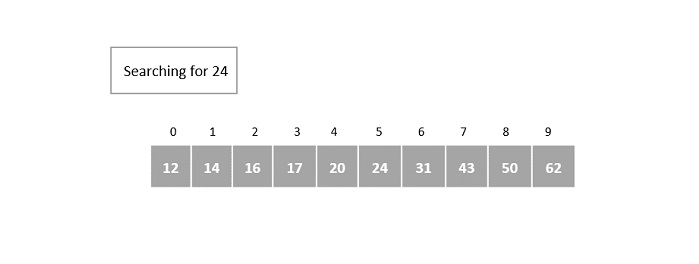
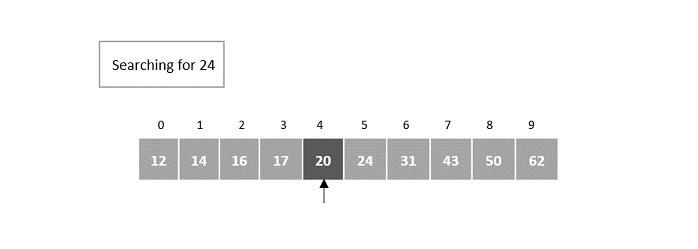
    Suppose we have a sorted array of elements {12, 14, 16, 17, 20, 24, 31, 43, 50, 62} and need to identify the location of element 24 in it using Fibonacci Search.

    searching_for_24

    Step 1

    The size of the input array is 10. The smallest Fibonacci number greater than 10 is 13.

    Therefore, Fm = 13, Fm-1 = 8, Fm-2 = 5.

    We initialize offset = -1

    Step 2

    In the first iteration, compare it with the element at index = minimum (offset + Fm-2, n 1) = minimum (-1 + 5, 9) = minimum (4, 9) = 4.

    The fourth element in the array is 20, which is not a match and is less than the key element.

    fourth_element_array_20

    Step 3

    In the second iteration, update the offset value and the Fibonacci numbers.

    Since the key is greater, the offset value will become the index of the element, i.e. 4. Fibonacci numbers are updated as Fm = Fm-1 = 8.

    Fm-1 = 5, Fm-2 = 3.

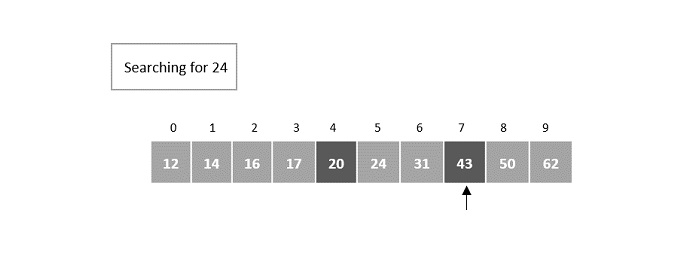
    Now, compare it with the element at index = minimum (offset + Fm-2, n 1) = minimum (4 + 3, 9) = minimum (7, 9) = 7.

    Element at the 7th index of the array is 43, which is not a match and is also lesser than the key.

    7th_index

    Step 4

    We discard the elements after the 7th index, so n = 7 and offset value remains 4.

    Fibonacci numbers are pushed two steps backward, i.e. Fm = Fm-2 = 3.

    Fm-1 = 2, Fm-2 = 1.

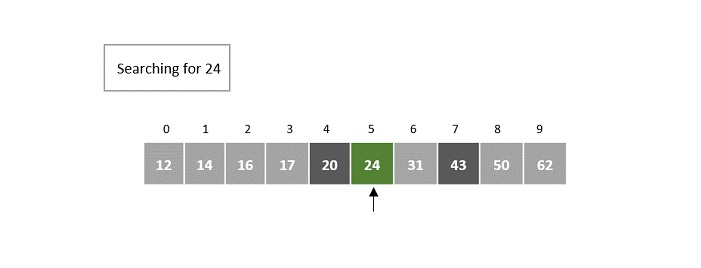
    Now, compare it with the element at index = minimum (offset + Fm-2, n 1) = minimum (4 + 1, 6) = minimum (5, 7) = 5.

    The element at index 5 in the array is 24, which is our key element. 5th index is returned as the output for this example array.

    index_5th

    The output is returned as 5.

    Implementation

    The Fibonacci search algorithm uses the divide and conquer strategy to eliminate the search spaces that are not likely to contain the required element. This elimination is done with the help of the Fibonacci numbers to narrow down the search range within an input array. The implementation for the Fibonacci search method in four different programming languages is shown below −

    CC++JavaPython

    #include <stdio.h>intmin(int,int);intfibonacci_search(int[],int,int);intmin(int a,int b){return(a > b)? b : a;}intfibonacci_search(int arr[],int n,int key){int offset =-1;int Fm2 =0;int Fm1 =1;int Fm = Fm2 + Fm1;while(Fm < n){
            Fm2 = Fm1;
            Fm1 = Fm;
            Fm = Fm2 + Fm1;}while(Fm >1){int i =min(offset + Fm2, n -1);if(arr[i]< key){
                Fm = Fm1;
                Fm1 = Fm2;
                Fm2 = Fm - Fm1;
                offset = i;}elseif(arr[i]> key){
                Fm = Fm2;
                Fm1 = Fm1 - Fm2;
                Fm2 = Fm - Fm1;}elsereturn i;}if(Fm1 && arr[offset +1]== key)return offset +1;return-1;}intmain(){int i, n, key, pos;int arr[10]={6,11,19,24,33,54,67,81,94,99};printf("Array elements are: ");int len =sizeof(arr)/sizeof(arr[0]);for(int j =0; j<len; j++){printf("%d ", arr[j]);}
       n =10;
       key =67;printf("\nThe element to be searched: %d", key); 
       pos =fibonacci_search(arr, n, key);if(pos >=0)printf("\nThe element is found at index %d", pos);elseprintf("\nUnsuccessful Search");}

    Output

    Array elements are: 6 11 19 24 33 54 67 81 94 99 
    The element to be searched: 67
    The element is found at index 6
  • Exponential Search Algorithm

    Exponential search algorithm targets a range of an input array in which it assumes that the required element must be present in and performs a binary search on that particular small range. This algorithm is also known as doubling search or finger search.

    It is similar to jump search in dividing the sorted input into multiple blocks and conducting a smaller scale search. However, the difference occurs while performing computations to divide the blocks and the type of smaller scale search applied (jump search applies linear search and exponential search applies binary search).

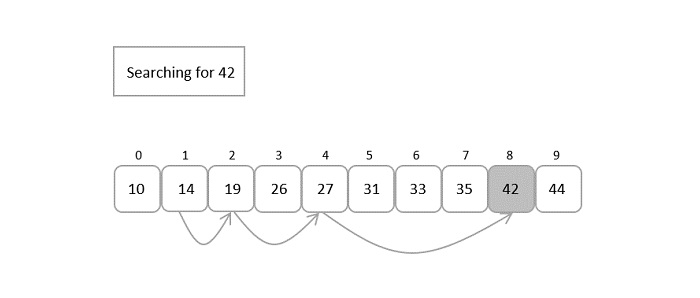
    Hence, this algorithm jumps exponentially in the powers of 2. In simpler words, the search is performed on the blocks divided using pow(2, k) where k is an integer greater than or equal to 0. Once the element at position pow(2, n) is greater than the key element, binary search is performed on the current block.

    searching_for_42

    Exponential Search Algorithm

    In the exponential search algorithm, the jump starts from the 1st index of the array. So we manually compare the first element as the first step in the algorithm.

    Step 1 − Compare the first element in the array with the key, if a match is found return the 0th index.

    Step 2 − Initialize i = 1 and compare the ith element of the array with the key to be search. If it matches return the index.

    Step 3 − If the element does not match, jump through the array exponentially in the powers of 2. Therefore, now the algorithm compares the element present in the incremental position.

    Step 4 − If the match is found, the index is returned. Otherwise Step 2 is repeated iteratively until the element at the incremental position becomes greater than the key to be searched.

    Step 5 − Since the next increment has the higher element than the key and the input is sorted, the algorithm applies binary search algorithm on the current block.

    Step 6 − The index at which the key is present is returned if the match is found; otherwise it is determined as an unsuccessful search.

    Pseudocode

    Begin
       m := pow(2, k) // m is the block size
       start := 1
       low := 0
       high := size  1 // size is the size of input
       if array[0] == key
          return 0
       while array[m] <= key AND m < size do
          start := start + 1
          m := pow(2, start)
          while low <= high do:
             mid = low + (high - low) / 2
             if array[mid] == x
                return mid
             if array[mid] < x
                low = mid + 1
             else
                high = mid - 1
       done
       return invalid location
    End
    

    Analysis

    Even though it is called Exponential search it does not perform searching in exponential time complexity. But as we know, in this search algorithm, the basic search being performed is binary search. Therefore, the time complexity of the exponential search algorithm will be the same as the binary search algorithms, O(log n).

    Example

    To understand the exponential search algorithm better and in a simpler way, let us search for an element in an example input array using the exponential search algorithm −

    The sorted input array given to the search algorithm is −

    search_algorithm

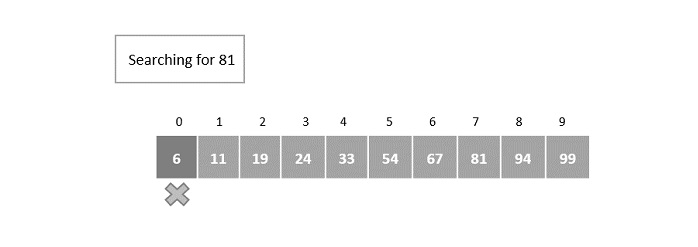
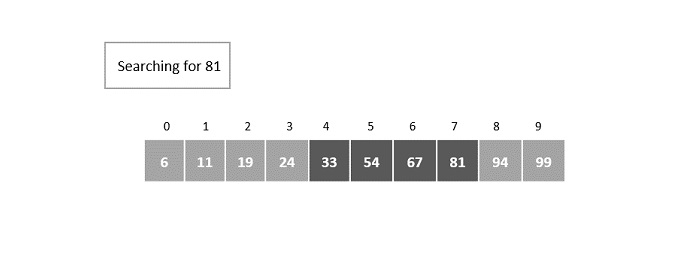
    Let us search for the position of element 81 in the given array.

    Step 1

    Compare the first element of the array with the key element 81.

    The first element of the array is 6, but the key element to be searched is 81; hence, the jump starts from the 1st index as there is no match found.

    searching_for_81

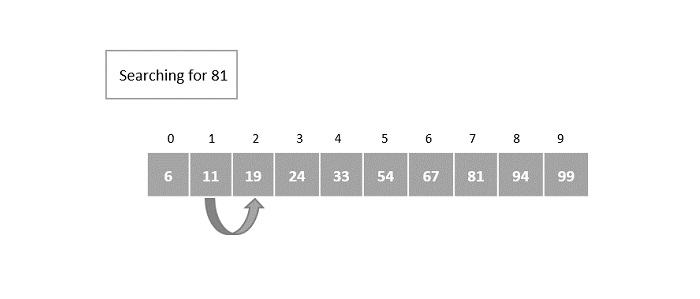
    Step 2

    After initializing i = 1, the key element is compared with the element in the first index. Here, the element in the 1st index does not match with the key element. So it is again incremented exponentially in the powers of 2.

    The index is incremented to 2m = 21 = the element in 2nd index is compared with the key element.

    again_incremented

    It is still not a match so it is once again incremented.

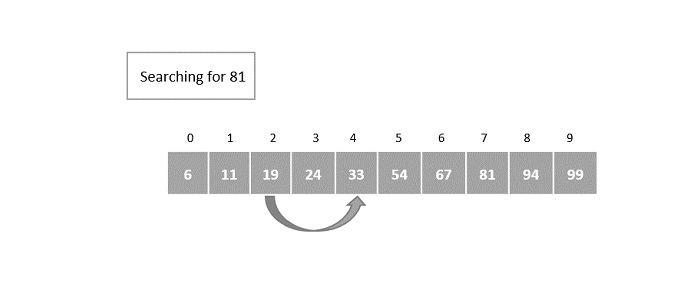
    Step 3

    The index is incremented in the powers of 2 again.

    22 = 4 = the element in 4th index is compared with the key element and a match is not found yet.

    4th_index_compare

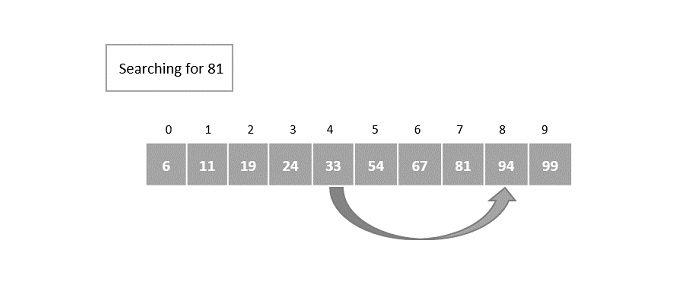
    Step 4

    The index is incremented exponentially once again. This time the element in the 8th index is compared with the key element and a match is not found.

    match_is_not_found

    However, the element in the 8th index is greater than the key element. Hence, the binary search algorithm is applied on the current block of elements.

    Step 5

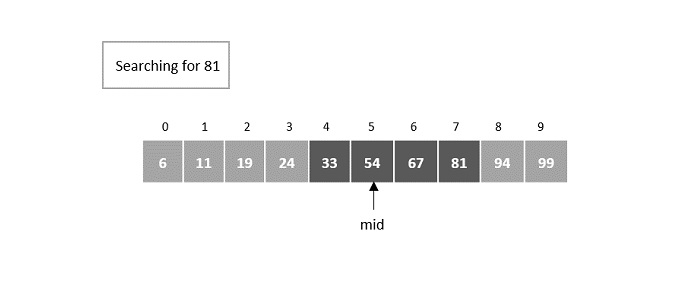
    The current block of elements includes the elements in the indices [4, 5, 6, 7].

    current_block_elements

    Small scale binary search is applied on this block of elements, where the mid is calculated to be the 5th element.

    calculated_5th_element

    Step 6

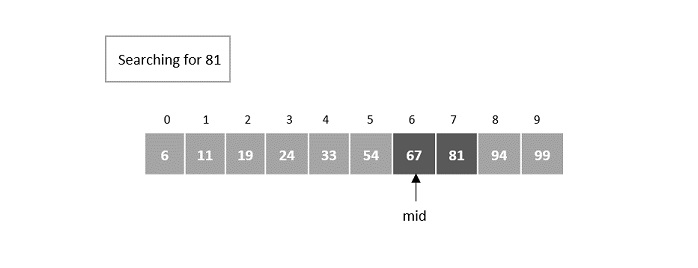
    The match is not found at the mid element and figures that the desired element is greater than the mid element. Hence, the search takes place is the right half of the block.

    The mid now is set as 6th element −

    6th_element

    Step 7

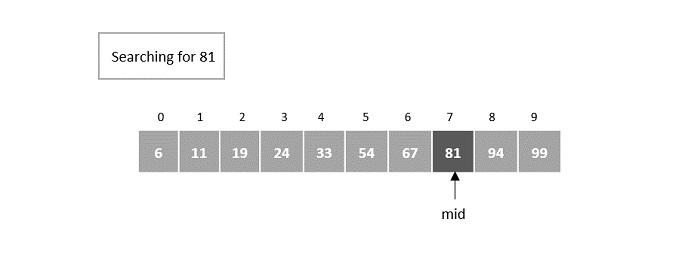
    The element is still not found at the 6th element so it now searches in the right half of the mid element.

    The next mid is set as 7th element.

    element_7

    Here, the element is found at the 7th index.

    Implementation

    In the implementation of the exponential search algorithm, the program checks for the matches at every exponential jump in the powers of 2. If the match is found the location of the element is returned otherwise the program returns an unsuccessful search.

    Once the element at an exponential jump becomes greater than the key element, a binary search is performed on the current block of elements.

    In this chapter, we will look into the implementation of exponential search in four different languages.

    CC++JavaPython

    #include <stdio.h>#include <math.h>intexponential_search(int[],int,int);intmain(){int i, n, key, pos;int arr[10]={6,11,19,24,33,54,67,81,94,99};
       n =10;printf("Array elements are: ");int len =sizeof(arr)/sizeof(arr[0]);for(int j =0; j<len; j++){printf("%d ", arr[j]);}
       key =67;printf("\nThe element to be searched: %d", key);
       pos =exponential_search(arr, n, key);if(pos >=0)printf("\nThe element is found at %d", pos);elseprintf("\nUnsuccessful Search");}intexponential_search(int a[],int n,int key){int i, m, low =0, high = n -1, mid;
       i =1;
       m =pow(2,i);if(a[0]== key)return0;while(a[m]<= key && m < n){
          i++;
          m =pow(2,i);while(low <= high){
             mid =(low + high)/2;if(a[mid]== key)return mid;elseif(a[mid]< key)
                low = mid +1;else
                high = mid -1;}}return-1;}

    Output

    Array elements are: 6 11 19 24 33 54 67 81 94 99 
    The element to be searched: 67
    The element is found at 6
  • Jump Search Algorithm

    Jump Search algorithm is a slightly modified version of the linear search algorithm. The main idea behind this algorithm is to reduce the time complexity by comparing lesser elements than the linear search algorithm. The input array is hence sorted and divided into blocks to perform searching while jumping through these blocks.

    For example, let us look at the given example below; the sorted input array is searched in the blocks of 3 elements each. The desired key is found only after 2 comparisons rather than the 6 comparisons of the linear search.

    Jump_Search

    Here, there arises a question about how to divide these blocks. To answer that, if the input array is of size n, the blocks are divided in the intervals of n. First element of every block is compared with the key element until the key elements value is less than the block element. Linear search is performed only on that previous block since the input is sorted. If the element is found, it is a successful search; otherwise, an unsuccessful search is returned.

    Jump search algorithm is discussed in detail further into this chapter.

    Jump Search Algorithm

    The jump search algorithm takes a sorted array as an input which is divided into smaller blocks to make the search simpler. The algorithm is as follows −

    Step 1 − If the size of the input array is n, then the size of the block is n. Set i = 0.

    Step 2 − The key to be searched is compared with the ith element of the array. If it is a match, the position of the element is returned; otherwise i is incremented with the block size.

    Step 3 − The Step 2 is repeated until the ith element is greater than the key element.

    Step 4 − Now, the element is figured to be in the previous block, since the input array is sorted. Therefore, linear search is applied on that block to find the element.

    Step 5 − If the element is found, the position is returned. If the element is not found, unsuccessful search is prompted.

    Pseudocode

    Begin
       blockSize := size
       start := 0
       end := blockSize
       while array[end] <= key AND end < size do
          start := end
          end := end + blockSize
          if end > size  1 then
             end := size
       done
       for i := start to end -1 do
          if array[i] = key then
             return i
       done
       return invalid location
    End
    

    Analysis

    The time complexity of the jump search technique is O(n) and space complexity is O(1).

    Example

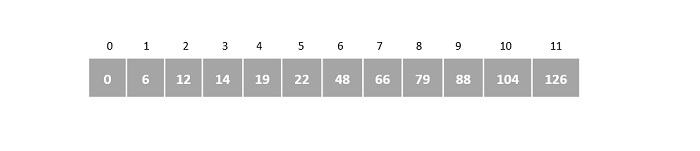
    Let us understand the jump search algorithm by searching for element 66 from the given sorted array, A, below −

    jump_search_algorithm

    Step 1

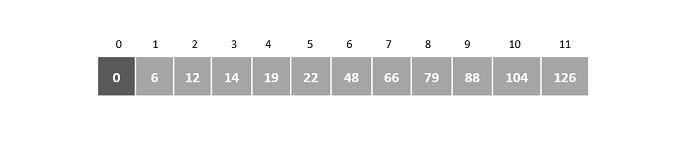
    Initialize i = 0, and size of the input array n = 12

    Suppose, block size is represented as m. Then, m = n = 12 = 3

    Step 2

    Compare A[0] with the key element and check whether it matches,

    A[0] = 0  66
    

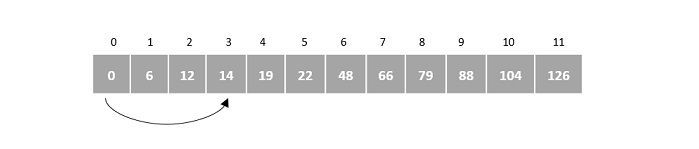
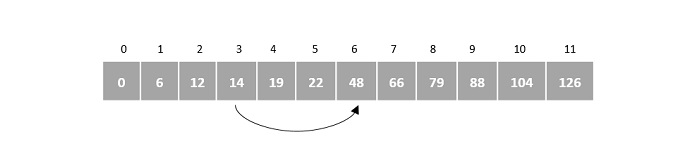
    Therefore, i is incremented by the block size = 3. Now the element compared with the key element is A[3].

    compare_index_3

    Step 3

    A[3] = 14  66
    

    Since it is not a match, i is again incremented by 3.

    incremented_3

    Step 4

    A[6] = 48  66
    

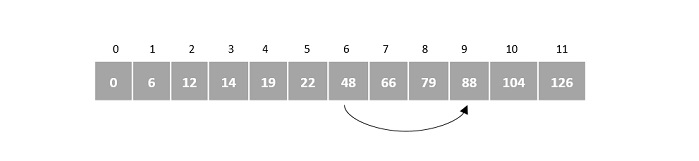
    i is incremented by 3 again. A[9] is compared with the key element.

    compare_with_index_6

    Step 5

    A[9] = 88  66
    

    However, 88 is greater than 66, therefore linear search is applied on the current block.

    88_greater_than_66

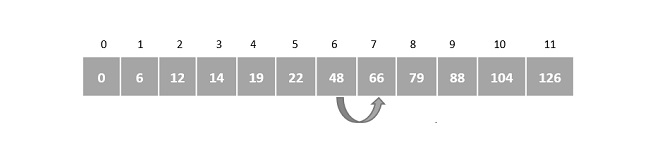
    Step 6

    After applying linear search, the pointer increments from 6th index to 7th. Therefore, A[7] is compared with the key element.

    returns_7th_index

    We find that A[7] is the required element, hence the program returns 7th index as the output.

    Implementation

    The jump search algorithm is an extended variant of linear search. The algorithm divides the input array into multiple small blocks and performs the linear search on a single block that is assumed to contain the element. If the element is not found in the assumed blocked, it returns an unsuccessful search.

    The output prints the position of the element in the array instead of its index. Indexing refers to the index numbers of the array that start from 0 while position is the place where the element is stored.

    CC++JavaPython

    #include<stdio.h>#include<math.h>intjump_search(int[],int,int);intmain(){int i, n, key, index;int arr[12]={0,6,12,14,19,22,48,66,79,88,104,126};int len =sizeof(arr)/sizeof(arr[0]);printf("Array elements are:");for(int j =0; j<len; j++){printf(" %d", arr[j]);}
       n =12;
       key =66;printf("\nThe element to be searched: %d\n", key);
       index =jump_search(arr, n, key);if(index >=0)printf("The element is found at position %d", index+1);elseprintf("Unsuccessful Search");return0;}intjump_search(int arr[],int n,int key){int i, j, m, k;
       i =0;
       m =sqrt(n);
       k = m;while(arr[m]<= key && m < n){
          i = m;
          m += k;if(m > n -1)return-1;}// linear search on the blockfor(j = i; j<m; j++){if(arr[j]== key)return j;}return-1;}

    Output

    Array elements are: 0 6 12 14 19 22 48 66 79 88 104 126
    The element to be searched: 66
    The element is found at position 8
  • Interpolation Search Algorithm

    Interpolation search is an improved variant of binary search. This search algorithm works on the probing position of the required value. For this algorithm to work properly, the data collection should be in a sorted form and equally distributed.

    Binary search has a huge advantage of time complexity over linear search. Linear search has worst-case complexity of (n) whereas binary search has (log n).

    There are cases where the location of target data may be known in advance. For example, in case of a telephone directory, if we want to search the telephone number of Morpheus. Here, linear search and even binary search will seem slow as we can directly jump to memory space where the names start from ‘M’ are stored.

    Positioning in Binary Search

    In binary search, if the desired data is not found then the rest of the list is divided in two parts, lower and higher. The search is carried out in either of them.

    Positioning_in_Binary_Search
    divided_in_two_parts
    positioning
    desired_data

    Even when the data is sorted, binary search does not take advantage to probe the position of the desired data.

    Position Probing in Interpolation Search

    Interpolation search finds a particular item by computing the probe position. Initially, the probe position is the position of the middle most item of the collection.

    Position_Probing_in_Interpolation_Search
    probe_position

    If a match occurs, then the index of the item is returned. To split the list into two parts, we use the following method −

    mid=Lo+(Hi−Lo)∗(X−A[Lo])A[Hi]−A[Lo]

    where −

    A = list
    Lo = Lowest index of the list
    Hi = Highest index of the list
    A[n] = Value stored at index n in the list
    

    If the middle item is greater than the item, then the probe position is again calculated in the sub-array to the right of the middle item. Otherwise, the item is searched in the sub-array to the left of the middle item. This process continues on the sub-array as well until the size of subarray reduces to zero.

    As it is an improvisation of the existing BST algorithm, we are mentioning the steps to search the ‘target’ data value index, using position probing −

    1. Start searching data from middle of the list. 
    2. If it is a match, return the index of the item, and exit. 
    3. If it is not a match, probe position. 
    4. Divide the list using probing formula and find the new middle. 
    5. If data is greater than middle, search in higher sub-list. 
    6. If data is smaller than middle, search in lower sub-list. 
    7. Repeat until match.
    

    Pseudocode

    A → Array list
    N → Size of A
    X → Target Value
    
    Procedure Interpolation_Search()
    
       Set Lo → 0
       Set Mid → -1
       Set Hi → N-1
    
       While X does not match
          if Lo equals to Hi OR A[Lo] equals to A[Hi]
             EXIT: Failure, Target not found
          end if
    
          Set Mid = Lo + ((Hi - Lo) / (A[Hi] - A[Lo])) * (X - A[Lo])
    
          if A[Mid] = X
             EXIT: Success, Target found at Mid
          else
             if A[Mid] < X
                Set Lo to Mid+1
             else if A[Mid] > X
                Set Hi to Mid-1
             end if
          end if
       End While
    End Procedure
    

    Analysis

    Runtime complexity of interpolation search algorithm is (log (log n)) as compared to (log n) of BST in favorable situations.

    Example

    To understand the step-by-step process involved in the interpolation search, let us look at an example and work around it.

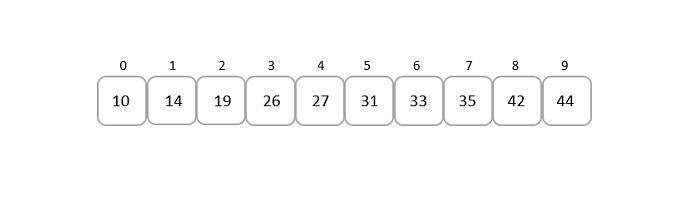
    Consider an array of sorted elements given below −

    array_of_sorted_elements

    Let us search for the element 19.

    Solution

    Unlike binary search, the middle point in this approach is chosen using the formula −

    mid=Lo+(Hi−Lo)∗(X−A[Lo])A[Hi]−A[Lo]

    So in this given array input,

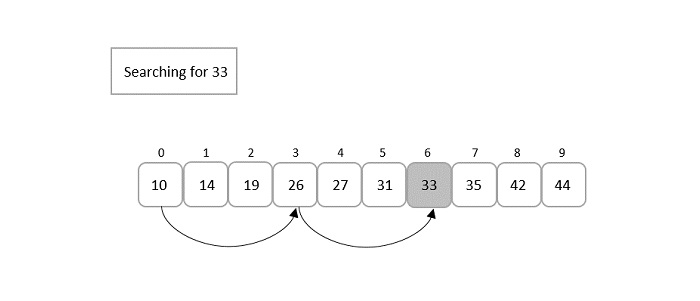
    Lo = 0, A[Lo] = 10
    Hi = 9, A[Hi] = 44
    X = 19
    

    Applying the formula to find the middle point in the list, we get

    mid=0+(9−0)∗(19−10)44−10

    mid=9∗934

    mid=8134=2.38

    Since, mid is an index value, we only consider the integer part of the decimal. That is, mid = 2.

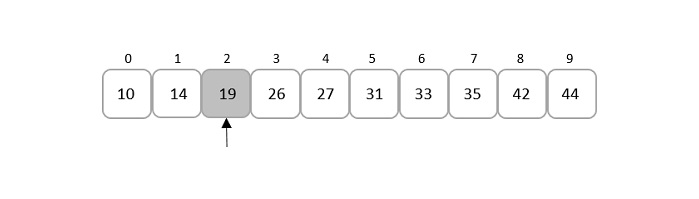
    at_index_2

    Comparing the key element given, that is 19, to the element present in the mid index, it is found that both the elements match.

    Therefore, the element is found at index 2.

    Implementation

    Interpolation search is an improved variant of binary search. This search algorithm works on the probing position of the required value. For this algorithm to work properly, the data collection should be in sorted and equally distributed form.

    CC++JavaPython

    #include<stdio.h>#define MAX 10// array of items on which linear search will be conducted.int list[MAX]={10,14,19,26,27,31,33,35,42,44};intinterpolation_search(int data){int lo =0;int hi = MAX -1;int mid =-1;int comparisons =1;int index =-1;while(lo <= hi){printf("Comparison %d \n", comparisons );printf("lo : %d, list[%d] = %d\n", lo, lo, list[lo]);printf("hi : %d, list[%d] = %d\n", hi, hi, list[hi]);
          comparisons++;// probe the mid point
          mid = lo +(((double)(hi - lo)/(list[hi]- list[lo]))*(data - list[lo]));printf("mid = %d\n",mid);// data foundif(list[mid]== data){
             index = mid;break;}else{if(list[mid]< data){// if data is larger, data is in upper half
                lo = mid +1;}else{// if data is smaller, data is in lower half
                hi = mid -1;}}}printf("Total comparisons made: %d",--comparisons);return index;}intmain(){//find location of 33int location =interpolation_search(33);// if element was foundif(location !=-1)printf("\nElement found at location: %d",(location+1));elseprintf("Element not found.");return0;}

    Output

    Comparison 1 
    lo : 0, list[0] = 10
    hi : 9, list[9] = 44
    mid = 6
    Total comparisons made: 1
    Element found at location: 7
  • Binary Search Algorithm

    Binary search is a fast search algorithm with run-time complexity of (log n). This search algorithm works on the principle of divide and conquer, since it divides the array into half before searching. For this algorithm to work properly, the data collection should be in the sorted form.

    Binary search looks for a particular key value by comparing the middle most item of the collection. If a match occurs, then the index of item is returned. But if the middle item has a value greater than the key value, the right sub-array of the middle item is searched. Otherwise, the left sub-array is searched. This process continues recursively until the size of a subarray reduces to zero.

    binary_search_algorithm

    Binary Search Algorithm

    Binary Search algorithm is an interval searching method that performs the searching in intervals only. The input taken by the binary search algorithm must always be in a sorted array since it divides the array into subarrays based on the greater or lower values. The algorithm follows the procedure below −

    Step 1 − Select the middle item in the array and compare it with the key value to be searched. If it is matched, return the position of the median.

    Step 2 − If it does not match the key value, check if the key value is either greater than or less than the median value.

    Step 3 − If the key is greater, perform the search in the right sub-array; but if the key is lower than the median value, perform the search in the left sub-array.

    Step 4 − Repeat Steps 1, 2 and 3 iteratively, until the size of sub-array becomes 1.

    Step 5 − If the key value does not exist in the array, then the algorithm returns an unsuccessful search.

    Pseudocode

    The pseudocode of binary search algorithms should look like this −

    Procedure binary_search
       A ← sorted array
       n ← size of array
       x ← value to be searched
    
       Set lowerBound = 1
       Set upperBound = n
    
       while x not found
          if upperBound < lowerBound
             EXIT: x does not exists.
    
          set midPoint = lowerBound + ( upperBound - lowerBound ) / 2
    
          if A[midPoint] < x
             set lowerBound = midPoint + 1
    
          if A[midPoint] > x
             set upperBound = midPoint - 1
    
          if A[midPoint] = x
             EXIT: x found at location midPoint
       end while
    end procedure
    

    Analysis

    Since the binary search algorithm performs searching iteratively, calculating the time complexity is not as easy as the linear search algorithm.

    The input array is searched iteratively by dividing into multiple sub-arrays after every unsuccessful iteration. Therefore, the recurrence relation formed would be of a dividing function.

    To explain it in simpler terms,

    • During the first iteration, the element is searched in the entire array. Therefore, length of the array = n.
    • In the second iteration, only half of the original array is searched. Hence, length of the array = n/2.
    • In the third iteration, half of the previous sub-array is searched. Here, length of the array will be = n/4.
    • Similarly, in the ith iteration, the length of the array will become n/2i

    To achieve a successful search, after the last iteration the length of array must be 1. Hence,

    n/2i = 1
    

    That gives us −

    n = 2i
    

    Applying log on both sides,

    log n = log 2i
    log n = i. log 2
    i = log n
    

    The time complexity of the binary search algorithm is O(log n)

    Example

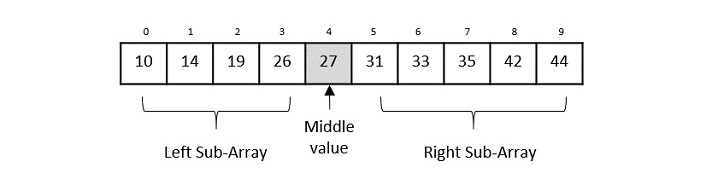
    For a binary search to work, it is mandatory for the target array to be sorted. We shall learn the process of binary search with a pictorial example. The following is our sorted array and let us assume that we need to search the location of value 31 using binary search.

    binary_search_with_pictorial_example

    First, we shall determine half of the array by using this formula −

    mid = low + (high - low) / 2
    

    Here it is, 0 + (9 – 0) / 2 = 4 (integer value of 4.5). So, 4 is the mid of the array.

    4th_index_array

    Now we compare the value stored at location 4, with the value being searched, i.e. 31. We find that the value at location 4 is 27, which is not a match. As the value is greater than 27 and we have a sorted array, so we also know that the target value must be in the upper portion of the array.

    location_4_value_27

    We change our low to mid + 1 and find the new mid value again.

    low = mid + 1
    mid = low + (high - low) / 2
    

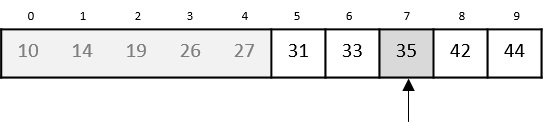
    Our new mid is 7 now. We compare the value stored at location 7 with our target value 31.

    at_loaction_7

    The value stored at location 7 is not a match, rather it is less than what we are looking for. So, the value must be in the lower part from this location.

    location_7_not_ match

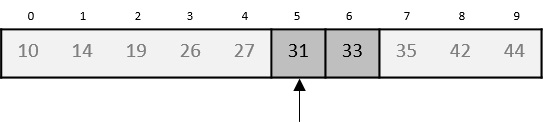
    Hence, we calculate the mid again. This time it is 5.

    at_location_5

    We compare the value stored at location 5 with our target value. We find that it is a match.

    location_5_matched

    We conclude that the target value 31 is stored at location 5.

    Binary search halves the searchable items and thus reduces the count of comparisons to be made to very less numbers.

    Implementation

    Binary search is a fast search algorithm with run-time complexity of (log n). This search algorithm works on the principle of divide and conquer. For this algorithm to work properly, the data collection should be in a sorted form.

    CC++JavaPython

    #include<stdio.h>voidbinary_search(int a[],int low,int high,int key){int mid;
       mid =(low + high)/2;if(low <= high){if(a[mid]== key)printf("Element found at index: %d\n", mid);elseif(key < a[mid])binary_search(a, low, mid-1, key);elseif(a[mid]< key)binary_search(a, mid+1, high, key);}elseif(low > high)printf("Unsuccessful Search\n");}intmain(){int i, n, low, high, key;
       n =5;
       low =0;
       high = n-1;int a[10]={12,14,18,22,39};
       key =22;binary_search(a, low, high, key);
       key =23;binary_search(a, low, high, key);return0;}

    Output

    Element found at index: 3
    Unsuccessful Search
  • Linear Search Algorithm

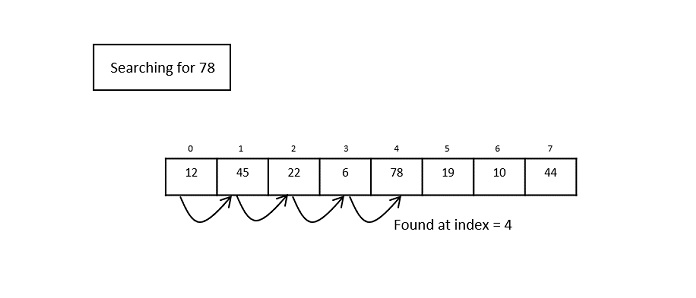
    Linear search is a type of sequential searching algorithm. In this method, every element within the input array is traversed and compared with the key element to be found. If a match is found in the array the search is said to be successful; if there is no match found the search is said to be unsuccessful and gives the worst-case time complexity.

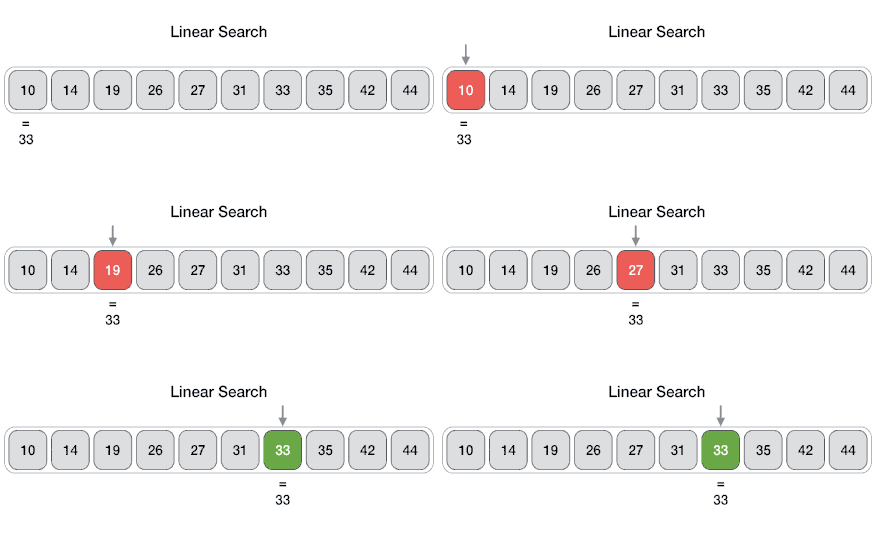
    For instance, in the given animated diagram, we are searching for an element 33. Therefore, the linear search method searches for it sequentially from the very first element until it finds a match. This returns a successful search.

    linear_search_diagram

    In the same diagram, if we have to search for an element 46, then it returns an unsuccessful search since 46 is not present in the input.

    Linear Search Algorithm

    The algorithm for linear search is relatively simple. The procedure starts at the very first index of the input array to be searched.

    Step 1 − Start from the 0th index of the input array, compare the key value with the value present in the 0th index.

    Step 2 − If the value matches with the key, return the position at which the value was found.

    Step 3 − If the value does not match with the key, compare the next element in the array.

    Step 4 − Repeat Step 3 until there is a match found. Return the position at which the match was found.

    Step 5 − If it is an unsuccessful search, print that the element is not present in the array and exit the program.

    Pseudocode

    procedure linear_search (list, value)
       for each item in the list
          if match item == value
             return the item's location
          end if
       end for
    end procedure
    

    Analysis

    Linear search traverses through every element sequentially therefore, the best case is when the element is found in the very first iteration. The best-case time complexity would be O(1).

    However, the worst case of the linear search method would be an unsuccessful search that does not find the key value in the array, it performs n iterations. Therefore, the worst-case time complexity of the linear search algorithm would be O(n).

    Example

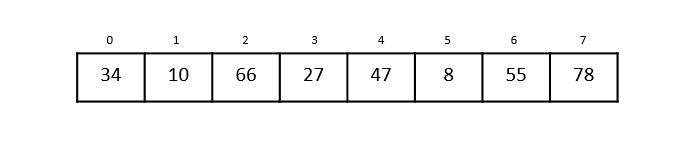
    Let us look at the step-by-step searching of the key element (say 47) in an array using the linear search method.

    binary_search_example

    Step 1

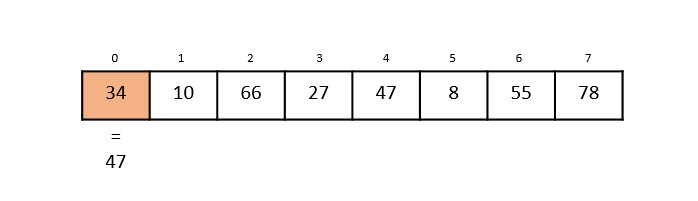
    The linear search starts from the 0th index. Compare the key element with the value in the 0th index, 34.

    1st_index

    However, 47 34. So it moves to the next element.

    Step 2

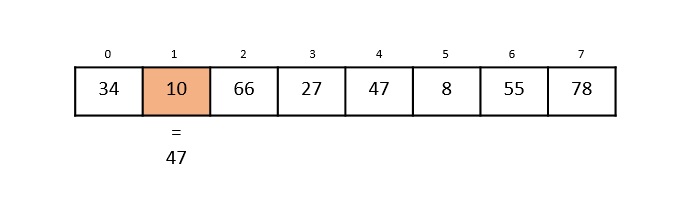
    Now, the key is compared with value in the 1st index of the array.

    1st_index_array

    Still, 47 10, making the algorithm move for another iteration.

    Step 3

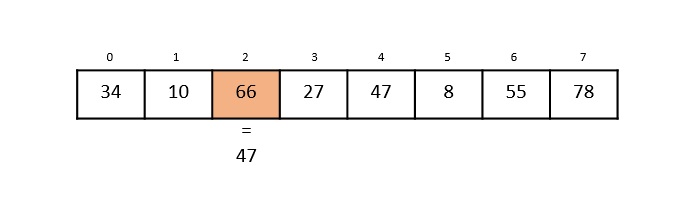
    The next element 66 is compared with 47. They are both not a match so the algorithm compares the further elements.

    index_2

    Step 4

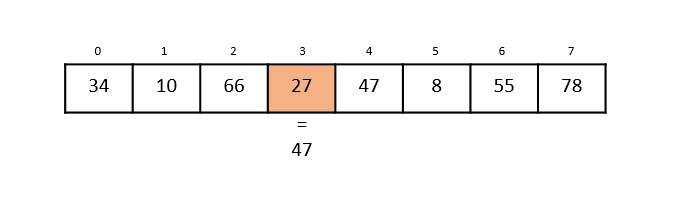
    Now the element in 3rd index, 27, is compared with the key value, 47. They are not equal so the algorithm is pushed forward to check the next element.

    index_3

    Step 5

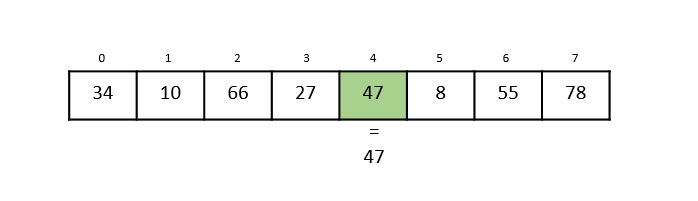
    Comparing the element in the 4th index of the array, 47, to the key 47. It is figured that both the elements match. Now, the position in which 47 is present, i.e., 4 is returned.

    index_4

    The output achieved is Element found at 4th index.

    Implementation

    In this tutorial, the Linear Search program can be seen implemented in four programming languages. The function compares the elements of input with the key value and returns the position of the key in the array or an unsuccessful search prompt if the key is not present in the array.

    CC++JavaPython

    #include <stdio.h>voidlinear_search(int a[],int n,int key){int i, count =0;for(i =0; i < n; i++){if(a[i]== key){// compares each element of the arrayprintf("The element is found at %d position\n", i+1);
             count = count +1;}}if(count ==0)// for unsuccessful searchprintf("The element is not present in the array\n");}intmain(){int i, n, key;
       n =6;int a[10]={12,44,32,18,4,10};
       key =18;linear_search(a, n, key);
       key =23;linear_search(a, n, key);return0;}

    Output

    The element is found at 4 position
    The element is not present in the array
  • Data Structures – Searching Algorithms

    In the previous section, we have discussed various Sorting Techniques and cases in which they can be used. However, the main idea behind performing sorting is to arrange the data in an orderly way, making it easier to search for any element within the sorted data.

    Searching is a process of finding a particular record, which can be a single element or a small chunk, within a huge amount of data. The data can be in various forms: arrays, linked lists, trees, heaps, and graphs etc. With the increasing amount of data nowadays, there are multiple techniques to perform the searching operation.

    Searching Algorithms in Data Structures

    Various searching techniques can be applied on the data structures to retrieve certain data. A search operation is said to be successful only if it returns the desired element or data; otherwise, the searching method is unsuccessful.

    There are two categories these searching techniques fall into. They are −

    • Sequential Searching
    • Interval Searching

    Sequential Searching

    As the name suggests, the sequential searching operation traverses through each element of the data sequentially to look for the desired data. The data need not be in a sorted manner for this type of search.

    Example − Linear Search

    Linear_Search

    Fig. 1: Linear Search Operation

    Interval Searching

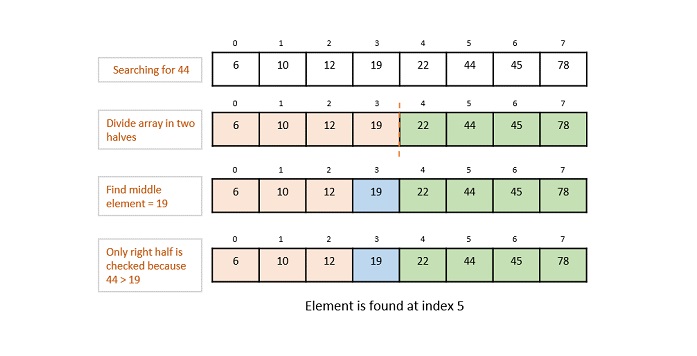
    Unlike sequential searching, the interval searching operation requires the data to be in a sorted manner. This method usually searches the data in intervals; it could be done by either dividing the data into multiple sub-parts or jumping through the indices to search for an element.

    Example − Binary Search, Jump Search etc.

    Binary_Search_Operation

    Fig. 2: Binary Search Operation

    Evaluating Searching Algorithms

    Usually, not all searching techniques are suitable for all types of data structures. In some cases, a sequential search is preferable while in other cases interval searching is preferable. Evaluation of these searching techniques is done by checking the running time taken by each searching method on a particular input.

    This is where asymptotic notations come into the picture. To learn more about Asymptotic Notations, please click here.

    To explain briefly, there are three different cases of time complexity in which a program can run. They are −

    • Best Case
    • Average Case
    • Worst Case

    We mostly concentrate on the only best-case and worst-case time complexities, as the average case is difficult to compute. And since the running time is based on the amount of input given to the program, the worst-case time complexity best describes the performance of any algorithm.

    For instance, the best case time complexity of a linear search is O(1) where the desired element is found in the first iteration; whereas the worst case time complexity is O(n) when the program traverses through all the elements and still does not find an element. This is labelled as an unsuccessful search. Therefore, the actual time complexity of a linear search is seen as O(n), where n is the number of elements present in the input data structure.

    Many types of searching methods are used to search for data entries in various data structures. Some of them include −

    • Linear Search
    • Binary Search
    • Interpolation Search
    • Jump Search
    • Hash Table
    • Exponential Search
    • Sublist search
    • Fibonacci Search
    • Ubiquitous Binary Search

    We will look at each of these searching methods elaborately in the following chapters.