Category: PHP Web Development

  • PHP – Complete Form

    This chapter puts all the concepts of form validation and extraction of HTML form data into PHP code. The complete form handling code given below has three sections: A PHP code section in the beginning that looks for any validation errors when the form is submitted, the HTML form with various elements such as text fields, radio buttons, Select control, checkbox, etc.

    The third part is again a PHP code that renders the data entered by the user.

    PHP Error Tracking

    The code that traps errors, is in the beginning of the entire script. Obviously, this will be executed every time the page is loaded.If it’s being loaded after the form is submitted, the following segment checks whether each element is empty, the email field is well-formed, and the checkbox is clicked (indicating that the user agrees to the terms).

    <?php
    
       // define variables and set to empty values
       $nameErr = $emailErr = $genderErr = $websiteErr = "";
       $name = $email = $gender = $class = $course = $subject = "";
    
       if ($_SERVER["REQUEST_METHOD"] == "POST") {
          if (empty($_POST["name"])) {
             $nameErr = "Name is required";
          } else {
             $name = test_input($_POST["name"]);
          }
    
          if (empty($_POST["email"])) {
             $emailErr = "Email is required";
          } else {
             $email = test_input($_POST["email"]);
    		 
             // check if e-mail address is well-formed
             if (!filter_var($email, FILTER_VALIDATE_EMAIL)) {
                $emailErr = "Invalid email format"; 
             }
          }
    
          if (empty($_POST["course"])) {
             $course = "";
          } else {
             $course = test_input($_POST["course"]);
          }
    
          if (empty($_POST["class"])) {
             $class = "";
          } else {
             $class = test_input($_POST["class"]);
          }
    
          if (empty($_POST["gender"])) {
             $genderErr = "Gender is required";
          } else {
             $gender = test_input($_POST["gender"]);
          }
    
          if (empty($_POST["subject"])) {
             $subjectErr = "You must select one or more subjects";
          } else {
             $subject = $_POST["subject"];	
          }
       }
    
       function test_input($data) {
          $data = trim($data);
          $data = stripslashes($data);
          $data = htmlspecialchars($data);
          return $data;
       }
    ?>

    HTML Form

    The HTML script that renders an entry form, follows the error trapping code. Various for elements have been employed in the form design.

    <h2>Absolute Classes Registration Form</h2><p><span class = "error">* required field.</span></p><form method = "POST" action = "<?php echo htmlspecialchars($_SERVER["PHP_SELF"]);?>">
       <table><tr><td>Name:</td><td><input type = "text" name = "name"><span class = "error">* <?php echo $nameErr;?></span></td></tr><tr><td>E-mail: </td><td><input type = "text" name = "email"><span class = "error">* <?php echo $emailErr;?></span></td></tr><tr><td>Time:</td><td><input type = "text" name = "course"><span class = "error"><?php echo $websiteErr;?></span></td></tr><tr><td>Classes:</td><td><textarea name = "class" rows = "5" cols = "40"></textarea></td></tr><tr><td>Gender:</td><td><input type = "radio" name = "gender" value = "female">Female
                <input type = "radio" name = "gender" value = "male">Male
                <span class = "error">* <?php echo $genderErr;?></span></td></tr><tr><td>Select:</td><td><select name = "subject[]" size = "4" multiple><option value = "Android">C</option><option value = "Java">Java</option><option value = "C#">C#</option><option value = "Data Base">C++</option><option value = "Hadoop">PHP</option><option value = "VB script">Python</option></select></td></tr><tr><td>Agree</td><td><input type = "checkbox" name = "checked" value = "1"></td><?php if(!isset($_POST['checked'])){ ?><span class = "error">* <?php echo "You must agree to terms";?></span><?php } ?></tr><tr><td><input type = "submit" name = "submit" value = "Submit"></td></tr></table></form>

    Note that the form data is submitted back to the same script, hence the form’s action attribute is set to $_SERVER[“PHP_SELF”] superglobal.

    This part also contains certain inline PHP code that flashes the error messages besides the respective form control – such as Name Required message just besides the Name text box, if the name field is empty while submitting the form.

    Display Form Data

    The third part of the script is again a PHP code that echoes the values of each of the form fields submitted by the user.

    <?php
       if ($_SERVER["REQUEST_METHOD"] == "POST") {
          echo "<h2>Your given values are as :</h2>";
          echo ("<p><b>Name</b> : $name</p>");
          echo ("<p><b>Email address</b> : $email</p>");
          echo ("<p><b>Preffered class time</b> : $course</p>");
          echo ("<p><b>Class info</b> : $class </p>");
          echo ("<p><b>Gender</b> : $gender</p>");
          echo "<p><b>Subjcts Chosen:</b><p>";
          if (!empty($subject)) { 
             echo "<ul>";
             for($i = 0; $i < count($subject); $i++) {
                echo "<li>$subject[$i]</u/li>";
             }
             echo "</ul>";
          }
       }
    ?>

    Here’s the sample data filled in the form when the script is run from the server’s document root folder −
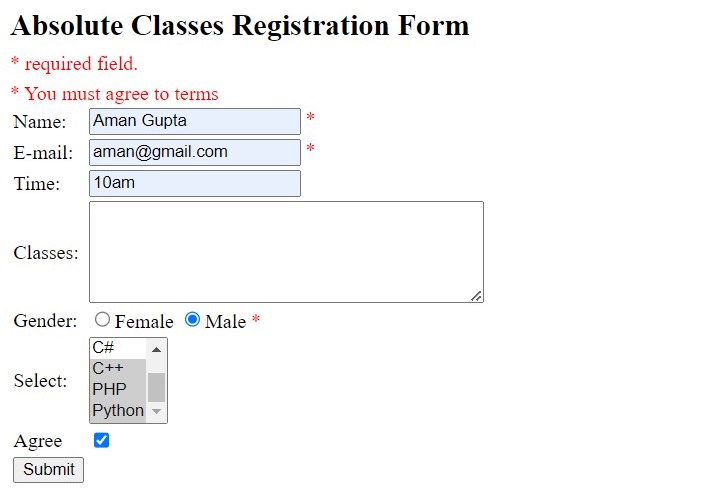
    PHP Complete Form 1

    When submitted, the output is rendered as below −

    PHP Complete Form 2

    Handling HTML Form

    The complete code of PHP’s handling HTML form is as follows −

    <html><head><style>
          .error {color: #FF0000;}
       </style></head><body><?php
       
          // define variables and set to empty values
          $nameErr = $emailErr = $genderErr = $websiteErr = "";
          $name = $email = $gender = $class = $course = $subject = "";
    
          if ($_SERVER["REQUEST_METHOD"] == "POST") {
             if (empty($_POST["name"])) {
                $nameErr = "Name is required";
             }else {
                $name = test_input($_POST["name"]);
             }
    
             if (empty($_POST["email"])) {
                $emailErr = "Email is required";
             } else {
                $email = test_input($_POST["email"]);
    
                // check if e-mail address is well-formed
                if (!filter_var($email, FILTER_VALIDATE_EMAIL)) {
                   $emailErr = "Invalid email format"; 
                }
             }
    
             if (empty($_POST["course"])) {
                $course = "";
             } else {
                $course = test_input($_POST["course"]);
             }
    
             if (empty($_POST["class"])) {
                $class = "";
             } else {
                $class = test_input($_POST["class"]);
             }
    
             if (empty($_POST["gender"])) {
                $genderErr = "Gender is required";
             } else {
                $gender = test_input($_POST["gender"]);
             }
    
             if (empty($_POST["subject"])) {
                $subjectErr = "You must select one or more subjects";
             } else {
                $subject = $_POST["subject"];	
             }
          }
    
          function test_input($data) {
             $data = trim($data);
             $data = stripslashes($data);
             $data = htmlspecialchars($data);
             return $data;
          }
       ?><h2>Absolute Classes Registration Form</h2><p><span class = "error">* required field.</span></p><form method = "POST" action = "<?php echo htmlspecialchars($_SERVER["PHP_SELF"]);?>"><table><tr><td>Name:</td><td><input type = "text" name = "name"><span class = "error">* <?php echo $nameErr;?></span></td></tr><tr><td>E-mail: </td><td><input type = "text" name = "email"><span class = "error">* <?php echo $emailErr;?></span></td></tr><tr><td>Time:</td><td><input type = "text" name = "course"><span class = "error"><?php echo $websiteErr;?></span></td></tr><tr><td>Classes:</td><td><textarea name = "class" rows = "5" cols = "40"></textarea></td></tr><tr><td>Gender:</td><td><input type = "radio" name = "gender" value = "female">Female
                   <input type = "radio" name = "gender" value = "male">Male
                   <span class = "error">* <?php echo $genderErr;?></span></td></tr><tr><td>Select:</td><td><select name = "subject[]" size = "4" multiple><option value = "C">C</option><option value = "Java">Java</option><option value = "C#">C#</option><option value = "c++">C++</option><option value = "PHP">PHP</option><option value = "Python">Python</option></select></td></tr><tr><td>Agree</td><td><input type = "checkbox" name = "checked" value = "1"></td><?php if(!isset($_POST['checked'])){ ?><span class = "error">* <?php echo "You must agree to terms";?></span><?php } ?></tr><tr><td><input type = "submit" name = "submit" value = "Submit"></td></tr></table></form><?php
          if ($_SERVER["REQUEST_METHOD"] == "POST") {
             echo "<h2>Your given values are as :</h2>";
             echo ("<p><b>Name</b> : $name</p>");
             echo ("<p><b>Email address</b> : $email</p>");
             echo ("<p><b>Preffered class time</b> : $course</p>");
             echo ("<p><b>Class info</b> : $class </p>");
             echo ("<p><b>Gender</b> : $gender</p>");
             echo "<p><b>Subjcts Chosen:</b><p>";
             if (!empty($subject)) { 
                echo "<ul>";
                for($i = 0; $i < count($subject); $i++) {
                   echo "<li>$subject[$i]</u/li>";
                }
                echo "</ul>";
             }
          }
       ?></body></html>

    It will produce the following output −
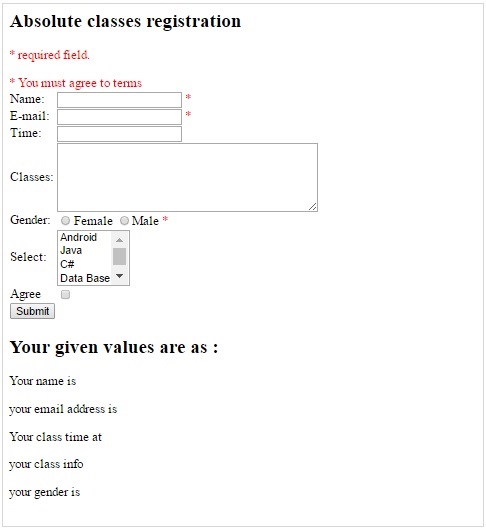
    PHP Complete Form 1
  • PHP – Form Email/URL

    PHP provides two alternatives for validating the form data items which are strings but are expected to be a representation of Email ID or a URL.

    One way to check the form element contains email/URL is with the use of RegEx (regular expressions), and the other, more convenient approach is to use filter_var() function. Let us apply both these methods and validate email and URL submitted by a form to a PHP script.

    Basic Form Structure

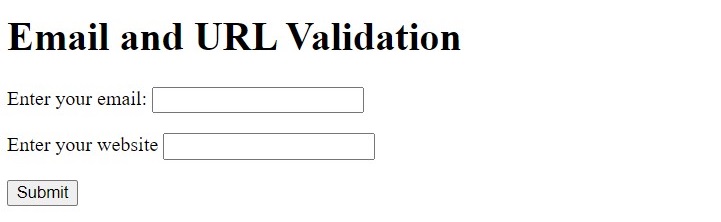
    The HTML Form used for this chapter is as follows −

    <h1>Email and URL Validation</h1><form action="hello.php" method="POST"><p><label for="email">Enter your email:</label><input type="text" id="email" name="email"></p><p><label for="URL">Enter your website<label><input type = "text" id="URL" name="url"></p><input type="submit"></form>

    Validation with Regex

    PHP’s built-in function library includes the preg_match() function that performs a regular expression match.

    preg_match(string$pattern,string$subject,array&$matches=null,int$flags=0,int$offset=0):int|false

    This function searches subject for a match to the regular expression given in pattern. preg_match() returns 1 if the pattern matches given subject, 0 if it does not, or false on failure.

    A valid email ID should satisfy the following regular expression −

    "/^([a-z0-9\+_\-]+)(\.[a-z0-9\+_\-]+)*@([a-z0-9\-]+\.)+[a-z]{2,6}$/ix"

    Similarly, a valid URL should satisfy the following regular expression −

    "/\b(?:(?:https?|ftp):\/\/|www\.)[-a-z0-9+&@#\/%?=~_|!:,.;]*[-a-z0-9+&@#\/%=~_|]/i"

    The following function returns “1” or “0” if the string is a valid email ID.

    functioncheckemail($str){return(!preg_match("/^([a-z0-9\+_\-]+)(\.[a-z0-9\+_\-]+)*@([a-z0-9\-]+\.)+[a-z]{2,6}$/ix",$str))?FALSE:TRUE;}

    Example: Check the Email Field

    Let us use the checkmail() function to check whether the email field in the above HTML is valid or not, with the help of following PHP code −

    <?php         
       function checkemail($str) {
          return (!preg_match("/^([a-z0-9\+_\-]+)(\.[a-z0-9\+_\-]+)*@
             ([a-z0-9\-]+\.)+[a-z]{2,6}$/ix", $str)) ? FALSE : TRUE;
       }
       if ($_SERVER["REQUEST_METHOD"] == "POST") {
          $email = $_POST['email'];
          if(!checkemail($email)){
             echo "Invalid email address.";
          } else {
             echo "Valid email address.";
          }
       }
    ?>

    The HTML form is rendered as below −

    PHP Form Email URl

    Test the PHP code by entering valid/invalid email string in the email field.

    The following checkURL() function checks if a string represents a valid or invalid URL, and returns “1 or “0”.

    functioncheckURL($str){return(!preg_match("/\b(?:(?:https?|ftp):\/\/|www\.)
          [-a-z0-9+&@#\/%?=~_|!:,.;]*[-a-z0-9+&@#\/%=~_|]/i",$str))?FALSE:TRUE;}

    Example

    The URL field extracted from the $_POST array is given as argument to the above function.

    <?php         
       function checkURL($str) {
          return (!preg_match("/\b(?:(?:https?|ftp):\/\/|www\.)[-a-z0-9+&@#\/%?=~_|!:,.;]
             *[-a-z0-9+&@#\/%=~_|]/i", $str)) ? FALSE : TRUE;
       }
       if ($_SERVER["REQUEST_METHOD"] == "POST") {
          $url = $_POST['url'];
          if(!checkURL($url)){
             echo "Invalid URL.";
          } else {
             echo "Valid URL.";
          }
       }
    ?>

    You can test the above code by entering URL string in the URL field of the above form.

    Using filter_var() function

    The built-in filter_var() function filters a variable with a specified filter.

    filter_var(mixed$value,int$filter=FILTER_DEFAULT,array|int$options=0):mixed

    Depending on the enumerated filter ID as the value of $filter parameter, the $value parameter is checked and the function returns the filtered data, or false if the filter fails.

    Predefined Filter ID Constants

    There are various predefined filter ID constants available −

    Sr.NoID & Description
    1FILTER_VALIDATE_BOOLReturns true for “1”, “true”, “on” and “yes”. Returns false otherwise.
    2FILTER_VALIDATE_DOMAINValidates whether the domain name label lengths are valid.
    3FILTER_VALIDATE_EMAILValidates whether the value is a valid e-mail address.
    4FILTER_VALIDATE_IPValidates value as IP address
    5FILTER_VALIDATE_URLValidates value as URL

    Example

    The following PHP script validates the email and URL data submitted by the HTML for above −

    <?php
       if ($_SERVER["REQUEST_METHOD"] == "POST") {
          $email = $_POST['email'];
          $url = $_POST['url'];
    
          if (!filter_var($email, FILTER_VALIDATE_EMAIL)) {
             echo "Invalid email format and please re-enter valid email\n"; 
          }
          else
          echo "Email entered is in valid format\n";
    
          if (!filter_var($url, FILTER_VALIDATE_URL)) {
             echo "Invalid URL format and please re-enter valid URL\n"; 
          }
          else
          echo "URL entered is in valid format\n";
       }
    ?>

    You can test the performance of the above script by entering valid/invalid email/URL.

  • PHP – Form Validation

    The term “Form Validation” refers to the process of ascertaining if the data entered by the user in various form elements is acceptable for further processing. Validation of data before its subsequent processing avoids possible exceptions and runtime errors.

    Types of Form Validation

    Validation can be done both on the client-side and on the server-side. When the client submits the form, the form data is intercepted by the PHP script running on the server. Using various functions available in PHP, the server-side form validation can be done.

    • Client-side Validation: This happens in the user’s web browser before the form submission. It provides instant feedback to users. This is commonly done with JavaScript.
    • Server-side Validation: After the submission of the form, server-side validation happens. It is important for security and ensures that data is checked on the server even when client-side validation is turned off.

    How to Validate Forms in PHP

    To validate forms in PHP you will have to follow the below steps −

    • Create a Form: First you need to create a simple HTML form.
    • Collect Form Data: Then use PHP to collect the data after the form is submitted.
    • Perform Validation: After that you have to check if the data meets specific criteria.
    • Provide Feedback: Inform the user if there are any errors or if the submission is successful.

    Client-side Validation

    The new input controls as per the HTML5 specifications have in-built validation. For example an input element of the type ’email’, even though is a text field, is customized to accept a string that is according to email address protocol.

    Validation takes place before the data is submitted to the server. Same thing is true with other input types such as URL, number, etc.

    Example

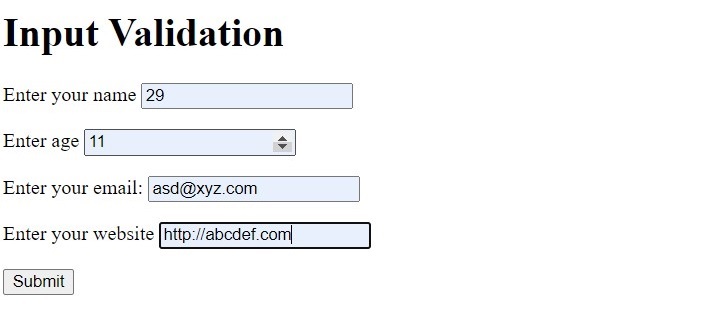
    Given below is an HTML form with input elements of number type, email type and URL type. If you enter data that is not as per the required format, a suitable error message is flashed as you try to submit the form.

    <h1>Input Validation</h1><form><p><Label for "name">Enter your name</label><input type = "text" id="name" name="name"></p><p><label for="age">Enter age</label><input type = "text" id = "age" name="age"></p><p><label for="email">Enter your email:</label><input type="text" id="email" name="email"></p><p><label for="URL">Enter your website<label><input type = "text" id="URL" name="url"></p><input type="submit"></form>

    The number type text field shows up/down counter arrows on the right. Only number is accepted, and can be incremented or decremented.

    PHP Form Validation 1

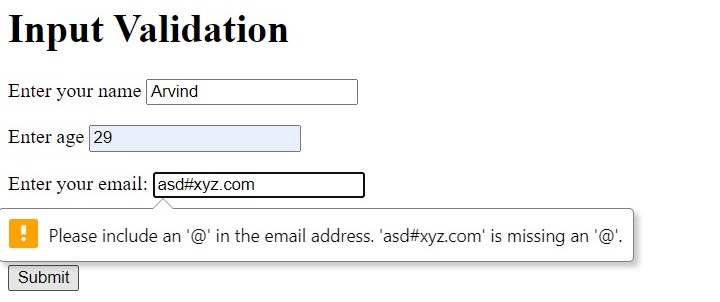
    If the data in email field is invalid, you get the error message flashed as below.

    PHP Form Validation 2

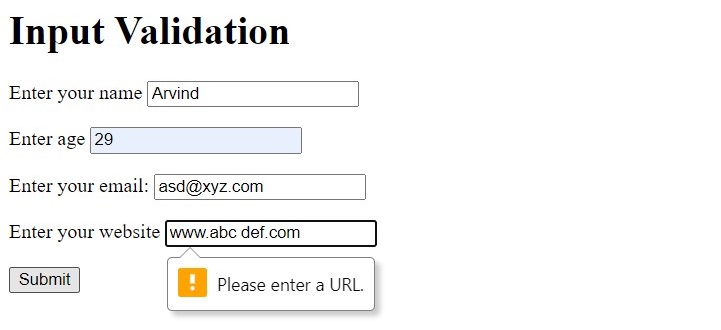
    Similarly, any incorrect format for the URL also flashes the error as shown −

    PHP Form Validation 3

    Server-Side Validation

    The validation on the server-side with PHP comes into picture, either when the form data passes the client-side validation, or there’s no validation on the client side at all.

    In the HTML form used in the above example, let us remove all special input types and use all text fields of text type. The form is submitted with POST method to hello.php on the server.

    <form action="hello.php" method="POST"><p><Label for "name">Enter your name</label><input type = "text" id="name" name="name"></p><p><label for="age">Enter age</label><input type = "text" id = "age" name="age"></p><p><label for="email">Enter your email:</label><input type="text" id="email" name="email"></p><p><label for="URL">Enter your website<label><input type = "text" id="URL" name="url"></p><input type="submit"></form>

    Form is Empty

    If the user (may be inadvertently) clicks the submit button, you can ask PHP to display the form again. You need to check if the $_POST array has been initialized with isset() function. If not, the header() function redirects the control back to the form.

    <?php 
       if ($_SERVER["REQUEST_METHOD"] == "POST") {
          if (isset($_POST)) {
             header("Location: hello.html", true, 301);  
             exit();  
          }
          // form processing if the form is not empty
       }
    ?>

    Example

    You can also check if any of the fields is empty at the time of submitting the form.

    <?php        
       if ($_SERVER["REQUEST_METHOD"] == "POST") {
          foreach($_POST as $k=>$v) {
             if (empty($v)==true) {
                echo "One or more fields are empty \n";
                echo "<a href = 'hello.html'>Click here to go back </a>";
                exit;
             }
             else
             echo "$k => $v \n";
          }
       }
    ?>

    Age field is non-numeric

    In the HTML form the input field for name is of text type, hence it can accept any characters. However, we want it to be numeric. This can be ensured by is_numeric() function

    <?php    
       if (is_numeric($_POST["age"])==false) {
          echo "Age cannot be non-numeric \n";
          echo "<a href = 'hello.html'>Click here to go back</a>";
       }
    ?>

    PHP also has is_string() function to check if a filed contains a string or not. Two other functions, trim() and htmlspecialchars() are also useful for form validation.

    • trim() − Removes whitespace from the beginning and end of a string
    • htmlspecialchars() − Converts special characters to HTML entities to prevent cross-site scripting (XSS) attacks.

    Why is Form Validation Important?

    Form validation is important for a number of reasons.

    • Security: It helps to prevent malicious attacks like SQL injection and cross-site scripting (XSS).
    • Data integrity: Validating data makes sure it is correct and usable.
    • User Experience: It provides users with instant feedback when they make errors, which improves their experience.

    Following are the rules for form validation −

    • Required Fields: You need to make sure important fields are not empty.
    • Email Validation: You can check if the email address is valid or not.
    • Number Validation: You should allow only numbers for fields like age or phone number.
    • URL Validation: Need to check if a valid website URL is entered by the user.
    • Length Check: You have to limit how many characters a user can enter in the form.
    • Pattern Matching: You can also use regular expressions to allow only specific characters.

    Avoid $_SERVER[“PHP_SELF”] Exploits

    $_SERVER[“PHP_SELF”] gets the current page’s filename. This is useful, but it can be dangerous if not used correctly. Hackers can use this to inject malicious code into your website. For example, imagine your form action is this −

    <form action="<?php echo $_SERVER["PHP_SELF"]; ?>" method="post">

    And the URL is changed to −

       http://example.com/form.php/<script>alert('Hacked!')</script>

    The above script can run and harm your website. So to avoid this you can use the htmlspecialchars() function. It turns special characters into harmless ones.

    <form action="<?php echo htmlspecialchars($_SERVER["PHP_SELF"]); ?>" method="post">

    If someone tries to inject code, it will now be shown as plain text rather than executed as a script. This prevents harmful scripts from running.

    Final Example

    Here is the final example to avoid exploits. This means that even if someone attempts to insert harmful code, it will have no effect on your website.

    <form action="<?php echo htmlspecialchars($_SERVER["PHP_SELF"]); ?>" method="post"><label for="name">Enter your name:</label><input type="text" id="name" name="name"><input type="submit"></form>
  • PHP – Form Handling

    HTML Forms play an important role in PHP web applications. Although a webpage composed purely with HTML is a static webpage, the HTML form component is an important feature that helps in bringing interactivity and rendering dynamic content. PHP’s form handling functionality can validate data collected from the user, before processing.

    What is Form Handling ?

    An HTML Form is a collection various form controls such as text fields, checkboxes, radio buttons, etc., with which the user can interact, enter or choose certain data that may be either locally processed by JavaScript (client-side processing), or sent to a remote server for processing with the help of server-side programming scripts such as PHP.

    For example – suppose a user enters their name and email, clicks submit and you can use PHP to handle this data.

    HTML Form Structure

    One or more form control elements are put inside <form> and </form> tags. The form element is characterized by different attributes such as name, action, and method.

    <form [attributes]>
       Form controls
    </form>

    Form Attributes

    Out of the many attributes of the HTML form element, the following attributes are often required and defined −

    Action Attribute

    a string representing the URL that processes the form submission. For example, http://example.com/test.php. To submit the for-data to the same PHP script in which the HTML form is defined, use the PHP_SELF server variable −

    <form action="<?php echo $_SERVER['PHP_SELF'];?>" method="post">

    Enctype Attribute

    specifies the method using which the form-data should be encoded before sending it to the server. Possible values are −

    • application/x-www-form-urlencoded − The default value.
    • multipart/form-data − Use this if the form contains <input> elements with type=file.
    • text/plain − Useful for debugging purposes.

    Method Attribute

    a string representing the HTTP method to submit the form with. The following methods are the possible values of method attribute −

    • post − The POST method; form data sent as the request body.
    • get (default) − The GET; form data appended to the action URL with a “?” separator. Use this method when the form has no side effects.
    • dialog − When the form is inside a <dialog>, closes the dialog and causes a submit event to be fired on submission, without submitting data or clearing the form.

    Name Attribute

    The name of the form. The value must not be the empty string, and must be unique if there are multiple forms in the same HTML document.

    Target Attribute

    a string that indicates where to display the response after submitting the form. Should be one of the following −

    • _self (default) − Load into the same browsing context as the current one.
    • _blank − Load into a new unnamed browsing context.
    • _parent − Load into the parent browsing context of the current one.
    • _top − Load into the top-level browsing context (an ancestor of the current one and has no parent).

    Hence, a typical HTML form, used in a PHP web application looks like −

    <form name="form1" action="<?php echo $_SERVER['PHP_SELF'];?>" action="POST">
       Form controls
    </form>

    Form Elements

    A HTML form is designed with different types of controls or elements. The user can interact with these controls to enter data or choose from the available options presented. Some of the elements are described below −

    Input Element

    The input element represents a data field, which enables the user to enter and/or edit the data.

    The type attribute of INPUT element controls the data. The INPUT element may be of the following types −

    Text

    A text field to enter a single line text.

    <input type="text" name="employee">

    Password

    A single line text filed that masks the entered characters.

    <input type="password" name="pwd"><br>

    Checkbox

    A rectangular checkable box which is a set of zero or more values from a predefined list.

    <input type="checkbox" id="s1" name="sport1" value="Cricket"><label for="s1">I like Cricket</label><br><input type="checkbox" id="s2" name="sport2" value="Football"><label for="s2">I like Football</label><br><input type="checkbox" id="s3" name="sport3" value="Tennis"><label for="s3">I like Tennis</label><br><br>

    Radio

    This type renders a round clickable button with two states (ON or OFF), usually a part of multiple buttons in a radio group.

    <input type="radio" id="g1" name="gender" value="Male"><label for="g1">Male</label><br><input type="radio" id="g2" name="female" value="Female"><label for="g2">Female</label><br>

    File

    The input type renders a button captioned file and allows the user to select a file from the client filesystem, usually to be uploaded on the server. The form’s enctype attribute must be set to “multipart/form-data”

    <input type="file" name="file">

    Email

    A single line text field, customized to accept a string conforming to valid email ID.

    URL

    A single line text filed customized to accept a string conforming to valid URL.

    Submit

    This input element renders a button, which when clicked, initiates the the submission of form data to the URL specified in the action attribute of the current form.

    <input type="submit" name="Submit">

    Select Element

    The select element represents a control for selecting amongst a set of options. Each choice is defined with option attribute of Select Control. For example −

    <select name="Subjects" id="subject"><option value="Physics">Physics</option><option value="Chemistry">Chemistry</option><option value="Maths">Maths</option><option value="English">English</option></select>

    Form Example

    Let us use these form elements to design a HTML form and send it to a PHP_SELF script

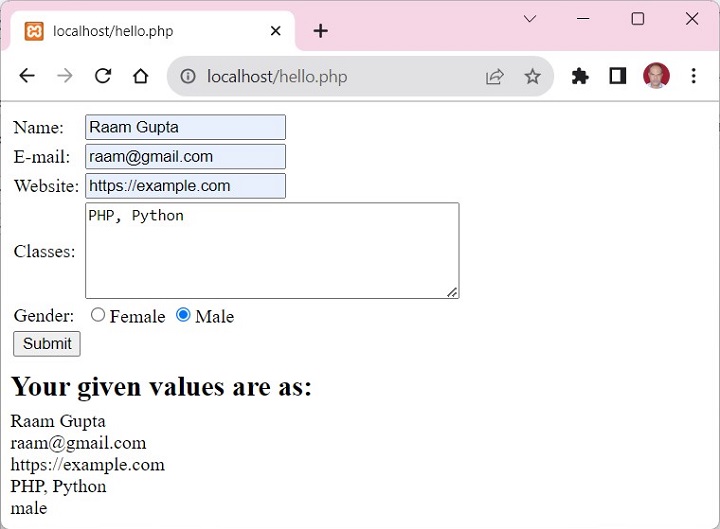
    When you fill out a form and hit the ‘Submit’ button, PHP steps in to get the information you have given. It uses something called $_POST to get the details from fields like your name, email, website, comment and gender. To keep things safe and secure, PHP employs the htmlspecialchars() function, which helps to block any potentially harmful code. After processing everything, PHP then shows you the information you’ve entered right on the webpage.

    <html><body><form method = "post" action = "<?php 
          echo htmlspecialchars($_SERVER["PHP_SELF"]);?>"><table><tr><td>Name:</td><td><input type = "text" name = "name"></td></tr><tr><td>E-mail: </td><td><input type = "email" name = "email"></td></tr><tr><td>Website:</td><td><input type = "url" name = "website"></td></tr><tr><td>Classes:</td><td><textarea name = "comment" rows = "5" cols = "40"></textarea></td></tr><tr><td>Gender:</td><td><input type = "radio" name = "gender" value = "female">Female
                   <input type = "radio" name = "gender" value = "male">Male
                </td></tr><td><input type = "submit" name = "submit" value = "Submit"></td></table></form><?php
          $name = $email = $gender = $comment = $site = "";
    
          if ($_SERVER["REQUEST_METHOD"] == "POST") {
             $name = $_POST["name"];
             $email = $_POST["email"];
             $name = $_POST["name"];
             $comment = $_POST["comment"];
             $gender = $_POST["gender"];
             $site = $_POST["website"];
          }
          echo "<h2>Your given values are as:</h2>";
          echo $name;
          echo "<br>";
    
          echo $email;
          echo "<br>";
    
          echo $site;
          echo "<br>";
    
          echo $comment;
          echo "<br>";
    
          echo $gender;
       ?></body></html>

    Output

    It will produce the following output −
    PHP Form Handling
  • PHP – Web Concepts

    PHP is a server-side scripting language that is used to create dynamic webpages. It is one of the most popular programming languages for web development. This chapter aims to let you get familiarized with certain important concepts of web application development using PHP.

    A web-based application is a collection of webpages. A webpage is mainly created with HTML tags. HTML consists of different HTML tags which are required to define the appearance of page elements like text, image, table, etc. Hence, HTML essentially creates a static webpage.

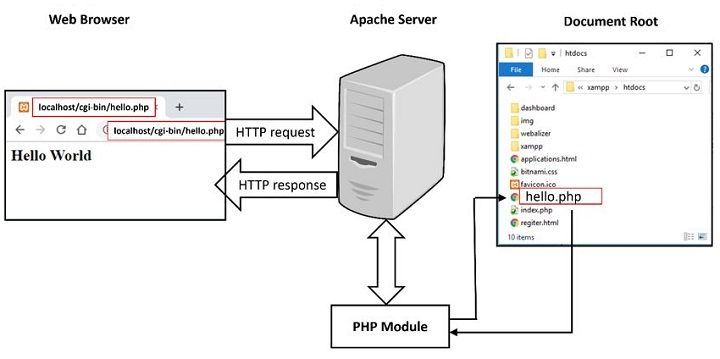
    A Web application is hosted on a HTTP server with PHP module installed. The browser acts as a http client, to establish communication with the server, following HTTP protocol.

    PHP Web Concepts

    How to Add Dynamic Content on a Webpage?

    To add dynamic content io a webpage, there are two possibilities.

    JavaScript is a client-side scripting language, that can access the HTML document object model and render dynamic content on the client browser. JavaScript code can be embedded in HTML page.

    The browser may collect data from the user in the form of HTML form elements and send it to a HTTP server for processing. PHP is a widely used Server-side processing language. PHP script can also be embedded inside HTML page.

    Example

    In the following script, JavaScript code embedded in HTML renders the current date as per the client browser, and the PHP code displays the current date as per the server, where this script is hosted.

    <!DOCTYPE html><html><body><script type="text/JavaScript">
          document.write("Client's date :"+Date()+"\n");
       </script><?php
          date_default_timezone_set("Asia/Calcutta");
          echo "server's date is " . date("Y-m-d") . "\n";
          echo "The time is " . date("h:i:sa");
       ?></body></html>

    PHP can intercept and process the data from HTML forms. This allows you to collect information from your users. The next chapter discusses PHP’s form handling.

    PHP can be used to interact with databases such as MySQL and PostgreSQL. This allows you to store and retrieve data from your database, and dynamically populate the web pages or to power the web applications. PHP includes mysql, mysqli and PDO extensions for database handling.

    PHP can handle the data received from the client with HTTP GET as well as POST methods. We shall discuss in detail, how PHP handles GET/POST methods in one of the latter chapters.

    HTTP is a stateless protocol. However, it allows Sessions and cookies to be maintained on server and client respectively. PHP can be used to create and manage sessions and cookies. Sessions allow you to track individual users as they navigate your website, while cookies allow you to store information on the user’s computer for later use. In of the subsequent chapters, we shall learn how PHP handles sessions and cookies.

    PHP can be used to upload files to your web server. This allows you to create web applications that allow users to upload files, such as images, videos, or documents.

    You can use PHP to create a login page for your website. When the user enters their username and password, PHP can check the database to see if the user is valid. If the user is valid, PHP can log the user in and redirect them to the main page of your website.

    Identifying Browser & Platform

    PHP creates some useful environment variables that can be seen in the phpinfo.php page that was used to setup the PHP environment.

    One of the environment variables set by PHP is HTTP_USER_AGENT which identifies the user’s browser and operating system.

    PHP provides a function getenv() to access the value of all the environment variables. The information contained in the HTTP_USER_AGENT environment variable can be used to create dynamic content appropriate to the browser.

    Example

    Following example demonstrates how you can identify a client browser and operating system.

    NOTE − The function preg_match()is discussed in PHP Regular expression session.

    <?php
       function getBrowser() { 
          $u_agent = $_SERVER['HTTP_USER_AGENT']; 
          $bname = 'Unknown';
          $platform = 'Unknown';
          $version = "";
                
          //First get the platform
          if (preg_match('/linux/i', $u_agent)) {
             $platform = 'linux';
          } elseif (preg_match('/macintosh|mac os x/i', $u_agent)) {
             $platform = 'mac';
          } elseif (preg_match('/windows|win32/i', $u_agent)) {
             $platform = 'windows';
          }
                
          // Next get the name of the useragent yes separately and for good reason
          if(preg_match('/MSIE/i',$u_agent) && !preg_match('/Opera/i',$u_agent)) {
             $bname = 'Internet Explorer';
             $ub = "MSIE";
          } elseif(preg_match('/Firefox/i',$u_agent)) {
             $bname = 'Mozilla Firefox';
             $ub = "Firefox";
          } elseif(preg_match('/Chrome/i',$u_agent)) {
             $bname = 'Google Chrome';
             $ub = "Chrome";
          } elseif(preg_match('/Safari/i',$u_agent)) {
             $bname = 'Apple Safari';
             $ub = "Safari";
          } elseif(preg_match('/Opera/i',$u_agent)) {
             $bname = 'Opera';
             $ub = "Opera";
          } elseif(preg_match('/Netscape/i',$u_agent)) {
             $bname = 'Netscape';
             $ub = "Netscape";
          }
                
          // finally get the correct version number
          $known = array('Version', $ub, 'other');
          $pattern = '#(?<browser>' . join('|', $known) . ')
             [/ ]+(?<version>[0-9.|a-zA-Z.]*)#';
    
          if (!preg_match_all($pattern, $u_agent, $matches)) {
             // we have no matching number just continue
          }
    
          // see how many we have
          $i = count($matches['browser']);
    
          if ($i != 1) {
             //we will have two since we are not using 'other' argument yet
    
             //see if version is before or after the name
             if (strripos($u_agent,"Version") < strripos($u_agent,$ub)){
                $version= $matches['version'][0];
             } else {
                $version= $matches['version'][1];
             }
          } else {
             $version= $matches['version'][0];
          }
                
          // check if we have a number
          if ($version == null || $version == "") {$version = "?";}
             return array(
                'userAgent' => $u_agent,
                'name'      => $bname,
                'version'   => $version,
                'platform'  => $platform,
                'pattern'   => $pattern
             );
       }
             
       // now try it
       $ua = getBrowser();
       $yourbrowser = "Your browser: " . $ua['name'] . " " . $ua['version'] .
       " on " .$ua['platform'] . " reports: <br >" . $ua['userAgent'];
    
       print_r($yourbrowser);
    ?>

    This is producing following result on my machine. This result may be different for your computer depending on what you are using.

    It will produce the following result −

    Your browser: Google Chrome 54.0.2840.99 on windows reports: 
    Mozilla/5.0 (Windows NT 6.3; Win64; x64) AppleWebKit/537.36 (KHTML, like Gecko) 
       Chrome/54.0.2840.99 Safari/537.36
    

    Display Images Randomly

    The PHP rand() function is used to generate a random number.i This function can generate numbers with-in a given range. The random number generator should be seeded to prevent a regular pattern of numbers being generated. This is achieved using the srand() function that specifies the seed number as its argument.

    Example

    Following example demonstrates how you can display different image each time out of four images −

    <?php
       srand( microtime() * 1000000 );
       $num = rand( 1, 4 );
             
       switch( $num ) {
          case 1: $image_file = "/php/images/php_image_sample_1.jpg";
             break;
                
          case 2: $image_file = "/php/images/php_image_sample_2.jpg";
             break;
                
          case 3: $image_file = "/php/images/php_image_sample_3.jpg";
             break;
                
          case 4: $image_file = "/php/images/php_image_sample_4.jpg";
             break;
       }
       echo "Random Image : <img src=$image_file />";
    ?>

    It will produce the following result −

    Display Image Randomly

    Using HTML Forms

    The most important thing to notice when dealing with HTML forms and PHP is that any form element in an HTML page will automatically be available to your PHP scripts.

    Example

    Try out following example by putting the source code in test.php script.

    <?php
       if( $_POST["name"] || $_POST["age"] ) {
          if (preg_match("/[^A-Za-z'-]/",$_POST['name'] )) {
             die ("invalid name and name should be alpha");
          }
          
          echo "Welcome ". $_POST['name']. "<br />";
          echo "You are ". $_POST['age']. " years old.";
          
          exit();
       }
    ?><form action = "<?php <b>$_PHP_SELF</b> ?>" method = "POST">
       Name: <input type = "text" name = "name" />
       Age: <input type = "text" name = "age" /><input type = "submit" /></form>

    It will produce the following result −

    Forms
    • The PHP default variable $_PHP_SELF is used for the PHP script name and when you click “submit” button then same PHP script will be called and will produce following result −
    • The method = “POST” is used to post user data to the server script. There are two methods of posting data to the server script which are discussed in PHP GET & POST chapter.

    Browser Redirection

    The PHP header() function supplies raw HTTP headers to the browser and can be used to redirect it to another location. The redirection script should be at the very top of the page to prevent any other part of the page from loading.

    The target is specified by the Location: header as the argument to the header() function. After calling this function the exit() function can be used to halt parsing of rest of the code.

    Example

    Following example demonstrates how you can redirect a browser request to another web page. Try out this example by putting the source code in test.php script.

    <?php
       if( $_POST["location"] ) {
          $location = $_POST["location"];
          header( "Location:$location" );
          
          exit();
       }
    ?><p>Choose a site to visit :</p><form action = "<?php <b>$_SERVER['PHP_SELF']</b> ?>" method ="POST"><select name = "location">.
             
          <option value = "http://www.tutorialspoint.com">
             Tutorialspoint.com
          </option><option value = "http://www.google.com">
             Google Search Page
          </option></select><input type = "submit" /></form>

    It will produce the following result −

    Browser Redirection