PHP version 7 extends the scalar type declaration feature to the return value of a function also. As per this new provision, the return type declaration specifies the type of value that a function should return. We can declare the following types for return types −
int
float
bool
string
interfaces
array
callable
To implement the return type declaration, a function is defined as −
functionmyfunction(type$par1,type$param2):type{# function bodyreturn$val;}
PHP parser is coercive typing by default. You need to declare “strict_types=1” to enforce stricter verification of the type of variable to be returned with the type used in the definition.
Example
In the following example, the division() function is defined with a return type as int.
Since the type checking has not been set to strict_types=1, the division take place even if one of the parameters is a non-integer.
First number: 20.5
Second number: 10
Division: 2
However, as soon as you add the declaration of strict_types at the top of the script, the program raises a fatal error message.
Fatal error: Uncaught TypeError:division():Argument#1 ($x) must be of type int, float given, called in div.php on line 12 and defined in div.php:3
Stack trace:#0 div.php(12): division(20.5, 10)#1 {main}
   thrown in div.php on line 3
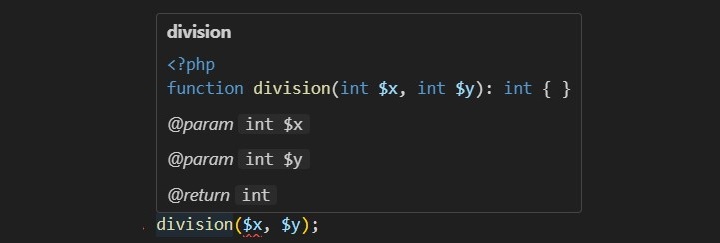
VS Code warns about the error even before running the code by displaying error lines at the position of error −
Example
To make the division() function return a float instead of int, cast the numerator to float, and see how PHP raises the fatal error −
Uncomment the declare statement at the top and run this code here to check its output. It will show an error −
First number: 20
Second number: 10PHP Fatal error:  Uncaught TypeError: division(): Return value must be of type int, float returned in /home/cg/root/14246/main.php:5
Stack trace:
#0 /home/cg/root/14246/main.php(13): division()
#1 {main}
  thrown in /home/cg/root/14246/main.php on line 5
The feature of providing type hints has been in PHP since version 5. Type hinting refers to the practice of providing the data type of a parameter in the function definition. Before PHP 7, it was possible to use only the array, callable, and class for type hints in a function. PHP 7 onward, you can also insert type hints for parameters of scalar data type such as int, string, bool, etc.
PHP is a dynamically (and weakly) typed language. Hence, you don’t need to declare the type of the parameter when a function is defined, something which is necessary in a statically type language like C or Java.
A typical definition of function in PHP is as follows −
functionaddition($x,$y){echo"First number: $x Second number: $y Addition: ".$x+$y;}
Here, we assume that the parameters $x and $y are numeric. However, even if the values passed to the function aren’t numeric, the PHP parser tries to cast the variables into compatible type as far as possible.
If one of the values passed is a string representation of a number, and the second is a numeric variable, PHP casts the string variable to numeric in order to perform the addition operation.
A new feature introduced with PHP version 7 allows defining a function with parameters whose data type can be specified within the parenthesis.
PHP 7 has introduced the following Scalar type declarations −
Int
Float
Bool
String
Interfaces
Array
Callable
Older versions of PHP allowed only the array, callable and class types to be used as type hints. Furthermore, in the older versions of PHP (PHP 5), the fatal error used to be a recoverable error while the new release (PHP 7) returns a throwable error.
Scalar type declaration is implemented in two modes −
Coercive Mode − Coercive is the default mode and need not to be specified.
Strict Mode − Strict mode has to be explicitly hinted.
Coercive Mode
The addition() function defined in the earlier example can now be re-written by incorporating the type declarations as follows −
functionaddition(int$x,int$y){echo"First number: $x Second number: $y Addition: ".$x+$y;}
Note that the parser still casts the incompatible types i.e., string to an int if the string contains an integer as earlier.
Obviously, this is because PHP is a weakly typed language, as PHP tries to coerce a variable of string type to an integer. PHP 7 has introduced a strict mode feature that addresses this issue.
Strict Mode
To counter the weak type checking of PHP, a strict mode has been introduced. This mode is enabled with a declare statement −
declare(strict_types=1);
You should put this statement at the top of the PHP script (usually just below the PHP tag). This means that the strictness of typing for scalars is configured on a per-file basis.
In the weak mode, the strict_types flag is 0. Setting it to 1 forces the PHP parser to check the compatibility of the parameters and values passed. Add this statement in the above code and check the result. It will show the following error message −
Fatal error: Uncaught TypeError:addition():Argument#1 ($x) must be of type int, string given,
called in add.php on line 12and defined in add.php:4

Stack trace:#0 add.php(12): addition('10', 20)#1 {main}
   thrown in add.php on line 4
Example
Here is another example of scalar type declaration in the function definition. The strict mode when enabled raises fatal error if the incompatible types are passed as parameters.
Uncomment the declare statement at the top of this code and run it. Now it will produce an error −
Fatal error: Uncaught TypeError:
sum(): Argument #2 must be of type int, string given,
called in add.php on line 9 and defined in add.php:4
Stack trace:
#0 add.php(9): sum(2, '3', 4.1)
#1 {main}
   thrown in add.php on line 4
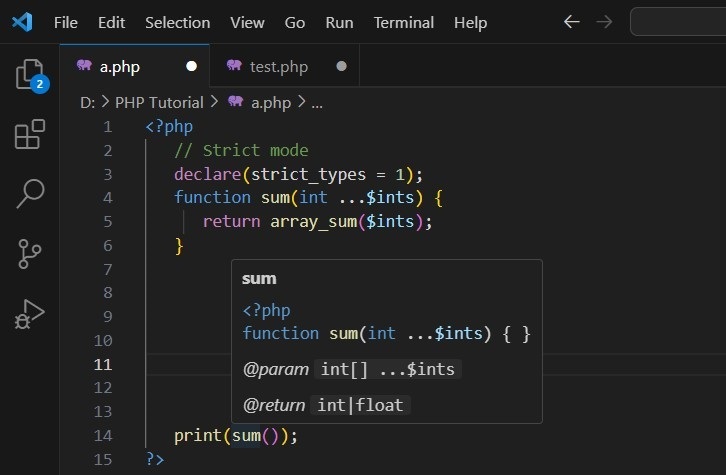
The type-hinting feature is mostly used by IDEs to prompt the user about the expected types of the parameters used in the function declaration. The following screenshot shows the VS Code editor popping up the function prototype as you type.
The built-in library of PHP has a wide range of functions that helps in programmatically handling and manipulating date and time information. Date and Time objects in PHP can be created by passing in a string presentation of date/time information, or from the current system’s time.
PHP provides the DateTime class that defines a number of methods. In this chapter, we will have a detailed view of the various Date and Time related methods available in PHP.
The date/time features in PHP implements the ISO 8601 calendar, which implements the current leap-day rules from before the Gregorian calendar was in place. The date and time information is internally stored as a 64-bit number.
Here are the topics we will cover in this chapter −
PHP’s time() function gives you all the information that you need about the current date and time. It requires no arguments but returns an integer.
time():int
The integer returned by time() represents the number of seconds elapsed since midnight GMT on January 1, 1970. This moment is known as the UNIX epoch, and the number of seconds that have elapsed since then is referred to as a time stamp.
<?php
   print time();
?>
Output
It will produce the following output −
1699421347
We can convert a time stamp into a form that humans are comfortable with.
Converting a Time Stamp with getdate()
The function getdate() optionally accepts a time stamp and returns an associative array containing information about the date. If you omit the time stamp, it works with the current time stamp as returned by time().
The following table lists the elements contained in the array returned by getdate().
Sr.No
Key & Description
Example
1
secondsSeconds past the minutes (0-59)
20
2
minutesMinutes past the hour (0 – 59)
29
3
hoursHours of the day (0 – 23)
22
4
mdayDay of the month (1 – 31)
11
5
wdayDay of the week (0 – 6)
4
6
monMonth of the year (1 – 12)
7
7
yearYear (4 digits)
1997
8
ydayDay of year ( 0 – 365 )
19
9
weekdayDay of the week
Thursday
10
monthMonth of the year
January
11
0Timestamp
948370048
Now you have complete control over date and time. You can format this date and time in whatever format you want.
The date() function returns a formatted string representing a date. You can exercise an enormous amount of control over the format that date() returns with a string argument that you must pass to it.
date(string$format,?int$timestamp=null):string
The date() optionally accepts a time stamp if omitted then current date and time will be used. Any other data you include in the format string passed to date() will be included in the return value.
The following table lists the codes that a format string can contain −
Sr.No
Format & Description
Example
1
a‘am’ or ‘pm’ lowercase
pm
2
A‘AM’ or ‘PM’ uppercase
PM
3
dDay of month, a number with leading zeroes
20
4
DDay of week (three letters)
Thu
5
FMonth name
January
6
hHour (12-hour format – leading zeroes)
12
7
HHour (24-hour format – leading zeroes)
22
8
gHour (12-hour format – no leading zeroes)
12
9
GHour (24-hour format – no leading zeroes)
22
10
iMinutes ( 0 – 59 )
23
11
jDay of the month (no leading zeroes
20
12
l (Lower ‘L’)Day of the week
Thursday
13
LLeap year (‘1’ for yes, ‘0’ for no)
1
14
mMonth of year (number – leading zeroes)
1
15
MMonth of year (three letters)
Jan
16
rThe RFC 2822 formatted date
Thu, 21 Dec 2000 16:01:07 +0200
17
nMonth of year (number – no leading zeroes)
2
18
sSeconds of hour
20
19
UTime stamp
948372444
20
yYear (two digits)
06
21
YYear (four digits)
2006
22
zDay of year (0 – 365)
206
23
ZOffset in seconds from GMT
+5
Example
Take a look at this following example −
<?php
   print date("m/d/y G.i:s \n", time()) . PHP_EOL;
   print "Today is ";
   print date("j of F Y, \a\\t g.i a", time());
?>
Output
It will produce the following output −
11/08/23 11.23:08

Today is 8 2023f November 2023, at 11.23 am
Formatting Date and Time
You can format the date and time in different ways with the help of the date() function. Here are some examples −
Hope you have good understanding on how to format date and time according to your requirement. For your reference a complete list of all the date and time functions is given in PHP Date & Time Functions.
When developing websites, we generally have to reuse the same information or code in many places. For example, we might want the same header, footer or menu across all pages. PHP allows us to use file inclusion instead of writing the same code many times!
File inclusion saves time, organizes our code and allows us to make simple changes. When we make a change to one file, that changes all other files that contain that file.
Types File Inclusion in PHP
You can include the content of a PHP file into another PHP file before the server executes it. There are two PHP functions which can be used to included one PHP file into another PHP file.
This is a strong point of PHP which helps in creating functions, headers, footers, or elements that can be reused on multiple pages. This will help developers to make it easy to change the layout of complete website with minimal effort. If there is any change required then instead of changing thousand of files just change included file.
The include() Function
The include() function takes all the text in a specified file and copies it into the file that uses the include function. If there is any problem in loading a file then the include() function generates a warning but the script will continue execution.
Syntax
Below is the syntax of the includefunction −
include'filename.php';
Here, filename.php is the file you want to include. It can be a relative or absolute path.
Example
Assume you want to create a common menu for your website. Then create a file menu.php with the following content.
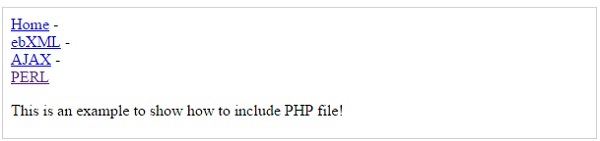
Now create as many pages as you like and include this file to create header. For example now your test.php file can have following content.
<?php <b>include("menu.php");</b> ?><p>This is an example to show how to include PHP file!</p>
Output
It will produce the following result −
Advantages of include() Method
Using the include() method in PHP has several advantages −
Adding a file allows you to reuse the same content on other pages without having to change any code.
You can add basic website elements like headers, footers, and menus to various pages.
If the included file has an error, include() will only display a warning message and the script will continue to run.
If you need to change the included file (for example, to update the header or footer), do so only once, and the changes will be reflected on all pages that use it.
The require() Function
The require() function takes all the text in a specified file and copies it into the file that uses the include function. If there is any problem in loading a file then the require() function generates a fatal error and halt the execution of the script.
So there is no difference in require() and include() except they handle error conditions. It is recommended to use the require() function instead of include(), because scripts should not continue executing if files are missing or misnamed.
Syntax
Below is the syntax of the requirefunction −
require'filename.php';
Here, filename.php is a file you want to require. It can be a relative or absolute path.
Example
You can try using above example with require() function and it will generate same result. But if you will try following two examples where file does not exist then you will get different results.
<?php include("xxmenu.php"); ?><p>This is an example to show how to include wrong PHP file!</p>
Output
This will produce the following result −
This is an example to show how to include wrong PHP file!
Now lets try same example with require() function.
<?php <b>require("xxmenu.php");</b> ?><p>This is an example to show how to include wrong PHP file!</p>
This time file execution halts and nothing is displayed.
NOTE − You may get plain warning messages or fatal error messages or nothing at all. This depends on your PHP Server configuration.
Advantages of require() Method
Using the require() method in PHP has many advantages −
If the required file is important for the page (for example, a database connection file), require() makes sure the script stops and displays an error if it is not found, preventing the page from loading with limited functionality.
The function makes sure all necessary files are always available for proper execution. This is useful for files that the website need to work properly.
Like include(), require() allows you to reuse code across multiple pages.
With require(), you only need to include the required code once, which reduces duplication.
Difference between include() and require() Methods
The require statement is also used to include a file within PHP code. However, there is one important difference between include and require: if a file is included using the include line but PHP cannot find it, the script will continue to run.
The include() function shows a warning and continues execution if the file is missing. While the require() method shows a fatal error and stops execution if the file is missing.
The include() function is basically used for non-critical files for example- header, footer. While require() is used for important files like database connection, configuration.
The include() method can include a file multiple times unless include_once() is used. And the require() includes a file multiple times unless require_once() is used.
The include() continues execution even if the file is not present of missing. And require() stops script execution if the file is missing.
The include_once() and require_once() Function
These functions are useful when you have to make sure a file is only included once.
// config.php
<?php
   $database_host = 'localhost';
?>

// settings.php
<?php
   // Includes config.php only once
   include_once 'config.php';

   // It will not include again if called multiple times
   require_once 'config.php';
   echo "Database host is: $database_host";
?>
Security Risks of File Inclusion
While file inclusion can make your code easier to work with, it may also create security risks, particularly if users have control over which files are included. This is known as Local File Inclusion (LFI) and can be used by attackers.
Example of a Vulnerable Code
In this scenario, a malicious user may gain access to any file on the server by changing the page query parameter, which could result in data breaches or other vulnerabilities. Here is an example code which you should avoid in your PHP applications −
<?php
   // User can set the page parameter
   $page = $_GET['page'];

   // This can lead to dangerous inclusions
   include($page);
?>
Prevent File Inclusion Vulnerabilities
Always check and sanitize any user input before using it in an include statement.
<?php
   $allowed_pages = ['home.php', 'about.php', 'contact.php'];
   if (in_array($page, $allowed_pages)) {
      include($page);
   } else {
      echo "Page not found.";
   }
?>
Instead of including files with user-generated content you can consider using predefined paths. If you don’t need remote file inclusion so you can disable it in your php.ini file.
Data types in PHP can be of “scalar type” or “compound type”. Integer, float, Boolean and string types are scalar types, whereas array and object types are classified as compound types. Values of more than one types can be stored together in a single variable of a compound type.
In PHP, objects and arrays are the two compound data types.
An array is an ordered collection of elements of other data types, not necessarily of the same type.
An object is an instance of either a built-in or a user defined class, consisting of properties and methods.
Arrays in PHP
An array is a data structure that stores one or more data values in a single variable. An array in PHP is an ordered map that associates the values to their keys.
There are two ways to declare an array in PHP. One is to use the built-in array() function, and the other is to put the array elements inside square brackets.
An array which is a collection of only values is called an indexed array. Each value is identified by a positional index staring from 0.
If the array is a collection of key-value pairs, it is called as an associative array. The key component of the pair can be a number or a string, whereas the value part can be of any type.
The array() Function in PHP
The built-in array() function uses the parameters given to it and returns an object of array type. One or more comma-separated parameters are the elements in the array.
array(mixed...$values):array
Each value in the parenthesis may be either a singular value (it may be a number, string, any object or even another array), or a key-value pair. The association between the key and its value is denoted by the “=>” symbol.
Instead of the array() function, the comma-separated array elements may also be put inside the square brackets to declare an array object. In this case too, the elements may be singular values or a string or another array.
To access any element from a given array, you can use the array[key] syntax. For an indexed array, put the index inside the square bracket, as the index itself is anyway the key.
Note that PHP internally treats the indexed array as an associative array, with the index being treated as the key. This fact can be verified by the var_dump() output of the array.
We can unpack each element of the indexed array in the key and value variables with the foreach syntax −
To declare an object of a class, we need to use the new operator.
$obj=newSayHello;
We can now call its method −
<?php
   class SayHello {
      function hello() {
         echo "Hello World". PHP_EOL;
      }
   }

   $obj=new SayHello;
   var_dump(gettype($obj));
   $obj->hello();
?>
It will produce the following output −
string(6) "object"
Hello World
The stdClass
PHP provides stdClass as a generic empty class which is useful for adding properties dynamically and casting. An object of stdClass is null to begin with. We can add properties to it dynamically.
A variable of any scalar type can also be converted to an object by type casting. The value of the scalar variable becomes the value of the object’s scalar property.
Heredoc and Nowdoc are PHP methods that allow you to write long strings without using too many quotes or escape characters. They allow you to write multi-line strings in a neat and readable manner.
PHP provides two alternatives for declaring single or double quoted strings in the form of heredoc and newdoc syntax.
Heredoc is useful for including variables, but Nowdoc is useful to get raw text without variable change.
The single quoted string doesn’t interpret the escape characters and doesn’t expand the variables.
On the other hand, if you declare a double quoted string that contains a double quote character itself, you need to escape it by the “\” symbol. The heredoc syntax provides a convenient method.
Heredoc Strings in PHP
The heredoc strings in PHP are much like double-quoted strings, without the double-quotes. It means that they don’t need to escape quotes and expand variables.
Heredoc Syntax
$str=<<<IDENTIFIER
place a string here
it can span multiple lines
and include single quote ' and double quotes "
IDENTIFIER;
First, start with the “<<<” operator. After this operator, an identifier is provided, then a newline. The string itself follows, and then the same identifier again to close the quotation. The string can span multiple lines and includes single quotes () or double quotes (“).
The closing identifier may be indented by space or tab, in which case the indentation will be stripped from all lines in the doc string.
Example
The identifier must contain only alphanumeric characters and underscores and start with an underscore or a non-digit character. The closing identifier should not contain any other characters except a semicolon (;). Furthermore, the character before and after the closing identifier must be a newline character only.
Take a look at the following example −
<?php
   $str1 = <<<STRING
   Hello World
      PHP Tutorial
         by TutorialsPoint
   STRING;

   echo $str1;
?>
It will produce the following output −
Hello World
    PHP Tutorial
        by TutorialsPoint
Example
The closing identifier may or may not contain indentation after the first column in the editor. Indentation, if any, will be stripped off. However, the closing identifier must not be indented further than any lines of the body. Otherwise, a ParseError will be raised. Take a look at the following example and its output −
<?php
   $str1 = <<<STRING
   Hello World
      PHP Tutorial
   by TutorialsPoint
   STRING;

   echo $str1;
?>
It will produce the following output −
PHP Parse error:  Invalid body indentation level
(expecting an indentation level of at least 16) in hello.php on line 3
Example
The quotes in a heredoc do not need to be escaped, but the PHP escape sequences can still be used. Heredoc syntax also expands the variables.
<?php
   $lang="PHP";
   echo <<<EOS
   Heredoc strings in $lang expand vriables.
   The escape sequences are also interpreted.
   Here, the hexdecimal ASCII characters produce \x50\x48\x50
   EOS;
?>
It will produce the following output −
Heredoc strings in PHP expand vriables.
The escape sequences are also interpreted.
Here, the hexdecimal ASCII characters produce PHP
Nowdoc Strings in PHP
A nowdoc string in PHP is similar to a heredoc string except that it doesn’t expand the variables, neither does it interpret the escape sequences.
<?php
   $lang="PHP";

   $str = <<<'IDENTIFIER'
   This is an example of Nowdoc string.
   it can span multiple lines
   and include single quote ' and double quotes "
   IT doesn't expand the value of $lang variable
   IDENTIFIER;

   echo $str;
?>
It will produce the following output −
This is an example of Nowdoc string.
it can span multiple lines
and include single quote ' and double quotes "
IT doesn't expand the value of $lang variable
The nowdoc’s syntax is similar to the heredoc’s syntax except that the identifier which follows the “<<<” operator needs to be enclosed in single quotes. The nowdoc’s identifier also follows the rules for the heredoc identifier.
Heredoc strings are like double-quoted strings without escaping. Nowdoc strings are like single-quoted strings without escaping.
Mathematical operations are important parts of programming. PHP has several built-in math functions that make calculations easy. These functions can be used to round numbers, find maximum and minimum values, work with exponents and logarithms and so on.
In this chapter, we will look at different PHP math functions and mathematical (arithmetic) operators and how they can be used with the help of some examples. If you need to calculate absolute values, round numbers or perform complex mathematical operations, PHP’s math functions make it easy and efficient.
The abs() function is an in-built function in PHP iterpreter. This function accepts any number as argument and returns a positive value, disregarding its sign. Absolute value of any number is always positive.
abs(mixed$num)
PHP abs() function returns the absolute value of num. If the data type of num is float, its return type will also be float. For integer parameter, the return type is integer.
negative float number: -9.99
absolute value : 9.99
positive float number: 25.55
absolute value : 25.55
negative integer number: -45
absolute value : 45
positive integer number: 25
absolute value : 25
PHP ceil() Function
The ceil() function is an in-built function in PHP iterpreter. This function accepts any float number as argument and rounds it up to the next highest integer. This function always returns a float number as the range of float is bigger than that of integer.
ceil(float$num):float
PHP ceil() function returns the smallest integer value that is bigger than or equal to given parameter.
Example 1
The following code rounds 5.78 to its next highest integer which is 6
The exp() function calculates exponent of e that is Euler Number. PHP has a predefined constant M_E that represents Euler Number and is equal to 2.7182818284590452354. Hence, exp(x) returns 2.7182818284590452354x
This function always returns a float.
exp(float$arg):float
PHP exp() function returns the Euler Number e raised to given arg. Note that e is the base of natural algorithm. The exp() function is the inverse of natural logarithm.
Example 1
One of the predefined constants in PHP is M_LN2 which stands for loge2 and is equal to 0.69314718055994530942. So, the exp() of this value will return 2.
The floor() function is another in-built function in PHP interpreter. This function accepts any float number as argument and rounds it down to the next lowest integer. This function always returns a float number as the range of float is bigger than that of integer.
floor(float$num):float
PHP floor() function returns the largest integer less than or equal to the given parameter.
Example 1
The following example shows how to round 15.05 to its next highest integer which is 15
The intdiv() function returns the integer quotient of two integer parameters. If x/y results in “i” as division and “r” as remainder, then −
x = y*i+r
In this case, intdiv(x,y) returns “i”
intdiv(int$x,int$y):int
The “x” parameter forms numerator part of the division expression, while the “y” parameter forms the denominator part of the division expression.
PHP intdiv() function returns the integer quotient of division of “x” by “y”. The return value is positive if both the parameters are positive or both the parameters are negative.
Example 1
The following example shows that if the numerator is less than the denominator, then intdiv() function returns 0.
The log10 () function calculates the base-10 logarithm of a number. Base-10 logarithm is also called common or standard algorithm. The log10(x) function calculates log10x. It is related to natural algorithm by the following equation −
log10x=logex/loge10 ; So that
log10100=loge100/loge10 =2
In PHP, log10 is represented by log10() function
log10(float$arg):float
PHP log10() function returns the base-10 logarithm of arg.
Example 1
The following code calculates the base-10 logarithm of 100
The max () function returns the highest element in an array, or the highest amongst two or more comma separated parameters.
max(array$values):mixed
Or,
max(mixed$value1[,mixed $...]):mixed
If only one parameter is given, it should be an array of values which may be of same or different types.
If two or more parameters are given, they should be any comparable values of same or different types.
PHP max() function returns the highest value from the array parameter or sequence of values. Standard comparison operators are applicable. If multiple values of different types evaluate as equal (e.g. 0 and ‘PHP’), the first parameter to the function will be returned.
Example 1
The following code returns the highest value from a numeric array.
The min () function returns the lowest element in an array, or the lowest amongst two or more comma separated parameters.
min(array$values):mixed
Or,
min(mixed$value1[,mixed $...]):mixed
If only one parameter is given, it should be an array of values which may be of same or different types
If two or more parameters are given, they should be any comparable values of same or different types
PHP min() function returns the lowest value from the array parameter or sequence of values. Standard comparison operators are applicable. If multiple values of different types evaluate as equal (e.g. 0 and ‘PHP’), the first parameter to the function will be returned
Example 1
The following code returns the smallest value from numeric array.
The pow () function is used to compute the power of a certain number. It returns xy calculation, also termed as x raised to y. PHP also provides “**” as exponentiation operator.
So, pow(x,y) returns xy which is same as x**y.
pow(number$base,number$exp):number
The first parameter is the base to be raised. The second parameter is the power to which base needs to be raised.
PHP pow() function returns the base raised to the power of exp. If both arguments are non-negative integers, the result is returned as integer, otherwise it is returned as a float.
Example 1
The following example calculates 102 using pow() function −
The round() function proves useful in rounding any floating point number upto a desired precision level. Positive precision parameter causes the number to be rounded after the decimal point; whereas with negative precision, rounding occurs before the decimal point. Precision is “0” by default.
For example, round(10.6) returns 11, round(10.2) returns 10. The function always returns a floating point number.
This function also has another optional parameter called mode that takes one of the redefined constants described later.
round(float$value,int$precision,int$mode):float
Parameters
Value − A float number to be rounded.
Precision − Number of decimal digits to round to. Default is 0. Positive precision rounds given number after decimal point. Negative precision rounds the given number before decimal point.
Mode − One of the following predefined constants.
Sr.No
Constant & Description
1
PHP_ROUND_HALF_UPRounds number away from 0 when it is half way there. Hence, 1.5 becomes 2 and -1.5 to -2
2
PHP_ROUND_HALF_DOWNRounds number towards 0 when it is half way there. Hence 1.5 becomes 1 and -1.5 to -1
3
PHP_ROUND_HALF_EVENRounds the number to nearest even value
4
PHP_ROUND_HALF_ODDRounds the number to nearest odd value
PHP round() function returns a float number that by rounding the value to a desired precision.
Example 1
The following code rounds the given number to positive precision values −
The sqrt() function returns the square root of a positive float number. Since square root for a negative number is not defined, it returns NAN. This is one of the most commonly used functions. This function always returns a floating point number.
sqrt(float$arg):float
PHP sqrt() function returns the square root of the given arg number. For negative numbers, the function returns NAN.
Example 1
The following code calculates the square root of 100 −
PHP Files and I/O is the process of reading, writing, creating and deleting files. PHP has various functions for easy file management. We can open a file and write to or read from it. Functions like fopen(), fread() and fwrite() are very useful.
Files allow you to store data for later use. Getting data from files is as simple. File management is important in web applications. It allows for the secure storage and management of data.
This chapter will explain following functions related to files −
The PHP fopen() function is used to open a file. It requires two arguments stating first the file name and then mode in which to operate.
Files modes can be specified as one of the six options in this table.
Sr.No
Mode & Purpose
1
rOpens the file for reading only.Places the file pointer at the beginning of the file.
2
r+Opens the file for reading and writing.Places the file pointer at the beginning of the file.
3
wOpens the file for writing only.Places the file pointer at the beginning of the file.and truncates the file to zero length. If files does notexist then it attempts to create a file.
4
w+Opens the file for reading and writing only.Places the file pointer at the beginning of the file.and truncates the file to zero length. If files does notexist then it attempts to create a file.
5
aOpens the file for writing only.Places the file pointer at the end of the file.If files does not exist then it attempts to create a file.
6
a+Opens the file for reading and writing only.Places the file pointer at the end of the file.If files does not exist then it attempts to create a file.
If an attempt to open a file fails then fopen returns a value of false otherwise it returns a file pointer which is used for further reading or writing to that file.
After making a changes to the opened file it is important to close it with the fclose() function. The fclose() function requires a file pointer as its argument and then returns true when the closure succeeds or false if it fails.
Reading a File
Once a file is opened using fopen() function it can be read with a function called fread(). This function requires two arguments. These must be the file pointer and the length of the file expressed in bytes.
The files length can be found using the filesize() function which takes the file name as its argument and returns the size of the file expressed in bytes.
So here are the steps required to read a file with PHP.
Open a file using fopen() function.
Get the file’s length using filesize() function.
Read the file’s content using fread() function.
Close the file with fclose() function.
Example
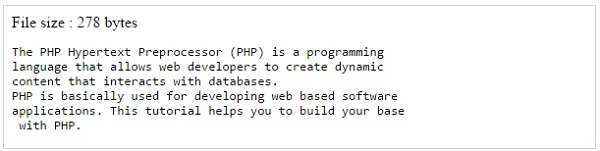
The following example assigns the content of a text file to a variable then displays those contents on the web page.
A new file can be written or text can be appended to an existing file using the PHP fwrite() function. This function requires two arguments specifying a file pointer and the string of data that is to be written. Optionally a third integer argument can be included to specify the length of the data to write. If the third argument is included, writing would will stop after the specified length has been reached.
Example
The following example creates a new text file then writes a short text heading inside it. After closing this file its existence is confirmed using file_exist() function which takes file name as an argument
Integer is one of the built-in scalar types in PHP. A whole number, without a decimal point in the literal, is of the type “int” in PHP. An integer can be represented in decimal (base 10), hexadecimal (base 16), octal (base 8) or binary (base 2) notation.
To use octal notation, a number is preceded with “0o” or “0O” (PHP 8.1.0 and earlier). From PHP 8.1.0 onward, a number prefixed with “0” and without a decimal point is an octal number.
To use hexadecimal notation, precede the number with “0x”. To use binary notation, precede the number with “0b”.
Syntax to Declare Integers in PHP
Here is syntax for declaring Integers in PHP Programming language −
There are three ways to define integers: decimal (base 10), hexadecimal (base 16 – prefixed with 0x), octal (base 8 – preceded with 0), and binary (base 2 – prefixed with 0b).
Integer Range in PHP
The size of an integer depends on the system, with 32-bit systems having a range of -2,147,483,648 to 2,147,483,647, and 64-bit systems having a larger range.
For checking the maximum and minimum integer values in PHP you can use −
<?php
   // Maximum integer value
   echo PHP_INT_MAX;

   echo "\n";

   // Minimum integer value
   echo PHP_INT_MIN;
?>
Output
It will generate the following result −
9223372036854775807
-9223372036854775808
Example
Take a look at this following example −
<?php
   $a = 1234;
   echo "1234 is an Integer in decimal notation: $a\n";

   $b = 0123;
   echo "0o123 is an integer in Octal notation: $b\n";

   $c = 0x1A;
   echo "0xaA is an integer in Hexadecimal notation: $c\n";

   $d = 0b1111;
   echo "0b1111 is an integer in binary notation: $d";
?>
Output
It will produce the below output −
1234 is an Integer in decimal notation: 1234
0o123 is an integer in Octal notation: 83
0xaA is an integer in Hexadecimal notation: 26
0b1111 is an integer in binary notation: 15
PHP 7.4.0 onwards, integer literals may contain underscores (_) as separators between digits, for better readability of literals. These underscores are removed by PHP’s scanner.
Example
Take a look at this following example −
<?php
   $a = 1_234_567;
   echo "1_234_567 is an Integer with _ as separator: $a";
?>
Output
It will generate the following output −
1_234_567 is an Integer with _ as separator: 1234567
PHP does not support unsigned ints. The size of an int is platform dependent. On 32 bit systems, the maximum value is about two billion. 64-bit platforms usually have a maximum value of about 9E18.
int size can be determined using the constant PHP_INT_SIZE, maximum value using the constant PHP_INT_MAX, and minimum value using the constant PHP_INT_MIN.
If an integer number happens to be beyond the bounds of the int type, or any operation results in a number beyond the bounds of the int type, it will be interpreted as a float instead.
PHP doesn’t have any operator for integer division. Hence, a division operation between an integer and a float always results in float. To obtain integral division, you may use the intval() built-in function.
So with the integers you can perform math operations like addition, subtraction, multiplication and division. Here is the examples for showing the usage −
In PHP, “bool” is a basic data type. It informs if something is true or not. A Boolean can only have two values: true or false. True and false in PHP can be written in several ways, such as true, TRUE, or True, and they all mean the same thing. Boolean values help you make decisions in your code.
For example, you can tell if something is correct (true) or incorrect (false). This can be used in conditions, loops and other PHP programming areas to control how the code executes based on true or false values.
The following is the list of topics discussed in this chapter −
Here is the simple example in which the variable $is_sunny is set to true. The if statement checks if $is_sunny variable is true. As it is true so it will print ‘It is a sunny day!’.
<?php
   $is_sunny = true;

   if ($is_sunny) {
      echo "It is a sunny day!";
   } else {
      echo "It is not sunny today.";
   }
?>
Here is the output of the above program −
It is a sunny day!
Boolean Values in PHP Conditions
Boolean values are used in the construction of control statements such as if, while, for and foreach. The behaviour of these statements depends on the true/false value returned by the Boolean operators.
The following conditional statement uses the Bool value returned by the expression in the parenthesis in front of the if keyword −
Use the (bool) casting operator to convert a value to bool. When a value is used in a logical context it will be automatically interpreted as a value of type bool.
A non-zero number is considered as true, only 0 (+0.0 or -0.0) is false. Non-empty string represents true, empty string “” is equivalent to false. Similarly, an empty array returns false.
Logical operators in PHP are symbols or words which perform logical operations on values that are either TRUE or FALSE. They are used to check logical conditions and manipulate boolean values.
<?php
   $a = true;
   $b = false;

   // AND operator
   var_dump($a && $b);

   // OR operator
   var_dump($a || $b);

   // NOT operator
   var_dump(!$a);
?>
It will generate the following outcome −
bool(false)
bool(true)
bool(false)
Strict Comparison with Booleans
A strict comparison with Boolean is the use of the strict equality operator (===) to compare values, that not only the values themselves but also their data types are equal and always returning a Boolean result of true or false.
PHP also provide some built in functions for boolean values. These functions are is_bool(), empty(), isset() etc. So we are showing the example of is_bool() which is used to check that the value is boolean or not and isset() which is used to check the value is set or not.
<?php
$is_bool = is_bool(true);
var_dump($is_bool);
// false if $name is not defined
$isset = isset($name);
var_dump($isset);
?>
It will produce the following output −
bool(true)
bool(false)
Boolean Arrays in PHP
Let us see if there is an array which contains boolean values and display the items of array using a loop.
In PHP, Boolean Constants are used to make logics and conditions. PHP offers two types of Boolean Constants true and false. Let us see an example below −
<?php
   const STATUS = true;
   if (STATUS) {
      echo "Status is active!";
   }
?>
It will produce the following output −
Status is active!
Practical Applications of Booleans
Real-world example where Boolean values are used, like user authentication, form validation and feature toggles. Here is an example where we will get the status of the user is logged in or not.