Category: Object Oriented PHP

  • PHP – Interfaces

    Just as a class is a template for its objects, an interface in PHP can be called as a template for classes. We know that when a class is instantiated, the properties and methods defined in a class are available to it. Similarly, an interface in PHP declares the methods along with their arguments and return value. These methods do not have any body, i.e., no functionality is defined in the interface.

    concrete class has to implement the methods in the interface. In other words, when a class implements an interface, it must provide the functionality for all methods in the interface.

    Create an Interface in PHP

    An interface is defined in the same way as a class is defined, except that the keyword “interface” is used in place of class.

    interfacemyInterface{publicfunctionmyfunction(int$arg1,int$arg2);publicfunctionmymethod(string$arg1,int$arg2);}

    Note that the methods inside the interface have not been provided with any functionality. Definitions of these methods must be provided by the class that implements this interface.

    When we define a child class, we use the keyword “extends“. In this case, the class that must use the keyword “implements“.

    Using the Interface

    All the methods declared in the interface must be defined, with the same number and type of arguments and return value.

    classmyclassimplementsmyinterface{publicfunctionmyfunction(int$arg1,int$arg2){## implementation of myfunction;}publicfunctionmymethod(string$arg1,int$arg2){# implementation of mymethod;}}

    Note that all the methods declared in an interface must be public.

    Example: Calculate Area Using a Shape Interface

    Let us define an interface called shape. A shape has a certain area. You have shapes of different geometrical appearance, such as rectangle, circle etc., each having an area, calculated with different formula. Hence the shape interface declares a method area() that returns a float value.

    interfaceshape{publicfunctionarea():float;}

    Next, we shall define a circle class that implements shape interface, to implement, the class must provide a concrete implementation of the functions in the interface. Here, the area() function in circle class calculates the area of a circle of a given radius.

    classcircleimplementsshape{var$radius;publicfunction__construct($arg1){$this->radius=$arg1;}publicfunctionarea():float{returnpow($this->radius,2)*pi();}}

    We can now declare an object of circle class, and call the area() method.

    $cir=newcircle(5);echo"Radius : ".$cir->radius." Area of Circle: ".$cir->area().PHP_EOL;

    An interface can be implemented by any number of classes (which may be unrelated to each other) provided the implementing class provides functionality of each method in the interface.

    Here is a Square class that implements shape. The area() method returns the square of the side property.

    classsquareimplementsshape{var$side;publicfunction__construct($arg1){$this->side=$arg1;}publicfunctionarea():float{returnpow($this->side,2);}}

    Similarly, create a Square object and call the area() method.

    Output

    Here is the output of the above example −

    Side: 4 | Area of Square: 16
    

    Example: Shape Interface with Circle and Square Classes

    Given below is the complete code for a shape interface, implemented by circle and Square classes −

    <?php
       interface shape {
          public function area(): float;
       }
    
       class square implements shape {
          var $side;
          public function __construct($arg1) {
             $this->side = $arg1; 
          }
          public function area(): float {
             return pow($this->side, 2);
          }
       }
       class circle implements shape {
          var $radius;
          public function __construct($arg1) {
             $this->radius = $arg1;
          }
          public function area(): float {
             return pow($this->radius,2)*pi();
          }
       }
    
       $sq = new square(5);
       echo "Side: " . $sq->side .  " Area of Square: ". $sq->area() . PHP_EOL;
    
       $cir = new circle(5);
       echo "Radius: " . $cir->radius .  " Area of Circle: " . $cir->area(). PHP_EOL;
    ?>

    Output

    It will produce the following output −

    Side: 5 Area of Square: 25
    Radius: 5 Area of Circle: 78.539816339745
    

    Multiple Inheritance in PHP

    PHP doesn’t have the provision to build a child class that extends two parent classes. In other words, the statement −

    classchildextendsparent1, parent2 
    

    is not accepted. However, PHP does support having a child class that extends one parent class, and implementing one or more interfaces.

    Let use look at the following example that shows a class that extends another and implements an interface.

    First, the parent class marks. It has three instance variables or properties $m1, $m2, $m3 representing the marks in three subjects. A constructor is provided to initialize the object.

    classmarks{protectedint$m1,$m2,$m3;publicfunction__construct($x,$y,$z){$this->m1=$x;$this->m2=$y;$this->m3=$z;}}

    We now provide an interface called percent that declares a method percent(), which should return a float but doesn’t have a function body.

    interfacepercent{publicfunctionpercent():float;}

    We now develop a class that extends marks class and provides implementation for percent() method in the interface.

    classstudentextendsmarksimplementspercent{publicfunctionpercent():float{return($this->m1+$this->m2+$this->m3)*100/300;}}

    The student class inherits the parent constructor, but provides implementation of parent() method that returns the percentage of marks.

    Example

    The complete code is as follows −

    <?php
       class marks {
          protected int $m1, $m2, $m3;
          public function __construct($x, $y, $z) {
             $this->m1 = $x;
             $this->m2 = $y;
             $this->m3 = $z;
          }
       }
       interface percent {
          public function percent(): float;
       }
    
       class student extends marks implements percent {
          public function percent(): float {
             return ($this->m1+$this->m2+$this->m3)*100/300;
          }
       }
    
       $s1 = new student(50, 60, 70);
       echo "Percentage of marks: ". $s1->percent() . PHP_EOL;
    ?>

    Output

    It will produce the following output −

    Percentage of marks: 60
    

    The interface in PHP defines a framework of methods that classes use to provide a different but concrete implementation of their own.

    Multiple Interface Implementation

    In PHP, interfaces is used to define the contract that all classes have to follow. They allow several classes to use the same methods. In this example, we will look at how a single class can implement two interfaces, A and B, with specific methods.

    <?php
       interface A {
          public function methodA();
       }
    
       interface B {
          public function methodB();
       }
    
       class MyClass implements A, B {
          public function methodA() {
             echo "Method A from interface A";
          }
    
          public function methodB() {
             echo "Method B from interface B";
          }
       }
    ?>

    Interface Constants

    Interfaces can also have constants. In PHP, interfaces can give constants that allow classes that implement them to access shared variables. In this example, we create an Animal interface using the constant TYPE “Mammal”. The Dog class implements the interface and has its own function.

    interfaceAnimal{constTYPE="Mammal";publicfunctionmakeSound();}classDogimplementsAnimal{publicfunctionmakeSound(){echo"Bark!";}}echoDog::TYPE;

    Output

    This will create the below output −

    Mammal
  • PHP – Abstract Classes

    An abstract class in PHP is a class that cannot be created on its own. This means you can’t create objects straight from an abstract class. Abstract classes are intended to be extended by subsequent classes. They serve as a blueprint for other classes, defining the common methods and properties that inheriting classes must implement.

    The list of reserved words in PHP includes the “abstract” keyword. When a class is defined with the “abstract” keyword, it cannot be instantiated, i.e., you cannot declare a new object of such a class. An abstract class can be extended by another class.

    Here is the syntax you can use for defining the abstract class −

    abstractclassmyclass{// class body}

    Create an Object of Abstract Class

    As mentioned above, you cannot declare an object of this class. Hence, the following statement −

    $obj=newmyclass;

    will result in an error message as shown below −

    PHP Fatal error:  Uncaught Error: Cannot instantiate abstract class myclass
    

    An abstract class may include properties, constants or methods. The class members may be of public, private or protected type. One or more methods in a class may also be defined as abstract.

    If any method in a class is abstract, the class itself must be an abstract class. In other words, a normal class cannot have an abstract method defined in it.

    This will raise an error −

    classmyclass{abstractfunctionmyabsmethod($arg1,$arg2);functionmymethod()#this is a normal method {echo"Hello";}}

    The error message will be shown as −

    PHP Fatal error:  Class myclass contains 1 abstract method 
    and must therefore be declared abstract
    

    You can use an abstract class as a parent and extend it with a child class. However, the child class must provide concrete implementation of each of the abstract methods in the parent class, otherwise an error will be encountered.

    Why Use Abstract Classes?

    There are two key reasons that you need to use abstract classes in PHP −

    • Code Reusability: Abstract classes allow you to describe common attributes and methods in one place which reduces code duplication.
    • Enforcing Structure: They require child classes to implement specific methods, resulting in a consistent structure throughout all classes.

    Example

    In the following code, myclass is an abstract class with myabsmethod() as an abstract method. Its derived class is mynewclass, but it doesn’t have the implementation of the abstract method in its parent.

    <?php
       abstract class myclass {
          abstract function myabsmethod($arg1, $arg2);
          function mymethod() {
             echo "Hello";
          }
       }
       class newclass extends myclass {
          function newmethod() {
             echo "World";
          }
       }
       $m1 = new newclass;
       $m1->mymethod();
    ?>

    The error message in such a situation is −

    PHP Fatal error:  Class newclass contains 1 abstract method and must 
    therefore be declared abstract or implement the remaining 
    methods (myclass::myabsmethod) 
    

    It indicates that newclass should either implement the abstract method or it should be declared as an abstract class.

    Example

    In the following PHP script, we have marks as an abstract class with percent() being an abstract method in it. Another student class extends the marks class and implements its percent() method.

    <?php
       abstract class marks {
          protected int $m1, $m2, $m3;
          abstract public function percent(): float;
       }
    
       class student extends marks {
          public function __construct($x, $y, $z) {
             $this->m1 = $x;
             $this->m2 = $y;
             $this->m3 = $z;
          }
          public function percent(): float {
             return ($this->m1+$this->m2+$this->m3)*100/300;
          }
       }
    
       $s1 = new student(50, 60, 70);
       echo "Percentage of marks: ". $s1->percent() . PHP_EOL;
    ?>

    It will produce the following output −

    Percentage of marks: 60
    

    Difference between Interface and Abstract Class in PHP

    The concept of abstract class in PHP is very similar to interface. However, there are a couple of differences between an interface and an abstract class.

    Abstract classInterface
    Use abstract keyword to define abstract classUse interface keyword to define interface
    Abstract class cannot be instantiatedInterface cannot be instantiated.
    Abstract class may have normal and abstract methodsInterface must declare the methods with arguments and return types only and not with any body.
    Abstract class is extended by child class which must implement all abstract methodsInterface must be implemented by another class, which must provide functionality of all methods in the interface.
    Can have public, private or protected propertiesProperties cannot be declared in interface
  • PHP – Class Constants

    PHP allows an identifier in a class to be defined as a “class constant” with a constant value, the one that remains unchanged on a per class basis. To differentiate from a variable or property within class, the name of the constant is not prefixed with the usual “$” symbol and is defined with the “const” qualifier. Note that a PHP program can also have a global constant created using the define() function.

    The default visibility of a constant is public, although other modifiers may be used in the definition. The value of a constant must be an expression and not a variable, nor a function call/property. The value of a constant is accessed through the class name using the scope resolution operator. Inside a method though, it can be referred to through self variable.

    Accessing Class Constants in PHP

    Here is the syntax you can follow for accessing class constants in PHP −

    classSomeClass{constCONSTANT='constant value';}echoSomeClass::CONSTANT;

    Constant names are case sensitive. Conventionally, the names of constants are in upper case.

    Key Points About Class Constants

    Here are some key points about class constant which you need to know before working with it −

    • Immutability: Once it is set, the value cannot be modified.
    • Scope: Class constants are accessible within the class that defines them .
    • Static: They are automatically static, so you do not need to create a class instance to access them.

    Why Use Class Constants?

    Using class constants provides many advantages −

    • Readability: Makes your code easier to read and understand.
    • Maintainability: If you need to modify the value, do it only once.
    • Avoid Magic Numbers: By avoiding magic numbers or strings in your code, you can better understand what each value represents.

    Example

    This example shows how a Class Constant is defined and accessed −

    <?php
       class square {
          const PI=M_PI;
          var $side=5;
          function area() {
             $area=$this->side**2*self::PI;
             return $area;
          }
       }
       $s1=new square();
       echo "PI=". square::PI . "\n";
       echo "area=" . $s1->area();
    ?>

    Output

    It will produce the following output −

    PI=3.1415926535898
    area=78.539816339745
    

    Class Constant as Expression

    In this example, the class constant is assigned an expression. This code defines a global constant PI, which is the ratio of X and Y, as well as a class square with a method for calculating the area using the constant −

    <?php
       const X = 22;
       const Y=7;
    
       class square {
          const PI=X/Y;
          var $side=5;
          function area() {
             $area=$this->side**2*self::PI;
             return $area;
          }
       }
       $s1=new square();
       echo "PI=". square::PI . "\n";
       echo "area=" . $s1->area();
    ?>

    Output

    It will produce the below output −

    PI=3.1428571428571
    area=78.571428571429
    

    Class Constant Visibility Modifiers

    This program generates a class example that has a public constant X and a private constant Y. Accessing the private constant outside of the class results in an error. Take a look at the following example −

    <?php
       class example {
          const X=10;
          private const Y=20;
       }
       $s1=new example();
       echo "public=". example::X. "\n";
       echo "private=" . $s1->Y ."\n";
       echo "private=" . example::Y ."\n";
    ?>

    Output

    It will generate the following output −

    public=10
    PHP Notice:  Undefined property: example::$Y in  line 11
    
    private=
    PHP Fatal error:  Uncaught Error: Cannot access private const example::Y
  • PHP – Inheritance

    Inheritance is one of the fundamental principles of object-oriented programming methodology. Inheritance is a software modelling approach that enables extending the capability of an existing class to build new class instead of building from scratch.

    PHP provides all the functionality to implement inheritance in its object model. Incorporating inheritance in PHP software development results in code reuse, remove redundant code duplication and logical organization.

    Class Inheritance in PHP

    Imagine that you need to design a new class whose most of the functionality already well defined in an existing class. Inheritance lets you to extend the existing class, add or remove its features and develop a new class. In fact, PHP has the “extends” keyword to establish inheritance relationship between existing and new classes.

    classnewclassextendsoldclass{......}

    Types of Inheritance in PHP

    There are three types of inheritance are there in PHP −

    • Single Inheritance: One child class inherits from one parent class.
    • Multilevel Inheritance: A class inherits from its child classes.
    • Hierarchical Inheritance: Multiple classes derive from the same parent class, resulting in hierarchical inheritance.

    Is-a Relationship

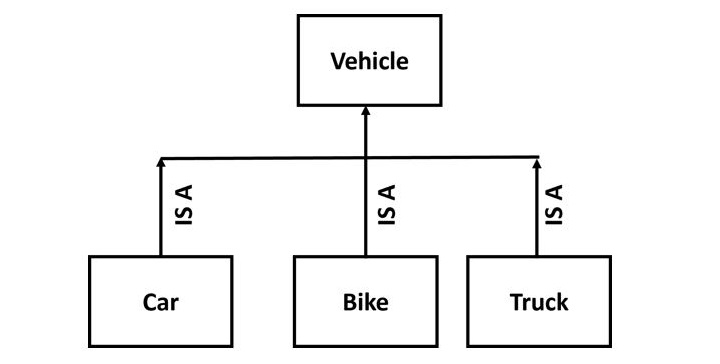
    Inheritance comes into picture when a new class (henceforth will be called inherited class, sub class, child class, etc.) possesses “IS A” relationship with an existing class (which will be called base class, super class, parent class, etc.).

    PHP Inheritance

    In PHP, when a new class is defined by extending another class, the subclass inherits the public and protected methods, properties and constants from the parent class. You are free to override the functionality of an inherited method, otherwise it will retain its functionality as defined in the parent class.

    Example of Multilevel Inheritance

    Now the below code shows an example of multilevel inheritance −

    <?php
       class Animal {  
          public function sound() {  
             echo "Animals make sound\n";  
          }  
       }  
       
       class Dog extends Animal {  
          public function bark() {  
             echo "Dog barks\n";  
          }  
       }  
       
       class Puppy extends Dog {  
          public function weep() {  
             echo "Puppy weeps\n";  
          }  
       }  
       
       $myPuppy = new Puppy();  
       $myPuppy->sound(); 
       $myPuppy->bark();  
       $myPuppy->weep();  
    ?>

    This will create the below output −

    Animals make sound
    Dog barks
    Puppy weeps
    

    Access Modifiers in Inheritance

    Now the below code shows how we can use access modifiers which decide whether properties and methods can be used outside or inside the class −

    <?php
       class Animal {  
          public $name = "Lion";  
          protected $type = "Wild";  
          private $age = 5;  
       
          public function getAge() {  
             return $this->age;  
          }  
       }  
       
       class Cat extends Animal {  
          public function showType() {  
             return $this->type;  
          }  
       }  
       
       $myCat = new Cat();  
       echo $myCat->name."\n";     
       echo $myCat->showType()."\n";
       echo $myCat->getAge()."\n";
    ?>

    This will produce the below output −

    Lion
    Wild
    5
    

    Example of Method Overriding in PHP

    Take a look at the following example −

    <?php
       class myclass {
          public function hello() {
             echo "Hello from the parent class" . PHP_EOL;      
          }
          public  function thanks() {
             echo "Thank you from parent class" . PHP_EOL;
          }
       }
       class newclass extends myclass {
          public function thanks() {
             echo "Thank you from the child class" . PHP_EOL;
          }
       }
    
       # object of parent class
       $obj1 = new myclass;
       $obj1->hello();
       $obj1->thanks();
    
       # object of child class
       $obj2 = new newclass;
       $obj2->hello();
       $obj2->thanks();
    ?>

    It will produce the following output −

    Hello from the parent class
    Thank you from parent class
    Hello from the parent class
    Thank you from the child class
    

    As mentioned before, the child class inherits public and protected members (properties and methods) of the parent. The child class may introduce additional properties or methods.

    In the following example, we use the Book class as the parent class. Here, we create an ebook class that extends the Book class. The new class has an additional property – format (indicating ebook’s file format – EPUB, PDF, MOBI etc). The ebook class defines two new methods to initialize and output the ebbok data – getebook() and dispebook() respectively.

    Example of Inheritance and Extended Functionality

    The complete code of inheritance example is given below −

    <?php
       class Book {
       
          /* Member variables */
          protected int $price;
          protected string $title;
    
          public function getbook(string $param1, int $param2) {
             $this->title = $param1;
             $this->price = $param2;
          }
          public function dispbook() {
             echo "Title: $this->title Price: $this->price \n";
          }
       }
    
       class ebook extends Book {
          private string $format;
          public function getebook(string $param1, int $param2, string $param3) {
             $this->title = $param1;
             $this->price = $param2;
             $this->format = $param3;
          }
          public function dispebook() {
             echo "Title: $this->title Price: $this->price\n";
             echo "Format: $this->format \n";
          }
       }
       $eb = new ebook;
       $eb->getebook("PHP Fundamentals", 450, "EPUB");
       $eb->dispebook();
    ?>

    The browser output is as shown below −

    Title: PHP Fundamentals Price: 450
    Format: EPUB
    

    If you take a closer look at the getebook() function, the first two assignment statements are in fact there getbook() function, which the ebook class has inherited. Hence, we can call it with parent keyword and scope resolution operator.

    Change the getebook() function code with the following −

    publicfunctiongetebook(string$param1,int$param2,string$param3){parent::getbook($param1,$param2);$this->format=$param3;}

    Similarly, the first echo statement in dispebook() function is replaced by a call to the dispbook() function in parent class −

    publicfunctiondispebook(){parent::dispbook();echo"Format: $this->format<br/>";}

    Constructor in Inheritance

    The constructor in the parent class constructor is inherited by the child class but it cannot be directly called in the child class if the child class defines a constructor.

    In order to run a parent constructor, a call to parent::__construct() within the child constructor is required.

    Example

    Take a look at the following example −

    <?php
       class myclass{
          public function __construct(){
             echo "This is parent constructor". PHP_EOL;
          }
       }
       class newclass extends myclass {
          public function __construct(){
             parent::__construct();
             echo "This is child class destructor" . PHP_EOL;
          }
       }
       $obj = new newclass();
    ?>

    It will produce the following output −

    This is parent constructor
    This is child class destructor
    

    However, if the child does not have a constructor, then it may be inherited from the parent class just like a normal class method (if it was not declared as private).

    Example

    Take a look at the following example −

    <?php
       class myclass{
          public function __construct(){
             echo "This is parent constructor". PHP_EOL;
          }
       }
       class newclass extends myclass{ }
       $obj = new newclass();
    ?>

    It will produce the following output −

    This is parent constructor
    

    Usage of Final Keyword

    In the following example, we are using the final keyword. So the final keyword is used if you do not want a method or class to be inherited or changed.

    <?php
       class Animal {  
          final public function sound() {  
             echo "Animals make sound";  
          }  
       }  
       
       class Dog extends Animal {  
          // This will create an error
          // public function sound() {  
          //     echo "Dog barks";  
          // }  
       }  
       
       $myDog = new Dog();  
       $myDog->sound();
    ?>

    Output

    Following is the output of the above code −

    Animals make sound 
    

    Inheritance Limitations

    PHP doesn’t allow developing a class by extending more than one parents. You can have hierarchical inheritance, wherein class B extends class A, class C extends class B, and so on. But PHP doesn’t support multiple inheritance where class C tries to extend both class A and class B. We can however extend one class and implement one or more interfaces. We shall learn about interfaces in one of the subsequent chapters.

  • PHP – Access Modifiers

    In PHP, the keywords public, private and protected are known as the access modifiers. These keywords control the extent of accessibility or visibility of the class properties and methods. One of these keywords is prefixed while declaring the member variables and defining member functions.

    Access Modifiers in PHP

    Whether the PHP code has free access to a class member, or it is restricted from getting access, or it has a conditional access, is determined by these keywords −

    • Public − class members are accessible from anywhere, even from outside the scope of the class, but only with the object reference.
    • Private − class members can be accessed within the class itself. It prevents members from outside class access even with the reference of the class instance.
    • Protected − members can be accessed within the class and its child class only, nowhere else.

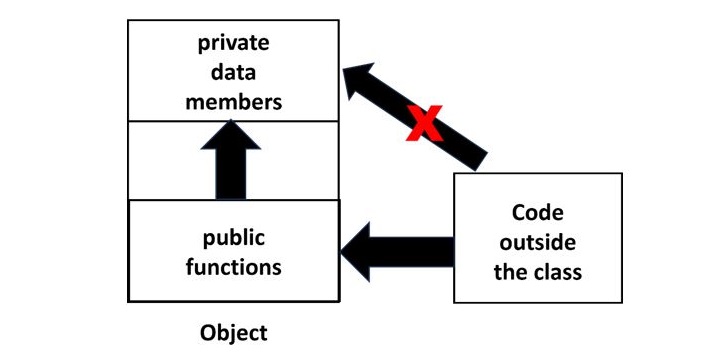
    The principle of data encapsulation is the cornerstone of the object-oriented programming methodology. It refers to the mechanism of keeping the data members or properties of an object away from the reach of the environment outside the class, allowing controlled access only through the methods or functions available in the class.

    Access Control in Object-Oriented Programming

    To implement encapsulation, data members of a class are made private and the methods are made public.

    Access Modifiers 1

    This above image shows the use of Access Modifiers in object-oriented programming, mainly how public and private members interact with code outside of the class.

    Private data members are only accessible within the class itself. The red “X” indicates that code outside of the class is unable to access secret members directly.

    Public functions can be accessed from outside the class via an object reference. Public functions are routinely used to securely access private data.

    It is obvious how private properties are hidden from the outside world, which enables encapsulation, which is one of the fundamental principles of OOP.

    Public Members

    In PHP, the class members (both member variables as well as member functions) are public by default.

    Example

    In the following program, the member variables title and price of the object are freely accessible outside the class because they are public by default, if not otherwise specified.

    <?php
       class Book {
          /* Member variables */
          var $price;
          var $title;
    
          /*Constructor*/
          function __construct(string $param1="PHP Basics", int $param2=380) {
             $this->title = $param1;
             $this->price = $param2;
          }
    
          function getPrice() {
             echo "Title: $this->price \n";
          }
    
          function getTitle() {
             echo "Price: $this->title \n";
          }
       }
       $b1 = new Book();
       echo "Title : $b1->title Price: $b1->price";
    ?>

    It will produce the following output −

    Title : PHP Basics Price: 380
    

    Private Members

    As mentioned above, the principle of encapsulation requires that the member variables should not be accessible directly. Only the methods should have the access to the data members. Hence, we need to make the member variables private and methods public.

    <?php
       class Book {
          /* Member variables */
          private $price;
          private $title;
    
          /*Constructor*/
          function __construct(string $param1="PHP Basics", int $param2=380) {
             $this->title = $param1;
             $this->price = $param2;
          }
    
          public function getPrice() {
             echo "Price: $this->price \n";
          }
    
          public function getTitle() {
             echo "Title: $this->title \n;";
          }
       }
       $b1 = new Book();
       $b1->getTitle();
       $b1->getPrice(); 
       echo "Title : $b1->title Price: $b1->price";
    ?>

    Output

    Now, the getTitle() and getPrice() functions are public, able to access the private member variables title and price. But, while trying to display the title and price directly, an error is encountered as they are not public.

    Title: PHP Basics
    Price: 380
    Fatal error: Uncaught Error: Cannot access private property 
    Book::$title in hello.php:31
    

    Protected Members

    The effect of specifying protected access to a class member is effective in case of class inheritance. We know that public members are accessible from anywhere outside the class, and private members are denied access from anywhere outside the class.

    The protected keyword grants access to an object of the same class and an object of its inherited class, denying it to any other environment.

    Let us set the title member in Book class example to protected, leaving price to private.

    classBook{/* Member variables */private$price;protected$title;# rest of the code kept as it is}$b1=newBook();$b1->getTitle();$b1->getPrice();

    PHP allows the both the member variables to be accessed, as the object belongs to the same class.

    Let us add a mybook class that inherits the Book class −

    classmybookextendsBook{# no additional members defined}

    whose object is still able to access the member variables, as the child class inherits public and protected members of the parent class.

    However, make mybook class as an independent class (not extending Book class) and define a getmytitle() function that tries to access protected title member variable of Book class.

    classmybook{publicfunctiongetmytitle($b){echo"Title: $b->title <br/>";}}$b1=newmybook();$b=newBook();$b1->getmytitle($b);

    As the getmytitle() function tries to print title of Book object, an error message showing Cannot access protected property Book::$title is raised.

    Example

    Try to run the following code −

    <?php
       class Book {
          private $price;
          protected $title;
          function __construct(string $param1="PHP Basics", int $param2=380) {
             $this->title = $param1;
             $this->price = $param2;
          }
          public function getPrice(){
             echo "Price: $this->price <br/>";
          }
          public function getTitle(){
             echo "Title: $this->title <br/>";
          }
       }
       class mybook {
          public function getmytitle($b) {
             echo "Title: $b->title <br/>";
          }
       }
       $b1 = new mybook();
       $b = new Book();
       $b1->getmytitle($b);
    ?>

    It will produce the following output −

    PHP Fatal error:  Uncaught Error: Cannot access protected property 
       Book::$title in /home/cg/root/97848/main.php:18
    

    Hence, it can be seen that the protected member is accessible by object of same class and inherited class only. For all other environment, protected members are not accessible.

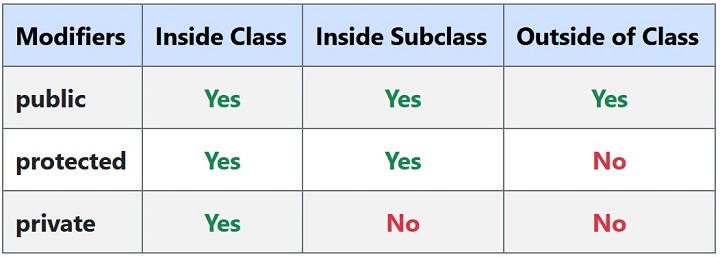
    Accessibility Rules

    The accessibility rules can be summarized by the following table −

    Access Modifiers 2
  • PHP – Constructor and Destructor

    As in most of the object-oriented languages, you can define a constructor function in a class in PHP also. When you declare an object with the new operator, its member variables are not assigned any value. The constructor function is used to initialize every new object at the time of declaration. PHP also supports having a destructor function that destroys the object from the memory as it no longer has any reference.

    Here is a list of topics we have discussed in this chapter −

    The __construct() Function

    PHP provides a __construct() function that initializes an object.

    __construct(mixed...$values=""):void

    The constructor method inside a class is called automatically on each newly created object. Note that defining a constructor is not mandatory. However, if present, it is suitable for any initialization that the object may need before it is used.

    You can pass as many as arguments you like into the constructor function. The __construct() function doesn’t have any return value.

    Let us define a constructor in the Book class used in the previous chapter

    <?php
       class Book {
       
          /* Member variables */
          var $price;
          var $title;
    
          /*Constructor*/
          function __construct(){
             $this->title = "PHP Fundamentals";
             $this->price = 275;
          }
    	  
          /* Member functions */
          function getPrice() {
             echo "Price: $this->price \n";
          }
    
          function getTitle(){
             echo "Title: $this->title \n";
          }    
       }
    
       $b1 = new Book;
       $b1->getTitle();
       $b1->getPrice();
    ?>

    It will produce the following output −

    Title: PHP Fundamentals
    Price: 275
    

    Parameterized Constructor

    The member variables of $b1 have been initialized without having to call setTitle() and setPrice() methods, because the constructor was called as soon as the object was declared. However, this constructor will be called for each object, and hence each object has the same values of title and price properties.

    To initialize each object with different values, define the __construct() function with parameters.

    Change the definition of __construct() function to the following −

    function__construct($param1,$param2){$this->title=$param1;$this->price=$param2;}

    To initialize the object, pass values to the parameters inside a parenthesis in the declaration.

    $b1=newBook("PHP Fundamentals",375);

    Example

    Now, you can have each object with different values to the member variables.

    <?php
       class Book {
       
          /* Member variables */
          var $price;
          var $title;
    
          /*Constructor*/
          function __construct($param1, $param2) {
             $this->title = $param1;
             $this->price = $param2;
          }
    
          /* Member functions */
          function getPrice(){
             echo "Price: $this->price \n";
          }
    
          function getTitle(){
             echo "Title: $this->title \n";
          }
       }
    
       $b1 = new Book("PHP Fundamentals", 375);
       $b2 = new Book("PHP Programming", 450);
    
       $b1->getTitle();
       $b1->getPrice();
       $b2->getTitle();
       $b2->getPrice();
    ?>

    It will produce the following output −

    Title: PHP Fundamentals
    Price: 375
    Title: PHP Programming
    Price: 450
    

    Constructor Overloading

    Method overloading is an important concept in object-oriented programming, where a class may have more than one definitions of constructor, each having different number of arguments. However, PHP doesn’t support method overloading. This limitation may be overcome by using arguments with default values in the constructor function.

    Change the __construct() function to the following −

    function__construct($param1="PHP Basics",$param2=380){$this->title=$param1;$this->price=$param2;}

    Now, declare an object without passing parameters, and the other with parameters. One without parameters will be initialized with default arguments, the other with the values passed.

    $b1=newBook();$b2=newBook("PHP Programming",450);

    It will produce the following output −

    Title: PHP Basics
    Price: 380
    Title: PHP Programming
    Price: 450
    

    Type Declaration in Constructor

    Since PHP (version 7.0 onwards) allows scalar type declarations for function arguments, the __construct() function may be defined as −

    function__construct(string$param1="PHP Basics",int$param2=380){$this->title=$param1;$this->price=$param2;}

    In the earlier versions of PHP, using the name of class to define a constructor function was allowed, but this feature has been deprecated since PHP version 8.0.

    The __destruct() Function

    PHP also has a __destructor() function. It implements a destructor concept similar to that of other object-oriented languages, as in C++. The destructor method will be called as soon as there are no other references to a particular object.

    __destruct():void

    The __destruct() function doesn’t have any parameters, neither does it have any return value. The fact that the __destruct() function is automatically called when any object goes out of scope, can be verified by putting var_dump($this) inside the function.

    As mentioned above, $this carries the reference to the calling object, the dump shows that the member variables are set to NULL

    Add destructor function in the Book class as follows −

    function__destruct(){var_dump($this);echo"object destroyed";}

    As the program exits, the following output will be displayed −

    object(Book)#1 (2) {
       ["price"]=>
       NULL
       ["title"]=>
       NULL
    }
    object destroyed
  • PHP – Classes and Objects

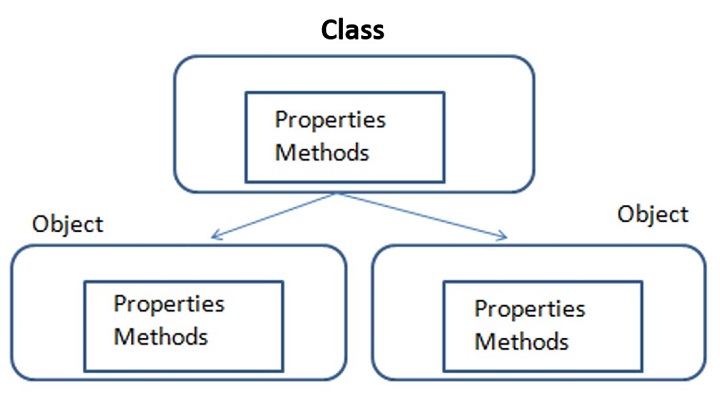
    The concept of classes and objects is central to PHP’s object-oriented programming methodology. A class is the template description of its objects. It includes the properties and functions that process the properties. An object is the instance of its class. It is characterized by the properties and functions defined in the class.

    Classes and Objects

    Defining a Class in PHP

    To define a class, PHP has a keyword “class“. Similarly, PHP provides the keyword “new” to declare an object of any given class.

    The general form for defining a new class in PHP is as follows −

    <?php
       class phpClass {
          var $var1;
          var $var2 = "constant string";
    
          function myfunc ($arg1, $arg2) {
             [..]
          }
          [..]
       }
    ?>

    The keyword class is followed by the name of the class that you want to define. Class name follows the same naming conventions as used for a PHP variable. It is followed by a pair of braces enclosing any number of variable declarations (properties) and function definitions.

    Variable declarations start with another reserved keyword var, which is followed by a conventional $variable name; they may also have an initial assignment to a constant value.

    Function definitions look much like standalone PHP functions but are local to the class and will be used to set and access object data. Functions inside a class are also called methods.

    Example

    Here is an example which defines a class of Book type −

    classBook{/* Member variables */var$price;var$title;/* Member functions */functionsetPrice($par){$this->price=$par;}functiongetPrice(){echo$this->price."<br/>";}functionsetTitle($par){$this->title=$par;}functiongetTitle(){echo$this->title." <br/>";}}

    The pseudo-variable $this is available when a method is called from within an object context. $this refers to the calling object.

    The Book class has two member variables (or properties) – $title and $price. The member variables (also sometimes called instance variables) usually have different values for each object; like each book has a title and price different from the other.

    The Book class has functions (functions defined inside the class are called methods) setTitle() and setPrice(). These functions are called with reference to an object and a parameter, used to set the value of title and price member variables respectively.

    The Book class also has getTitle() and getPrice() methods. When called, they return the title and price of the object whose reference is passed.

    Defining an Object in PHP

    An object is an instance of a class. When you create an object, you follow the blueprint provided by the class. Each object can have different attributes.

    Once a class is defined, you can declare one or more objects, using new operator.

    $b1=newBook;$b2=newBook;

    The new operator allocates the memory required for the member variables and methods of each object. Here we have created two objects and these objects are independent of each other and they will have their existence separately.

    Each object has access to its member variables and methods with the “->” operator. For example, the $title property of b1 object is “$b1->title” and to call setTitle() method, use the “$b1->setTitle()” statement.

    To set the title and price of b1 object,

    $b1->setTitle("PHP Programming");$b1->setPrice(450);

    Similarly, the following statements fetch the title and price of b1 book −

    echo$b1->getPrice();echo$b1->getTitle();

    Example

    Given below is the complete PHP script that defines Book class, declares two objects and calls the member functions.

    <?php
       class Book {
       
          /* Member variables */
          var $price;
          var $title;
    
          /* Member functions */
          function setPrice($par){
             $this->price = $par;
          }
    
          function getPrice(){
             echo $this->price ."\n";
          }
    
          function setTitle($par){
             $this->title = $par;
          }
    
          function getTitle(){
             echo $this->title ."\n";
          }
       }
    
       $b1 = new Book;
       $b2 =new Book;
    
       $b1->setTitle("PHP Programming");
       $b1->setPrice(450);
       $b2->setTitle("PHP Fundamentals");
       $b2->setPrice(275);
       $b1->getTitle();
       $b1->getPrice();
       $b2->getTitle();
       $b2->getPrice();
    ?>

    It will produce the following output −

    PHP Programming
    450
    PHP Fundamentals
    275
    

    Why Use Classes and Objects?

    Using classes and objects can help you −

    • Organize Code: Place related properties and methods together.
    • Reuse Code: Create several objects from the same class without changing the code.
    • Encapsulation: It is the process of keeping properties and methods safe from outside interference.
  • Object Oriented Programming in PHP

    We can imagine our universe made of different objects like sun, earth, moon etc. Similarly we can imagine our car made of different objects like wheel, steering, gear etc. Same way there is object oriented programming concepts which assume everything as an object and implement a software using different objects.

    Object Oriented Concepts

    Before we go in detail, lets define important terms related to Object Oriented Programming here −

    • Class − This is a programmer-defined data type, which includes local functions as well as local data. You can think of a class as a template for making many instances of the same kind (or class) of object.
    • Object − An individual instance of the data structure defined by a class. You define a class once and then make many objects that belong to it. Objects are also known as instance.
    • Member Variable − These are the variables defined inside a class. This data will be invisible to the outside of the class and can be accessed via member functions. These variables are called attribute of the object once an object is created.
    • Member function − These are the function defined inside a class and are used to access object data.
    • Inheritance − When a class is defined by inheriting existing function of a parent class then it is called inheritance. Here child class will inherit all or few member functions and variables of a parent class.
    • Parent class − A class that is inherited from by another class. This is also called a base class or super class.
    • Child Class − A class that inherits from another class. This is also called a subclass or derived class.
    • Polymorphism − This is an object oriented concept where same function can be used for different purposes. For example function name will remain same but it take different number of arguments and can do different task.
    • Overloading − a type of polymorphism in which some or all of operators have different implementations depending on the types of their arguments. Similarly functions can also be overloaded with different implementation.
    • Data Abstraction − Any representation of data in which the implementation details are hidden (abstracted).
    • Encapsulation − refers to a concept where we encapsulate all the data and member functions together to form an object.
    • Constructor − refers to a special type of function which will be called automatically whenever there is an object formation from a class.
    • Destructor − refers to a special type of function which will be called automatically whenever an object is deleted or goes out of scope.

    Defining PHP Classes

    The general form for defining a new class in PHP is as follows −

    <?php
       class phpClass {
          var $var1;
          var $var2 = "constant string";
          
          function myfunc ($arg1, $arg2) {
             [..]
          }
          [..]
       }
    ?>

    Here is the description of each line −

    • The special form class, followed by the name of the class that you want to define.
    • A set of braces enclosing any number of variable declarations and function definitions.
    • Variable declarations start with the special form var, which is followed by a conventional $ variable name; they may also have an initial assignment to a constant value.
    • Function definitions look much like standalone PHP functions but are local to the class and will be used to set and access object data.

    Example

    Here is an example which defines a class of Books type −

    <?php
       class Books {
          /* Member variables */
          var $price;
          var $title;
          
          /* Member functions */
          function setPrice($par){
             $this->price = $par;
          }
          
          function getPrice(){
             echo $this->price ."<br/>";
          }
          
          function setTitle($par){
             $this->title = $par;
          }
          
          function getTitle(){
             echo $this->title ." <br/>";
          }
       }
    ?>

    The variable $this is a special variable and it refers to the same object ie. itself.

    Creating Objects in PHP

    Once you defined your class, then you can create as many objects as you like of that class type. Following is an example of how to create object using new operator.

    $physics=newBooks;$maths=newBooks;$chemistry=newBooks;

    Here we have created three objects and these objects are independent of each other and they will have their existence separately. Next we will see how to access member function and process member variables.

    Calling Member Functions

    After creating your objects, you will be able to call member functions related to that object. One member function will be able to process member variable of related object only.

    Following example shows how to set title and prices for the three books by calling member functions.

    $physics->setTitle("Physics for High School");$chemistry->setTitle("Advanced Chemistry");$maths->setTitle("Algebra");$physics->setPrice(10);$chemistry->setPrice(15);$maths->setPrice(7);

    Now you call another member functions to get the values set by in above example −

    $physics->getTitle();$chemistry->getTitle();$maths->getTitle();$physics->getPrice();$chemistry->getPrice();$maths->getPrice();

    This will produce the following result −

    Physics for High School
    Advanced Chemistry
    Algebra
    10
    15
    7
    

    Constructor Functions

    Constructor Functions are special type of functions which are called automatically whenever an object is created. So we take full advantage of this behaviour, by initializing many things through constructor functions.

    PHP provides a special function called __construct() to define a constructor. You can pass as many as arguments you like into the constructor function.

    Following example will create one constructor for Books class and it will initialize price and title for the book at the time of object creation.

    function__construct($par1,$par2){$this->title=$par1;$this->price=$par2;}

    Now we don’t need to call set function separately to set price and title. We can initialize these two member variables at the time of object creation only. Check following example below −

    $physics=newBooks("Physics for High School",10);$maths=newBooks("Advanced Chemistry",15);$chemistry=newBooks("Algebra",7);/* Get those set values */$physics->getTitle();$chemistry->getTitle();$maths->getTitle();$physics->getPrice();$chemistry->getPrice();$maths->getPrice();

    This will produce the following result −

    Physics for High School
    Advanced Chemistry
    Algebra
    10
    15
    7
    

    Destructor

    Like a constructor function you can define a destructor function using function __destruct(). You can release all the resources with-in a destructor.

    Inheritance

    PHP class definitions can optionally inherit from a parent class definition by using the extends clause. The syntax is as follows −

    classChildextendsParent{<definition body>}

    The effect of inheritance is that the child class (or subclass or derived class) has the following characteristics −

    • Automatically has all the member variable declarations of the parent class.
    • Automatically has all the same member functions as the parent, which (by default) will work the same way as those functions do in the parent.

    Following example inherit Books class and adds more functionality based on the requirement.

    classNovelextendsBooks{var$publisher;functionsetPublisher($par){$this->publisher=$par;}functiongetPublisher(){echo$this->publisher."<br />";}}

    Now apart from inherited functions, class Novel keeps two additional member functions.

    Function Overriding

    Function definitions in child classes override definitions with the same name in parent classes. In a child class, we can modify the definition of a function inherited from parent class.

    In the following example getPrice and getTitle functions are overridden to return some values.

    functiongetPrice(){echo$this->price."<br/>";return$this->price;}functiongetTitle(){echo$this->title."<br/>";return$this->title;}

    Public Members

    Unless you specify otherwise, properties and methods of a class are public. That is to say, they may be accessed in three possible situations −

    • From outside the class in which it is declared
    • From within the class in which it is declared
    • From within another class that implements the class in which it is declared

    Till now we have seen all members as public members. If you wish to limit the accessibility of the members of a class then you define class members as private or protected.

    Private Members

    By designating a member private, you limit its accessibility to the class in which it is declared. The private member cannot be referred to from classes that inherit the class in which it is declared and cannot be accessed from outside the class.

    A class member can be made private by using private keyword infront of the member.

    classMyClass{private$car="skoda";$driver="SRK";function__construct($par){// Statements here run every time// an instance of the class// is created.}functionmyPublicFunction(){return("I'm visible!");}privatefunctionmyPrivateFunction(){return("I'm  not visible outside!");}}

    When MyClass class is inherited by another class using extends, myPublicFunction() will be visible, as will $driver. The extending class will not have any awareness of or access to myPrivateFunction and $car, because they are declared private.

    Protected Members

    A protected property or method is accessible in the class in which it is declared, as well as in classes that extend that class. Protected members are not available outside of those two kinds of classes. A class member can be made protected by using protected keyword in front of the member.

    Here is different version of MyClass −

    classMyClass{protected$car="skoda";$driver="SRK";function__construct($par){// Statements here run every time// an instance of the class// is created.}functionmyPublicFunction(){return("I'm visible!");}protectedfunctionmyPrivateFunction(){return("I'm  visible in child class!");}}

    Interfaces

    Interfaces are defined to provide a common function names to the implementers. Different implementors can implement those interfaces according to their requirements. You can say, interfaces are skeletons which are implemented by developers.

    As of PHP5, it is possible to define an interface, like this −

    interfaceMail{publicfunctionsendMail();}

    Then, if another class implemented that interface, like this −

    classReportimplementsMail{// sendMail() Definition goes here}

    Constants

    A constant is somewhat like a variable, in that it holds a value, but is really more like a function because a constant is immutable. Once you declare a constant, it does not change.

    Declaring one constant is easy, as is done in this version of MyClass −

    classMyClass{constrequiredMargin=1.7;function__construct($incomingValue){// Statements here run every time// an instance of the class// is created.}}

    In this class, requiredMargin is a constant. It is declared with the keyword const, and under no circumstances can it be changed to anything other than 1.7. Note that the constant’s name does not have a leading $, as variable names do.

    Abstract Classes

    An abstract class is one that cannot be instantiated, only inherited. You declare an abstract class with the keyword abstract, like this −

    When inheriting from an abstract class, all methods marked abstract in the parent’s class declaration must be defined by the child; additionally, these methods must be defined with the same visibility.

    abstractclassMyAbstractClass{abstractfunctionmyAbstractFunction(){}}

    Note that function definitions inside an abstract class must also be preceded by the keyword abstract. It is not legal to have abstract function definitions inside a non-abstract class.

    Static Keyword

    Declaring class members or methods as static makes them accessible without needing an instantiation of the class. A member declared as static can not be accessed with an instantiated class object (though a static method can).

    Try out following example −

    <?php
       class Foo {
          public static $my_static = 'foo';
          
          public function staticValue() {
             return self::$my_static;
          }
       }
    	
       print Foo::$my_static . "\n";
       $foo = new Foo();
       
       print $foo->staticValue() . "\n";
    ?>

    Final Keyword

    PHP 5 introduces the final keyword, which prevents child classes from overriding a method by prefixing the definition with final. If the class itself is being defined final then it cannot be extended.

    Following example results in Fatal error: Cannot override final method BaseClass::moreTesting()

    <?php
    
       class BaseClass {
          public function test() {
             echo "BaseClass::test() called<br>";
          }
          
          final public function moreTesting() {
             echo "BaseClass::moreTesting() called<br>";
          }
       }
       
       class ChildClass extends BaseClass {
          public function moreTesting() {
             echo "ChildClass::moreTesting() called<br>";
          }
       }
    ?>

    Calling Parent Constructors

    Instead of writing an entirely new constructor for the subclass, let’s write it by calling the parent’s constructor explicitly and then doing whatever is necessary in addition for instantiation of the subclass. Here’s a simple example −

    className{var$_firstName;var$_lastName;functionName($first_name,$last_name){$this->_firstName=$first_name;$this->_lastName=$last_name;}functiontoString(){return($this->_lastName.", ".$this->_firstName);}}classNameSub1extendsName{var$_middleInitial;functionNameSub1($first_name,$middle_initial,$last_name){Name::Name($first_name,$last_name);$this->_middleInitial=$middle_initial;}functiontoString(){return(Name::toString()." ".$this->_middleInitial);}}

    In this example, we have a parent class (Name), which has a two-argument constructor, and a subclass (NameSub1), which has a three-argument constructor. The constructor of NameSub1 functions by calling its parent constructor explicitly using the :: syntax (passing two of its arguments along) and then setting an additional field. Similarly, NameSub1 defines its non constructor toString() function in terms of the parent function that it overrides.

    NOTE − A constructor can be defined with the same name as the name of a class. It is defined in above example.