Python literals or constants are the notation for representing a fixed value in source code. In contrast to variables, literals (123, 4.3, “Hello”) are static values or you can say constants which do not change throughout the operation of the program or application. For example, in the following assignment statement.
x =10
Here 10 is a literal as numeric value representing 10, which is directly stored in memory. However,
y = x*2
Here, even if the expression evaluates to 20, it is not literally included in source code. You can also declare an int object with built-in int() function. However, this is also an indirect way of instantiation and not with literal.
x =int(10)
Different Types of Python Literals
Python provides following literals which will be explained this tutorial:
Any representation involving only the digit symbols (0 to 9) creates an object of int type. The object so declared may be referred by a variable using an assignment operator.
Integer literals consist three different types of different literal values decimal, octal, and hexadecimal literals.
1. Decimal Literal
Decimal literals represent the signed or unsigned numbers. Digitals from 0 to 9 are used to create a decimal literal value.
Look at the below statement assigning decimal literal to the variable −
x =10
y =-25
z =0
2. Octal Literal
Python allows an integer to be represented as an octal number or a hexadecimal number. A numeric representation with only eight digit symbols (0 to 7) but prefixed by 0o or 0O is an octal number in Python.
Look at the below statement assigning octal literal to the variable −
x =0O34
3. Hexadecimal Literal
Similarly, a series of hexadecimal symbols (0 to 9 and a to f), prefixed by 0x or 0X represents an integer in Hexedecimal form in Python.
Look at the below statement assigning hexadecimal literal to the variable −
x =0X1C
However, it may be noted that, even if you use octal or hexadecimal literal notation, Python internally treats them as of int type.
Example
# Using Octal notation
x =0O34print("0O34 in octal is", x,type(x))# Using Hexadecimal notation
x =0X1cprint("0X1c in Hexadecimal is", x,type(x))
When you run this code, it will produce the following output −
0O34 in octal is 28 <class 'int'>
0X1c in Hexadecimal is 28 <class 'int'>
Python Float Literal
A floating point number consists of an integral part and a fractional part. Conventionally, a decimal point symbol (.) separates these two parts in a literal representation of a float. For example,
Example of Float Literal
x =25.55
y =0.05
z =-12.2345
For a floating point number which is too large or too small, where number of digits before or after decimal point is more, a scientific notation is used for a compact literal representation. The symbol E or e followed by positive or negative integer, follows after the integer part.
Example of Float Scientific Notation Literal
For example, a number 1.23E05 is equivalent to 123000.00. Similarly, 1.23e-2 is equivalent to 0.0123
# Using normal floating point notation
x =1.23print("1.23 in normal float literal is", x,type(x))# Using Scientific notation
x =1.23E5print("1.23E5 in scientific notation is", x,type(x))
x =1.23E-2print("1.23E-2 in scientific notation is", x,type(x))
Here, you will get the following output −
1.23 in normal float literal is 1.23 <class 'float'>
1.23E5 in scientific notation is 123000.0 <class 'float''>
1.23E-2 in scientific notation is 0.0123 <class 'float''>
Python Complex Literal
A complex number comprises of a real and imaginary component. The imaginary component is any number (integer or floating point) multiplied by square root of “-1”
(√ −1). In literal representation (\sqrt{−1}) is representation by “j” or “J”. Hence, a literal representation of a complex number takes a form x+yj.
Example of Complex Type Literal
#Using literal notation of complex number
x =2+3jprint("2+3j complex literal is", x,type(x))
y =2.5+4.6jprint("2.5+4.6j complex literal is", x,type(x))
This code will produce the following output −
2+3j complex literal is (2+3j) <class 'complex'>
2.5+4.6j complex literal is (2+3j) <class 'complex'>
Python String Literal
A string object is one of the sequence data types in Python. It is an immutable sequence of Unicode code points. Code point is a number corresponding to a character according to Unicode standard. Strings are objects of Python’s built-in class ‘str’.
String literals are written by enclosing a sequence of characters in single quotes (‘hello’), double quotes (“hello”) or triple quotes (”’hello”’ or “””hello”””).
Example of String Literal
var1='hello'print("'hello' in single quotes is:", var1,type(var1))
var2="hello"print('"hello" in double quotes is:', var1,type(var1))
var3='''hello'''print("''''hello'''' in triple quotes is:", var1,type(var1))
var4="""hello"""print('"""hello""" in triple quotes is:', var1,type(var1))
Here, you will get the following output −
'hello' in single quotes is: hello <class 'str'>
"hello" in double quotes is: hello <class 'str'>
''''hello'''' in triple quotes is: hello <class 'str'>
"""hello""" in triple quotes is: hello <class 'str'>
Example of String Literal With Double Quoted Inside String
If it is required to embed double quotes as a part of string, the string itself should be put in single quotes. On the other hand, if single quoted text is to be embedded, string should be written in double quotes.
var1='Welcome to "Python Tutorial" from TutorialsPoint'print(var1)
var2="Welcome to 'Python Tutorial' from TutorialsPoint"print(var2)
It will produce the following output −
Welcome to "Python Tutorial" from TutorialsPoint
Welcome to 'Python Tutorial' from TutorialsPoint
Python List Literal
List object in Python is a collection of objects of other data type. List is an ordered collection of items not necessarily of same type. Individual object in the collection is accessed by index starting with zero.
Literal representation of a list object is done with one or more items which are separated by comma and enclosed in square brackets [].
Example of List Type Literal
L1=[1,"Ravi",75.50,True]print(L1,type(L1))
It will produce the following output −
[1, 'Ravi', 75.5, True] <class 'list'>
Python Tuple Literal
Tuple object in Python is a collection of objects of other data type. Tuple is an ordered collection of items not necessarily of same type. Individual object in the collection is accessed by index starting with zero.
Literal representation of a tuple object is done with one or more items which are separated by comma and enclosed in parentheses ().
Example of Tuple Type Literal
T1=(1,"Ravi",75.50,True)print(T1,type(T1))
It will produce the following output −
[1, 'Ravi', 75.5, True] <class tuple>
Example of Tuple Type Literal Without Parenthesis
Default delimiter for Python sequence is parentheses, which means a comma separated sequence without parentheses also amounts to declaration of a tuple.
T1=1,"Ravi",75.50,Trueprint(T1,type(T1))
Here too, you will get the same output −
[1, 'Ravi', 75.5, True] <class tuple>
Python Dictionary Literal
Like list or tuple, dictionary is also a collection data type. However, it is not a sequence. It is an unordered collection of items, each of which is a key-value pair. Value is bound to key by the “:” symbol. One or more key:value pairs separated by comma are put inside curly brackets to form a dictionary object.
Key should be an immutable object. Number, string or tuple can be used as key. Key cannot appear more than once in one collection. If a key appears more than once, only the last one will be retained. Values can be of any data type. One value can be assigned to more than one keys. For example,
Software applications often require to display messages output in a variety in different languages such as in English, French, Japanese, Hebrew, or Hindi. Python’s string type uses the Unicode Standard for representing characters. It makes the program possible to work with all these different possible characters.
A character is the smallest possible component of a text. ‘A’, ‘B’, ‘C’, etc., are all different characters. So are ” and ”. A unicode string is a sequence of code points, which are numbers from 0 through 0x10FFFF (1,114,111 decimal). This sequence of code points needs to be represented in memory as a set of code units, and code units are then mapped to 8-bit bytes.
Character Encoding
A sequence of code points is represented in memory as a set of code units, mapped to 8-bit bytes. The rules for translating a Unicode string into a sequence of bytes are called a character encoding.
Three types of encodings are present, UTF-8, UTF-16 and UTF-32. UTF stands for Unicode Transformation Format.
Python’s Unicode Support
Python 3.0 onwards has built-in support for Unicode. The str type contains Unicode characters, hence any string created using single, double or the triple-quoted string syntax is stored as Unicode. The default encoding for Python source code is UTF-8.
Hence, string may contain literal representation of a Unicode character (3/4) or its Unicode value (\u00BE).
Example
var ="3/4"print(var)
var ="\u00BE"print(var)
This above code will produce the following output −
3/4
Example
In the following example, a string ’10’ is stored using the Unicode values of 1 and 0 which are \u0031 and u0030 respectively.
var ="\u0031\u0030"print(var)
It will produce the following output −
10
Strings display the text in a human-readable format, and bytes store the characters as binary data. Encoding converts data from a character string to a series of bytes. Decoding translates the bytes back to human-readable characters and symbols. It is important not
to confuse these two methods. encode is a string method, while decode is a method of the Python byte object.
Example
In the following example, we have a string variable that consists of ASCII characters. ASCII is a subset of Unicode character set. The encode() method is used to convert it into a bytes object.
From a programming point of view, a type casting refers to converting an object of one type into another. Here, we shall learn about type casting in Python Programming.
Python Type Casting is a process in which we convert a literal of one data type to another data type. Python supports two types of casting − implicit and explicit.
In Python there are different data types, such as numbers, sequences, mappings etc. There may be a situation where, you have the available data of one type but you want to use it in another form. For example, the user has input a string but you want to use it as a number. Python’s type casting mechanism let you do that.
Python Implicit Casting
When any language compiler/interpreter automatically converts object of one type into other, it is called automatic or implicit casting. Python is a strongly typed language. It doesn’t allow automatic type conversion between unrelated data types. For example, a string cannot be converted to any number type. However, an integer can be cast into a float. Other languages such as JavaScript is a weakly typed language, where an integer is coerced into a string for concatenation.
Note that memory requirement of each data type is different. For example, an integer object in Python occupies 4 bytes of memory, while a float object needs 8 bytes because of its fractional part. Hence, Python interpreter doesn’t automatically convert a float to int, because it will result in loss of data. On the other hand, int can be easily converted into float by setting its fractional part to 0.
Implicit int to float casting takes place when any arithmetic operation on int and float operands is done.
Consider we have an ,int and one float variable
<<< a=10# int object<<< b=10.5# float object
To perform their addition, 10 − the integer object is upgraded to 10.0. It is a float, but equivalent to its earlier numeric value. Now we can perform addition of two floats.
<<< c=a+b
<<<print(c)20.5
In implicit type casting, a Python object with lesser byte size is upgraded to match the bigger byte size of other object in the operation. For example, a Boolean object is first upgraded to int and then to float, before the addition with a floating point object. In the following example, we try to add a Boolean object in a float, pleae note that True is equal to 1, and False is equal to 0.
a=True;
b=10.5;
c=a+b;print(c);
This will produce the following result:
11.5
Python Explicit Casting
Although automatic or implicit casting is limited to int to float conversion, you can use Python’s built-in functions int(), float() and str() to perform the explicit conversions such as string to integer.
Python int() Function
Python’s built-in int() function converts an integer literal to an integer object, a float to integer, and a string to integer if the string itself has a valid integer literal representation.
Using int() with an int object as argument is equivalent to declaring an int object directly.
<<< a =int(10)<<< a
10
is same as −
<<< a =10<<< a
10<<<type(a)<class 'int>
If the argument to int() function is a float object or floating point expression, it returns an int object. For example −
<<< a =int(10.5)#converts a float object to int<<< a
10<<< a =int(2*3.14)#expression results float, is converted to int<<< a
6<<<type(a)<class'int'>
The int() function also returns integer 1 if a Boolean object is given as argument.
<<< a=int(True)<<< a
1<<<type(a)<class'int'>
String to Integer
The int() function returns an integer from a string object, only if it contains a valid integer representation.
<<< a =int("100")<<< a
100<<<type(a)<class'int'><<< a =("10"+"01")<<< a =int("10"+"01")<<< a
1001<<<type(a)<class'int'>
However, if the string contains a non-integer representation, Python raises ValueError.
<<< a =int("10.5")
Traceback (most recent call last):
   File "<stdin>", line 1,in<module>
ValueError: invalid literal forint()with base 10:'10.5'<<< a =int("Hello World")
Traceback (most recent call last):
   File "<stdin>", line 1,in<module>
ValueError: invalid literal forint()with base 10:'Hello World'
The int() function also returns integer from binary, octal and hexa-decimal string. For this, the function needs a base parameter which must be 2, 8 or 16 respectively. The string should have a valid binary/octal/Hexa-decimal representation.
Binary String to Integer
The string should be made up of 1 and 0 only, and the base should be 2.
<<< a =int("110011",2)<<< a
51
The Decimal equivalent of binary number 110011 is 51.
Octal String to Integer
The string should only contain 0 to 7 digits, and the base should be 8.
<<< a =int("20",8)<<< a
16
The Decimal equivalent of octal 20 is 16.
Hexa-Decimal String to Integer
The string should contain only the Hexadecimal symbols i.e., 0-9 and A, B, C, D, E or F. Base should be 16.
<<< a =int("2A9",16)<<< a
681
Decimal equivalent of Hexadecimal 2A9 is 681. You can easily verify these conversions with calculator app in Windows, Ubuntu or Smartphones.
Following is an example to convert number, float and string into integer data type:
a =int(1)# a will be 1
b =int(2.2)# b will be 2
c =int("3")# c will be 3print(a)print(b)print(c)
This produce the following result −
1
2
3
Python float() Function
The float() is a built-in function in Python. It returns a float object if the argument is a float literal, integer or a string with valid floating point representation.
Using float() with an float object as argument is equivalent to declaring a float object directly
<<< a =float(9.99)<<< a
9.99<<<type(a)<class'float'>
is same as −
<<< a =9.99<<< a
9.99<<<type(a)<class'float'>
If the argument to float() function is an integer, the returned value is a floating point with fractional part set to 0.
<<< a =float(100)<<< a
100.0<<<type(a)<class'float'>
The float() function returns float object from a string, if the string contains a valid floating point number, otherwise ValueError is raised.
<<< a =float("9.99")<<< a
9.99<<<type(a)<class'float'><<< a =float("1,234.50")
Traceback (most recent call last):
   File "<stdin>", line 1,in<module>
ValueError: could not convert string to float:'1,234.50'
The reason of ValueError here is the presence of comma in the string.
For the purpose of string to float conversion, the sceientific notation of floating point is also considered valid.
<<< a =float("1.00E4")<<< a
10000.0<<<type(a)<class'float'><<< a =float("1.00E-4")<<< a
0.0001<<<type(a)<class'float'>
Following is an example to convert number, float and string into float data type:
a =float(1)# a will be 1.0
b =float(2.2)# b will be 2.2
c =float("3.3")# c will be 3.3print(a)print(b)print(c)
This produce the following result −
1.0
2.2
3.3
Python str() Function
We saw how a Python obtains integer or float number from corresponding string representation. The str() function works the opposite. It surrounds an integer or a float object with quotes (‘) to return a str object. The str() function returns the string representation of any Python object. In this section, we shall see different examples of str() function in Python.
The str() function has three parameters. First required parameter (or argument) is the object whose string representation we want. Other two operators, encoding and errors, are optional.
We shall execute str() function in Python console to easily verify that the returned object is a string, with the enclosing quotation marks (‘).
Integer to string
You can convert any integer number into a string as follows:
<<< a =str(10)<<< a
'10'<<<type(a)<class'str'>
Float to String
str() function converts floating point objects with both the notations of floating point, standard notation with a decimal point separating integer and fractional part, and the scientific notation to string object.
<<< a=str(11.10)<<< a
'11.1'<<<type(a)<class'str'><<< a =str(2/5)<<< a
'0.4'<<<type(a)<class'str'>
In the second case, a division expression is given as argument to str() function. Note that the expression is evaluated first and then result is converted to string.
Floating points in scientific notations using E or e and with positive or negative power are converted to string with str() function.
<<< a=str(10E4)<<< a
'100000.0'<<<type(a)<class'str'><<< a=str(1.23e-4)<<< a
'0.000123'<<<type(a)<class'str'>
When Boolean constant is entered as argument, it is surrounded by (‘) so that True becomes ‘True’. List and Tuple objects can also be given argument to str() function. The resultant string is the list/tuple surrounded by (‘).
<<< a=str('True')<<< a
'True'<<< a=str([1,2,3])<<< a
'[1, 2, 3]'<<< a=str((1,2,3))<<< a
'(1, 2, 3)'<<< a=str({1:100,2:200,3:300})<<< a
'{1: 100, 2: 200, 3: 300}'
Following is an example to convert number, float and string into string data type:
a =str(1)# a will be "1"
b =str(2.2)# b will be "2.2"
c =str("3.3")# c will be "3.3"print(a)print(b)print(c)
This produce the following result −
1
2.2
3.3
Conversion of Sequence Types
List, Tuple and String are Python’s sequence types. They are ordered or indexed collection of items.
A string and tuple can be converted into a list object by using the list() function. Similarly, the tuple() function converts a string or list to a tuple.
We shall take an object each of these three sequence types and study their inter-conversion.
<<< a=[1,2,3,4,5]# List Object<<< b=(1,2,3,4,5)# Tupple Object<<< c="Hello"# String Object### list() separates each character in the string and builds the list<<< obj=list(c)<<< obj
['H','e','l','l','o']### The parentheses of tuple are replaced by square brackets<<< obj=list(b)<<< obj
[1,2,3,4,5]### tuple() separates each character from string and builds a tuple of characters<<< obj=tuple(c)<<< obj
('H','e','l','l','o')### square brackets of list are replaced by parentheses.<<< obj=tuple(a)<<< obj
(1,2,3,4,5)### str() function puts the list and tuple inside the quote symbols.<<< obj=str(a)<<< obj
'[1, 2, 3, 4, 5]'<<< obj=str(b)<<< obj
'(1, 2, 3, 4, 5)'
Thus Python’s explicit type casting feature allows conversion of one data type to other with the help of its built-in functions.
Data Type Conversion Functions
There are several built-in functions to perform conversion from one data type to another. These functions return a new object representing the converted value.
Sr.No.
Function & Description
1
Python int() functionConverts x to an integer. base specifies the base if x is a string.
2
Python long() functionConverts x to a long integer. base specifies the base if x is a string.
Python data types are actually classes, and the defined variables are their instances or objects. Since Python is dynamically typed, the data type of a variable is determined at runtime based on the assigned value.
In general, the data types are used to define the type of a variable. It represents the type of data we are going to store in a variable and determines what operations can be done on it.
Each programming language has its own classification of data items.With these datatypes, we can store different types of data values.
Types of Data Types in Python
Python supports the following built-in data types −
Python numeric data types store numeric values. Number objects are created when you assign a value to them. For example −
var1 =1# int data type
var2 =True# bool data type
var3 =10.023# float data type
var4 =10+3j# complex data type
Python supports four different numerical types and each of them have built-in classes in Python library, called int, bool, float and complex respectively −
int (signed integers)
float (floating point real values)
complex (complex numbers)
A complex number is made up of two parts – real and imaginary. They are separated by ‘+’ or ‘-‘ signs. The imaginary part is suffixed by ‘j’ which is the imaginary number. The square root of -1 (\sqrt{-1}), is defined as imaginary number. Complex number in Python is represented as x+yj, where x is the real part, and y is the imaginary part. So, 5+6j is a complex number.
>>>type(5+6j)<class'complex'>
Here are some examples of numbers −
int
float
complex
10
0.0
3.14j
0O777
15.20
45.j
-786
-21.9
9.322e-36j
080
32.3+e18
.876j
0x17
-90.
-.6545+0J
-0x260
-32.54e100
3e+26J
0x69
70.2-E12
4.53e-7j
Example of Numeric Data Types
Following is an example to show the usage of Integer, Float and Complex numbers:
# integer variable.
a=100print("The type of variable having value", a," is ",type(a))# float variable.
c=20.345print("The type of variable having value", c," is ",type(c))# complex variable.
d=10+3jprint("The type of variable having value", d," is ",type(d))
2. Python String Data Type
Python string is a sequence of one or more Unicode characters, enclosed in single, double or triple quotation marks (also called inverted commas). Python strings are immutable which means when you perform an operation on strings, you always produce a new string object of the same type, rather than mutating an existing string.
As long as the same sequence of characters is enclosed, single or double or triple quotes don’t matter. Hence, following string representations are equivalent.
A string in Python is an object of str class. It can be verified with type() function.
>>>type("Welcome To TutorialsPoint")<class'str'>
A string is a non-numeric data type. Obviously, we cannot perform arithmetic operations on it. However, operations such as slicing and concatenation can be done. Python’s str class defines a number of useful methods for string processing. Subsets of strings can be taken using the slice operator ([ ] and [:] ) with indexes starting at 0 in the beginning of the string and working their way from -1 at the end.
The plus (+) sign is the string concatenation operator and the asterisk (*) is the repetition operator in Python.
Example of String Data Type
str='Hello World!'print(str)# Prints complete stringprint(str[0])# Prints first character of the stringprint(str[2:5])# Prints characters starting from 3rd to 5thprint(str[2:])# Prints string starting from 3rd characterprint(str*2)# Prints string two timesprint(str+"TEST")# Prints concatenated string
Sequence is a collection data type. It is an ordered collection of items. Items in the sequence have a positional index starting with 0. It is conceptually similar to an array in C or C++. There are following three sequence data types defined in Python.
List Data Type
Tuple Data Type
Range Data Type
Python sequences are bounded and iterable – Whenever we say an iterable in Python, it means a sequence data type (for example, a list).
(a) Python List Data Type
Python Lists are the most versatile compound data types. A Python list contains items separated by commas and enclosed within square brackets ([]). To some extent, Python lists are similar to arrays in C. One difference between them is that all the items belonging to a Python list can be of different data type where as C array can store elements related to a particular data type.
>>>[2023,"Python",3.11,5+6j,1.23E-4]
A list in Python is an object of list class. We can check it with type() function.
As mentioned, an item in the list may be of any data type. It means that a list object can also be an item in another list. In that case, it becomes a nested list.
>>>[['One','Two','Three'],[1,2,3],[1.0,2.0,3.0]]
A list can have items which are simple numbers, strings, tuple, dictionary, set or object of user defined class also.
The values stored in a Python list can be accessed using the slice operator ([ ] and [:]) with indexes starting at 0 in the beginning of the list and working their way to end -1. The plus (+) sign is the list concatenation operator, and the asterisk (*) is the repetition operator.
Example of List Data Type
list=['abcd',786,2.23,'john',70.2]
tinylist =[123,'john']print(list)# Prints complete listprint(list[0])# Prints first element of the listprint(list[1:3])# Prints elements starting from 2nd till 3rd print(list[2:])# Prints elements starting from 3rd elementprint(tinylist *2)# Prints list two timesprint(list+ tinylist)# Prints concatenated lists
Python tuple is another sequence data type that is similar to a list. A Python tuple consists of a number of values separated by commas. Unlike lists, however, tuples are enclosed within parentheses (…).
A tuple is also a sequence, hence each item in the tuple has an index referring to its position in the collection. The index starts from 0.
>>>(2023,"Python",3.11,5+6j,1.23E-4)
In Python, a tuple is an object of tuple class. We can check it with the type() function.
tuple=('abcd',786,2.23,'john',70.2)
tinytuple =(123,'john')print(tuple)# Prints the complete tupleprint(tuple[0])# Prints first element of the tupleprint(tuple[1:3])# Prints elements of the tuple starting from 2nd till 3rd print(tuple[2:])# Prints elements of the tuple starting from 3rd elementprint(tinytuple *2)# Prints the contents of the tuple twiceprint(tuple+ tinytuple)# Prints concatenated tuples
The main differences between lists and tuples are: Lists are enclosed in brackets ( [ ] ) and their elements and size can be changed i.e. lists are mutable, while tuples are enclosed in parentheses ( ( ) ) and cannot be updated (immutable). Tuples can be thought of as read-only lists.
The following code is invalid with tuple, because we attempted to update a tuple, which is not allowed. Similar case is possible with lists −
tuple=('abcd',786,2.23,'john',70.2)list=['abcd',786,2.23,'john',70.2]tuple[2]=1000# Invalid syntax with tuplelist[2]=1000# Valid syntax with list
(c) Python Range Data Type
A Python range is an immutable sequence of numbers which is typically used to iterate through a specific number of items.
It is represented by the Range class. The constructor of this class accepts a sequence of numbers starting from 0 and increments to 1 until it reaches a specified number. Following is the syntax of the function −
range(start, stop, step)
Here is the description of the parameters used −
start: Integer number to specify starting position, (Its optional, Default: 0)
stop: Integer number to specify ending position (It’s mandatory)
step: Integer number to specify increment, (Its optional, Default: 1)
Example of Range Data Type
Following is a program which uses for loop to print number from 0 to 4 −
for i inrange(5):print(i)
This produce the following result −
0
1
2
3
4
Now let’s modify above program to print the number starting from 2 instead of 0 −
for i inrange(2,5):print(i)
This produce the following result −
2
3
4
Again, let’s modify the program to print the number starting from 1 but with an increment of 2 instead of 1:
for i inrange(1,5,2):print(i)
This produce the following result −
1
3
4. Python Binary Data Types
A binary data type in Python is a way to represent data as a series of binary digits, which are 0’s and 1’s. It is like a special language computers understand to store and process information efficiently.
This type of data is commonly used when dealing with things like files, images, or anything that can be represented using just two possible values. So, instead of using regular numbers or letters, binary sequence data types use a combination of 0s and 1s to represent information.
Python provides three different ways to represent binary data. They are as follows −
bytes
bytearray
memoryview
Let us discuss each of these data types individually −
(a) Python Bytes Data Type
The byte data type in Python represents a sequence of bytes. Each byte is an integer value between 0 and 255. It is commonly used to store binary data, such as images, files, or network packets.
We can create bytes in Python using the built-in bytes() function or by prefixing a sequence of numbers with b.
Example of Bytes Data Type
In the following example, we are using the built-in bytes() function to explicitly specify a sequence of numbers representing ASCII values −
# Using bytes() function to create bytes
b1 =bytes([65,66,67,68,69])print(b1)
The result obtained is as follows −
b'ABCDE'
In here, we are using the “b” prefix before a string to automatically create a bytes object −
# Using prefix 'b' to create bytes
b2 =b'Hello'print(b2)
Following is the output of the above code −
b'Hello'
(b) Python Bytearray Data Type
The bytearray data type in Python is quite similar to the bytes data type, but with one key difference: it is mutable, meaning you can modify the values stored in it after it is created.
You can create a bytearray using various methods, including by passing an iterable of integers representing byte values, by encoding a string, or by converting an existing bytes or bytearray object. For this, we use bytearray() function.
Example of Bytearray Data Type
In the example below, we are creating a bytearray by passing an iterable of integers representing byte values −
# Creating a bytearray from an iterable of integers
value =bytearray([72,101,108,108,111])print(value)
The output obtained is as shown below −
bytearray(b'Hello')
Now, we are creating a bytearray by encoding a string using a “UTF-8” encoding −
# Creating a bytearray by encoding a string
val =bytearray("Hello",'utf-8')print(val)
The result produced is as follows −
bytearray(b'Hello')
(c) Python Memoryview Data Type
In Python, a memoryview is a built-in object that provides a view into the memory of the original object, generally objects that support the buffer protocol, such as byte arrays (bytearray) and bytes (bytes). It allows you to access the underlying data of the original object without copying it, providing efficient memory access for large datasets.
You can create a memoryview using various methods. These methods include using the memoryview() constructor, slicing bytes or bytearray objects, extracting from array objects, or using built-in functions like open() when reading from files.
Example of Memoryview Data Type
In the given example, we are creating a memoryview object directly by passing a supported object to the memoryview() constructor. The supported objects generally include byte arrays (bytearray), bytes (bytes), and other objects that support the buffer protocol −
data =bytearray(b'Hello, world!')
view =memoryview(data)print(view)
Following is the output of the above code −
<memory at 0x00000186FFAA3580>
If you have an array object, you can create a memoryview using the buffer interface as shown below −
You can also create a memoryview by slicing a bytes or bytearray object −
data =b'Hello, world!'# Creating a view of the last part of the data
view =memoryview(data[7:])print(view)
The result obtained is as follows −
<memory at 0x00000200D9AA3580>
5. Python Dictionary Data Type
Python dictionaries are kind of hash table type. A dictionary key can be almost any Python type, but are usually numbers or strings. Values, on the other hand, can be any arbitrary Python object.
Python dictionary is like associative arrays or hashes found in Perl and consist of key:value pairs. The pairs are separated by comma and put inside curly brackets {}. To establish mapping between key and value, the semicolon’:’ symbol is put between the two.
>>>{1:'one',2:'two',3:'three'}
In Python, dictionary is an object of the built-in dict class. We can check it with the type() function.
>>>type({1:'one',2:'two',3:'three'})<class'dict'>
Dictionaries are enclosed by curly braces ({ }) and values can be assigned and accessed using square braces ([]).
Example of Dictionary Data Type
dict={}dict['one']="This is one"dict[2]="This is two"

tinydict ={'name':'john','code':6734,'dept':'sales'}print(dict['one'])# Prints value for 'one' keyprint(dict[2])# Prints value for 2 keyprint(tinydict)# Prints complete dictionaryprint(tinydict.keys())# Prints all the keysprint(tinydict.values())# Prints all the values
This produce the following result −
This is one
This is two
{'dept': 'sales', 'code': 6734, 'name': 'john'}
['dept', 'code', 'name']
['sales', 6734, 'john']
Python’s dictionary is not a sequence. It is a collection of items but each item (key:value pair) is not identified by positional index as in string, list or tuple. Hence, slicing operation cannot be done on a dictionary. Dictionary is a mutable object, so it is possible to perform add, modify or delete actions with corresponding functionality defined in dict class. These operations will be explained in a subsequent chapter.
6. Python Set Data Type
Set is a Python implementation of set as defined in Mathematics. A set in Python is a collection, but is not an indexed or ordered collection as string, list or tuple. An object cannot appear more than once in a set, whereas in List and Tuple, same object can appear more than once.
Comma separated items in a set are put inside curly brackets or braces {}. Items in the set collection can be of different data types.
Note that items in the set collection may not follow the same order in which they are entered. The position of items is optimized by Python to perform operations over set as defined in mathematics.
Python’s Set is an object of built-in set class, as can be checked with the type() function.
A set can store only immutable objects such as number (int, float, complex or bool), string or tuple. If you try to put a list or a dictionary in the set collection, Python raises a TypeError.
Hashing is a mechanism in computer science which enables quicker searching of objects in computer’s memory. Only immutable objects are hashable.
Even if a set doesn’t allow mutable items, the set itself is mutable. Hence, add/delete/update operations are permitted on a set object, using the methods in built-in set class. Python also has a set of operators to perform set manipulation. The methods and operators are explained in latter chapters
Python boolean type is one of built-in data types which represents one of the two values either True or False. Python bool() function allows you to evaluate the value of any expression and returns either True or False based on the expression.
A Boolean number has only two possible values, as represented by the keywords, True and False. They correspond to integer 1 and 0 respectively.
Following is a program which prints the value of boolean variables a and b −
a =True# display the value of aprint(a)# display the data type of aprint(type(a))
This will produce the following result −
true
<class 'bool'>
Following is another program which evaluates the expressions and prints the return values −
# Returns false as a is not equal to b
a =2
b =4print(bool(a==b))# Following also prints the sameprint(a==b)# Returns False as a is None
a =Noneprint(bool(a))# Returns false as a is an empty sequence
a =()print(bool(a))# Returns false as a is 0
a =0.0print(bool(a))# Returns false as a is 10
a =10print(bool(a))
This produce the following result −
False
False
False
False
False
True
8. Python None Type
Python’s none type is represented by the “nonetype.” It is an object of its own data type. The nonetype represents the null type of values or absence of a value.
Example of None Type
In the following example, we are assigning None to a variable x and printing its type, which will be nonetyoe −
# Declaring a variable# And, assigning a Null value (None)

x =None# Printing its value and typeprint("x = ", x)print("type of x = ",type(x))
This produce the following result −
x =  None
type of x =  <class 'NoneType'>
Getting Data Type
To get the data types in Python, you can use the type() function. The type() is a built-in function that returns the class of the given object.
Example
In the following example, we are getting the type of the values and variables −
# Getting type of valuesprint(type(123))print(type(9.99))# Getting type of variables
a =10
b =2.12
c ="Hello"
d =(10,20,30)
e =[10,20,30]print(type(a))print(type(b))print(type(c))print(type(d))print(type(e))
In Python, during declaring a variable or an object, you don’t need to set the data types. Data type is set automatically based on the assigned value.
Example
The following example, demonstrating how a variable’s data type is set based on the given value −
# Declaring a variable# And, assigning an integer value

x =10# Printing its value and typeprint("x = ", x)print("type of x = ",type(x))# Now, assigning string value to# the same variable
x ="Hello World!"# Printing its value and typeprint("x = ", x)print("type of x = ",type(x))
This produce the following result −
x =  10
type of x =  <class 'int'>
x =  Hello World!
type of x =  <class 'str'>
Primitive and Non-primitive Data Types
The above-explained data types can also be categorized as primitive and non-primitive.
1. Primitive Types
The primitive data types are the fundamental data types that are used to create complex data types (sometimes called complex data structures). There are mainly four primitive data types, which are −
Integers
Floats
Booleans, and
Strings
2. Non-primitive Types
The non-primitive data types store values or collections of values. There are mainly four types of non-primitive types, which are −
Lists
Tuples
Dictionaries, and
Sets
Python Data Type Conversion
Sometimes, you may need to perform conversions between the built-in data types. To convert data between different Python data types, you simply use the type name as a function.
Following is an example which converts different values to integer, floating point and string values respectively −
print("Conversion to integer data type")
a =int(1)# a will be 1
b =int(2.2)# b will be 2
c =int("3.3")# c will be 3print(a)print(b)print(c)print("Conversion to floating point number")
a =float(1)# a will be 1.0
b =float(2.2)# b will be 2.2
c =float("3.3")# c will be 3.3print(a)print(b)print(c)print("Conversion to string")
a =str(1)# a will be "1"
b =str(2.2)# b will be "2.2"
c =str("3.3")# c will be "3.3"print(a)print(b)print(c)
This produce the following result −
Conversion to integer data type
1
2
3
Conversion to floating point number
1.0
2.2
3.3
Conversion to string
1
2.2
3.3
Data Type Conversion Functions
There are several built-in functions to perform conversion from one data type to another. These functions return a new object representing the converted value.
Sr.No.
Function & Description
1
Python int() functionConverts x to an integer. base specifies the base if x is a string.
2
Python long() functionConverts x to a long integer. base specifies the base if x is a string. This function has been deprecated.
Python is an object-oriented programming language that allows you to create classes and objects. Encapsulation is one of the core principles of OPPs. To achieve encapsulation, we use private variables and methods. In this chapter, we will discuss private variables in Python and how to use them.
Following topics will be covered in this chapter −
Private variables are a special type of variable that is only accessible within the class they are defined in. Means, they are not directly accessible from outside the class or from any subclass. This is done to protect the data and ensure that it is not modified or accessed by unauthorized code snippets.
Only direct access is restricted. We can define a public method to access the private variable from outside the class, it is called a getter method. Similarly, we can use a setter method to modify the value of a private variable from outside the class.
The image shows how Private variables are different from Public and Protected variables.
Public Variables: Public variables are accessible from anywhere, both inside and outside the class. In the image, a public place is considered as an analogy for public variables as they can be accessed by anyone.
Protected Variables: Protected variable can be accessed within the class and its subclasses. In the image, a private domicile is considered as an analogy for protected variables as they can be accessed by family members (subclasses) but not by outsiders.
Private Variables: Private variables are only accessible within the class they are defined in. In the image, a vault is considered as an analogy for private variables as they can only be accessed by the owner (the class itself) and not by anyone else.
Defining Private Variables in Python
In Python, private variables are defined by adding a double underscore (__) before the variable name. Unlike other programming languages like Java or C++, Python does not have strict access modifiers like public, private, or protected. So, the double underscore is a convention used to indicate that a variable is private. Similarly, a single underscore (_) is used to indicate that a variable is protected.
Example
The code below shows how to define a private variable and access it using a public method.
classMyClass:def__init__(self):
        self.__private_var ="I am Private"defshow_private(self):return self.__private_var

obj = MyClass()# print(obj.__private_var)   # ✗ AttributeErrorprint(obj.show_private())# ✓ Access through method
We have commented out the direct access to the private variable (Uncommenting it will raise an AttributeError). So, the output of the above code will be −
I am Private
Name Mangling for Private Variables
In Python, private variables are not truly private. They can still be accessed from outside the class using a technique called name mangling. That is, when you create a private variable using a double underscore (__var), Python internally changes its name to _ClassName__var. Now, you can access the private variable using this mangled name. Let’s see an example to understand this better.
classMyClass:def__init__(self):
        self.__private_var ="I am Private"defshow_private(self):return self.__private_var

obj = MyClass()# Accessing private variable using name manglingprint(obj._MyClass__private_var)# ✓ Access using name mangling
The output of the above code will be −
I am Private
Private Methods in Python
Similar to private variables, we can also define private methods in Python. Private methods are methods that are only accessible within the class they are defined in. They are not accessible from outside the class or from any subclass. To define a private method, we use a double underscore (__) before the method name.
classMyClass:def__init__(self):
        self.__private_var ="I am Private"def__private_method(self):return"This is a private method"defshow_private(self):return self.__private_var +" and "+ self.__private_method()

obj = MyClass()print(obj.show_private())# ✓ Access through method# print(obj.__private_method())  # ✗ AttributeErrorprint(obj._MyClass__private_method())# ✓ Access using name mangling
The output of the above code will be −
I am Private and This is a private method
This is a private method
Real World Example of Private Variables
Consider a banking application where we have a class called BankAccount. This class has private variables for the account number and balance. We will define public methods to deposit, withdraw, and check the balance. We need to ensure that balance cannot be directly modified outside the class, but can only be changed through deposit and withdraw methods.
The code below demonstrates this concept.
classBankAccount:def__init__(self, account_number, balance):
        self.__account_number = account_number   # Private
        self.__balance = balance                 # Privatedefdeposit(self, amount):if amount >0:
            self.__balance += amount
        return self.__balance

    defwithdraw(self, amount):if0< amount <= self.__balance:
            self.__balance -= amount
        return self.__balance

    defget_balance(self):return self.__balance

account = BankAccount("12345",1000)# Direct access will failtry:
    account.__balance +=500# ✗ AttributeErrorexcept AttributeError:print("Direct access to private variable failed!!!")# Access using methodsprint("Your account balance is: ", account.get_balance())# ✓ 1000

account.deposit(500)print("Your account balance after deposit is: ", account.get_balance())# ✓ 1500
The output of the above code will be −
Direct access to private variable failed!!!
Your account balance is:  1000
Your account balance after deposit is:  1500
Public vs Protected vs Private Variables
Here is a tabular comparison of Public, Protected, and Private variables in Python −
Feature
Public Variables
Protected Variables
Private Variables
Definition
Variables that can be accessed from anywhere.
Variables that can be accessed within the class and its subclasses.
Variables that can only be accessed within the class they are defined in.
Syntax
int var
int _var
int __var
Security
Least secure
Moderately secure
Most secure
Example
int age = 25
int _age = 25
int __age = 25
Conclusion
In this chapter, we learned about private variables in Python and how to use them to achieve encapsulation. We also discussed name mangling, how private methods work, getters and setters. The name mangling technique allows us to access private variables and methods from outside the class, but it is not recommended to use it as it breaks the encapsulation principle.
Python variables are the reserved memory locations used to store values with in a Python Program. This means that when you create a variable you reserve some space in the memory.
Based on the data type of a variable, memory space is allocated to it. Therefore, by assigning different data types to Python variables, you can store integers, decimals or characters in these variables.
Memory Addresses
Data items belonging to different data types are stored in computer’s memory. Computer’s memory locations are having a number or address, internally represented in binary form. Data is also stored in binary form as the computer works on the principle of binary representation. In the following diagram, a string May and a number 18 is shown as stored in memory locations.
If you know the assembly language, you will covert these data items and the memory address, and give a machine language instruction. However, it is not easy for everybody. Language translator such as Python interpreter performs this type of conversion. It stores the object in a randomly chosen memory location. Python’s built-in id() function returns the address where the object is stored.
>>>"May"
May
>>>id("May")2167264641264>>>1818>>>id(18)140714055169352
Once the data is stored in the memory, it should be accessed repeatedly for performing a certain process. Obviously, fetching the data from its ID is cumbersome. High level languages like Python make it possible to give a suitable alias or a label to refer to the memory location.
In the above example, let us label the location of May as month, and location in which 18 is stored as age. Python uses the assignment operator (=) to bind an object with the label.
>>> month="May">>> age=18
The data object (May) and its name (month) have the same id(). The id() of 18 and age are also same.
The label is an identifier. It is usually called as a variable. A Python variable is a symbolic name that is a reference or pointer to an object.
Creating Python Variables
Python variables do not need explicit declaration to reserve memory space or you can say to create a variable. A Python variable is created automatically when you assign a value to it. The equal sign (=) is used to assign values to variables.
The operand to the left of the = operator is the name of the variable and the operand to the right of the = operator is the value stored in the variable. For example −
Example to Create Python Variables
This example creates different types (an integer, a float, and a string) of variables.
counter =100# Creates an integer variable
miles   =1000.0# Creates a floating point variable
name    ="Zara Ali"# Creates a string variable
Printing Python Variables
Once we create a Python variable and assign a value to it, we can print it using print() function. Following is the extension of previous example and shows how to print different variables in Python:
Example to Print Python Variables
This example prints variables.
counter =100# Creates an integer variable
miles   =1000.0# Creates a floating point variable
name    ="Zara Ali"# Creates a string variableprint(counter)print(miles)print(name)
Here, 100, 1000.0 and “Zara Ali” are the values assigned to counter, miles, and name variables, respectively. When running the above Python program, this produces the following result −
100
1000.0
Zara Ali
Deleting Python Variables
You can delete the reference to a number object by using the del statement. The syntax of the del statement is −
del var1[,var2[,var3[....,varN]]]]
You can delete a single object or multiple objects by using the del statement. For example −
del var
del var_a, var_b
Example
Following examples shows how we can delete a variable and if we try to use a deleted variable then Python interpreter will throw an error:
100
Traceback (most recent call last):
  File "main.py", line 7, in <module>
    print (counter)
NameError: name 'counter' is not defined
Getting Type of a Variable
You can get the data type of a Python variable using the python built-in function type() as follows.
Example: Printing Variables Type
x ="Zara"
y =10
z =10.10print(type(x))print(type(y))print(type(z))
This will produce the following result:
<class 'str'>
<class 'int'>
<class 'float'>
Casting Python Variables
You can specify the data type of a variable with the help of casting as follows:
Example
This example demonstrates case sensitivity of variables.
x =str(10)# x will be '10'
y =int(10)# y will be 10
z =float(10)# z will be 10.0print("x =", x )print("y =", y )print("z =", z )
This will produce the following result:
x = 10
y = 10
z = 10.0
Case-Sensitivity of Python Variables
Python variables are case sensitive which means Age and age are two different variables:
age =20
Age =30print("age =", age )print("Age =", Age )
This will produce the following result:
age = 20
Age = 30
Python Variables – Multiple Assignment
Python allows to initialize more than one variables in a single statement. In the following case, three variables have same value.
>>> a=10>>> b=10>>> c=10
Instead of separate assignments, you can do it in a single assignment statement as follows −
>>> a=b=c=10>>>print(a,b,c)101010
In the following case, we have three variables with different values.
>>> a=10>>> b=20>>> c=30
These separate assignment statements can be combined in one. You need to give comma separated variable names on left, and comma separated values on the right of = operator.
>>> a,b,c =10,20,30>>>print(a,b,c)102030
Let’s try few examples in script mode: −
a = b = c =100print(a)print(b)print(c)
This produces the following result:
100
100
100
Here, an integer object is created with the value 1, and all three variables are assigned to the same memory location. You can also assign multiple objects to multiple variables. For example −
a,b,c =1,2,"Zara Ali"print(a)print(b)print(c)
This produces the following result:
1
2
Zara Ali
Here, two integer objects with values 1 and 2 are assigned to variables a and b respectively, and one string object with the value “Zara Ali” is assigned to the variable c.
Python Variables – Naming Convention
Every Python variable should have a unique name like a, b, c. A variable name can be meaningful like color, age, name etc. There are certain rules which should be taken care while naming a Python variable:
A variable name must start with a letter or the underscore character
A variable name cannot start with a number or any special character like $, (, * % etc.
A variable name can only contain alpha-numeric characters and underscores (A-z, 0-9, and _ )
Python variable names are case-sensitive which means Name and NAME are two different variables in Python.
Python reserved keywords cannot be used naming the variable.
If the name of variable contains multiple words, we should use these naming patterns −
Camel case − First letter is a lowercase, but first letter of each subsequent word is in uppercase. For example: kmPerHour, pricePerLitre
Pascal case − First letter of each word is in uppercase. For example: KmPerHour, PricePerLitre
Snake case − Use single underscore (_) character to separate words. For example: km_per_hour, price_per_litre
Once you use a variable to identify a data object, it can be used repeatedly without its id() value. Here, we have a variables height and width of a rectangle. We can compute the area and perimeter with these variables.
>>> width=10>>> height=20>>> area=width*height
>>> area
200>>> perimeter=2*(width+height)>>> perimeter
60
Use of variables is especially advantageous when writing scripts or programs. Following script also uses the above variables.
Save the above script with .py extension and execute from command-line. The result would be −
Area = 200
Perimeter = 60
Python Local Variables
Python Local Variables are defined inside a function. We can not access variable outside the function.
A Python functions is a piece of reusable code and you will learn more about function in Python – Functions tutorial.
Example
Following is an example to show the usage of local variables:
defsum(x,y):sum= x + y
   returnsumprint(sum(5,10))
This will produce the following result −
15
Python Global Variables
Any variable created outside a function can be accessed within any function and so they have global scope.
Example
Following is an example of global variables −
x =5
y =10defsum():sum= x + y
   returnsumprint(sum())
This will produce the following result −
15
Constants in Python
Python doesn’t have any formally defined constants, However you can indicate a variable to be treated as a constant by using all-caps names with underscores. For example, the name PI_VALUE indicates that you don’t want the variable redefined or changed in any way.
The naming convention using all-caps is sometimes referred to as screaming snake case – where the all-caps (screaming) and the underscores (snakes).
Python vs C/C++ Variables
The concept of variable works differently in Python than in C/C++. In C/C++, a variable is a named memory location. If a=10 and also b=10, both are two different memory locations. Let us assume their memory address is 100 and 200 respectively.
If a different value is assigned to “a” – say 50, 10 in the address 100 is overwritten.
A Python variable refers to the object and not the memory location. An object is stored in memory only once. Multiple variables are really the multiple labels to the same object.
The statement a=50 creates a new int object 50 in the memory at some other location, leaving the object 10 referred by “b”.
Further, if you assign some other value to b, the object 10 remains unreferred.
Python’s garbage collector mechanism releases the memory occupied by any unreferred object.
Python’s identity operator is returns True if both the operands have same id() value.
>>> a=b=10>>> a is b
True>>>id(a),id(b)(140731955278920,140731955278920)
The Python syntax defines a set of rules that are used to create a Python Program. The Python Programming Language Syntax has many similarities to Perl, C, and Java Programming Languages. However, there are some definite differences between the languages.
First Python Program
Let us execute a Python program to print “Hello, World!” in two different modes of Python Programming. (a) Interactive Mode Programming (b) Script Mode Programming.
Python – Interactive Mode Programming
We can invoke a Python interpreter from command line by typing python at the command prompt as following −
$ python3
Python 3.10.6(main, Mar 102023,10:55:28)[GCC 11.3.0] on linux
Type "help","copyright","credits"or"license"for more information.>>>
Here >>> denotes a Python Command Prompt where you can type your commands. Let’s type the following text at the Python prompt and press the Enter −
>>>print("Hello, World!")
If you are running older version of Python, like Python 2.4.x, then you would need to use print statement without parenthesis as in print “Hello, World!”. However in Python version 3.x, this produces the following result −
Hello, World!
Python – Script Mode Programming
We can invoke the Python interpreter with a script parameter which begins the execution of the script and continues until the script is finished. When the script is finished, the interpreter is no longer active.
Let us write a simple Python program in a script which is simple text file. Python files have extension .py. Type the following source code in a test.py file −
print("Hello, World!")
We assume that you have Python interpreter path set in PATH variable. Now, let’s try to run this program as follows −
$ python3 test.py
This produces the following result −
Hello, World!
Let us try another way to execute a Python script. Here is the modified test.py file −
#!/usr/bin/python3print("Hello, World!")
We assume that you have Python interpreter available in /usr/bin directory. Now, try to run this program as follows −
$ chmod +x test.py     # This is to make file executable
$./test.py
This produces the following result −
Hello, World!
Python Identifiers
A Python identifier is a name used to identify a variable, function, class, module or other object. An identifier starts with a letter A to Z or a to z or an underscore (_) followed by zero or more letters, underscores and digits (0 to 9).
Python does not allow punctuation characters such as @, $, and % within identifiers.
Python is a case sensitive programming language. Thus, Manpower and manpower are two different identifiers in Python.
Here are naming conventions for Python identifiers −
Python Class names start with an uppercase letter. All other identifiers start with a lowercase letter.
Starting an identifier with a single leading underscore indicates that the identifier is private identifier.
Starting an identifier with two leading underscores indicates a strongly private identifier.
If the identifier also ends with two trailing underscores, the identifier is a language-defined special name.
Python Reserved Words
The following list shows the Python keywords. These are reserved words and you cannot use them as constant or variable or any other identifier names. All the Python keywords contain lowercase letters only.
and
as
assert
break
class
continue
def
del
elif
else
except
False
finally
for
from
global
if
import
in
is
lambda
None
nonlocal
not
or
pass
raise
return
True
try
while
with
yield
Python Lines and Indentation
Python programming provides no braces to indicate blocks of code for class and function definitions or flow control. Blocks of code are denoted by line indentation, which is rigidly enforced.
The number of spaces in the indentation is variable, but all statements within the block must be indented the same amount. For example −
Thus, in Python all the continuous lines indented with same number of spaces would form a block. The following example has various statement blocks −
Do not try to understand the logic at this point of time. Just make sure you understood various blocks even if they are without braces.
import sys

try:# open file streamfile=open(file_name,"w")except IOError:print"There was an error writing to", file_name
   sys.exit()print"Enter '", file_finish,print"' When finished"while file_text != file_finish:
   file_text =raw_input("Enter text: ")if file_text == file_finish:# close the filefile.close
      breakfile.write(file_text)file.write("\n")file.close()
file_name =raw_input("Enter filename: ")iflen(file_name)==0:print"Next time please enter something"
   sys.exit()try:file=open(file_name,"r")except IOError:print"There was an error reading file"
   sys.exit()
file_text =file.read()file.close()print file_text
Python Multi-Line Statements
Statements in Python typically end with a new line. Python does, however, allow the use of the line continuation character (\) to denote that the line should continue. For example −
total = item_one + \
        item_two + \
        item_three
Statements contained within the [], {}, or () brackets do not need to use the line continuation character. For example following statement works well in Python −
days =['Monday','Tuesday','Wednesday','Thursday','Friday']
Quotations in Python
Python accepts single (‘), double (“) and triple (”’ or “””) quotes to denote string literals, as long as the same type of quote starts and ends the string.
The triple quotes are used to span the string across multiple lines. For example, all the following are legal −
word ='word'print(word)

sentence ="This is a sentence."print(sentence)

paragraph ="""This is a paragraph. It is
 made up of multiple lines and sentences."""print(paragraph)
Comments in Python
A comment is a programmer-readable explanation or annotation in the Python source code. They are added with the purpose of making the source code easier for humans to understand, and are ignored by Python interpreter
Just like most modern languages, Python supports single-line (or end-of-line) and multi-line (block) comments. Python comments are very much similar to the comments available in PHP, BASH and Perl Programming languages.
A hash sign (#) that is not inside a string literal begins a comment. All characters after the # and up to the end of the physical line are part of the comment and the Python interpreter ignores them.
# First commentprint("Hello, World!")# Second comment
This produces the following result −
Hello, World!
You can type a comment on the same line after a statement or expression −
name ="Madisetti"# This is again comment
You can comment multiple lines as follows −
# This is a comment.# This is a comment, too.# This is a comment, too.# I said that already.
Following triple-quoted string is also ignored by Python interpreter and can be used as a multiline comments:
'''
This is a multiline
comment.
'''
Using Blank Lines in Python Programs
A line containing only whitespace, possibly with a comment, is known as a blank line and Python totally ignores it.
In an interactive interpreter session, you must enter an empty physical line to terminate a multiline statement.
Waiting for the User
The following line of the program displays the prompt, the statement saying Press the enter key to exit, and waits for the user to take action −
#!/usr/bin/pythonraw_input("\n\nPress the enter key to exit.")
Here, “\n\n” is used to create two new lines before displaying the actual line. Once the user presses the key, the program ends. This is a nice trick to keep a console window open until the user is done with an application.
Multiple Statements on a Single Line
The semicolon ( ; ) allows multiple statements on the single line given that neither statement starts a new code block. Here is a sample snip using the semicolon −
import sys; x ='foo'; sys.stdout.write(x +'\n')
Multiple Statement Groups as Suites
A group of individual statements, which make a single code block are called suites in Python. Compound or complex statements, such as if, while, def, and class require a header line and a suite.
Header lines begin the statement (with the keyword) and terminate with a colon ( : ) and are followed by one or more lines which make up the suite. For example −
if expression :
   suite
elif expression :
   suite
else:
   suite
Command Line Arguments in Python
Many programs can be run to provide you with some basic information about how they should be run. Python enables you to do this with -h −
$ python3 -h
usage: python3 [option]...[-c cmd |-m mod |file|-][arg]...
Options and arguments (and corresponding environment variables):-c cmd : program passed inas string (terminates option list)-d     : debug output from parser (also PYTHONDEBUG=x)-E     : ignore environment variables (such as PYTHONPATH)-h     :print this help message and exit

[ etc.]
You can also program your script in such a way that it should accept various options. Command Line Arguments is an advanced topic and should be studied a bit later once you have gone through rest of the Python concepts.
Python virtual environments create a virtual installation of Python inside a project directory. Users can then install and manage Python packages for each project. This allows users to be able to install packages and modify their Python environment without fear of breaking packages installed in other environments.
What is Virtual Environment in Python?
A Python virtual environment is:
Considered as disposable.
Used to contain a specific Python interpreter and software libraries and binaries which are needed to support a project.
Contained in a directory, conventionally either named venv or .venv in the project directory.
Not considered as movable or copyable.
When you install Python software on your computer, it is available for use from anywhere in the filesystem. This is a system-wide installation.
While developing an application in Python, one or more libraries may be required to be installed using the pip utility (e.g., pip3 install somelib). Moreover, an application (let us say App1) may require a particular version of the library − say somelib 1.0. At the same time another Python application (for example App2) may require newer version of same library say somelib 2.0. Hence by installing a new version, the functionality of App1 may be compromised because of conflict between two different versions of same library.
This conflict can be avoided by providing two isolated environments of Python in the same machine. These are called virtual environment. A virtual environment is a separate directory structure containing isolated installation having a local copy of Python interpreter, standard library and other modules.
The following figure shows the purpose of advantage of using virtual environment. Using the global Python installation, more than one virtual environments are created, each having different version of the same library, so that conflict is avoided.
Creation of Virtual Environments in Python using venv
This functionality is supported by venv module in standard Python distribution. Use following commands to create a new virtual environment.
Here, myvenv is the folder in which a new Python virtual environment will be created showing following directory structure −
Directory of C:\pythonapp\myvenv
22-02-202309:53<DIR>.22-02-202309:53<DIR>..22-02-202309:53<DIR> Include
22-02-202309:53<DIR> Lib
22-02-202309:5377 pyvenv.cfg
22-02-202309:53<DIR> Scripts
The utilities for activating and deactivating the virtual environment as well as the local copy of Python interpreter will be placed in the scripts folder.
Note the name of the virtual environment in the parentheses. The Scripts folder contains a local copy of Python interpreter. You can start a Python session in this virtual environment.
Checking If Python is Running Inside a Virtual Environment?
To confirm whether this Python session is in virtual environment check the sys.path.
(myvenv) C:\pythonapp>python
Python 3.10.1(tags/v3.10.1:2cd268a, Dec 62021,19:10:37)[MSC v.192964 bit (AMD64)] on win32
Type "help","copyright","credits"or"license"for more information.>>>import sys
>>> sys.path
['','C:\\Python310\\python310.zip','C:\\Python310\\DLLs','C:\\Python310\\lib','C:\\Python310','C:\\pythonapp\\myvenv','C:\\pythonapp\\myvenv\\lib\\site-packages']>>>
The scripts folder of this virtual environment also contains pip utilities. If you install a package from PyPI, that package will be active only in current virtual environment.
Deactivating Virtual Environment
To deactivate this environment, run deactivate.bat.
First step in the journey of learning Python is to install it on your machine. Today most computer machines, especially having Linux OS, have Python pre-installed. However, it may not be the latest version.
Python is available on a wide variety of platforms including Linux and Mac OS X. Let’s understand how to set up our Python environment.
Python has also been ported to the Java and .NET virtual machines
Local Environment Setup
Open a terminal window and type “python” to find out if it is already installed and which version is installed. If Python is already installed then you will get a message something like as follows:
$ python
Python 3.11.2 (main, Feb 8 2023, 14:49:24) [GCC 9.4.0] on linux
Type "help", "copyright", "credits" or "license" for more information.

>>>
Downloading Python
The most up-to-date and current source code, binaries, documentation, news, etc., is available on the official website of Python https://www.python.org/
You can download Python documentation from https://www.python.org/doc/. The documentation is available in HTML, PDF, and PostScript formats.
Installing Python
Python distribution is available for a wide variety of platforms. You need to download only the binary code applicable for your platform and install Python.
If the binary code for your platform is not available, you need a C compiler to compile the source code manually. Compiling the source code offers more flexibility in terms of choice of features that you require in your installation.
Here is a quick overview of installing Python on various platforms −
Install Python on Ubuntu Linux
To check whether Python is already installed, open the Linux terminal and enter the following command −
$ python3.11--version
In Ubuntu Linux, the easiest way to install Python is to use apt Advanced Packaging Tool. It is always recommended to update the list of packages in all the configured repositories.
$ sudo apt update
Even after the update, the latest version of Python may not be available for install, depending upon the version of Ubuntu you are using. To overcome this, add the deadsnakes repository.
To install the latest Python 3.11 version, enter the following command in the terminal −
$ sudo apt-get install python3.11
Check whether it has been properly installed.
$ python3
Python 3.11.2(main, Feb 82023,14:49:24)[GCC 9.4.0] on linux
Type "help","copyright","credits"or"license"for more information.>>>print("Hello World")
Hello World

>>>
Install Python on other Linux
Here are the simple steps to install Python on Unix/Linux machine.
Follow the link to download zipped source code available for Unix/Linux.
Download and extract files.
Editing the Modules/Setup file if you want to customize some options.
Now issue the following commands:
$ run ./configure script
$ make
$ make install
This installs Python at standard location /usr/local/bin and its libraries at /usr/local/lib/pythonXX where XX is the version of Python.
Using Yum Command
Red Hat Enterprise Linux (RHEL 8) does not install Python 3 by default. We usually use yum command on CentOS and other related variants. The procedure for installing Python-3 on RHEL 8 is as follows:
$ sudo yum install python3
Install Python on Windows
It should be noted that Python’s version 3.10 onwards cannot be installed on Windows 7 or earlier operating systems.
The recommended way to install Python is to use the official installer. A link to the latest stable version is given on the home page itself. It is also found at https://www.python.org/downloads/windows/.
You can find embeddable packages and installers for 32 as well as 64-bit architecture.
Double click on the file where it has been downloaded to start the installation.
Although you can straight away proceed by clicking the Install Now button, it is advised to choose the installation folder with a relatively shorter path, and tick the second check box to update the PATH variable.
Accept defaults for rest of the steps in this installation wizard to complete the installation.
Open the Window Command Prompt terminal and run Python to check the success of installation.
C:\Users\Acer>python
Python 3.11.2(tags/v3.11.2:878ead1, Feb 72023,16:38:35)[MSC v.193464 bit (AMD64)] on win32
Type "help","copyright","credits"or"license"for more information.>>>
Python’s standard library has an executable module called IDLE short for Integrated Development and Learning Environment. Find it from Window start menu and launch.
IDLE contains Python shell (interactive interpreter) and a customizable multi-window text editor with features such as syntax highlighting, smart indent, auto completion etc. It is cross-platform so works the same on Windows, MacOS and Linux. It also has a debugger with provision to set breakpoints, stepping, and viewing of global and local namespaces.
Here are the steps to install Python on Windows machine.
Follow the link for the Windows installer python-XYZ.msi file where XYZ is the version you need to install.
To use this installer python-XYZ.msi, the Windows system must support Microsoft Installer 2.0. Save the installer file to your local machine and then run it to find out if your machine supports MSI.
Run the downloaded file. This brings up the Python install wizard, which is really easy to use. Just accept the default settings, wait until the install is finished, and you are done.
Macintosh Installation
Recent Macs come with Python installed, but it may be several years out of date. See http://www.python.org/download/mac/ for instructions on getting the current version along with extra tools to support development on the Mac. For older Mac OS’s before Mac OS X 10.3 (released in 2003), MacPython is available.
Jack Jansen maintains it and you can have full access to the entire documentation at his website − https://homepages.cwi.nl/~jack/macpython/index.html. You can find complete installation details for Mac OS installation.
Setting up PATH
Programs and other executable files can be in many directories, so operating systems provide a search path that lists the directories that the OS searches for executables.
The path is stored in an environment variable, which is a named string maintained by the operating system. This variable contains information available to the command shell and other programs.
The path variable is named as PATH in Unix or Path in Windows (Unix is case sensitive; Windows is not).
In Mac OS, the installer handles the path details. To invoke the Python interpreter from any particular directory, you must add the Python directory to your path.
Setting path at Unix/Linux
To add the Python directory to the path for a particular session in Unix −
In the csh shell − type setenv PATH “$PATH:/usr/local/bin/python” and press Enter.
In the bash shell (Linux) − type export PATH=”$PATH:/usr/local/bin/python” and press Enter.
In the sh or ksh shell − type PATH=”$PATH:/usr/local/bin/python” and press Enter.
Note − /usr/local/bin/python is the path of the Python directory
Setting path at Windows
To add the Python directory to the path for a particular session in Windows −
At the command prompt − type path %path%;C:\Python and press Enter.
Note − C:\Python is the path of the Python directory
Python Environment Variables
Here are important environment variables, which can be recognized by Python −
Sr.No.
Variable & Description
1
PYTHONPATHIt has a role similar to PATH. This variable tells the Python interpreter where to locate the module files imported into a program. It should include the Python source library directory and the directories containing Python source code. PYTHONPATH is sometimes preset by the Python installer.
2
PYTHONSTARTUPIt contains the path of an initialization file containing Python source code. It is executed every time you start the interpreter. It is named as .pythonrc.py in Unix and it contains commands that load utilities or modify PYTHONPATH.
3
PYTHONCASEOKIt is used in Windows to instruct Python to find the first case-insensitive match in an import statement. Set this variable to any value to activate it.
4
PYTHONHOMEIt is an alternative module search path. It is usually embedded in the PYTHONSTARTUP or PYTHONPATH directories to make switching module libraries easy.
Running Python
There are three different ways to start Python −
Interactive Interpreter
You can start Python from Unix, DOS, or any other system that provides you a command-line interpreter or shell window.
Enter python the command line.
Start coding right away in the interactive interpreter.
$python # Unix/Linux
or
python% # Unix/Linux
or
C:> python # Windows/DOS
Here is the list of all the available command line options −
Sr.No.
Option & Description
1
-dIt provides debug output.
2
-OIt generates optimized bytecode (resulting in .pyo files).
3
-SDo not run import site to look for Python paths on startup.
4
-vverbose output (detailed trace on import statements).
5
-Xdisable class-based built-in exceptions (just use strings); obsolete starting with version 1.6.
6
-c cmdrun Python script sent in as cmd string
7
filerun Python script from given file
Script from the Command-line
A Python script can be executed at command line by invoking the interpreter on your application, as in the following −
$python script.py # Unix/Linux

or

python% script.py # Unix/Linux

or

C: >python script.py # Windows/DOS
Note − Be sure the file permission mode allows execution.
Integrated Development Environment
You can run Python from a Graphical User Interface (GUI) environment as well, if you have a GUI application on your system that supports Python.
Unix − IDLE is the very first Unix IDE for Python.
Windows − PythonWin is the first Windows interface for Python and is an IDE with a GUI.
Macintosh − The Macintosh version of Python along with the IDLE IDE is available from the main website, downloadable as either MacBinary or BinHex’d files.
If you are not able to set up the environment properly, then you can take help from your system admin. Make sure the Python environment is properly set up and working perfectly fine.
We have provided Python Online Compiler/Interpreter which helps you to Edit and Execute the code directly from your browser. Try to click the icon to run the following Python code to print conventional “Hello, World!”.
Below code box allows you to change the value of the code. Try to change the value inside print() and run it again to verify the result.
# This is my first Python program.# This will print 'Hello, World!' as the outputprint("Hello, World!");
Python is an interpreter-based language. In a Linux system, Python’s executable is installed in /usr/bin/ directory. For Windows, the executable (python.exe) is found in the installation folder (for example C:\python311).
This tutorial will teach you How Python Interpreter Works in interactive and scripted mode. Python code is executed by one statement at a time method. Python interpreter has two components. The translator checks the statement for syntax. If found correct, it generates an intermediate byte code. There is a Python virtual machine which then converts the byte code in native binary and executes it. The following diagram illustrates the mechanism:
Python interpreter has an interactive mode and a scripted mode.
Python Interpreter – Interactive Mode
When launched from a command line terminal without any additional options, a Python prompt >>> appears and the Python interpreter works on the principle of REPL (Read, Evaluate, Print, Loop). Each command entered in front of the Python prompt is read, translated and executed. A typical interactive session is as follows.
>>> price =100>>> qty =5>>> total = price*qty
>>> total
500>>>print("Total = ", total)
Total =500
To close the interactive session, enter the end-of-line character (ctrl+D for Linux and ctrl+Z for Windows). You may also type quit() in front of the Python prompt and press Enter to return to the OS prompt.
>>> quit()

$
The interactive shell available with standard Python distribution is not equipped with features like line editing, history search, auto-completion etc. You can use other advanced interactive interpreter software such as IPython and bpython to have additional functionalities.
Python Interpreter – Scripting Mode
Instead of entering and obtaining the result of one instruction at a time as in the interactive environment, it is possible to save a set of instructions in a text file, make sure that it has .py extension, and use the name as the command line parameter for Python command.
Save the following lines as prog.py, with the use of any text editor such as vim on Linux or Notepad on Windows.
print("My first program")
price =100
qty =5
total = price*qty
print("Total = ", total)
When we execute above program on a Windows machine, it will produce following result:
C:\Users\Acer>python prog.py
My first program
Total = 500
Note that even though Python executes the entire script in one go, but internally it is still executed in line by line fashion.
In case of any compiler-based language such as Java, the source code is not converted in byte code unless the entire code is error-free. In Python, on the other hand, statements are executed until first occurrence of error is encountered.
Let us introduce an error purposefully in the above code.
print("My first program")
price =100
qty =5
total = prive*qty #Error in this statementprint("Total = ", total)
Note the misspelt variable prive instead of price. Try to execute the script again as before −
C:\Users\Acer>python prog.py
My first program
Traceback (most recent call last):
  File "C:\Python311\prog.py", line 4, in <module>
   total = prive*qty
   ^^^^^
NameError: name 'prive' is not defined. Did you mean: 'price'?
Note that the statements before the erroneous statement are executed and then the error message appears. Thus it is now clear that Python script is executed in interpreted manner.
Python Interpreter – Using Shebang #!
In addition to executing the Python script as above, the script itself can be a selfexecutable in Linux, like a shell script. You have to add a shebang line on top of the script. The shebang indicates which executable is used to interpret Python statements in the script. Very first line of the script starts with #! And followed by the path to Python executable.
Modify the prog.py script as follows −
#! /usr/bin/python3.11print("My first program")
price =100
qty =5
total = price*qty
print("Total = ", total)
To mark the script as self-executable, use the chmod command
$ chmod +x prog.py
You can now execute the script directly, without using it as a command-line argument.
$ ./hello.py
Interactive Python – IPython
IPython (stands for Interactive Python) is an enhanced and powerful interactive environment for Python with many functionalities compared to the standard Python shell. IPython was originally developed by Fernando Perez in 2001.
IPython has the following important features −
IPython‘s object introspection ability to check properties of an object during runtime.
Its syntax highlighting proves to be useful in identifying the language elements such as keywords, variables etc.
The history of interactions is internally stored and can be reproduced.
Tab completion of keywords, variables and function names is one of the most important features.
IPython’s Magic command system is useful for controlling Python environment and performing OS tasks.
It is the main kernel for Jupyter notebook and other front-end tools of Project Jupyter.
Install IPython with PIP installer utility.
pip3 install ipython
Launch IPython from command-line
C:\Users\Acer>ipython
Python 3.11.2(tags/v3.11.2:878ead1, Feb 72023,16:38:35)[MSC v.193464 bit (AMD64)] on win32
Type 'copyright','credits'or'license'for more information
IPython 8.4.0-- An enhanced Interactive Python. Type '?'forhelp.
In [1]:
Instead of the regular >>> prompt as in standard interpreter, you will notice two major IPython prompts as explained below −
In[1] appears before any input expression.
Out[1]appears before the Output appears.
In [1]: price =100
In [2]: quantity =5
In [3]: total = price*quantity
In [4]: total
Out[4]:500
In [5]:
Tab completion is one of the most useful enhancements provided by IPython. IPython pops up appropriate list of methods as you press tab key after dot in front of object.
IPython provides information (introspection) of any object by putting ? in front of it. It includes docstring, function definitions and constructor details of class. For example to explore the string object var defined above, in the input prompt enter var?.
In [5]: var ="Hello World"
In [6]: var?
Type:str
String form: Hello World
Length:11
Docstring:str(object='')->strstr(bytes_or_buffer[, encoding[, errors]])->str
Create a new string objectfrom the given object. If encoding or
errors is specified, then the object must expose a data buffer
that will be decoded using the given encoding and error handler.
Otherwise, returns the result of object.__str__()(if defined)orrepr(object).
encoding defaults to sys.getdefaultencoding().
errors defaults to 'strict'.
IPython’s magic functions are extremely powerful. Line magics let you run DOS commands inside IPython. Let us run the dir command from within IPython console
In [8]: !dir*.exe
 Volume in drive F has no label.
 Volume Serial Number is E20D-C4B9

 Directory of F:\Python311

07-02-202316:55103,192 python.exe
07-02-202316:55101,656 pythonw.exe
                2 File(s)204,848bytes0 Dir(s)105,260,306,432bytes free
Jupyter notebook is a web-based interface to programming environments of Python, Julia, R and many others. For Python, it uses IPython as its main kernel.
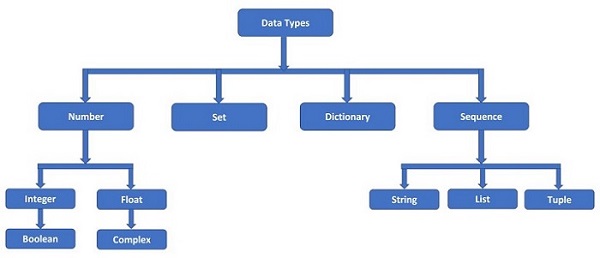

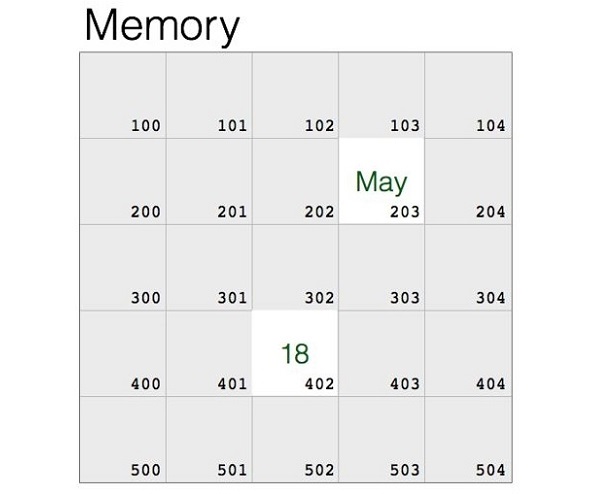
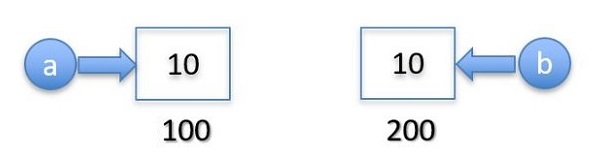
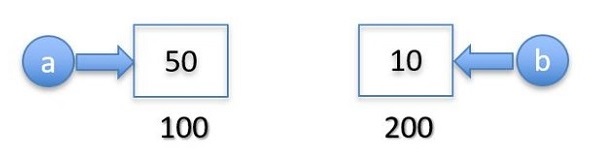

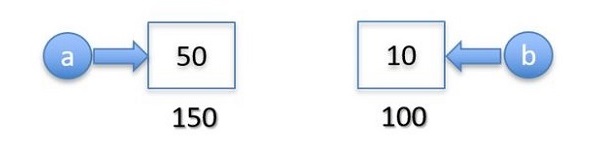
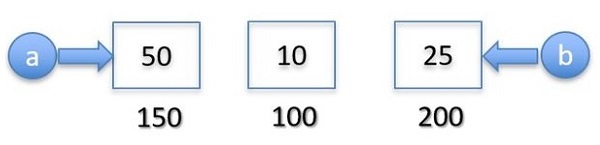
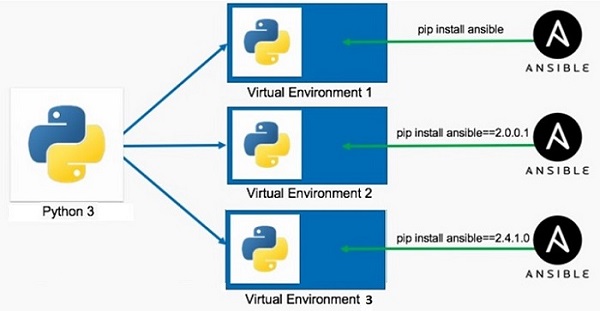
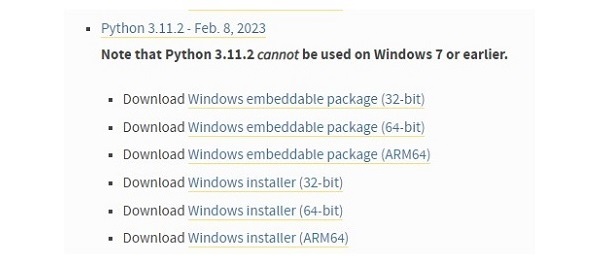
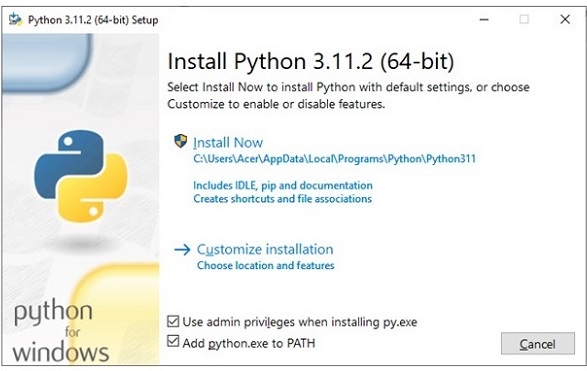
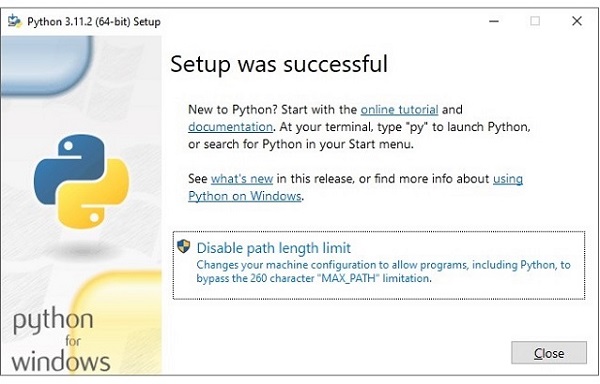
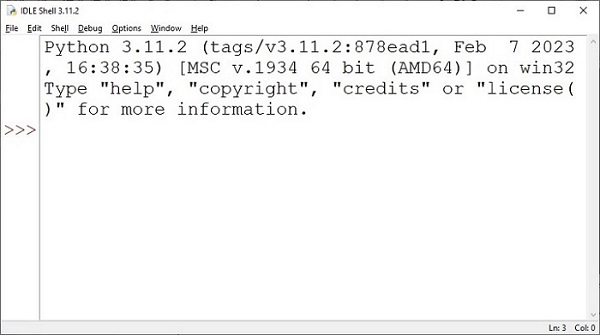
 to run the following Python code to print conventional “Hello, World!”.