In Python, when you write one or more loops within a loop statement that is known as a nested loop. The main loop is considered as outer loop and loop(s) inside the outer loop are known as inner loops.
The Python programming language allows the use of one loop inside another loop. A loop is a code block that executes specific instructions repeatedly. There are two types of loops, namely for and while, using which we can create nested loops.
You can put any type of loop inside of any other type of loop. For example, a for loop can be inside a while loop or vice versa.
Python Nested for Loop
The for loop with one or more inner for loops is called nested for loop. A for loop is used to loop over the items of any sequence, such as a list, tuple or a string and performs the same action on each item of the sequence.
Python Nested for Loop Syntax
The syntax for a Python nested for loop statement in Python programming language is as follows −
for iterating_var in sequence:for iterating_var in sequence:
      statements(s)
   statements(s)
Python Nested for Loop Example
The following program uses a nested for loop to iterate over months and days lists.
months =["jan","feb","mar"]
days =["sun","mon","tue"]for x in months:for y in days:print(x, y)print("Good bye!")
When the above code is executed, it produces following result −
jan sun
jan mon
jan tue
feb sun
feb mon
feb tue
mar sun
mar mon
mar tue
Good bye!
Python Nested while Loop
The while loop having one or more inner while loops are nested while loop. A while loop is used to repeat a block of code for an unknown number of times until the specified boolean expression becomes TRUE.
Python Nested while Loop Syntax
The syntax for a nested while loop statement in Python programming language is as follows −
while expression:while expression:
      statement(s)
   statement(s)
Python Nested while Loop Example
The following program uses a nested while loop to find the prime numbers from 2 to 100 −
i =2while(i <25):
   j =2while(j <=(i/j)):ifnot(i%j):break
      j = j +1if(j > i/j):print(i," is prime")
   i = i +1print("Good bye!")
On executing, the above code produces following result −
2 is prime
3 is prime
5 is prime
7 is prime
11 is prime
13 is prime
17 is prime
19 is prime
23 is prime
Good bye!
Python pass statement is used when a statement is required syntactically but you do not want any command or code to execute. It is a null which means nothing happens when it executes. This is also useful in places where piece of code will be added later, but a placeholder is required to ensure the program runs without errors.
For instance, in a function or class definition where the implementation is yet to be written, pass statement can be used to avoid the SyntaxError. Additionally, it can also serve as a placeholder in control flow statements like for and while loops.
Syntax of pass Statement
Following is the syntax of Python pass statement −
pass
Example of pass Statement
The following code shows how you can use the pass statement in Python −
for letter in'Python':if letter =='h':passprint('This is pass block')print('Current Letter :', letter)print("Good bye!")
When the above code is executed, it produces the following output −
Current Letter : P
Current Letter : y
Current Letter : t
This is pass block
Current Letter : h
Current Letter : o
Current Letter : n
Good bye!
Dumpy Infinite Loop with pass Statement
This is simple enough to create an infinite loop using pass statement in Python.
Example
If you want to code an infinite loop that does nothing each time through, do it as shown below −
whileTrue:pass# Type Ctrl-C to stop
Because the body of the loop is just an empty statement, Python gets stuck in this loop.
Using Ellipses (…) as pass Statement Alternative
Python 3.X allows ellipses (coded as three consecutive dots …) to be used in place of pass statement. Both serve as placeholders for code that are going to be written later.
Example
For example if we create a function which does not do anything especially for code to be filled in later, then we can make use of …
deffunc1():# Alternative to pass...# Works on same line toodeffunc2():...# Does nothing if called
func1()
func2()
Python continue statement is used to skip the execution of the program block and returns the control to the beginning of the current loop to start the next iteration. When encountered, the loop starts next iteration without executing the remaining statements in the current iteration.
The continue statement is just the opposite to that of break. It skips the remaining statements in the current loop and starts the next iteration.
Syntax of continue Statement
looping statement:
   condition check:continue
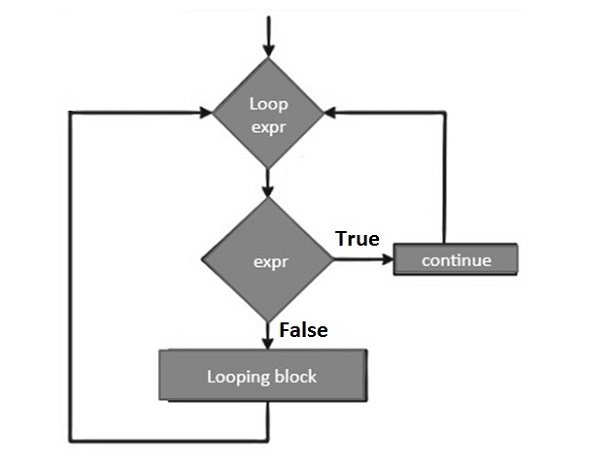
Flow Diagram of continue Statement
The flow diagram of the continue statement looks like this −
Python continue Statement with for Loop
In Python, the continue statement is allowed to be used with a for loop. Inside the for loop, you should include an if statement to check for a specific condition. If the condition becomes TRUE, the continue statement will skip the current iteration and proceed with the next iteration of the loop.
Example
Let’s see an example to understand how the continue statement works in for loop.
for letter in'Python':if letter =='h':continueprint('Current Letter :', letter)print("Good bye!")
When the above code is executed, it produces the following output −
Current Letter : P
Current Letter : y
Current Letter : t
Current Letter : o
Current Letter : n
Good bye!
Python continue Statement with while Loop
Python continue statement is used with ‘for’ loops as well as ‘while’ loops to skip the execution of the current iteration and transfer the program’s control to the next iteration.
Example: Checking Prime Factors
Following code uses continue to find the prime factors of a given number. To find prime factors, we need to successively divide the given number starting with 2, increment the divisor and continue the same process till the input reduces to 1.
num =60print("Prime factors for: ", num)
d=2while num >1:if num%d==0:print(d)
      num=num/d
      continue
   d=d+1
On executing, this code will produce the following output −
Prime factors for: 60
2
2
3
5
Assign different value (say 75) to num in the above program and test the result for its prime factors.
Python break statement is used to terminate the current loop and resumes execution at the next statement, just like the traditional break statement in C.
The most common use for Python break statement is when some external condition is triggered requiring a sudden exit from a loop. The break statement can be used in both Python while and for loops.
If you are using nested loops in Python, the break statement stops the execution of the innermost loop and start executing the next line of code after the block.
Syntax of break Statement
The syntax for a break statement in Python is as follows −
looping statement:
   condition check:break
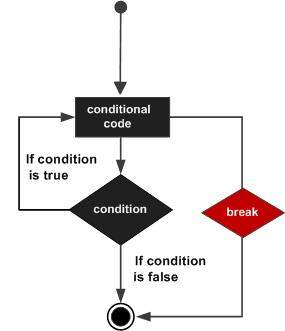
Flow Diagram of break Statement
Following is the flowchart of the break statement −
break Statement with for loop
If we use break statement inside a for loop, it interrupts the normal flow of program and exit the loop before completing the iteration.
Example
In this example, we will see the working of break statement in for loop.
for letter in'Python':if letter =='h':breakprint("Current Letter :", letter)print("Good bye!")
When the above code is executed, it produces the following result −
Current Letter : P
Current Letter : y
Current Letter : t
Good bye!
break Statement with while loop
Similar to the for loop, we can use the break statement to skip the code inside while loop after the specified condition becomes TRUE.
Example
The code below shows how to use break statement with while loop.
var =10while var >0:print('Current variable value :', var)
   var = var -1if var ==5:breakprint("Good bye!")
On executing the above code, it produces the following result −
Current variable value : 10
Current variable value : 9
Current variable value : 8
Current variable value : 7
Current variable value : 6
Good bye!
break Statement with Nested Loops
In nested loops, one loop is defined inside another. The loop that enclose another loop (i.e. inner loop) is called as outer loop.
When we use a break statement with nested loops, it behaves as follows −
When break statement is used inside the inner loop, only the inner loop will be skipped and the program will continue executing statements after the inner loop
And, when the break statement is used in the outer loop, both the outer and inner loops will be skipped and the program will continue executing statements immediate to the outer loop.
Example
The following program demonstrates the use of break in a for loop iterating over a list. Here, the specified number will be searched in the list. If it is found, then the loop terminates with the “found” message.
no =33
numbers =[11,33,55,39,55,75,37,21,23,41,13]for num in numbers:if num == no:print('number found in list')breakelse:print('number not found in list')
The above program will produce the following output −
A while loop in Python programming language repeatedly executes a target statement as long as the specified boolean expression is true. This loop starts with while keyword followed by a boolean expression and colon symbol (:). Then, an indented block of statements starts.
Here, statement(s) may be a single statement or a block of statements with uniform indent. The condition may be any expression, and true is any non-zero value. As soon as the expression becomes false, the program control passes to the line immediately following the loop.
If it fails to turn false, the loop continues to run, and doesn’t stop unless forcefully stopped. Such a loop is called infinite loop, which is undesired in a computer program.
Syntax of while Loop
The syntax of a while loop in Python programming language is −
while expression:
   statement(s)
In Python, all the statements indented by the same number of character spaces after a programming construct are considered to be part of a single block of code. Python uses indentation as its method of grouping statements.
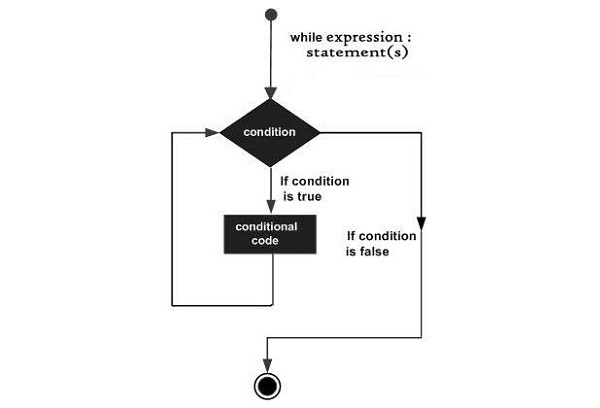
Flowchart of While loop
The following flow diagram illustrates the while loop −
Example 1
The following example illustrates the working of while loop. Here, the iteration run till value of count will become 5.
count=0while count<5:
   count+=1print("Iteration no. {}".format(count))print("End of while loop")
On executing, this code will produce the following output −
Iteration no. 1
Iteration no. 2
Iteration no. 3
Iteration no. 4
Iteration no. 5
End of while loop
Example 2
Here is another example of using the while loop. For each iteration, the program asks for user input and keeps repeating till the user inputs a non-numeric string. The isnumeric() function returns true if input is an integer, false otherwise.
var ='0'while var.isnumeric()==True:
   var ="test"if var.isnumeric()==True:print("Your input", var)print("End of while loop")
On running the code, it will produce the following output −
enter a number..10
Your input 10
enter a number..100
Your input 100
enter a number..543
Your input 543
enter a number..qwer
End of while loop
Python Infinite while Loop
A loop becomes infinite loop if a condition never becomes FALSE. You must be cautious when using while loops because of the possibility that this condition never resolves to a FALSE value. This results in a loop that never ends. Such a loop is called an infinite loop.
An infinite loop might be useful in client/server programming where the server needs to run continuously so that client programs can communicate with it as and when required.
Example
Let’s take an example to understand how the infinite loop works in Python −
var =1while var ==1:# This constructs an infinite loop
   num =int(input("Enter a number :"))print("You entered: ", num)print("Good bye!")
On executing, this code will produce the following output −
Enter a number :20
You entered: 20
Enter a number :29
You entered: 29
Enter a number :3
You entered: 3
Enter a number :11
You entered: 11
Enter a number :22
You entered: 22
Enter a number :Traceback (most recent call last):
   File "examples\test.py", line 5, in
      num = int(input("Enter a number :"))
KeyboardInterrupt
The above example goes in an infinite loop and you need to use CTRL+C to exit the program.
Python while-else Loop
Python supports having an else statement associated with a while loop. If the else statement is used with a while loop, the else statement is executed when the condition becomes false before the control shifts to the main line of execution.
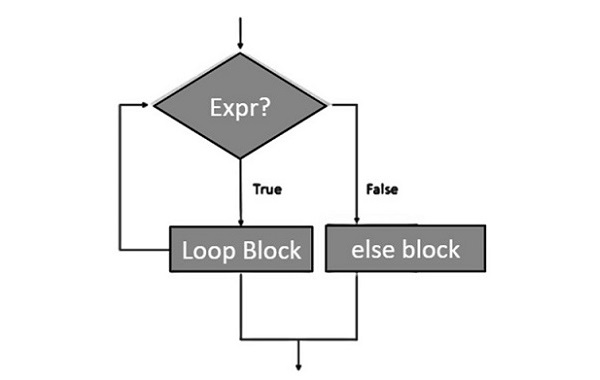
Flowchart of While loop with else Statement
The following flow diagram shows how to use else statement with while loop −
Example
The following example illustrates the combination of an else statement with a while statement. Till the count is less than 5, the iteration count is printed. As it becomes 5, the print statement in else block is executed, before the control is passed to the next statement in the main program.
count=0while count<5:
   count+=1print("Iteration no. {}".format(count))else:print("While loop over. Now in else block")print("End of while loop")
On running the above code, it will print the following output −
Iteration no. 1
Iteration no. 2
Iteration no. 3
Iteration no. 4
Iteration no. 5
While loop over. Now in else block
End of while loop
Single Statement Suites
Similar to the if statement syntax, if your while clause consists only of a single statement, it may be placed on the same line as the while header.
Example
The following example shows how to use one-line while clause.
flag =0while(flag):print("Given flag is really true!")print("Good bye!")
When you run this code, it will display the following output −
Good bye!
Change the flag value to “1” and try the above program. If you do so, it goes into infinite loop and you need to press CTRL+C keys to exit.
Python supports an optional else block to be associated with a for loop. If a else block is used with a for loop, it is executed only when the for loop terminates normally.
The for loop terminates normally when it completes all its iterations without encountering a break statement, which allows us to exit the loop when a certain condition is met.
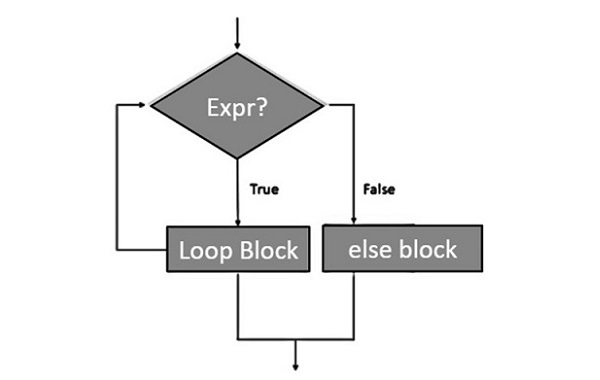
Flowchart of For Else Loop
The following flowchart illustrates use of for-else loop −
Syntax of For Else Loop
Following is the syntax of for loop with optional else block −
for variable_name in iterable:#stmts in the loop...else:#stmts in else clause..
Example of For Else Loop
The following example illustrates the combination of an else statement with a for statement in Python. Till the count is less than 5, the iteration count is printed. As it becomes 5, the print statement in else block is executed, before the control is passed to the next statement in the main program.
for count inrange(6):print("Iteration no. {}".format(count))else:print("for loop over. Now in else block")print("End of for loop")
On executing, this code will produce the following output −
Iteration no. 1
Iteration no. 2
Iteration no. 3
Iteration no. 4
Iteration no. 5
for loop over. Now in else block
End of for loop
For-Else Construct without break statement
As mentioned earlier in this tutorial, the else block executes only when the loop terminates normally i.e. without using break statement.
Example
In the following program, we use the for-else loop without break statement.
for i in['T','P']:print(i)else:# Loop else statement# there is no break statement in for loop, hence else part gets executed directlyprint("ForLoop-else statement successfully executed")
On executing, the above program will generate the following output
T
P
ForLoop-else statement successfully executed
For-Else Construct with break statement
In case of forceful termination (by using break statement) of the loop, else statement is overlooked by the interpreter and hence its execution is skipped.
Example
The following program shows how else conditions work in case of a break statement.
for i in['T','P']:print(i)breakelse:# Loop else statement# terminated after 1st iteration due to break statement in for loopprint("Loop-else statement successfully executed")
On executing, the above program will generate the following output
T
For-Else with break statement and if conditions
If we use for-else construct with break statement and if condition, the for loop will iterate over the iterators and within this loop, you can use an if block to check for a specific condition. If the loop completes without encountering a break statement, the code in the else block is executed.
Example
The following program shows how else conditions works in case of break statement and conditional statements.
# creating a function to check whether the list item is a positive# or a negative numberdefpositive_or_negative():# traversing in a listfor i in[5,6,7]:# checking whether the list element is greater than 0if i>=0:# printing positive number if it is greater than or equal to 0print("Positive number")else:# Else printing Negative number and breaking the loopprint("Negative number")break# Else statement of the for loopelse:# Statement inside the else blockprint("Loop-else Executed")# Calling the above-created function
positive_or_negative()
On executing, the above program will generate the following output
Positive number
Positive number
Positive number
Loop-else Executed
The for loop in Python provides the ability to loop over the items of any sequence, such as a list, tuple or a string. It performs the same action on each item of the sequence. This loop starts with the for keyword, followed by a variable that represents the current item in the sequence. The in keyword links the variable to the sequence you want to iterate over. A colon (:) is used at the end of the loop header, and the indented block of code beneath it is executed once for each item in the sequence.
Syntax of Python for Loop
for iterating_var in sequence:
   statement(s)
Here, the iterating_var is a variable to which the value of each sequence item will be assigned during each iteration. Statements represents the block of code that you want to execute repeatedly.
Before the loop starts, the sequence is evaluated. If it’s a list, the expression list (if any) is evaluated first. Then, the first item (at index 0) in the sequence is assigned to iterating_var variable.
During each iteration, the block of statements is executed with the current value of iterating_var. After that, the next item in the sequence is assigned to iterating_var, and the loop continues until the entire sequence is exhausted.
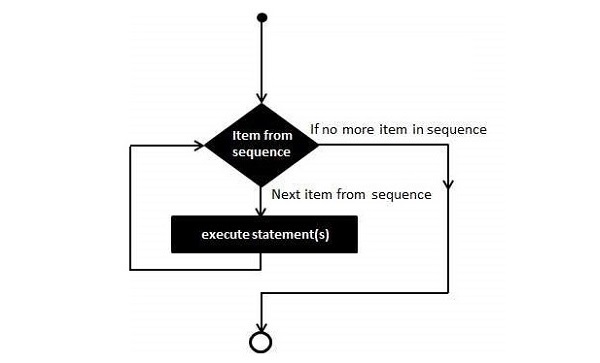
Flowchart of Python for Loop
The following flow diagram illustrates the working of for loop −
Python for Loop with Strings
A string is a sequence of Unicode letters, each having a positional index. Since, it is a sequence, you can iterate over its characters using the for loop.
Example
The following example compares each character and displays if it is not a vowel (‘a’, ‘e’, ‘i’, ‘o’, ‘u’).
zen ='''
Beautiful is better than ugly.
Explicit is better than implicit.
Simple is better than complex.
Complex is better than complicated.
'''for char in zen:if char notin'aeiou':print(char, end='')
On executing, this code will produce the following output −
Btfl s bttr thn gly.
Explct s bttr thn mplct.
Smpl s bttr thn cmplx.
Cmplx s bttr thn cmplctd.
Python for Loop with Tuples
Python’s tuple object is also an indexed sequence, and hence you can traverse its items with a for loop.
Example
In the following example, the for loop traverses a tuple containing integers and returns the total of all numbers.
numbers =(34,54,67,21,78,97,45,44,80,19)
total =0for num in numbers:
   total += num
print("Total =", total)
On running this code, it will produce the following output −
Total = 539
Python for Loop with Lists
Python’s list object is also an indexed sequence, and hence you can iterate over its items using a for loop.
Example
In the following example, the for loop traverses a list containing integers and prints only those which are divisible by 2.
numbers =[34,54,67,21,78,97,45,44,80,19]
total =0for num in numbers:if num%2==0:print(num)
When you execute this code, it will show the following result −
34
54
78
44
80
Python for Loop with Range Objects
Python’s built-in range() function returns an iterator object that streams a sequence of numbers. This object contains integers from start to stop, separated by step parameter. You can run a for loop with range as well.
Syntax
The range() function has the following syntax −
range(start, stop, step)
Where,
Start − Starting value of the range. Optional. Default is 0
Stop − The range goes upto stop-1
Step − Integers in the range increment by the step value. Option, default is 1.
Example
In this example, we will see the use of range with for loop.
for num inrange(5):print(num, end=' ')print()for num inrange(10,20):print(num, end=' ')print()for num inrange(1,10,2):print(num, end=' ')
When you run the above code, it will produce the following output −
0 1 2 3 4
10 11 12 13 14 15 16 17 18 19
1 3 5 7 9
Python for Loop with Dictionaries
Unlike a list, tuple or a string, dictionary data type in Python is not a sequence, as the items do not have a positional index. However, traversing a dictionary is still possible with the for loop.
Example
Running a simple for loop over the dictionary object traverses the keys used in it.
numbers ={10:"Ten",20:"Twenty",30:"Thirty",40:"Forty"}for x in numbers:print(x)
On executing, this code will produce the following output −
10
20
30
40
Once we are able to get the key, its associated value can be easily accessed either by using square brackets operator or with the get() method.
Example
The following example illustrates the above mentioned approach.
numbers ={10:"Ten",20:"Twenty",30:"Thirty",40:"Forty"}for x in numbers:print(x,":",numbers[x])
It will produce the following output −
10 : Ten
20 : Twenty
30 : Thirty
40 : Forty
The items(), keys() and values() methods of dict class return the view objects dict_items, dict_keys and dict_values respectively. These objects are iterators, and hence we can run a for loop over them.
Example
The dict_items object is a list of key-value tuples over which a for loop can be run as follows −
numbers ={10:"Ten",20:"Twenty",30:"Thirty",40:"Forty"}for x in numbers.items():print(x)
Python supports to have an else statement associated with a loop statement. However, the else statement is executed when the loop has exhausted iterating the list.
Example
The following example illustrates the combination of an else statement with a for statement that searches for prime numbers from 10 to 20.
#For loop to iterate between 10 to 20for num inrange(10,20):#For loop to iterate on the factors for i inrange(2,num):#If statement to determine the first factorif num%i ==0:#To calculate the second factor
         j=num/i
         print("%d equals %d * %d"%(num,i,j))#To move to the next numberbreakelse:print(num,"is a prime number")break
When the above code is executed, it produces the following result −
10 equals 2 * 5
11 is a prime number
12 equals 2 * 6
13 is a prime number
14 equals 2 * 7
15 equals 3 * 5
16 equals 2 * 8
17 is a prime number
18 equals 2 * 9
19 is a prime number
Python loops allow us to execute a statement or group of statements multiple times.
In general, statements are executed sequentially: The first statement in a function is executed first, followed by the second, and so on. There may be a situation when you need to execute a block of code several number of times.
Programming languages provide various control structures that allow for more complicated execution paths.
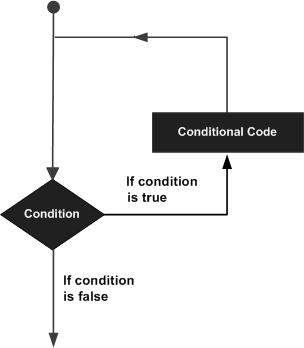
Flowchart of a Loop
The following diagram illustrates a loop statement −
Types of Loops in Python
Python programming language provides following types of loops to handle looping requirements −
Sr.No.
Loop Type & Description
1
while loopRepeats a statement or group of statements while a given condition is TRUE. It tests the condition before executing the loop body.
2
for loopExecutes a sequence of statements multiple times and abbreviates the code that manages the loop variable.
3
nested loopsYou can use one or more loop inside any another while, for or do..while loop.
Python Loop Control Statements
Loop control statements change execution from its normal sequence. When execution leaves a scope, all automatic objects that were created in that scope are destroyed.
Python supports the following control statements. Click the following links to check their detail.
Let us go through the loop control statements briefly
Sr.No.
Control Statement & Description
1
break statementTerminates the loop statement and transfers execution to the statement immediately following the loop.
2
continue statementCauses the loop to skip the remainder of its body and immediately retest its condition prior to reiterating.
3
pass statementThe pass statement in Python is used when a statement is required syntactically but you do not want any command or code to execute.
A Python match-case statement takes an expression and compares its value to successive patterns given as one or more case blocks. Only the first pattern that matches gets executed. It is also possible to extract components (sequence elements or object attributes) from the value into variables.
With the release of Python 3.10, a pattern matching technique called match-case has been introduced, which is similar to the switch-case construct available in C/C++/Java etc. Its basic use is to compare a variable against one or more values. It is more similar to pattern matching in languages like Rust or Haskell than a switch statement in C or C++.
Syntax
The following is the syntax of match-case statement in Python –
match variable_name:
   case 'pattern 1': statement 1
   case 'pattern 2': statement 2...
   case 'pattern n': statement n
Example
The following code has a function named weekday(). It receives an integer argument, matches it with all possible weekday number values, and returns the corresponding name of day.
defweekday(n):
   match n:
      case 0:return"Monday"
      case 1:return"Tuesday"
      case 2:return"Wednesday"
      case 3:return"Thursday"
      case 4:return"Friday"
      case 5:return"Saturday"
      case 6:return"Sunday"
      case _:return"Invalid day number"print(weekday(3))print(weekday(6))print(weekday(7))
On executing, this code will produce the following output −
Thursday
Sunday
Invalid day number
The last case statement in the function has “_” as the value to compare. It serves as the wildcard case, and will be executed if all other cases are not true.
Combined Cases in Match Statement
Sometimes, there may be a situation where for more than one cases, a similar action has to be taken. For this, you can combine cases with the OR operator represented by “|” symbol.
Example
The code below shows how to combine cases in match statement. It defines a function named access() and has one string argument, representing the name of the user. For admin or manager user, the system grants full access; for Guest, the access is limited; and for the rest, there’s no access.
defaccess(user):
   match user:
      case "admin"|"manager":return"Full access"
      case "Guest":return"Limited access"
      case _:return"No access"print(access("manager"))print(access("Guest"))print(access("Ravi"))
On running the above code, it will show the following result −
Full access
Limited access
No access
List as the Argument in Match Case Statement
Since Python can match the expression against any literal, you can use a list as a case value. Moreover, for variable number of items in the list, they can be parsed to a sequence with “*” operator.
Example
In this code, we use list as argument in match case statement.
defgreeting(details):
   match details:
      case [time, name]:returnf'Good {time} {name}!'
      case [time,*names]:
         msg=''for name in names:
            msg+=f'Good {time} {name}!\n'return msg

print(greeting(["Morning","Ravi"]))print(greeting(["Afternoon","Guest"]))print(greeting(["Evening","Kajal","Praveen","Lata"]))
On executing, this code will produce the following output −
Good Morning Ravi!
Good Afternoon Guest!
Good Evening Kajal!
Good Evening Praveen!
Good Evening Lata!
Using “if” in “Case” Clause
Normally Python matches an expression against literal cases. However, it allows you to include if statement in the case clause for conditional computation of match variable.
Example
In the following example, the function argument is a list of amount and duration, and the intereset is to be calculated for amount less than or more than 10000. The condition is included in the case clause.
defintr(details):
   match details:
      case [amt, duration]if amt<10000:return amt*10*duration/100
      case [amt, duration]if amt>=10000:return amt*15*duration/100print("Interest = ", intr([5000,5]))print("Interest = ", intr([15000,3]))
On executing, this code will produce the following output −
Generally, Input makes the program interactive, allowing the users to provide the data to the program that can use to make decisions. However, in many situations, we donât want raw input but we want to react differently depending on what the user enters. This is where the conditional user inputs comes in.
Conditional user inputs indicates that after collecting input from the user, the program decides what to do next based on certain conditions. Python provides the simple structures such as if, elif and else to handle these decisions. For example,
Checking the eligibility to vote, if the user enters the age.
Displaying the grades of the students, if the student enters the marks.
Different Conditional User Inputs in Python
Let’s dive into the tutorial to learn more about the different conditional user inputs in the python.
Using if and else Conditions
It is basic form of the conditional input. After receiving the input from the user, it uses the if statement to check a condition and retrieves the different responses based on whether the condition is true or false.
Example
In the following example, we are going to check whether the entered number is positive or not using the if-else condition.
x =int(input("Enter a number: "))if x >0:print("It Is A Positive Number")else:print("It Is Not A Positive Number")
Following is the output of the above program –
Enter a number: 8
It Is A Positive Number
Using if-elif-else Conditions
It is used when there are multiple possibilities. It evaluates the conditions one by one until it finds one that is true. If none match, the else block is executed.
Example
Consider the following example, where we are going to check whether the number is positive, negative or zero.
x =int(input("Enter a number: "))if x >0:print("Entered Number Is Positive")elif x <0:print("Entered Number Is Negative")else:print("Entered Number Is Zero")
The output of the above program is –
Enter a number:0
Entered Number Is Zero
Using Nested if Conditions
The nested if indicates that the one if statement inside the another. It is used when one decision depends on another.
Example
In the following example, we are going to check if the person is eligible to vote. Here, we will check the age first, if the age is valid, then we will check the citizenship.
x =int(input("Enter your age: "))
y =input("Are you a citizen (yes/no)? ")if x >=18:if y.lower()=="yes":print("Eligible to vote.")else:print("Must be a Citizen to vote.")else:print("Must be at least 18 years old to vote.")
Following is the output of the above program –
Enter your age: 24
Are you a citizen (yes/no)? yes
Eligible to vote.