Recursion is a fundamental programming concept where a function calls itself in order to solve a problem. This technique breaks down a complex problem into smaller and more manageable sub-problems of the same type. In Python, recursion is implemented by defining a function that makes one or more calls to itself within its own body.
Components of Recursion
As we discussed before Recursion is a technique where a function calls itself. Here for understanding recursion, it’s required to know its key components. Following are the primary components of the recursion −
Base Case
Recursive Case
Base Case
The Base case is a fundamental concept in recursion, if serving as the condition under which a recursive function stops calling itself. It is essential for preventing infinite recursion and subsequent stack overflow errors.
The base case provides a direct solution to the simplest instance of the problem ensuring that each recursive call gets closer to this terminating condition.
The most popular example of recursion is calculation of factorial. Mathematically factorial is defined as −
n! = n × (n-1)!
It can be seen that we use factorial itself to define factorial. Hence this is a fit case to write a recursive function. Let us expand above definition for calculation of factorial value of 5.
While we can perform this calculation using a loop, its recursive function involves successively calling it by decrementing the number till it reaches 1.
Example
The following example shows hows you can use a recursive function to calculate factorial −
deffactorial(n):if n ==1:print(n)return1#base caseelse:print(n,'*', end=' ')return n * factorial(n-1)#Recursive caseprint('factorial of 5=', factorial(5))
The above programs generates the following output −
5 * 4 * 3 * 2 * 1
factorial of 5= 120
Recursive Case
The recursive case is the part of a recursive function where the function calls itself to solve a smaller or simpler instance of the same problem. This mechanism allows a complex problem to be broken down into more manageable sub-problems where each them is a smaller version of the original problem.
The recursive case is essential for progressing towards the base case, ensuring that the recursion will eventually terminate.
Example
Following is the example of the Recursive case. In this example we are generating the Fibonacci sequence in which the recursive case sums the results of the two preceding Fibonacci numbers −
deffibonacci(n):if n <=0:return0# Base case for n = 0elif n ==1:return1# Base case for n = 1else:return fibonacci(n -1)+ fibonacci(n -2)# Recursive case

fib_series =[fibonacci(i)for i inrange(6)]print(fib_series)
The above programs generates the following output −
[0, 1, 1, 2, 3, 5]
Binary Search using Recursion
Binary search is a powerful algorithm for quickly finding elements in sorted lists, with logarithmic time complexity making it highly efficient.
Let us have a look at another example to understand how recursion works. The problem at hand is to check whether a given number is present in a list.
While we can perform a sequential search for a certain number in the list using a for loop and comparing each number, the sequential search is not efficient especially if the list is too large. The binary search algorithm that checks if the index ‘high’ is greater than index ‘low. Based on value present at ‘mid’ variable, the function is called again to search for the element.
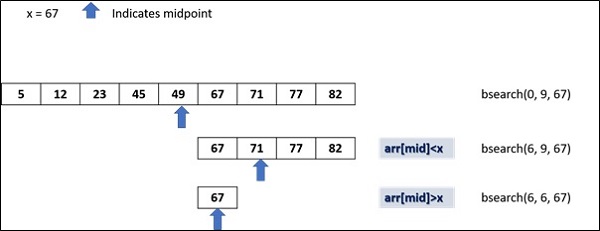
We have a list of numbers, arranged in ascending order. The we find the midpoint of the list and restrict the checking to either left or right of midpoint depending on whether the desired number is less than or greater than the number at midpoint.
The following diagram shows how binary search works −
Example
The following code implements the recursive binary searching technique −
defbsearch(my_list, low, high, elem):if high >= low:
      mid =(high + low)//2if my_list[mid]== elem:return mid
      elif my_list[mid]> elem:return bsearch(my_list, low, mid -1, elem)else:return bsearch(my_list, mid +1, high, elem)else:return-1

my_list =[5,12,23,45,49,67,71,77,82]
num =67print("The list is")print(my_list)print("Check for number:", num)
my_result = bsearch(my_list,0,len(my_list)-1,num)if my_result !=-1:print("Element found at index ",str(my_result))else:print("Element not found!")
Output
The list is
[5, 12, 23, 45, 49, 67, 71, 77, 82]
Check for number: 67
Element found at index 5
A Decorator in Python is a function that receives another function as argument. The argument function is the one to be decorated by decorator. The behaviour of argument function is extended by the decorator without actually modifying it.
In this chapter, we whall learn how to use Python decorator.
Defining Function Decorator
Function in Python is a first order object. It means that it can be passed as argument to another function just as other data types such as number, string or list etc. It is also possible to define a function inside another function. Such a function is called nested function. Moreover, a function can return other function as well.
The typical definition of a decorator function is as under −
defdecorator(arg_function):#arg_function to be decorateddefnested_function():#this wraps the arg_function and extends its behaviour#call arg_function
      arg_function()return nested_function
Here a normal Python function −
deffunction():print("hello")
You can now decorate this function to extend its behaviour by passing it to decorator −
function=decorator(function)
If this function is now executed, it will show output extended by decorator.
Examples of Python Decorators
Practice the following examples to understand the concept of Python decorators −
Example 1
Following code is a simple example of decorator −
defmy_function(x):print("The number is=",x)defmy_decorator(some_function,num):defwrapper(num):print("Inside wrapper to check odd/even")if num%2==0:
         ret="Even"else:
         ret="Odd!"
      some_function(num)return ret
   print("wrapper function is called")return wrapper

no=10
my_function = my_decorator(my_function, no)print("It is ",my_function(no))
The my_function() just prints out the received number. However, its behaviour is modified by passing it to a my_decorator. The inner function receives the number and returns whether it is odd/even. Output of above code is −
wrapper function is called
Inside wrapper to check odd/even
The number is= 10
It is Even
Example 2
An elegant way to decorate a function is to mention just before its definition, the name of decorator prepended by @ symbol. The above example is re-written using this notation −
defmy_decorator(some_function):defwrapper(num):print("Inside wrapper to check odd/even")if num%2==0:
         ret="Even"else:
         ret="Odd!"
      some_function(num)return ret
   print("wrapper function is called")return wrapper

@my_decoratordefmy_function(x):print("The number is=",x)
no=10print("It is ",my_function(no))
Python’s standard library defines following built-in decorators −
@classmethod Decorator
The classmethod is a built-in function. It transforms a method into a class method. A class method is different from an instance method. Instance method defined in a class is called by its object. The method received an implicit object referred to by self. A class method on the other hand implicitly receives the class itself as first argument.
Syntax
In order to declare a class method, the following notation of decorator is used −
classMyclass:@classmethoddefmymethod(cls):#....
The @classmethod form is that of function decorator as described earlier. The mymethod receives reference to the class. It can be called by the class as well as its object. That means Myclass.mymethod as well as Myclass().mymethod both are valid calls.
Example of @classmethod Decorator
Let us understand the behaviour of class method with the help of following example −
classcounter:
   count=0def__init__(self):print("init called by ", self)
      counter.count=counter.count+1print("count=",counter.count)@classmethoddefshowcount(cls):print("called by ",cls)print("count=",cls.count)

c1=counter()
c2=counter()print("class method called by object")
c1.showcount()print("class method called by class")
counter.showcount()
In the class definition count is a class attribute. The __init__() method is the constructor and is obviously an instance method as it received self as object reference. Every object declared calls this method and increments count by 1.
The @classmethod decorator transforms showcount() method into a class method which receives reference to the class as argument even if it is called by its object. It can be seen even when c1 object calls showcount, it displays reference of counter class.
It will display the following output −
init called by <__main__.counter object at 0x000001D32DB4F0F0>
count= 1
init called by <__main__.counter object at 0x000001D32DAC8710>
count= 2
class method called by object
called by <class '__main__.counter'>
count= 2
class method called by class
called by <class '__main__.counter'>
@staticmethod Decorator
The staticmethod is also a built-in function in Python standard library. It transforms a method into a static method. Static method doesn’t receive any reference argument whether it is called by instance of class or class itself. Following notation used to declare a static method in a class −
Syntax
classMyclass:@staticmethoddefmymethod():#....
Even though Myclass.mymethod as well as Myclass().mymethod both are valid calls, the static method receives reference of neither.
Example of @staticmethod Decorator
The counter class is modified as under −
classcounter:
   count=0def__init__(self):print("init called by ", self)
      counter.count=counter.count+1print("count=",counter.count)@staticmethoddefshowcount():print("count=",counter.count)

c1=counter()
c2=counter()print("class method called by object")
c1.showcount()print("class method called by class")
counter.showcount()
As before, the class attribute count is increment on declaration of each object inside the __init__() method. However, since mymethod(), being a static method doesn’t receive either self or cls parameter. Hence value of class attribute count is displayed with explicit reference to counter.
The output of the above code is as below −
init called by <__main__.counter object at 0x000002512EDCF0B8>
count= 1
init called by <__main__.counter object at 0x000002512ED48668>
count= 2
class method called by object
count= 2
class method called by class
count= 2
@property Decorator
Python’s property() built-in function is an interface for accessing instance variables of a class. The @property decorator turns an instance method into a “getter” for a read-only attribute with the same name, and it sets the docstring for the property to “Get the current value of the instance variable.”
You can use the following three decorators to define a property −
@property − Declares the method as a property.
@<property-name>.setter: − Specifies the setter method for a property that sets the value to a property.
@<property-name>.deleter − Specifies the delete method as a property that deletes a property.
A property object returned by property() function has getter, setter, and delete methods.
The fget argument is the getter method, fset is setter method. It optionally can have fdel as method to delete the object and doc is the documentation string.
Syntax
The property() object’s setter and getter may also be assigned with the following syntax also.
A Python closure is a nested function which has access to a variable from an enclosing function that has finished its execution. Such a variable is not bound in the local scope. To use immutable variables (number or string), we have to use the non-local keyword.
The main advantage of Python closures is that we can help avoid the using global values and provide some form of data hiding. They are used in Python decorators.
Closures are closely related to nested functions and allow inner functions to capture and retain the enclosing function’s local state, even after the outer function has finished execution. Understanding closures requires familiarity with nested functions, variable scope and how Python handles function objects.
Nested Functions: In Python functions can be defined inside other functions. These are called nested functions or inner functions.
Accessing Enclosing Scope: Inner functions can access variables from the enclosing i.e. outer scope. This is where closures come into play.
Retention of State: When an inner function i.e. closure captures and retains variables from its enclosing scope, even if the outer function has completed execution or the scope is no longer available.
Nested Functions
Nested functions in Python refer to the practice of defining one function inside another function. This concept allows us to organize code more effectively, encapsulate functionality and manage variable scope.
Following is the example of nested functions where functionB is defined inside functionA. Inner function is then called from inside the outer function’s scope.
When a closure is created i.e. an inner function that captures variables from its enclosing scope, it retains access to those variables even after the outer function has finished executing. This behavior allows closures to “remember” and manipulate the values of variables from the enclosing scope.
Example
Following is the example of the closure with the variable scope −
defouter_function(x):
    y =10definner_function(z):return x + y + z  # x and y are captured from the enclosing scopereturn inner_function

closure = outer_function(5)
result = closure(3)print(result)
Output
18
Creating a closure
Creating a closure in Python involves defining a nested function within an outer function and returning the inner function. Closures are useful for capturing and retaining the state of variables from the enclosing scope.
Example
In the below example, we have a functionA function which creates and returns another function functionB. The nested functionB function is the closure.
The outer functionA function returns a functionB function and assigns it to the myfunction variable. Even if it has finished its execution. However, the printer closure still has access to the name variable.
Following is the example of creating the closure in python −
deffunctionA(name):
   name ="New name"deffunctionB():print(name)return functionB

myfunction = functionA("My name")
myfunction()
Output
New name
nonlocal Keyword
In Python, nonlocal keyword allows a variable outside the local scope to be accessed. This is used in a closure to modify an immutable variable present in the scope of outer variable. Here is the example of the closure with the nonlocal keyword.
In Programming, functions are essential, they allows us to group the logic into the reusable blocks, making the code cleaner and easier to maintain. Generally, when we define a function we give it a name, parameters and a body.
For instance, if we need a small function that will be used only once such as sorting a list, filtering data or performing a calculation. In this cases, writing the full function feels like unnecessary, this is where we use the Lambda Expressions. Let’s dive into the tutorial to understand more about the lambda expressions.
Lambda Expressions
A Lambda Expressions is a used to define a small, nameless (anonymous) function in a single line. We use lambda to create a function instantly and pass it wherever a function is need, Instead of writing the complete function with the def keyword (Python) or similar keyword in other languages. For example, instead of writing:
def add(a, b):
    return a + b
We can use the lambda expression as:
add = lambda a, b: a + b
Both perform the same operation adding two numbers, but the lambda version is shorter and can be created at the point of use, without defining it separately.
Syntax
Following is the syntax for lambda expressions:
lambda parameters: expression
Following are the parameters –
lambda − It indicates the keyword.
parameters − They are the inputs, just like function arguments.
expression − It indicates the expression to gets evaluated and returned.
Use of Lambda Expressions
The lambda expressions are not meant to replace all the regular functions. They are useful in specific situations:
Inline Usage − They can be used directly where the function is needed, avoiding the need to create a separate function.
Conciseness − They allows us to define the simple function in one line without writing a full def block.
Functional Programming − They integrate smoothly with higher-order functions like map(), filter() and reduce().
Examples of Using Lambda Expressions
Let’s explore some of the practical examples to understand more about the Lambda expressions.
Example 1
Consider the following example, where we are going to use the lamba with the map() function.
array =[1,2,3]
result =list(map(lambda x: x **2, array))print(result)
The output of the above program is –
[1, 4, 9]
Example 2
In the following example, we are going to use the lambda with the filter() function.
array =[5,10,15,20]
result =list(filter(lambda x: x %2==0, array))print(result)
Following is the output of the above program –
[10, 20]
Example 3
Let’s look at the following example, where we are going to use the lambda with the sorted() function.
array =['Ravi','Ram','Ravan','Richel']
result =sorted(array, key=lambda x:len(x))print(result)
Python is the versatile language with many ways to handle the data efficiently. Among them one of the feature is the generator expressions, Which create the iterators easily in a memory-efficient way. In this tutorial we are going to explore about the generator expressions.
Generator Expression
The Generator Expression is a simple way to create a generator, an iterator that process items one by one instead of creating an entire collection in memory at once.
Syntax
Following is the syntax for generator expression:
(expression for item in iterable if condition)
Following are the parameters –
expression − It is the value to process for each item.
item − It indicates the loop variable.
iterable − It indicates the sequence or iterator we loop over.
if condition (optional) − It filters the items based on the condition.
Generator expressions looks like a list comprehension, but it uses the parentheses () instead of the square brackets [] For example,
A List Comprehension
a =[x * x for x inrange(5)]print(a)
The output of the above program is –
[0, 1, 4, 9, 16]
A Generator Expression
a =(x * x for x inrange(5))print(a)
Following is the output of the above program –
<generator object <genexpr> at 0x7f007ac5d080>
When we try to print the generator, we can’t see the data directly. Instead we can observe the generator object, because the values arenât all produced at once. we need to iterate over it to retrieve them:
a =(x * x for x inrange(5))for value in a:print(value)
The output of the above program is –
0
1
4
9
16
Use of Generator Expressions
The main reason of using the generator expressions is efficiency in terms of both memory and speed.
Memory Efficiency − It doesnât build the whole result list in the memory. Instead, it produces values on demand. It is useful when working with the large datasets or infinite sequences.
Lazy Evaluation − The generator only produce the value when we ask for it. If we donât use all the values, no extra computation is wasted.
Cleaner Code − It makes the code compact and readable, especially for simple data transformations.
Examples of Using Generator Expressions
Let’s explore some of the practical examples to understand more about the generator expressions.
Example 1
Consider the following example, where we are going to count the even number in a range based on the condition.
a =sum(1for x inrange(100)if x %2==0)print(a)
The output of the above program is –
50
Example 2
In the following example, we are going to combine the data from two lists without storing all combinations.
a =['Ravi','Ramu','Remo']
b =['BMW','Cruze']
c =(f"{name}-{color}"for name in a for color in b)for pair in c:print(pair)
Generators in Python are a convenient way to create iterators. They allow us to iterate through a sequence of values which means, values are generated on the fly and not stored in memory, which is especially useful for large datasets or infinite sequences.
The generator in Python is a special type of function that returns an iterator object. It appears similar to a normal Python function in that its definition also starts with def keyword. However, instead of return statement at the end, generator uses the yield keyword.
Syntax
The following is the syntax of the generator() function −
defgenerator():......yield obj
it = generator()next(it)...
Creating Generators
There are two primary ways to create generators in python −
Using Generator Functions
Using Generator Expressions
Using Generator Functions
The generator function uses ‘yield’ statement for returning the values all at a time. Each time the generators __next__() method is called the generator resumes where it left off i.e. from right after the last yield statement. Here’s the example of creating the generator function.
defcount_up_to(max_value):
    current =1while current <= max_value:yield current
        current +=1# Using the generator
counter = count_up_to(5)for number in counter:print(number)
Output
1
2
3
4
5
Using Generator Expressions
Generator expressions provide a compact way to create generators. They use a syntax similar to list comprehensions but used parentheses i.e. “{}” instead of square brackets i.e. “[]”
gen_expr =(x * x for x inrange(1,6))for value in gen_expr:print(value)
Output
1
4
9
16
25
Exception Handling in Generators
We can create a generator and iterate it using a ‘while’ loop with exception handling for ‘StopIteration’ exception. The function in the below code is a generator that successively yield integers from 1 to 5.
When this function is called, it returns an iterator. Every call to next() method transfers the control back to the generator and fetches next integer.
defgenerator(num):for x inrange(1, num+1):yield x
   return

it = generator(5)whileTrue:try:print(next(it))except StopIteration:break
Output
1
2
3
4
5
Normal function vs Generator function
Normal functions and generator functions in Python serve different purposes and exhibit distinct behaviors. Understanding their differences is essential for leveraging them effectively in our code.
A normal function computes and returns a single value or a set of values whether in a list or tuple, when called. Once it returns, the function’s execution is complete and all local variables are discarded where as a generator function yields values one at a time by suspending and resuming its state between each yield. It uses the yield statement instead of return.
Example
In this example we are creating a normal function and build a list of Fibonacci numbers and then iterate the list using a loop −
deffibonacci(n):
   fibo =[]
   a, b =0,1whileTrue:
      c=a+b
      if c>=n:break
      fibo.append(c)
      a, b = b, c
   return fibo
f = fibonacci(10)for i in f:print(i)
Output
1
2
3
5
8
Example
In the above example we created a fibonacci series using the normal function and When we want to collect all Fibonacci series numbers in a list and then the list is traversed using a loop. Imagine that we want Fibonacci series going upto a large number.
In such cases, all the numbers must be collected in a list requiring huge memory. This is where generator is useful as it generates a single number in the list and gives it for consumption. Following code is the generator-based solution for list of Fibonacci numbers −
deffibonacci(n):
   a, b =0,1whileTrue:
      c=a+b
      if c>=n:breakyield c
      a, b = b, c
   return

f = fibonacci(10)whileTrue:try:print(next(f))except StopIteration:break
Output
1
2
3
5
8
Asynchronous Generator
An asynchronous generator is a co-routine that returns an asynchronous iterator. A co-routine is a Python function defined with async keyword, and it can schedule and await other co-routines and tasks.
Just like a normal generator, the asynchronous generator yields incremental item in the iterator for every call to anext() function, instead of next() function.
Syntax
The following is the syntax of the Asynchronous Generator −
asyncdefgenerator():......yield obj
it = generator()
anext(it)...
Example
Following code demonstrates a coroutine generator that yields incrementing integers on every iteration of an async for loop.
import asyncio

asyncdefasync_generator(x):for i inrange(1, x+1):await asyncio.sleep(1)yield i

asyncdefmain():asyncfor item in async_generator(5):print(item)

asyncio.run(main())
Output
1
2
3
4
5
Example
Let us now write an asynchronous generator for Fibonacci numbers. To simulate some asynchronous task inside the co-routine, the program calls sleep() method for a duration of 1 second before yielding the next number. As a result, we will get the numbers printed on the screen after a delay of one second.
import asyncio

asyncdeffibonacci(n):
   a, b =0,1whileTrue:
      c=a+b
      if c>=n:breakawait asyncio.sleep(1)yield c
      a, b = b, c
   returnasyncdefmain():
   f = fibonacci(10)asyncfor num in f:print(num)

asyncio.run(main())
An iterator in Python is an object that enables traversal through a collection such as a list or a tuple, one element at a time. It follows the iterator protocol by using the implementation of two methods __iter__() and __next__().
The __iter__() method returns the iterator object itself and the __next__() method returns the next element in the sequence by raising a StopIteration exception when no more elements are available.
Iterators provide a memory-efficient way to iterate over data, especially useful for large datasets. They can be created from iterable objects using the iter() function or implemented using custom classes and generators.
Iterables vs Iterators
Before going deep into the iterator working, we should know the difference between the Iterables and Iterators.
Iterable: An object capable of returning its members one at a time (e.g., lists, tuples).
Iterator: An object representing a stream of data, returned one element at a time.
We normally use for loop to iterate through an iterable as follows −
for element in sequence:print(element)
Python’s built-in method iter() implements __iter__() method. It receives an iterable and returns iterator object.
Example of Python Iterator
Following code obtains iterator object from sequence types such as list, string and tuple. The iter() function also returns keyiterator from dictionary.
<str_iterator object at 0x7fd0416b42e0>
<list_iterator object at 0x7fd0416b42e0>
<tuple_iterator object at 0x7fd0416b42e0>
<dict_keyiterator object at 0x7fd041707560>
However, int id not iterable, hence it produces TypeError.
iterator =iter(100)print(iterator)
It will produce the following output −
Traceback (most recent call last):
File "C:\Users\user\example.py", line 5, in <module>
print (iter(100))
^^^^^^^^^
TypeError: 'int' object is not iterable
Error Handling in Iterators
Iterator object has a method named __next__(). Every time it is called, it returns next element in iterator stream. Call to next() function is equivalent to calling __next__() method of iterator object.
This method which raises a StopIteration exception when there are no more items to return.
Example
In the following is an example the iterator object we have created have only 3 elements and we are iterating through it more than thrice −
it =iter([1,2,3])print(next(it))print(it.__next__())print(it.__next__())print(next(it))
It will produce the following output −
1
2
3
Traceback (most recent call last):
File "C:\Users\user\example.py", line 5, in <module>
print (next(it))
^^^^^^^^
StopIteration
This exception can be caught in the code that consumes the iterator using try and except blocks, though it’s more common to handle it implicitly by using constructs like for loops which manage the StopIteration exception internally.
it =iter([1,2,3,4,5])print(next(it))whileTrue:try:
no =next(it)print(no)except StopIteration:break
It will produce the following output −
1
2
3
4
5
Custom Iterator
A custom iterator in Python is a user-defined class that implements the iterator protocol which consists of two methods __iter__() and __next__(). This allows the class to behave like an iterator, enabling traversal through its elements one at a time.
To define a custom iterator class in Python, the class must define these methods.
Example
In the following example, the Oddnumbers is a class implementing __iter__() and __next__() methods. On every call to __next__(), the number increments by 2 thereby streaming odd numbers in the range 1 to 10.
Let’s create another iterator that generates the first n Fibonacci numbers with the following code −
classFibonacci:def__init__(self, max_count):
self.max_count = max_count
self.count =0
self.a, self.b =0,1def__iter__(self):return self
def__next__(self):if self.count >= self.max_count:raise StopIteration
fib_value = self.a
self.a, self.b = self.b, self.a + self.b
self.count +=1return fib_value
# Using the Fibonacci iterator
fib_iterator = Fibonacci(10)for number in fib_iterator:print(number)
It will produce the following output −
0
1
1
2
3
5
8
13
21
34
Asynchronous Iterator
Asynchronous iterators in Python allow us to iterate over asynchronous sequences, enabling the handling of async operations within a loop.
They follow the asynchronous iterator protocol which consists of the methods __aiter__() and __anext__() (added in Python 3.10 version onwards.). These methods are used in conjunction with the async for loop to iterate over asynchronous data sources.
The aiter() function returns an asynchronous iterator object. It is an asynchronous counter part of the classical iterator. Any asynchronous iterator must support ___aiter()__ and __anext__() methods. These methods are internally called by the two built-in functions.
Asynchronous functions are called co-routines and are executed with asyncio.run() method. The main() co-routine contains a while loop that successively obtains odd numbers and raises StopAsyncIteration if the number exceeds 9.
Like the classical iterator the asynchronous iterator gives a stream of objects. When the stream is exhausted, the StopAsyncIteration exception is raised.
Example
In the example give below, an asynchronous iterator class Oddnumbers is declared. It implements __aiter__() and __anext__() method. On each iteration, a next odd number is returned and the program waits for one second, so that it can perform any other process asynchronously.
The math module is a built-in module in Python that is used for performing mathematical operations. This module provides various built-in methods for performing different mathematical tasks.
Note: The math module’s methods do not work with complex numbers. For that, you can use the cmath module.
Importing math Module
Before using the methods of the math module, you need to import the math module into your code. The following is the syntax:
import math
Methods of Python math Module
The following is the list of math module methods that we have categorized based on their functionality and usage.
Math Module – Theoretic and Representation Methods
Python includes following theoretic and representation Functions in the math module −
Sr.No.
Function & Description
1
math.ceil(x)The ceiling of x: the smallest integer not less than x
2
math.comb(n,k)This function is used to find the returns the number of ways to choose “x” items from “y” items without repetition and without order.
3
math.copysign(x, y)This function returns a float with the magnitude (absolute value) of x but the sign of y.
4
math.cmp(x, y)This function is used to compare the values of to objects. This function is deprecated in Python3.
5
math.fabs(x)This function is used to calculate the absolute value of a given integer.
6
math.factorial(n)This function is used to find the factorial of a given integer.
7
math.floor(x)This function calculates the floor value of a given integer.
8
math.fmod(x, y)The fmod() function in math module returns same result as the “%” operator. However fmod() gives more accurate result of modulo division than modulo operator.
9
math.frexp(x)This function is used to calculate the mantissa and exponent of a given number.
10
math.fsum(iterable)This function returns the floating point sum of all numeric items in an iterable i.e. list, tuple, array.
11
math.gcd(*integers)This function is used to calculate the greatest common divisor of all the given integers.
12
math.isclose()This function is used to determine whether two given numeric values are close to each other.
13
math.isfinite(x)This function is used to determine whether the given number is a finite number.
14
math.isinf(x)This function is used to determine whether the given value is infinity (+ve or, -ve).
15
math.isnan(x)This function is used to determine whether the given number is “NaN”.
16
math.isqrt(n)This function calculates the integer square-root of the given non negative integer.
17
math.lcm(*integers)This function is used to calculate the least common factor of the given integer arguments.
18
math.ldexp(x, i)This function returns product of first number with exponent of second number. So, ldexp(x,y) returns x*2**y. This is inverse of frexp() function.
19
math.modf(x)This returns the fractional and integer parts of x in a two-item tuple.
math.perm(n, k)This function is used to calculate the permutation. It returns the number of ways to choose x items from y items without repetition and with order.
22
math.prod(iterable, *, start)This function is used to calculate the product of all numeric items in the iterable (list, tuple) given as argument.
23
math.remainder(x,y)This function returns the remainder of x with respect to y. This is the difference x − n*y, where n is the integer closest to the quotient x / y.
24
math.trunc(x)This function returns integral part of the number, removing the fractional part. trunc() is equivalent to floor() for positive x, and equivalent to ceil() for negative x.
25
math.ulp(x)This function returns the value of the least significant bit of the float x. trunc() is equivalent to floor() for positive x, and equivalent to ceil() for negative x.
Math Module – Power and Logarithmic Methods
Sr.No.
Function & Description
1
math.cbrt(x)This function is used to calculate the cube root of a number.
2
math.exp(x)This function calculate the exponential of x: ex
3
math.exp2(x)This function returns 2 raised to power x. It is equivalent to 2**x.
4
math.expm1(x)This function returns e raised to the power x, minus 1. Here e is the base of natural logarithms.
5
math.log(x)This function calculates the natural logarithm of x, for x> 0.
6
math.log1p(x)This function returns the natural logarithm of 1+x (base e). The result is calculated in a way which is accurate for x near zero.
7
math.log2(x)This function returns the base-2 logarithm of x. This is usually more accurate than log(x, 2).
math.cos(x)This function returns the cosine of x radians.
6
math.sin(x)This function returns the sine of x radians.
7
math.tan(x)This function returns the tangent of x radians.
8
math.hypot(x, y)This function returns the Euclidean norm, sqrt(x*x + y*y).
Math Module – Angular conversion Methods
Following are the angular conversion function provided by Python math module −
Sr.No.
Function & Description
1
math.degrees(x)This function converts the given angle from radians to degrees.
2
math.radians(x)This function converts the given angle from degrees to radians.
Math Module – Mathematical Constants
The Python math module defines the following mathematical constants −
Sr.No.
Constants & Description
1
math.piThis represents the mathematical constant pi, which equals to “3.141592…” to available precision.
2
math.eThis represents the mathematical constant e, which is equal to “2.718281…” to available precision.
3
math.tauThis represents the mathematical constant Tau (denoted by ). It is equivalent to the ratio of circumference to radius, and is equal to 2.
4
math.infThis represents positive infinity. For negative infinity use “−math.inf”.
5
math.nanThis constant is a floating-point “not a number” (NaN) value. Its value is equivalent to the output of float(‘nan’).
Math Module – Hyperbolic Methods
Hyperbolic functions are analogs of trigonometric functions that are based on hyperbolas instead of circles. Following are the hyperbolic functions of the Python math module −
Sr.No.
Function & Description
1
math.acosh(x)This function is used to calculate the inverse hyperbolic cosine of the given value.
2
math.asinh(x)This function is used to calculate the inverse hyperbolic sine of a given number.
3
math.atanh(x)This function is used to calculate the inverse hyperbolic tangent of a number.
4
math.cosh(x)This function is used to calculate the hyperbolic cosine of the given value.
5
math.sinh(x)This function is used to calculate the hyperbolic sine of a given number.
6
math.tanh(x)This function is used to calculate the hyperbolic tangent of a number.
Math Module – Special Methods
Following are the special functions provided by the Python math module −
Sr.No.
Function & Description
1
math.erf(x)This function returns the value of the Gauss error function for the given parameter.
2
math.erfc(x)This function is the complementary for the error function. Value of erf(x) is equivalent to 1-erf(x).
3
math.gamma(x)This is used to calculate the factorial of the complex numbers. It is defined for all the complex numbers except the non-positive integers.
4
math.lgamma(x)This function is used to calculate the natural logarithm of the absolute value of the Gamma function at x.
Example Usage
The following example demonstrates the use of math module and its methods:
# Importing math Moduleimport math
# Using methods of math moduleprint(math.sqrt(9))print(math.pow(3,3))print(math.exp(1))print(math.log(100,10))print(math.factorial(4))print(math.gcd(12,3))
A Python program can handle date and time in several ways. Converting between date formats is a common chore for computers. Following modules in Python’s standard library handle date and time related processing −
DateTime module
Time module
Calendar module
What are Tick Intervals
Time intervals are floating-point numbers in units of seconds. Particular instants in time are expressed in seconds since 12:00am, January 1, 1970(epoch).
There is a popular time module available in Python, which provides functions for working with times, and for converting between representations. The function time.time() returns the current system time in ticks since 12:00am, January 1, 1970(epoch).
Example
import time # This is required to include time module.
ticks = time.time()print("Number of ticks since 12:00am, January 1, 1970:", ticks)
This would produce a result something as follows −
Number of ticks since 12:00am, January 1, 1970: 1681928297.5316436
Date arithmetic is easy to do with ticks. However, dates before the epoch cannot be represented in this form. Dates in the far future also cannot be represented this way – the cutoff point is sometime in 2038 for UNIX and Windows.
What is TimeTuple?
Many of the Python’s time functions handle time as a tuple of 9 numbers, as shown below −
The above tuple is equivalent to struct_time structure. This structure has the following attributes −
Index
Attributes
Values
0
tm_year
2016
1
tm_mon
1 to 12
2
tm_mday
1 to 31
3
tm_hour
0 to 23
4
tm_min
0 to 59
5
tm_sec
0 to 61 (60 or 61 are leap-seconds)
6
tm_wday
0 to 6 (0 is Monday)
7
tm_yday
1 to 366 (Julian day)
8
tm_isdst
-1, 0, 1, -1 means library determines DST
Getting the Current Time
To translate a time instant from seconds since the epoch floating-point value into a time-tuple, pass the floating-point value to a function (e.g., localtime) that returns a time-tuple with all valid nine items.
import time
localtime = time.localtime(time.time())print("Local current time :", localtime)
This would produce the following result, which could be formatted in any other presentable form −
Local current time : time.struct_time(tm_year=2023, tm_mon=4, tm_mday=19, tm_hour=23, tm_min=42, tm_sec=41, tm_wday=2, tm_yday=109, tm_isdst=0)
Getting the Formatted Time
You can format any time as per your requirement, but a simple method to get time in a readable format is asctime() −
import time
localtime = time.asctime( time.localtime(time.time()))print("Local current time :", localtime)
This would produce the following output −
Local current time : Wed Apr 19 23:45:27 2023
Getting the Calendar for a Month
The calendar module gives a wide range of methods to play with yearly and monthly calendars. Here, we print a calendar for a given month (Jan 2008).
import calendar
cal = calendar.month(2023,4)print("Here is the calendar:")print(cal)
This would produce the following output −
Here is the calendar:
April 2023
Mo Tu We Th Fr Sa Su
1 2
3 4 5 6 7 8 9
10 11 12 13 14 15 16
17 18 19 20 21 22 23
24 25 26 27 28 29 30
The time Module
There is a popular time module available in Python, which provides functions for working with times and for converting between representations. Here is the list of all available methods.
Sr.No.
Function with Description
1
time.altzoneThe offset of the local DST timezone, in seconds west of UTC, if one is defined. This is negative if the local DST timezone is east of UTC (as in Western Europe, including the UK). Only use this if daylight is nonzero.
2
time.asctime([tupletime])Accepts a time-tuple and returns a readable 24-character string such as ‘Tue Dec 11 18:07:14 2008’.
3
time.clock( )Returns the current CPU time as a floating-point number of seconds. To measure computational costs of different approaches, the value of time.clock is more useful than that of time.time().
4
time.ctime([secs])Like asctime(localtime(secs)) and without arguments is like asctime( )
5
time.gmtime([secs])Accepts an instant expressed in seconds since the epoch and returns a time-tuple t with the UTC time. Note : t.tm_isdst is always 0
6
time.localtime([secs])Accepts an instant expressed in seconds since the epoch and returns a time-tuple t with the local time (t.tm_isdst is 0 or 1, depending on whether DST applies to instant secs by local rules).
7
time.mktime(tupletime)Accepts an instant expressed as a time-tuple in local time and returns a floating-point value with the instant expressed in seconds since the epoch.
time.strftime(fmt[,tupletime])Accepts an instant expressed as a time-tuple in local time and returns a string representing the instant as specified by string fmt.
time.time( )Returns the current time instant, a floating-point number of seconds since the epoch.
12
time.tzset()Resets the time conversion rules used by the library routines. The environment variable TZ specifies how this is done.
Let us go through the functions briefly.
There are two important attributes available with time module. They are −
Sr.No.
Attribute with Description
1
time.timezoneAttribute time.timezone is the offset in seconds of the local time zone (without DST) from UTC (>0 in the Americas; <=0 in most of Europe, Asia, Africa).
2
time.tznameAttribute time.tzname is a pair of locale-dependent strings, which are the names of the local time zone without and with DST, respectively.
The calendar Module
The calendar module supplies calendar-related functions, including functions to print a text calendar for a given month or year.
By default, calendar takes Monday as the first day of the week and Sunday as the last one. To change this, call the calendar.setfirstweekday() function.
Here is a list of functions available with the calendar module −
Sr.No.
Function with Description
1
calendar.calendar()Returns a multi-line string with a calendar for year year formatted into three columns separated by c spaces. w is the width in characters of each date; each line has length 21*w+18+2*c. l is the number of lines for each week.
2
calendar.firstweekday()Returns the current setting for the weekday that starts each week. By default, when calendar is first imported, this is 0, meaning Monday.
3
calendar.isleap()Returns True if year is a leap year; otherwise, False.
4
calendar.leapdays()Returns the total number of leap days in the years within range(y1,y2).
5
calendar.month()Returns a multi-line string with a calendar for month month of year year, one line per week plus two header lines. w is the width in characters of each date; each line has length 7*w+6. l is the number of lines for each week.
6
calendar.monthcalendar()Returns a list of lists of ints. Each sublist denotes a week. Days outside month month of year year are set to 0; days within the month are set to their day-of-month, 1 and up.
7
calendar.monthrange()Returns two integers. The first one is the code of the weekday for the first day of the month month in year year; the second one is the number of days in the month. Weekday codes are 0 (Monday) to 6 (Sunday); month numbers are 1 to 12.
calendar.setfirstweekday()Sets the first day of each week to weekday code weekday. Weekday codes are 0 (Monday) to 6 (Sunday).
11
calendar.timegm()The inverse of time.gmtime: accepts a time instant in time-tuple form and returns the same instant as a floating-point number of seconds since the epoch.
12
calendar.weekday()Returns the weekday code for the given date. Weekday codes are 0 (Monday) to 6 (Sunday); month numbers are 1 (January) to 12 (December).
Python datetime Module
Python’s datetime module is included in the standard library. It consists of classes that help manipulate data and time data and perform date time arithmetic.
Objects of datetime classes are either aware or nave. If the object includes timezone information it is aware, and if not it is classified as nave. An object of date class is nave, whereas time and datetime objects are aware.
Python date Object
A date object represents a date with year, month, and day. The current Gregorian calendar is indefinitely extended in both directions.
Syntax
datetime.date(year, month, day)
Arguments must be integers, in the following ranges −
year − MINYEAR <= year <= MAXYEAR
month − 1 <= month <= 12
day − 1 <= day <= number of days in the given month and year
If the value of any argument outside those ranges is given, ValueError is raised.
Example
from datetime import date
date1 = date(2023,4,19)print("Date:", date1)
date2 = date(2023,4,31)
It will produce the following output −
Date: 2023-04-19
Traceback (most recent call last):
 File "C:\Python311\hello.py", line 8, in <module>
  date2 = date(2023, 4, 31)
ValueError: day is out of range for month
date class attributes
date.min − The earliest representable date, date(MINYEAR, 1, 1).
date.max − The latest representable date, date(MAXYEAR, 12, 31).
date.resolution − The smallest possible difference between non-equal date objects.
date.year − Between MINYEAR and MAXYEAR inclusive.
date.month − Between 1 and 12 inclusive.
date.day − Between 1 and the number of days in the given month of the given year.
Example
from datetime import date

# Getting min date
mindate = date.minprint("Minimum Date:", mindate)# Getting max date
maxdate = date.maxprint("Maximum Date:", maxdate)

Date1 = date(2023,4,20)print("Year:", Date1.year)print("Month:", Date1.month)print("Day:", Date1.day)
fromtimestamp(timestamp) − Return the local date corresponding to the POSIX timestamp, such as is returned by time.time().
fromordinal(ordinal) − Return the date corresponding to the proleptic Gregorian ordinal, where January 1 of year 1 has ordinal 1.
fromisoformat(date_string) − Return a date corresponding to a date_string given in any valid ISO 8601 format, except ordinal dates
Example
from datetime import date

print(date.today())
d1=date.fromisoformat('2023-04-20')print(d1)
d2=date.fromisoformat('20230420')print(d2)
d3=date.fromisoformat('2023-W16-4')print(d3)
It will produce the following output −
2023-04-20
2023-04-20
2023-04-20
2023-04-20
Instance Methods in Date Class
replace() − Return a date by replacing specified attributes with new values by keyword arguments are specified.
timetuple() − Return a time.struct_time such as returned by time.localtime().
toordinal() − Return the proleptic Gregorian ordinal of the date, where January 1 of year 1 has ordinal 1. For any date object d, date.fromordinal(d.toordinal()) == d.
weekday() − Return the day of the week as an integer, where Monday is 0 and Sunday is 6.
isoweekday() − Return the day of the week as an integer, where Monday is 1 and Sunday is 7.
isocalendar() − Return a named tuple object with three components: year, week and weekday.
isoformat() − Return a string representing the date in ISO 8601 format, YYYY-MM-DD:
__str__() − For a date d, str(d) is equivalent to d.isoformat()
ctime() − Return a string representing the date:
strftime(format) − Return a string representing the date, controlled by an explicit format string.
__format__(format) − Same as date.strftime().
Example
from datetime import date
d = date.fromordinal(738630)# 738630th day after 1. 1. 0001print(d)print(d.timetuple())# Methods related to formatting string outputprint(d.isoformat())print(d.strftime("%d/%m/%y"))print(d.strftime("%A %d. %B %Y"))print(d.ctime())print('The {1} is {0:%d}, the {2} is {0:%B}.'.format(d,"day","month"))# Methods for to extracting 'components' under different calendars
t = d.timetuple()for i in t:print(i)

ic = d.isocalendar()for i in ic:print(i)# A date object is immutable; all operations produce a new objectprint(d.replace(month=5))
It will produce the following output −
2023-04-20
time.struct_time(tm_year=2023, tm_mon=4, tm_mday=20, tm_hour=0, tm_min=0, tm_sec=0, tm_wday=3, tm_yday=110, tm_isdst=-1)
2023-04-20
20/04/23
Thursday 20. April 2023
Thu Apr 20 00:00:00 2023
The day is 20, the month is April.
2023
4
20
0
0
0
3
110
-1
2023
16
4
2023-05-20
Python time Module
An object time class represents the local time of the day. It is independent of any particular day. It the object contains the tzinfo details, it is the aware object. If it is None then the time object is the naive object.
All arguments are optional. tzinfo may be None, or an instance of a tzinfo subclass. The remaining arguments must be integers in the following ranges −
hour − 0 <= hour < 24,
minute − 0 <= minute < 60,
second − 0 <= second < 60,
microsecond − 0 <= microsecond < 1000000
If any of the arguments are outside those ranges is given, ValueError is raised.
Time: 08:14:36
time 00:12:00
time 00:00:00
Traceback (most recent call last):
  File "/home/cg/root/64b912f27faef/main.py", line 12, in
    time4 = time(hour = 26)
ValueError: hour must be in 0..23
Class attributes
time.min − The earliest representable time, time(0, 0, 0, 0).
time.max − The latest representable time, time(23, 59, 59, 999999).
time.resolution − The smallest possible difference between non-equal time objects.
Example
from datetime import time
print(time.min)print(time.max)print(time.resolution)
It will produce the following output −
00:00:00
23:59:59.999999
0:00:00.000001
Instance attributes
time.hour − In range(24)
time.minute − In range(60)
time.second − In range(60)
time.microsecond − In range(1000000)
time.tzinfo − the tzinfo argument to the time constructor, or None.
Example
from datetime import time
t = time(8,23,45,5000)print(t.hour)print(t.minute)print(t.second)print(t.microsecond)
It will produce the following output −
8
23
455000
Instance Methods of time Object
replace() − Return a time with the same value, except for those attributes given new values by whichever keyword arguments are specified.
isoformat() − Return a string representing the time in ISO 8601 format
__str__() − For a time t, str(t) is equivalent to t.isoformat().
strftime(format) − Return a string representing the time, controlled by an explicit format string.
__format__(format) − Same as time.strftime().
utcoffset() − If tzinfo is None, returns None, else returns self.tzinfo.utcoffset(None),
dst() − If tzinfo is None, returns None, else returns self.tzinfo.dst(None),
tzname() − If tzinfo is None, returns None, else returns self.tzinfo.tzname(None), or raises an exception
Python datetime object
An object of datetime class contains the information of date and time together. It assumes the current Gregorian calendar extended in both directions; like a time object, and there are exactly 3600*24 seconds in every day.
today() − Return the current local datetime, with tzinfo None.
now(tz=None) − Return the current local date and time.
utcnow() − Return the current UTC date and time, with tzinfo None.
utcfromtimestamp(timestamp) − Return the UTC datetime corresponding to the POSIX timestamp, with tzinfo None
fromtimestamp(timestamp, timezone.utc) − On the POSIX compliant platforms, it is equivalent todatetime(1970, 1, 1, tzinfo=timezone.utc) + timedelta(seconds=timestamp)
fromordinal(ordinal) − Return the datetime corresponding to the proleptic Gregorian ordinal, where January 1 of year 1 has ordinal 1.
fromisoformat(date_string) − Return a datetime corresponding to a date_string in any valid ISO 8601 format.
Instance Methods of datetime Object
date() − Return date object with same year, month and day.
time() − Return time object with same hour, minute, second, microsecond and fold.
timetz() − Return time object with same hour, minute, second, microsecond, fold, and tzinfo attributes. See also method time().
replace() − Return a datetime with the same attributes, except for those attributes given new values by whichever keyword arguments are specified.
astimezone(tz=None) − Return a datetime object with new tzinfo attribute tz
utcoffset() − If tzinfo is None, returns None, else returns self.tzinfo.utcoffset(self)
dst() − If tzinfo is None, returns None, else returns self.tzinfo.dst(self)
tzname() − If tzinfo is None, returns None, else returns self.tzinfo.tzname(self)
timetuple() − Return a time.struct_time such as returned by time.localtime().
atetime.toordinal() − Return the proleptic Gregorian ordinal of the date.
timestamp() − Return POSIX timestamp corresponding to the datetime instance.
isoweekday() − Return day of the week as an integer, where Monday is 1, Sunday is 7.
isocalendar() − Return a named tuple with three components: year, week and weekday.
isoformat(sep=’T’, timespec=’auto’) − Return a string representing the date and time in ISO 8601 format
__str__() − For a datetime instance d, str(d) is equivalent to d.isoformat(‘ ‘).
ctime() − Return a string representing the date and time:
strftime(format) − Return a string representing the date and time, controlled by an explicit format string.
__format__(format) − Same as strftime().
Example
from datetime import datetime, date, time, timezone

# Using datetime.combine()
d = date(2022,4,20)
t = time(12,30)
datetime.combine(d, t)# Using datetime.now()
d = datetime.now()print(d)# Using datetime.strptime()
dt = datetime.strptime("23/04/20 16:30","%d/%m/%y %H:%M")# Using datetime.timetuple() to get tuple of all attributes
tt = dt.timetuple()for it in tt:print(it)# Date in ISO format
ic = dt.isocalendar()for it in ic:print(it)