Category: Python Functions & Modules

https://zain.sweetdishy.com/wp-content/uploads/2025/12/coding.png

  • Python – Built-in Functions

    Built-in Functions in Python?

    Built-in functions are those functions that are pre-defined in the Python interpreter and you don’t need to import any module to use them. These functions help to perform a wide variety of operations on strings, iterators, and numbers. For instance, the built-in functions like sum(), min(), and max() are used to simplify mathematical operations.

    How to Use Built-in Function in Python?

    To use built-in functions in your code, simply call the specific function by passing the required parameter (if any) inside the parentheses. Since these functions are pre-defined, you don’t need to import any module or package.

    Example of Using Built-in Functions

    Consider the following example demonstrating the use of built-in functions in your code:

    # Using print() and len() function
    
    text ="Tutorials Point"print(len(text))# Prints 15

    In the above example, we are using two built-in functions print() and len().

    List of Python Built-in Functions

    As of Python 3.12.2 version, the list of built-in functions is given below −

    Sr.No.Function & Description
    1Python aiter() functionReturns an asynchronous iterator for an asynchronous iterable.
    2Python all() functionReturns true when all elements in iterable is true.
    3Python anext() functionReturns the next item from the given asynchronous iterator.
    4Python any() functionChecks if any Element of an Iterable is True.
    5Python ascii() functionReturns String Containing Printable Representation.
    6Python bin() functionConverts integer to binary string.
    7Python bool() functionConverts a Value to Boolean.
    8Python breakpoint() functionThis function drops you into the debugger at the call site and calls sys.breakpointhook().
    9Python bytearray() functionReturns array of given byte size.
    10Python bytes() functionReturns immutable bytes object.
    11Python callable() functionChecks if the Object is Callable.
    12Python chr() functionReturns a Character (a string) from an Integer.
    13Python classmethod() functionReturns class method for given function.
    14Python compile() functionReturns a code object.
    15Python complex() functionCreates a Complex Number.
    16Python delattr() functionDeletes Attribute From the Object.
    17Python dict() functionCreates a Dictionary.
    18Python dir() functionTries to Return Attributes of Object.
    19Python divmod() functionReturns a Tuple of Quotient and Remainder.
    20Python enumerate() functionReturns an Enumerate Object.
    21Python eval() functionRuns Code Within Program.
    22Python exec() functionExecutes Dynamically Created Program.
    23Python filter() functionConstructs iterator from elements which are true.
    24Python float() functionReturns floating point number from number, string.
    25Python format() functionReturns formatted representation of a value.
    26Python frozenset() functionReturns immutable frozenset object.
    27Python getattr() functionReturns value of named attribute of an object.
    28Python globals() functionReturns dictionary of current global symbol table.
    29Python hasattr() functionReturns whether object has named attribute.
    30Python hash() functionReturns hash value of an object.
    31Python help() functionInvokes the built-in Help System.
    32Python hex() functionConverts to Integer to Hexadecimal.
    33Python id() functionReturns Identify of an Object.
    34Python input() functionReads and returns a line of string.
    35Python int() functionReturns integer from a number or string.
    36Python isinstance() functionChecks if a Object is an Instance of Class.
    37Python issubclass() functionChecks if a Class is Subclass of another Class.
    38Python iter() functionReturns an iterator.
    39Python len() functionReturns Length of an Object.
    40Python list() functionCreates a list in Python.
    41Python locals() functionReturns dictionary of a current local symbol table.
    42Python map() functionApplies Function and Returns a List.
    43Python memoryview() functionReturns memory view of an argument.
    44Python next() functionRetrieves next item from the iterator.
    45Python object() functionCreates a featureless object.
    46Python oct() functionReturns the octal representation of an integer.
    47Python open() functionReturns a file object.
    48Python ord() functionReturns an integer of the Unicode character.
    49Python print() functionPrints the Given Object.
    50Python property() functionReturns the property attribute.
    51Python range() functionReturns a sequence of integers.
    52Python repr() functionReturns a printable representation of the object.
    53Python reversed() functionReturns the reversed iterator of a sequence.
    54Python set() functionConstructs and returns a set.
    55Python setattr() functionSets the value of an attribute of an object.
    56Python slice() functionReturns a slice object.
    57Python sorted() functionReturns a sorted list from the given iterable.
    58Python staticmethod() functionTransforms a method into a static method.
    59Python str() functionReturns the string version of the object.
    60Python super() functionReturns a proxy object of the base class.
    61Python tuple() functionReturns a tuple.
    62Python type() functionReturns the type of the object.
    63Python vars() functionReturns the __dict__ attribute.
    64Python zip() functionReturns an iterator of tuples.
    65Python __import__() functionFunction called by the import statement.
    66Python unichr() functionConverts a Unicode code point to its corresponding Unicode character.
    67Python long() functionRepresents integers of arbitrary size.

    Built-in Mathematical Functions

    There are some additional built-in functions that are used for performing only mathematical operations in Python, they are listed below −

    Sr.No.Function & Description
    1Python abs() functionThe abs() function returns the absolute value of x, i.e. the positive distance between x and zero.
    2Python max() functionThe max() function returns the largest of its arguments or largest number from the iterable (list or tuple).
    3Python min() functionThe function min() returns the smallest of its arguments i.e. the value closest to negative infinity, or smallest number from the iterable (list or tuple)
    4Python pow() functionThe pow() function returns x raised to y. It is equivalent to x**y. The function has third optional argument mod. If given, it returns (x**y) % mod value
    5Python round() Functionround() is a built-in function in Python. It returns x rounded to n digits from the decimal point.
    6Python sum() functionThe sum() function returns the sum of all numeric items in any iterable (list or tuple). An optional start argument is 0 by default. If given, the numbers in the list are added to start value.

    Advantages of Using Built-in Functions

    The following are the advantages of using built-in functions:

    • The use of the built-in functions simplifies and reduces the code length and enhances the readability of the code.
    • Instead of writing the same logic repeatedly, you can use these functions across different sections of the program. This not only saves time but also helps in maintaining consistency of code.
    • These functions provide a wide range of functionalities including mathematical operations, datatype conversion, and performing operations on iterators.
    • These functions have descriptive names that make the code easier to understand and maintain. Developers need not write additional complex code for performing certain operations.

    Frequently Asked Questions about Built-in Functions

    How do I handle errors with built-in functions?

    While working with built-in functions, you may encounter errors and to handle those errors you can use the try-except blocks. This may help you identify the type of error and exceptions raised.

    Can we extend the functionality of built-in functions?

    Yes, we can extend the functionality of built-in functions by using it with other methods and by applying your logic as per the need. However, it will not affect the pre-defined feature of the used function.

    Can I create my built-in functions?

    No, you cannot create your built-in function. But, Python allows a user to create user-defined functions.

    How do I use built-in functions?

    Using a built-in function is very simple, call it by its name followed by parentheses, and pass the required arguments inside the parentheses.
  • Packing and Unpacking in Python

    Packing and unpacking are a techniques used in Python to handle multiple values in a single variable. This is similar to how we pack items into a bag and unpack them when needed. Python functions can be used to accept a packed set of arguments, which can then be unpacked inside the function for further processing. This is called as packing and unpacking of arguments.

    In this chapter, we will discuss all the details of packing and unpacking in Python and how it is performed inside function arguments. Following are the topics that we will cover in this chapter −

    What is Packing and Unpacking?

    Packing is a technique used to group multiple values into a single variable. For example, while calling a function, you can pass multiple arguments by packing them into a tuple or list. Unpacking is just the reverse process of packing. It is used to extract individual values from a packed variable and assign them to separate variables. Generally, an unpacking is performed inside any functions to access the individual values from a packed variable.

    In Python, packing and unpacking can be done using the following symbols −

    • * − This is used to pack or unpack a variable number of positional arguments.
    • ** − This is used to pack or unpack a variable number of keyword arguments.

    Let’s look at an example to understand how packing and unpacking works in Python −

    # Packing Exampledefpack_example(*args):print("Packed arguments:", args)
    pack_example(1,2,3,'a','b')# Unpacking Exampledefunpack_example(a, b, c):print("Unpacked arguments:", a, b, c)
    values =[1,2,3]
    unpack_example(*values)

    The output of the above code will be −

    Packed arguments: (1, 2, 3, 'a', 'b')
    Unpacked arguments: 1 2 3
    

    Packing and Unpacking Tuples in Python

    In the context of tuples, packing refers to the process of creating a tuple by grouping multiple values together. Similarly, unpacking refers to the process of extracting individual values from a tuple and assigning them to separate variables. This operation is useful for functions that return multiple values as a tuple.

    You can use following syntax to pack and unpack tuples in Python −

    # Packing a tuple
    my_tuple =(1,2,3)# Unpacking a tuple
    a, b, c = my_tuple
    

    Example 1

    In this example, the tuple contains 6 values and variables to be unpacked are 3. We prefix “*” to the second variable.

    tup1 =(10,20,30,40,50,60)
    x,*y, z = tup1
    print("x: ",x,"y: ", y,"z: ", z)

    It will produce the following output −

    x: 10 y: [20, 30, 40, 50] z: 60
    

    Here, the values are unpacked in “x” and “z” first, and then the rest of the values are assigned to “y” as a list.

    Example 2

    In this example, we will add the prefix “*” to the first variable and see what will be the output.

    tup1 =(10,20,30,40,50,60)*x, y, z = tup1
    print("x: ",x,"y: ", y,"z: ", z)

    It will produce the following output −

    x: [10, 20, 30, 40] y: 50 z: 60
    

    Here again, the tuple is unpacked in such a way that individual variables take up a single value first, leaving the remaining values to the list “x”.

    Packing Arguments in Python

    The packing arguments refer to the process of collecting multiple arguments into a single function parameter. This is useful when you pass an iterable (like a list or tuple) or a dictionary to a function and want to combine them into a single parameter.

    There are two ways to pack arguments in Python –

    Packing Arguments with *args

    In the following example, we declared a function that uses *args to combine multiple positional arguments into a single tuple. We then print the whole tuple using a single print statement.

    defpack_args(*args):print("Packed arguments:", args)# Calling the function with multiple arguments
    pack_args(1,2,3,'a','b')

    The output of the above code will be −

    Packed arguments: (1, 2, 3, 'a', 'b')
    

    Packing Arguments with **kwargs

    In the example below, we declared a function that uses **kwargs to combine multiple keyword arguments into a single dictionary. The function then prints the whole dictionary.

    defpack_kwargs(**kwargs):print("Packed keyword arguments:", kwargs)# Calling the function with multiple keyword arguments
    pack_kwargs(name="Alice", age=30, city="New York")

    The output of the above code will be −

    Packed keyword arguments: {'name': 'Alice', 'age': 30, 'city': 'New York'}
    

    Unpacking Arguments in Python

    The unpacking arguments is just the opposite of packing arguments. In this case, we will pass an entire collection (like a list, tuple, or dictionary) to a function and unpack its elements into individual arguments inside the function. There are two ways to unpack arguments in Python.

    Unpacking Arguments with *

    The * operator is used to unpack a list or tuple into individual positional arguments. In the example shown below, we declared a function that takes three positional arguments. We then unpack a list of values into individual arguments when calling the function.

    defunpack_args(a, b, c):print("Unpacked arguments:", a, b, c)# List of values to unpack
    values =[1,2,3]# Calling the function with unpacked values
    unpack_args(*values)

    The output of the above code will be −

    Unpacked arguments: 1 2 3
    

    Unpacking Arguments with **

    The ** operator is used to unpack a dictionary into individual keyword arguments. In the following example, we declared a function that takes three keyword arguments. We then unpack a dictionary of values into individual keyword arguments when calling the function.

    defunpack_kwargs(name, age, city):print("Unpacked keyword arguments:", name, age, city)# Dictionary of values to unpack
    info ={"name":"Farhan","age":25,"city":"Los Angeles"}# Calling the function with unpacked values
    unpack_kwargs(**info)

    The output of the above code will be −

    Unpacked keyword arguments: Farhan 25 Los Angeles
    

    Real-World Use-Case of Packing and Unpacking Arguments

    Packing and unpacking arguments are commonly used in real-world applications. Here is an example of a shopping cart application where we use packing and unpacking arguments to handle variable numbers of items and their details.

    In this example, we have two functions: one for calculating the total price of items in the cart using packing with *args, and one for printing the invoice details using packing with **kwargs. We also show unpacking a list of item prices and a dictionary of item details when calling these functions.

    # Function that accepts variable number of items (packing with *args)defcalculate_total(*items):print("Items in cart:", items)returnsum(items)# Function that accepts variable keyword arguments (packing with **kwargs)defprint_invoice(customer_name,**details):print(f"Invoice for {customer_name}")for key, value in details.items():print(f"{key}: {value}")# _ Unpacking Example _# Order items (list of prices)
    order_items =[250,100,75]# Prices of products
    total_amount = calculate_total(*order_items)# Unpacking listprint("Total Amount:", total_amount)# Order details (dictionary)
    order_details ={"Product":"Laptop","Quantity":1,"Price": total_amount,"Payment Method":"Credit Card"}# Passing dictionary as keyword args
    print_invoice("Farhan",**order_details)

    The output of the above code will be −

    Items in cart: (250, 100, 75)
    Total Amount: 425
    Invoice for Farhan
    Product: Laptop
    Quantity: 1
    Price: 425
    Payment Method: Credit Card
    

    Comparison of Packing and Unpacking Arguments

    Here is a detailed comparison of packing and unpacking arguments in Python −

    FeaturePacking ArgumentsUnpacking Arguments
    DefinitionPacking arguments is the process of collecting multiple arguments into a single parameter using *args or **kwargs.Unpacking arguments is the process of breaking down a collection (like a list, tuple, or dictionary) into individual arguments using * or **.
    PurposeAllows functions to accept a variable number of arguments.Allows passing values dynamically to functions or variables.
    WorkingCombine multiple values into a single entity (tuple or dictionary).Break down a single entity (list, tuple, or dictionary) into multiple values.
    Use CaseCommonly used when the number of arguments is unknown or variable.Commonly used when you have a collection of values that need to be passed as individual arguments.
    Example Syntaxdef func(*args, **kwargs):func(*list_of_values) or func(**dict_of_values)

    Conclusion

    Packing and unpacking arguments are new features in Python that allow us to write flexible function definitions and calls. One important thing to note is that when using both *args and **kwargs in a function definition, *args must appear before **kwargs. This ensures that positional arguments are collected first, then the keyword arguments.

  • Python – Modules

    Python Modules

    The concept of module in Python further enhances the modularity. You can define more than one related functions together and load required functions. A module is a file containing definition of functions, classesvariables, constants or any other Python object. Contents of this file can be made available to any other program. Python has the import keyword for this purpose.

    function is a block of organized, reusable code that is used to perform a single, related action. Functions provide better modularity for your application and a high degree of code reusing.

    Example of Python Module

    import math
    print("Square root of 100:", math.sqrt(100))

    It will produce the following output −

    Square root of 100: 10.0
    

    Python Built-in Modules

    Python’s standard library comes bundled with a large number of modules. They are called built-in modules. Most of these built-in modules are written in C (as the reference implementation of Python is in C), and pre-compiled into the library. These modules pack useful functionality like system-specific OS management, disk IO, networking, etc.

    Here is a select list of built-in modules −

    Sr.No.Name & Brief Description
    1osThis module provides a unified interface to a number of operating system functions.
    2stringThis module contains a number of functions for string processing
    3reThis module provides a set of powerful regular expression facilities. Regular expression (RegEx), allows powerful string search and matching for a pattern in a string
    4mathThis module implements a number of mathematical operations for floating point numbers. These functions are generally thin wrappers around the platform C library functions.
    5cmathThis module contains a number of mathematical operations for complex numbers.
    6datetimeThis module provides functions to deal with dates and the time within a day. It wraps the C runtime library.
    7gcThis module provides an interface to the built-in garbage collector.
    8asyncioThis module defines functionality required for asynchronous processing
    9CollectionsThis module provides advanced Container datatypes.
    10functoolsThis module has Higher-order functions and operations on callable objects. Useful in functional programming
    11operatorFunctions corresponding to the standard operators.
    12pickleConvert Python objects to streams of bytes and back.
    13socketLow-level networking interface.
    14sqlite3A DB-API 2.0 implementation using SQLite 3.x.
    15statisticsMathematical statistics functions
    16typingSupport for type hints
    17venvCreation of virtual environments.
    18jsonEncode and decode the JSON format.
    19wsgirefWSGI Utilities and Reference Implementation.
    20unittestUnit testing framework for Python.
    21randomGenerate pseudo-random numbers
    22sysProvides functions that acts strongly with the interpreter.
    23requestsIt simplifies HTTP requests by offering a user-friendly interface for sending and handling responses.
    24itertoolsAn iterator object is used to traverse through a collection (i.e., list, tuple etc..). This module provides various tools which are used to create and manipulate iterators.
    25localeThe locale module in Python is used to set and manage cultural conventions for formatting data. It allows programmers to adapt their programs to different languages and regional formatting standards by changing how numbers, dates, and currencies are displayed.

    Python User-defined Modules

    Any text file with .py extension and containing Python code is basically a module. It can contain definitions of one or more functions, variables, constants as well as classes. Any Python object from a module can be made available to interpreter session or another Python script by import statement. A module can also include runnable code.

    Creating a Python Module

    Creating a module is nothing but saving a Python code with the help of any editor. Let us save the following code as mymodule.py

    defSayHello(name):print("Hi {}! How are you?".format(name))return

    You can now import mymodule in the current Python terminal.

    >>>import mymodule
    >>> mymodule.SayHello("Harish")
    Hi Harish! How are you?
    

    You can also import one module in another Python script. Save the following code as example.py

    import mymodule
    mymodule.SayHello("Harish")

    Run this script from command terminal

    Hi Harish! How are you?
    

    The import Statement

    In Python, the import keyword has been provided to load a Python object from one module. The object may be a function, class, a variable etc. If a module contains multiple definitions, all of them will be loaded in the namespace.

    Let us save the following code having three functions as mymodule.py.

    defsum(x,y):return x+y
    
    defaverage(x,y):return(x+y)/2defpower(x,y):return x**y
    

    The import mymodule statement loads all the functions in this module in the current namespace. Each function in the imported module is an attribute of this module object.

    >>>dir(mymodule)['__builtins__','__cached__','__doc__','__file__','__loader__','__name__','__package__','__spec__','average','power','sum']

    To call any function, use the module object’s reference. For example, mymodule.sum().

    import mymodule
    print("sum:",mymodule.sum(10,20))print("average:",mymodule.average(10,20))print("power:",mymodule.power(10,2))

    It will produce the following output −

    sum:30
    average:15.0
    power:100
    

    The from … import Statement

    The import statement will load all the resources of the module in the current namespace. It is possible to import specific objects from a module by using this syntax. For example −

    Out of three functions in mymodule, only two are imported in following executable script example.py

    from mymodule importsum, average
    print("sum:",sum(10,20))print("average:",average(10,20))

    It will produce the following output −

    sum: 30
    average: 15.0
    

    Note that function need not be called by prefixing name of its module to it.

    The from…import * Statement

    It is also possible to import all the names from a module into the current namespace by using the following import statement −

    from modname import*

    This provides an easy way to import all the items from a module into the current namespace; however, this statement should be used sparingly.

    The import … as Statement

    You can assign an alias name to the imported module.

    from modulename as alias
    

    The alias should be prefixed to the function while calling.

    Take a look at the following example −

    import mymodule as x
    print("sum:",x.sum(10,20))print("average:", x.average(10,20))print("power:", x.power(10,2))

    Locating Modules

    When you import a module, the Python interpreter searches for the module in the following sequences −

    • The current directory.
    • If the module isn’t found, Python then searches each directory in the shell variable PYTHONPATH.
    • If all else fails, Python checks the default path. On UNIX, this default path is normally /usr/local/lib/python/.

    The module search path is stored in the system module sys as the sys.path variable. The sys.path variable contains the current directory, PYTHONPATH, and the installation-dependent default.

    The PYTHONPATH Variable

    The PYTHONPATH is an environment variable, consisting of a list of directories. The syntax of PYTHONPATH is the same as that of the shell variable PATH.

    Here is a typical PYTHONPATH from a Windows system −

    set PYTHONPATH = c:\python20\lib;

    And here is a typical PYTHONPATH from a UNIX system −

    set PYTHONPATH =/usr/local/lib/python
    

    Namespaces and Scoping

    Variables are names (identifiers) that map to objects. A namespace is a dictionary of variable names (keys) and their corresponding objects (values).

    • A Python statement can access variables in a local namespace and in the global namespace. If a local and a global variable have the same name, the local variable shadows the global variable.
    • Each function has its own local namespace. Class methods follow the same scoping rule as ordinary functions.
    • Python makes educated guesses on whether variables are local or global. It assumes that any variable assigned a value in a function is local.
    • In order to assign a value to a global variable within a function, you must first use the global statement.
    • The statement global VarName tells Python that VarName is a global variable. Python stops searching the local namespace for the variable.

    Example

    For example, we define a variable Money in the global namespace. Within the function Money, we assign Money a value, therefore Python assumes Money as a local variable. However, we accessed the value of the local variable Money before setting it, so an UnboundLocalError is the result. Uncommenting the global statement fixes the problem.

    Money =2000defAddMoney():# Uncomment the following line to fix the code:# global Money
       Money = Money +1print(Money)
    AddMoney()print(Money)

    Module Attributes

    In Python, a module is an object of module class, and hence it is characterized by attributes.

    Following are the module attributes −

    • __file__ returns the physical name of the module.
    • __package__ returns the package to which the module belongs.
    • __doc__ returns the docstring at the top of the module if any
    • __dict__ returns the entire scope of the module
    • __name__ returns the name of the module

    Example

    Assuming that the following code is saved as mymodule.py

    "The docstring of mymodule"defsum(x,y):return x+y
    
    defaverage(x,y):return(x+y)/2defpower(x,y):return x**y
    

    Let us check the attributes of mymodule by importing it in the following script −

    import mymodule
    
    print("__file__ attribute:", mymodule.__file__)print("__doc__ attribute:", mymodule.__doc__)print("__name__ attribute:", mymodule.__name__)

    It will produce the following output −

    __file__ attribute: C:\math\examples\mymodule.py
    __doc__ attribute: The docstring of mymodule
    __name__ attribute: mymodule
    

    The __name__Attribute

    The __name__ attribute of a Python module has great significance. Let us explore it in more detail.

    In an interactive shell, __name__ attribute returns ‘__main__’

    >>> __name__
    '__main__'

    If you import any module in the interpreter session, it returns the name of the module as the __name__ attribute of that module.

    >>>import math
    >>> math.__name__
    'math'

    From inside a Python script, the __name__ attribute returns ‘__main__’

    #example.pyprint("__name__ attribute within a script:", __name__)

    Run this in the command terminal −

    __name__ attribute within a script: __main__
    

    This attribute allows a Python script to be used as executable or as a module. Unlike in C++, Java, C# etc., in Python, there is no concept of the main() function. The Python program script with .py extension can contain function definitions as well as executable statements.

    Save mymodule.py and with the following code −

    "The docstring of mymodule"defsum(x,y):return x+y
       
    print("sum:",sum(10,20))

    You can see that sum() function is called within the same script in which it is defined.

    sum: 30
    

    Now let us import this function in another script example.py.

    import mymodule
    print("sum:",mymodule.sum(10,20))

    It will produce the following output −

    sum: 30
    sum: 30
    

    The output “sum:30” appears twice. Once when mymodule module is imported. The executable statements in imported module are also run. Second output is from the calling script, i.e., example.py program.

    What we want to happen is that when a module is imported, only the function should be imported, its executable statements should not run. This can be done by checking the value of __name__. If it is __main__, means it is being run and not imported. Include the executable statements like function calls conditionally.

    Add if statement in mymodule.py as shown −

    "The docstring of mymodule"defsum(x,y):return x+y
    
    if __name__ =="__main__":print("sum:",sum(10,20))

    Now if you run example.py program, you will find that the sum:30 output appears only once.

    sum: 30
    

    The dir( ) Function

    The dir() built-in function returns a sorted list of strings containing the names defined by a module.

    The list contains the names of all the modules, variables and functions that are defined in a module. Following is a simple example −

    # Import built-in module mathimport math
    
    content =dir(math)print(content)

    When the above code is executed, it produces the following result −

    ['__doc__', '__file__', '__name__', 'acos', 'asin', 'atan', 
    'atan2', 'ceil', 'cos', 'cosh', 'degrees', 'e', 'exp', 
    'fabs', 'floor', 'fmod', 'frexp', 'hypot', 'ldexp', 'log',
    'log10', 'modf', 'pi', 'pow', 'radians', 'sin', 'sinh', 
    'sqrt', 'tan', 'tanh']
    

    The reload() Function

    Sometimes you may need to reload a module, especially when working with the interactive interpreter session of Python.

    Assume that we have a test module (test.py) with the following function −

    defSayHello(name):print("Hi {}! How are you?".format(name))return

    We can import the module and call its function from Python prompt as −

    >>> import test
    >>> test.SayHello("Deepak")
    Hi Deepak! How are you?
    

    However, suppose you need to modify the SayHello() function, such as −

    defSayHello(name, course):print("Hi {}! How are you?".format(name))print("Welcome to {} Tutorial by TutorialsPoint".format(course))return

    Even if you edit the test.py file and save it, the function loaded in the memory won’t update. You need to reload it, using reload() function in imp module.

    >>> import imp
    >>> imp.reload(test)
    >>> test.SayHello("Deepak", "Python")
    Hi Deepak! How are you?
    Welcome to Python Tutorial by TutorialsPoint
    

    Packages in Python

    A package is a hierarchical file directory structure that defines a single Python application environment that consists of modules, subpackages and, sub-subpackages, and so on.

    Consider a file Pots.py available in Phone directory. This file has following line of source code −

    defPots():print"I'm Pots Phone"

    Similar way, we have another two files having different functions with the same name as above −

    • Phone/Isdn.py file having function Isdn()
    • Phone/G3.py file having function G3()

    Now, create one more file __init__.py in Phone directory −

    • Phone/__init__.py

    To make all of your functions available when you’ve imported Phone, you need to put explicit import statements in __init__.py as follows −

    from Pots import Pots
    from Isdn import Isdn
    from G3 import G3
    

    After you add these lines to __init__.py, you have all of these classes available when you import the Phone package.

    # Now import your Phone Package.import Phone
    
    Phone.Pots()
    Phone.Isdn()
    Phone.G3()

    When the above code is executed, it produces the following result −

    I'm Pots Phone
    I'm 3G Phone
    I'm ISDN Phone
    

    In the above example, we have taken example of a single functions in each file, but you can keep multiple functions in your files. You can also define different Python classes in those files and then you can create your packages out of those classes.

  • Python – Function Annotations

    Function Annotations

    The function annotation feature of Python enables you to add additional explanatory metadata about the arguments declared in a function definition, and also the return data type. They are not considered by Python interpreter while executing the function. They are mainly for the Python IDEs for providing a detailed documentation to the programmer.

    Although you can use the docstring feature of Python for documentation of a function, it may be obsolete if certain changes in the function’s prototype are made. Hence, the annotation feature was introduced in Python as a result of PEP 3107.

    Annotations are any valid Python expressions added to the arguments or return data type. Simplest example of annotation is to prescribe the data type of the arguments. Annotation is mentioned as an expression after putting a colon in front of the argument.

    Example

    Remember that Python is a dynamically typed language, and doesn’t enforce any type checking at runtime. Hence annotating the arguments with data types doesn’t have any effect while calling the function. Even if non-integer arguments are given, Python doesn’t detect any error.

    defmyfunction(a:int, b:int):
       c = a+b
       return c
       
    print(myfunction(10,20))print(myfunction("Hello ","Python"))

    It will produce the following output −

    30
    Hello Python
    

    Function Annotations With Return Type

    Annotations are ignored at runtime, but are helpful for the IDEs and static type checker libraries such as mypy.

    You can give annotation for the return data type as well. After the parentheses and before the colon symbol, put an arrow (->) followed by the annotation.

    Example

    In this example, we are providing annotation for return type.

    defmyfunction(a:int, b:int)->int:
       c = a+b
       return c
    print(myfunction(56,88))print(myfunction.__annotations__)

    This will generate the following output −

    144
    {'a': <class 'int'>, 'b': <class 'int'>, 'return': <class 'int'>}
    

    Function Annotations With Expression

    As using the data type as annotation is ignored at runtime, you can put any expression which acts as the metadata for the arguments. Hence, function may have any arbitrary expression as annotation.

    Example

    In the below example, we are using expression as a function annotation.

    deftotal(x :'marks in Physics', y:'marks in chemistry'):return x+y
    print(total(86,88))print(total.__annotations__)

    Following is the output −

    174
    {'x': 'marks in Physics', 'y': 'marks in chemistry'}
    

    Function Annotations With Default Arguments

    If you want to specify a default argument along with the annotation, you need to put it after the annotation expression. Default arguments must come after the required arguments in the argument list.

    Example 1

    The following example demonstrates how to provide annotation for default arguments of a function.

    defmyfunction(a:"physics", b:"Maths"=20)->int:
       c = a+b
       return c
    print(myfunction(10))

    The function in Python is also an object, and one of its attributes is __annotations__. You can check with dir() function.

    print(dir(myfunction))

    This will print the list of myfunction object containing __annotations__ as one of the attributes.

    ['__annotations__', '__builtins__', '__call__', '__class__', '__closure__', '__code__', '__defaults__', '__delattr__', '__dict__', '__dir__', '__doc__', '__eq__', '__format__', '__ge__', '__get__', '__getattribute__', '__getstate__', '__globals__', '__gt__', '__hash__', '__init__', '__init_subclass__', '__kwdefaults__', '__le__', '__lt__', '__module__', '__name__', '__ne__', '__new__', '__qualname__', '__reduce__', '__reduce_ex__', '__repr__', '__setattr__', '__sizeof__', '__str__', '__subclasshook__']
    

    Example 2

    The __annotations__ attribute itself is a dictionary in which arguments are keys and anotations their values.

    defmyfunction(a:"physics", b:"Maths"=20)->int:
       c = a+b
       return c
    print(myfunction.__annotations__)

    It will produce the following output −

    {'a': 'physics', 'b': 'Maths', 'return': <class 'int'>}
    

    Example 3

    You may have arbitrary positional and/or arbitrary keyword arguments for a function. Annotations can be given for them also.

    defmyfunction(*args:"arbitrary args",**kwargs:"arbitrary keyword args")->int:passprint(myfunction.__annotations__)

    It will produce the following output −

    {'args': 'arbitrary args', 'kwargs': 'arbitrary keyword args', 'return': <class 'int'>}
    

    Example 4

    In case you need to provide more than one annotation expressions to a function argument, give it in the form of a dictionary object in front of the argument itself.

    defdivision(num:dict(type=float, msg='numerator'), den:dict(type=float, msg='denominator'))->float:return num/den
    print(division.__annotations__)

    It will produce the following output −

    {'num': {'type': <class 'float'>, 'msg': 'numerator'}, 'den': {'type': <class 'float'>, 'msg': 'denominator'}, 'return': <class 'float'>}
    
     'numerator'}, 'den': {'type': <clas
  • Python Variable Scope

    The scope of a variable in Python is defined as the specific area or region where the variable is accessible to the user. The scope of a variable depends on where and how it is defined. In Python, a variable can have either a global or a local scope.

    Types of Scope for Variables in Python

    On the basis of scope, the Python variables are classified in three categories −

    • Local Variables
    • Global Variables
    • Nonlocal Variables

    Local Variables

    A local variable is defined within a specific function or block of code. It can only be accessed by the function or block where it was defined, and it has a limited scope. In other words, the scope of local variables is limited to the function they are defined in and attempting to access them outside of this function will result in an error. Always remember, multiple local variables can exist with the same name.

    Example

    The following example shows the scope of local variables.

    defmyfunction():
       a =10
       b =20print("variable a:", a)print("variable b:", b)return a+b
       
    print(myfunction())

    In the above code, we have accessed the local variables through its function. Hence, the code will produce the following output −

    variable a: 10
    variable b: 20
    30
    

    Global Variables

    A global variable can be accessed from any part of the program, and it is defined outside any function or block of code. It is not specific to any block or function.

    Example

    The following example shows the scope of global variable. We can access them inside as well as outside of the function scope.

    #global variables
    name ='TutorialsPoint'
    marks =50defmyfunction():# accessing inside the functionprint("name:", name)print("marks:", marks)# function call   
    myfunction()

    The above code will produce the following output −

    name: TutorialsPoint
    marks: 50
    

    Nonlocal Variables

    The Python variables that are not defined in either local or global scope are called nonlocal variables. They are used in nested functions.

    Example

    The following example demonstrates the how nonlocal variables works.

    defyourfunction():
       a =5
       b =6# nested functiondefmyfunction():# nonlocal function nonlocal a
          nonlocal b
          a =10
          b =20print("variable a:", a)print("variable b:", b)return a+b
       print(myfunction())
    yourfunction()

    The above code will produce the below output −

    variable a: 10
    variable b: 20
    30
    

    Namespace and Scope of Python Variables

    A namespace is a collection of identifiers, such as variable names, function names, class names, etc. In Python, namespace is used to manage the scope of variables and to prevent naming conflicts.

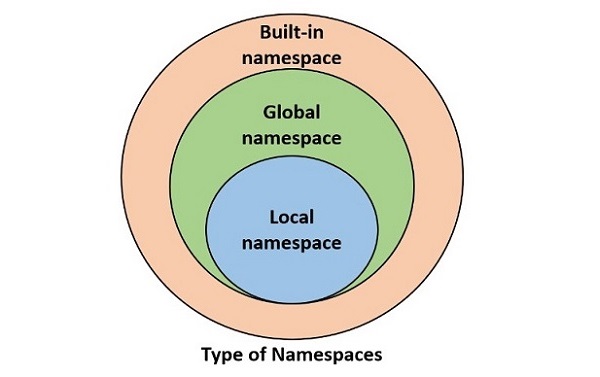
    Python provides the following types of namespaces −

    • Built-in namespace contains built-in functions and built-in exceptions. They are loaded in the memory as soon as Python interpreter is loaded and remain till the interpreter is running.
    • Global namespace contains any names defined in the main program. These names remain in memory till the program is running.
    • Local namespace contains names defined inside a function. They are available till the function is running.

    These namespaces are nested one inside the other. Following diagram shows relationship between namespaces.

    Types Of Namespace

    The life of a certain variable is restricted to the namespace in which it is defined. As a result, it is not possible to access a variable present in the inner namespace from any outer namespace.

    Python globals() Function

    Python’s standard library includes a built-in function globals(). It returns a dictionary of symbols currently available in global namespace.

    Run the globals() function directly from the Python prompt.

    >>> globals()
    {'__name__': '__main__', '__doc__': None, '__package__': None, '__loader__': <class '_frozen_importlib.BuiltinImporter'>, '__spec__': None, '__annotations__': {}, '__builtins__': <module 'builtins' (built-in)>}
    

    It can be seen that the built-in module which contains definitions of all built-in functions and built-in exceptions is loaded.

    Example

    Save the following code that contains few variables and a function with few more variables inside it.

    name ='TutorialsPoint'
    marks =50
    result =Truedefmyfunction():
       a =10
       b =20return a+b
       
    print(globals())

    Calling globals() from inside this script returns following dictionary object −

    {'__name__': '__main__', '__doc__': None, '__package__': None, '__loader__': <_frozen_importlib_external.SourceFileLoader object at 0x00000263E7255250>, '__spec__': None, '__annotations__': {}, '__builtins__': <module 'builtins' (built-in)>, '__file__': 'C:\\Users\\user\\examples\\main.py', '__cached__': None, 'name': 'TutorialsPoint', 'marks': 50, 'result': True, 'myfunction': <function myfunction at 0x00000263E72004A0>}
    

    The global namespace now contains variables in the program and their values and the function object in it (and not the variables in the function).

    Python locals() Function

    Python’s standard library includes a built-in function locals(). It returns a dictionary of symbols currently available in the local namespace of the function.

    Example

    Modify the above script to print dictionary of global and local namespaces from within the function.

    name ='TutorialsPoint'
    marks =50
    result =Truedefmyfunction():
       a =10
       b =20
       c = a+b
       print("globals():",globals())print("locals():",locals())return c
    myfunction()

    The output shows that locals() returns a dictionary of variables and their values currently available in the function.

    globals(): {'__name__': '__main__', '__doc__': None, '__package__': None, '__loader__': <_frozen_importlib_external.SourceFileLoader object at 0x00000169AE265250>, '__spec__': None, '__annotations__': {}, '__builtins__': <module 'builtins' (built-in)>, '__file__': 'C:\\Users\\mlath\\examples\\main.py', '__cached__': None, 'name': 'TutorialsPoint', 'marks': 50, 'result': True, 'myfunction': <function myfunction at 0x00000169AE2104A0>}
    locals(): {'a': 10, 'b': 20, 'c': 30}
    

    Since both globals() and locals functions return dictionary, you can access value of a variable from respective namespace with dictionary get() method or index operator.

    print(globals()['name'])# displays TutorialsPointprint(locals().get('a'))# displays 10

    Namespace Conflict in Python

    If a variable of same name is present in global as well as local scope, Python interpreter gives priority to the one in local namespace.

    Example

    In the following example, we define a local and a global variable.

    marks =50# this is a global variabledefmyfunction():
       marks =70# this is a local variableprint(marks)
       
    myfunction()print(marks)# prints global value

    It will produce the following output −

    70
    50
    

    Example

    If you try to manipulate value of a global variable from inside a function, Python raises UnboundLocalError as shown in example below −

    # this is a global variable
    marks =50defmyfunction():
       marks = marks +20print(marks)
    
    myfunction()# prints global valueprint(marks)

    It will produce the following error message −

       marks = marks + 20
               ^^^^^
    UnboundLocalError: cannot access local variable 'marks' where it is not associated with a value
    

    Example

    To modify a global variable, you can either update it with a dictionary syntax, or use the global keyword to refer it before modifying.

    var1 =50# this is a global variable
    var2 =60# this is a global variabledefmyfunction():"Change values of global variables"globals()['var1']=globals()['var1']+10global var2
       var2 = var2 +20
    
    myfunction()print("var1:",var1,"var2:",var2)#shows global variables with changed values

    On executing the code, it will produce the following output −

    var1: 60 var2: 80
    

    Example

    Lastly, if you try to access a local variable in global scope, Python raises NameError as the variable in local scope can’t be accessed outside it.

    var1 =50# this is a global variable
    var2 =60# this is a global variabledefmyfunction(x, y):
       total = x+y
       print("Total is a local variable: ", total)
    
    myfunction(var1, var2)print(total)# This gives NameError

    It will produce the following error message −

    Total is a local variable: 110
    Traceback (most recent call last):
       File "C:\Users\user\examples\main.py", line 9, in <module>
       print (total) # This gives NameError
              ^^^^^
    NameError: name 'total' is not defined
  • Python – Arbitrary or Variable-length Arguments

    Arbitrary Arguments (*args)

    You may want to define a function that is able to accept arbitrary or variable number of arguments. Moreover, the arbitrary number of arguments might be positional or keyword arguments.

    • An argument prefixed with a single asterisk * for arbitrary positional arguments.
    • An argument prefixed with two asterisks ** for arbitrary keyword arguments.

    Arbitrary Arguments Example

    Given below is an example of arbitrary or variable length positional arguments −

    # sum of numbersdefadd(*args):
       s=0for x in args:
          s=s+x
       return s
    result = add(10,20,30,40)print(result)
    
    result = add(1,2,3)print(result)

    The args variable prefixed with “*” stores all the values passed to it. Here, args becomes a tuple. We can run a loop over its items to add the numbers.

    It will produce the following output −

    100
    6
    

    Required Arguments With Arbitrary Arguments

    It is also possible to have a function with some required arguments before the sequence of variable number of values.

    Example

    The following example has avg() function. Assume that a student can take any number of tests. First test is mandatory. He can take as many tests as he likes to better his score. The function calculates the average of marks in first test and his maximum score in the rest of tests.

    The function has two arguments, first is the required argument and second to hold any number of values.

    #avg of first test and best of following testsdefavg(first,*rest):
       second=max(rest)return(first+second)/2
       
    result=avg(40,30,50,25)print(result)

    Following call to avg() function passes first value to the required argument first, and the remaining values to a tuple named rest. We then find the maximum and use it to calculate the average.

    It will produce the following output −

    45.0
    

    Arbitrary Keyword Arguments (**kwargs)

    If a variable in the argument list has two asterisks prefixed to it, the function can accept arbitrary number of keyword arguments. The variable becomes a dictionary of keyword:value pairs.

    Example

    The following code is an example of a function with arbitrary keyword arguments. The addr() function has an argument **kwargs which is able to accept any number of address elements like name, city, phno, pin, etc. Inside the function kwargs dictionary of kw:value pairs is traversed using items() method.

    defaddr(**kwargs):for k,v in kwargs.items():print("{}:{}".format(k,v))print("pass two keyword args")
    addr(Name="John", City="Mumbai")print("pass four keyword args")# pass four keyword args
    addr(Name="Raam", City="Mumbai", ph_no="9123134567", PIN="400001")

    It will produce the following output −

    pass two keyword args
    Name:John
    City:Mumbai
    pass four keyword args
    Name:Raam
    City:Mumbai
    ph_no:9123134567
    PIN:400001
    

    Multiple Arguments With Arbitrary Keyword Arguments

    If the function uses mixed types of arguments, the arbitrary keyword arguments should be after positional, keyword and arbitrary positional arguments in the argument list.

    Example

    Imagine a case where science and maths are mandatory subjects, in addition to which student may choose any number of elective subjects.

    The following code defines a percent() function where marks in science and marks are stored in required arguments, and the marks in variable number of elective subjects in **optional argument.

    defpercent(math, sci,**optional):print("maths:", math)print("sci:", sci)
       s=math+sci
       for k,v in optional.items():print("{}:{}".format(k,v))
          s=s+v
       return s/(len(optional)+2)
    
    result=percent(math=80, sci=75, Eng=70, Hist=65, Geo=72)print("percentage:", result)

    It will produce the following output −

    maths: 80
    sci: 75
    Eng:70
    Hist:65
    Geo:72
    percentage: 72.4
  • Python – Positional-Only Arguments

    Positional Only Arguments

    It is possible in Python to define a function in which one or more arguments can not accept their value with keywords. Such arguments are called positional-only arguments.

    To make an argument positional-only, use the forward slash (/) symbol. All the arguments before this symbol will be treated as positional-only.

    Python’s built-in input() function is an example of positional-only arguments. The syntax of input function is −

    input(prompt ="")

    Prompt is an explanatory string for the benefit of the user. However, you cannot use the prompt keyword inside the parentheses.

    Example

    In this example, we are using prompt keyword, which will lead to error.

    name =input(prompt="Enter your name ")

    On executing, this code will show the following error message −

       name = input (prompt="Enter your name ")
             ^^^^^^^^^^^^^^^^^^^^^^^^^^^^^^^^^
    TypeError: input() takes no keyword arguments
    

    Positional-Only Arguments Examples

    Let’s understand positional-only arguments with the help of some examples −

    Example 1

    In this example, we make both the arguments of intr() function as positional-only by putting “/” at the end.

    defintr(amt, rate,/):
       val = amt * rate /100return val
       
    print(intr(316200,4))

    When you run the code, it will show the following result −

    12648.0
    

    Example 2

    If we try to use the arguments as keywords, Python raises errors as shown in the below example.

    defintr(amt, rate,/):
       val = amt * rate /100return val
       
    print(intr(amt=1000, rate=10))

    On running this code, it will show following error message −

       interest = intr(amt=1000, rate=10)
                  ^^^^^^^^^^^^^^^^^^^^^^^
    TypeError: intr() got some positional-only arguments passed as keyword arguments: 'amt, rate'
    

    Example 3

    A function may be defined in such a way that it has some keyword-only and some positional-only arguments. Here, x is a required positional-only argument, y is a regular positional argument, and z is a keyword-only argument.

    defmyfunction(x,/, y,*, z):print(x, y, z)
       
    myfunction(10, y=20, z=30)
    myfunction(10,20, z=30)

    The above code will show the following output −

    10 20 30
    10 20 30 
  • Python – Positional Arguments

    Positional Arguments

    The list of variables declared in the parentheses at the time of defining a function are the formal arguments. And, these arguments are also known as positional arguments. A function may be defined with any number of formal arguments.

    While calling a function −

    • All the arguments are required.
    • The number of actual arguments must be equal to the number of formal arguments.
    • They Pick up values in the order of definition.
    • The type of arguments must match.
    • Names of formal and actual arguments need not be same.

    Positional Arguments Examples

    Let’s discuss some examples of Positional arguments −

    Example 1

    The following example shows the use of positional argument.

    defadd(x,y):
       z = x+y
       print("x={} y={} x+y={}".format(x,y,z))
    a =10
    b =20
    add(a, b)

    It will produce the following output −

    x=10 y=20 x+y=30
    

    Here, the add() function has two formal arguments, both are numeric. When integers 10 and 20 passed to it. The variable “a” takes 10 and “b” takes 20, in the order of declaration. The add() function displays the addition.

    Example 2

    Python also raises error when the number of arguments don’t match. If you give only one argument and check the result you can see an error.

    defadd(x,y):
       z=x+y
       print(z)
    a=10;
    add(a)

    The error generated will be as shown below −

    TypeError: add() missing 1 required positional argument: 'y'
    

    Example 3

    Similarly, if you pass more than the number of formal arguments an error will be generated stating the same −

    defadd(x,y):
       z=x+y
       print("x={} y={} x+y={}".format(x,y,z))
    add(10,20,30)

    Following is the output −

    TypeError: add() takes 2 positional arguments but 3 were given
    

    Example 4

    Data type of corresponding actual and formal arguments must match. Change a to a string value and see the result.

    defadd(x,y):
       z=x+y
       print(z)
    a="Hello"
    b=20
    add(a,b)

    It will produce the following error −

    z=x+y
         ~^~
    TypeError: can only concatenate str (not "int") to str
    

    Difference between Positional and Keyword argument

    The below table explains the difference between positional and keyword argument −

    Positional ArgumentKeyword Argument
    Only the names of arguments are used to pass data to the given function.Keyword arguments are passed to a function in name=value form.
    Arguments are passed in the order defined in function declaration.While passing arguments, their order can be changed.
    Syntax: function(param1, param2,…)Syntax: function(param1 = value1,…)
  • Python – Keyword-Only Arguments

    Keyword-Only Arguments

    You can use the variables in formal argument list as keywords to pass value. Use of keyword arguments is optional. But, you can force the function to accept arguments by keyword only. You should put an astreisk (*) before the keyword-only arguments list.

    Let us say we have a function with three arguments, out of which we want second and third arguments to be keyword-only. For that, put * after the first argument.

    Example of Keyword-Only Arguments

    The built-in print() function is an example of keyword-only arguments. You can give list of expressions to be printed in the parentheses. The printed values are separated by a white space by default. You can specify any other separation character instead using “sep” argument.

    print("Hello","World", sep="-")

    It will print −

    Hello-World
    

    Example: Using “sep” as non-keyword Argument

    The sep argument of the print() function is keyword-only. Try using it as non-keyword argument.

    print("Hello","World","-")

    You’ll get different output, not as desired −

    Hello World -
    

    Using Keyword-Only argument in User-Defined Method

    To make an argument keyword-only, put the astreisk (*) before it while creating the user-defined function.

    Those Python functions that are defined by us within a given class to perform certain actions are called as user-defined function. They are not predefined by Python.

    Example

    In the following user defined function “intr()” the “rate” argument is keyword-only. To call this function, the value for rate must be passed by keyword.

    defintr(amt,*, rate):
       val = amt*rate/100return val
       
    interest = intr(1000, rate=10)print(interest)
    100.0
    

    However, if you try to use the default positional way of calling the above function, you will encounter an error.

    Example

    The code below shows it is not possible to use positional arguments when keyword-only arguments are required.

    defintr(amt,*, rate):
       val = amt * rate /100return val
       
    interest = intr(1000,10)print(interest)

    On executing, this code will show the following result −

    interest = intr(1000, 10)
                   ^^^^^^^^^^^^^^
    TypeError: intr() takes 1 positional argument but 2 were given
  • Python – Keyword Arguments

    Keyword Arguments

    Python allows to pass function arguments in the form of keywords which are also called named arguments. Variables in the function definition are used as keywords. When the function is called, you can explicitly mention the name and its value.

    Calling Function With Keyword Arguments

    The following example demonstrates keyword arguments in Python. In the second function call, we have used keyword arguments.

    # Function definition is heredefprintinfo( name, age ):"This prints a passed info into this function"print("Name: ", name)print("Age ", age)return# Now you can call printinfo function# by positional arguments
    printinfo ("Naveen",29)# by keyword arguments
    printinfo(name="miki", age =30)

    It will produce the following output −

    Name: Naveen
    Age 29
    Name: miki
    Age 30
    

    Order of Keyword Arguments

    By default, the function assigns the values to arguments in the order of appearance. However, while using keyword arguments, it is not necessary to follow the order of formal arguments in function definition. Use of keyword arguments is optional. You can use mixed calling. You can pass values to some arguments without keywords, and for others with keyword.

    Example

    Let us try to understand with the help of following function definition −

    defdivision(num, den):
       quotient = num/den
       print("num:{} den:{} quotient:{}".format(num, den, quotient))
    
    division(10,5)
    division(5,10)

    Since the values are assigned as per the position, the output is as follows −

    num:10 den:5 quotient:2.0
    num:5 den:10 quotient:0.5
    

    Example

    Instead of passing the values with positional arguments, let us call the function with keyword arguments −

    defdivision(num, den):
       quotient = num/den
       print("num:{} den:{} quotient:{}".format(num, den, quotient))
       
    division(num=10, den=5)
    division(den=5, num=10)

    Unlike positional arguments, the order of keyword arguments does not matter. Hence, it will produce the following output −

    num:10 den:5 quotient:2.0
    num:10 den:5 quotient:2.0
    

    However, the positional arguments must be before the keyword arguments while using mixed calling.

    Example

    Try to call the division() function with the keyword arguments as well as positional arguments.

    defdivision(num, den):
       quotient = num/den
       print("num:{} den:{} quotient:{}".format(num, den, quotient))
    
    division(num =5,10)

    As the Positional argument cannot appear after keyword arguments, Python raises the following error message −

        division(num=5, 10)
                          ^
    SyntaxError: non-keyword arg after keyword arg