Category: Object Oriented Programming

https://zain.sweetdishy.com/wp-content/uploads/2025/12/python-3.png

  • Python – Constructors

    Python constructor is an instance method in a class, that is automatically called whenever a new object of the class is created. The constructor’s role is to assign value to instance variables as soon as the object is declared.

    Python uses a special method called __init__() to initialize the instance variables for the object, as soon as it is declared.

    Creating a constructor in Python

    The __init__() method acts as a constructor. It needs a mandatory argument named self, which is the reference to the object.

    def__init__(self, parameters):#initialize instance variables

    The __init__() method as well as any instance method in a class has a mandatory parameter, self. However, you can give any name to the first parameter, not necessarily self.

    Types of Constructor in Python

    Python has two types of constructor −

    • Default Constructor
    • Parameterized Constructor

    Default Constructor in Python

    The Python constructor which does not accept any parameter other than self is called as default constructor.

    Example

    Let us define the constructor in the Employee class to initialize name and age as instance variables. We can then access these attributes through its object.

    classEmployee:'Common base class for all employees'def__init__(self):
          self.name ="Bhavana"
          self.age =24
    
    e1 = Employee()print("Name: {}".format(e1.name))print("age: {}".format(e1.age))

    It will produce the following output −

    Name: Bhavana
    age: 24
    

    For the above Employee class, each object we declare will have same value for its instance variables name and age. To declare objects with varying attributes instead of the default, define arguments for the __init__() method.

    Parameterized Constructor

    If a constructor is defined with multiple parameters along with self is called as parameterized constructor.

    Example

    In this example, the __init__() constructor has two formal arguments. We declare Employee objects with different values −

    classEmployee:'Common base class for all employees'def__init__(self, name, age):
          self.name = name
          self.age = age
    
    e1 = Employee("Bhavana",24)
    e2 = Employee("Bharat",25)print("Name: {}".format(e1.name))print("age: {}".format(e1.age))print("Name: {}".format(e2.name))print("age: {}".format(e2.age))

    It will produce the following output −

    Name: Bhavana
    age: 24
    Name: Bharat
    age: 25
    

    You can also assign default values to the formal arguments in the constructor so that the object can be instantiated with or without passing parameters.

    classEmployee:'Common base class for all employees'def__init__(self, name="Bhavana", age=24):
          self.name = name
          self.age = age
    
    e1 = Employee()
    e2 = Employee("Bharat",25)print("Name: {}".format(e1.name))print("age: {}".format(e1.age))print("Name: {}".format(e2.name))print("age: {}".format(e2.age))

    It will produce the following output −

    Name: Bhavana
    age: 24
    Name: Bharat
    age: 25
    

    Python – Instance Methods

    In addition to the __init__() constructor, there may be one or more instance methods defined in a class. A method with self as one of the formal arguments is called instance method, as it is called by a specific object.

    Example

    In the following example a displayEmployee() method has been defined as an instance method. It returns the name and age attributes of the Employee object that calls the method.

    classEmployee:def__init__(self, name="Bhavana", age=24):
          self.name = name
          self.age = age
       defdisplayEmployee(self):print("Name : ", self.name,", age: ", self.age)
    
    e1 = Employee()
    e2 = Employee("Bharat",25)
    
    e1.displayEmployee()
    e2.displayEmployee()

    It will produce the following output −

    Name : Bhavana , age: 24
    Name : Bharat , age: 25
    

    You can add, remove, or modify attributes of classes and objects at any time −

    # Add a 'salary' attribute
    emp1.salary =7000# Modify 'name' attribute
    emp1.name ='xyz'# Delete 'salary' attributedel emp1.salary 
    

    Instead of using the normal statements to access attributes, you can use the following functions −

    • The getattr(obj, name[, default]) − to access the attribute of object.
    • The hasattr(obj,name) − to check if an attribute exists or not.
    • The setattr(obj,name,value) − to set an attribute. If attribute does not exist, then it would be created.
    • The delattr(obj, name) − to delete an attribute.
    # Returns true if 'salary' attribute existsprint(hasattr(e1,'salary'))# Returns value of 'name' attributeprint(getattr(e1,'name'))# Set attribute 'salary' at 8setattr(e1,'salary',7000)# Delete attribute 'age'delattr(e1,'age')

    It will produce the following output −

    False
    Bhavana
    

    Python Multiple Constructors

    As mentioned earlier, we define the __init__() method to create a constructor. However, unlike other programming languages like C++ and Java, Python does not allow multiple constructors.

    If you try to create multiple constructors, Python will not throw an error, but it will only consider the last __init__() method in your class. Its previous definition will be overridden by the last one.

    But, there is a way to achieve similar functionality in Python. We can overload constructors based on the type or number of arguments passed to the __init__() method. This will allow a single constructor method to handle various initialization scenarios based on the arguments provided.

    Example

    The following example shows how to achieve functionality similar to multiple constructors.

    classStudent:def__init__(self,*args):iflen(args)==1:
             self.name = args[0]eliflen(args)==2:
             self.name = args[0]
             self.age = args[1]eliflen(args)==3:
             self.name = args[0]
             self.age = args[1]
             self.gender = args[2]
                
    st1 = Student("Shrey")print("Name:", st1.name)
    st2 = Student("Ram",25)print(f"Name: {st2.name} and Age: {st2.age}")
    st3 = Student("Shyam",26,"M")print(f"Name: {st3.name}, Age: {st3.age} and Gender: {st3.gender}")

    When we run the above code, it will produce the following output −

    Name: Shrey
    Name: Ram and Age: 25
    Name: Shyam, Age: 26 and Gender: M
  • Python – Static Methods

    What is Python Static Method?

    In Python, a static method is a type of method that does not require any instance to be called. It is very similar to the class method but the difference is that the static method doesn’t have a mandatory argument like reference to the object − self or reference to the class − cls.

    Static methods are used to access static fields of a given class. They cannot modify the state of a class since they are bound to the class, not instance.

    How to Create Static Method in Python?

    There are two ways to create Python static methods −

    • Using staticmethod() Function
    • Using @staticmethod Decorator

    Using staticmethod() Function

    Python’s standard library function named staticmethod() is used to create a static method. It accepts a method as an argument and converts it into a static method.

    Syntax

    staticmethod(method)

    Example

    In the Employee class below, the showcount() method is converted into a static method. This static method can now be called by its object or reference of class itself.

    classEmployee:
       empCount =0def__init__(self, name, age):
          self.__name = name
          self.__age = age
          Employee.empCount +=1# creating staticmethoddefshowcount():print(Employee.empCount)return
       counter =staticmethod(showcount)
    
    e1 = Employee("Bhavana",24)
    e2 = Employee("Rajesh",26)
    e3 = Employee("John",27)
    
    e1.counter()
    Employee.counter()

    Executing the above code will print the following result −

    3
    3
    

    Using @staticmethod Decorator

    The second way to create a static method is by using the Python @staticmethod decorator. When we use this decorator with a method it indicates to the Interpreter that the specified method is static.

    Syntax

    @staticmethoddefmethod_name():# your code

    Example

    In the following example, we are creating a static method using the @staticmethod decorator.

    classStudent:
       stdCount =0def__init__(self, name, age):
          self.__name = name
          self.__age = age
          Student.stdCount +=1# creating staticmethod@staticmethoddefshowcount():print(Student.stdCount)
    
    e1 = Student("Bhavana",24)
    e2 = Student("Rajesh",26)
    e3 = Student("John",27)print("Number of Students:")
    Student.showcount()

    Running the above code will print the following result −

    Number of Students:
    3
    

    Advantages of Static Method

    There are several advantages of using static method, which includes −

    • Since a static method cannot access class attributes, it can be used as a utility function to perform frequently re-used tasks.
    • We can invoke this method using the class name. Hence, it eliminates the dependency on the instances.
    • A static method is always predictable as its behavior remain unchanged regardless of the class state.
    • We can declare a method as a static method to prevent overriding.
  • Python – Class Methods

    Methods belongs to an object of a class and used to perform specific operations. We can divide Python methods in three different categories, which are class method, instance method and static method.

    A Python class method is a method that is bound to the class and not to the instance of the class. It can be called on the class itself, rather than on an instance of the class.

    Most of us often get class methods confused with static methods. Always remember, while both are called on the class, static methods do not have access to the “cls” parameter and therefore it cannot modify the class state.

    Unlike class method, the instance method can access the instance variables of the an object. It can also access the class variable as it is common to all the objects.

    Creating Class Methods in Python

    There are two ways to create class methods in Python −

    • Using classmethod() Function
    • Using @classmethod Decorator

    Using classmethod() Function

    Python has a built-in function classmethod() which transforms an instance method to a class method which can be called with the reference to the class only and not the object.

    Syntax

    classmethod(instance_method)

    Example

    In the Employee class, define a showcount() instance method with the “self” argument (reference to calling object). It prints the value of empCount. Next, transform the method to class method counter() that can be accessed through the class reference.

    classEmployee:
       empCount =0def__init__(self, name, age):
          self.__name = name
          self.__age = age
          Employee.empCount +=1defshowcount(self):print(self.empCount)
          
       counter =classmethod(showcount)
    
    e1 = Employee("Bhavana",24)
    e2 = Employee("Rajesh",26)
    e3 = Employee("John",27)
    
    e1.showcount()
    Employee.counter()

    Output

    Call showcount() with object and call count() with class, both show the value of employee count.

    3
    3
    

    Using @classmethod Decorator

    Use of @classmethod() decorator is the prescribed way to define a class method as it is more convenient than first declaring an instance method and then transforming it into a class method.

    Syntax

    @classmethoddefmethod_name():# your code

    Example

    The class method acts as an alternate constructor. Define a newemployee() class method with arguments required to construct a new object. It returns the constructed object, something that the __init__() method does.

    classEmployee:
        empCount =0def__init__(self, name, age):
            self.name = name
            self.age = age
            Employee.empCount +=1@classmethoddefshowcount(cls):print(cls.empCount)@classmethoddefnewemployee(cls, name, age):return cls(name, age)
    
    e1 = Employee("Bhavana",24)
    e2 = Employee("Rajesh",26)
    e3 = Employee("John",27)
    e4 = Employee.newemployee("Anil",21)
    
    Employee.showcount()

    There are four Employee objects now. If we run the above program, it will show the count of Employee object −

    4
    

    Access Class Attributes in Class Method

    Class attributes are those variables that belong to a class and whose value is shared among all the instances of that class.

    To access class attributes within a class method, use the cls parameter followed by dot (.) notation and name of the attribute.

    Example

    In this example, we are accessing a class attribute in class method.

    classCloth:# Class attribute
       price =4000@classmethoddefshowPrice(cls):return cls.price
    
    # Accessing class attributeprint(Cloth.showPrice())

    On running the above code, it will show the following output −

    4000
    

    Dynamically Add Class Method to a Class

    The Python setattr() function is used to set an attribute dynamically. If you want to add a class method to a class, pass the method name as a parameter value to setattr() function.

    Example

    The following example shows how to add a class method dynamically to a Python class.

    classCloth:pass# class method@classmethoddefbrandName(cls):print("Name of the brand is Raymond")# adding dynamicallysetattr(Cloth,"brand_name", brandName)
    newObj = Cloth()
    newObj.brand_name()

    When we execute the above code, it will show the following output −

    Name of the brand is Raymond
    

    Dynamically Delete Class Methods

    The Python del operator is used to delete a class method dynamically. If you try to access the deleted method, the code will raise AttributeError.

    Example

    In the below example, we are deleting the class method named “brandName” using del operator.

    classCloth:# class method@classmethoddefbrandName(cls):print("Name of the brand is Raymond")# deleting dynamicallydel Cloth.brandName
    print("Method deleted")

    On executing the above code, it will show the following output −

    Method deleted
  • Python – Class Attributes

    The properties or variables defined inside a class are called as Attributes. An attribute provides information about the type of data a class contains. There are two types of attributes in Python namely instance attribute and class attribute.

    The instance attribute is defined within the constructor of a Python class and is unique to each instance of the class. And, a class attribute is declared and initialized outside the constructor of the class.

    Class Attributes (Variables)

    Class attributes are those variables that belong to a class and whose value is shared among all the instances of that class. A class attribute remains the same for every instance of the class.

    Class attributes are defined in the class but outside any method. They cannot be initialized inside __init__() constructor. They can be accessed by the name of the class in addition to the object. In other words, a class attribute is available to the class as well as its object.

    Accessing Class Attributes

    The object name followed by dot notation (.) is used to access class attributes.

    Example

    The below example demonstrates how to access the attributes of a Python class.

    classEmployee:
       name ="Bhavesh Aggarwal"
       age ="30"# instance of the class
    emp = Employee()# accessing class attributesprint("Name of the Employee:", emp.name)print("Age of the Employee:", emp.age)

    Output

    Name of the Employee: Bhavesh Aggarwal
    Age of the Employee: 30
    

    Modifying Class Attributes

    To modify the value of a class attribute, we simply need to assign a new value to it using the class name followed by dot notation and attribute name.

    Example

    In the below example, we are initializing a class variable called empCount in Employee class. For each object declared, the __init__() method is automatically called. This method initializes the instance variables as well as increments the empCount by 1.

    classEmployee:# class attribute    
       empCount =0def__init__(self, name, age):
          self.__name = name
          self.__age = age
          # modifying class attribute
          Employee.empCount +=1print("Name:", self.__name,", Age: ", self.__age)# accessing class attributeprint("Employee Count:", Employee.empCount)
    
    e1 = Employee("Bhavana",24)print()
    e2 = Employee("Rajesh",26)

    Output

    We have declared two objects. Every time, the empCount increments by 1.

    Name: Bhavana , Age:  24
    Employee Count: 1
    
    Name: Rajesh , Age:  26
    Employee Count: 2
    

    Significance of Class Attributes

    The class attributes are important because of the following reasons −

    • They are used to define those properties of a class that should have the same value for every object of that class.
    • Class attributes can be used to set default values for objects.
    • This is also useful in creating singletons. They are objects that are instantiated only once and used in different parts of the code.

    Built-In Class Attributes

    Every Python class keeps the following built-in attributes and they can be accessed using the dot operator like any other attribute −

    • __dict__ − Dictionary containing the class’s namespace.
    • __doc__ − Class documentation string or none, if undefined.
    • __name__ − Class name.
    • __module__ − Module name in which the class is defined. This attribute is “__main__” in interactive mode.
    • __bases__ − A possibly empty tuple containing the base classes, in the order of their occurrence in the base class list.

    Access Built-In Class Attributes

    To access built-in class attributes in Python, we use the class name followed by a dot (.) and then attribute name.

    Example

    For the Employee class, we are trying to access all the built-in class attributes −

    classEmployee:def__init__(self, name="Bhavana", age=24):
          self.name = name
          self.age = age
       defdisplayEmployee(self):print("Name : ", self.name,", age: ", self.age)print("Employee.__doc__:", Employee.__doc__)print("Employee.__name__:", Employee.__name__)print("Employee.__module__:", Employee.__module__)print("Employee.__bases__:", Employee.__bases__)print("Employee.__dict__:", Employee.__dict__ )

    Output

    It will produce the following output −

    Employee.__doc__: None
    Employee.__name__: Employee
    Employee.__module__: __main__
    Employee.__bases__: (<class 'object'>,)
    Employee.__dict__: {'__module__': '__main__', '__init__': <function Employee.__init__ at 0x0000022F866B8B80>, 'displayEmployee': <function Employee.displayEmployee at 0x0000022F866B9760>, '__dict__': <attribute '__dict__' of 'Employee' objects>, '__weakref__': <attribute '__weakref__' of 'Employee' objects>, '__doc__': None}
    

    Instance Attributes

    As stated earlier, an instance attribute in Python is a variable that is specific to an individual object of a class. It is defined inside the __init__() method.

    The first parameter of this method is self and using this parameter the instance attributes are defined.

    Example

    In the following code, we are illustrating the working of instance attributes.

    classStudent:def__init__(self, name, grade):
          self.__name = name
          self.__grade = grade
          print("Name:", self.__name,", Grade:", self.__grade)# Creating instances 
    student1 = Student("Ram","B")
    student2 = Student("Shyam","C")

    Output

    On running the above code, it will produce the following output −

    Name: Ram , Grade: B
    Name: Shyam , Grade: C
    

    Instance Attributes Vs Class Attributes

    The below table shows the difference between instance attributes and class attributes −

    SNo.Instance AttributeClass Attribute
    1It is defined directly inside the __init__() function.It is defined inside the class but outside the __init__() function.
    2Instance attribute is accessed using the object name followed by dot notation.Class attributes can be accessed by both class name and object name.
    3The value of this attribute cannot be shared among other objects.Its value is shared among other objects of the class.
    4Changes made to the instance attribute affect only the object within which it is defined.Changes made to the class attribute affect all the objects of the given class.
  • Python – Classes and Objects

    Python is an object-oriented programming language, which means that it is based on principle of OOP concept. The entities used within a Python program is an object of one or another class. For instance, numbers, strings, lists, dictionaries, and other similar entities of a program are objects of the corresponding built-in class.

    In Python, a class named Object is the base or parent class for all the classes, built-in as well as user defined.

    What is a Class in Python?

    In Python, a class is a user defined entity (data types) that defines the type of data an object can contain and the actions it can perform. It is used as a template for creating objects. For instance, if we want to define a class for Smartphone in a Python program, we can use the type of data like RAM, ROM, screen-size and actions like call and message.

    Creating Classes in Python

    The class keyword is used to create a new class in Python. The name of the class immediately follows the keyword class followed by a colon as shown below −

    classClassName:'Optional class documentation string'
       class_suite
    
    • The class has a documentation string, which can be accessed via ClassName.__doc__.
    • The class_suite consists of all the component statements defining class members, data attributes and functions.

    Example

    Following is the example of a simple Python class −

    classEmployee:'Common base class for all employees'
       empCount =0def__init__(self, name, salary):
          self.name = name
          self.salary = salary
          Employee.empCount +=1defdisplayCount(self):print"Total Employee %d"% Employee.empCount
    
       defdisplayEmployee(self):print"Name : ", self.name,", Salary: ", self.salary
    
    • The variable empCount is a class variable whose value is shared among all instances of a this class. This can be accessed as Employee.empCount from inside the class or outside the class.
    • The first method __init__() is a special method, which is called class constructor or initialization method that Python calls when you create a new instance of this class.
    • You declare other class methods like normal functions with the exception that the first argument to each method is self. Python adds the self argument to the list for you; you do not need to include it when you call the methods.

    What is an Object?

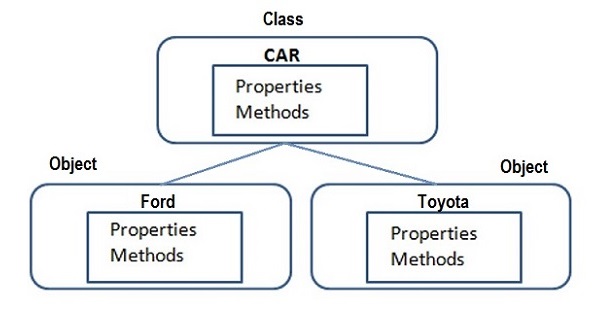
    An object is refered to as an instance of a given Python class. Each object has its own attributes and methods, which are defined by its class.

    When a class is created, it only describes the structure of obejcts. The memory is allocated when an object is instantiated from a class.

    class object in python

    In the above figure, Vehicle is the class name and Car, Bus and SUV are its objects.

    Creating Objects of Classes in Python

    To create instances of a class, you call the class using class name and pass in whatever arguments its __init__ method accepts.

    # This would create first object of Employee class
    emp1 = Employee("Zara",2000)# This would create second object of Employee class
    emp2 = Employee("Manni",5000)

    Accessing Attributes of Objects in Python

    You access the object’s attributes using the dot operator with object. Class variable would be accessed using class name as follows −

    emp1.displayEmployee()
    emp2.displayEmployee()print("Total Employee %d"% Employee.empCount)

    Now, putting all the concepts together −

    classEmployee:"Common base class for all employees"
       empCount =0def__init__(self, name, salary):
          self.name = name
          self.salary = salary
          Employee.empCount +=1defdisplayCount(self):print("Total Employee %d"% Employee.empCount)defdisplayEmployee(self):print("Name : ", self.name,", Salary: ", self.salary)# This would create first object of Employee class
    emp1 = Employee("Zara",2000)# This would create second object of Employee class
    emp2 = Employee("Manni",5000)
    emp1.displayEmployee()
    emp2.displayEmployee()print("Total Employee %d"% Employee.empCount)

    When the above code is executed, it produces the following result −

    Name :  Zara , Salary:  2000
    Name :  Manni , Salary:  5000
    Total Employee 2
    

    You can add, remove, or modify attributes of classes and objects at any time −

    # Add an 'age' attribute
    emp1.age =7# Modify 'age' attribute
    emp1.age =8# Delete 'age' attributedel emp1.age  
    

    Instead of using the normal statements to access attributes, you can also use the following functions −

    • getattr(obj, name[, default]) − to access the attribute of object.
    • hasattr(obj,name) − to check if an attribute exists or not.
    • setattr(obj,name,value) − to set an attribute. If attribute does not exist, then it would be created.
    • delattr(obj, name) − to delete an attribute.
    # Returns true if 'age' attribute existshasattr(emp1,'age')# Returns value of 'age' attributegetattr(emp1,'age')# Set attribute 'age' at 8setattr(emp1,'age',8)# Delete attribute 'age'delattr(empl,'age')

    Built-In Class Attributes in Python

    Every Python class keeps following built-in attributes and they can be accessed using dot operator like any other attribute −

    SNo.Attributes & Description
    1__dict__Dictionary containing the class’s namespace.
    2__doc__Class documentation string or none, if undefined.
    3__name__Class name
    4__module__Module name in which the class is defined. This attribute is “__main__” in interactive mode.
    5__bases__A possibly empty tuple containing the base classes, in the order of their occurrence in the base class list.

    Example

    For the above Employee class, let us try to access its attributes −

    classEmployee:'Common base class for all employees'
       empCount =0def__init__(self, name, salary):
          self.name = name
          self.salary = salary
          Employee.empCount +=1defdisplayCount(self):print("Total Employee %d"% Employee.empCount)defdisplayEmployee(self):print("Name : ", self.name,", Salary: ", self.salary)print("Employee.__doc__:", Employee.__doc__)print("Employee.__name__:", Employee.__name__)print("Employee.__module__:", Employee.__module__)print("Employee.__bases__:", Employee.__bases__)print("Employee.__dict__:", Employee.__dict__)

    When the above code is executed, it produces the following result −

    Employee.__doc__: Common base class for all employees
    Employee.__name__: Employee
    Employee.__module__: __main__
    Employee.__bases__: ()
    Employee.__dict__: {'__module__': '__main__', 'displayCount':
    <function displayCount at 0xb7c84994>, 'empCount': 2, 
    'displayEmployee': <function displayEmployee at 0xb7c8441c>, 
    '__doc__': 'Common base class for all employees', 
    '__init__': <function __init__ at 0xb7c846bc>}
    

    Built-in Class of Python datatypes

    As mentioned earlier, Python follows object-oriented programming paradigm. Entities like strings, lists and data types belongs to one or another built-in class.

    If we want to see which data type belongs to which built-in class, we can use the Python type() function. This function accepts a data type and returns its corresponding class.

    Example

    The below example demonstrates how to check built-in class of a given data type.

    num =20print(type(num))
    num1 =55.50print(type(num1))
    s ="TutorialsPoint"print(type(s))
    dct ={'a':1,'b':2,'c':3}print(type(dct))defSayHello():print("Hello World")returnprint(type(SayHello))

    When you execute this code, it will display the corresponding classes of Python data types −

    <class 'int'>
    <class 'float'>
    <class 'str'>
    <class 'dict'>
    <class 'function'>
    

    Garbage Collection(Destroying Objects) in Python

    Python deletes unwanted objects (built-in types or class instances) automatically to free the memory space. The process by which Python periodically reclaims blocks of memory that no longer are in use is termed Garbage Collection.

    Python’s garbage collector runs during program execution and is triggered when an object’s reference count reaches zero. An object’s reference count changes as the number of aliases that point to it changes.

    An object’s reference count increases when it is assigned a new name or placed in a container (list, tuple, or dictionary). The object’s reference count decreases when it’s deleted with del, its reference is reassigned, or its reference goes out of scope. When an object’s reference count reaches zero, Python collects it automatically.

    # Create object <40>
    a =40# Increase ref. count  of <40> 
    b = a       
    # Increase ref. count  of <40> 
    c =[b]# Decrease ref. count  of <40>del a       
    # Decrease ref. count  of <40>
    b =100# Decrease ref. count  of <40>
    c[0]=-1

    You normally will not notice when the garbage collector destroys an unused instance and reclaims its space. But a class can implement the special method __del__(), called a destructor, that is invoked when the instance is about to be destroyed. This method might be used to clean up any non memory resources used by an instance.

    Example

    The __del__() destructor prints the class name of an instance that is about to be destroyed as shown in the below code block −

    classPoint:def__init__( self, x=0, y=0):
          self.x = x
          self.y = y
       def__del__(self):
          class_name = self.__class__.__name__
          print(class_name,"destroyed")
    
    pt1 = Point()
    pt2 = pt1
    pt3 = pt1
    # prints the ids of the obejctsprint(id(pt1),id(pt2),id(pt3))del pt1
    del pt2
    del pt3
    

    On executing, the above code will produces following result −

    135007479444176 135007479444176 135007479444176
    Point destroyed
    

    Data Hiding in Python

    An object’s attributes may or may not be visible outside the class definition. You need to name attributes with a double underscore prefix, and those attributes then are not be directly visible to outsiders.

    Example

    classJustCounter:
       __secretCount =0defcount(self):
          self.__secretCount +=1print self.__secretCount
    
    counter = JustCounter()
    counter.count()
    counter.count()print counter.__secretCount
    

    When the above code is executed, it produces the following result −

    1
    2
    ERROR!
    Traceback (most recent call last):
      File <main.py>", line 11, in <module>
    AttributeError: 'JustCounter' object has no attribute '__secretCount'
    

    Python protects those members by internally changing the name to include the class name. You can access such attributes as object._className__attrName. If you would replace your last line as following, then it works for you −

    print(counter._JustCounter__secretCount)

    When the above code is executed, it produces the following result −

    1
    2
    2
  • Python – OOP Concepts

    OOP is an abbreviation that stands for Object-oriented programming paradigm. It is defined as a programming model that uses the concept of objects which refers to real-world entities with state and behavior. This chapter helps you become an expert in using object-oriented programming support in Python language.

    Python is a programming language that supports object-oriented programming. This makes it simple to create and use classes and objects. If you do not have any prior experience with object-oriented programming, you are at the right place. Let’s start by discussing a small introduction of Object-Oriented Programming (OOP) to help you.

    Procedural Oriented Approach

    Early programming languages developed in 50s and 60s are recognized as procedural (or procedure oriented) languages.

    A computer program describes procedure of performing certain task by writing a series of instructions in a logical order. Logic of a more complex program is broken down into smaller but independent and reusable blocks of statements called functions.

    Every function is written in such a way that it can interface with other functions in the program. Data belonging to a function can be easily shared with other in the form of arguments, and called function can return its result back to calling function.

    Prominent problems related to procedural approach are as follows −

    • Its top-down approach makes the program difficult to maintain.
    • It uses a lot of global data items, which is undesired. Too many global data items would increase memory overhead.
    • It gives more importance to process and doesn’t consider data of same importance and takes it for granted, thereby it moves freely through the program.
    • Movement of data across functions is unrestricted. In real-life scenario where there is unambiguous association of a function with data it is expected to process.

    Python – OOP Concepts

    In the real world, we deal with and process objects, such as student, employee, invoice, car, etc. Objects are not only data and not only functions, but combination of both. Each real-world object has attributes and behavior associated with it.

    oop_concepts

    Attributes

    • Name, class, subjects, marks, etc., of student
    • Name, designation, department, salary, etc., of employee
    • Invoice number, customer, product code and name, price and quantity, etc., in an invoice
    • Registration number, owner, company, brand, horsepower, speed, etc., of car

    Each attribute will have a value associated with it. Attribute is equivalent to data.

    Behavior

    Processing attributes associated with an object.

    • Compute percentage of student’s marks
    • Calculate incentives payable to employee
    • Apply GST to invoice value
    • Measure speed of car

    Behavior is equivalent to function. In real life, attributes and behavior are not independent of each other, rather they co-exist.

    The most important feature of object-oriented approach is defining attributes and their functionality as a single unit called class. It serves as a blueprint for all objects having similar attributes and behavior.

    In OOP, class defines what are the attributes its object has, and how is its behavior. Object, on the other hand, is an instance of the class.

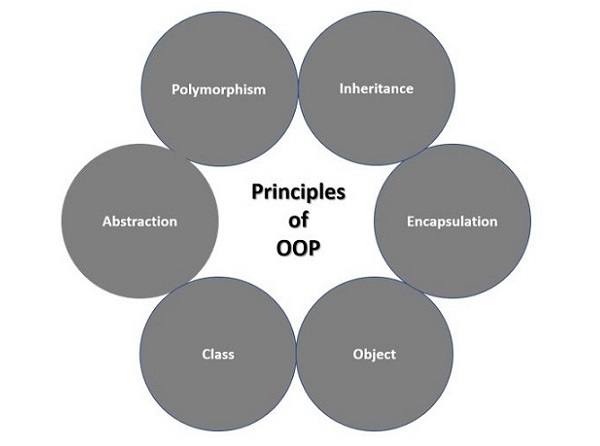
    Principles of OOPs Concepts

    Object-oriented programming paradigm is characterized by the following principles −

    • Class
    • Object
    • Encapsulation
    • Inheritance
    • Polymorphism
    principles_of_oop

    Class & Object

    A class is an user-defined prototype for an object that defines a set of attributes that characterize any object of the class. The attributes are data members (class variables and instance variables) and methods, accessed via dot notation.

    An object refers to an instance of a certain class. For example, an object named obj that belongs to a class Circle is an instance of that class. A unique instance of a data structure that is defined by its class. An object comprises both data members (class variables and instance variables) and methods.

    Example

    The below example illustrates how to create a class and its object in Python.

    # defining classclassSmartphone:# constructor    def__init__(self, device, brand):
          self.device = device
          self.brand = brand
       
       # method of the classdefdescription(self):returnf"{self.device} of {self.brand} supports Android 14"# creating object of the class
    phoneObj = Smartphone("Smartphone","Samsung")print(phoneObj.description())

    On executing the above code, it will display the following output −

    Smartphone of Samsung supports Android 14
    

    Encapsulation

    Data members of class are available for processing to functions defined within the class only. Functions of class on the other hand are accessible from outside class context. So object data is hidden from environment that is external to class. Class function (also called method) encapsulates object data so that unwarranted access to it is prevented.

    Example

    In this example, we are using the concept of encapsulation to set the price of desktop.

    classDesktop:def__init__(self):
          self.__max_price =25000defsell(self):returnf"Selling Price: {self.__max_price}"defset_max_price(self, price):if price > self.__max_price:
             self.__max_price = price
    
    # Object
    desktopObj = Desktop()print(desktopObj.sell())# modifying the price directly
    desktopObj.__max_price =35000print(desktopObj.sell())# modifying the price using setter function
    desktopObj.set_max_price(35000)print(desktopObj.sell())

    When the above code is executed, it produces the following result −

    Selling Price: 25000
    Selling Price: 25000
    Selling Price: 35000
    

    Inheritance

    A software modelling approach of OOP enables extending capability of an existing class to build new class instead of building from scratch. In OOP terminology, existing class is called base or parent class, while new class is called child or sub class.

    Child class inherits data definitions and methods from parent class. This facilitates reuse of features already available. Child class can add few more definitions or redefine a base class function.

    Syntax

    Derived classes are declared much like their parent class; however, a list of base classes to inherit from is given after the class name −

    classSubClassName(ParentClass1[, ParentClass2,...]):'Optional class documentation string'
       class_suite
    

    Example

    The following example demonstrates the concept of Inheritance in Python −

    #!/usr/bin/python# define parent classclassParent:        
       parentAttr =100def__init__(self):print("Calling parent constructor")defparentMethod(self):print("Calling parent method")defsetAttr(self, attr):
          Parent.parentAttr = attr
    
       defgetAttr(self):print("Parent attribute :", Parent.parentAttr)# define child classclassChild(Parent):def__init__(self):print("Calling child constructor")defchildMethod(self):print("Calling child method")# instance of child
    c = Child()# child calls its method        
    c.childMethod()# calls parent's method     
    c.parentMethod()# again call parent's method   
    c.setAttr(200)# again call parent's method     
    c.getAttr()

    When the above code is executed, it produces the following result −

    Calling child constructor
    Calling child method
    Calling parent method
    Parent attribute : 200
    

    Similar way, you can drive a class from multiple parent classes as follows −

    classA:# define your class A.....classB:# define your class B.....classC(A, B):# subclass of A and B.....

    You can use issubclass() or isinstance() functions to check a relationships of two classes and instances.

    • The issubclass(sub, sup) boolean function returns true if the given subclass sub is indeed a subclass of the superclass sup.
    • The isinstance(obj, Class) boolean function returns true if obj is an instance of class Class or is an instance of a subclass of Class

    Polymorphism

    Polymorphism is a Greek word meaning having multiple forms. In OOP, polymorphism occurs when each sub class provides its own implementation of an abstract method in base class.

    You can always override your parent class methods. One reason for overriding parent’s methods is because you may want special or different functionality in your subclass.

    Example

    In this example, we are overriding the parent’s method.

    # define parent classclassParent:defmyMethod(self):print("Calling parent method")# define child classclassChild(Parent):defmyMethod(self):print("Calling child method")# instance of child
    c = Child()# child calls overridden method          
    c.myMethod()

    When the above code is executed, it produces the following result −

    Calling child method
    

    Base Overloading Methods in Python

    Following table lists some generic functionality that you can override in your own classes −

    Sr.No.Method, Description & Sample Call
    1__init__ ( self [,args…] )Constructor (with any optional arguments)Sample Call : obj = className(args)
    2__del__( self )Destructor, deletes an objectSample Call : del obj
    3__repr__( self )Evaluable string representationSample Call : repr(obj)
    4__str__( self )Printable string representationSample Call : str(obj)
    5__cmp__ ( self, x )Object comparisonSample Call : cmp(obj, x)

    Overloading Operators in Python

    Suppose you have created a Vector class to represent two-dimensional vectors, what happens when you use the plus operator to add them? Most likely Python will yell at you.

    You could, however, define the __add__ method in your class to perform vector addition and then the plus operator would behave as per expectation −

    Example

    classVector:def__init__(self, a, b):
          self.a = a
          self.b = b
    
       def__str__(self):return'Vector (%d, %d)'%(self.a, self.b)def__add__(self,other):return Vector(self.a + other.a, self.b + other.b)
    
    v1 = Vector(2,10)
    v2 = Vector(5,-2)print(v1 + v2)

    When the above code is executed, it produces the following result −

    Vector(7,8)