Category: Object Oriented Programming

https://zain.sweetdishy.com/wp-content/uploads/2025/12/python-3.png

  • Python – Dataclass

    The dataclass is a feature in Python that helps for automatically adding special methods to user-defined classes. For example, a dataclass can be used to automatically generate a constructor method for your class, so you can easily create instances of the class. In this chapter, we will explain all the features of the dataclass module with the help of examples.

    What is a Dataclass?

    dataclass is a Python class denoted with the @dataclass decorator from the dataclasses module. It is used to automatically generate special methods like constructor method __init__(), string representation method __repr__(), equality method __eq__(), and others based on the class attributes defined in the class body. This simply means that using dataclasses can reduce boilerplate code in your class definitions.

    Syntax of Dataclass

    The syntax to define a dataclass is as follows −

    @dataclass(init=True,repr=True, eq=True, order=False, unsafe_hash=False, frozen=False)

    Each argument is taking a boolean value, which indicates whether corresponding special methods should be automatically generated.

    The @dataclass decorator can take these options:

    • init (default: True) − Automatically creates an __init__() method for initializing class instances.
    • repr (default: True) − Automatically creates a __repr__() method to provide a readable string representation of the object.
    • eq (default: True) − Generates an __eq__() method for comparing objects using the == operator.
    • order (default: False) − If set to True, comparison methods (like < and >) are generated for sorting objects.
    • unsafe_hash (default: False) − If false, it produces a default __hash__() method based on how equality and mutability are defined.
    • frozen (default: False) − Creates immutable instances (they can’t be changed after creation).

    Creating a Dataclass

    In the code below, you can see that we have defined a simple dataclass named Student with three attributes: name, age, and percent. Even though we are not using constructor or other special methods, we can still create instances of the Student class and use its attributes. This is because the dataclass decorator automatically generates these methods for us.

    from dataclasses import dataclass  
    
    @dataclassclassStudent:  
        name:str  
        age:int  
        percent:float
    
    s1 = Student("Alice",20,90.0)
    s2 = Student("Bob",22,85.5)print(s1)print(s1 == s2)

    The output of the above code will be −

    Student(name='Alice', age=20, percent=90.0)
    False
    

    Example without Dataclass

    The above code is equivalent to the following code in traditional class definition without using dataclass −

    classStudent:def__init__(self, name:str, age:int, percent:float):  
            self.name = name  
            self.age = age  
            self.percent = percent  
        def__repr__(self):returnf"Student(name={self.name}, age={self.age}, percent={self.percent})"def__eq__(self, other):ifnotisinstance(other, Student):return NotImplemented  
            return(self.name == other.name and self.age == other.age and self.percent == other.percent)
    s1 = Student("Alice",20,90.0)
    s2 = Student("Bob",22,85.5)print(s1)print(s1 == s2)

    The output of this code will same as above −

    Student(name='Alice', age=20, percent=90.0)
    False
    

    Default Values in Dataclass

    You can also provide default values for the attributes in a dataclass. If a value is not provided during the creation of an instance, then the default value will be used. In the code below, we have provided a default value of 0.0 for the percent attribute.

    from dataclasses import dataclass
    
    @dataclassclassStudent:
        name:str
        age:int
        percent:float=0.0# Default value for percent
    
    s1 = Student("Alice",20)
    s2 = Student("Bob",22,85.5)print(s1)print(s2)

    The output of the above code will be −

    Student(name='Alice', age=20, percent=0.0)
    Student(name='Bob', age=22, percent=85.5)
    

    Dataclass with Mutable Default Values

    Mutable default values refers to default values that can be modified after the instance is created, such as lists or dictionaries. When using mutable default values in a dataclass, it is recommended to use the field() function from the dataclasses module with the default_factory parameter. Because if you use a mutable object as a default value directly, it will be shared across all instances of the dataclass. This can lead security issues and unexpected behavior.

    In the code below, we have defined a dataclass named Course with a mutable default value for the students attribute.

    from dataclasses import dataclass, field
    from typing import List
    @dataclassclassCourse:
        name:str
        students: List[str]= field(default_factory=list)# Mutable default value
    
    course1 = Course("Math")
    course2 = Course("Science",["Alice","Bob"])
    course1.students.append("Charlie")print(course1)print(course2)

    The output of the above code will be −

    Course(name='Math', students=['Charlie'])
    Course(name='Science', students=['Alice', 'Bob'])
    

    Explantion: If you used students: List[str] = [] directly, all the instances of Course will get the same list, because default values are evaluated only once, i.e., during creation of class. By using field(default_factory=list), Python ensures that every Course instance gets its own separate list and avoids security vulnerabilities.

    Immuatable/Frozen Dataclasses

    An immutable or frozen dataclass indicates that the instances of the dataclass cannot be modified after they are created. This can be achieved by setting the frozen parameter to True in the @dataclass decorator. When a dataclass is frozen, any attempt to modify its attributes will create a FrozenInstanceError.

    The frozen dataclasses are often used to secure applications by preventing unauthorized access or modification of sensitive data. In the code below, we have defined a frozen dataclass named Point with two attributes: x and y. We will catch the FrozenInstanceError when trying to modify the x attribute.

    from dataclasses import dataclass, FrozenInstanceError
    @dataclass(frozen=True)classPoint:
        x:int
        y:int
    p = Point(1,2)print(p)try:
        p.x =10# This will raise an errorexcept FrozenInstanceError as e:print(e)

    The output of the above code will be −

    Point(x=1, y=2)
    cannot assign to field 'x'
    

    Setting Up Post-Initialization

    The post-Initialization refer to the additional initialization logic that can be added to a dataclass after the automatic __init__() method has been called. This can be done by defining a special method named __post_init__() in the dataclass. The __post_init__() method is called automatically after the instance is created and all the attributes have been initialized.

    In the code below, we have defined a dataclass named Rectangle with default value for the area as 0.0. The area is then calculated in the __post_init__() method based on the recived width and height values.

    from dataclasses import dataclass
    @dataclassclassRectangle:
        width:float
        height:float
        area:float=0.0# This will be calculated in __post_init__def__post_init__(self):
            self.area = self.width * self.height  # Calculate area after initialization
    r = Rectangle(5.0,10.0)print(r)print(f"Area of the rectangle: {r.area}")

    The output of the above code will be −

    Rectangle(width=5.0, height=10.0, area=50.0)
    Area of the rectangle: 50.0
    

    Convert Dataclass to Dictionary

    You can convert a dataclass instance to a dictionary using the asdict() function from the dataclasses module. This function recursively converts the dataclass and its fields into a dictionary. This is useful when you want to serialize the dataclass instance or work with its data in a dictionary format.

    from dataclasses import dataclass, asdict
    from typing import List 
    
    @dataclassclassStudent:
        name:str
        age:int
        grades: List[float]  
    
    student = Student("Alice",20,[88.5,92.0,79.5])
    student_dict = asdict(student)print(student_dict)

    The output of the above code will be −

    {'name': 'Alice', 'age': 20, 'grades': [88.5, 92.0, 79.5]}
    

    Conclusion

    In this chapter, we have learned that dataclass is feature introduced in Python to reduce boilerplate code in class definitions. We have seen how to create a dataclass, provide default values, handle mutable default values, etc. One thing to note is that dataclasses are available in Python 3.7 and later versions. If you are using an earlier version of Python, you will need to use traditional class definitions without the dataclass decorator.
  • Python – Reflection

    In object-oriented programming, reflection refers to the ability to extract information about any object in use. You can get to know the type of object, whether is it a subclass of any other class, what are its attributes, and much more. Python’s standard library has several functions that reflect on different properties of an object. Reflection is also sometimes called introspect.

    Following is the list of reflection functions in Python −

    • type() Function
    • isinstance() Function
    • issubclass() Function
    • callable() Function
    • getattr() Function
    • setattr() Function
    • hasattr() Function
    • dir() Function

    The type() Function

    We have used this function many times. It tells you which class an object belongs to.

    Example

    Following statements print the respective class of different built-in data type objects

    print(type(10))print(type(2.56))print(type(2+3j))print(type("Hello World"))print(type([1,2,3]))print(type({1:'one',2:'two'}))

    Here, you will get the following output −

    <class 'int'>
    <class 'float'>
    <class 'complex'>
    <class 'str'>
    <class 'list'>
    <class 'dict'>
    

    Let us verify the type of an object of a user-defined class −

    classtest:pass
       
    obj = test()print(type(obj))

    It will produce the following output −

    <class '__main__.test'>
    

    The isinstance() Function

    This is another built-in function in Python which ascertains if an object is an instance of the given class.

    Syntax

    isinstance(obj,class)

    This function always returns a Boolean value, true if the object is indeed belongs to the given class and false if not.

    Example

    Following statements return True −

    print(isinstance(10,int))print(isinstance(2.56,float))print(isinstance(2+3j,complex))print(isinstance("Hello World",str))

    It will produce the following output −

    True
    True
    True
    True
    

    In contrast, these statements print False.

    print(isinstance([1,2,3],tuple))print(isinstance({1:'one',2:'two'},set))

    It will produce the following output −

    False
    False
    

    You can also perform check with a user defined class

    classtest:pass
       
    obj = test()print(isinstance(obj, test))

    It will produce the following output −

    True
    

    In Python, even the classes are objects. All classes are objects of object class. It can be verified by following code −

    classtest:passprint(isinstance(int,object))print(isinstance(str,object))print(isinstance(test,object))

    All the above print statements print True.

    The issubclass() Function

    This function checks whether a class is a subclass of another class. Pertains to classes, not their instances.

    As mentioned earlier, all Python classes are subclassed from object class. Hence, output of following print statements is True for all.

    classtest:passprint(issubclass(int,object))print(issubclass(str,object))print(issubclass(test,object))

    It will produce the following output −

    True
    True
    True
    

    The callable() Function

    An object is callable if it invokes a certain process. A Python function, which performs a certain process, is a callable object. Hence callable(function) returns True. Any function, built-in, user-defined, or method is callable. Objects of built-in data types such as int, str, etc., are not callable.

    Example

    deftest():passprint(callable("Hello"))print(callable(abs))print(callable(list.clear([1,2])))print(callable(test))

    string object is not callable. But abs is a function which is callable. The pop method of list is callable, but clear() is actually call to the function and not a function object, hence not a callable

    It will produce the following output −

    False
    True
    True
    False
    True
    

    A class instance is callable if it has a __call__() method. In the example below, the test class includes __call__() method. Hence, its object can be used as if we are calling function. Hence, object of a class with __call__() function is a callable.

    classtest:def__init__(self):passdef__call__(self):print("Hello")
          
    obj = test()
    obj()print("obj is callable?",callable(obj))

    It will produce the following output −

    Hello
    obj is callable? True
    

    The getattr() Function

    The getattr() built-in function retrieves the value of the named attribute of object.

    Example

    classtest:def__init__(self):
          self.name ="Manav"
          
    obj = test()print(getattr(obj,"name"))

    It will produce the following output −

    Manav
    

    The setattr() Function

    The setattr() built-in function adds a new attribute to the object and assigns it a value. It can also change the value of an existing attribute.

    In the example below, the object of test class has a single attribute − name. We use setattr() to add age attribute and to modify the value of name attribute.

    classtest:def__init__(self):
          self.name ="Manav"
          
    obj = test()setattr(obj,"age",20)setattr(obj,"name","Madhav")print(obj.name, obj.age)

    It will produce the following output −

    Madhav 20
    

    The hasattr() Function

    This built-in function returns True if the given attribute is available to the object argument, and false if not. We use the same test class and check if it has a certain attribute or not.

    classtest:def__init__(self):
          self.name ="Manav"
          
    obj = test()print(hasattr(obj,"age"))print(hasattr(obj,"name"))

    It will produce the following output −

    False
    True
    

    The dir() Function

    If this built-in function is called without an argument, return the names in the current scope. For any object as an argument, it returns a list of the attributes of the given object and attributes reachable from it.

    • For a module object − the function returns the module’s attributes.
    • For a class object − the function returns its attributes, and recursively the attributes of its bases.
    • For any other object − its attributes, its class’s attributes, and recursively the attributes of its class’s base classes.

    Example

    print("dir(int):",dir(int))

    It will produce the following output −

    dir(int): ['__abs__', '__add__', '__and__', '__bool__', '__ceil__', '__class__', '__delattr__', '__dir__', '__divmod__', '__doc__', '__eq__', '__float__', '__floor__', '__floordiv__', '__format__', '__ge__', '__getattribute__', '__getnewargs__', '__getstate__', '__gt__', '__hash__', '__index__', '__init__', '__init_subclass__', '__int__', '__invert__', '__le__', '__lshift__', '__lt__', '__mod__', '__mul__', '__ne__', '__neg__', '__new__', '__or__', '__pos__', '__pow__', '__radd__', '__rand__', '__rdivmod__', '__reduce__', '__reduce_ex__', '__repr__', '__rfloordiv__', '__rlshift__', '__rmod__', '__rmul__', '__ror__', '__round__', '__rpow__', '__rrshift__', '__rshift__', '__rsub__', '__rtruediv__', '__rxor__', '__setattr__', '__sizeof__', '__str__', '__sub__', '__subclasshook__', '__truediv__', '__trunc__', '__xor__', 'as_integer_ratio', 'bit_count', 'bit_length', 'conjugate', 'denominator', 'from_bytes', 'imag', 'numerator', 'real', 'to_bytes']
    

    Example

    print("dir(dict):",dir(dict))

    It will produce the following output −

    dir(dict): ['__class__', '__class_getitem__', '__contains__', '__delattr__', '__delitem__', '__dir__', '__doc__', '__eq__', '__format__', '__ge__', '__getattribute__', '__getitem__', '__getstate__', '__gt__', '__hash__', '__init__', '__init_subclass__', '__ior__', '__iter__', '__le__', '__len__', '__lt__', '__ne__', '__new__', '__or__', '__reduce__', '__reduce_ex__', '__repr__', '__reversed__', '__ror__', '__setattr__', '__setitem__', '__sizeof__', '__str__', '__subclasshook__', 'clear', 'copy', 'fromkeys', 'get', 'items', 'keys', 'pop', 'popitem', 'setdefault', 'update', 'values']
    

    Example

    classtest:def__init__(self):
          self.name ="Manav"
    
    obj = test()print("dir(obj):",dir(obj))

    It will produce the following output −

    dir(obj): ['__class__', '__delattr__', '__dict__', '__dir__', '__doc__', '__e
  • Python – Enums

    Enums in Python

    In Python, the term enumeration refers to the process of assigning fixed constant values to a set of strings so that each string can be identified by the value bound to it. The Enum class included in enum module (which is a part of Python’s standard library) is used as the parent class to define enumeration of a set of identifiers − conventionally written in upper case.

    Example

    In the below code, “subjects” is the enumeration. It has different enumeration members and each member is an object of the enumeration class subjects. These members have name and value attributes.

    # importing enum from enum import Enum
    
    classsubjects(Enum):
       ENGLISH =1
       MATHS =2
       SCIENCE =3
       SANSKRIT =4
    
    obj = subjects.MATHS
    print(type(obj))

    It results in following output −

    <enum 'subjects'> 
    

    An enum class cannot have the same member appearing twice, however, more than one member may be assigned the same value. To ensure that each member has a unique value bound to it, use the @unique decorator.

    Example

    In this example, we are using the @unique decorator to restrict duplicacy.

    from enum import Enum, unique
    
    @uniqueclasssubjects(Enum):
       ENGLISH =1
       MATHS =2
       GEOGRAPHY =3
       SANSKRIT =2

    This will raise an exception as shown below −

       @unique
        ^^^^^^
       raise ValueError('duplicate values found in %r: %s' %
    ValueError: duplicate values found in <enum 'subjects'>: SANSKRIT -> MATHS
    

    The Enum class is a callable class, hence you can use its constructor to create an enumeration. This constructor accepts two arguments, which are the name of enumeration and a string consisting of enumeration member symbolic names separated by a whitespace.

    Example

    following is an alternative method of defining an enumeration −

    from enum import Enum
    subjects = Enum("subjects","ENGLISH MATHS SCIENCE SANSKRIT")print(subjects.ENGLISH)print(subjects.MATHS)print(subjects.SCIENCE)print(subjects.SANSKRIT)

    This code will give the following output −

    subjects.ENGLISH
    subjects.MATHS
    subjects.SCIENCE
    subjects.SANSKRIT
    

    Accessing Modes in Enums

    Members of an enum class can be accessed in two modes −

    • Value − In this mode, value of the enum member is accessed using the “value” keyword followed by object of the enum class.
    • Name − Similarly, we use the “name” keyword to access name of the enum member.

    Example

    The following example illustrates how to access value and name of the enum member.

    from enum import Enum
    
    classsubjects(Enum):
       ENGLISH ="E"
       MATHS ="M"
       GEOGRAPHY ="G"
       SANSKRIT ="S"
       
    obj = subjects.SANSKRIT
    print(type(obj))print(obj.name)print(obj.value)

    It will produce the following output −

    <enum 'subjects'> 
    SANSKRIT
    S
    

    Iterating through Enums

    You can iterate through the enum members in the order of their appearance in the definition, with the help of a for loop.

    Example

    The following example shows how to iterate through an enumeration using for loop −

    from enum import Enum
    
    classsubjects(Enum):
       ENGLISH ="E"
       MATHS ="M"
       GEOGRAPHY ="G"
       SANSKRIT ="S"for sub in subjects:print(sub.name, sub.value)

    It will produce the following output −

    ENGLISH E
    MATHS M
    GEOGRAPHY G
    SANSKRIT S
    

    We know that enum member can be accessed with the unique value assigned to it, or by its name attribute. Hence, subjects(“E”) as well as subjects[“ENGLISH”] returns subjects.ENGLISH member.

  • Python – Wrapper Classes

    function in Python is a first-order object. A function can have another function as its argument and wrap another function definition inside it. This helps in modifying a function without actually changing it. Such functions are called decorators.

    This feature is also available for wrapping a class. This technique is used to manage the class after it is instantiated by wrapping its logic inside a decorator.

    Example

    defdecorator_function(Wrapped):classWrapper:def__init__(self,x):
             self.wrap = Wrapped(x)defprint_name(self):return self.wrap.name
       return Wrapper
       
    @decorator_functionclassWrapped:def__init__(self,x):
          self.name = x
          
    obj = Wrapped('TutorialsPoint')print(obj.print_name())

    Here, Wrapped is the name of the class to be wrapped. It is passed as argument to a function. Inside the function, we have a Wrapper class, modify its behavior with the attributes of the passed class, and return the modified class. The returned class is instantiated and its method can now be called.

    When you execute this code, it will produce the following output −

    TutorialsPoint
  • Python – Singleton Class

    In Python, a Singleton class is the implementation of singleton design pattern which means this type of class can have only one object. This helps in optimizing memory usage when you perform some heavy operation, like creating a database connection.

    If we try to create multiple objects for a singleton class, the object will be created only for the first time. After that, the same object instance will be returned.

    Creating Singleton Classes in Python

    We can create and implement singleton classes in Python using the following ways −

    • using __init__
    • using __new__

    Using __init__

    The __init__ method is an instance method that is used for initializing a newly created object. Its automatically called when an object is created from a class.

    If we use this method with a static method and provide necessary checks i.e., whether an instance of the class already exists or not, we can restrict the creation of a new object after the first one is created.

    Example

    In the below example, we are creating a singleton class using the __init__ method.

    classSingleton:
      __uniqueInstance =None@staticmethoddefcreateInstance():if Singleton.__uniqueInstance ==None:
          Singleton()return Singleton.__uniqueInstance
        
      def__init__(self):if Singleton.__uniqueInstance !=None:raise Exception("Object exist!")else:
              Singleton.__uniqueInstance = self
               
    obj1 = Singleton.createInstance()print(obj1)
    obj2 = Singleton.createInstance()print(obj2)

    When we run the above code, it will show the following result −

    <__main__.Singleton object at 0x7e4da068a910>
    <__main__.Singleton object at 0x7e4da068a910>
    

    Using __new__

    The __new__ method is a special static method in Python that is called to create a new instance of a class. It takes the class itself as the first argument and returns a new instance of that class.

    When an instance of a Python class is declared, it internally calls the __new__() method. If you want to implement a Singleton class, you can override this method.

    In the overridden method, you first check whether an instance of the class already exists. If it doesnt (i.e., if the instance is None), you call the super() method to create a new object. At the end, save this instance in a class attribute and return the result.

    Example

    In the following example, we are creating a singleton class using the __new__ method.

    classSingletonClass:
       _instance =Nonedef__new__(cls):if cls._instance isNone:print('Creating the object')
             cls._instance =super(SingletonClass, cls).__new__(cls)return cls._instance
          
    obj1 = SingletonClass()print(obj1)
    
    obj2 = SingletonClass()print(obj2)

    The above code gives the following result −

    Creating the object
    <__main__.SingletonClass object at 0x000002A5293A6B50>
    <__main__.SingletonClass object at 0x000002A5293A6B50>
  • Python – Anonymous Class and Objects

    Python’s built-in type() function returns the class that an object belongs to. In Python, a class, both a built-in class or a user-defined class are objects of type class.

    Example

    classmyclass:def__init__(self):
          self.myvar=10return
          
    obj = myclass()print('class of int',type(int))print('class of list',type(list))print('class of dict',type(dict))print('class of myclass',type(myclass))print('class of obj',type(obj))

    It will produce the following output −

    class of int <class 'type'>
    class of list <class 'type'>
    class of dict <class 'type'>
    class of myclass <class 'type'>
    

    The type() has a three argument version as follows −

    Syntax

    newclass=type(name, bases, dict)
    

    Using above syntax, a class can be dynamically created. Three arguments of type function are −

    • name − name of the class which becomes __name__ attribute of new class
    • bases − tuple consisting of parent classes. Can be blank if not a derived class
    • dict − dictionary forming namespace of the new class containing attributes and methods and their values.

    Create an Anonymous Class

    We can create an anonymous class with the above version of type() function. The name argument is a null string, second argument is a tuple of one class the object class (note that each class in Python is inherited from object class). We add certain instance variables as the third argument dictionary. We keep it empty for now.

    anon=type('',(object,),{})

    Create an Anonymous Object

    To create an object of this anonymous class −

    obj = anon()print("type of obj:",type(obj))

    The result shows that the object is of anonymous class

    type of obj:<class'__main__.'>

    Anonymous Class and Object Example

    We can also add instance variables and instance methods dynamically. Take a look at this example −

    defgetA(self):return self.a
    obj =type('',(object,),{'a':5,'b':6,'c':7,'getA':getA,'getB':lambda self : self.b})()print(obj.getA(), obj.getB())

    It will produce the following output −

    5 6
  • Python – Inner Classes

    Inner Class in Python

    A class defined inside another class is known as an inner class in Python. Sometimes inner class is also called nested class. If the inner class is instantiated, the object of inner class can also be used by the parent class. Object of inner class becomes one of the attributes of the outer class. Inner class automatically inherits the attributes of the outer class without formally establishing inheritance.

    Syntax

    classouter:def__init__(self):passclassinner:def__init__(self):pass

    An inner class lets you group classes. One of the advantages of nesting classes is that it becomes easy to understand which classes are related. The inner class has a local scope. It acts as one of the attributes of the outer class.

    Example

    In the following code, we have student as the outer class and subjects as the inner class. The __init__() constructor of student initializes name attribute and an instance of subjects class. On the other hand, the constructor of inner subjects class initializes two instance variables sub1, sub2.

    A show() method of outer class calls the method of inner class with the object that has been instantiated.

    classstudent:def__init__(self):
          self.name ="Ashish"
          self.subs = self.subjects()returndefshow(self):print("Name:", self.name)
          self.subs.display()classsubjects:def__init__(self):
             self.sub1 ="Phy"
             self.sub2 ="Che"returndefdisplay(self):print("Subjects:",self.sub1, self.sub2)
             
    s1 = student()
    s1.show()

    When you execute this code, it will produce the following output −

    Name: Ashish
    Subjects: Phy Che
    

    It is quite possible to declare an object of outer class independently, and make it call its own display() method.

    sub = student().subjects().display()

    It will list out the subjects.

    Types of Inner Class

    In Python, inner classes are of two types −

    • Multiple Inner Class
    • Multilevel Inner Class

    Multiple Inner Class

    In multiple inner class, a single outer class contains more than one inner class. Each inner class works independently but it can interact with the members of outer class.

    Example

    In the below example, we have created an outer class named Organization and two inner classes.

    classOrganization:def__init__(self):
          self.inner1 = self.Department1()
          self.inner2 = self.Department2()defshowName(self):print("Organization Name: Tutorials Point")classDepartment1:defdisplayDepartment1(self):print("In Department 1")classDepartment2:defdisplayDepartment2(self):print("In Department 2")# instance of OuterClass
    outer = Organization()# Calling show method
    outer.showName()# InnerClass instance 1
    inner1 = outer.inner1 
    # Calling display method
    inner1.displayDepartment1()# InnerClass instance 2
    inner2 = outer.inner2 
    # Calling display method
    inner2.displayDepartment2()

    On executing, this code will produce the following output −

    Organization Name: Tutorials Point
    In Department 1
    In Department 2
    

    Multilevel Inner Class

    It refers to an inner class that itself contains another inner class. It creates multiple levels of nested classes.

    Example

    The following code explains the working of Multilevel Inner Class in Python −

    classOrganization:def__init__(self):
          self.inner = self.Department()defshowName(self):print("Organization Name: Tutorials Point")classDepartment:def__init__(self):
             self.innerTeam = self.Team1()defdisplayDep(self):print("In Department")classTeam1:defdisplayTeam(self):print("Team 1 of the department")# instance of outer class                
    outer = Organization()# call the method of outer class
    outer.showName()# Inner Class instance
    inner = outer.inner  
    inner.displayDep()# Access Team1 instance
    innerTeam = inner.innerTeam  
    # Calling display method
    innerTeam.displayTeam()

    When you run the above code, it will produce the below output −

    Organization Name: Tutorials Point
    In Department
    Team 1 of the department
  • Python – Packages

    In Python, the module is a Python script with a .py extension and contains objects such as classes, functions, etc. Packages in Python extend the concept of the modular approach further. The package is a folder containing one or more module files; additionally, a special file “__init__.py” file may be empty but may contain the package list.

    Create a Python Package

    Let us create a Python package with the name mypackage. Follow the steps given below −

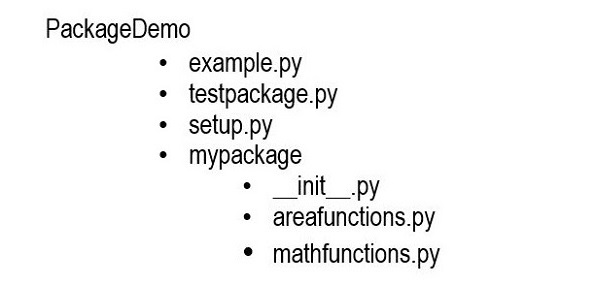
    • Create an outer folder to hold the contents of mypackage. Let its name be packagedemo.
    • Inside it, create another folder mypackage. This will be the Python package we are going to construct. Two Python modules areafunctions.py and mathfunctions.py will be created inside mypackage.
    • Create an empty “__.init__.py” file inside mypackage folder.
    • Inside the outer folder, we shall later store a Python script example.py to test our package.

    The file/folder structure should be as shown below −

    folder_structure

    Using your favorite code editor, save the following two Python modules in mypackage folder.

    Example to Create a Python Package

    # mathfunctions.pydefsum(x,y):
       val = x+y
       return val
       
    defaverage(x,y):
       val =(x+y)/2return val
    
    defpower(x,y):
       val = x**y
       return val
    

    Create another Python script −

    # areafunctions.pydefrectangle(w,h):
       area = w*h
       return area
       
    defcircle(r):import math
       area = math.pi*math.pow(r,2)return area
    

    Let us now test the myexample package with the help of a Python script above this package folder. Refer to the folder structure above.

    #example.pyfrom mypackage.areafunctions import rectangle
    print("Area :", rectangle(10,20))from mypackage.mathsfunctions import average
    print("average:", average(10,20))

    This program imports functions from mypackage. If the above script is executed, you should get following output −

    Area : 200
    average: 15.0
    

    Define Package List

    You can put selected functions or any other resources from the package in the “__init__.py” file. Let us put the following code in it.

    from.areafunctions import circle
    from.mathsfunctions importsum, power
    

    To import the available functions from this package, save the following script as testpackage.py, above the package folder as before.

    Example to Define a Package List

    #testpackage.pyfrom mypackage import power, circle
    
    print("Area of circle:", circle(5))print("10 raised to 2:", power(10,2))

    It will produce the following output −

    Area of circle: 78.53981633974483
    10 raised to 2: 100
    

    Package Installation

    Right now, we are able to access the package resources from a script just above the package folder. To be able to use the package anywhere in the file system, you need to install it using the PIP utility.

    First of all, save the following script in the parent folder, at the level of package folder.

    #setup.pyfrom setuptools import setup
    setup(name='mypackage',
    version='0.1',
    description='Package setup script',
    url='#',
    author='anonymous',
    author_email='[email protected]',
    license='MIT',
    packages=['mypackage'],
    zip_safe=False)

    Run the PIP utility from command prompt, while remaining in the parent folder.

    C:\Users\user\packagedemo>pip3 install .
    Processing c:\users\user\packagedemo
     Preparing metadata (setup.py) ... done
    Installing collected packages: mypackage
     Running setup.py install for mypackage ... done
    Successfully installed mypackage-0.1
    

    You should now be able to import the contents of the package in any environment.

    C:\Users>python
    Python 3.11.2 (tags/v3.11.2:878ead1, Feb 7 2023, 16:38:35) [MSC v.1934 64 bit (AMD64)] on win32
    Type "help", "copyright", "credits" or "license" for more information.
    >>> import mypackage
    >>> mypackage.circle(5)
    78.53981633974483
  • Python – Interfaces

    In software engineering, an interface is a software architectural pattern. It is similar to a class but its methods just have prototype signature definition without any executable code or implementation body. The required functionality must be implemented by the methods of any class that inherits the interface.

    The method defined without any executable code is known as abstract method.

    Interfaces in Python

    In languages like Java and Go, there is keyword called interface which is used to define an interface. Python doesn’t have it or any similar keyword. It uses abstract base classes (in short ABC module) and @abstractmethod decorator to create interfaces.

    NOTE: In Python, abstract classes are also created using ABC module.

    An abstract class and interface appear similar in Python. The only difference in two is that the abstract class may have some non-abstract methods, while all methods in interface must be abstract, and the implementing class must override all the abstract methods.

    Rules for implementing Python Interfaces

    We need to consider the following points while creating and implementing interfaces in Python −

    • Methods defined inside an interface must be abstract.
    • Creating object of an interface is not allowed.
    • A class implementing an interface needs to define all the methods of that interface.
    • In case, a class is not implementing all the methods defined inside the interface, the class must be declared abstract.

    Ways to implement Interfaces in Python

    We can create and implement interfaces in two ways −

    • Formal Interface
    • Informal Interface

    Formal Interface

    Formal interfaces in Python are implemented using abstract base class (ABC). To use this class, you need to import it from the abc module.

    Example

    In this example, we are creating a formal interface with two abstract methods.

    from abc import ABC, abstractmethod
    
    # creating interfaceclassdemoInterface(ABC):@abstractmethoddefmethod1(self):print("Abstract method1")return@abstractmethoddefmethod2(self):print("Abstract method1")return

    Let us provide a class that implements both the abstract methods.

    # class implementing the above interfaceclassconcreteclass(demoInterface):defmethod1(self):print("This is method1")returndefmethod2(self):print("This is method2")return# creating instance      
    obj = concreteclass()# method call
    obj.method1()
    obj.method2()

    Output

    When you execute this code, it will produce the following output −

    This is method1
    This is method2
    

    Informal Interface

    In Python, the informal interface refers to a class with methods that can be overridden. However, the compiler cannot strictly enforce the implementation of all the provided methods.

    This type of interface works on the principle of duck typing. It allows us to call any method on an object without checking its type, as long as the method exists.

    Example

    In the below example, we are demonstrating the concept of informal interface.

    classdemoInterface:defdisplayMsg(self):passclassnewClass(demoInterface):defdisplayMsg(self):print("This is my message")# creating instance      
    obj = newClass()# method call
    obj.displayMsg()

    Output

    On running the above code, it will produce the following output −

    This is my message
  • Python – Encapsulation

    Encapsulation is the process of bundling attributes and methods within a single unit. It is one of the main pillars on which the object-oriented programming paradigm is based.

    We know that a class is a user-defined prototype for an object. It defines a set of data members and methods, capable of processing the data.

    According to the principle of data encapsulation, the data members that describe an object are hidden from the environment external to the class. They can only be accessed through the methods within the same class. Methods themselves on the other hand are accessible from outside class context. Hence, object data is said to be encapsulated by the methods. In this way, encapsulation prevents direct access to the object data.

    Implementing Encapsulation in Python

    Languages such as C++ and Java use access modifiers to restrict access to class members (i.e., variables and methods). These languages have keywords public, protected, and private to specify the type of access.

    A class member is said to be public if it can be accessed from anywhere in the program. Private members are allowed to be accessed from within the class only. Usually, methods are defined as public, and instance variables are private. This arrangement of private instance variables and public methods ensures the implementation of encapsulation.

    Unlike these languages, Python has no provision to specify the type of access that a class member may have. By default, all the variables and methods in a Python class are public, as demonstrated by the following example.

    Example 1

    Here, we have an Employee class with instance variables, name and age. An object of this class has these two attributes. They can be directly accessed from outside the class, because they are public.

    classStudent:def__init__(self, name="Rajaram", marks=50):
          self.name = name
          self.marks = marks
    
    s1 = Student()
    s2 = Student("Bharat",25)print("Name: {} marks: {}".format(s1.name, s2.marks))print("Name: {} marks: {}".format(s2.name, s2.marks))

    It will produce the following output −

    Name: Rajaram marks: 50
    Name: Bharat marks: 25
    

    In the above example, the instance variables are initialized inside the class. However, there is no restriction on accessing the value of instance variables from outside the class, which is against the principle of encapsulation.

    Although there are no keywords to enforce visibility, Python has a convention of naming the instance variables in a peculiar way. In Python, prefixing name of a variable/method with a single or double underscore to emulate the behavior of protected and private access modifiers.

    If a variable is prefixed by a single double underscore (such as “__age“), the instance variable is private, similarly if a variable name is prefixed with a single underscore (such as “_salary“)

    Example 2

    Let us modify the Student class. Add another instance variable salary. Make name private and marks as private by prefixing double underscores to them.

    classStudent:def__init__(self, name="Rajaram", marks=50):
          self.__name = name
          self.__marks = marks
       defstudentdata(self):print("Name: {} marks: {}".format(self.__name, self.__marks))
          
    s1 = Student()
    s2 = Student("Bharat",25)
    
    s1.studentdata()
    s2.studentdata()print("Name: {} marks: {}".format(s1.__name, s2.__marks))print("Name: {} marks: {}".format(s2.__name, __s2.marks))

    When you run this code, it will produce the following output −

    Name: Rajaram marks: 50
    Name: Bharat marks: 25
    Traceback (most recent call last):
     File "C:\Python311\hello.py", line 14, in <module>
      print ("Name: {} marks: {}".format(s1.__name, s2.__marks))
    AttributeError: 'Student' object has no attribute '__name'
    

    The above output makes it clear that the instance variables name and age, can be accessed by a method declared inside the class (the studentdata() method), but the double underscores prefix makes the variables private, and hence, accessing them outside the class is restricted which raises Attribute error.

    What is Name Mangling?

    Python doesn’t block access to private data entirely. It just leaves it to the wisdom of the programmer, not to write any code that accesses it from outside the class. You can still access the private members by Python’s name mangling technique.

    Name mangling is the process of changing name of a member with double underscore to the form object._class__variable. If so required, it can still be accessed from outside the class, but the practice should be refrained.

    In our example, the private instance variable “__name” is mangled by changing it to the format

    obj._class__privatevar
    

    So, to access the value of “__marks” instance variable of “s1” object, change it to “s1._Student__marks”.

    Change the print() statement in the above program to −

    print(s1._Student__marks)

    It now prints 50, the marks of s1.

    Hence, we can conclude that Python doesn’t implement encapsulation exactly as per the theory of object-oriented programming. It adapts a more mature approach towards it by prescribing a name convention and letting the programmer use name mangling if it is really required to have access to private data in the public scope.