Category: Object Oriented JavaScript

https://zain.sweetdishy.com/wp-content/uploads/2026/01/coding-1.png

  • JavaScript – Abstraction

    Abstraction in JavaScript

    The Abstraction in JavaScript can be achieved using the abstract class. In object-oriented programming, the abstraction concept allows you to hide the implementation details and expose features only to the users.

    For example, you can execute the Math object methods in JavaScript by accessing the method using its name but cant see how it is implemented. Same way array methods like push(), pop(), etc., can be executed, but you dont know how it is implemented internally.

    So, the abstraction makes code cleaner by exposing the required features and hiding the internal implementation details.

    How to Achieve Abstraction in JavaScript?

    In most programming languages, you can achieve abstraction using the abstract class. The abstract class contains only method declaration but not implementation. Furthermore, you need to implement the methods declared in the abstract class into the child class. Also, you cant create an instance of the abstract class.

    JavaScript doesnt allow to create an abstract class like Java or CPP natively, but you can achieve the same functionality using the object constructor function.

    First, lets create an abstract class using the example below.

    Creating the Abstract Class

    In the below example, the fruit() function initializes the name property. When anyone creates an instance of the fruit(), the value of the constructor property becomes equal to the fruit. So, we throw an error to prevent creating an instance of the fruit.

    Also, we have added the getName() method to the prototype. After that, we create an instance of the fruit() constructor, and you can observe the error in the output.

    <html><body><div id ="output"></div><script>try{// Object constructorfunctionfruit(){this.name ="Fruit";if(this.constructor === fruit){// Preventing the instance of the objectthrownewError("You can't create the instance of the fruit.");}}// Implementing method in the prototype
             fruit.prototype.getName=function(){returnthis.name;}const apple =newfruit();}catch(error){
             document.getElementById("output").innerHTML = error;}</script></body></html>

    Output

    Error: You can't create the instance of the fruit.
    

    In the above example, you learned to achieve the abstract class functionality.

    Now, you will learn to extend the abstract class and implement the methods defined in the abstract class via the example below.

    Extending the Abstract Class

    In the example below, fruit() constructor is similar to the above example. We have implemented the Apple() constructor, initializing the name property.

    After that, we assign the prototype of the fruit() function to the Apple() function using the Object.create() method. It means Apple() function inherits the properties and methods of the fruit() class.

    After that, we have created the instance of the Apple() class and invoked the getName() method.

    <html><body><div id ="output">The name of the fruit is:</div><script>// Abstract classfunctionfruit(){this.name ="Fruit";if(this.constructor === fruit){// Preventing the instance of the objectthrownewError("You can't create the instance of the fruit.");}}// Implementing method in the prototype
          fruit.prototype.getName=function(){returnthis.name;}// Child classfunctionApple(fruitname){this.name = fruitname;}// Extending the Apple class with the fruit classApple.prototype = Object.create(fruit.prototype);const apple =newApple("Apple");
          document.getElementById("output").innerHTML += apple.getName();</script></body></html>

    Output

    The name of the fruit is: Apple
    

    The prototype implements the getName() method in the above code. So, it is hidden.

    This way, you can use an object constructor to achieve abstraction in JavaScript.

  • JavaScript – Inheritance

    Inheritance in JavaScript

    The concept of inheritance in JavaScript allows the child class to inherit the properties and methods of the parent class. Inheritance is also a fundamental concept of object-oriented programming like encapsulation and polymorphism.

    Sometimes, you must add the properties and methods of the one class into another. For example, you have created a general class for the bike containing the same properties and methods for each bike. After that, you create a separate class for the bike “Honda”, and you need to add all properties and methods to the “Honda” class. You can achieve it using inheritance.

    Before ECMAScript 6 (ES6), the object’s prototype was used for inheritance, but in ES6, the ‘extends’ keyword was introduced to inherit classes.

    The following terminologies are used in this chapter.

    • Parent class − It is a class whose properties are inherited by other classes.
    • Child class − It is a class that inherits the properties of the other class.

    JavaScript Single Class Inheritance

    You can use the ‘extends‘ keyword to inherit the parent class properties into the child class. In single class inheritance only a single class inherits the properties of another class.

    Syntax

    You can follow the syntax below for the single-class inheritance.

    classchildClassextendsparentClass{// Child class body}

    In the above syntax, you can replace the ‘childClass’ with the name of the child class and ‘parentClass’ with the name of the parent class.

    Example: Single Class Inheritance

    In the example below, the ‘Bike’ class is a parent class, and the ‘Suzuki’ class is a child class. The suzuki class inherits the properties of the Bike class.

    The Bike class contains the constructor() method initializing the gears property and the getGears() method returning the value of the gears property.

    The suzuki class contains the constructor() method to initialize the brand property and getBrand() method, returning the value of the brand property.

    We have created an object of the ‘suzuki’ class. Using the ‘suzuki’ class instance, we invoke the getBrand() and getGears() methods.

    <html><body><div id ="output1">The brand of the bike is:</div><div id ="output2">Total gears in the bike is:</div><script>// Parent classclassBike{constructor(){this.gear =5;}getGears(){returnthis.gear;}}// Child classclasssuzukiextendsBike{constructor(){super();this.brand ="Yamaha"}getBrand(){returnthis.brand;}}const suzukiBike =newsuzuki();
          document.getElementById("output1").innerHTML += suzukiBike.getBrand();
          document.getElementById("output2").innerHTML += suzukiBike.getGears();</script></body></html>

    Output

    The brand of the bike is: Yamaha
    Total gears in the bike is: 5
    

    In this way, you can use the properties and methods of the parent class through the instance of the child class.

    JavaScript super() Keyword

    In the above example, we have initialized the ‘gear’ property of the Bike class with a static value. In real life, you need to initialize it with the dynamic value according to the model of the bike.

    Now, the question is how to initialize the properties of the parent class from the child class. The solution is a super() keyword.

    The super() keyword is used to invoke the method or access the properties of the parent class in the child class. By default, the super() keyword invokes the constructor function of the parent class. You can also pass the parameters to the super() keyword to pass it to the constructor of the parent class.

    Example: Using super() keyword to initialize the parent class properties

    In the example below, suzuki class extends the Bike class.

    The Bike class contains the constructor, taking gears as parameters and, using it, initializes the gears property.

    The ‘suzuki’ class also contains the constructor, taking a brand and gears as a parameter. Using the brand parameter, it initializes the brand property and passes the gears parameter as an argument of the super() keyword.

    After that, we create an object of the ‘suzuki’ class and pass the brand and gears as an argument of the constructor. You can see the dynamic value of the brand and gear property in the output.

    <html><body><div id ="output1">The brand of the bike is:</div><div id ="output2">Total gears in the bike is:</div><script>// Parent classclassBike{constructor(gears){this.gears = gears;}}// Child classclasssuzukiextendsBike{constructor(brand, gears){super(gears);this.brand = brand;}}const suzukiBike =newsuzuki("Suzuki",4);
          document.getElementById("output1").innerHTML += suzukiBike.brand;
          document.getElementById("output2").innerHTML += suzukiBike.gears;</script></body></html>

    Output

    The brand of the bike is: Suzuki
    Total gears in the bike is: 4
    

    In this way, you can dynamically initialize the properties of the parent class from the child class.

    JavaScript Multilevel Inheritance

    Multilevel inheritance is a type of inheritance in JavaScript. In multilevel inheritance, one class inherits the properties of another class, and other classes inherit current class properties.

    Syntax

    Users can follow the syntax below for the multilevel inheritance.

    classA{}classBextendsA{}classCextendsB{}

    In the above syntax, the C class inherits the B class, and the B class inherits the A class.

    Example

    In the example below, the Honda class inherits the Bike class. The Shine class inherits the Honda class.

    We use the super() keyword in each class to invoke the parent class’s constructor () and initialize its properties.

    We are accessing the properties of the Bike class using the instance of the Shine class, as it indirectly inherits the properties of the Bike class.

    <html><body><p id ="output"></p><script>// Parent classclassBike{constructor(gears){this.gears = gears;}}// Child classclassHondaextendsBike{constructor(brand, gears){super(gears);this.brand = brand;}}classShineextendsHonda{constructor(model, brand, gears){super(brand, gears);this.model = model;}}const newBike =newShine("Shine","Honda",5);
          document.getElementById("output").innerHTML =`The ${newBike.model} model of the ${newBike.brand} brand has total ${newBike.gears} gears.`;</script></body></html>

    Output

    The Shine model of the Honda brand has total 5 gears.
    

    JavaScript Hierarchical Inheritance

    In JavaScript hierarchical inheritance, one class is inherited by multiple classes.

    Syntax

    The syntax of JYou can follow the syntax below for the hierarchical inheritance.

    classA{}classBextendsA{}
    Class CextendsA{}

    In the above syntax, B and C both classes inherit the properties of the A class.

    Example

    In the example below, the Bike class contains the gears property and is initialized using the constructor() method.

    The Honda class extends the Bike class. The constructor() method of the Honda class initializes the properties of the Bike class using the super() keyword and model property of itself.

    The Suzuki class inherits the Bike class properties. The constructor() method of the Suzuki class also initializes the Bike class properties and the other two properties of itself.

    After that, we create objects of both Honda and Suzuki classes and access their properties.

    <html><body><p id ="output1"> Honda Bike Object:</p><p id ="output2"> Suzuki Bike Object:</p><script>// Parent classclassBike{constructor(gears){this.gears = gears;}}// Child classclassHondaextendsBike{constructor(model, gears){super(gears);this.model = model;}}// Child classclassSuzukiextendsBike{constructor(model, color, gears){super(gears);this.model = model;this.color = color;}}const h_Bike =newHonda("Shine",5);const s_Bike =newSuzuki("Zx6","Blue",6);
          document.getElementById("output1").innerHTML +=JSON.stringify(h_Bike);
          document.getElementById("output2").innerHTML +=JSON.stringify(s_Bike);</script></body></html>

    Output

    Honda Bike Object: {"gears":5,"model":"Shine"}
    
    Suzuki Bike Object: {"gears":6,"model":"Zx6","color":"Blue"}
    

    Inheriting Static Members of the Class

    In JavaScript, you can invoke the static methods of the parent class using the super keyword in the child class. Outside the child class, you can use the child class name to invoke the static methods of the parent and child class.

    Example

    In the example below, the Bike class contains the getDefaultBrand() static method. The Honda class also contains the Bikename() static method.

    In the Bikename() method, we invoke the getDefaultBrand() method of the parent class using the ‘super’ keyword.

    Also, we execute the Bikename() method using the ‘Honda’ class name.

    <html><body><p id ="output">The bike name is:</p><script>// Parent classclassBike{constructor(gears){this.gears = gears;}staticgetDefaultBrand(){return"Yamaha";}}// Child classclassHondaextendsBike{constructor(model, gears){super(gears);this.model = model;}staticBikeName(){returnsuper.getDefaultBrand()+", X6";}}
          document.getElementById("output").innerHTML += Honda.BikeName();</script></body></html>

    Output

    The bike name is: Yamaha, X6
    

    When you execute any method using the ‘super’ keyword in the multilevel inheritance, the class finds the methods in the parent class. If the method is not found in the parent class, it finds in the parent’s parent class, and so on.

    JavaScript Prototype Based Inheritance

    You can also update or extend the prototype of the class to inherit the properties of the multiple classes to the single class. So, it is also called multiple inheritance.

    Syntax

    You can follow the syntax below to use prototype-based inheritance.

    Child.prototype = Instance of parent class

    In the above syntax, we assign the parent class instance to the child object’s prototype.

    Example: JavaScript Prototype Based Inheritance

    In the example below, Bike() is an object constructor that initializes the brand property.

    After that, we add the getBrand() method to the prototype of the Bike() function.

    Next, we have created the Vehicle() object constructor and instance of the Bike() constructor.

    After that, we update the prototype of the Vehicle class with an instance of the Bike. Here, Vehicle works as a child class and Bike as a parent class.

    We access the getBrand() method of the Bike() function’s prototype using the instance of the Vehicle () function.

    <html><body><p id ="output1">Bike brand:</p><p id ="output2">Bike Price:</p><script>functionBike(brand){this.brand = brand;}Bike.prototype.getBrand=function(){returnthis.brand;}//Another constructor function  functionVehicle(price){this.price = price;}const newBike =newBike("Yamaha");Vehicle.prototype = newBike;//Now Bike treats as a parent of Vehicle.  const vehicle =newVehicle(100000);
    
          document.getElementById("output1").innerHTML += vehicle.getBrand();
          document.getElementById("output2").innerHTML += vehicle.price;</script></body></html>

    Output

    Bike brand: Yamaha
    
    Bike Price: 100000
    

    You can’t access the private members to the parent class in the child class.

    Benefits of Inheritance

    Here, we will learn the benefits of the inheritance concept in JavaScript.

    • Code reusability − The child class can inherit the properties of the parent class. So, it is the best way to reuse the parent class code.
    • Functionality extension − You can add new properties and methods to extend the parent class functionality in each child class.
    • Code maintenance − It is easier to maintain a code as you can divide the code into sub-classes.
    • Multilevel and hierarchical inheritance allows you to combine data together.
  • JavaScript – Encapsulation

    What is Encapsulation?

    Encapsulation in JavaScript is a way to keep the related properties and methods under a single namespace by bundling them. It can be a function, a class or an object. In JavaScript, the encapsulation can be implemented using closures, classes and getters and setters.

    Encapsulation is a fundamental concept in Object-oriented programming languages, along with inheritance and polymorphism. JavaScript is an object oriented programming language.

    It is used to hide the data from the outside world and give access to required data only to improve the integrity and security of the data.

    What is the need for encapsulation?

    Let’s discuss the need for encapsulation in JavaScript via the following example.

    For example, you have defined the below object in your code.

    const car ={
       Brand:"Honda city",
       model:"sx",
       year:2016,}

    Anyone can access the properties of the car object, as shown below.

    car.Brand
    

    Also, anyone can change the value of any property of the car object, as shown below.

    car.Brand =true;

    Here, the value of the Brand property is changed to the boolean from the string. So, it is required to secure the original data of the object and give limited access to the data to the outside world.

    In this situation, the concept of encapsulation comes into the picture.

    Different Ways to Achieve Encapsulation in JavaScript

    There are three different ways to achieve encapsulation.

    • Using the function closures
    • Using the ES6 classes
    • Using the Getters and Setters

    Here, we will learn each approach for achieving encapsulation one by one.

    Achieving Encapsulation Using the Function Closures

    A JavaScript function closure is a concept allowing the inner function to access the variable defined in the outer function even after the outer function is executed. The variables defined in the outer function can’t be accessed outside its functional scope but can be accessed using the inner scope.

    Example

    In the below code, shoppingCart() function is an outer function that contains the variables and function. The outer function has its private scope.

    The carItems[] array is used to store the shopping cart’s items.

    The add() function can access the carItems[] array and add items.

    The remove() function checks whether the cartItems[] contains the items you need to remove. If yes, it removes the item. Otherwise, it prints the message that you can’t remove the item.

    The shoppingCart() function returns the object containing the add() and remove() functions.

    After creating a new instance of the shoppingCart() function, you can use the add() and remove() functions to manipulate the shopping cart data.

    <html><body><p id ="output"></p><script>let output = document.getElementById("output");functionshoppingCart(){const cartItems =[];functionadd(item){
            cartItems.push(item);
            output.innerHTML +=`${item.name} added to the cart. <br>`;}functionremove(itemName){const index = cartItems.findIndex(item=> item.name === itemName);if(index !==-1){const removedItem = cartItems.splice(index,1)[0];
              output.innerHTML +=`${removedItem.name} removed from the cart. <br>`;}else{
              output.innerHTML +=`Item ${itemName} not found in the cart. <br>`;}}return{
            add,
            remove,};}// Defining itemsconst item1 ={ name:'Car', price:1000000};const item2 ={ name:'Bike', price:100000};// Create a new Shopping cartconst cart =shoppingCart();// Adding items to the cart
        cart.add(item1);
        cart.add(item2);// Remove bike from the cart
        cart.remove('Bike');</script></body></html>

    Output

    Car added to the cart.
    Bike added to the cart.
    Bike removed from the cart.
    

    In this way, no one can directly access and modify the cartItems[] array.

    Achieving Encapsulation Using ES6 Classes and Private Variables

    In JavaScript, you can use classes and private variables to achieve the encapsulation.

    Private Variables (Fields) in JavaScript

    To define the private class variables, you can write a variable name followed by the # sign. For example, ‘name’ is a private variable in the below code.

    classcar{
        #name="TATA";}

    If you try to access the name by the instance of the class, it will give you an error that private fields can’t be accessed outside the class.

    To achieve encapsulation, you can define the private variables in the class and give them access to the outside world using different methods.

    Example

    In the example below, we have defined the car class.

    The car class contains the ‘brand’, ‘name’, and ‘milage’ private variables.

    The getMilage() method is defined to return the milage of the car, and the setMilage() method is used to set the milage of the method.

    We created the car class’s object and used the method to access and modify the private fields. If you try to access the private field of the class, the code will throw an error.

    You can also define more methods in the class to access and modify other private fields.

    <html><body><div id ="output1">The car mileage is:</div><div id ="output2">After updating the car mileage is:</div><script>classCar{
          #brand ="TATA";// Private field
          #name ="Nexon";// Private field
          #milage =16;// Private fieldgetMilage(){returnthis.#milage;// Accessing private field}setMilage(milage){this.#milage = milage;// Modifying private field}}let carobj =newCar();
        document.getElementById("output1").innerHTML += carobj.getMilage();
        carobj.setMilage(20);
        document.getElementById("output2").innerHTML += carobj.getMilage();// carobj.#milage);  will throw an error.</script></body></html>

    Output

    The car mileage is: 16
    After updating the car mileage is: 20
    

    Achieving Encapsulation Using the Getters and Setters

    The JavaScript getters and setters can be defined using the get and set keywords, respectively. The getters are used to get the class properties, and setters are used to update the class properties.

    They are very similar to the class methods but defined using the get/set keyword followed by the method name.

    Example

    In the example below, we have defined the User class containing the three private fields named username, password, and isLoggedIn.

    The getters and setters named username are defined to get and set user names. Here, you can observe that name of the getters and setters method is the same.

    After that, we create an object of the class and use the getters and setters as the property to access and update the username field of the class.

    You may also create getters and setters for the other class fields.

    <html><body><div id ="output1">The initial username is:</div><div id ="output2">The newusername is:</div><script>classUser{
                #username ="Bob";
                #password ="12345678";
                #isLoggedIn =false;getusername(){returnthis.#username;}setusername(user){this.#username = user;}}const user =newUser();
            document.getElementById("output1").innerHTML += user.username;
            user.username ="Alice";
            document.getElementById("output2").innerHTML += user.username;</script></body></html>

    Output

    The initial username is: Bob
    The new username is: Alice
    

    From the above all, you can understand that encapsulation is making variable privates and restricting its access to the outside world.

    Benefits of Encapsulation in JavaScript

    Here, we have listed some benefits of encapsulation in JavaScript −

    • Data protection − The encapsulation allows you to control the access of the class data by making them private. You can expose the required data and methods only. So, no one can modify the data by mistake. Also, you can validate the data while updating them. If new data is not valid, you can throw an error.
    • Code reusability − The class is a template for the object, and you can reuse it to create objects with different data.
    • Code Maintenance − The encapsulation makes it easy to maintain the code as each object is independent, and if you make changes to one object, it doesn’t affect the other code.
  • JavaScript – ES5 Object Methods

    The ES5 Object methods in JavaScript are used to manipulate and protect the obejcts. ECMAScript 5 (ES5) is a significant revision of the language introduced in 2009. It has added many object methods to JavaScript.

    These methods provide us with efficient ways to iterate through object properties, manipulate values, and perform various operations on objects. Object manipulation is a fundamental aspect of JavaScript programming.

    JavaScript ES5 Object Methods

    In ES5, object-related methods are added to manipulate and protect the objects. The following tables highlight the object methods and their descriptions −

    Methods to Manipulate the Object

    JavaScript contains built-in constructors, which we have listed in the below table.

    Sr.No.MethodDescription
    1create()To create new objects with specified prototype object.
    2defineProperty()To make a clone of the object and add new properties to its prototype.
    3defineProperties()To define a property into a particular object and get the updated object.
    4getOwnPropertyDescriptor()To get the property descriptor for the properties of the object.
    5getOwnPropertyNames()To get object properties.
    6getPrototypeOf()To get the prototype of the object.
    7keys()To get all keys of the object in the array format.

    Methods to Protect the Object

    Sr.No.MethodDescription
    1freeze()To prevent adding or updating object properties by freezing the object.
    2seal()To seal the object.
    3isFrozen()To check if the object is frozen.
    4isSealed()To check if the object is sealed.
    5isExtensible()To check if an object is extensible.
    6keys()To get all keys of the object in the array format.
    7preventExtensions()To prevent the prototype updation of the object.

    Let’s undertand each of the methods listed above with the help of some examples −

    JavaScript Object.create() Method

    The JavaScript Object.create() method creates a new object with the specified prototype object and properties. It is a static method in JavaScript.

    The syntax of the Object.create() method in JavaScript is as follows

    Object.create(proto, propertiesObject)

    The paramters in the Object.create() method are as follows −

    • proto − it is the object that is used as prototype of new object.
    • propertiesObejct (optaional) − It’s an object that defines the properties of new object.

    Example

    In the example below, the student object is created using the person object as it’s prototype.

    <html><body><div id ="output"></div><script>const person ={
          firstName:"John",
          lastName:"Doe"};const student = Object.create(person);
        student.age =18;
        
        document.getElementById("output").innerHTML = 
        student.firstName +"<br>"+
        student.lastName +"<br>"+
        student.age;</script></body></html>

    Output

    John
    Doe
    18
    

    JavaScript Object.defineProperty() Method

    You can use the Object.definedProperty() method to define a single property of the object or update the property value and metadata. It’s a static method in JavaScript.

    The syntax of the Object.definedProperty() method in JavaScript is as follows −

    Object.defineProperty(obj, prop, descriptor)

    The paramters in the Object.definedProperty() method are as follows −

    • obj − it is the object on which the property is to be defined or modified.
    • prop (string or symbol) − It’s the name of property to be defined or modified.
    • descriptor − It’s an object that defines the property’s attributes.

    Example

    The below example contains the car object’s brand, model, and price properties. We used the defineProperty() method to define the ‘gears’ property in the object.

    <html><body><div id ="output">The obj object is -</div><script>const car ={
                brand:"Tata",
                model:"Nexon",
                price:1000000,}
    
            Object.defineProperty(car,"gears",{
                value:6,
                writable:true,
                enumerable:true,
                configurable:true})
            
            document.getElementById("output").innerHTML +=JSON.stringify(car);</script></body></html>

    Output

    The obj object is - {"brand":"Tata","model":"Nexon","price":1000000,"gears":6}
    

    JavaScript Object.defineProperties() Method

    The Object.defineProperties() method in JavaScript is a static method that defines new properties of object or modifies the properties.

    The syntax of Object.defineProperties() method in JavaScript is as follows

    Object.defineProperties(obj, props)

    The parameters in the Object.defineProperties() method are as follows −

    • obj − it is the object on which the properties are to be defined or modified.
    • prop (string or symbol) − It’s the name of property to be defined or modified.

    Example

    In the following example, we use Object.defineProperties() method to add two mew properties named property1 and property2. The property1 is writable and property2 is non-writable.

    <html><body><div id ="output"></div><script>const object1 ={};
    
        Object.defineProperties(object1,{
          property1:{
            value:42,
            writable:true,},
          property2:{
          value:"Tutorials Point",
          writable:false,},});
    
        document.getElementById("output").innerHTML ="Property1 : "+ object1.property1 +"<br>"+"Property2 : "+ object1.property2;</script></body></html>

    Output

    Property1 : 42
    Property2 : Tutorials Point
    

    JavaScript Object.getOwnPropertyDescriptor() Method

    The Object.getOwnPropertyDescriptor() method in JavaScript returns a property descriptor for a specific property of an object. The returned property descriptor is a JavaScript object.

    Example

    Try the following example −

    <html><body><div id ="output"></div><script>const object1 ={
          property1:42,};const descriptor1 = Object.getOwnPropertyDescriptor(object1,'property1');
    
        document.getElementById("output").innerHTML ="descriptor configurable? : "+ descriptor1.configurable +"<br>"+"descriptor value : "+ descriptor1.value;</script></body></html>

    Output

    descriptor configurable? : true
    descriptor value : 42
    

    JavaScript Object.getOwnPropertyNames() Method

    The Object.getOwnPropertyNames() method in JavaScript returns an array of all the properties found in a given object. This includes both enumerable and non-enumerable properties.

    Example

    In the example below, we use getOwnPropertyNames() method to get the property names of the created object.

    <html><body><div id ="output"></div><script>const obj ={
          a:10,
          b:20,
          c:30,};
        document.getElementById("output").innerHTML = Object.getOwnPropertyNames(obj);</script></body></html>

    Output

    a,b,c
    

    JavaScript Object.getPrototypeOf() Method

    The Object.getPrototypeOf() method in JavaScript returns the prototype of the specified object. It’s a static JavaScript method added in ES5.

    Example

    <html><body><div id ="output"></div><script>const prototype1 ={name:"John Doe"};const object1 = Object.create(prototype1);const prot = Object.getPrototypeOf(object1)
        document.getElementById("output").innerHTML =JSON.stringify(prot);</script></body></html>

    Output

    {"name":"John Doe"}
    

    JavaScrip Object.keys() Method

    The Object.keys() method in javaScript takes an object as an argument and returns an array containing the object’s own enumerable property names.

    <html><body><div id ="output"></div><script>let person ={
           name:"John Doe",
           age:20,
           profession:"Software Engineer"};
    
        document.getElementById("output").innerHTML = Object.keys(person);</script></body></html>

    Output

    name,age,profession
    

    JavaScript Object.freeze() Method

    The Object.freeze() in JavaScript is static method that freezes an object. A frozen object can not be further changed. No new property can be added or the existing properties can not be removed. The values of the properties can not be modified.

    <html><body><div id ="output"></div><script>const obj ={
          prop:23,};
    
        Object.freeze(obj);// obj.prop = 33;// Throws an error in strict mode
        document.getElementById("output").innerHTML = obj.prop;</script></body></html>

    Output

    23
    

    JavaScript Object.seal() Method

    The Object.seal() static method seals an object. In a sealed object, no new property can be added, no property can be deleted.

    <html><body><div id ="output"></div><script>const obj ={
          property:34,};
    
        Object.seal(obj);
        obj.property =33;
        document.getElementById("output").innerHTML = obj.property;delete obj.property;// Cannot delete when sealed
        
        document.getElementById("output").innerHTML = obj.property;</script></body></html>

    Output

    33
    

    JavaScript Object.isFrozen() Method

    The Object.isFrozen() method in JavaScript returns true if the given object is frozen, else it returns false if the object is not frozen.

    <html><body><div id ="output1"></div><div id ="output2"></div><script>const person ={
          age:21,};
        document.getElementById("output1").innerHTML = Object.isFrozen(person);// Expected output: false
        Object.freeze(person);
        document.getElementById("output2").innerHTML += Object.isFrozen(person);// Expected output: true</script></body></html>

    Output

    false
    true
    

    JavaScript Object.isSealed() Method

    The Object.isSeal() method in JavaScript is used to check if the given object is sealed or not. It returns true if the object is sealed else it retuens flase.

    <html><body><div id ="output1"></div><div id ="output2"></div><script>const person ={
          name:"John Doe",};
        document.getElementById("output1").innerHTML = Object.isFrozen(person);// Expected output: false
        Object.seal(person);
        document.getElementById("output2").innerHTML += Object.isSealed(person);// Expected output: true</script></body></html>

    Output

    false
    true
    

    JavaScript Object.preventExtensions() Method

    The ES5 Object.preventExtensions() method is used to prevent the prototype updation of an object. It also prevent the new properties to be added to an object.

    <html><body><div id ="output"></div><script>const person ={};
        Object.preventExtensions(person);try{
          Object.defineProperty(person,'name',{
            value:"John Doe",});}catch(e){
          document.getElementById("output").innerHTML =e;}</script></body></html>

    Output

    It will produce the following output −

    TypeError: Cannot define property name, object is not extensible
    

    JavaScript Object.isExtensible() Method

    The JavaScript Object.isExtensible() method is used to check if an object is extensible or not. It returns true indicating the given object is extensible, else it will return false. An object is extensible if it can have new properties added to it.

    <html><body><div id ="output1"></div><div id ="output2"></div><script>const person ={
          name:"John Doe",};
        
        document.getElementById("output1").innerHTML = Object.isExtensible(person);// Expected output: false
        Object.preventExtensions(person);
        document.getElementById("output2").innerHTML += Object.isExtensible(person);// Expected output: false</script></body></html>

    Output

    true
    false
  • JavaScript – Native Prototypes

    Native Prototypes

    The native prototypes in JavaScript are property of Object.prototype object. The prototypes are the mechanism by which the objects inherit features from one another.

    In JavaScript, each object contains the prototype property. The prototype of each object contains the methods and properties related to the object. So, it is also called the native prototype.

    However, you can update or add new methods and properties to the native prototype object, but you can’t delete any already existing.

    The JavaScript object and object constructor are the main prerequisites to understand JavaScript native prototypes.

    Syntax

    You can follow the syntax below to access the native prototype of the object.

    Object.prototype;

    In the above syntax, the object can be any JavaScript object.

    Example: Accessing the array’s prototype

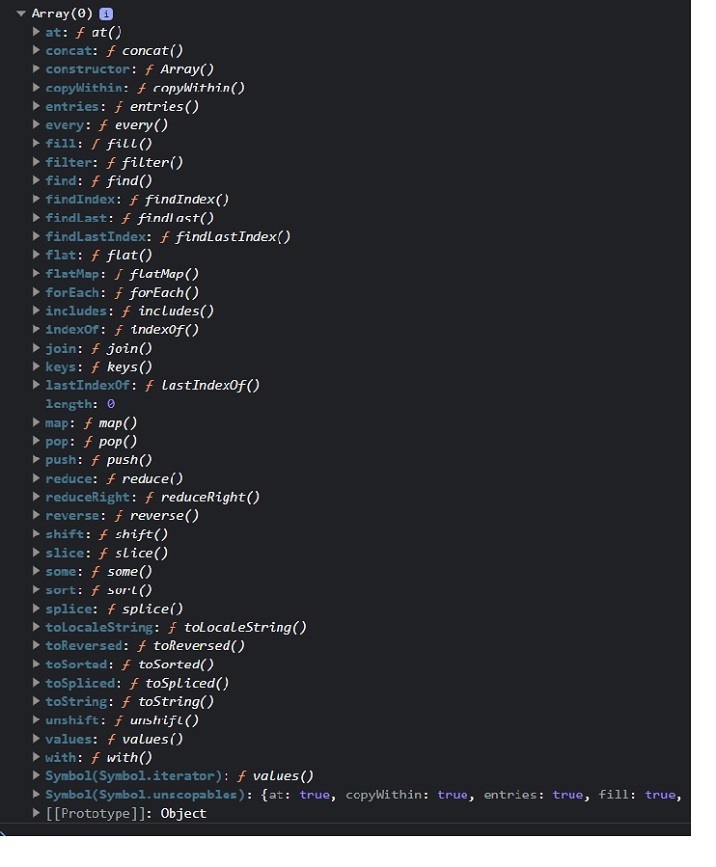
    Whenever you execute the below code in the browser, it will print the prototype of the array in the browser console. In the same way, you can check the prototype of the other objects.

    In the console, you can see that the prototype object contains the methods which you can use with array methods.

    <html><body><script>
    		console.log(Array.prototype);</script><p>Please open the web console before executing the above program.</p></body></html>

    Output

    On running the above program, you will see the result in web console similar to the following screenshot −

    JavaScript Array Prototype

    Updating the Native Prototype

    You can update the existing method or property of the native prototype object or add a new method or property to the native prototype object.

    Syntax

    You can follow the syntax below to update or add new properties or methods to the prototype object.

    objName.prototype.name = value
    

    In the above syntax, objName is an object whose prototype you need to update.

    The ‘name’ is a method or property name. You can assign new values or function expressions to the ‘name.

    Example: Updating the toLowerCase() method of the string object’s prototype

    The prototype of the String object contains the toLowerCase() method. Here, we update the toLowerCase() method.

    The updated toLowerCase() method returns the string in the uppercase. In the output, you can observe the string, which is in uppercase.

    In this way, you can update the functionality of the built-in methods of the object.

    <html><body><p id ="output">After updating the string.toLowerCase() method:</p><script>String.prototype.toLowerCase=function(){returnthis.toUpperCase();}let str ="Hello World";
    		document.getElementById("output").innerHTML += str.toLowerCase();</script></body></html>

    Output

    After updating the string.toLowerCase() method: HELLO WORLD
    

    You shouldn’t update the methods and properties of the native prototype object. However, you can add new as shown in the example below.

    Example: Adding a new method to the prototype object

    You can also add a new method to the Object prototype. Here, we added the firstCase() method in the object prototype.

    The firstCase() method returns a string after converting the string’s first character to the uppercase.

    <html><body><p id ="output">After executing the string.firstCase() method:</p><script>String.prototype.firstCase=function(){// First character in uppercase. Other characters in lowercase.returnthis.charAt(0).toUpperCase()+this.slice(1).toLowerCase();}let str ="hello world";
    		document.getElementById("output").innerHTML += str.firstCase();</script></body></html>

    Output

    After executing the string.firstCase() method: Hello world
    

    Adding a method to the constructor function

    Whenever you define an object using the constructor function, you can’t add a method or property to the constructor function using its instance. So, you need to add the method to the constructor function prototype. So it can be accessible through all instances of the object.

    Example

    In the example below, the Person() is a constructor function that initializes object properties.

    After that, we added the display() method to the prototype of the person() function.

    Next, we created two instances of the Person() function and used the display() method with them. So, methods and properties added in the prototype of the object constructor can be accessed through all instances of the constructor function.

    <html><body><p id ="demo"></p><script>const output = document.getElementById("demo");functionPerson(id, name){this.id = id;this.name = name;}Person.prototype.display=function(){
    			output.innerHTML +=this.id +", "+this.name +"<br>";}const p1 =newPerson(1,"James");const p2 =newPerson(2,"Nayan");
    		p1.display();
    		p2.display();</script></body></html>

    Output

    1, James
    2, Nayan
    

    All instances of the object inherit the properties and methods from their parent’s prototype.

    JavaScript Prototype Chaining

    Simply, you can say that the prototype stores the default values of the properties. The code overrides the prototype property value if the object constructor and its prototype contain the same properties.

    Example

    In the below code, the Person() function contains the name property. We have added the name and age property in the function’s prototype.

    We have created the p1 object using the Person() constructor function. The value of the name property of the p1 object is ‘Nayan’ as the name already exists in the constructor. The value of the age property is 20, which is the same as the age property value in the prototype.

    <html><body><p id ="output"></p><script>functionPerson(id, name){this.id = id;this.name = name;}Person.prototype.name ="John";Person.prototype.age =20;const p1 =newPerson(1,"Adam");
    		document.getElementById("output").innerHTML ="Id: "+ p1.id +", Name: "+ p1.name +", Age: "+ p1.age;</script></body></html>

    Output

    Id: 1, Name: Adam, Age: 20
  • JavaScript – Object Constructors

    Object Constructors

    An object constructor in JavaScript is a function that creates an instance of a class, which is typically called an object. A constructor is called when you declare an object using the new keyword. The purpose of a constructor is to create an object and set values if there are any object properties present.

    There are two ways to create a template for the object in JavaScript – using a class and using an object constructor.

    Whenever you need to create multiple objects with the same syntax, you require a template for the object. For example, you are managing the car inventory. So, it is not a good idea to create a new object every time using the object literal. In such cases, you need to use the object constructors.

    The main benefit of the object constructors is that you can reuse the code.

    Syntax

    You can follow the syntax below to use the object constructor to create an object.

    functionFuncname(p1, p2, ... , pN){this.prop1 = p1;}const obj =newFuncname(args);

    In the above syntax, Funcname() is a constructor function, and you can replace any valid identifier with the Funcname.

    A p1, p2, , and pN are parameters you can use inside the function body. You need to pass arguments to the constructor while creating the object.

    The ‘this’ keyword represents the function context you are using. Here, the ‘this’ keyword refers to the current instance of the object.

    To create an object, you can use the function constructor with a ‘new’ keyword.

    Example: Creating an object using a constructor function

    In the example below, we have created a Tree() function. In the function body, we initialize the name and age properties.

    After that, we use the function name with a ‘new’ keyword to create an object of the Tree() constructor.

    <html><body><p id ="output"></p><script>functionTree(){this.name ="palm";this.age =5;}const tree1 =newTree();
        document.getElementById("output").innerHTML ="name = "+ tree1.name +", age = "+ tree1.age;</script></body></html>

    Output

    name = palm, age = 5
    

    Example: Constructor function with parameters

    In the example below, the Bike() function takes three parameters. In the function body, we initialize the properties using the parameters.

    After that, we created bike1 and bike2 objects with different values using the Bike() constructor. In the output, you can observe the object property values.

    <html><body><p id ="output1">The bike1 object is :</p><p id ="output2">The bike2 object is :</p><script>functionBike(name, speed, gear){this.name = name;this.speed = speed;this.gear = gear;}const bike1 =newBike("Honda",100,4);const bike2 =newBike("Yamaha",200,6);
        document.getElementById("output1").innerHTML +=JSON.stringify(bike1);
        document.getElementById("output2").innerHTML +=JSON.stringify(bike2);</script></body></html>

    Output

    The bike1 object is : {"name":"Honda","speed":100,"gear":4}
    
    The bike2 object is : {"name":"Yamaha","speed":200,"gear":6}
    

    In this way, you can use the object constructor to reuse the object syntax code and create multiple objects of the same type.

    Adding a Property or Method to a Constructor

    You learned to add a property of method using the dot or square bracket notation into the object in the Objects chapter. But what if you want to add a property or method to the object constructor?

    The object constructor doesn’t allow you to add the property or method after defining it. So, you always need to add the required properties and methods while defining it. Let’s understand it via the example below.

    Example

    The below example demonstrates adding methods and properties into the object constructor. We added the three properties and the getFullAddress() method in the houseAddress() constructor function.

    Also, we have executed the method by taking the object as a reference.

    <html><body><p id ="output1">The house object is  </p><p id ="output2">The full address of the house is  </p><script>functionHouseAddress(no, street, city){// Adding propertiesthis.houseNo = no,this.street = street,this.city = city;// Adding a methodthis.getFullAddress=function(){returnthis.houseNo +", "+this.street +", "+this.city;};}const house =newHouseAddress(20,"Cooper Square","New York");
        document.getElementById("output1").innerHTML +=JSON.stringify(house);
        document.getElementById("output2").innerHTML += house.getFullAddress();</script></body></html>

    Output

    The house object is {"houseNo":20,"street":"Cooper Square","city":"New York"}
    
    The full address of the house is 20, Cooper Square, New York
    

    If you add the method or property as shown below. It will be added to the particular object but not to the constructor function.

    Obj.prop =20;

    Other objects created using the object constructor don’t contain the prop property as it is added to the obj object only.

    JavaScript Object Prototype

    In JavaScript, each object contains the prototype property by default, and the object constructor is also one kind of object. So, you can add properties or methods to the object prototype.

    Syntax

    You can follow the syntax below to add properties or methods to the object constructor prototype.

    obj.prototype.name = value;

    In the above syntax, ‘obj’ is an object constructor in which you need to add a property or method.

    The ‘name’ is a property or method name.

    For the property, you can replace a ‘value’ with an actual value; for the method, you can replace a ‘value’ with a function expression.

    Example

    In the example below, we have added the BikeDetails() method to the prototype of the Bike() constructor.

    The BikDetails() method can be executed using any object of the Bike() constructor. However, when you print the bike1 and bike2 objects, it won’t show you BikeDetails() method as it is added in the prototype.

    <html><body><p id ="output1">The bike1 details is:</p><p id ="output2">The bike2 details is:</p><script>functionBike(name, speed, gear){this.name = name;this.speed = speed;this.gear = gear;}Bike.prototype.BikeDetails=function(){returnthis.name +", "+this.speed +", "+this.gear +"<br>";};const bike1 =newBike("Honda",100,4);const bike2 =newBike("Yamaha",200,6);
        document.getElementById("output1").innerHTML += bike1.BikeDetails();
        document.getElementById("output2").innerHTML += bike2.BikeDetails();</script></body></html>

    Output

    The bike1 details is: Honda, 100, 4
    
    The bike2 details is: Yamaha, 200, 6
    

    Built-in Object Constructors in JavaScript

    JavaScript contains a built-in constructor, which we have listed in the below table.

    Sr. No.ConstructorDescriptionExample
    1ArrayTo create an array.new Array()
    2StringTo create a string.new String(“Hello”)
    3NumberTo create a number.new Number(92)
    4BooleanTo create a boolean.new Boolean(true)
    5SetTo create a new set.new Set()
    6MapTo create a new map.new Map()
    7ObjectTo create a new object.new Object()
    8FunctionTo create a new function.new Function(“x”, “return x * x;”)
    9DateTo create an instance of Date object.new Date()
    10RegExpTo create a new regular expression.new RegExp(“\\d+”)
    11ErrorTo create a new error.new Error(“new error.”)
    12SymbolTo create a symbol.Symbol(“description”)

    However, you can also use literal expressions to define the number, strings, boolean, etc., variables containing primitive values.

  • JavaScript – Object Accessors

    The object accessor properties in JavaScript are methods that get or set the value of an object. They are defined using the get and set keywords. Accessor properties are a powerful way to control how your objects are accessed and modified.

    The JavaScript object can have two kinds of properties.

    • Data properties
    • Accessor properties

    The below property is called the data properties.

    const obj ={
        key:"value",// Data property}

    Object Accessor Properties

    In JavaScript, you can use the getters to get the object properties and setters to set the object properties.

    There are two keywords to define accessor properties.

    • get − The get keyword is used to define a method to get the object property value.
    • set − The set keyword is used to define a method to update the object property value.

    JavaScript Getters

    The getters are used to access the object properties. To define a method as getter, we use get keyword followed by method name. Follow the syntax below to define the getter.

    getmethodName(){// Method body}
    obj.methodName;

    In the above syntax, we have defined the getters using the ‘get’ keyword followed by the method name.

    You can use the method name as an object property to get its returned value.

    You don’t need to write the pair of parenthesis followed by the method name to execute the getters. You can access it like the object property.

    Example

    In the example below, in the wall object, we have defined the getColor() getters. The getColor() returns the value of the color property.

    After that, we use the getColor() method to access the color property value of the object.

    <html><body><p id ="output">The color of the wall is :</p><script>const wall ={
          color:"brown",getgetColor(){returnthis.color;}}
        document.getElementById("output").innerHTML += wall.getColor;</script></body></html>

    Output

    The color of the wall is : brown
    

    JavaScript Setters

    The setters are used to update the JavaScript object properties. To define a method as setter, we use set keyword followed by method name You can follow the syntax below to define setters in the JavaScript object.

    setmethodName(param){// Setter methodreturnthis.color = color;}
    
    wall.methodName ="Red";
    • In the above syntax, the ‘set’ keyword is used to define the setter method.
    • The method_name can be any valid identifier.
    • The setter method always takes a single parameter. If you don’t pass a parameter or multiple parameters, it will give you an error.
    • You can assign value to the setter method as you assign value to the property.

    Example

    In the example below, we have defined the setter method to set the value of the color property of the wall object. We set the ‘red’ value to the color property of the object using the ‘setColor’ setter method.

    <html><body><p id ="output"></p><script>const wall ={
          color:"brown",setsetColor(color){returnthis.color = color;}}
        document.getElementById("output").innerHTML +="The color of the wall before update is : "+ wall.color +"<br>";//updating the color of wall
        wall.setColor ="Red";
        document.getElementById("output").innerHTML +="The color of the wall after update is : "+ wall.color;</script></body></html>

    Output

    The color of the wall before update is : brown
    The color of the wall after update is : Red
    

    JavaScript Object Methods vs. Getters/Setters

    In JavaScript, whatever you can do using the getters and setters, you can also do by defining the specific object method. The difference is that getters and setters provide simpler syntax.

    Let’s understand it with the help of some examples.

    Example

    In the example below, we have defined the getColor() getters method and colorMethod() object method in the wall object. Both method returns the color value.

    You can observe that defining and accessing getters is more straightforward than defining and accessing the object method.

    <html><body><p id ="output"></p><script>const wall ={
          color:"brown",getgetColor(){returnthis.color;},colorMethod:function(){returnthis.color;}}
        
        document.getElementById("output").innerHTML +="Getting the color using the getters : "+ wall.getColor +"<br>";
        
        document.getElementById("output").innerHTML +="Getting the color using the object method : "+ wall.colorMethod();</script></body></html>

    Output

    Getting the color using the getters : brown
    Getting the color using the object method : brown
    

    Data Quality and Security

    The getter and setter methods can provide better data quality. Also, they are used for encapsulation to secure the object data.

    Let’s understand how getter and setter improve data quality and provide security via the example below.

    Example

    In the example below, the getColor() is a getter method, returning the value of the color property after converting it to the uppercase. Also, it hides the color property from users, as you can access its value using the getColor() method.

    <html><body><p id ="output"></p><script>const wall ={
          color:"Brown",getgetColor(){returnthis.color.toUpperCase();}}
        document.getElementById("output").innerHTML +="Getting the color using the getters : "+ wall.getColor;</script></body></html>

    Output

    Getting the color using the getters : BROWN
    

    Defining getters/setters using the Object.defineProperty()

    You can also use the Object.defineProperty() method to add getters or setters into the object.

    Object.defineProperty(object,"methodName",{keyword:function(){// Method body},})

    Using the above syntax, you can define the getter or setter same as methodName.

    Parameters

    • object − It is an object where you need to add getters or setters.
    • methodName − It is the name of the method for getters or setters.
    • keyword − It can be ‘get’ or ‘set’ according to you want to define the getter or setter method.

    Example

    In the example below, we have added the getSize and setSize getter and setter to the object using the object.defineProperty() method.

    After that, we use the getSize and setSize to get and set the size, respectively.

    <html><body><p id ="demo"></p><script>const output = document.getElementById("demo");const door ={
          size:20,}
        Object.defineProperty(door,"getSize",{get:function(){returnthis.size;}});
    
        Object.defineProperty(door,"setSize",{set:function(value){this.size = value;},})
    
        output.innerHTML +="Door size is : "+ door.getSize +"<br>";
        door.setSize =30;
        output.innerHTML +="Door size after update is : "+ door.getSize;</script></body></html>

    Output

    Door size is : 20
    Door size after update is : 30
    

    Reasons to use getters and setters

    Here are the benefits of using the getters and setters in JavaScript.

    • It has a simple syntax than object methods.
    • To improve the data quality by validating the data.
    • For the encapsulation or securing the data.
    • It also allows abstraction or data hiding.
  • JavaScript – Display Objects

    Displaying Objects in JavaScript

    There are different ways to display objects in JavaScript. Using the console.log() method, we can display the object in the web console. Sometimes developers require to display the object properties and their value in the HTML or for debugging the code.

    For displaying an object, we can access the different properties and display them. We can also convert the object to a JSON string and display it as a string.

    When you print the object like other variables in the output, it prints the ‘[object Object]’ as shown in the example below.

    In the example below, we have created a fruit object and printed it in the output. You can observe that it prints the [object Object].

    <html><body><p id ="output">The object is:</p><script>const fruit ={
          name:"Banana",
          price:100,}
        document.getElementById("output").innerHTML += fruit;</script></body></html>

    Output

    The object is: [object Object]
    

    To overcome the above problem, you need to use specific approaches to display the object.

    Some approaches to display the JavaScript objects are as follows −

    • Accessing the object properties
    • Using the JSON.stringify() method
    • Using the Object.entries() method
    • Using the for…in loop

    Accessing the Object Properties

    In the object properties chapter, you learned different ways to access the values of the object properties. You can use the dot notation or square bracket notation to display the property values.

    This way, you may get all property values and display them in the output.

    Syntax

    Users can follow the syntax below to display the object by accessing properties.

    obj.property;OR
    obj["property"];

    In the above syntax, we access the property using the obj object’s dot and square bracket notation.

    Example

    In the example below, we have accessed the ‘name’ property of the object using the dot notation and the ‘price’ property using the square bracket notation.

    <html><body><p id="output"></p><script>const fruit ={
          name:"Banana",
          price:100,}const fruitName = fruit.name;const fruitPrice = fruit["price"];
    
        document.getElementById("output").innerHTML ="The price of the "+ fruitName +" is: "+ fruitPrice;</script></body></html>

    Output

    The price of the Banana is: 100
    

    Using the JSON.stringify() Method

    When object contains the dynamic properties or you don’t know object properties, you can’t print properties and values using the first approach. So, you need to use the JSON.stringify() method. It converts the object into a string.

    Syntax

    Follow the syntax below to use the JSON.stringify() method to display the object.

    JSON.stringify(obj);

    You need to pass the object as a parameter of the JSON.stringify() method.

    Example

    In the example below, we have converted the fruit string into the JSON string and displayed in the output.

    <html><body><p id ="output">The fruit object is </p><script>const fruit ={
          name:"Banana",
          price:100,}
        document.getElementById("output").innerHTML +=JSON.stringify(fruit);</script></body></html>

    Output

    The fruit object is {"name":"Banana","price":100}
    

    Using the Object.enteries() Method

    The Object.entries() is a static method of the Object class, allowing you to extract the properties and values in the 2D array. After that, you can use the loop to traverse the array and display each property and value pair individually.

    Syntax

    Follow the syntax below to use the Object.entries() method.

    Object.entries(obj);

    The Object.entries() method takes the object as a parameter and returns the 2D array, where each 1D array contains the key-value pair.

    Example

    In the example below, the numbers object contains the 4 properties. We used the Object.entries() method to get all entries of the object.

    After that, we used the for loop to traverse the object entries and display them.

    <html><body><p> Displaying the object entries</p><p id ="output"></p><script>const numbers ={
          num1:10,
          num2:20,
          num3:30,
          num4:40,}for(const[key, value]of Object.entries(numbers)){
          document.getElementById("output").innerHTML += key +": "+ value +" <br>";}</script></body></html>

    Output

    Displaying the object entries
    
    num1: 10
    num2: 20
    num3: 30
    num4: 40
    

    Using the for…in Loop

    The for…in loop is used to traverse the iterable, and the object is one of them.

    Syntax

    Users can follow the syntax below to use the for…in loop to traverse the object and display it in the output.

    for(key in obj){// Use the key to access the value}

    In the above syntax, obj is an object to display. In the loop body, you can access the value related to the key and print the key-value pair.

    Example

    In the example below, we used the for…in loop to traverse each key of the object and print them in the output.

    <html><body><p> Displaying Object Entries using for...in loop:</p><p id ="output"></p><script>const languages ={
          language1:"JavaScript",
          language2:"Python",
          language3:"Java",
          language4:"HTML",}for(const key in languages){
          document.getElementById("output").innerHTML += 
          key +": "+ languages [key]+" <br>";}</script></body></html>

    Output

    Displaying Object Entries using for...in loop:
    
    language1: JavaScript
    language2: Python
    language3: Java
    language4: HTML
    

    The best way to display the object is using the JSON.stringify() method. It converts the object into a flat string. Other approaches can’t be used to display the nested objects, but JSON.stringify() method can be used.

  • JavaScript – Static Methods

    What are Static Methods?

    static method in JavaScript is defined using the static keyword followed by the method name. You can execute the static method by taking the class name as a reference rather than an instance of the class.

    The main benefit of the static method is that it can be used to create a utility function that doesn’t require the instance of the class for the execution. For example, a Math object contains various static methods, which we can invoke through Math class directly.

    Also, you can use static methods to add all related methods under a single namespace. Furthermore, static methods give better performance than the regular class methods due to memory optimization.

    In the following syntax, we define a static method called getSize() in the class called Table −

    classTable{staticgetSize(){// Static methodreturn"10 x 10";}}
    Table.getSize();// Static method invocation

    In the above syntax, getSize() is a static method. We used the class name to execute the getSize() method.

    Examples

    Let’s understand the JavaScript static methods with the help of some examples of difference use-cases −

    Example: Static Method

    In the example below, printSize() is a static method, and getSize() is a regular method in the table class. You can see that printSize() method is invoked using the table class name, and getSize() method is executed using the class instance.

    So, the class can contain static and non-static both methods.

    <html><body><p id ="demo"></p><script>const output = document.getElementById("demo");classTable{staticprintSize(){return"The size of the table is: 20 x 20 <br>";}getColor(){return"Black";}}
    
    		output.innerHTML = Table.printSize();// Static method executionconst tableObj =newTable();
    		output.innerHTML +="The color of the table is: "+ tableObj.getColor();</script></body></html>

    Output

    The size of the table is: 20 x 20
    The color of the table is: Black
    

    The single class can also contain multiple static methods.

    Example: Multiple Static Methods

    In the below code, the table class contains the printSize() and getSize() static methods. Both methods are executed by taking the class name as a reference.

    <html><body><p id ="output"></p><script>classTable{staticprintSize(){return"The size of the table is 20 x 20 <br>";}staticgetColor(){return"The color of the table is Pink";}}
    
    		document.getElementById("output").innerHTML = 
    		Table.printSize()+"br"+
    		Table.getColor();</script></body></html>

    Output

    The size of the table is 20 x 20
    brThe color of the table is Pink
    

    A single class can contain multiple static methods with the same name. When you execute the static method with the same name, it executes the last method.

    Example: Static Methods with the Same Name

    In the example below, the table class contains the duplicate printSize() method. In the output, you can observe that the code executes the second printSize() method.

    <html><body><p id ="output"></p><script>classTable{staticprintSize(){return"The size of the table is: 20 x 20 <br>";}staticprintSize(){return"The size of the table is: 30 x 30 <br>";}}
    		document.getElementById("output").innerHTML = Table.printSize();// Static method execution</script></body></html>

    Output

    The size of the table is: 30 x 30
    

    You can also execute the static method of the class in the constructor. You can use this keyword followed by the constructor keyword followed by the static method name to execute the static method in the constructor.

    Example: Static Method Execution in the Constructor

    In the example below, the Num class contains the getSqrt() static method. We have executed the getSqrt() method in the constructor.

    Whenever you create a new object of the Num class, it will store the square root of the number in the ‘sqrt’ property of the class.

    <html><body><p id ="output">The square root of the 10 is:</p><script>classNum{constructor(a){// Static method executionthis.sqrt =this.constructor.getSqrt(a);}staticgetSqrt(a){return a * a;}}const num1 =newNum(10);
    		document.getElementById("output").innerHTML += num1.sqrt;</script></body></html>

    Output

    The square root of the 10 is: 100
    

    You can also execute the static method in the non-static method. You need to use the class name as a reference to execute the static method in the non-static method.

    Example: Static Method Execution in Non-Static Method

    In the example below, getSqrt() is a static method, and printSqrt() is a regular class method. In the printSqrt() method, we execute the getSqrt() method.

    We used the instance of the Num class to execute the printSqrt() method.

    <html><body><p id ="demo"></p><script>const output = document.getElementById("demo");classNum{staticgetSqr(a){return a * a;}printSqr(a){
    				output.innerHTML +="The square of "+ a +" is: "+ Num.getSqr(a)+"<br>";}}const num1 =newNum();
    		num1.printSqr(6);</script></body></html>

    Output

    The square of 6 is: 36
  • JavaScript – Object Methods

    JavaScript Object Methods

    JavaScript object methods are object properties that contains function definitions. An object is a collection of properties, and a property is an association between a name (or key) and a value. A property’s value can be a function; in that case the property is known as a method.

    You can either directly add a method to the object or add it as a property value. The method can also take the parameters and return the value. Object methods are a powerful way to add functionality to objects. They allow you to encapsulate code and make it reusable.

    Syntax

    Follow the syntax below to add a method to the object.

    const obj ={sum:function(){// Method body}}
    obj.sum();

    In the above syntax, ‘sum’ is a method defined inside the ‘obj’ object. You can access the method as you access the object property and add the pair of parenthesis to invoke the method.

    Example

    We added the getInfo() method in the ‘company’ object in the example below. The getInfo() method returns the string containing the object properties.

    Here, we used the ‘this’ keyword to access the object properties inside the object. The ‘this’ keyword represents the object itself.

    After that, we used the object as a reference to invoke the method.

    <html><body><p>Company Information</p><p id ="output"></p><script>const company ={
    		   companyName:"Tutorials Point",
    			companyWebsite:"www.tutorialspoint.com",getInfo:function(){return"Comapny Name: "+this.companyName +"<br>Website: "+this.companyWebsite;},}
    		document.getElementById("output").innerHTML = company.getInfo();</script></body></html>

    Output

    Company Information
    
    Comapny Name: Tutorials Point
    Website: www.tutorialspoint.com
    

    Object Method Shorthand

    The ES6 provides the shortest way to define a method into the object.

    Syntax

    Follow the syntax below to add a method to the object.

    const Obj ={sum(){// Method body}}
    Obj.sum();

    Like the previous one, you can access and invoke the method in the above syntax.

    Example

    In the example below, we defined the getInfo() method as the previous example.

    <html><body><p id ="output"></p><script>const employee ={
    			name:"John Doe",
    			age:32,getInfo(){return"The employee name is "+this.name +" and his age is "+this.age +" Years.";},}
        
    		document.getElementById("output").innerHTML = employee.getInfo();</script></body></html>

    Output

    The employee name is John Doe and his age is 32 Years.
    

    Example

    The example below defines the getSum() method inside the ‘nums’ object. The getSum() method takes the two parameters and returns their sum.

    We passed the number arguments to the method while invoking it.

    <html><body><p id ="output">The sum of2 and 3 is  </p><script>const nums ={getSum(a, b){return a + b;}}
    		document.getElementById("output").innerHTML += nums.getSum(2,3);</script></body></html>

    Output

    The sum of 2 and 3 is 5
    

    Updating or Adding a Method to the Object

    In JavaScript, updating or adding a new method to the object is same as updating or adding new proeprties to the object. You can either use the dot or square bracket notation to update or add method to the object.

    Example

    The example below defines the getSum() method inside the ‘nums’ object.

    After that, we add the getMul() method inside the nums object. We invoke the getMul() method by passing two arguments to get the multiplication of them.

    <html><body><p id ="output">The multiplication of2 and 3 is </p><script>const nums ={getSum(a, b){return a + b;}}
    		nums.getMul=function(a, b){return a * b;}
        
    		document.getElementById("output").innerHTML += nums.getMul(2,3);</script></body></html>

    Output

    The multiplication of 2 and 3 is 6
    

    Using Built-in Methods

    JavaScript objects like string, number, boolean, etc., also contain built-in methods. You can execute them by taking the object as a reference.

    Example

    In the example below, we have defined the ‘num’ variable containing the numeric value. After that, we used the toString() method to convert the number to a string.

    <html><body><p id ="demo"></p><script>const output = document.getElementById("demo");const num =newNumber(20);let str = num.toString();
    		output.innerHTML +="After converting the number to string: "+ str +"<br>";
    		output.innerHTML +="Data type of after conversion: "+typeof str;</script></body></html>

    Output

    After converting the number to string: 20
    Data type of after conversion: string