Category: Data Structure

  • Skip List: Alternative to Balanced Trees

    Skip List is an advanced data structure that is used for storing a sorted list of elements.

    Let’s suppose, you are working on a project called “Music Player”. You have a list of songs that you want to play in a specific order. You want to store these songs in a data structure that allows you to quickly search for a song, insert a new song, and delete a song. You also want to maintain the order of the songs. This is where the Skip List data structure comes in use.

    What is a Skip List?

    Skip List is a data structure that help us to search, insert, and delete elements in a sorted list. It is similar to a linked list, but with additional pointers that allow us to skip over some elements. This makes searching for an element faster than a linked list.

    A Skip List is a probabilistic data structure, which means that the structure of the list is determined by random choices. The Skip List is a versatile data structure that can be used in a variety of applications, such as databases, search engines, and network routing algorithms.

    How does a Skip List work?

    Skip list has multiple levels. The bottom level is a sorted linked list that contains all the elements. Then, each higher level contains a subset of the elements from the lower level. The higher levels have pointers that allow us to skip over some elements. This makes searching for an element faster than a linked list.

    Representation of Skip List

    A Skip List is represented as a series of linked lists, where each list is a level of the Skip List. Each node in the Skip List contains a key and a value. The key is used to sort the elements in the list, and the value is the data associated with the key.

    Each node also contains pointers to the next node in the same level, and pointers to the next node in the level below. The top level of the Skip List contains only one node, which is the head of the list. The head node contains pointers to the first node in each level of the Skip List.
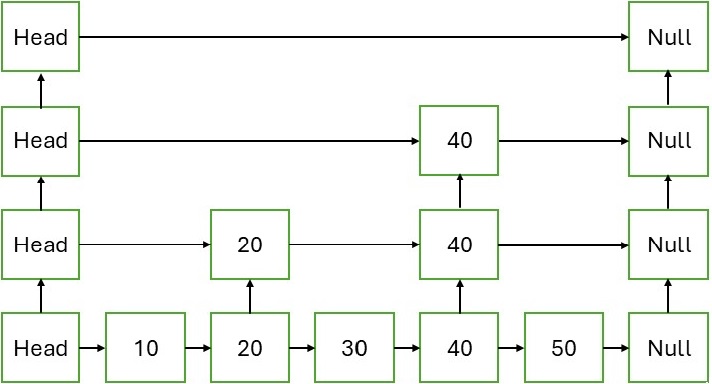
    Skip List

    Types of Skip List

    There are more than one type of Skip Lists:

    • Randomized Skip List: In a randomized skip list, the elements promoted to higher levels are chosen randomly. This makes the structure of the skip list unpredictable.
    • Deterministic Skip List:In the deterministic skip list, the elements promoted to higher levels are chosen based on a deterministic rule. This makes the structure of the skip list predictable. For example, in a deterministic skip list, every 2nd element is promoted to the next level.

    Operations on Skip List

    A Skip List supports the following operations:

    • Search: Search for an element in the Skip List.
    • Insert: Insert an element into the Skip List.
    • Delete: Delete an element from the Skip List.

    Implementing a Skip List

    A Skip List can be implemented using a linked list data structure. Each node in the Skip List contains a key, a value, and an array of pointers to the next node in each level. The Skip List also contains a head node that points to the first node in each level. Here is an example of a Skip List implemented in C, C++, Java and Python:

    Algorithm to implement Skip List

    In order to implement a Skip List, we need to follow these steps:


    Create a Node structure, with key, value, and an array of pointers.Create a SkipList structure, with a head node and the level of the Skip List.Create a function to create a new node.Create a function to create a new Skip List.Create a function to generate a random level for a node.Create a function to insert a node into the Skip List.Create a function to display the Skip List.At last, create a main function to test the Skip List.

    Example of Skip List

    Following is an example of a Skip List implemented in C, C++, Java, and Python that demonstrates the insertion of elements into the Skip List and displays the Skip List:

    CC++JavaPython

    //C Program to implement Skip List#include <stdio.h>#include <stdlib.h>#include <limits.h>#include <time.h>#define MAX_LEVEL 6// Node structurestructNode{int key;structNode*forward[MAX_LEVEL];};// SkipList structurestructSkipList{structNode*header;int level;};// Create a nodestructNode*createNode(int key,int level){structNode*newNode =(structNode*)malloc(sizeof(structNode));
       newNode->key = key;for(int i =0; i < level; i++)
          newNode->forward[i]=NULL;return newNode;}// Create a SkipListstructSkipList*createSkipList(){structSkipList*list =(structSkipList*)malloc(sizeof(structSkipList));
       list->header =createNode(INT_MIN, MAX_LEVEL);
       list->level =0;return list;}// Generate random level for nodeintrandomLevel(){int level =0;while(rand()< RAND_MAX /2&& level < MAX_LEVEL)
          level++;return level;}// Insert a nodevoidinsertNode(structSkipList*list,int key){structNode*current = list->header;structNode*update[MAX_LEVEL];for(int i = list->level; i >=0; i--){while(current->forward[i]!=NULL&& current->forward[i]->key < key)
             current = current->forward[i];
          update[i]= current;}
       current = current->forward[0];if(current ==NULL|| current->key != key){int rlevel =randomLevel();if(rlevel > list->level){for(int i = list->level +1; i <= rlevel; i++)
                update[i]= list->header;
             list->level = rlevel;}structNode*newNode =createNode(key, rlevel);for(int i =0; i <= rlevel; i++){
             newNode->forward[i]= update[i]->forward[i];
             update[i]->forward[i]= newNode;}}}// Display the SkipListvoiddisplayList(structSkipList*list){printf("\nSkip List\n");for(int i =0; i <= list->level; i++){structNode*node = list->header->forward[i];printf("Level %d: ", i);while(node !=NULL){printf("%d ", node->key);
             node = node->forward[i];}printf("\n");}}intmain(){srand((unsigned)time(0));structSkipList*list =createSkipList();insertNode(list,3);insertNode(list,6);insertNode(list,7);insertNode(list,9);insertNode(list,12);insertNode(list,19);insertNode(list,17);insertNode(list,26);insertNode(list,21);insertNode(list,25);displayList(list);return0;}

    Output

    The output obtained is as follows −

    Skip List
    Level 0: 3 6 7 9 12 17 19 21 25 26 
    Level 1: 6 9 12 17 21 26 
    Level 2: 9 
    

    Note: output may vary as the level of the Skip List is generated randomly.

    Search Operation in Skip List

    The search operation in a Skip List is similar to a linked list. We start from the top level and move to the next level if the key is greater than the current node. We continue this process until we find the key or reach the bottom level. If the key is found, we return the node; otherwise, we return NULL.

    Algorithm

    Following are steps to search for a key in a Skip List:


    Start from the top level of the Skip List.Move to the next level if the key is greater than the current node.Continue this process until we find the key or reach the bottom level.If the key is found, return the node; otherwise, return NULL.

    Example of Search Operation in Skip List

    Let’s search for the key 12 in the Skip List. The search operation is as follows:

    CC++JavaPython

    //C Program to search for a key in Skip List#include <stdio.h>#include <stdlib.h>#include <limits.h>#include <time.h>#define MAX_LEVEL 6// Node structurestructNode{int key;structNode*forward[MAX_LEVEL];};// SkipList structurestructSkipList{structNode*header;int level;};// Create a nodestructNode*createNode(int key,int level){structNode*newNode =(structNode*)malloc(sizeof(structNode));
       newNode->key = key;for(int i =0; i < level; i++)
          newNode->forward[i]=NULL;return newNode;}// Create a SkipListstructSkipList*createSkipList(){structSkipList*list =(structSkipList*)malloc(sizeof(structSkipList));
       list->header =createNode(INT_MIN, MAX_LEVEL);
       list->level =0;return list;}// Generate random level for nodeintrandomLevel(){int level =0;while(rand()< RAND_MAX /2&& level < MAX_LEVEL)
          level++;return level;}// Search for a keystructNode*searchNode(structSkipList*list,int key){structNode*current = list->header;for(int i = list->level; i >=0; i--){while(current->forward[i]!=NULL&& current->forward[i]->key < key)
             current = current->forward[i];}
       current = current->forward[0];if(current !=NULL&& current->key == key)return current;returnNULL;}// create nodevoidinsertNode(structSkipList*list,int key){structNode*current = list->header;structNode*update[MAX_LEVEL];for(int i = list->level; i >=0; i--){while(current->forward[i]!=NULL&& current->forward[i]->key < key)
              current = current->forward[i];
           update[i]= current;}
        current = current->forward[0];if(current ==NULL|| current->key != key){int rlevel =randomLevel();if(rlevel > list->level){for(int i = list->level +1; i <= rlevel; i++)
                 update[i]= list->header;
              list->level = rlevel;}structNode*newNode =createNode(key, rlevel);for(int i =0; i <= rlevel; i++){
              newNode->forward[i]= update[i]->forward[i];
              update[i]->forward[i]= newNode;}}}intmain(){srand((unsigned)time(0));structSkipList*list =createSkipList();insertNode(list,3);insertNode(list,6);insertNode(list,7);insertNode(list,9);insertNode(list,12);insertNode(list,19);insertNode(list,17);insertNode(list,26);insertNode(list,21);insertNode(list,25);structNode*node =searchNode(list,12);if(node !=NULL)printf("Key found: %d\n", node->key);elseprintf("Key not found\n");return0;}

    Output

    The output obtained is as follows −

    Key found: 12
    

    Delete Operation in Skip List

    The delete operation in a Skip List is similar to a linked list. We search for the key to be deleted and update the pointers to remove the node from the list. The delete operation is as follows:

    Algorithm

    Following are the steps to delete a key in a Skip List:


    Search for the key to be deleted in the Skip List.Update the pointers to remove the node from the list.Repeat this process for all levels of the Skip List.

    Example of Delete Operation in Skip List

    Let’s delete the key 12 from the Skip List. The delete operation is as follows:

    CC++JavaPython

    //C Program to delete a key in Skip List#include <stdio.h>#include <stdlib.h>#include <limits.h>#include <time.h>#define MAX_LEVEL 6// Node structurestructNode{int key;structNode*forward[MAX_LEVEL];};// SkipList structurestructSkipList{structNode*header;int level;};// Create a nodestructNode*createNode(int key,int level){structNode*newNode =(structNode*)malloc(sizeof(structNode));
       newNode->key = key;for(int i =0; i < level; i++)
          newNode->forward[i]=NULL;return newNode;}// Create a SkipListstructSkipList*createSkipList(){structSkipList*list =(structSkipList*)malloc(sizeof(structSkipList));
       list->header =createNode(INT_MIN, MAX_LEVEL);
       list->level =0;return list;}// Generate random level for nodeintrandomLevel(){int level =0;while(rand()< RAND_MAX /2&& level < MAX_LEVEL)
          level++;return level;}// Search for a keystructNode*searchNode(structSkipList*list,int key){structNode*current = list->header;for(int i = list->level; i >=0; i--){while(current->forward[i]!=NULL&& current->forward[i]->key < key)
             current = current->forward[i];}
       current = current->forward[0];if(current !=NULL&& current->key == key)return current;returnNULL;}// Delete a keyvoiddeleteNode(structSkipList*list,int key){structNode*current = list->header;structNode*update[MAX_LEVEL];for(int i = list->level; i >=0; i--){while(current->forward[i]!=NULL&& current->forward[i]->key < key)
             current = current->forward[i];
          update[i]= current;}
       current = current->forward[0];if(current !=NULL&& current->key == key){for(int i =0; i <= list->level; i++){if(update[i]->forward[i]!= current)break;
             update[i]->forward[i]= current->forward[i];}free(current);while(list->level >0&& list->header->forward[list->level]==NULL)
             list->level--;}}// Insert a nodevoidinsertNode(structSkipList*list,int key){structNode*current = list->header;structNode*update[MAX_LEVEL];for(int i = list->level; i >=0; i--){while(current->forward[i]!=NULL&& current->forward[i]->key < key)
              current = current->forward[i];
           update[i]= current;}
        current = current->forward[0];if(current ==NULL|| current->key != key){int rlevel =randomLevel();if(rlevel > list->level){for(int i = list->level +1; i <= rlevel; i++)
                 update[i]= list->header;
              list->level = rlevel;}structNode*newNode =createNode(key, rlevel);for(int i =0; i <= rlevel; i++){
              newNode->forward[i]= update[i]->forward[i];
              update[i]->forward[i]= newNode;}}}//display list voiddisplayList(structSkipList*list){printf("\nSkip List\n");for(int i =0; i <= list->level; i++){structNode*node = list->header->forward[i];printf("Level %d: ", i);while(node !=NULL){printf("%d ", node->key);
             node = node->forward[i];}printf("\n");}}intmain(){srand((unsigned)time(0));structSkipList*list =createSkipList();insertNode(list,3);insertNode(list,6);insertNode(list,7);insertNode(list,9);insertNode(list,12);insertNode(list,19);insertNode(list,17);insertNode(list,26);insertNode(list,21);insertNode(list,25);deleteNode(list,12);structNode*node =searchNode(list,12);printf("\nBefore deleting 12:\n");displayList(list);if(node !=NULL)printf("Key found: %d\n", node->key);elseprintf("Key not found:\n");printf("\nAfter deleting 12:\n");displayList(list);return0;}

    Output

    The output obtained is as follows −

    Before deleting 12:
    
    Skip List
    Level 0: 3 6 7 9 17 19 21 25 26 
    Level 1: 6 7 21 
    Level 2: 6 
    Key not found:
    
    After deleting 12:
    
    Skip List
    Level 0: 3 6 7 9 17 19 21 25 26 
    Level 1: 6 7 21 
    Level 2: 6 
    

    Time Complexity and Space Complexity of Skip List

    • The time complexity of search, insert, and delete operations in a Skip List is O(log n) on average.
    • The time complexity of these operations is the same as that of a balanced binary search tree.
    • The space complexity of a Skip List is O(n).

    Applications of Skip List

    The Skip List data structure is used in the following applications:

    • Database Indexing: Skip Lists are used in databases to index data efficiently.
    • Search Engines: Skip Lists are also used in search engines to store and retrieve web pages.
    • Network Routing Algorithms: This data structure also used in network routing algorithms to find the shortest path between two nodes.

    Advantages of Skip List

    Following are the advantages of Skip List −

    • Efficient Operations: Skip Lists provide efficient search, insert, and delete operations.
    • Simple Implementation: Skip Lists are easy to implement compared to other data structures like AVL trees and Red-Black trees.
    • Space Efficiency: Skip Lists are space-efficient and require less memory compared to other data structures.

    Disadvantages of Skip List

    Following are the disadvantages of Skip List −

    • Complexity: Skip Lists are complex data structures compared to linked lists.
    • Randomness: The performance of Skip Lists depends on the randomness of the levels.

    Conclusion

    In this tutorial, we learned about the Skip List data structure, its operations, and its implementation in C, C++, Java, and Python. Skip Lists are efficient data structures that provide fast search, insert, and delete operations. Skip Lists are used in various applications like database indexing, search engines, and network routing algorithms.
  • Array Data Structure

    What is an Array?

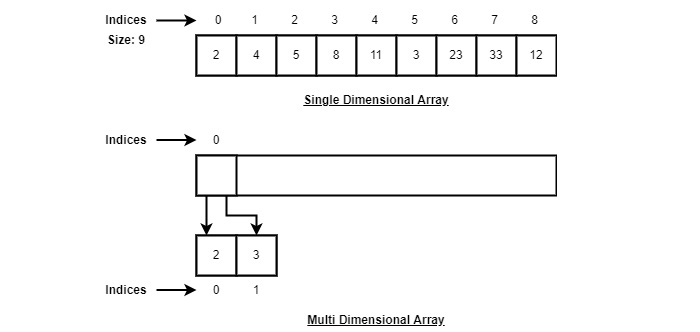
    An array is a type of linear data structure that is defined as a collection of elements with same or different data types. They exist in both single dimension and multiple dimensions. These data structures come into picture when there is a necessity to store multiple elements of similar nature together at one place.

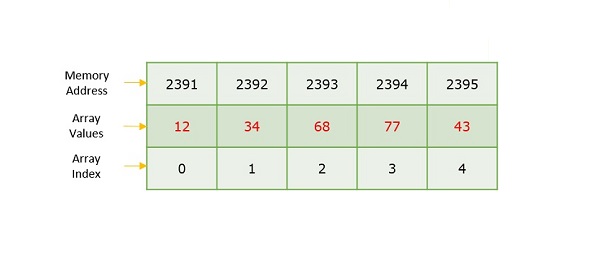
    Array

    The difference between an array index and a memory address is that the array index acts like a key value to label the elements in the array. However, a memory address is the starting address of free memory available.

    Following are the important terms to understand the concept of Array.

    • Element − Each item stored in an array is called an element.
    • Index − Each location of an element in an array has a numerical index, which is used to identify the element.

    Syntax

    Creating an array in C and C++ programming languages −

    data_type array_name[array_size]={elements separated by commas}
    or,
    data_type array_name[array_size];

    Creating an array in Java programming language −

    data_type[] array_name ={elements separated by commas}
    or,
    data_type array_name =new data_type[array_size];

    Need for Arrays

    Arrays are used as solutions to many problems from the small sorting problems to more complex problems like travelling salesperson problem. There are many data structures other than arrays that provide efficient time and space complexity for these problems, so what makes using arrays better? The answer lies in the random access lookup time.

    Arrays provide O(1) random access lookup time. That means, accessing the 1st index of the array and the 1000th index of the array will both take the same time. This is due to the fact that array comes with a pointer and an offset value. The pointer points to the right location of the memory and the offset value shows how far to look in the said memory.

                               array_name[index]
                                  |       |
                               Pointer   Offset
    

    Therefore, in an array with 6 elements, to access the 1st element, array is pointed towards the 0th index. Similarly, to access the 6th element, array is pointed towards the 5th index.

    Array Representation

    Arrays are represented as a collection of buckets where each bucket stores one element. These buckets are indexed from ‘0’ to ‘n-1’, where n is the size of that particular array. For example, an array with size 10 will have buckets indexed from 0 to 9.

    This indexing will be similar for the multidimensional arrays as well. If it is a 2-dimensional array, it will have sub-buckets in each bucket. Then it will be indexed as array_name[m][n], where m and n are the sizes of each level in the array.

    Array Representation

    As per the above illustration, following are the important points to be considered.

    • Index starts with 0.
    • Array length is 9 which means it can store 9 elements.
    • Each element can be accessed via its index. For example, we can fetch an element at index 6 as 23.

    Basic Operations in Arrays

    The basic operations in the Arrays are insertion, deletion, searching, display, traverse, and update. These operations are usually performed to either modify the data in the array or to report the status of the array.

    Following are the basic operations supported by an array.

    • Traverse − print all the array elements one by one.
    • Insertion − Adds an element at the given index.
    • Deletion − Deletes an element at the given index.
    • Search − Searches an element using the given index or by the value.
    • Update − Updates an element at the given index.
    • Display − Displays the contents of the array.

    In C, when an array is initialized with size, then it assigns defaults values to its elements in following order.

    Data TypeDefault Value
    boolfalse
    char0
    int0
    float0.0
    double0.0f
    void
    wchar_t0

    Array – Insertion Operation

    In the insertion operation, we are adding one or more elements to the array. Based on the requirement, a new element can be added at the beginning, end, or any given index of array. This is done using input statements of the programming languages.

    Algorithm

    Following is an algorithm to insert elements into a Linear Array until we reach the end of the array −

    1. Start
    2. Create an Array of a desired datatype and size.
    3. Initialize a variable 'i' as 0.
    4. Enter the element at ith index of the array.
    5. Increment i by 1.
    6. Repeat Steps 4 & 5 until the end of the array.
    7. Stop
    

    Example

    Here, we see a practical implementation of insertion operation, where we add data at the end of the array −

    CC++JavaPython

    #include <stdio.h>intmain(){int LA[3]={}, i;printf("Array Before Insertion:\n");for(i =0; i <3; i++)printf("LA[%d] = %d \n", i, LA[i]);printf("Inserting Elements.. \n");printf("The array elements after insertion :\n");// prints array valuesfor(i =0; i <3; i++){
          LA[i]= i +2;printf("LA[%d] = %d \n", i, LA[i]);}return0;}

    Output

    Array Before Insertion:
    LA[0] = 0
    LA[1] = 0
    LA[2] = 0
    Inserting elements..
    Array After Insertion:
    LA[0] = 2
    LA[1] = 3
    LA[2] = 4
    LA[3] = 5
    LA[4] = 6
    

    For other variations of array insertion operation, click here.

    Array – Deletion Operation

    In this array operation, we delete an element from the particular index of an array. This deletion operation takes place as we assign the value in the consequent index to the current index.

    Algorithm

    Consider LA is a linear array with N elements and K is a positive integer such that K<=N. Following is the algorithm to delete an element available at the Kth position of LA.

    1. Start
    2. Set J = K
    3. Repeat steps 4 and 5 while J < N
    4. Set LA[J] = LA[J + 1]
    5. Set J = J+1
    6. Set N = N-1
    7. Stop
    

    Example

    Following are the implementations of this operation in various programming languages −

    CC++JavaPython

    #include <stdio.h>voidmain(){int LA[]={1,3,5};int n =3;int i;printf("The original array elements are :\n");for(i =0; i<n; i++)printf("LA[%d] = %d \n", i, LA[i]);for(i =1; i<n; i++){
          LA[i]= LA[i+1];
          n = n -1;}printf("The array elements after deletion :\n");for(i =0; i<n; i++)printf("LA[%d] = %d \n", i, LA[i]);}

    Output

    The original array elements are :
    LA[0] = 1
    LA[1] = 3
    LA[2] = 5
    The array elements after deletion :
    LA[0] = 1
    LA[1] = 5
    

    Array – Search Operation

    Searching an element in the array using a key; The key element sequentially compares every value in the array to check if the key is present in the array or not.

    Algorithm

    Consider LA is a linear array with N elements and K is a positive integer such that K<=N. Following is the algorithm to find an element with a value of ITEM using sequential search.

    1. Start
    2. Set J = 0
    3. Repeat steps 4 and 5 while J < N
    4. IF LA[J] is equal ITEM THEN GOTO STEP 6
    5. Set J = J +1
    6. PRINT J, ITEM
    7. Stop
    

    Example

    Following are the implementations of this operation in various programming languages −

    CC++JavaPython

    #include <stdio.h>voidmain(){int LA[]={1,3,5,7,8};int item =5, n =5;int i =0, j =0;printf("The original array elements are :\n");for(i =0; i<n; i++){printf("LA[%d] = %d \n", i, LA[i]);}for(i =0; i<n; i++){if( LA[i]== item ){printf("Found element %d at position %d\n", item, i+1);}}}

    Output

    The original array elements are :
    LA[0] = 1
    LA[1] = 3
    LA[2] = 5
    LA[3] = 7
    LA[4] = 8
    Found element 5 at position 3
    

    Array – Traversal Operation

    This operation traverses through all the elements of an array. We use loop statements to carry this out.

    Algorithm

    Following is the algorithm to traverse through all the elements present in a Linear Array −

    1  Start
    2. Initialize an Array of certain size and datatype.
    3. Initialize another variable i with 0.
    4. Print the ith value in the array and increment i.
    5. Repeat Step 4 until the end of the array is reached.
    6. End
    

    Example

    Following are the implementations of this operation in various programming languages −

    CC++JavaPython

    #include <stdio.h>intmain(){int LA[]={1,3,5,7,8};int item =10, k =3, n =5;int i =0, j = n;printf("The original array elements are :\n");for(i =0; i<n; i++){printf("LA[%d] = %d \n", i, LA[i]);}}

    Output

    The original array elements are :
    LA[0] = 1
    LA[1] = 3
    LA[2] = 5
    LA[3] = 7
    LA[4] = 8
    

    Array – Update Operation

    Update operation refers to updating an existing element from the array at a given index.

    Algorithm

    Consider LA is a linear array with N elements and K is a positive integer such that K<=N. Following is the algorithm to update an element available at the Kth position of LA.

    1. Start
    2. Set LA[K-1] = ITEM
    3. Stop
    

    Example

    Following are the implementations of this operation in various programming languages −

    CC++JavaPython

    #include <stdio.h>voidmain(){int LA[]={1,3,5,7,8};int k =3, n =5, item =10;int i, j;printf("The original array elements are :\n");for(i =0; i<n; i++){printf("LA[%d] = %d \n", i, LA[i]);}
       LA[k-1]= item;printf("The array elements after updation :\n");for(i =0; i<n; i++){printf("LA[%d] = %d \n", i, LA[i]);}}

    Output

    The original array elements are :
    LA[0] = 1
    LA[1] = 3
    LA[2] = 5
    LA[3] = 7
    LA[4] = 8
    The array elements after updation :
    LA[0] = 1
    LA[1] = 3
    LA[2] = 10
    LA[3] = 7
    LA[4] = 8
    

    Array – Display Operation

    This operation displays all the elements in the entire array using a print statement.

    Algorithm

    Consider LA is a linear array with N elements. Following is the algorithm to display an array elements.

    1. Start
    2. Print all the elements in the Array
    3. Stop
    

    Example

    Following are the implementations of this operation in various programming languages −

    CC++JavaPython

    #include <stdio.h>intmain(){int LA[]={1,3,5,7,8};int n =5;int i;printf("The original array elements are :\n");for(i =0; i<n; i++){printf("LA[%d] = %d \n", i, LA[i]);}}

    Output

    The original array elements are : LA[0] = 1 LA[1] = 3 LA[2] = 5 LA[3] = 7 LA[4] = 8

  • Data Structures and Types

    Data structures are introduced in order to store, organize and manipulate data in programming languages. They are designed in a way that makes accessing and processing of the data a little easier and simpler. These data structures are not confined to one particular programming language; they are just pieces of code that structure data in the memory.

    Data types are often confused as a type of data structures, but it is not precisely correct even though they are referred to as Abstract Data Types. Data types represent the nature of the data while data structures are just a collection of similar or different data types in one.

    Data Structures And Types

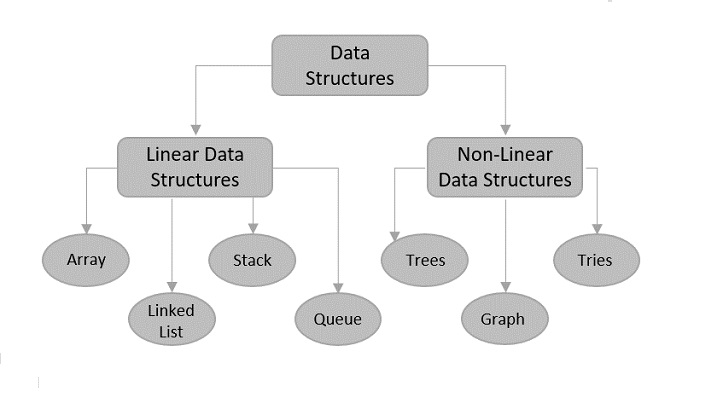
    There are usually just two types of data structures −

    • Linear
    • Non-Linear

    Linear Data Structures

    The data is stored in linear data structures sequentially. These are rudimentary structures since the elements are stored one after the other without applying any mathematical operations.

    Linear Data Structures

    Linear data structures are usually easy to implement but since the memory allocation might become complicated, time and space complexities increase. Few examples of linear data structures include −

    • Arrays
    • Linked Lists
    • Stacks
    • Queues

    Based on the data storage methods, these linear data structures are divided into two sub-types. They are − static and dynamic data structures.

    Static Linear Data Structures

    In Static Linear Data Structures, the memory allocation is not scalable. Once the entire memory is used, no more space can be retrieved to store more data. Hence, the memory is required to be reserved based on the size of the program. This will also act as a drawback since reserving more memory than required can cause a wastage of memory blocks.

    The best example for static linear data structures is an array.

    Dynamic Linear Data Structures

    In Dynamic linear data structures, the memory allocation can be done dynamically when required. These data structures are efficient considering the space complexity of the program.

    Few examples of dynamic linear data structures include: linked lists, stacks and queues.

    Non-Linear Data Structures

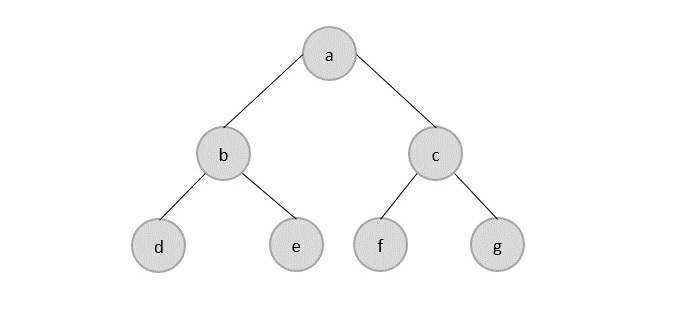
    Non-Linear data structures store the data in the form of a hierarchy. Therefore, in contrast to the linear data structures, the data can be found in multiple levels and are difficult to traverse through.

    Non-Linear Data Structures

    However, they are designed to overcome the issues and limitations of linear data structures. For instance, the main disadvantage of linear data structures is the memory allocation. Since the data is allocated sequentially in linear data structures, each element in these data structures uses one whole memory block. However, if the data uses less memory than the assigned block can hold, the extra memory space in the block is wasted. Therefore, non-linear data structures are introduced. They decrease the space complexity and use the memory optimally.

    Few types of non-linear data structures are −

    • Graphs
    • Trees
    • Tries
    • Maps
  • Data Structure Basics

    This tutorial explains the basic terms related to data structure.

    Data Definition

    Data Definition defines a particular data with the following characteristics.

    • Atomic − Definition should define a single concept.
    • Traceable − Definition should be able to be mapped to some data element.
    • Accurate − Definition should be unambiguous.
    • Clear and Concise − Definition should be understandable.

    Data Object

    Data Object represents an object having a data.

    Data Type

    Data type is a way to classify various types of data such as integer, string, etc. which determines the values that can be used with the corresponding type of data, the type of operations that can be performed on the corresponding type of data. There are two data types −

    • Built-in Data Type
    • Derived Data Type

    Built-in Data Type

    Those data types for which a language has built-in support are known as Built-in Data types. For example, most of the languages provide the following built-in data types.

    • Integers
    • Boolean (true, false)
    • Floating (Decimal numbers)
    • Character and Strings

    Derived Data Type

    Those data types which are implementation independent as they can be implemented in one or the other way are known as derived data types. These data types are normally built by the combination of primary or built-in data types and associated operations on them. For example −

    • List
    • Array
    • Stack
    • Queue

    Basic Operations

    The data in the data structures are processed by certain operations. The particular data structure chosen largely depends on the frequency of the operation that needs to be performed on the data structure.

    • Traversing
    • Searching
    • Insertion
    • Deletion
    • Sorting
    • Merging