C++ string comparison refers to the process of evaluating two strings to determine their equality or their order based on lexicographical rules.
String comparison can be done by using built-in operators such as ==, !=, <, and > or by the compare() method. But by default these comparisons are case-sensitive, which means “tutorial point” and “Tutorial point” are considered different. String comparison plays an important role in performing tasks like sorting, searching, and input validation.
Types of String in C++
Basically there are two primary types of string in C++ −
C-style strings − This string in C++ is an array of characters with a null character (‘\0’).
std::string − This string is a part of the C++ Standard Library which provides a more robust and user-friendly way to handle strings because it manages memory automatically, allows dynamic resizing, and provides a vast set of member functions for manipulation like concatenation, substring extraction, and searching.
Comparing C-Style Strings
Here’s how you can compare C-style strings −
1. strcmp()
You can use the strcmp() function from the <cstring> library to compare two strings.
Example
Heres a given example showing a comparison between two C-style strings −
#include <iostream>#include <cstring>intmain(){constchar* str1 ="hello";constchar* str2 ="Tutorialspoint Learner";int result =strcmp(str1, str2);if(result <0){
      std::cout <<"str1 is less than str2\n";}elseif(result >0){
      std::cout <<"str1 is greater than str2\n";}else{
      std::cout <<"str1 is equal to str2\n";}return0;}
Output
str1 is greater than str2
Explanation
The strcmp function compares the two strings and returns negative (str1 < str2), zero(str1 = str2) and positive(str1 > str2).
In this case, “hello” is lexicographically greater than “Tutorialspoint Learner”, so the output is “str1 is greater than str2”.
In lexicographical order, strings are compared character by character based on their ASCII values, where ‘h’ (ASCII 104) and ‘T’ (ASCII 84)
So 104 > 84 then this comparison resulted in “hello” being greater than “Tutorialspoint Learner”.
2. strcoll()
The strcoll() function compares two C-strings according to the current locale, which is useful for internationalization. It behaves similarly to strcmp() but takes into account locale-specific rules.
Example
#include <iostream>#include <cstring>#include <locale>intmain(){constchar* str1 ="hello";constchar* str2 ="Tutorialspoint Learner";// Set the locale (optional, depends on your environment)
   std::setlocale(LC_COLLATE,"en_US.UTF-8");int result =strcoll(str1, str2);if(result <0){
      std::cout <<"str1 is less than str2\n";}elseif(result >0){
      std::cout <<"str1 is greater than str2\n";}else{
      std::cout <<"str1 is equal to str2\n";}return0;}
Output
str1 is greater than str2
Explanation
The std::setlocale() function sets the locale for string collation (comparison) to “en_US.UTF-8”, which is the U.S. English locale.
The strcoll() function compares str1 and str2 according to the current locale.
It returns a “-ve” value if str1 < str2, 0 if they are equal, and a “+ve” value if str1 > str2.
Since ‘h’ (ASCII 104) > ‘T’ (ASCII 84) therefor output is ‘h’ is greater than ‘T’.
Comparing std::string
In C++ for comparing std::string objects have various methods that give different ways of accessing their equality or relative order.
Since the ASCII value of A (65) is less than a (97), So receiving output accordingly.
2. std::string::compare() Method
The std::string::compare() method is also used to compare the value of two strings. It returns an integer value based on the lexicographical comparison.
String concatenation is the process of adding an element to an existing element. In this context, string concatenation is the method by which two (or more) strings can be added to one another. Hence, the resultant string is the combination of the initial string and the added string.
There are several methods to concatenate strings in C++, some of which are given as follows −
Using string::append() function
Using ‘+’ operator
Using strcat() function for C-style strings
Using for loop
Using while loop
Using range based loop
Using inheritance
Using friend function with OOPS
These methods are explained in detail in the next few articles of this chapter. So, lets dive into these concepts.
String Concatenation Using string::append() Function
String is a class defined in <string> header file, and the append() function is an inherited method of that class. This method is used to append or add a given string to an initial string.
Syntax
The following syntax is used to concatenate string using the append() method −
initial_string.append(new_string);
initial_string.append(this is new);
Parameters
The string::append() function takes a string as a parameter. The string can be passed explicitly or as an object.
Example of append() function
The following exemplar code is used to concatenate string using the append() method −
#include <iostream>usingnamespace std;intmain(){
   string initial_string("I Love TP.");
   string new_string(" I am new here.");//using append function with object parameter
   initial_string.append(new_string);//using append function with explicit string
   initial_string.append(" Could you help me?");

   cout << initial_string << endl;return0;}
Output
I Love TP. I am new here. Could you help me?
String Concatenation Using ‘+’ Operator
One of the easiest way to add strings is to use the ‘+’ operator on two or more strings. This can be done in place (i.e. without creating a new string), or in a new string object. This is one of the newer features of C++ programming language.
Syntax
The following syntax is used to concatenate string using the ‘+’ opertaor −
Here, the new string can be added in place or by creating a new string object.
Example
The following exemplar code is used to concatenate string using the ‘+’ opertaor −
#include <iostream>usingnamespace std;intmain(){
   string initial_string("I Love TP.");
   string new_string(" I am new here.");

   string a="Hey !!! "+ initial_string;//using new string object

   a+=new_string;//inplace addition

   a+=" Could you help me? ";

   cout << a << endl;return0;}
Output
Hey !!! I Love TP. I am new here. Could you help me?
String Concatenation Using for Loop
We can use a simple for loop from the beginning of the new string to the end of the new string, and for each iteration, we can add that character to the initial string. This can be done in place, or by using a new string object. This type of concatenation is also possible in C-style strings, which are character arrays.
Syntax
The following syntax is used to concatenate string using for loop from beginning of the string to the end −
for(int i=0;i<s.length();i++){
   initial+=s[i];}
Example
The following exemplar code is used to concatenate string using for loop from beginning of the string to the end −
#include <iostream>usingnamespace std;intmain(){
   string initial_string("I Love TP.");
   string new_string(" I am new here.");for(int i=0;i<new_string.size();i++){
      initial_string+=new_string[i];}//using for loop to iterate over new_string

   cout << initial_string << endl;return0;}
Output
I Love TP. I am new here.
String Length Using while Loop
We can also use a simple while loop. This loop runs till we reach the end of the string, and at each iteration, we can add the corresponding character to the initial string. This can be done in place, or by using a new string object. This type of concatenation is also possible in C-style strings, which are character arrays.
Syntax
The following syntax is used to concatenate string using while loop from beginning of the string to the end −
for(int i=0;i<s.length();i++){
   initial+=s[i];}
Example
The following exemplar code is used to concatenate string using while loop from beginning of the string to the end −
#include <iostream>usingnamespace std;intmain(){
   string initial_string("I Love TP.");
   string new_string(" I am new here.");int i=0;while(new_string[i]!='\0'){
      initial_string+=new_string[i];
      i++;}//using while loop to iterate over new_string

   cout << initial_string << endl;return0;}
String Concatenation Using range based loop
We can also use a range based loop, which will automatically iterate over the whole string and we can add each character to the initial string. This can be done in place, or by using a new string object.
Syntax
The following syntax is used to concatenate string using range based loop from beginning of the string to the end −
for(char c: s){
   initial+=c;}
Example
The following exemplar code is used to concatenate string using range based loop from beginning of the string to the end −
#include <iostream>usingnamespace std;intmain(){
   string initial_string("I Love TP.");
   string new_string(" I am new here.");for(char c: new_string){
      initial_string+=c;}//using range based loop for concatentation

   cout << initial_string << endl;return0;}
Output
I Love TP. I am new here.
String Concatenation Using strcat() Function
We can use strcat() function to concatenate strings in C++. But, this method does not work for string objects, it only works for C-style strings, i.e. character arrays. This method is defined in the <string.h> header file.
Syntax
The following syntax is used to concatenate string using the strcat() method −
strcat(s1,s2);
Parameters
Here, s1 and s2 are two character arrays (i.e. strings) which are passed as parameters to the strcat() method.
Example
The following exemplar code is used to concatenate string using the strcat() method −
#include <bits/stdc++.h>usingnamespace std;intmain(){char s1[]="I love ";char s2[]=" TP. Could you help me? ";//using strcat function to concatenate//result stored in s1strcat(s1,s2);
   cout << s1 << endl;return0;}
Output
I love TP. Could you help me?
String Concatenation Using Inheritance
We can use strcat() function to concatenate strings in C++. But, this method does not work for string objects, it only works for C-style strings, i.e. character arrays. This method is defined in the <string.h> header file.
Syntax
The following syntax is used to concatenate string using the inheritance method in OOP concepts −
strcat(s1,s2);
Example
The following exemplar code is used to concatenate string using the inheritance method in OOP concepts −
#include <bits/stdc++.h>usingnamespace std;//parent classclassparent{public:virtual string concatenate(string s1, string s2)=0;//creating a virtual method to inherit};//child classclasschild:parent{public:
      string concatenate(string s1, string s2){
         s1+=s2;//using + operator to add stringsreturn s1;}};intmain(){
   child ch1;
   cout << ch1.concatenate("I love ","TP !!!");return0;}
Output
I love TP !!!
String Concatenation Using Friend Function with OOPS
A friend class can access private and protected members of other classes in which it is declared as a friend. It is sometimes useful to allow a particular class to access private and protected members of other classes.
Hence, we make use of this friend class to declare a helper method, and then use the strcat() function for C-style strings.
Syntax
The following syntax is used to concatenate string using the friend method in C++ −
Class A {
   string s1=[value];
   string s2=[value];friendvoidhelper(A obj);}helper(A){strcat(obj.s1, obj.s2);};
Example
The following exemplar code is used to concatenate string using the friend method in C++ −
#include <bits/stdc++.h>usingnamespace std;// concatenate class classconcatenate{public:char s1[20]="I love TP !!!";char s2[20]="Hey... ";friendvoidhelper(concatenate par1);};voidhelper(concatenate par1){// Pass parameter to concatenate strcat(par1.s2, par1.s1);

   cout << par1.s2;}intmain(){// Create object of class
   concatenate par1;//pass this object to helper function helper(par1);return0;}
Length of a string is the number of characters present in the string. These characters can be of the data type char, and these include all alphanumeric elements, symbols and miscellaneous characters. In C++ programming language, there are two types of strings- Character Arrays of C-Style type, and String objects which are built-in objects of <string> class.
The length of a string also includes white spaces, but in case a string includes a terminating character “\0”, the string ends at that character and the count of length is terminated just before that character.
There are many ways to find the length of a given string. Some of these methods are iterative, whereas some also use in-built functions and methods. These methods are explained clearly in the following parts of this chapter −
Using strlen() Method
Using string::length() Method of String Class
Using string::size() Method of String Class
Using Iterative for Loop
Using Iterative while Loop
String Length Using strlen() Method
Strings are defined as character arrays which are accessed using the pointer to the first iterator of the array. We can use strlen() method of C Library to calculate the length of C-type arrays.
Syntax
The following syntax shows how to use strlen() method to calculate the length of the string −
strlen(string_name);
Example
The following example shows how to calculate the length of the string using strlen() method −
#include <bits/stdc++.h>usingnamespace std;intmain(){char s[]="I love TP !!!";
   cout<<"Length of string s : "<<strlen(s);return0;}
Output
Length of string s : 13
String Length Using string::size() Method
Most programmers commonly use string::size() method of string class when there is a need to calculate the length of a string in C++ programming language. It is the most basic method, and it is generally used while traversing a string object.
Syntax
The following syntax shows how to use size() method to calculate the length of the string −
string_object.size();
Example
The following example shows how to calculate the length of the string using size() method −
#include <bits/stdc++.h>usingnamespace std;intmain(){
   string s="I love TP !!!\0 and others";

   cout<<"Length of string s : "<<s.size();return0;}
Output
Length of string s : 13
String Length Using string::length() Method
We can also use length() method of string class to determine the length of the given string. Both length() and size() methods are part of <string> header file, and these are called as methods to the string object.
Syntax
The following syntax shows how to use length() method to calculate the length of the string −
string_object.length();
Example
The following example shows how to calculate the length of the string using length() method −
#include <bits/stdc++.h>usingnamespace std;intmain(){
   string s="I love TP !!!\0 and others";

   cout<<"Length of string s : "<<s.length();return0;}
Output
Length of string s : 13
String Length Using while Loop
We can use a simple while loop to iterate over the string and initialize a variable count to calculate the length of the string until we reach the end of the string. For each iteration, the count increases by one, hence the net result will be the length of the string.
Syntax
The following syntax shows how to use a while loop to calculate the length of the string −
while(s[i]!='\0'){[body]}
Example
The following example shows how to calculate the length of the string using a single while loop −
#include <bits/stdc++.h>usingnamespace std;intmain(){
   string s="I love TP !!!\0 and others";int count=0, i=0;while(s[i]!='\0')
      count++, i++;

   cout<<"Length of string s : "<<count;return0;}
Output
Length of string s : 13
String Length Using a for Loop
We can use a simple for loop to iterate over the string and initialize a variable count to calculate the length of the string until we reach the end of the string. For each iteration, the count increases by one, hence the net result will be the length of the string.
Syntax
The following syntax shows how to use a for loop to calculate the length of the string −
for(int i=0;s[i]!='\0';i++){[body]}
Example
The following example shows how to calculate the length of the string using a single for loop −
#include <bits/stdc++.h>usingnamespace std;intmain(){
   string s="I love TP !!!\0 and others";int count=0;for(int i=0;s[i]!='\0';i++)
      count++;

   cout<<"Length of string s : "<<count;return0;}
C++ string is an array of characters that can be extracted and manipulated with the help of various member functions. It is much more flexible and advanced than a traditional C-style character array because it supports self-memory management and offers many useful functions for manipulation, such as concatenation, substring extraction, and searching. To create an object of a string, you must use the std::string class from the <string> header.
Looping Through a String
A loop over a string is essentially an iteration or traversal process covering each character of a string to perform diversified operations such as access, modification, or analysis of characters. That can be achieved using the different types of looping constructs, including the traditional for loops and while loops or even range-based for loops.
Using a for-loop
A for loop is a common way to iterate through a string in C++. It allows you to access each character in sequence.
Example
#include <iostream>#include <string>intmain(){
   std::string str ="TutorialsPoint";for(size_t i =0; i < str.length();++i){
      std::cout << str[i]<<" ";// Print each character}return0;}
Output
T u t o r i a l s P o i n t
Using a while loop
A while loop is a kind of control flow statement in which a block of code repeats or is executed as long as the given condition stands true, and if that condition becomes false then the loop stops.
Example
#include <iostream>#include <string>intmain(){
   std::string str ="TutorialsPoint";
   size_t i =0;while(i < str.length()){
      std::cout << str[i]<<" ";// Print each character++i;}return0;}
Output
T u t o r i a l s P o i n t
Using a range-based for loop
There is another type of control flow statement called the range-based for loop that allows for iterating over elements in a collection. It differs from the while and for loops because it will allow for iteration over the elements in a collection using a much more direct and intuitive approach.
Example
#include <iostream>#include <string>intmain(){
   std::string str ="TutorialsPoint";for(char c : str){
      std::cout << c <<" ";// Print each character}return0;}
C++ provides following two types of string representations −
The C-style character string.
The string class type introduced with Standard C++.
The C-Style Character String
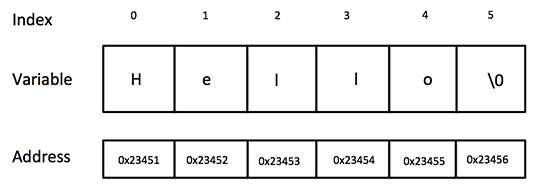
The C-style character string originated within the C language and continues to be supported within C++. This string is actually a one-dimensional array of characters which is terminated by a null character ‘\0’. Thus a null-terminated string contains the characters that comprise the string followed by a null.
The following declaration and initialization create a string consisting of the word “Hello”. To hold the null character at the end of the array, the size of the character array containing the string is one more than the number of characters in the word “Hello.”
If you follow the rule of array initialization, then you can write the above statement as follows −
char greeting[] = "Hello";
Following is the memory presentation of above defined string in C/C++ −
Actually, you do not place the null character at the end of a string constant. The C++ compiler automatically places the ‘\0’ at the end of the string when it initializes the array. Let us try to print above-mentioned string −
We can declare a String variable using the ‘string’ keyword. This is included in the <string> header file. The syntax of declaring a string is explained as follows −
Syntax
string variable_name =[value];
Here, [value] is an optional and can be used to assign value during the declaration.
Example
In the following examples, we are declaring a string variable, assigning a value to it.
We can traverse a string using for loops, while loops and do while loops using a pointer to the first and the last index in the string.
Using iterators
Using range based loops, we can iterate over the string using iterators. This is achieved using “:” operator while running a range based loop.
Example of Iterating a String
The following example code shows string traversal using both of these methods −
#include <iostream>usingnamespace std;intmain(){
   string s="Hey, I am at TP.";for(int i=0;i<s.length();i++){
      cout<<s[i]<<" ";}
   cout<<endl;for(char c:s){
      cout<<c<<" ";}return0;}
Output
H e y ,   I   a m   a t   T P .
H e y ,   I   a m   a t   T P .
Accessing Characters of String
We can access the characters of a string using both iterators and pointer to the indices of the string.
Example
The following example code shows how we can access the characters in a string −
#include <iostream>usingnamespace std;intmain(){
   string s="Hey, I am at TP.";
   cout<<s<<endl;for(int i=0;i<s.length();i++){
     s[i]='A';}
   cout<<s<<endl;for(char&c:s){
      c='B';}
   cout<<s<<endl;return0;}
Output
Hey, I am at TP.
AAAAAAAAAAAAAAAA
BBBBBBBBBBBBBBBB
String Functions
String is an object of the <string> class, and hence, it has a variety of functions that users can utilize for a variety of operations. Some of these functions are as follows −
This function is used to remove a certain part of a string.
Length of a String
The length of a string is the number of characters present in the string. Hence, the string “apple” has a length of 5 characters and the string “hello son” has a length of 9 characters (including empty spaces). This can be accessed using the length() method in <string> header file.
String concatenation is a way to add two strings together. This can be done using two ways −
Addition Operator
The addition operator is used to add two elements. In case of strings, the addition operator concatenates the two strings. This is clearly explained in the following example −
Example
#include <iostream>#include <string>usingnamespace std;intmain(){
   string x ="10";
   string y ="20";
   cout<<x+y<<endl;return0;}
Output
1020
This is different from integer addition. When we take two integers and add them using addition operator, we get the sum of the two numbers instead.
This is clearly explained in the following example −
Example
#include <iostream>#include <string>usingnamespace std;intmain(){int x =10;int y =20;
   cout<<x+y<<endl;return0;}
Output
30
Using string append() method
C++ is an object oriented programming language, and hence a string is actually an object, which contain functions that can perform certain operations on strings. We can use string append() method to append one string to another.
The syntax of this operation is as follows −
Syntax
string_1.append(string_2);
The usage of this method is depicted clearly in the following example −
Strings can be taken as an input to the program, and the most common way to do this is by using cin method.
There are three methods to take a string as an input, and these methods are given as follows −
cin
getline()
stringstream
Using cin Method
This is the simplest way to take a string as an input. The syntax is given as follows −
Syntax
cin>>string_name;
Example
#include <iostream>usingnamespace std;intmain(){

   string s;
   cout <<"Enter custom string : "<<endl;//enter the string here
   cin>>s;
   cout<<"The string is : "<<s;}
Using getline() Method
The getline() method can be used to read a string from an input stream. This is defined in the <string> header file. The syntax of the above method is given as follows −
Syntax
getline(cin, string_name);
Example
#include <iostream>usingnamespace std;intmain(){

   string s;
   cout <<"Enter String as input : "<< endl;getline(cin, s);//enter the string here
   cout <<"Printed string is : "<< s << endl;return0;}
Using stringstream
The stringstream class is used to take multiple strings as input, all at once. The syntax of the above method is given as follows −
Syntax
Stringstream object_name(string_name);
Example
#include <iostream>#include <sstream>#include <string>usingnamespace std;intmain(){

   string s ="Hey, I am at TP";
   stringstream object(s);
   string newstr;// >> operator will read from the stringstream objectwhile(object >> newstr){
      cout << newstr <<" ";}return0;}