Category: C++ Jump Statements

https://zain.sweetdishy.com/wp-content/uploads/2026/02/Jump-Statements.png

  • Return Statement in C++

    The return statement in C++ is used to exit a function and to send a value back to the function’s caller which is optional depending on requirement. It plays a very important role in controlling the flow of a program and making sure that functions will provide results to other parts of the code.

    Syntax

    Below is the syntax of using return statement in C++ −

    return[expression];

    Where, “expression” is optional, specifically used for function. If provided, it specifies the value to be returned to the caller.

    Example of return Statement

    The following is an example of return statement −

    #include <iostream>usingnamespace std;intsum(int a,int b){// Here, returning sum of a and breturn a + b;}intmain(){// Calling the functionint ans =sum(5,2);
       cout <<"The sum of two integers 5 and 2 is:  "<< ans << endl;// Returning from the main (),// 0 represents execution done without any errorreturn0;}

    Output

    The sum of two integers 5 and 2 is:  7
    

    Key Aspects of return Statement

    1. Function Termination

    When a return statement is executed, the function exits immediately, and optionally sends value back to the caller.

    2. Returning Types

    Return by Value

    In this the specified value in return statement is sent back to the caller. This is essential for functions which perform calculations or need to provide results.

    intAdd(int a,int b){return a + b;// Returns the sum of a and b}

    No Return Value (void)

    The functions which are declared with void, the return statement can be used without an expression to exit the function early.

    voidGetMessage(){
       cout <<"Hello, TutorialsPoint Learner!";return;// Exits the function}

    3. Multiple return Statements

    A function may consist of multiple return statements, which we generally get to see within conditional statements.

    intmax(int a,int b){if(a > b)return a;elsereturn b;}

    4. Returning Objects

    Functions can return objects, which can be useful for returning multiple values encapsulated in a class or struct.

    structpoint{int x, y;};
    
    point getOrigin(){return{0,0};}

    5. Early Exit

    The return statement can be used to exit a function early, which is useful for error handling or special conditions.

    intdivideInteger(int a,int b){if(b ==0){
          cer <<"Error: Division by zero!"<< endl;return-1;// Shows an error}return a / b;}

    Return Types and Value Handling in C++

    In C++, the return type of a function determines what kind of value (if any) a function will return to the caller. Proper handling of return types and values is important for making sure that functions behave as expected and integrate smoothly with other parts of the program.

    1. Primitive Data Types

    Primitive data types are the basic built-in types provided by C++. Common examples are like int, float, double, char etc.

    Example

    #include <iostream>usingnamespace std;// created a function which returns an integerintgetSquare(int num){return num * num;}intmain(){int value =5;int result =getSquare(value);// Calling the function and storing its result
       cout <<"The square of "<< value <<" is "<< result << endl;return0;}
    Output
    The square of 5 is 25
    

    2. User-Defined Types

    User-defined types include structs and classes. These types allow you to define complex data structures and customize them as per your specific requirements.

    Example with Struct

    #include <iostream>usingnamespace std;structPoint{int x;int y;};
    Point createPoint(int x,int y){
       Point p;
       p.x = x;
       p.y = y;return p;// will returns a Point object}intmain(){
       Point p =createPoint(10,20);
       cout <<"Point coordinates: ("<< p.x <<", "<< p.y <<")"<< endl;return0;}
    Output
    Point coordinates: (10, 20)
    

    Example with Classes

    #include <iostream>usingnamespace std;classrectangle{public:rectangle(int w,int h):width(w),height(h){}intgetArea()const{return width * height;}private:int width;int height;};
    
    rectangle createRectangle(int width,int height){returnrectangle(width, height);// Returns a Rectangle object}intmain(){
       rectangle rect =createRectangle(10,5);
       cout <<"Area of given Rectangle is: "<< rect.getArea()<< endl;return0;}
    Output
    Area of given Rectangle is: 50
    

    3. References and Pointers

    References and pointers are used to refer to variables or objects without making any copies. Which can be useful for efficiency and and easy to modify the original data when needed.

    Returning by Reference

    #include <iostream>usingnamespace std;int globalValue =100;int&getGlobalValue(){return globalValue;// Returns a reference to the global variable}intmain(){int& ref =getGlobalValue();
       ref =200;// Modifies the global variable
       cout <<"Global Value: "<< globalValue << endl;return0;}
    Output
    Global Value: 200
    

    Returning by Pointer

    #include <iostream>usingnamespace std;int*createArray(int size){int* array =newint[size];// Allocating memory dynamicallyfor(int i =0; i < size;++i){
          array[i]= i *10;}return array;// Returning a pointer to the allocated array}intmain(){int* myArray =createArray(5);for(int i =0; i <5;++i){
          cout << myArray[i]<<" ";}delete[] myArray;// Free dynamically allocated memoryreturn0;}

    Output

    0 10 20 30 40 
  • C++ goto Statement

    The goto Statement

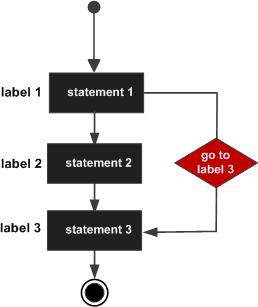
    goto statement provides an unconditional jump from the goto to a labeled statement in the same function.

    NOTE − Use of goto statement is highly discouraged because it makes difficult to trace the control flow of a program, making the program hard to understand and hard to modify. Any program that uses a goto can be rewritten so that it doesn’t need the goto.

    The goto statement in C++ is a kind of control flow construct that lets the program jump directly to a given statement within the same function. The goto statement transfers control to a given label in the function. A label is defined with an identifier followed by a colon (:).

    Syntax

    The syntax of a goto statement in C++ is given as follow −

    goto label;...
    label: statement;

    Where, label is an identifier that identifies a labeled statement.
    A labeled statement is any statement that is preceded by an identifier followed by a colon (:).

    Flow Diagram

    Here is the following flow diagram, showcasing the working of goto statement

    C++ goto statement

    Example

    Here is the following example code:

    #include <iostream>usingnamespace std;intmain(){// Local variable declaration:int a =10;// do loop execution
       LOOP:do{if( a ==15){// skip the iteration.
             a = a +1;goto LOOP;}
          cout <<"value of a: "<< a << endl;
          a = a +1;}while( a <20);return0;}

    Output

    When the above code is compiled and executed, it produces the following result −

    value of a: 10
    value of a: 11
    value of a: 12
    value of a: 13
    value of a: 14
    value of a: 16
    value of a: 17
    value of a: 18
    value of a: 19
    

    One good use of goto is to exit from a deeply nested routine. For example, consider the following code fragment −

    for(...){for(...){while(...){if(...)goto stop;...}}}
    stop:
    cout <<"Error in program.\n";

    Eliminating the goto would force a number of additional tests to be performed. A simple break statement would not work here, because it would only cause the program to exit from the innermost loop.

    When to Use goto?

    The goto statement generally is considered unsatisfactory to modern programming style because it causes code to become unstructured. However, it might be useful in the following cases:

    • Breaking out of deeply nested loops.
    • Handling errors or exceptional cases in legacy code.

    Example: Breaking Out of Nested Loops

    #include <iostream>usingnamespace std;intmain(){for(int i =0; i <3;++i){for(int j =0; j <3;++j){if(i ==1&& j ==1){goto exitLoops;}
          cout <<"i: "<< i <<", j: "<< j << endl;}}
    
      exitLoops:
        cout <<"Exited the nested loops!"<< endl;return0;}

    Output

    i: 0, j: 0  
    i: 0, j: 1  
    i: 0, j: 2  
    i: 1, j: 0  
    Exited the nested loops!
  • C++ continue Statement

    The continue Statement

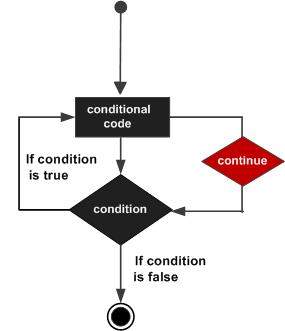
    The continue statement works somewhat like the break statement. Instead of forcing termination, however, continue forces the next iteration of the loop to take place, skipping any code in between.

    For the for loop, continue causes the conditional test and increment portions of the loop to execute. For the while and do…while loops, program control passes to the conditional tests.

    Syntax

    The syntax of a continue statement in C++ is −

    continue;

    Flow Diagram

    Here is the following flow diagram showcasing a continuation statement in C++:

    C++ continue statement

    Example

    Here is the following example of a continue statement in C++:

    #include <iostream>usingnamespace std;intmain(){// Local variable declaration:int a =10;// do loop executiondo{if( a ==15){// skip the iteration.
             a = a +1;continue;}
          cout <<"value of a: "<< a << endl;
          a = a +1;}while( a <20);return0;}

    Output

    When the above code is compiled and executed, it produces the following result −

    value of a: 10
    value of a: 11
    value of a: 12
    value of a: 13
    value of a: 14
    value of a: 16
    value of a: 17
    value of a: 18
    value of a: 19
    

    Explanation

    1. Firstly, the do-while loop will ensure that the block of code inside the do section executes at least once and then it will check the condition a < 20, and the loop will continue til it satisfies the condition.
    2. In the if statement, if a == 15, then a = a + 1 will increment the value by 1, and the continue statement will skip the 15; therefore, 15 will not be printed.

    The continue Vs break Statements

    The continue statement skips the remaining part of the current iteration and moves to the next iteration of the loop. This is basically used when a user wants to skip specific iterations based on a condition. It does not terminate the loop, it just transfers the execution to the next iteration. Whereas the break statement terminates the loop completely based on any specific condition given and stops the further execution of the loop.

    Use Cases of Continue Statement

    • Filtering Data: The continue statement is useful when you filter data by skipping invalid or unwanted data in a dataset.
    • Skipping Unnecessary Calculations and Invalid User Input: By using the continue statement, you can avoid redundant computations when the result for certain cases is predetermined.
    • Performance optimization: It will optimize overall performance by avoiding unnecessary processing.
    • Beneficial for Complex Loop Structure: As a complex loop structure requires selective execution of iterations, using a continue statement would be beneficial for such cases.
  • C++ break statement

    The break statement has the following two usages in C++ −

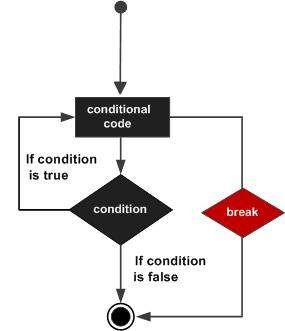
    • When the break statement is encountered inside a loop, the loop is immediately terminated and program control resumes at the next statement following the loop.
    • It can be used to terminate a case in the switch statement (covered in the next chapter).

    If you are using nested loops (i.e., one loop inside another loop), the break statement will stop the execution of the innermost loop and start executing the next line of code after the block.

    Syntax

    The syntax of a break statement in C++ is −

    break;

    Flow Diagram

    C++ break statement

    Example

    #include <iostream>usingnamespace std;intmain(){// Local variable declaration:int a =10;// do loop executiondo{
          cout <<"value of a: "<< a << endl;
          a = a +1;if( a >15){// terminate the loopbreak;}}while( a <20);return0;}

    When the above code is compiled and executed, it produces the following result −

    value of a: 10
    value of a: 11
    value of a: 12
    value of a: 13
    value of a: 14
    value of a: 15