Category: C++ Advanced

https://zain.sweetdishy.com/wp-content/uploads/2026/02/Advanced.png

  • C++ Preprocessor

    The preprocessors are the directives, which give instructions to the compiler to preprocess the information before actual compilation starts.

    All preprocessor directives begin with #, and only white-space characters may appear before a preprocessor directive on a line. Preprocessor directives are not C++ statements, so they do not end in a semicolon (;).

    You already have seen a #include directive in all the examples. This macro is used to include a header file into the source file.

    There are number of preprocessor directives supported by C++ like #include, #define, #if, #else, #line, etc. Let us see important directives −

    The #define Preprocessor

    The #define preprocessor directive creates symbolic constants. The symbolic constant is called a macro and the general form of the directive is −

    #define macro-name replacement-text 

    When this line appears in a file, all subsequent occurrences of macro in that file will be replaced by replacement-text before the program is compiled. For example −

    #include <iostream>usingnamespace std;#define PI 3.14159intmain(){
       cout <<"Value of PI :"<< PI << endl;return0;}

    Now, let us do the preprocessing of this code to see the result assuming we have the source code file. So let us compile it with -E option and redirect the result to test.p. Now, if you check test.p, it will have lots of information and at the bottom, you will find the value replaced as follows −

    $gcc -E test.cpp > test.p
    
    ...intmain(){
       cout <<"Value of PI :"<<3.14159<< endl;return0;}

    Function-Like Macros

    You can use #define to define a macro which will take argument as follows −

    #include <iostream>usingnamespace std;#define MIN(a,b) (((a)<(b)) ? a : b)intmain(){int i, j;
       
       i =100;
       j =30;
       
       cout <<"The minimum is "<<MIN(i, j)<< endl;return0;}

    If we compile and run above code, this would produce the following result −

    The minimum is 30
    

    Conditional Compilation

    There are several directives, which can be used to compile selective portions of your program’s source code. This process is called conditional compilation.

    The conditional preprocessor construct is much like the if selection structure. Consider the following preprocessor code −

    #ifndef NULL#define NULL 0#endif

    You can compile a program for debugging purpose. You can also turn on or off the debugging using a single macro as follows −

    #ifdef DEBUG
       cerr <<"Variable x = "<< x << endl;#endif

    This causes the cerr statement to be compiled in the program if the symbolic constant DEBUG has been defined before directive #ifdef DEBUG. You can use #if 0 statment to comment out a portion of the program as follows −

    #if 0
       code prevented from compiling
    #endif

    Let us try the following example −

    #include <iostream>usingnamespace std;#define DEBUG#define MIN(a,b) (((a)<(b)) ? a : b)intmain(){int i, j;
       
       i =100;
       j =30;#ifdef DEBUG
       cerr <<"Trace: Inside main function"<< endl;#endif#if 0/* This is commented part */
       cout <<MKSTR(HELLO C++)<< endl;#endif
    
       cout <<"The minimum is "<<MIN(i, j)<< endl;#ifdef DEBUG
       cerr <<"Trace: Coming out of main function"<< endl;#endifreturn0;}

    If we compile and run above code, this would produce the following result −

    The minimum is 30
    Trace: Inside main function
    Trace: Coming out of main function
    

    The # and ## Operators

    The # and ## preprocessor operators are available in C++ and ANSI/ISO C. The # operator causes a replacement-text token to be converted to a string surrounded by quotes.

    Consider the following macro definition −

    #include <iostream>usingnamespace std;#define MKSTR( x ) #xintmain(){
    
       cout <<MKSTR(HELLO C++)<< endl;return0;}

    If we compile and run above code, this would produce the following result −

    HELLO C++
    

    Let us see how it worked. It is simple to understand that the C++ preprocessor turns the line −

    cout <<MKSTR(HELLO C++)<< endl;

    Above line will be turned into the following line −

    cout <<"HELLO C++"<< endl;

    The ## operator is used to concatenate two tokens. Here is an example −

    #define CONCAT( x, y )  x ## y

    When CONCAT appears in the program, its arguments are concatenated and used to replace the macro. For example, CONCAT(HELLO, C++) is replaced by “HELLO C++” in the program as follows.

    #include <iostream>usingnamespace std;#define concat(a, b) a ## bintmain(){int xy =100;
       
       cout <<concat(x, y);return0;}

    If we compile and run above code, this would produce the following result −

    100
    

    Let us see how it worked. It is simple to understand that the C++ preprocessor transforms −

    cout <<concat(x, y);

    Above line will be transformed into the following line −

    cout << xy;

    Predefined C++ Macros

    C++ provides a number of predefined macros mentioned below −

    Sr.NoMacro & Description
    1__LINE__This contains the current line number of the program when it is being compiled.
    2__FILE__This contains the current file name of the program when it is being compiled.
    3__DATE__This contains a string of the form month/day/year that is the date of the translation of the source file into object code.
    4__TIME__This contains a string of the form hour:minute:second that is the time at which the program was compiled.

    Let us see an example for all the above macros −

    #include <iostream>usingnamespace std;intmain(){
       cout <<"Value of __LINE__ : "<<__LINE__<< endl;
       cout <<"Value of __FILE__ : "<<__FILE__<< endl;
       cout <<"Value of __DATE__ : "<<__DATE__<< endl;
       cout <<"Value of __TIME__ : "<<__TIME__<< endl;return0;}

    If we compile and run above code, this would produce the following result −

    Value of __LINE__ : 6
    Value of __FILE__ : test.cpp
    Value of __DATE__ : Feb 28 2011
    Value of __TIME__ : 18:52:48
  • C++ Templates

    Templates are the foundation of generic programming, a programming style that allows writing functions, classes, algorithms, and different code snippets that work with different data types.

    A template is a blueprint or formula for creating a generic class or a function. The library containers like iterators and algorithms are examples of generic programming and have been developed using template concepts.

    There is a single definition of each container, such as vector, but we can define many different kinds of vectors, for example, vector <int> or vector <string>.The two keywords that are used to define a template are template and typename.

    Function Template

    Function templates define a blueprint for functions that enables a function to operate on different data types without rewriting the same logic.

    Syntax

    The syntax for the general form of a template function definition is shown here −

    template<typenameidentifier> function_declaration;

    Here the ‘template’ keyword declares the generic function and ‘typename’ keyword specifies the type to be used for the parameter.

    Example

    Here is the following example of a function template that returns the maximum of two values.

    #include <iostream>#include <string>usingnamespace std;template<typenameT>inline T const&Max(T const& a, T const& b){return a < b ? b:a;}intmain(){int i =39;int j =20;
       cout <<"Max(i, j): "<<Max(i, j)<< endl;double f1 =13.5;double f2 =20.7; 
       cout <<"Max(f1, f2): "<<Max(f1, f2)<< endl; 
    
       string s1 ="Hello"; 
       string s2 ="World"; 
       cout <<"Max(s1, s2): "<<Max(s1, s2)<< endl;return0;}

    Output

    Max(i, j): 39
    Max(f1, f2): 20.7
    Max(s1, s2): World
    

    Class Template

    Similarly, class templates also define a blueprint for creating classes that can work with any data type.

    Syntax

    template<classtype>classclass-name {...}

    Here, type is the placeholder type name, which will be specified when a class is instantiated. You can define more than one generic data type by using a comma-separated list.

    Example

    Following is the example of defining class Stack<> and implementing generic methods to push and pop the elements from the stack −

    #include <iostream>#include <vector>#include <cstdlib>#include <string>#include <stdexcept>usingnamespace std;template<classT>classStack{private: 
          vector<T> elems;// elements public:voidpush(T const&);// push element voidpop();// pop element 
          T top()const;// return top element boolempty()const{// return true if empty.return elems.empty();}};template<classT>voidStack<T>::push(T const& elem){// append copy of passed element 
       elems.push_back(elem);}template<classT>voidStack<T>::pop(){if(elems.empty()){throwout_of_range("Stack<>::pop(): empty stack");}// remove last element 
       elems.pop_back();}template<classT>
    T Stack<T>::top()const{if(elems.empty()){throwout_of_range("Stack<>::top(): empty stack");}// return copy of last element return elems.back();}intmain(){try{
          Stack<int>         intStack;// stack of ints 
          Stack<string> stringStack;// stack of strings // manipulate int stack 
          intStack.push(7); 
          cout << intStack.top()<<endl;// manipulate string stack 
          stringStack.push("hello"); 
          cout << stringStack.top()<< std::endl; 
          stringStack.pop(); 
          stringStack.pop();}catch(exception const& ex){ 
          cerr <<"Exception: "<< ex.what()<<endl;return-1;}}

    Output

    7
    hello
    Exception: Stack<>::pop(): empty stack
    

    Template Argument Deduction

    Template argument deduction is a feature that automatically deduces (understands) the data type of the argument passed to a function or class template. Instead of explicitly specifying template arguments, the compiler figures them out for you.

    Example

    Lets see an example of the Template Argument Deduction −

    template<typenameT>
    T add(T a, T b){return a + b;}intmain(){// The compiler deduces T as intauto result1 =add(5,3);// The compiler deduces T as doubleauto result2 =add(3.14,2.86);}

    In this code, we didn’t write add<int>(5,3) or add<double>(3.14, 2.86). The compiler deduces the type based on the arguments you provide.

    Function Template Argument Deduction

    In C++ Function template argument is a feature that allows the compiler to automatically deduce the types of template parameters based on the arguments passed to the function.

    Example

    Heres a simple example of a Function template argument deduction.

    #include <iostream>// Function templatetemplate<typenameT>voidprintValue(T value){
       std::cout << value << std::endl;}intmain(){// Usage examplesprintValue(42);// T is intprintValue("Hello");// T is const char*printValue(3.14159);// T is doublereturn0;}

    Output

    42
    Hello
    3.14159
    

    Class Template Argument Deduction

    Class template argument deduction in C++ is a feature that enables the compiler to automatically infer template parameters for class templates from the constructor arguments when creating an object.

    Example

    Heres a basic implementation of class template deduction.

    #include <iostream>template<typenameT>classHolder{public:Holder(T value):data(value){}voidshow()const{ std::cout << data << std::endl;}private:
          T data;};intmain(){
       Holder h1(42);// T deduced as int
       Holder h2(3.14);// T deduced as double
       Holder h3("Hello");// T deduced as const char*
    
       h1.show();// Output: 42
       h2.show();// Output: 3.14
       h3.show();// Output: Helloreturn0;}

    Output

    42
    3.14
    Hello
    

    Benefits of C++ Templates

    • Code Reusability − Templates enable you to write generic code that works with all data types, thus eliminating the need to write identical code for each required type. This saves development time by reducing code duplication.
    • Reduced Maintenance − Update a template and see the changes across all instantiations. Which applies better in terms of bug fixing, fixing ones, and seeing the benefits of all the instantiations.
    • Enhanced Performance − Template instantiations occur at compile time, reducing run time errors. The compiler optimizes the code for specific data types.
    • Organize the code better − Since templates separate the algorithmic logic from the data type it helps in creating modular code which further is good in terms of development scenario. It helps reduce searching for different implementations of a code.
  • Namespaces in C++

    Consider a situation, when we have two persons with the same name, Zara, in the same class. Whenever we need to differentiate them definitely we would have to use some additional information along with their name, like either the area, if they live in different area or their mothers or fathers name, etc.

    Same situation can arise in your C++ applications. For example, you might be writing some code that has a function called xyz() and there is another library available which is also having same function xyz(). Now the compiler has no way of knowing which version of xyz() function you are referring to within your code.

    namespace is designed to overcome this difficulty and is used as additional information to differentiate similar functions, classes, variables etc. with the same name available in different libraries. Using namespace, you can define the context in which names are defined. In essence, a namespace defines a scope.

    Defining a Namespace

    A namespace definition begins with the keyword namespace followed by the namespace name as follows −

    namespace namespace_name {// code declarations}

    To call the namespace-enabled version of either function or variable, prepend (::) the namespace name as follows −

    name::code;// code could be variable or function.

    Let us see how namespace scope the entities including variable and functions −

    #include <iostream>usingnamespace std;// first name spacenamespace first_space {voidfunc(){
          cout <<"Inside first_space"<< endl;}}// second name spacenamespace second_space {voidfunc(){
          cout <<"Inside second_space"<< endl;}}intmain(){// Calls function from first name space.
       first_space::func();// Calls function from second name space.
       second_space::func();return0;}

    If we compile and run above code, this would produce the following result −

    Inside first_space
    Inside second_space
    

    The using directive

    You can also avoid prepending of namespaces with the using namespace directive. This directive tells the compiler that the subsequent code is making use of names in the specified namespace. The namespace is thus implied for the following code −

    #include <iostream>usingnamespace std;// first name spacenamespace first_space {voidfunc(){
          cout <<"Inside first_space"<< endl;}}// second name spacenamespace second_space {voidfunc(){
          cout <<"Inside second_space"<< endl;}}usingnamespace first_space;intmain(){// This calls function from first name space.func();return0;}

    If we compile and run above code, this would produce the following result −

    Inside first_space
    

    The using directive can also be used to refer to a particular item within a namespace. For example, if the only part of the std namespace that you intend to use is cout, you can refer to it as follows −

    using std::cout;

    Subsequent code can refer to cout without prepending the namespace, but other items in the std namespace will still need to be explicit as follows −

    #include <iostream>using std::cout;intmain(){
       cout <<"std::endl is used with std!"<< std::endl;return0;}

    If we compile and run above code, this would produce the following result −

    std::endl is used with std!
    

    Names introduced in a using directive obey normal scope rules. The name is visible from the point of the using directive to the end of the scope in which the directive is found. Entities with the same name defined in an outer scope are hidden.

    Discontiguous Namespaces

    A namespace can be defined in several parts and so a namespace is made up of the sum of its separately defined parts. The separate parts of a namespace can be spread over multiple files.

    So, if one part of the namespace requires a name defined in another file, that name must still be declared. Writing a following namespace definition either defines a new namespace or adds new elements to an existing one −

    namespace namespace_name {// code declarations}

    Nested Namespaces

    Namespaces can be nested where you can define one namespace inside another name space as follows −

    namespace namespace_name1 {// code declarationsnamespace namespace_name2 {// code declarations}}

    You can access members of nested namespace by using resolution operators as follows −

    // to access members of namespace_name2usingnamespace namespace_name1::namespace_name2;// to access members of namespace:name1usingnamespace namespace_name1;

    In the above statements if you are using namespace_name1, then it will make elements of namespace_name2 available in the scope as follows −

    #include <iostream>usingnamespace std;// first name spacenamespace first_space {voidfunc(){
          cout <<"Inside first_space"<< endl;}// second name spacenamespace second_space {voidfunc(){
             cout <<"Inside second_space"<< endl;}}}usingnamespace first_space::second_space;intmain(){// This calls function from second name space.func();return0;}

    If we compile and run above code, this would produce the following result −

    Inside second_space
  • Move Semantics in C++

    Move semantics are used in C++ to transfer the ownership of resources from one object to another instead of copying them. It improves the performance as it avoid unnecessary copying of objects, reducing memory usage, improves efficiency, and efficiently handles the temporary objects like rvalue.

    Why Move Semantics are Needed?

    Before C++11, we used to copy the resource and it was less efficient and created duplicates. In C++11, move semantics were introduced to solve this problem of memory overhead and reducing the duplicates. Here are reasons why we need move semantics −

    • Move semantics avoid copying of resources. It helps in avoiding duplicates and cause less memory overhead.
    • It handles temporary objects like rvalues.
    • It improves the performance by moving the resources instead of copying.

    Expression Types in C++

    An expression in C++ means any valid combination of variable, operator, constant, and function call that can give result. There are two types of expression which are as follows −

    lvalue Expression

    An lvalue is a type of expression in which object has a memory address and can be modified if it is not const. Example of lvalue can be a variable, array elements, and many more.

    An lvalue reference is used to create a reference to an lvalue. It is denoted by (&) and is used for implementing copy semantics.

    rvalue Expression

    An rvalue is a type of expression that does not have a memory address and it represents a value that generally appears on the right side. It is a temporary expression that is about to get destroyed. Example of rvalue can be a constant, temporary object, and many more.

    An rvalue reference is used to reference rvalues or temporary objects. It is denoted by (&&) and is used for implementing move semantics.

    Here is an example of demonstrating lvalue and rvalue in C++. The x is an lvalue expression and x+5 is an rvalue expression.

    #include <iostream>usingnamespace std;intmain(){// x is an lvalueint x =10;// 'x + 5' is an rvalue         int y = x +5;       
    
        cout <<"Old x: "<< x << endl;
        cout <<"Old y: "<< y << endl;// Demonstrating assignments
        x =20;// correct, as x is an lvalue// (x + 5) = 15;     // wrong, as x + 5 is an rvalue
    
        cout <<"New x: "<< x << endl;return0;}

    The output of the above code is as follows −

    Old x: 10
    Old y: 15
    New x: 20
    

    The following example demonstrates lvalue reference(int &x) and rvalue reference(int &&x) −

    #include <iostream>usingnamespace std;voidprintValue(int&x){
       cout <<"Calling with Lvalue reference: "<< x << endl;// lvalue reference}voidprintValue(int&&x){
       cout <<"Calling with Rvalue reference: "<< x << endl;// rvalue reference}intmain(){int a =10;printValue(a);// a is an lvalueprintValue(20);// 20 is an rvaluereturn0;}

    The output of the above code is as follows −

    Calling with Lvalue reference: 10
    Calling with Rvalue reference: 20
    

    Why do Move Semantics Apply to Rvalues Only?

    The move semantics is applied only to rvalues because, the rvalues are temporary objects, that are about to get destroyed. The rvalue will not affect the program in future as they are temporary and can be changed. So, applying move semantics on rvalue to transfer the ownership won’t affect the program.

    Here are the techniques that can be used to implement move semantics −

    Move Constructor

    A move constructor is a special constructor used to transfer the ownership of resources from a temporary object or rvalue to a new object using rvalue reference. The move constructor is automatically called when initializing an object with an rvalue.

    #include <iostream>#include <cstring>usingnamespace std;classMyString{private:char*data;
          size_t length;public:// Regular constructorMyString(constchar*str){
       
          length =strlen(str);
          data =newchar[length +1];strcpy(data, str);
          cout <<"Constructor called\n";}// Move constructor MyString(MyString &&other)noexcept{
       
          data = other.data;// transferring ownership
          length = other.length;
          other.data =nullptr; 
          other.length =0;
          cout <<"Move constructor called\n";}// Destructor~MyString(){delete[] data;
          cout <<"Destructor called\n";}voidprint()const{if(data)
             cout << data << endl;}};// Function returning a temporary object(rvalue)
    MyString createString(){returnMyString("Temporary");}intmain(){// Calling move constructor 
       MyString s1 =createString(); 
       s1.print();return0;}

    The output of the above code is as follows −

    Constructor called
    Temporary
    Destructor called
    

    In the above code, the desired output is not being displayed because of modern compiler apply RVO(Return Value Optimization).

    Move Assignment Operator

    The move assignment operator uses ‘(=)’ and rvalue reference for move semantic. First, it releases the current resource of object and then take ownership of the source object’s resources. Below is an example of move assignment operator −

    #include <iostream>#include <cstring>usingnamespace std;classMyString{private:char* data;
          size_t length;public:// Regular constructorMyString(constchar* str){
             length =strlen(str);
             data =newchar[length +1];strcpy(data, str);
             cout <<"Constructor called\n";}// Move constructorMyString(MyString&& other)noexcept{
             data = other.data;
             length = other.length;
             other.data =nullptr;
             other.length =0;
             cout <<"Move constructor called\n";}// Move assignment operator
          MyString&operator=(MyString&& other)noexcept{if(this!=&other){delete[] data;          
                data = other.data;// transferring ownership
                length = other.length;
                other.data =nullptr;   
                other.length =0;
                cout <<"Move assignment operator called\n";}return*this;}// Destructor~MyString(){delete[] data;
             cout <<"Destructor called\n";}voidprint()const{if(data)
            cout << data << endl;}};intmain(){
       MyString s1("Hello");
       MyString s2("World");
    
       cout <<"Before move assignment:\n";
       s1.print();
       s2.print();
    
       s1 = std::move(s2);// Move assignment operator called
    
       cout <<"After move assignment:\n";
       s1.print();
       s2.print();// s2 is now empty return0;}

    The output of the above code is as follows −

    Constructor called
    Constructor called
    Before move assignment:
    Hello
    World
    Move assignment operator called
    After move assignment:
    World
    Destructor called
    Destructor called
    

    std::move() Function

    Below is an example to transfer the ownership using the std::move() function −

    #include <iostream>#include <string>#include <utility> // for moveusingnamespace std;intmain(){
       cout <<"Before move() function:";
       string str1 ="Hello";
       cout <<"\nstring 1: "<< str1 << endl;
    
       cout <<"\nAfter move() function:";
       string str2 =move(str1);
       cout <<"\nstr2: "<< str2;
       cout <<"\nstr1: "<< str1 <<"\n";return0;}

    The output of the above code is as follows −

    Before move() function:
    string 1: Hello
    
    After move() function:
    str2: Hello
    str1: 
    

    Conclusion

    In this chapter, we discussed about move semantics. Its main purpose is to transfer the ownership of resources of rvalues to save memory overhead and increase the efficiency of the code.

  • C++ Dynamic Memory

    A good understanding of how dynamic memory really works in C++ is essential to becoming a good C++ programmer. Memory in your C++ program is divided into two parts −

    • The stack − All variables declared inside the function will take up memory from the stack.
    • The heap − This is unused memory of the program and can be used to allocate the memory dynamically when program runs.

    Many times, you are not aware in advance how much memory you will need to store particular information in a defined variable and the size of required memory can be determined at run time.

    You can allocate memory at run time within the heap for the variable of a given type using a special operator in C++ which returns the address of the space allocated. This operator is called new operator.

    If you are not in need of dynamically allocated memory anymore, you can use delete operator, which de-allocates memory that was previously allocated by new operator.

    new and delete Operators

    There is following generic syntax to use new operator to allocate memory dynamically for any data-type.

    new data-type;

    Here, data-type could be any built-in data type including an array or any user defined data types include class or structure. Let us start with built-in data types. For example we can define a pointer to type double and then request that the memory be allocated at execution time. We can do this using the new operator with the following statements −

    double* pvalue  =NULL;// Pointer initialized with null
    pvalue  =newdouble;// Request memory for the variable

    The memory may not have been allocated successfully, if the free store had been used up. So it is good practice to check if new operator is returning NULL pointer and take appropriate action as below −

    double* pvalue  =NULL;if(!(pvalue  =newdouble)){
       cout <<"Error: out of memory."<<endl;exit(1);}

    The malloc() function from C, still exists in C++, but it is recommended to avoid using malloc() function. The main advantage of new over malloc() is that new doesn’t just allocate memory, it constructs objects which is prime purpose of C++.

    At any point, when you feel a variable that has been dynamically allocated is not anymore required, you can free up the memory that it occupies in the free store with the delete operator as follows −

    delete pvalue;// Release memory pointed to by pvalue

    Let us put above concepts and form the following example to show how new and delete work −

    #include <iostream>usingnamespace std;intmain(){double* pvalue  =NULL;// Pointer initialized with null
       pvalue  =newdouble;// Request memory for the variable*pvalue =29494.99;// Store value at allocated address
       cout <<"Value of pvalue : "<<*pvalue << endl;delete pvalue;// free up the memory.return0;}

    If we compile and run above code, this would produce the following result −

    Value of pvalue : 29495
    

    Dynamic Memory Allocation for Arrays

    Consider you want to allocate memory for an array of characters, i.e., string of 20 characters. Using the same syntax what we have used above we can allocate memory dynamically as shown below.

    char* pvalue  =NULL;// Pointer initialized with null
    pvalue  =newchar[20];// Request memory for the variable

    To remove the array that we have just created the statement would look like this −

    delete[] pvalue;// Delete array pointed to by pvalue

    Following the similar generic syntax of new operator, you can allocate for a multi-dimensional array as follows −

    double** pvalue  =NULL;// Pointer initialized with null 
    pvalue  =newdouble[3][4];// Allocate memory for a 3x4 array 

    However, the syntax to release the memory for multi-dimensional array will still remain same as above −

    delete[] pvalue;// Delete array pointed to by pvalue

    Dynamic Memory Allocation for Objects

    Objects are no different from simple data types. For example, consider the following code where we are going to use an array of objects to clarify the concept −

    #include <iostream>usingnamespace std;classBox{public:Box(){ 
             cout <<"Constructor called!"<<endl;}~Box(){ 
             cout <<"Destructor called!"<<endl;}};intmain(){
       Box* myBoxArray =new Box[4];delete[] myBoxArray;// Delete arrayreturn0;}

    If you were to allocate an array of four Box objects, the Simple constructor would be called four times and similarly while deleting these objects, destructor will also be called same number of times.

    If we compile and run above code, this would produce the following result −

    Constructor called!
    Constructor called!
    Constructor called!
    Constructor called!
    Destructor called!
    Destructor called!
    Destructor called!
    Destructor called!
  • C++ Exception Handling

    An exception is a problem that arises during the execution of a program. A C++ exception is a response to an exceptional circumstance that arises while a program is running, such as an attempt to divide by zero.

    Exceptions provide a way to transfer control from one part of a program to another. C++ exception handling is built upon three keywords: try, catch, and throw.

    • throw − A program throws an exception when a problem shows up. This is done using a throw keyword.
    • catch − A program catches an exception with an exception handler at the place in a program where you want to handle the problem. The catch keyword indicates the catching of an exception.
    • try − A try block identifies a block of code for which particular exceptions will be activated. It’s followed by one or more catch blocks.

    Assuming a block will raise an exception, a method catches an exception using a combination of the try and catch keywords. A try/catch block is placed around the code that might generate an exception. Code within a try/catch block is referred to as protected code, and the syntax for using try/catch as follows −

    try{// protected code}catch( ExceptionName e1 ){// catch block}catch( ExceptionName e2 ){// catch block}catch( ExceptionName eN ){// catch block}

    You can list down multiple catch statements to catch different type of exceptions in case your try block raises more than one exception in different situations.

    Throwing Exceptions

    Exceptions can be thrown anywhere within a code block using throw statement. The operand of the throw statement determines a type for the exception and can be any expression and the type of the result of the expression determines the type of exception thrown.

    Example

    Following is an example of throwing an exception when dividing by zero condition occurs −

    doubledivision(int a,int b){if( b ==0){throw"Division by zero condition!";}return(a/b);}

    Catching Exceptions

    The catch block following the try block catches any exception. You can specify what type of exception you want to catch and this is determined by the exception declaration that appears in parentheses following the keyword catch.

    try{// protected code}catch( ExceptionName e ){// code to handle ExceptionName exception}

    Above code will catch an exception of ExceptionName type. If you want to specify that a catch block should handle any type of exception that is thrown in a try block, you must put an ellipsis, …, between the parentheses enclosing the exception declaration as follows −

    try{// protected code}catch(...){// code to handle any exception}

    Example

    The following is an example, which throws a division by zero exception and we catch it in catch block.

    #include <iostream>usingnamespace std;doubledivision(int a,int b){if( b ==0){throw"Division by zero condition!";}return(a/b);}intmain(){int x =50;int y =0;double z =0;try{
          z =division(x, y);
          cout << z << endl;}catch(constchar* msg){
         cerr << msg << endl;}return0;}

    Because we are raising an exception of type const char*, so while catching this exception, we have to use const char* in catch block. If we compile and run above code, this would produce the following result −

    Division by zero condition!
    

    C++ Standard Exceptions

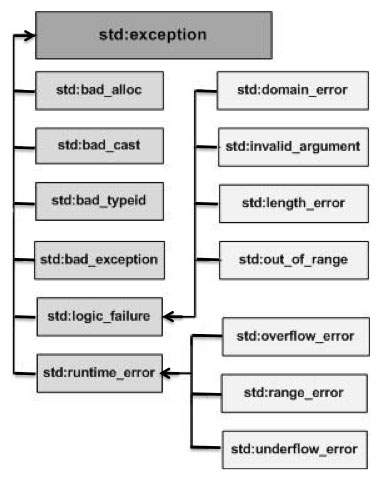
    C++ provides a list of standard exceptions defined in <exception> which we can use in our programs. These are arranged in a parent-child class hierarchy shown below −

    C++ Exceptions Hierarchy

    Here is the small description of each exception mentioned in the above hierarchy −

    Sr.NoException & Description
    1std::exceptionAn exception and parent class of all the standard C++ exceptions.
    2std::bad_allocThis can be thrown by new.
    3std::bad_castThis can be thrown by dynamic_cast.
    4std::bad_exceptionThis is useful device to handle unexpected exceptions in a C++ program.
    5std::bad_typeidThis can be thrown by typeid.
    6std::logic_errorAn exception that theoretically can be detected by reading the code.
    7std::domain_errorThis is an exception thrown when a mathematically invalid domain is used.
    8std::invalid_argumentThis is thrown due to invalid arguments.
    9std::length_errorThis is thrown when a too big std::string is created.
    10std::out_of_rangeThis can be thrown by the ‘at’ method, for example a std::vector and std::bitset<>::operator[]().
    11std::runtime_errorAn exception that theoretically cannot be detected by reading the code.
    12std::overflow_errorThis is thrown if a mathematical overflow occurs.
    13std::range_errorThis is occurred when you try to store a value which is out of range.
    14std::underflow_errorThis is thrown if a mathematical underflow occurs.

    Define New Exceptions

    You can define your own exceptions by inheriting and overriding exception class functionality.

    Example

    Following is the example, which shows how you can use std::exception class to implement your own exception in standard way −

    #include <iostream>#include <exception>usingnamespace std;structMyException:public exception{constchar*what()constthrow(){return"C++ Exception";}};intmain(){try{throwMyException();}catch(MyException& e){
          std::cout <<"MyException caught"<< std::endl;
          std::cout << e.what()<< std::endl;}catch(std::exception& e){//Other errors}}

    This would produce the following result −

    MyException caught
    C++ Exception
    

    Here, what() is a public method provided by exception class and it has been overridden by all the child exception classes. This returns the cause of an exception.