Multidimensional Array
C++ multidimensional array is an array that has more than one dimension and allows you to store data in a grid-like structure. You can create arrays with multiple dimensions, but here we will discuss two-dimensional (2D) and three-dimensional (3D) arrays.
C++ allows multidimensional arrays. Here is the general form of a multidimensional array declaration −
Syntax
Here is the given syntax for a Multidimensional array in C++:
type name[size1][size2]...[sizeN];
Example
For example, the following declaration creates a three dimensional 5 . 10 . 4 integer array −
int threedim[5][10][4];
Two-Dimensional Arrays
The simplest form of the multidimensional array is the two-dimensional array. A two-dimensional array is, in essence, a list of one-dimensional arrays. To declare a two-dimensional integer array of size x, and y, you would write something as follows −
type arrayName [ x ][ y ];
Where type can be any valid C++ data type and arrayName will be a valid C++ identifier.
A two-dimensional array can be thought of as a table, which will have x number of rows and y number of columns. A 2-dimensional array a, which contains three rows and four columns can be shown below −
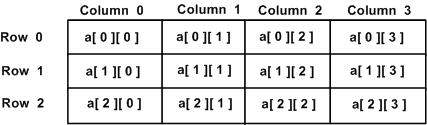
Thus, every element in array a is identified by an element name of the form a[ i ][ j ], where a is the name of the array, and i and j are the subscripts that uniquely identify each element in a.
Initializing Two-Dimensional Arrays
Multidimensional arrays may be initialized by specifying bracketed values for each row. Following is an array with 3 rows and each row has 4 columns.
int a[3][4]={{0,1,2,3},/* initializers for row indexed by 0 */{4,5,6,7},/* initializers for row indexed by 1 */{8,9,10,11}/* initializers for row indexed by 2 */};
The nested braces, which indicate the intended row, are optional. The following initialization is equivalent to the previous example −
int a[3][4]={0,1,2,3,4,5,6,7,8,9,10,11};
Accessing Two-Dimensional Array Elements
An element in the 2-dimensional array is accessed by using the subscripts, i.e., row index and column index of the array. For example −
int val = a[2][3];
The above statement will take the 4th element from the 3rd row of the array. You can verify it in the above diagram.
#include <iostream>usingnamespace std;intmain(){// an array with 5 rows and 2 columns.int a[5][2]={{0,0},{1,2},{2,4},{3,6},{4,8}};// output each array element's value                      for(int i =0; i <5; i++)for(int j =0; j <2; j++){

         cout <<"a["<< i <<"]["<< j <<"]: ";
         cout << a[i][j]<< endl;}return0;}
When the above code is compiled and executed, it produces the following result −
a[0][0]: 0
a[0][1]: 0
a[1][0]: 1
a[1][1]: 2
a[2][0]: 2
a[2][1]: 4
a[3][0]: 3
a[3][1]: 6
a[4][0]: 4
a[4][1]: 8
As explained above, you can have arrays with any number of dimensions, although it is likely that most of the arrays you create will be of one or two dimensions.
Three-Dimensional Arrays
Similarly, A three-dimensional (3D) array in C++ is an extension of the two-dimensional array concept to add another dimension. Which gives you access to store data in a three-dimensional space. you can visualize it as a cube where each element is identified by three indices which typically denote the dimensions in terms of depth, rows, and columns. To declare a two-dimensional integer array of size x, y and z you would write something as follows −
type arrayName [ x ][ y ][z];
Where type can be any valid C++ data type and arrayName will be a valid C++ identifier.
A three-dimensional array can be thought of as a collection of two-dimensional tables stacked on top of each other, forming a cube-like structure.
Thus, every element in array a is identified by an element name of the form b[ i ][ j ][k], where a is the name of the array, and i, j, and k are the subscripts that uniquely identify each element in b.
Initializing Three-Dimensional Array
A three-dimensional array can be initialized by specifying bracketed values for each layer, row, and column. Following is an example of a 3D array with 2 layers, 3 rows, and 4 columns.
int b[2][3][4]={{{0,1,2,3},/* Initializers for layer 0, row 0 */{4,5,6,7},/* Initializers for layer 0, row 1 */{8,9,10,11}/* Initializers for layer 0, row 2 */},{{12,13,14,15},/* Initializers for layer 1, row 0 */{16,17,18,19},/* Initializers for layer 1, row 1 */{20,21,22,23}/* Initializers for layer 1, row 2 */}};
In this initialization, the nested braces are used for the intended layer and row for each set of values.
Flat Initialization
Alternatively, you can also initialize a three-dimensional array without nested braces. This method involves the array as a single contiguous block of values. This is the following example:
int b[2][3][4]={0,1,2,3,4,5,6,7,8,9,10,11,12,13,14,15,16,17,18,19,20,21,22,23};
In this case, the values are listed in a flat format. Both methods of initialization are valid and produce the same array structure.
Accessing Three-Dimensional Array Elements
An element in the 3-dimensional array is accessed by using three subscripts, i.e., the layer index, the row index, and the column index. For example −
int val = b[1][2][3];
In this above statement, val will take the 4th element from the 3rd row in the 2nd layer of the array b.
Here’s given how the indexing works:
- The first index (1) specifies the layer (or depth) of the array.
- The second index (2) specifies the row within that layer.
- The third index (3) specifies the column within that row.
Thus, the element accessed by b[1][2][3] corresponds to the value located in the 1st layer, 2nd row, and 3rd column of the array. You can visualize this by considering how the data is structured in a cube format in which each coordinate points to a specific element within that 3D space.
Example
Here’s a given code for this:
#include <iostream>usingnamespace std;intmain(){// An array with 2 layers, 3 rows, and 4 columns.int b[2][3][4]={{{0,1,2,3},// Layer 0, Row 0{4,5,6,7},// Layer 0, Row 1{8,9,10,11}// Layer 0, Row 2},{{12,13,14,15},// Layer 1, Row 0{16,17,18,19},// Layer 1, Row 1{20,21,22,23}// Layer 1, Row 2}};// Output each array element's valuefor(int i =0; i <2; i++){// Iterating through layersfor(int j =0; j <3; j++){// Iterating through rowsfor(int k =0; k <4; k++){// Iterating through columns
        cout <<"b["<< i <<"]["<< j <<"]["<< k <<"]: ";
        cout << b[i][j][k]<< endl;}}}return0;}
When the above code is compiled and executed, it produces the following result −
b[0][0][0]: 0
b[0][0][1]: 1
b[0][0][2]: 2
b[0][0][3]: 3
b[0][1][0]: 4
b[0][1][1]: 5
b[0][1][2]: 6
b[0][1][3]: 7
b[0][2][0]: 8
b[0][2][1]: 9
b[0][2][2]: 10
b[0][2][3]: 11
b[1][0][0]: 12
b[1][0][1]: 13
b[1][0][2]: 14
b[1][0][3]: 15
b[1][1][0]: 16
b[1][1][1]: 17
b[1][1][2]: 18
b[1][1][3]: 19
b[1][2][0]: 20
b[1][2][1]: 21
b[1][2][2]: 22
b[1][2][3]: 23
The above code effectively demonstrates how to work with three-dimensional arrays in C++.
Leave a Reply