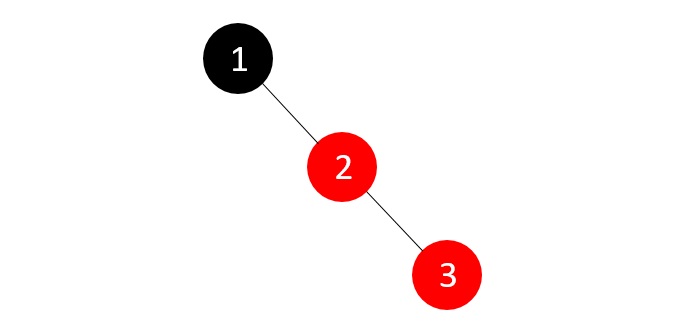
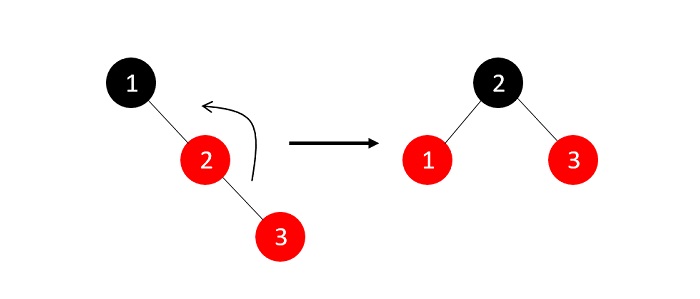
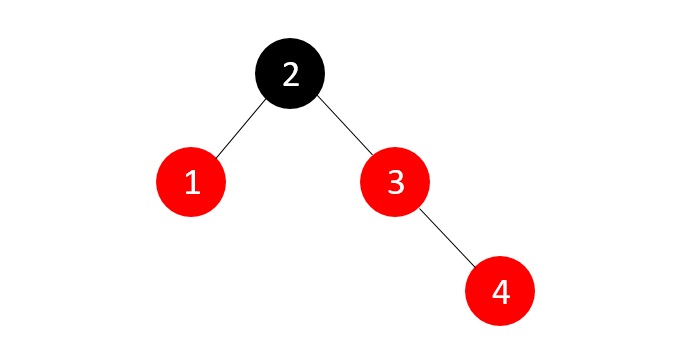
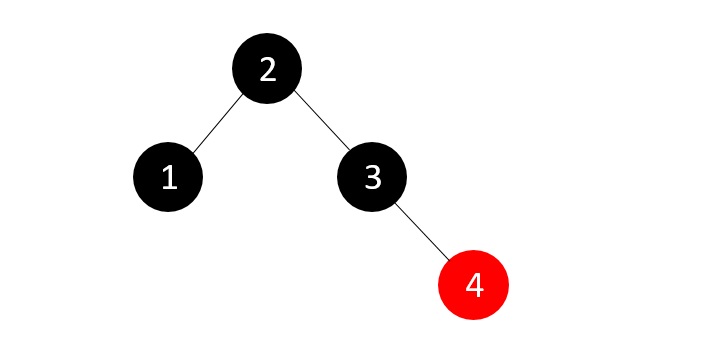
Author: admin

  • k-ary Tree in Data Structure

    What is K-Ary Tree?

    K-ary tree also known as K-way or N-ary tree is a tree data structure in which each node has at most K children. The value of K is fixed for a given tree. The value of K can be 2, 3, 4, 5, etc.

    For example, a binary tree is a 2-ary tree, a ternary tree is a 3-ary tree, and so on.

    Characteristics of K-Ary Tree

    Following are the characteristics of K-ary tree:

    • K : This number represents the maximum number of children a node can have.
    • Height : The height of a K-ary tree is the maximum number of edges on the longest path between the root node and a leaf node.
    • Level: The level of a node is the number of edges on the path from the root node to the node.
    • Root: The topmost node in the tree.
    • Parent: The node that is connected to its child node.
    • Leaf Node: The node that does not have any children.
    • Internal Node: The node that has at least one child.

    Types of K-Ary Tree

    There are two types of K-ary tree:

    • Full K-ary Tree : A K-ary tree is called a full K-ary tree if each node has exactly K children or no children.
    • Complete K-ary Tree : A K-ary tree is called a complete K-ary tree if all levels are completely filled except possibly for the last level, which is filled from left to right.

    Representation of K-Ary Tree

    K-ary tree can be represented using an array. The array representation of a complete K-ary tree is as follows:

    • Parent Node : The parent node of the ith node is at the position (i-1)/K.
    • Child Node : The K children of the ith node are at the positions K*i+1, K*i+2, …, K*i+K.

    For example, consider a 3-ary tree:
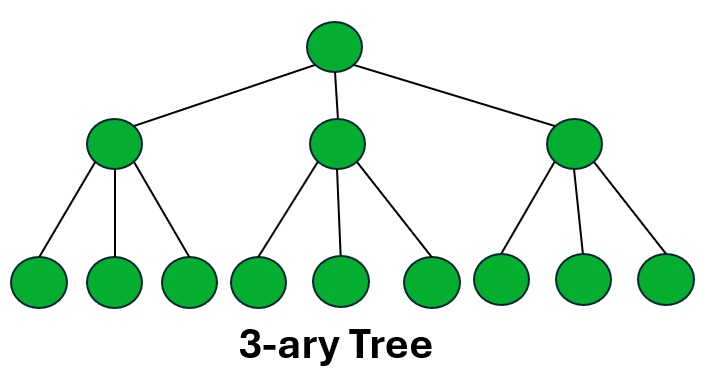
    3-ary Tree

    The array representation of the above 3-ary tree is as follows:

    The formula to find the parent node of the ith node is (i-1)/3.

    The formula to find the child nodes of the ith node is 3*i+1, 3*i+2, 3*i+3.

    Array: 1 2 3 4 5 6 7 8 9 10 11 12 13 14 15
    Index: 0 1 2 3 4 5 6 7 8 9 10 11 12 13 14
    
    Parent Node:
    Parent of 2: (2-1)/3 = 0
    Parent of 3: (3-1)/3 = 0
    Parent of 4: (4-1)/3 = 1
    Parent of 5: (5-1)/3 = 1
    Parent of 6: (6-1)/3 = 1
    Parent of 7: (7-1)/3 = 2
    Parent of 8: (8-1)/3 = 2
    Parent of 9: (9-1)/3 = 2
    Parent of 10: (10-1)/3 = 3
    Parent of 11: (11-1)/3 = 3
    Parent of 12: (12-1)/3 = 3
    Parent of 13: (13-1)/3 = 4
    Parent of 14: (14-1)/3 = 4
    Parent of 15: (15-1)/3 = 4
    

    Similarly, we can find the child nodes of each node using the above formula.

    Operations on K-Ary Tree

    Following are the important operations that can be performed on a K-ary tree:

    • Insertion: Insert a new node into the K-ary tree.
    • Deletion: Delete a node from the K-ary tree.
    • Traversal: Traverse the K-ary tree in different ways such as inorder, preorder, postorder, and level order.
    • Search: Search for a specific node in the K-ary tree.

    Implementation of K-Ary Tree

    We will discuss the Insertion operation on the K-ary tree. The following is the algorithm to insert a new node into the K-ary tree

    Algorithm to Insert a Node in K-Ary Tree

    Follow the steps below to insert a new node into the K-ary tree:

    1. Create a class Node with data and an array of children.
    2. Create a class KaryTree with a root node and a K-ary tree.
    3. Insert a new node into the K-ary tree.
    

    Code to Insert a Node in K-Ary Tree

    Following is the code to insert a new node into the K-ary tree:

    CC++JavaPython

    #include <stdio.h>#include <stdlib.h>#define MAX_CHILDREN 3  // Define k (max number of children per node)// Node structure for k-ary treestructNode{int data;structNode* children[MAX_CHILDREN];};// Function to create a new nodestructNode*createNode(int data){structNode* newNode =(structNode*)malloc(sizeof(structNode));
       newNode->data = data;// Initialize all child pointers to NULLfor(int i =0; i < MAX_CHILDREN; i++){
          newNode->children[i]=NULL;}return newNode;}// Function to insert a new child node to a parent nodevoidinsert(structNode* parent,int data){for(int i =0; i < MAX_CHILDREN; i++){if(parent->children[i]==NULL){
             parent->children[i]=createNode(data);return;}}printf("Node %d already has maximum children (%d).\n", parent->data, MAX_CHILDREN);}// Function to print the tree structurevoidprintTree(structNode* root){if(root ==NULL)return;printf("Node %d: ", root->data);for(int i =0; i < MAX_CHILDREN; i++){if(root->children[i]!=NULL){printf("%d ", root->children[i]->data);}}printf("\n");// Recursively print childrenfor(int i =0; i < MAX_CHILDREN; i++){if(root->children[i]!=NULL){printTree(root->children[i]);}}}intmain(){structNode* root =createNode(1);// Insert children into rootinsert(root,2);insert(root,3);insert(root,4);// Insert child nodes into node 3insert(root->children[1],5);insert(root->children[1],6);// Print the tree structureprintTree(root);return0;}

    Output

    Following is the output of the above C program:

    Node 1: 2 3 4 
    Node 2: 
    Node 3: 5 6 
    Node 5: 
    Node 6: 
    Node 4: 
    

    Traversal of K-Ary Tree

    There are different ways to traverse a K-ary tree:

    • Inorder Traversal : Traverse the left subtree, visit the root node, and then traverse the right subtree.
    • Preorder Traversal : Visit the root node, traverse the left subtree, and then traverse the right subtree.
    • Postorder Traversal : Traverse the left subtree, traverse the right subtree, and then visit the root node.
    • Level Order Traversal : Traverse the tree level by level from left to right.

    Algorithm for Inorder, Preorder, and Postorder Traversal

    Follow the steps below to perform an inorder traversal of a K-ary tree:

    1. Traverse the left subtree.
    2. Visit the root node.
    3. Traverse the right subtree.
    

    Follow the steps below to perform a preorder traversal of a K-ary tree:

    1. Visit the root node.
    2. Traverse the left subtree.
    3. Traverse the right subtree.
    

    Follow the steps below to perform a postorder traversal of a K-ary tree:

    1. Traverse the left subtree.
    2. Traverse the right subtree.
    3. Visit the root node.
    

    Code to Perform Inorder, Preorder, and Postorder Traversal

    Following is the code to perform inorder, preorder, and postorder traversal of a K-ary tree:

    CC++JavaPython

    #include <stdio.h>#include <stdlib.h>#define MAX_CHILDREN 3structNode{int data;structNode* children[MAX_CHILDREN];};structNode*createNode(int data){structNode* newNode =(structNode*)malloc(sizeof(structNode));
       newNode->data = data;for(int i =0; i < MAX_CHILDREN; i++){
          newNode->children[i]=NULL;}return newNode;}voidinorder(structNode* root){if(root ==NULL)return;int mid = MAX_CHILDREN /2;// Find the middle index for ordering// First, traverse the left children (half of them)for(int i =0; i < mid; i++){inorder(root->children[i]);}printf("%d ", root->data);// Then, traverse the right children (remaining half)for(int j = mid; j < MAX_CHILDREN; j++){inorder(root->children[j]);}}voidpreorder(structNode* root){if(root ==NULL)return;printf("%d ", root->data);for(int i =0; i < MAX_CHILDREN; i++){preorder(root->children[i]);}}voidpostorder(structNode* root){if(root ==NULL)return;for(int i =0; i < MAX_CHILDREN; i++){postorder(root->children[i]);}printf("%d ", root->data);}intmain(){structNode* root =createNode(1);
       root->children[0]=createNode(2);
       root->children[1]=createNode(3);
       root->children[2]=createNode(4);
       root->children[1]->children[0]=createNode(5);
       root->children[1]->children[1]=createNode(6);printf("Inorder Traversal: ");inorder(root);printf("\n");printf("Preorder Traversal: ");preorder(root);printf("\n");printf("Postorder Traversal: ");postorder(root);printf("\n");return0;}

    Output

    Following is the output of the above C program:

    Inorder Traversal: 2 1 3 5 6 4
    Preorder Traversal: 1 2 3 5 6 4
    Postorder Traversal: 2 5 6 3 4 1
    

    Level Order Traversal on K-ary Tree

    Follow the steps below to perform a level order traversal of a K-ary tree:

    1. Create a queue and enqueue the root node.
    2. Repeat the following steps until the queue is empty:
       a. Dequeue a node from the queue.
       b. Print the data of the dequeued node.
       c. Enqueue all children of the dequeued node.
    

    Code to Perform Level Order Traversal

    Following is the code to perform a level order traversal of a K-ary tree:

    CC++JavaPython

    #include <stdio.h>#include <stdlib.h>#define MAX_CHILDREN 3structNode{int data;structNode* children[MAX_CHILDREN];};structNode*createNode(int data){structNode* newNode =(structNode*)malloc(sizeof(structNode));
       newNode->data = data;for(int i =0; i < MAX_CHILDREN; i++){
          newNode->children[i]=NULL;}return newNode;}voidlevelOrder(structNode* root){if(root ==NULL)return;structNode* queue[100];int front =0, rear =0;
       queue[rear++]= root;while(front < rear){structNode* current = queue[front++];printf("%d ", current->data);for(int i =0; i < MAX_CHILDREN; i++){if(current->children[i]!=NULL){
                queue[rear++]= current->children[i];}}}}intmain(){structNode* root =createNode(1);
       root->children[0]=createNode(2);
       root->children[1]=createNode(3);
       root->children[2]=createNode(4);
       root->children[1]->children[0]=createNode(5);
       root->children[1]->children[1]=createNode(6);printf("Level Order Traversal: ");levelOrder(root);printf("\n");return0;}

    Output

    Following is the output of the above C program:

    Level Order Traversal: 1 2 3 4 5 6
    

    Search Operation on K-Ary Tree

    Follow the steps below to search for a specific node in a K-ary tree:

    1. Create a queue and enqueue the root node.
    2. Repeat the following steps until the queue is empty:
       a. Dequeue a node from the queue.
       b. If the data of the dequeued node matches the search key, return true.
       c. Enqueue all children of the dequeued node.
    3. If the search key is not found, return false.
    

    Code to Search a Node in K-Ary Tree

    Following is the code to search for a specific node in a K-ary tree:

    CC++JavaPython

    #include <stdio.h>#include <stdlib.h>#define MAX_CHILDREN 3structNode{int data;structNode* children[MAX_CHILDREN];};structNode*createNode(int data){structNode* newNode =(structNode*)malloc(sizeof(structNode));
       newNode->data = data;for(int i =0; i < MAX_CHILDREN; i++){
          newNode->children[i]=NULL;}return newNode;}intsearch(structNode* root,int key){if(root ==NULL)return0;structNode* queue[100];int front =0, rear =0;
       queue[rear++]= root;while(front < rear){structNode* current = queue[front++];if(current->data == key)return1;for(int i =0; i < MAX_CHILDREN; i++){if(current->children[i]!=NULL){
                queue[rear++]= current->children[i];}}}return0;}intmain(){structNode* root =createNode(1);
       root->children[0]=createNode(2);
       root->children[1]=createNode(3);
       root->children[2]=createNode(4);
       root->children[1]->children[0]=createNode(5);
       root->children[1]->children[1]=createNode(6);int key =5;if(search(root, key)){printf("Node %d found in the tree.\n", key);}else{printf("Node %d not found in the tree.\n", key);}return0;}

    Output

    Following is the output of the above C program:

    Node 5 found in the tree.
    

    Applications of K-Ary Tree

    K-ary tree is used in the following applications:

    • File systems
    • Routing tables
    • Database indexing
    • Multiway search trees
    • Heap data structure

    Conclusion

    In this tutorial, we learned about K-ary trees, their representation, and different operations like insertion, traversal, search, and level order traversal. We also discussed the applications of K-ary trees. You can now implement K-ary trees in your programs and solve problems related to them.

  • Hashed Array Tree

    Hashed Array Tree is a type of data structure that is used for storing and managing data in the form of an array. It is a combination of an array and a hash table. The hashed array tree provides the benefits of both arrays and hash tables, such as fast access to elements and efficient memory usage.

    It has a dynamic size, so it can grow and shrink as needed. The hashed array tree is implemented using an array that stores the elements and a hash table that maps the keys to the indices of the elements in the array.

    How Hashed Array Tree Works?

    Let’s understand how a hashed array tree works with the help of an example:

    Suppose we have a set of elements {A, B, C, D, E, F, G, H, I, J} and we want to store these elements in a hashed array tree.

    Here’s how a hashed array tree works:

    • Initially, we create an array of size ‘n’ and a hash table that maps the keys to the indices of the elements in the array.
    • For each element in the set, we calculate the hash value of the key and store the element at the corresponding index in the array.
    • We also store the key and the index in the hash table.
    • When we want to access an element by its key, we calculate the hash value of the key and retrieve the index from the hash table.
    • We then access the element at the retrieved index in the array.

    Operations on Hashed Array Tree

    A hashed array tree supports the following operations:

    • Insert(key, value): Insert an element with the given key and value into the hashed array tree.
    • Get(key): Retrieve the element with the given key from the hashed array tree.
    • Delete(key): Delete the element with the given key from the hashed array tree.

    Implementation of Hashed Array Tree

    Now, let’s understand how we can implement a hashed array tree. We need to keep few things in mind while implementing hashed array trees we need to handle collisions, resizing the array, and rehashing the keys.

    Algorithm for Insert Operation

    Following is the algorithm for Insert Operation −

    1.Calculate the hash value of the key.
    2.Check if the hash value is within the array bounds.
    3.If the index is empty, insert the element at the index.
    4.If the index is not empty, handle the collision.
    

    Code for Insert Operation

    Following is an example of how we can implement the insert operation in a hashed array tree:

    CC++JavaPython

    // C Program to perform Insert Operation on Hashed Array Tree#include <stdio.h>#include <stdlib.h>#define SIZE 10int hashTable[SIZE]={0};int arr[SIZE]={0};inthashFunction(int key){return key % SIZE;}voidinsert(int key,int value){int index =hashFunction(key);while(arr[index]!=0){
          index =(index +1)% SIZE;}
       arr[index]= value;
       hashTable[index]= key;}voiddisplay(){for(int i =0; i < SIZE; i++){if(arr[i]!=0){printf("Key: %d, Value: %d\n", hashTable[i], arr[i]);}}}intmain(){insert(3,10);insert(13,20);insert(23,30);insert(33,40);insert(43,50);insert(53,60);insert(63,70);display();return0;}

    Output

    Following is the output of the above C program:

    Key: 3, Value: 10
    Key: 13, Value: 20
    Key: 23, Value: 30
    Key: 33, Value: 40
    Key: 43, Value: 50
    Key: 53, Value: 60
    Key: 63, Value: 70
    

    Algorithm for Get Operation on Hashed Array Tree

    Following is the algorithm for the Get Operation on Hashed Array Tree −

    1.Calculate the hash value of the key.
    2.Retrieve the index from the hash table.
    3.Access the element at the retrieved index in the array.
    

    Code for Get Operation

    Following is an example of how we can implement the get operation in a hashed array tree:

    CC++JavaPython

    // C Program to perform Get Operation on Hashed Array Tree#include <stdio.h>#include <stdlib.h>#define SIZE 10int hashTable[SIZE]={0};int arr[SIZE]={0};inthashFunction(int key){return key % SIZE;}voidinsert(int key,int value){int index =hashFunction(key);while(arr[index]!=0){
          index =(index +1)% SIZE;}
       arr[index]= value;
       hashTable[index]= key;}intget(int key){int index =hashFunction(key);while(hashTable[index]!= key){
          index =(index +1)% SIZE;}return arr[index];}intmain(){insert(3,10);insert(13,20);insert(23,30);insert(33,40);insert(43,50);insert(53,60);insert(63,70);insert(73,80);insert(83,90);insert(93,100);printf("Value: %d\n",get(33));return0;}

    Output

    Following is the output of the above C program:

    Value: 40
    

    Algorithm for Delete Operation on Hashed Array Tree

    Following is the algorithm for the Delete Operation on Hashed Array Tree −

    1.Calculate the hash value of the key.
    2.Retrieve the index from the hash table.
    3.Delete the element at the retrieved index in the array.
    

    Code for Delete Operation

    Following is an example of how we can implement the delete operation in a hashed array tree:

    CC++JavaPython

    // C Program to perform Delete Operation on Hashed Array Tree#include <stdio.h>#include <stdlib.h>#define SIZE 10int hashTable[SIZE]={0};int arr[SIZE]={0};inthashFunction(int key){return key % SIZE;}voidinsert(int key,int value){int index =hashFunction(key);while(arr[index]!=0){
          index =(index +1)% SIZE;}
       arr[index]= value;
       hashTable[index]= key;}voiddeleteEl(int key){int index =hashFunction(key);while(hashTable[index]!= key){
          index =(index +1)% SIZE;}
       arr[index]=0;
       hashTable[index]=0;}voiddisplay(){for(int i =0; i < SIZE; i++){if(arr[i]!=0){printf("Key: %d, Value: %d\n", hashTable[i], arr[i]);}}}intmain(){insert(3,10);insert(13,20);insert(23,30);insert(33,40);insert(43,50);insert(53,60);printf("Before Deletion:\n");display();deleteEl(33);printf("After Deletion:\n");display();return0;}

    Output

    Following is the output of the above C program:

    Before Deletion
    Key: 3, Value: 10
    Key: 13, Value: 20
    Key: 23, Value: 30
    Key: 33, Value: 40
    Key: 43, Value: 50
    Key: 53, Value: 60
    After Deletion
    Key: 3, Value: 10
    Key: 13, Value: 20
    Key: 23, Value: 30
    Key: 43, Value: 50
    Key: 53, Value: 60
    

    Time Complexity of Hashed Array Tree

    The time complexity of operations on a hashed array tree is as follows:

    • Insert Operation: The time complexity of the insert operation is O(1) on average, as the hash function provides constant-time access to the array index.
    • Get Operation: The time complexity of the get operation is O(1) on average, as the hash function provides constant-time access to the array index.
    • Delete Operation: The time complexity of the delete operation is O(1) on average, as the hash function provides constant-time access to the array index.

    Applications of Hashed Array Tree

    Hashed array tree is used in the following applications:

    • Database Management: Hashed array tree is used to store and manage data in databases.
    • Cache Management: It is used to store and manage cache data efficiently.
    • File Systems: Hashed array tree is used to store and manage file system data.
    • Indexing: It is used to create indexes for fast data retrieval.
    • Memory Management: Hashed array tree is used to manage memory efficiently.

    Conclusion

    In this chapter, we learned about hashed array tree in data structures. We discussed how hashed array tree works, its operations, implementation, and time complexity. We also saw examples of insertget, and delete operations on a hashed array tree in C, C++, Java, and Python. Hashed array tree is a powerful data structure that provides fast access to elements and efficient memory usage.

  • Fusion Tree

    Fusion Tree is a part of advanced data structures which is used for maintaining the ordered set of elements.

    On a finite universe, if each input integers has size less than 2w and if those numbers are non-negative, it implements an associative array on W-bit integers.

    It uses the combination of a B-Tree and a hash table which help in reducing the time complexity of the operations like insertiondeletion and searching in the tree.

    How Fusion Tree Works?

    Following factors are considered while implementing a fusion tree:

    • Bit manipulation : The tree extracts specific bits from stored integers and processes them in order to speed up the operations.
    • Parallelism : It uses 64 or 128 bits machine words to compare and manipulate multiple keys at same time.
    • Sketching : Sketching means summarizing integers into smaller representation (called as sketches) which can be used to compare the integers. It is done by extracting most important bits from the integers. that reduces the number of comparisons it usually requires to compare two integers.
    • Precomputed Operations : It pre-computes the operations like minmaxsuccessor and predecessor which are used frequently in the tree.

    Representation of Fusion Tree

    Fusion tree is represented as a B-tree of height logWn where n is the number of elements in the tree.

    Here, W is the number of bits in the integer.

    Each node can hold child point upto B+1 just like a B-tree where B is the maximum number of children a node can have.

    Operations on Fusion Tree

    Following are the operations that can be performed on a fusion tree:

    • Insertion
    • Deletion
    • Searching

    Implementation of Fusion Tree

    Algorithm to Insert and Create Elements in Fusion Tree

    2. Create a fusion tree with root node as NULL
    3. Insert the elements in the tree
    4. If the tree is empty, create a new node and insert the element in it
    5. If the tree is not empty, find the appropriate node to insert the element
    6. If the node is full, split the node and insert the element in the appropriate node
    7. Repeat the steps 5 and 6 until all the elements are inserted
    

    Code to Insert Elements in Fusion Tree

    Now let’s see how we can implement a fusion tree in C, C++, Java and Python:

    CC++JavaPython

    #include <stdio.h>#include <stdlib.h>#define W 32  // Word size (number of bits in an integer)#define B 4   // Max number of keys per nodestructnode{int keys[B];// Keys in the nodestructnode*child[B +1];// Child pointers (B+1 for B keys)int n;// Number of keys in the nodeint leaf;// 1 if the node is a leaf, 0 otherwise};// Root of the treestructnode*root =NULL;// Function to create a new nodestructnode*createNode(){structnode*newNode =(structnode*)malloc(sizeof(structnode));
       newNode->n =0;
       newNode->leaf =1;for(int i =0; i <= B; i++){
          newNode->child[i]=NULL;}return newNode;}// Split the child node if it is fullvoidsplitChild(structnode*parent,int i,structnode*fullChild){structnode*halfChild =createNode();
       halfChild->leaf = fullChild->leaf;
       halfChild->n = B /2;// Move the last B/2 keys of fullChild to halfChildfor(int j =0; j < B /2; j++){
          halfChild->keys[j]= fullChild->keys[j + B /2];}// Move the child pointers of fullChild to halfChildif(fullChild->leaf ==0){for(int j =0; j < B /2+1; j++){
             halfChild->child[j]= fullChild->child[j + B /2];}}
    
        fullChild->n = B /2;// Move the middle key from fullChild to parentfor(int j = parent->n; j > i; j--){
          parent->child[j +1]= parent->child[j];}
       parent->child[i +1]= halfChild;for(int j = parent->n -1; j >= i; j--){
          parent->keys[j +1]= parent->keys[j];}
       parent->keys[i]= fullChild->keys[B /2];
       parent->n++;}// Insert a key into a node (when the node is not full)voidinsertNonFull(structnode*current,int key){int i = current->n -1;if(current->leaf){// Find the position to insert the keywhile(i >=0&& current->keys[i]> key){
             current->keys[i +1]= current->keys[i];
             i--;}
       current->keys[i +1]= key;
       current->n++;}else{// Find the correct child to insert the keywhile(i >=0&& current->keys[i]> key){
             i--;}
          i++;if(current->child[i]->n == B){// If the child is full, split itsplitChild(current, i, current->child[i]);if(current->keys[i]< key){
                i++;}}insertNonFull(current->child[i], key);}}// Insert a key into the treevoidinsert(int key){if(root ==NULL){
          root =createNode();
          root->keys[0]= key;
          root->n =1;}else{if(root->n == B){// If root is full, split itstructnode*newNode =createNode();
             newNode->child[0]= root;
             root = newNode;splitChild(root,0, newNode->child[0]);}insertNonFull(root, key);}}// Display the treevoiddisplay(structnode*root){if(root ==NULL){return;}for(int i =0; i < root->n; i++){if(root->leaf ==0){display(root->child[i]);}printf("%d ", root->keys[i]);}if(root->leaf ==0){display(root->child[root->n]);}}// Main functionintmain(){insert(10);insert(20);insert(30);insert(40);printf("Fusion Tree keys: ");display(root);return0;}

    Output

    Following is the output of the above code:

    Fusion Tree keys: 10 20 30 40
    

    Search and Delete Operations in Fusion Tree

    Search and delete operations in a fusion tree are similar to the insertion operation. You can implement these operations by modifying the above code.

    Search operation is used to find the element in the tree and delete operation is used to delete the element from the tree.

    Algorithm to Search and Delete Elements in Fusion Tree

    Following are the steps to implement search and delete operations in a fusion tree:

    2. Search the element in the tree
    3. If the element is found, delete the element from the tree
    4. If the element is not found, display the message "Element not found"
    

    Code to Search and Delete Elements in Fusion Tree

    Now let’s see how we can implement search and delete operations in a fusion tree in C, C++, Java and Python:

    CC++JavaPython

    #include <stdio.h>#include <stdlib.h>#define W 32#define B 4  // The branching factor (maximum number of keys per node)structnode{int keys[B];// Array to store keysstructnode*child[B +1];// Array of child pointersint n;// Number of keys in the nodeint leaf;// Flag to check if it's a leaf node};structnode*root =NULL;// Create a new nodestructnode*createNode(){structnode*newNode =(structnode*)malloc(sizeof(structnode));
       newNode->n =0;
       newNode->leaf =1;return newNode;}// Split the child nodevoidsplitChild(structnode*parent,int i,structnode*fullChild){structnode*halfChild =createNode();
       halfChild->leaf = fullChild->leaf;
       halfChild->n = B /2;// Move the second half of the keys to the new childfor(int j =0; j < B /2; j++){
          halfChild->keys[j]= fullChild->keys[j + B /2];}// Move the second half of the childrenif(!fullChild->leaf){for(int j =0; j < B /2+1; j++){
             halfChild->child[j]= fullChild->child[j + B /2];}}
    
       fullChild->n = B /2;// Move the children of the parent to make spacefor(int j = parent->n; j > i; j--){
          parent->child[j +1]= parent->child[j];}// Make room for the new child
       parent->child[i +1]= halfChild;// Move the keys of the parent to make spacefor(int j = parent->n -1; j >= i; j--){
          parent->keys[j +1]= parent->keys[j];}// Move the middle key up to the parent
       parent->keys[i]= fullChild->keys[B /2];
       parent->n++;}// Insert the key into a non-full nodevoidinsertNonFull(structnode*node,int key){int i = node->n -1;if(node->leaf){// Find the position to insert the keywhile(i >=0&& node->keys[i]> key){
             node->keys[i +1]= node->keys[i];
             i--;}
          node->keys[i +1]= key;
          node->n++;}else{// Find the correct child to insert the keywhile(i >=0&& node->keys[i]> key){
             i--;}
          i++;if(node->child[i]->n == B){splitChild(node, i, node->child[i]);if(node->keys[i]< key){
                i++;}}insertNonFull(node->child[i], key);}}// Insert a key into the treevoidinsert(int key){if(root ==NULL){
          root =createNode();
          root->keys[0]= key;
          root->n =1;}else{if(root->n == B){structnode*newRoot =createNode();
             newRoot->child[0]= root;
             root = newRoot;splitChild(root,0, newRoot->child[0]);}insertNonFull(root, key);}}// Display the keys in the treevoiddisplay(structnode*root){if(root !=NULL){for(int i =0; i < root->n; i++){if(!root->leaf){display(root->child[i]);}printf("%d ", root->keys[i]);}if(!root->leaf){display(root->child[root->n]);}}}// Search for a key in the treevoidsearch(structnode*root,int key){if(root !=NULL){for(int i =0; i < root->n; i++){if(root->keys[i]== key){printf("Element %d found\n", key);return;}}for(int i =0; i < root->n; i++){if(key < root->keys[i]){search(root->child[i], key);return;}}search(root->child[root->n], key);}}// Delete a key from the treevoiddelete(structnode*root,int key){if(root !=NULL){int i;for(i =0; i < root->n; i++){if(root->keys[i]== key){break;}}if(i < root->n){for(int j = i; j < root->n -1; j++){
                root->keys[j]= root->keys[j +1];}
             root->n--;printf("Element %d deleted\n", key);}else{printf("Element %d not found\n", key);}}}intmain(){insert(10);insert(20);insert(30);insert(40);printf("Fusion Tree keys: ");display(root);printf("\n");search(root,20);delete(root,20);search(root,20);printf("Fusion Tree keys after deletion: ");display(root);printf("\n");return0;}

    Output

    Following is the output of the above code:

    Fusion Tree keys: 10 20 30 40
    Element 20 found
    Element 20 deleted
    Element 20 not found
    Fusion Tree keys after deletion: 10 30 40
    

    Time Complexity of Fusion Tree

    Time complexity of the operations on a fusion tree is as follows:

    • Insertion: O(logWn)
    • Deletion: O(logWn)
    • Searching: O(logWn)

    Here, n is the number of elements in the tree and W is the word size.

    Applications of Fusion Tree

    Fusion trees are used in various applications where we need to store a large number of elements and perform operations like insertion, deletion, and searching efficiently. Some of the applications of fusion trees are:

    • Database indexing
    • File systems
    • Geographic information systems
    • Network routing
    • Computer graphics

    These are some of the applications where fusion trees are used to store and manage large datasets efficiently.

    Conclusion

    In this chapter, we learned about fusion trees, a data structure that is used to store a large number of elements efficiently. We discussed the structure of a fusion tree, its operations like insertion, deletion, and searching, and the time complexity of these operations. We also saw how to implement fusion trees in C, C++, Java, and Python and perform search and delete operations on them. We also discussed the applications of fusion trees in various fields.
  • Fenwick Tree or, Binary Indexed Tree

    Fenwick tree also known as Binary Indexed Tree (BIT) is a data structure that is designed for querying and updating the prefix sums of an array efficiently.

    Fenwick trees permit both operations to be accomplished in O(log m) time. This is obtained by representing the numbers as a tree, where the value of each node is treated as the sum of the numbers in that subtree. The tree structure permits operations to be accomplished using only O(log m) node accesses.

    For example, you are tracking customer reward points for each day on basis of the number of orders placed. You need to calculate the total reward points for a range of days.

    You want to quickly check their total points up to a specific day and update the points for a specific day. Here, you can use Fenwick tree to calculate the cumulative sum of the reward points in a range of days.

    Characteristics of Fenwick Tree

    Following are the characteristics of Fenwick tree:

    • Size : The size of the Fenwick tree is equal to the size of the input array.
    • Height : The height of the Fenwick tree is O(log n).
    • Parent : The parent of the ith node is i – (i & -i).
    • Child : The child of the ith node is i + (i & -i).

    Structure of Fenwick Tree

    Fenwick tree is a binary tree that is represented as an array. It is implemented as a one-dimensional array where each element stores information about a segment of the original array.

    It uses binary indexing for showing cumulative data.

    • Indexing starts from 1 for making it simple, though 0-based can be used.
    • Each index in Fenwick tree array shows a specific range of the original array.

    Operation on Fenwick Tree

    There are basically two main operations that can be performed on Fenwick tree:

    • Query : It is used to find the sum of the elements from the start of the array to a specific index.
    • Update : It is used to update the value of an element in the array.

    Query Operation on Fenwick Tree

    We will find the sum of the elements from the start of the array to a specific index. This example will help you understand the query operation on Fenwick tree.

    In order to perform the query operation on Fenwick tree, all you need to do is follow the steps below:

    1. Initialize the sum as 0.
    2. Traverse the Fenwick tree from the given index to 1.
    3. Add the value of the current index to the sum.
    4. Update the index to the parent of the current index.
    5. Repeat the above steps until the index is greater than 0.
    6. Return the sum.
    

    Code for Query Operation

    Following is the code for the query operation on Fenwick tree in C, C++, Java, and Python:

    CC++JavaPython

    #include <stdio.h>// Function to update Fenwick Treevoidupdate(int*fenwickTree,int n,int index,int value){while(index <= n){
          fenwickTree[index]+= value;
          index += index &-index;// Move to next index}}// Function to find the sum from index 1 to a given indexintquery(int*fenwickTree,int index){int sum =0;while(index >0){
          sum += fenwickTree[index];
          index -= index &-index;// Move to parent index}return sum;}intmain(){int arr[]={1,2,3,4,5,6,7,8,9,10};int n =sizeof(arr)/sizeof(arr[0]);int fenwickTree[n +1];// Fenwick Tree (1-based index)// Initialize Fenwick Tree with 0for(int i =0; i <= n; i++){
          fenwickTree[i]=0;}// Build the Fenwick Treefor(int i =0; i < n; i++){update(fenwickTree, n, i +1, arr[i]);// Update with arr[i]}// Query sumsprintf("Sum of elements from 1 to 5: %d\n",query(fenwickTree,5));printf("Sum of elements from 1 to 10: %d\n",query(fenwickTree,10));return0;}

    Output

    Following is the output of the above code:

    Sum of elements from 1 to 5: 15
    Sum of elements from 1 to 10: 55
    

    Update Operation on Fenwick Tree

    We will update the value of an element in the array. This example will help you understand the update operation on Fenwick tree.

    We need to use the update operation when we need to change the dynamic values of the array. For example, you are tracking customer reward points for each day on the basis of the number of orders placed. You need to update the points for a specific day. Here, you can use the update operation on Fenwick tree to update the points for a specific day.

    Follow the steps below to perform the update operation on Fenwick tree:

    1. Traverse the Fenwick tree from the given index to the end of the array.
    2. Update the value of the current index by adding the value to be updated.
    3. Update the index to the child of the current index.
    4. Repeat the above steps until the index is less than or equal to the size of the array.
    

    Code for Update Operation

    Following is the code for the update operation on Fenwick tree in C, C++, Java, and Python:

    CC++JavaPython

    // C program to demonstrate the update operation on Fenwick tree#include <stdio.h>// Function to update the value of an element in the arrayvoidupdate(int*fenwickTree,int index,int value,int n){while(index <= n){
          fenwickTree[index]+= value;
          index += index &-index;}}// query functionintquery(int*fenwickTree,int index){int sum =0;while(index >0){
          sum += fenwickTree[index];
          index -= index &-index;}return sum;}// Main functionintmain(){int arr[]={1,2,3,4,5,6,7,8,9,10};int n =sizeof(arr)/sizeof(arr[0]);int fenwickTree[n+1];for(int i =1; i <= n; i++){
          fenwickTree[i]=0;}for(int i =0; i < n; i++){int index = i +1;while(index <= n){
             fenwickTree[index]+= arr[i];
             index += index &-index;}}update(fenwickTree,5,10, n);printf("Sum of elements from 1 to 10 after update: %d\n",query(fenwickTree,10));return0;}

    Output

    Following is the output of the above code:

    Sum of elements from 1 to 10 after update: 65
    

    Applications of Fenwick Tree

    Following are the applications of Fenwick tree:

    • It is used in computing the prefix sum of an array.
    • Also used in inversion count of an array.
    • And, it is useful in computing the range sum of an array.

    Complexity of Fenwick Tree

    Following is the complexity of Fenwick tree:

    • Time Complexity : The time complexity of Fenwick tree is O(log n) for both query and update operations.
    • Space Complexity : The space complexity of Fenwick tree is O(n).

    Conclusion

    In this chapter, we learned about what is Fenwick tree, its characteristicsstructureoperations, and applications. We also saw how to perform query and update operations on Fenwick tree using code examples in CC++Java, and PythonFenwick tree is a powerful data structure that allows us to efficiently calculate the prefix sum of an array and perform range queries and updates.

  • Segment Trees

    What is Segment Tree?

    Segment tree is a binary tree where each node represents an interval. The root node represents the whole array and the leaf nodes represent the single element of the array.

    Segment tree is a data structure which is used for solving range queries in logarithmic time. It is used for storage of Interval or Segment of elements.

    [1, 2, 3, 4, 5, 6, 7, 8, 9, 10] // entire array
    [1, 2, 3, 4, 5] // segment 1
    [6, 7, 8, 9, 10] // segment 2
    

    Here, the entire array is divided into two segments. The first segment is [1, 2, 3, 4, 5] and the second segment is [6, 7, 8, 9, 10].

    Usage of Segment Tree with Example

    Segment tree is a data structure that is build for solving the range query problems.

    For example, you have an array of 10 elements [1, 2, 3, 4, 5, 6, 7, 8, 9, 10]. Now you have to find the minimum value between the 3rd and 7th index.

    [1, 2, 3, 4, 5, 6, 7, 8, 9, 10]
    3rd index = 3
    4th index = 4
    5th index = 5
    6th index = 6
    7th index = 7
    Minimum = 3
    

    So, the minimum will be 3 between the 3rd and 7th index.

    If we solve this problem using the general brute force approch time complexity will be O(n) where n is the total elements of the array. This is not better way to do this problem because if we have a large dataset then it will take more time to find the minimum value.

    So, to solve this problem efficiently we can use the segment tree data structure. In this tutorial let’s understand how we can solve this problem using the segment tree.

    Note : You should be familiar with the recursion and tree data structure before learning the segment tree.

    Representation of Segment Tree

    Here, we will represent the segment tree using the array. The segment tree is a binary tree where each node represents an interval. The root node represents the whole array and the leaf nodes represent the single element of the array.

    Segment Tree

    In the above image, the segment tree is formed for finding the maximum value in the array [3,2,1,0,4,5] where the segment of the root node is [0,5]. The left child of the root node represents the segment [0,2] and the right child of the root node represents the segment [3,5]. Similary it goes on.

    Each node of the segment tree contains the following information:

    • Start index of the segment
    • End index of the segment
    • Maximum value of the segment
    • Left child of the segment
    • Right child of the segment

    How Segment Tree Works?

    Segment tree works in the following way:

    • Build the segment tree from the given array.
    • Perform the range query on the segment tree.
    • Update the value of the array and segment tree.

    Build the Segment Tree

    The sengment tree uses the recursive approach to build the tree. The steps to build the segment tree are:

    • Start with the root node that represents the whole array.
    • Divide the array into two equal parts and build the left and right child of the root node.
    • Continue this process until the leaf node is reached.

    Let’s understand the steps to build the segment tree with an example.

    Example

    Now, we will build the segment tree for the sum query of the array [4, 3, 2, 1, 6, 7].

    CC++JavaPython

    #include <stdio.h>#include <stdlib.h>#include <math.h>intnextPowerOf2(int n){int power =1;while(power < n){
          power *=2;}return power;}voidbuildSegmentTree(int*arr,int*segment,int low,int high,int pos){if(low == high){
          segment[pos]= arr[low];return;}int mid =(low + high)/2;buildSegmentTree(arr, segment, low, mid,2* pos +1);buildSegmentTree(arr, segment, mid +1, high,2* pos +2);
       segment[pos]= segment[2* pos +1]+ segment[2* pos +2];}voidprintSegmentTree(int*segment,int size){for(int i =0; i < size; i++){printf("%d ", segment[i]);}printf("\n");}intmain(){int arr[]={4,3,2,1,6,7};int n =sizeof(arr)/sizeof(arr[0]);int segSize =2*nextPowerOf2(n)-1;int*segment =(int*)malloc(segSize *sizeof(int));for(int i =0; i < segSize; i++){
          segment[i]=0;}buildSegmentTree(arr, segment,0, n -1,0);printSegmentTree(segment, segSize);free(segment);return0;}

    Output

    The output obtained is as follows −

    23 9 14 4 5 6 7 4 3 2 1 0 0 0
    

    Applications of Segment Tree

    Segment tree is used in various applications, such as:

    • Range Sum Query
    • Range Minimum/Maximum Query
    • Range Update Query
    • Range Count Query

    Conclusion

    In this tutorial, we have learned about the segment tree data structure. We have seen how the segment tree is built and how it is used to solve the range query problems. We have also seen the applications of the segment tree in various fields.

  • Range Queries

    Range Query is a question that asks for the sum, minimum, maximum, or average of the values between the two indices of a dataset. It is a common operation in data structures and is used in various applications.

    For example, suppose you have to know the sum of all the values between the 3rd and 7th index of an array. This is a sum range query.

    Let’s assume you have a list of numbers : [1, 2, 3, 4, 5, 6, 7, 8, 9, 10]

    Now, someone asks you to find the sum between the 3rd and 7th index. You will have to add the values at the 3rd, 4th, 5th, 6th, and 7th index. Let’s do it.

    [1, 2, 3, 4, 5, 6, 7, 8, 9, 10]
    3rd index = 4
    4th index = 5
    5th index = 6
    6th index = 7
    7th index = 8
    Sum = 4 + 5 + 6 + 7 + 8 = 30
    

    We got the sum of the values between the 3rd and 7th index. This is a range query, where we have to find the sum of the values between the start and end index.

    Range Queries in Data Structures

    Now, let’s understand what and how range queries are used in data structures.

    Range Queries are mostly used for finding the sum of the values between the start and end index. But, it can be used for other operations like finding the minimum, maximum, or average of the values between the start and end index.

    For example, you might have a large dataset (like an array, a list, or a tree), and you want to quickly access the range of values. In this case, instead of iterating through the entire dataset, you can use a data structure that supports range queries.

    There are many data structures that support range queries, and those are listed below:

    • Segment Trees
    • Fenwick Trees / Binary Indexed Trees
    • Priority Search Trees
    • kd-Trees
    • Interval Trees
    • Range Trees
    • Wavelet Trees
    • Quad Trees

    Types of Range Queries

    There are different types of range queries that can be performed on a dataset. Some of the common types are:

    • Range Sum Query :
    • Range Minimum/Maximum Query :
    • Range Update Query :
    • Range Count Query :

    Applications of Range Queries

    Range Queries are used in various applications, such as:

    • Database Management Systems
    • Geographical Information Systems
    • Image Processing
    • Computer Graphics
    • Machine Learning
    • Web Search Engines
    • Network Traffic Analysis
    • Statistical Analysis
    • Genomic Data Analysis
    • Financial Analysis
    • Scientific Computing
    • Game Development

    These are some of the applications where range queries are used to efficiently access and process the data.

    Conclusion

    Range queries are important concept in data structures. You can use it for various operations and also it is useful in competitive programming. You can use range queries to solve many problems efficiently.

  • Splay Trees

    Splay trees are the altered versions of the Binary Search Trees, since it contains all the operations of BSTs, like insertion, deletion and searching, followed by another extended operation called splaying.

    For instance, a value “A” is supposed to be inserted into the tree. If the tree is empty, add “A” to the root of the tree and exit; but if the tree is not empty, use binary search insertion operation to insert the element and then perform splaying on the new node.

    Similarly, after searching an element in the splay tree, the node consisting of the element must be splayed as well.

    But how do we perform splaying? Splaying, in simpler terms, is just a process to bring an operational node to the root. There are six types of rotations for it.

    • Zig rotation
    • Zag rotation
    • Zig-Zig rotation
    • Zag-Zag rotation
    • Zig-Zag rotation
    • Zag-Zig rotation

    Zig rotation

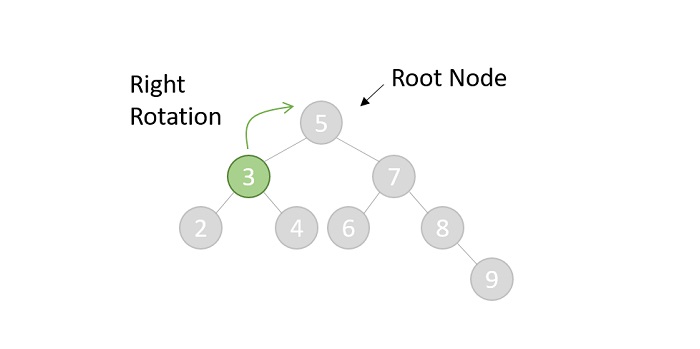
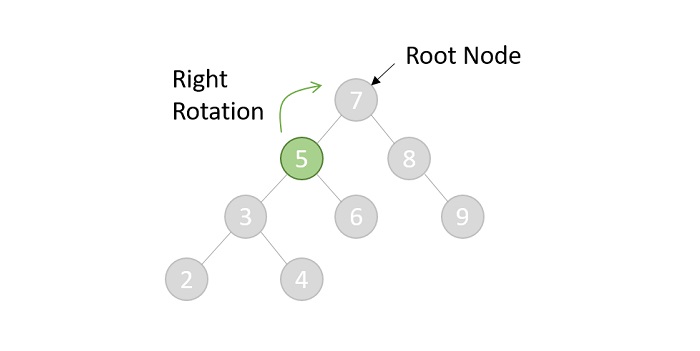
    The zig rotations are performed when the operational node is either the root node or the left child node of the root node. The node is rotated towards its right.

    Zig rotation

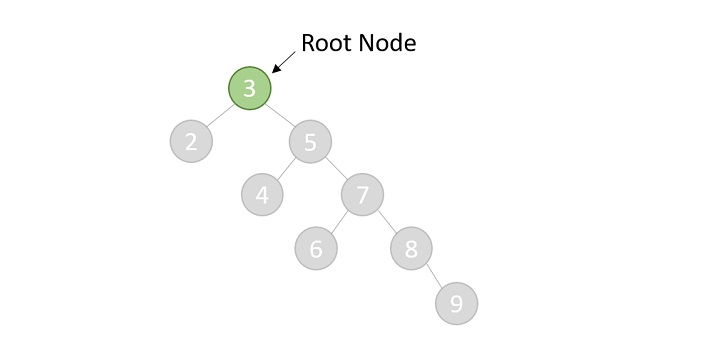
    After the shift, the tree will look like −

    after shift

    Zag rotation

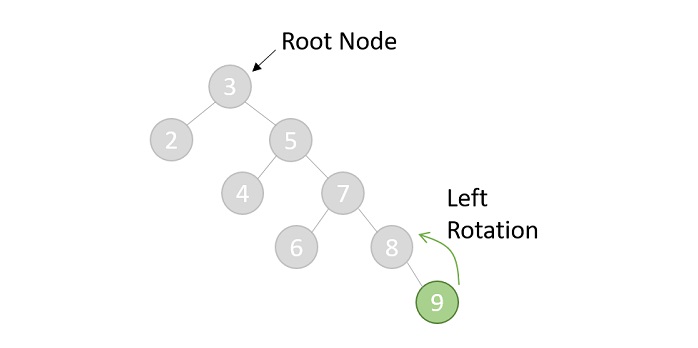
    The zag rotations are also performed when the operational node is either the root node or the right child nod of the root node. The node is rotated towards its left.

    Zag rotation

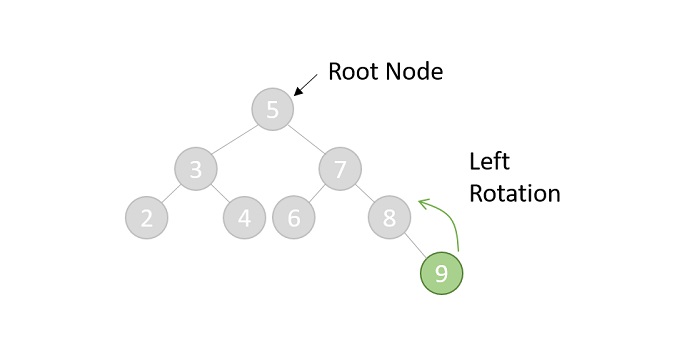
    The operational node becomes the root node after the shift −

    root node

    Zig-Zig rotation

    The zig-zig rotations are performed when the operational node has both parent and a grandparent. The node is rotated two places towards its right.

    Zig Zig rotation

    The first rotation will shift the tree to one position right −

    root node 5

    The second right rotation will once again shift the node for one position. The final tree after the shift will look like this −

    root node 3

    Zag-Zag rotation

    The zag-zag rotations are also performed when the operational node has both parent and a grandparent. The node is rotated two places towards its left.

    Zag Zag rotation

    After the first rotation, the tree will look like −

    after first rotation

    Then the final tree after the second rotation is given as follows. However, the operational node is still not the root so the splaying is considered incomplete. Hence, other suitable rotations are again applied in this case until the node becomes the root.

    after second rotatio

    Zig-Zag rotation

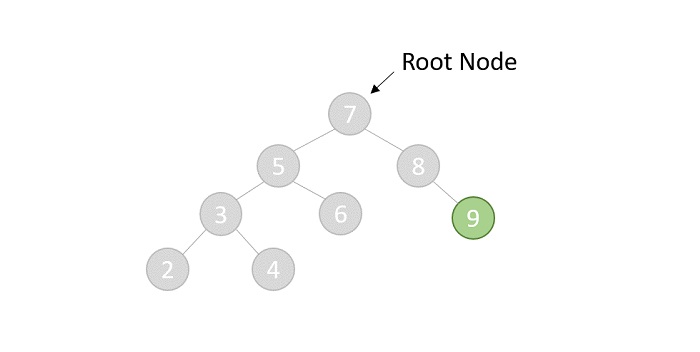
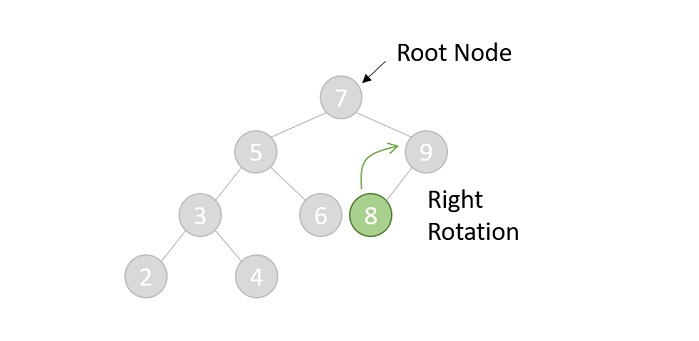
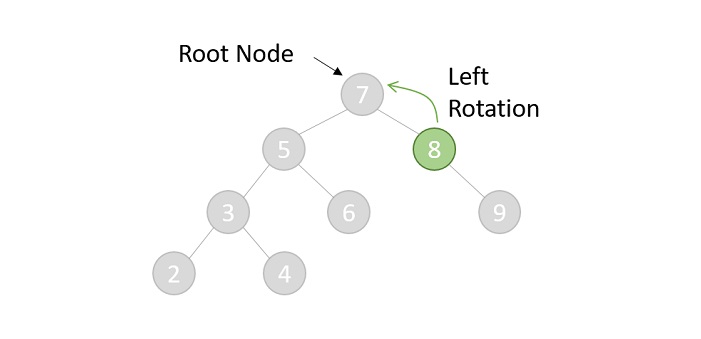
    The zig-zag rotations are performed when the operational node has both a parent and a grandparent. But the difference is the grandparent, parent and child are in LRL format. The node is rotated first towards its right followed by left.

    Zig Zag rotation

    After the first rotation, the tree is −

    left rotation

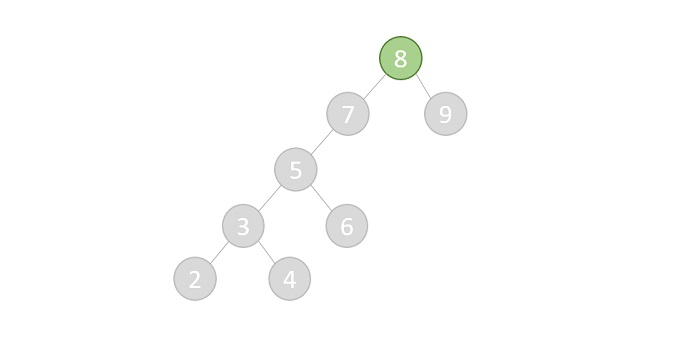
    The final tree after the second rotation −

    root node 8

    Zag-Zig rotation

    The zag-zig rotations are also performed when the operational node has both parent and grandparent. But the difference is the grandparent, parent and child are in RLR format. The node is rotated first towards its left followed by right.

    Zag Zig rotation

    First rotation is performed, the tree is obtained as −

    tree obtained

    After second rotation, the final tree is given as below. However, the operational node is not the root node yet so one more rotation needs to be performed to make the said node as the root.

    after second rotation

    Basic Operations of Splay Trees

    A splay contains the same basic operations that a Binary Search Tree provides with: Insertion, Deletion, and Search. However, after every operation there is an additional operation that differs them from Binary Search tree operations: Splaying. We have learned about Splaying already so let us understand the procedures of the other operations.

    Insertion operation

    The insertion operation in a Splay tree is performed in the exact same way insertion in a binary search tree is performed. The procedure to perform the insertion in a splay tree is given as follows −

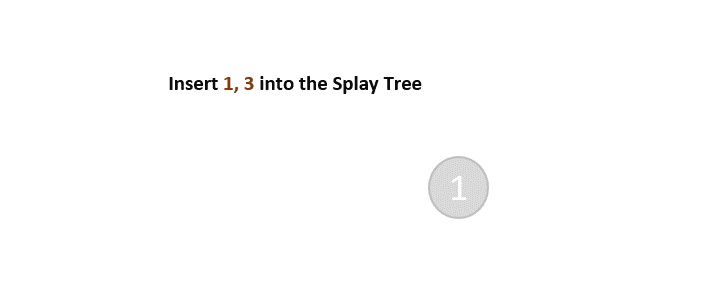
    • Check whether the tree is empty; if yes, add the new node and exit
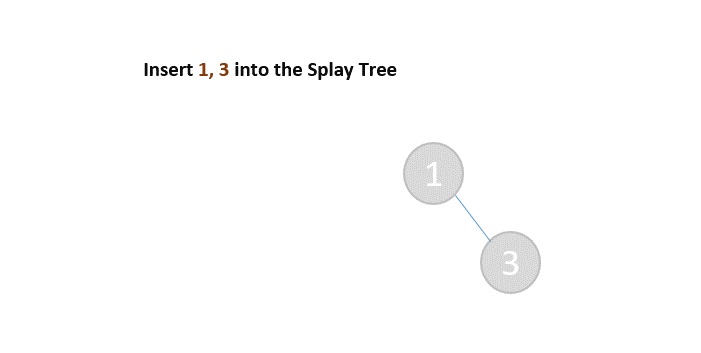
    insertion
    • If the tree is not empty, add the new node to the existing tree using the binary search insertion.
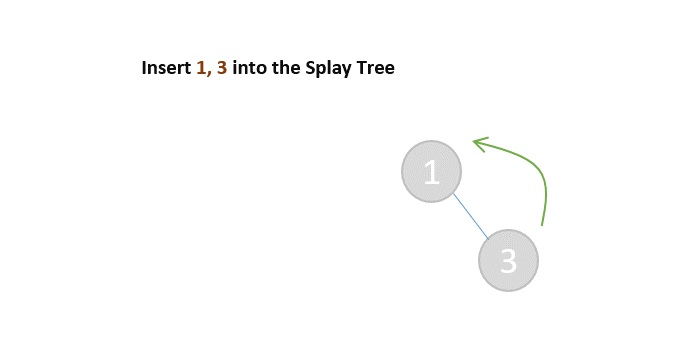
    adding nodes
    • Then, suitable splaying is chosen and applied on the newly added node.
    splaying chosen

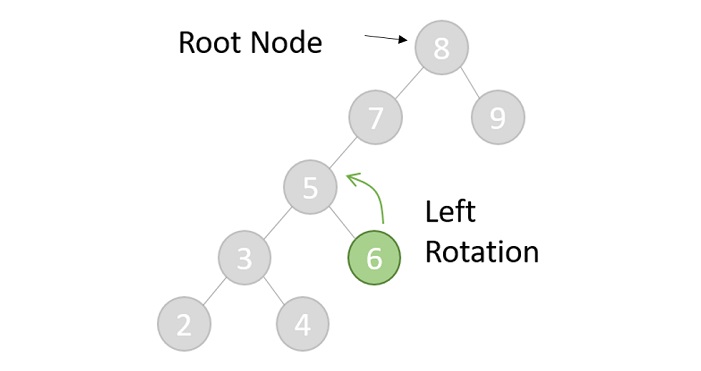
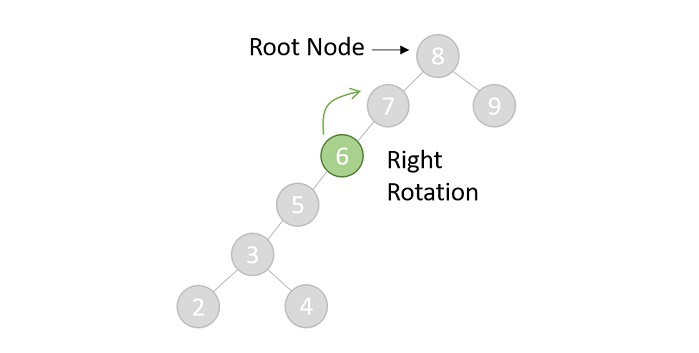
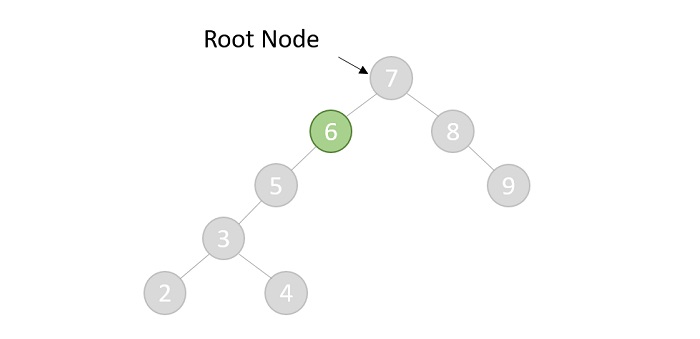
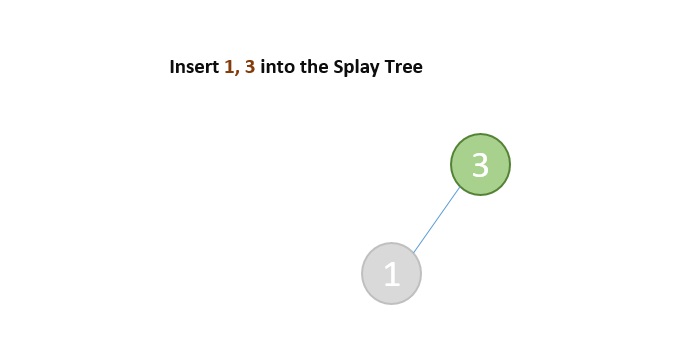
    Zag (Left) Rotation is applied on the new node

    left rotation applied

    Example

    Following are the implementations of this operation in various programming languages −

    CC++JavaPython

    #include <stdio.h>#include <stdlib.h>structnode{int data;structnode*leftChild,*rightChild;};structnode*newNode(int data){structnode* Node =(structnode*)malloc(sizeof(structnode));
       Node->data = data;
       Node->leftChild = Node->rightChild =NULL;return(Node);}structnode*rightRotate(structnode*x){structnode*y = x->leftChild;
       x->leftChild = y->rightChild;
       y->rightChild = x;return y;}structnode*leftRotate(structnode*x){structnode*y = x->rightChild;
       x->rightChild = y->leftChild;
       y->leftChild = x;return y;}structnode*splay(structnode*root,int data){if(root ==NULL|| root->data == data)return root;if(root->data > data){if(root->leftChild ==NULL)return root;if(root->leftChild->data > data){
             root->leftChild->leftChild =splay(root->leftChild->leftChild, data);
             root =rightRotate(root);}elseif(root->leftChild->data < data){
             root->leftChild->rightChild =splay(root->leftChild->rightChild, data);if(root->leftChild->rightChild !=NULL)
                root->leftChild =leftRotate(root->leftChild);}return(root->leftChild ==NULL)? root:rightRotate(root);}else{if(root->rightChild ==NULL)return root;if(root->rightChild->data > data){
             root->rightChild->leftChild =splay(root->rightChild->leftChild, data);if(root->rightChild->leftChild !=NULL)
                root->rightChild =rightRotate(root->rightChild);}elseif(root->rightChild->data < data){
             root->rightChild->rightChild =splay(root->rightChild->rightChild, data);
             root =leftRotate(root);}return(root->rightChild ==NULL)? root:leftRotate(root);}}structnode*insert(structnode*root,int k){if(root ==NULL)returnnewNode(k);
       root =splay(root, k);if(root->data == k)return root;structnode*newnode =newNode(k);if(root->data > k){
          newnode->rightChild = root;
          newnode->leftChild = root->leftChild;
          root->leftChild =NULL;}else{
          newnode->leftChild = root;
          newnode->rightChild = root->rightChild;
          root->rightChild =NULL;}return newnode;}voidprintTree(structnode*root){if(root ==NULL)return;if(root !=NULL){printTree(root->leftChild);printf("%d ", root->data);printTree(root->rightChild);}}intmain(){structnode* root =newNode(34);
       root->leftChild =newNode(15);
       root->rightChild =newNode(40);
       root->leftChild->leftChild =newNode(12);
       root->leftChild->leftChild->rightChild =newNode(14);
       root->rightChild->rightChild =newNode(59);printf("The Splay tree is: \n");printTree(root);return0;}

    Output

    The Splay tree is: 
    12 14 15 34 40 59 
    

    Deletion operation

    The deletion operation in a splay tree is performed as following −

    • Apply splaying operation on the node to be deleted.
    • Once, the node is made the root, delete the node.
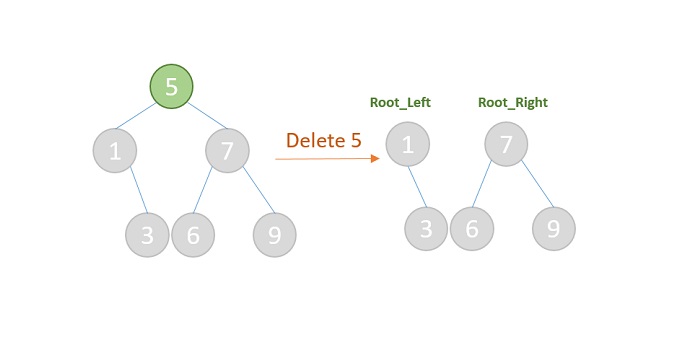
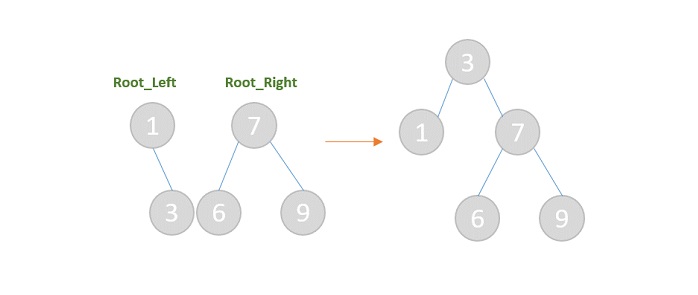
    • Now, the tree is split into two trees, the left subtree and the right subtree; with their respective first nodes as the root nodes: say root_left and root_right.
    delete
    • If root_left is a NULL value, then the root_right will become the root of the tree. And vice versa.
    • But if both root_left and root_right are not NULL values, then select the maximum value from the left subtree and make it the new root by connecting the subtrees.
    deleted 5 node

    Example

    Following are the implementations of Splay Tree deletion operation in various programming languages −

    CC++JavaPython

    #include <stdio.h>#include <stdlib.h>structnode{int data;structnode*leftChild,*rightChild;};structnode*newNode(int data){structnode* Node =(structnode*)malloc(sizeof(structnode));
       Node->data = data;
       Node->leftChild = Node->rightChild =NULL;return(Node);}structnode*rightRotate(structnode*x){structnode*y = x->leftChild;
       x->leftChild = y->rightChild;
       y->rightChild = x;return y;}structnode*leftRotate(structnode*x){structnode*y = x->rightChild;
       x->rightChild = y->leftChild;
       y->leftChild = x;return y;}structnode*splay(structnode*root,int data){if(root ==NULL|| root->data == data)return root;if(root->data > data){if(root->leftChild ==NULL)return root;if(root->leftChild->data > data){
             root->leftChild->leftChild =splay(root->leftChild->leftChild, data);
             root =rightRotate(root);}elseif(root->leftChild->data < data){
             root->leftChild->rightChild =splay(root->leftChild->rightChild, data);if(root->leftChild->rightChild !=NULL)
                root->leftChild =leftRotate(root->leftChild);}return(root->leftChild ==NULL)? root:rightRotate(root);}else{if(root->rightChild ==NULL)return root;if(root->rightChild->data > data){
             root->rightChild->leftChild =splay(root->rightChild->leftChild, data);if(root->rightChild->leftChild !=NULL)
                root->rightChild =rightRotate(root->rightChild);}elseif(root->rightChild->data < data){
             root->rightChild->rightChild =splay(root->rightChild->rightChild, data);
             root =leftRotate(root);}return(root->rightChild ==NULL)? root:leftRotate(root);}}structnode*insert(structnode*root,int k){if(root ==NULL)returnnewNode(k);
       root =splay(root, k);if(root->data == k)return root;structnode*newnode =newNode(k);if(root->data > k){
          newnode->rightChild = root;
          newnode->leftChild = root->leftChild;
          root->leftChild =NULL;}else{
          newnode->leftChild = root;
          newnode->rightChild = root->rightChild;
          root->rightChild =NULL;}return newnode;}structnode*deletenode(structnode* root,int data){structnode* temp;if(root ==NULL)returnNULL;
       root =splay(root, data);if(data != root->data)return root;if(!root->leftChild){
          temp = root;
          root = root->rightChild;}else{
          temp = root;
          root =splay(root->leftChild, data);
          root->rightChild = temp->rightChild;}free(temp);return root;}voidprintTree(structnode*root){if(root ==NULL)return;if(root !=NULL){printTree(root->leftChild);printf("%d ", root->data);printTree(root->rightChild);}}intmain(){structnode* root =newNode(34);
       root->leftChild =newNode(15);
       root->rightChild =newNode(40);printf("The Splay tree is \n");printTree(root);
       root =deletenode(root,40);printf("\nThe Splay tree after deletion is \n");printTree(root);return0;}

    Output

    The Splay tree is 
    15 34 40 
    The Splay tree after deletion is 
    15 34 
    

    The search operation in a Splay tree follows the same procedure of the Binary Search Tree operation. However, after the searching is done and the element is found, splaying is applied on the node searched. If the element is not found, then unsuccessful search is prompted.

    Example

    Following are the implementations of this operation in various programming languages −

    CC++JavaPython

    #include <stdio.h>#include <stdlib.h>structnode{int data;structnode*leftChild,*rightChild;};structnode*newNode(int data){structnode* Node =(structnode*)malloc(sizeof(structnode));
       Node->data = data;
       Node->leftChild = Node->rightChild =NULL;return(Node);}structnode*rightRotate(structnode*x){structnode*y = x->leftChild;
       x->leftChild = y->rightChild;
       y->rightChild = x;return y;}structnode*leftRotate(structnode*x){structnode*y = x->rightChild;
       x->rightChild = y->leftChild;
       y->leftChild = x;return y;}structnode*splay(structnode*root,int data){if(root ==NULL|| root->data == data)return root;if(root->data > data){if(root->leftChild ==NULL)return root;if(root->leftChild->data > data){
             root->leftChild->leftChild =splay(root->leftChild->leftChild, data);
             root =rightRotate(root);}elseif(root->leftChild->data < data){
             root->leftChild->rightChild =splay(root->leftChild->rightChild, data);if(root->leftChild->rightChild !=NULL)
                root->leftChild =leftRotate(root->leftChild);}return(root->leftChild ==NULL)? root:rightRotate(root);}else{if(root->rightChild ==NULL)return root;if(root->rightChild->data > data){
             root->rightChild->leftChild =splay(root->rightChild->leftChild, data);if(root->rightChild->leftChild !=NULL)
                root->rightChild =rightRotate(root->rightChild);}elseif(root->rightChild->data < data){
             root->rightChild->rightChild =splay(root->rightChild->rightChild, data);
             root =leftRotate(root);}return(root->rightChild ==NULL)? root:leftRotate(root);}}structnode*insert(structnode*root,int k){if(root ==NULL)returnnewNode(k);
       root =splay(root, k);if(root->data == k)return root;structnode*newnode =newNode(k);if(root->data > k){
          newnode->rightChild = root;
          newnode->leftChild = root->leftChild;
          root->leftChild =NULL;}else{
          newnode->leftChild = root;
          newnode->rightChild = root->rightChild;
          root->rightChild =NULL;}return newnode;}structnode*search(structnode* root,int data){returnsplay(root, data);}voidprintTree(structnode*root){if(root ==NULL)return;if(root !=NULL){printTree(root->leftChild);printf("%d ", root->data);printTree(root->rightChild);}}voidpreOrder(structnode*root){if(root !=NULL){printf("%d ", root->data);preOrder(root->leftChild);preOrder(root->rightChild);}}intmain(){structnode* root =newNode(34);
       root->leftChild =newNode(15);
       root->rightChild =newNode(40);
       root->leftChild->leftChild =newNode(12);
       root->leftChild->leftChild->rightChild =newNode(14);
       root->rightChild->rightChild =newNode(59);printf("The Splay tree is \n");printTree(root);int ele =14;printf("\nElement to be searched: %d", ele);
       root =search(root, ele);printf("\nModified preorder traversal if element is found: ");preOrder(root);}

    Output

    The Splay tree is 
    12 14 15 34 40 59 
    Element to be searched: 14
    Modified preorder traversal if element is found: 14 12 15 34 40 59 
  • B+ Trees

    The B+ trees are extensions of B trees designed to make the insertion, deletion and searching operations more efficient.

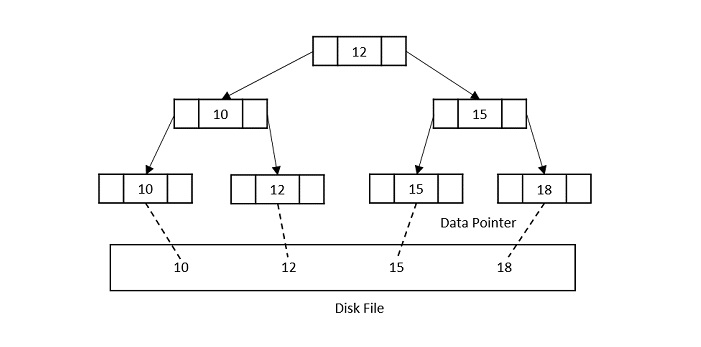
    The properties of B+ trees are similar to the properties of B trees, except that the B trees can store keys and records in all internal nodes and leaf nodes while B+ trees store records in leaf nodes and keys in internal nodes. One profound property of the B+ tree is that all the leaf nodes are connected to each other in a single linked list format and a data pointer is available to point to the data present in disk file. This helps fetch the records in equal numbers of disk access.

    Since the size of main memory is limited, B+ trees act as the data storage for the records that couldnt be stored in the main memory. For this, the internal nodes are stored in the main memory and the leaf nodes are stored in the secondary memory storage.

    b plus tree

    Properties of B+ trees

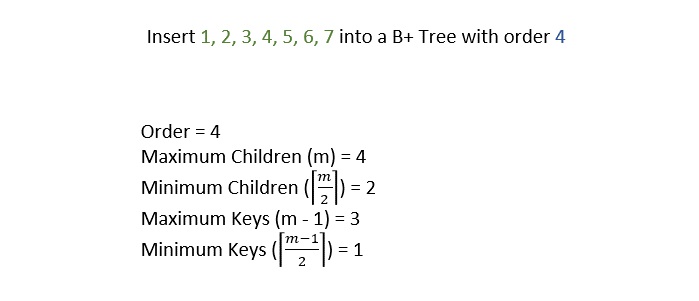
    • Every node in a B+ Tree, except root, will hold a maximum of m children and (m-1) keys, and a minimum of ⌈m2⌉ children and ⌈m−12⌉ keys, since the order of the tree is m.
    • The root node must have no less than two children and at least one search key.
    • All the paths in a B tree must end at the same level, i.e. the leaf nodes must be at the same level.
    • A B+ tree always maintains sorted data.

    Basic Operations of B+ Trees

    The operations supported in B+ trees are Insertion, deletion and searching with the time complexity of O(log n) for every operation.

    They are almost similar to the B tree operations as the base idea to store data in both data structures is same. However, the difference occurs as the data is stored only in the leaf nodes of a B+ trees, unlike B trees.

    Insertion operation

    The insertion to a B+ tree starts at a leaf node.

    Step 1 − Calculate the maximum and minimum number of keys to be added onto the B+ tree node.

    calculate number of keys

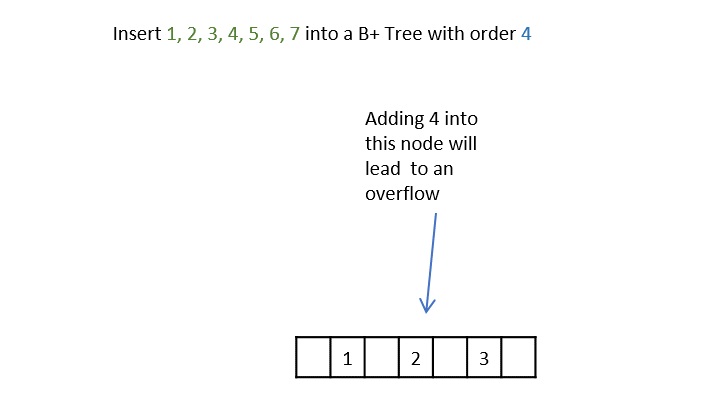
    Step 2 − Insert the elements one by one accordingly into a leaf node until it exceeds the maximum key number.

    Insert elements

    Step 3 − The node is split into half where the left child consists of minimum number of keys and the remaining keys are stored in the right child.

    node split

    Step 4 − But if the internal node also exceeds the maximum key property, the node is split in half where the left child consists of the minimum keys and remaining keys are stored in the right child. However, the smallest number in the right child is made the parent.

    insert into b plus tree

    Step 5 − If both the leaf node and internal node have the maximum keys, both of them are split in the similar manner and the smallest key in the right child is added to the parent node.

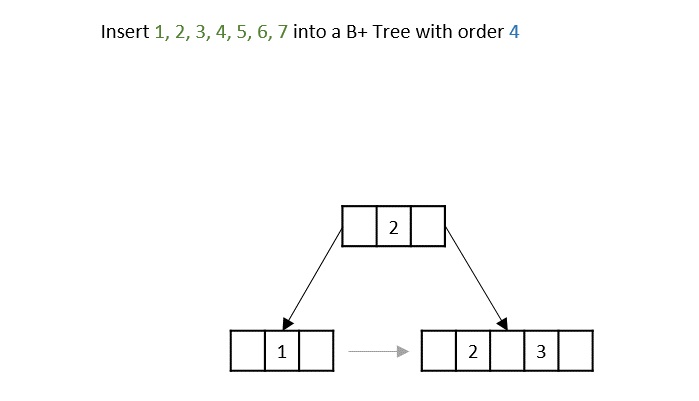
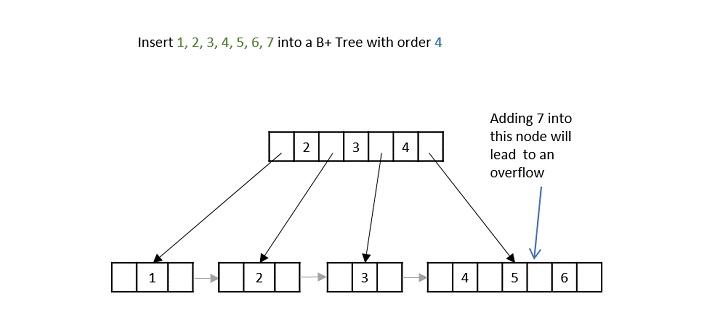
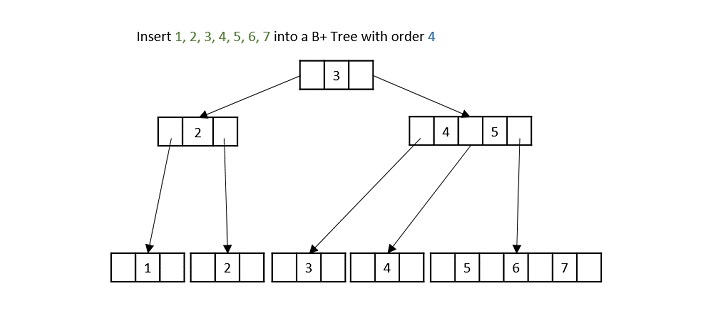
    b_plus_tree_order_4

    Example

    Following are the implementations of this operation in various programming languages −

    CC++JavaPython

    // C program for Bplus tree#include <stdio.h>#include <stdlib.h>structBplusTree{int*d;structBplusTree**child_ptr;int l;int n;};structBplusTree*r =NULL,*np =NULL,*x =NULL;structBplusTree*init(){//to create nodesint i;
       np =(structBplusTree*)malloc(sizeof(structBplusTree));
       np->d =(int*)malloc(6*sizeof(int));// order 6
       np->child_ptr =(structBplusTree**)malloc(7*sizeof(structBplusTree*));
       np->l =1;
       np->n =0;for(i =0; i <7; i++){
          np->child_ptr[i]=NULL;}return np;}voidtraverse(structBplusTree*p){//traverse treeprintf("\n");int i;for(i =0; i < p->n; i++){if(p->l ==0){traverse(p->child_ptr[i]);}printf(" %d", p->d[i]);}if(p->l ==0){traverse(p->child_ptr[i]);}printf("\n");}voidsort(int*p,int n){int i, j, t;for(i =0; i < n; i++){for(j = i; j <= n; j++){if(p[i]> p[j]){
                t = p[i];
                p[i]= p[j];
                p[j]= t;}}}}intsplit_child(structBplusTree*x,int i){int j, mid;structBplusTree*np1,*np3,*y;
       np3 =init();
       np3->l =1;if(i ==-1){
          mid = x->d[2];
          x->d[2]=0;
          x->n--;
          np1 =init();
          np1->l =0;
          x->l =1;for(j =3; j <6; j++){
             np3->d[j -3]= x->d[j];
             np3->child_ptr[j -3]= x->child_ptr[j];
             np3->n++;
             x->d[j]=0;
             x->n--;}for(j =0; j <6; j++){
             x->child_ptr[j]=NULL;}
          np1->d[0]= mid;
          np1->child_ptr[np1->n]= x;
          np1->child_ptr[np1->n +1]= np3;
          np1->n++;
          r = np1;}else{
          y = x->child_ptr[i];
          mid = y->d[2];
          y->d[2]=0;
          y->n--;for(j =3; j <6; j++){
             np3->d[j -3]= y->d[j];
             np3->n++;
             y->d[j]=0;
             y->n--;}
          x->child_ptr[i +1]= y;
          x->child_ptr[i +1]= np3;}return mid;}voidinsert(int a){int i, t;
       x = r;if(x ==NULL){
          r =init();
          x = r;}else{if(x->l ==1&& x->n ==6){
             t =split_child(x,-1);
             x = r;for(i =0; i < x->n; i++){if(a > x->d[i]&& a < x->d[i +1]){
                   i++;break;}elseif(a < x->d[0]){break;}else{continue;}}
             x = x->child_ptr[i];}else{while(x->l ==0){for(i =0; i < x->n; i++){if(a > x->d[i]&& a < x->d[i +1]){
                      i++;break;}elseif(a < x->d[0]){break;}else{continue;}}if(x->child_ptr[i]->n ==6){
                   t =split_child(x, i);
                   x->d[x->n]= t;
                   x->n++;continue;}else{
                   x = x->child_ptr[i];}}}}
       x->d[x->n]= a;sort(x->d, x->n);
       x->n++;}intmain(){int i, n, t;insert(10);insert(20);insert(30);insert(40);insert(50);printf("Insertion Done");printf("\nB+ tree:");traverse(r);return0;}

    Output

    Insertion Done
    B+ tree:
     10 20 30 40 50
  • B Trees

    B trees are extended binary search trees that are specialized in m-way searching, since the order of B trees is ‘m’. Order of a tree is defined as the maximum number of children a node can accommodate. Therefore, the height of a b tree is relatively smaller than the height of AVL tree and RB tree.

    They are general form of a Binary Search Tree as it holds more than one key and two children.

    The various properties of B trees include −

    • Every node in a B Tree will hold a maximum of m children and (m-1) keys, since the order of the tree is m.
    • Every node in a B tree, except root and leaf, can hold at least m/2 children
    • The root node must have no less than two children.
    • All the paths in a B tree must end at the same level, i.e. the leaf nodes must be at the same level.
    • A B tree always maintains sorted data.
    b trees

    B trees are also widely used in disk access, minimizing the disk access time since the height of a b tree is low.

    Note − A disk access is the memory access to the computer disk where the information is stored and disk access time is the time taken by the system to access the disk memory.

    Basic Operations of B Trees

    The operations supported in B trees are Insertion, deletion and searching with the time complexity of O(log n) for every operation.

    Insertion operation

    The insertion operation for a B Tree is done similar to the Binary Search Tree but the elements are inserted into the same node until the maximum keys are reached. The insertion is done using the following procedure −

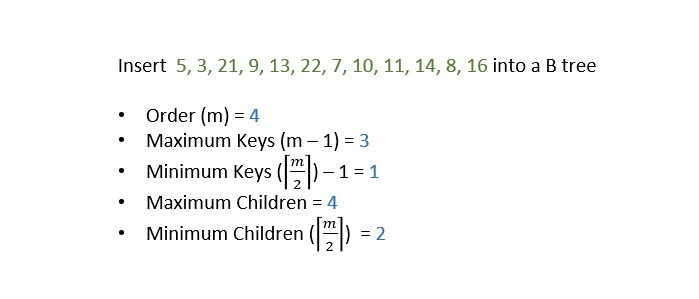
    Step 1 − Calculate the maximum (m−1) and, minimum (⌈m2⌉−1) number of keys a node can hold, where m is denoted by the order of the B Tree.

    Calculate min max

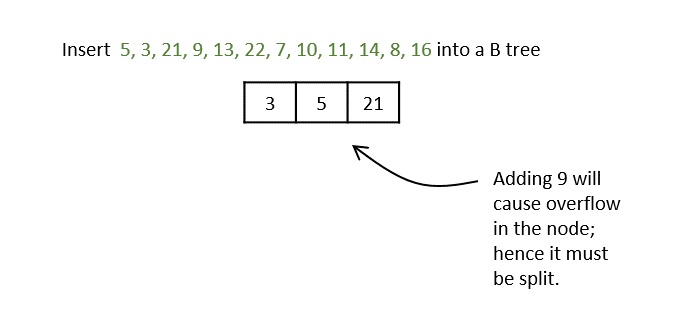
    Step 2 − The data is inserted into the tree using the binary search insertion and once the keys reach the maximum number, the node is split into half and the median key becomes the internal node while the left and right keys become its children.

    data_inserted

    Step 3 − All the leaf nodes must be on the same level.

    leaf nodes same level

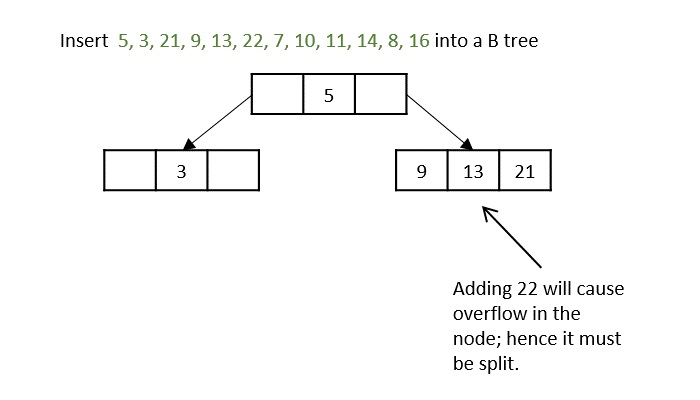
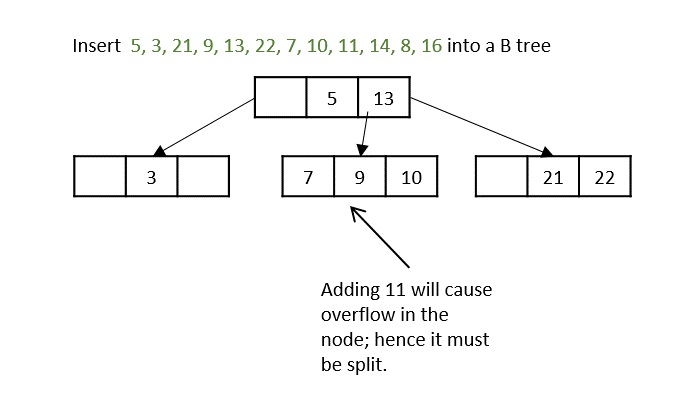
    The keys, 5, 3, 21, 9, 13 are all added into the node according to the binary search property but if we add the key 22, it will violate the maximum key property. Hence, the node is split in half, the median key is shifted to the parent node and the insertion is then continued.

    adding 11

    Another hiccup occurs during the insertion of 11, so the node is split and median is shifted to the parent.

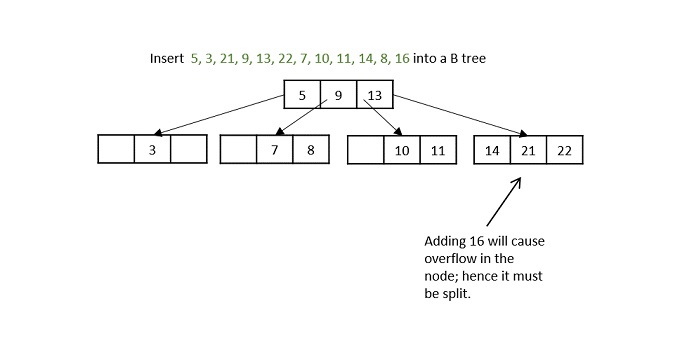
    adding 16

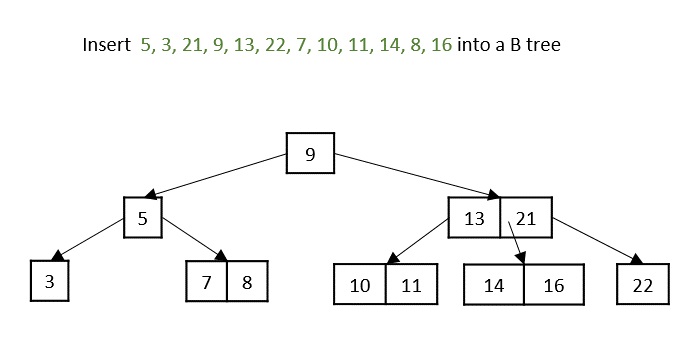
    While inserting 16, even if the node is split in two parts, the parent node also overflows as it reached the maximum keys. Hence, the parent node is split first and the median key becomes the root. Then, the leaf node is split in half the median of leaf node is shifted to its parent.

    final B tree

    The final B tree after inserting all the elements is achieved.

    Example

    Following are the implementations of this operation in various programming languages −

    CC++JavaPython

    // C Program for B trees #include <stdio.h>#include <stdlib.h>structBTree{//node declarationint*d;structBTree**child_ptr;int l;int n;};structBTree*r =NULL;structBTree*np =NULL;structBTree*x =NULL;//creation of nodestructBTree*init(){int i;
       np =(structBTree*)malloc(sizeof(structBTree));//order 6
       np->d =(int*)malloc(6*sizeof(int));
       np->child_ptr =(structBTree**)malloc(7*sizeof(structBTree*));
       np->l =1;
       np->n =0;for(i =0; i <7; i++){
          np->child_ptr[i]=NULL;}return np;}//traverse the treevoidtraverse(structBTree*p){printf("\n");int i;for(i =0; i < p->n; i++){if(p->l ==0){traverse(p->child_ptr[i]);}printf(" %d", p->d[i]);}if(p->l ==0){traverse(p->child_ptr[i]);}printf("\n");}//sort the treevoidsort(int*p,int n){int i, j, t;for(i =0; i < n; i++){for(j = i; j <= n; j++){if(p[i]> p[j]){
                t = p[i];
                p[i]= p[j];
                p[j]= t;}}}}intsplit_child(structBTree*x,int i){int j, mid;structBTree*np1,*np3,*y;
       np3 =init();//create new node
       np3->l =1;if(i ==-1){
          mid = x->d[2];//find mid
          x->d[2]=0;
          x->n--;
          np1 =init();
          np1->l =0;
          x->l =1;for(j =3; j <6; j++){
             np3->d[j -3]= x->d[j];
             np3->child_ptr[j -3]= x->child_ptr[j];
             np3->n++;
             x->d[j]=0;
             x->n--;}for(j =0; j <6; j++){
             x->child_ptr[j]=NULL;}
          np1->d[0]= mid;
          np1->child_ptr[np1->n]= x;
          np1->child_ptr[np1->n +1]= np3;
          np1->n++;
          r = np1;}else{
          y = x->child_ptr[i];
          mid = y->d[2];
          y->d[2]=0;
          y->n--;for(j =3; j <6; j++){
             np3->d[j -3]= y->d[j];
             np3->n++;
             y->d[j]=0;
             y->n--;}
          x->child_ptr[i +1]= y;
          x->child_ptr[i +1]= np3;}return mid;}voidinsert(int a){int i, t;
       x = r;if(x ==NULL){
          r =init();
          x = r;}else{if(x->l ==1&& x->n ==6){
             t =split_child(x,-1);
             x = r;for(i =0; i < x->n; i++){if(a > x->d[i]&& a < x->d[i +1]){
                   i++;break;}elseif(a < x->d[0]){break;}else{continue;}}
             x = x->child_ptr[i];}else{while(x->l ==0){for(i =0; i < x->n; i++){if(a > x->d[i]&& a < x->d[i +1]){
                      i++;break;}elseif(a < x->d[0]){break;}else{continue;}}if(x->child_ptr[i]->n ==6){
                   t =split_child(x, i);
                   x->d[x->n]= t;
                   x->n++;continue;}else{
                   x = x->child_ptr[i];}}}}
       x->d[x->n]= a;sort(x->d, x->n);
       x->n++;}intmain(){int i, n, t;insert(10);insert(20);insert(30);insert(40);insert(50);printf("Insertion Done");printf("\nB tree:");traverse(r);return0;}

    Output

    Insertion Done
    B tree:
     10 20 30 40 50
    

    Deletion operation

    The deletion operation in a B tree is slightly different from the deletion operation of a Binary Search Tree. The procedure to delete a node from a B tree is as follows −

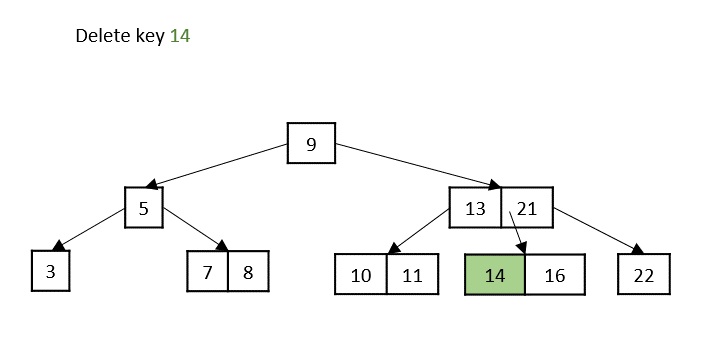
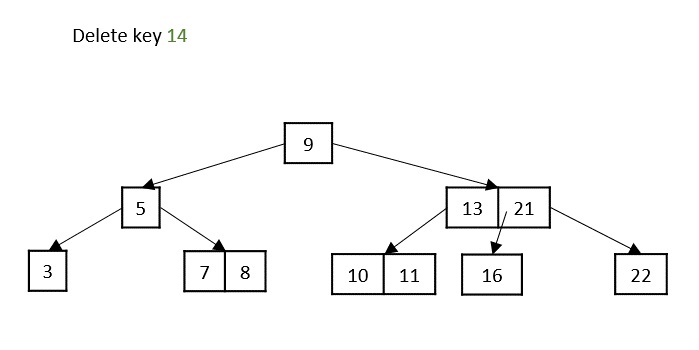
    Case 1 − If the key to be deleted is in a leaf node and the deletion does not violate the minimum key property, just delete the node.

    delete key 14
    deleted key 14

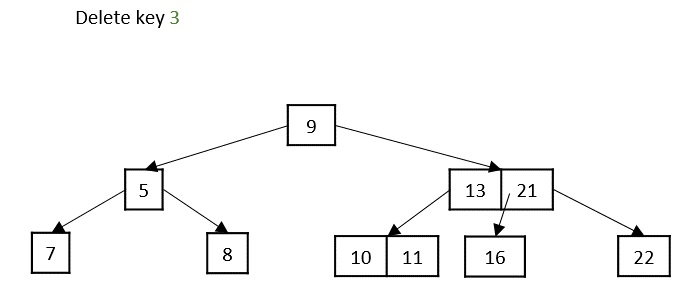
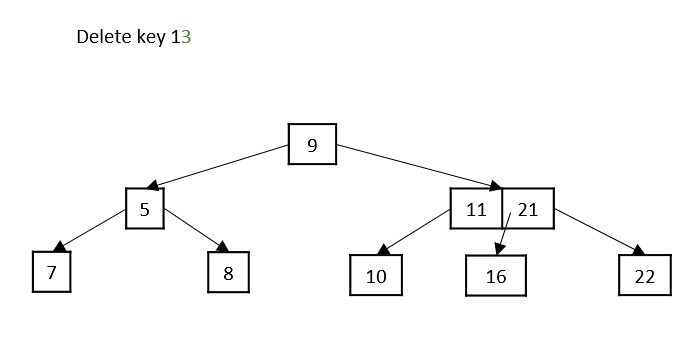
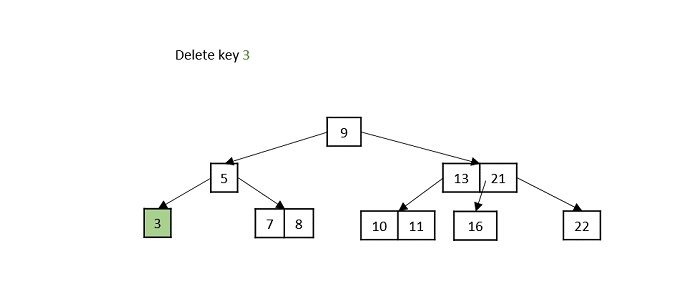
    Case 2 − If the key to be deleted is in a leaf node but the deletion violates the minimum key property, borrow a key from either its left sibling or right sibling. In case if both siblings have exact minimum number of keys, merge the node in either of them.
    delete key 13
    deleted key 3

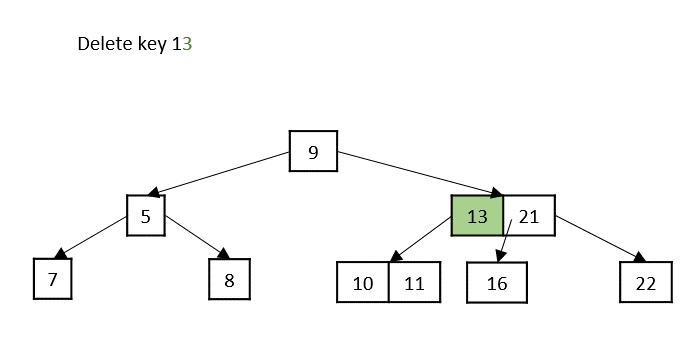
    Case 3 − If the key to be deleted is in an internal node, it is replaced by a key in either left child or right child based on which child has more keys. But if both child nodes have minimum number of keys, theyre merged together.
    delete key 13
    deleted key 13

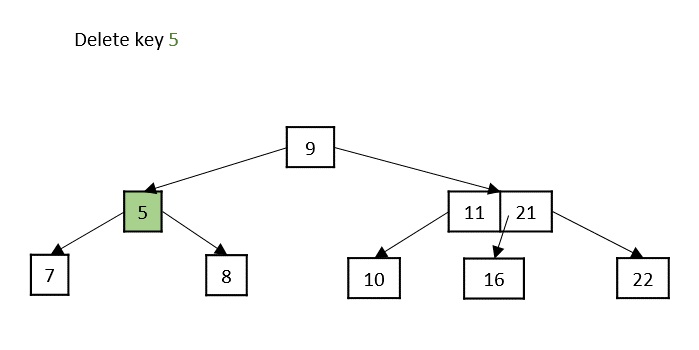
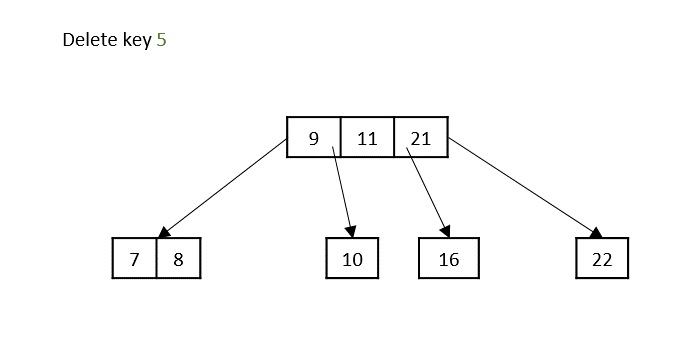
    Case 4 − If the key to be deleted is in an internal node violating the minimum keys property, and both its children and sibling have minimum number of keys, merge the children. Then merge its sibling with its parent.

    delete key 5
    deleted key 5

    Example

    Following are the implementations of this operation in various programming languages −

    CC++JavaPython

    //deletion operation in BTree#include <stdio.h>#include <stdlib.h>#define MAX 3#define MIN 2structBTreeNode{int item[MAX +1], count;structBTreeNode*linker[MAX +1];};structBTreeNode*root;// creating nodestructBTreeNode*createNode(int item,structBTreeNode*child){structBTreeNode*newNode;
       newNode =(structBTreeNode*)malloc(sizeof(structBTreeNode));
       newNode->item[1]= item;
       newNode->count =1;
       newNode->linker[0]= root;
       newNode->linker[1]= child;return newNode;}// adding value to the nodevoidaddValToNode(int item,int pos,structBTreeNode*node,structBTreeNode*child){int j = node->count;while(j > pos){
       node->item[j +1]= node->item[j];
       node->linker[j +1]= node->linker[j];
       j--;}
       node->item[j +1]= item;
       node->linker[j +1]= child;
       node->count++;}// Spliting the nodevoidsplitNode(int item,int*pval,int pos,structBTreeNode*node,structBTreeNode*child,structBTreeNode**newNode){int median, j;if(pos > MIN)
        median = MIN +1;else
        median = MIN;*newNode =(structBTreeNode*)malloc(sizeof(structBTreeNode));
      j = median +1;while(j <= MAX){(*newNode)->item[j - median]= node->item[j];(*newNode)->linker[j - median]= node->linker[j];
        j++;}
      node->count = median;(*newNode)->count = MAX - median;if(pos <= MIN){addValToNode(item, pos, node, child);}else{addValToNode(item, pos - median,*newNode, child);}*pval = node->item[node->count];(*newNode)->linker[0]= node->linker[node->count];
      node->count--;}// Set the value in the nodeintsetValueInNode(int item,int*pval,structBTreeNode*node,structBTreeNode**child){int pos;if(!node){*pval = item;*child =NULL;return1;}if(item < node->item[1]){
       pos =0;}else{for(pos = node->count;(item < node->item[pos]&& pos >1); pos--);if(item == node->item[pos]){printf("Duplicates not allowed\n");return0;}}if(setValueInNode(item, pval, node->linker[pos], child)){if(node->count < MAX){addValToNode(*pval, pos, node,*child);}else{splitNode(*pval, pval, pos, node,*child, child);return1;}}return0;}// inserting elements in BTreevoidinsert(int item){int flag, i;structBTreeNode*child;   
       flag =setValueInNode(item,&i, root,&child);if(flag)
          root =createNode(i, child);}// Copy the successorvoidcopySuccessor(structBTreeNode*myNode,int pos){structBTreeNode*dummy;
       dummy = myNode->linker[pos];for(; dummy->linker[0]!=NULL;)
          dummy = dummy->linker[0];
       myNode->item[pos]= dummy->item[1];}// Remove the value in BTreevoidremoveVal(structBTreeNode*myNode,int pos){int i = pos +1;while(i <= myNode->count){
          myNode->item[i -1]= myNode->item[i];
          myNode->linker[i -1]= myNode->linker[i];
          i++;}
       myNode->count--;}// right shiftvoidrightShift(structBTreeNode*myNode,int pos){structBTreeNode*x = myNode->linker[pos];int j = x->count;while(j >0){
          x->item[j +1]= x->item[j];
          x->linker[j +1]= x->linker[j];}
       x->item[1]= myNode->item[pos];
       x->linker[1]= x->linker[0];
       x->count++;   
       x = myNode->linker[pos -1];
       myNode->item[pos]= x->item[x->count];
       myNode->linker[pos]= x->linker[x->count];
       x->count--;return;}// left shiftvoidleftShift(structBTreeNode*myNode,int pos){int j =1;structBTreeNode*x = myNode->linker[pos -1];  
       x->count++;
       x->item[x->count]= myNode->item[pos];
       x->linker[x->count]= myNode->linker[pos]->linker[0];   
       x = myNode->linker[pos];
       myNode->item[pos]= x->item[1];
       x->linker[0]= x->linker[1];
       x->count--;while(j <= x->count){
          x->item[j]= x->item[j +1];
          x->linker[j]= x->linker[j +1];
          j++;}return;}// Merge the nodesvoidmergeNodes(structBTreeNode*myNode,int pos){int j =1;structBTreeNode*x1 = myNode->linker[pos],*x2 = myNode->linker[pos   -1];   
       x2->count++;
       x2->item[x2->count]= myNode->item[pos];
       x2->linker[x2->count]= myNode->linker[0];while(j <= x1->count){
          x2->count++;
          x2->item[x2->count]= x1->item[j];
          x2->linker[x2->count]= x1->linker[j];
          j++;
       j = pos;while(j < myNode->count){
           myNode->item[j]= myNode->item[j +1];
           myNode->linker[j]= myNode->linker[j +1];
           j++;}
       myNode->count--;free(x1);}}// Adjust the node in BTreevoidadjustNode(structBTreeNode*myNode,int pos){if(!pos){if(myNode->linker[1]->count > MIN){leftShift(myNode,1);}else{mergeNodes(myNode,1);}}else{if(myNode->count != pos){if(myNode->linker[pos -1]->count > MIN){rightShift(myNode, pos);}else{if(myNode->linker[pos +1]->count > MIN){leftShift(myNode, pos +1);}else{mergeNodes(myNode, pos);}}}else{if(myNode->linker[pos -1]->count > MIN)rightShift(myNode, pos);elsemergeNodes(myNode, pos);}}}// Delete a value from the nodeintdelValFromNode(int item,structBTreeNode*myNode){int pos, flag =0;if(myNode){if(item < myNode->item[1]){
          pos =0;
          flag =0;}else{for(pos = myNode->count;(item < myNode->item[pos]&& pos >1); pos--);if(item == myNode->item[pos]){
                flag =1;}else{
                flag =0;}}if(flag){if(myNode->linker[pos -1]){copySuccessor(myNode, pos);
              flag =delValFromNode(myNode->item[pos], myNode->linker[pos]);if(flag ==0){printf("Given data is not present in B-Tree\n");}}else{removeVal(myNode, pos);}}else{
          flag =delValFromNode(item, myNode->linker[pos]);}if(myNode->linker[pos]){if(myNode->linker[pos]->count < MIN)adjustNode(myNode, pos);}}return flag;}// Delete operaiton in BTreevoiddelete(int item,structBTreeNode*myNode){structBTreeNode*tmp;if(!delValFromNode(item, myNode)){printf("Not present\n");return;}else{if(myNode->count ==0){
             tmp = myNode;
             myNode = myNode->linker[0];free(tmp);}}
       root = myNode;return;}voiddisplay(structBTreeNode*myNode){int i;if(myNode){for(i =0; i < myNode->count; i++){display(myNode->linker[i]);printf("%d ", myNode->item[i +1]);}display(myNode->linker[i]);}}intmain(){int item, ch;insert(8);insert(9);insert(10);insert(11);insert(15);insert(16);insert(17);insert(18);insert(20);insert(23);printf("Insertion Done");printf("\nBTree elements before deletion: \n");display(root);int ele =20;printf("\nThe element to be deleted: %d", ele);delete(ele, root);printf("\nBTree elements before deletion: \n");display(root);}

    Output

    Insertion Done
    BTree elements before deletion: 
    8 9 10 11 15 16 17 18 20 23 
    The element to be deleted: 20
    BTree elements before deletion: 
    8 9 10 11 15 16 17 18 23 8 9 23 
  • Red Black Trees

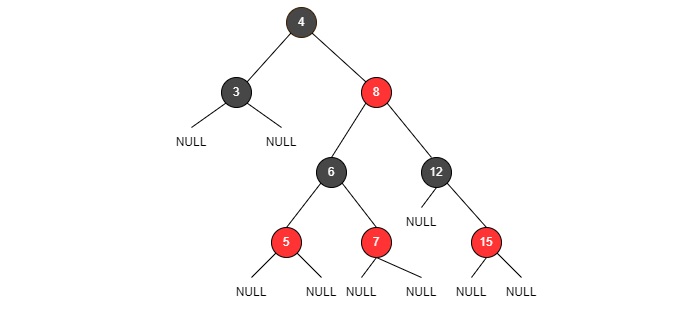
    Red-Black Trees are another type of the Balanced Binary Search Trees with two coloured nodes: Red and Black. It is a self-balancing binary search tree that makes use of these colours to maintain the balance factor during the insertion and deletion operations. Hence, during the Red-Black Tree operations, the memory uses 1 bit of storage to accommodate the colour information of each node

    In Red-Black trees, also known as RB trees, there are different conditions to follow while assigning the colours to the nodes.

    • The root node is always black in colour.
    • No two adjacent nodes must be red in colour.
    • Every path in the tree (from the root node to the leaf node) must have the same amount of black coloured nodes.

    Even though AVL trees are more balanced than RB trees, with the balancing algorithm in AVL trees being stricter than that of RB trees, multiple and faster insertion and deletion operations are made more efficient through RB trees.

    RB trees

    Fig: RB trees

    Basic Operations of Red-Black Trees

    The operations on Red-Black Trees include all the basic operations usually performed on a Binary Search Tree. Some of the basic operations of an RB Tree include −

    • Insertion
    • Deletion
    • Search

    Insertion operation

    Insertion operation of a Red-Black tree follows the same insertion algorithm of a binary search tree. The elements are inserted following the binary search property and as an addition, the nodes are color coded as red and black to balance the tree according to the red-black tree properties.

    Follow the procedure given below to insert an element into a red-black tree by maintaining both binary search tree and red black tree properties.

    Case 1 − Check whether the tree is empty; make the current node as the root and color the node black if it is empty.

    Case 2 − But if the tree is not empty, we create a new node and color it red. Here we face two different cases −

    • If the parent of the new node is a black colored node, we exit the operation and tree is left as it is.
    • If the parent of this new node is red and the color of the parent’s sibling is either black or if it does not exist, we apply a suitable rotation and recolor accordingly.
    • If the parent of this new node is red and color of the parent’s sibling is red, recolor the parent, the sibling and grandparent nodes to black. The grandparent is recolored only if it is not the root node; if it is the root node recolor only the parent and the sibling.

    Example

    Let us construct an RB Tree for the first 7 integer numbers to understand the insertion operation in detail −

    The tree is checked to be empty so the first node added is a root and is colored black.

    first node

    Now, the tree is not empty so we create a new node and add the next integer with color red,

    new node

    The nodes do not violate the binary search tree and RB tree properties, hence we move ahead to add another node.

    The tree is not empty; we create a new red node with the next integer to it. But the parent of the new node is not a black colored node,

    third node

    The tree right now violates both the binary search tree and RB tree properties; since parent’s sibling is NULL, we apply a suitable rotation and recolor the nodes.

    suitable rotation

    Now that the RB Tree property is restored, we add another node to the tree −

    RB Tree property

    The tree once again violates the RB Tree balance property, so we check for the parent’s sibling node color, red in this case, so we just recolor the parent and the sibling.

    RB Tree balance property

    We next insert the element 5, which makes the tree violate the RB Tree balance property once again.

    insert element 5

    And since the sibling is NULL, we apply suitable rotation and recolor.

    sibling is NULL

    Now, we insert element 6, but the RB Tree property is violated and one of the insertion cases need to be applied −

    insert element 6

    The parent’s sibling is red, so we recolor the parent, parent’s sibling and the grandparent nodes since the grandparent is not the root node.

    recolor parent

    Now, we add the last element, 7, but the parent node of this new node is red.

    add last element

    Since the parent’s sibling is NULL, we apply suitable rotations (RR rotation)

    RB Tree achieved

    The final RB Tree is achieved.

    Deletion operation

    The deletion operation on red black tree must be performed in such a way that it must restore all the properties of a binary search tree and a red black tree. Follow the steps below to perform the deletion operation on the red black tree −

    Firstly, we perform deletion based on the binary search tree properties.

    Case 1 − If either the node to be deleted or the node’s parent is red, just delete it.

    Case 2 − If the node is a double black, just remove the double black (double black occurs when the node to be deleted is a black colored leaf node, as it adds up the NULL nodes which are considered black colored nodes too)

    Case 3 − If the double black’s sibling node is also a black node and its child nodes are also black in color, follow the steps below −

    • Remove double black
    • Recolor its parent to black (if the parent is a red node, it becomes black; if the parent is already a black node, it becomes double black)
    • Recolor the parent’s sibling with red
    • If double black node still exists, we apply other cases.

    Case 4 − If the double black node’s sibling is red, we perform the following steps −

    • Swap the colors of the parent node and the parent’s sibling node.
    • Rotate parent node in the double black’s direction
    • Reapply other cases that are suitable.

    Case 5 − If the double black’s sibling is a black node but the sibling’s child node that is closest to the double black is red, follows the steps below −

    • Swap the colors of double black’s sibling and the sibling’s child in question
    • Rotate the sibling node is the opposite direction of double black (i.e. if the double black is a right child apply left rotations and vice versa)
    • Apply case 6.

    Case 6 − If the double black’s sibling is a black node but the sibling’s child node that is farther to the double black is red, follows the steps below −

    • Swap the colors of double black’s parent and sibling nodes
    • Rotate the parent in double black’s direction (i.e. if the double black is a right child apply right rotations and vice versa)
    • Remove double black
    • Change the color of red child node to black.

    Example

    Considering the same constructed Red-Black Tree above, let us delete few elements from the tree.

    RB Tree achieved

    Delete elements 4, 5, 3 from the tree.

    To delete the element 4, let us perform the binary search deletion first.

    delete element 4

    After performing the binary search deletion, the RB Tree property is not disturbed, therefore the tree is left as it is.

    Then, we delete the element 5 using the binary search deletion

    delete element 5

    But the RB property is violated after performing the binary search deletion, i.e., all the paths in the tree do not hold same number of black nodes; so we swap the colors to balance the tree.

    RB property violated

    Then, we delete the node 3 from the tree obtained −

    Applying binary search deletion, we delete node 3 normally as it is a leaf node. And we get a double node as 3 is a black colored node.

    delete node 3

    We apply case 3 deletion as double black’s sibling node is black and its child nodes are also black. Here, we remove the double black, recolor the double black’s parent and sibling.

    RB Tree property maintained

    All the desired nodes are deleted and the RB Tree property is maintained.

    The search operation in red-black tree follows the same algorithm as that of a binary search tree. The tree is traversed and each node is compared with the key element to be searched; if found it returns a successful search. Otherwise, it returns an unsuccessful search.

    Complete implementation

    Following are the complete implementations of Red Black Tree in various programming languages −

    C++JavaPython

    // C++ program for Red black trees algorithmn#include <iostream>usingnamespace std;structNode{int data;
      Node *parent;
      Node *left;
      Node *right;int color;};typedef Node *NodePtr;classRedBlackTree{private:
      NodePtr root;
      NodePtr TNULL;voidinitializeNULLNode(NodePtr node, NodePtr parent){
        node->data =0;
        node->parent = parent;
        node->left =nullptr;
        node->right =nullptr;
        node->color =0;}// PreordervoidpreOrderHelper(NodePtr node){if(node != TNULL){
          cout << node->data <<" ";preOrderHelper(node->left);preOrderHelper(node->right);}}// InordervoidinOrderHelper(NodePtr node){if(node != TNULL){inOrderHelper(node->left);
          cout << node->data <<" ";inOrderHelper(node->right);}}// Post ordervoidpostOrderHelper(NodePtr node){if(node != TNULL){postOrderHelper(node->left);postOrderHelper(node->right);
          cout << node->data <<" ";}}
      NodePtr searchTreeHelper(NodePtr node,int key){if(node == TNULL || key == node->data){return node;}if(key < node->data){returnsearchTreeHelper(node->left, key);}returnsearchTreeHelper(node->right, key);}// For balancing the tree after deletionvoiddeleteFix(NodePtr x){
        NodePtr s;while(x != root && x->color ==0){if(x == x->parent->left){
            s = x->parent->right;if(s->color ==1){
              s->color =0;
              x->parent->color =1;leftRotate(x->parent);
              s = x->parent->right;}if(s->left->color ==0&& s->right->color ==0){
              s->color =1;
              x = x->parent;}else{if(s->right->color ==0){
                s->left->color =0;
                s->color =1;rightRotate(s);
                s = x->parent->right;}
              s->color = x->parent->color;
              x->parent->color =0;
              s->right->color =0;leftRotate(x->parent);
              x = root;}}else{
            s = x->parent->left;if(s->color ==1){
              s->color =0;
              x->parent->color =1;rightRotate(x->parent);
              s = x->parent->left;}if(s->right->color ==0&& s->right->color ==0){
              s->color =1;
              x = x->parent;}else{if(s->left->color ==0){
                s->right->color =0;
                s->color =1;leftRotate(s);
                s = x->parent->left;}
              s->color = x->parent->color;
              x->parent->color =0;
              s->left->color =0;rightRotate(x->parent);
              x = root;}}}
        x->color =0;}voidrbTransplant(NodePtr u, NodePtr v){if(u->parent ==nullptr){
          root = v;}elseif(u == u->parent->left){
          u->parent->left = v;}else{
          u->parent->right = v;}
        v->parent = u->parent;}voiddeleteNodeHelper(NodePtr node,int key){
        NodePtr z = TNULL;
        NodePtr x, y;while(node != TNULL){if(node->data == key){
            z = node;}if(node->data <= key){
            node = node->right;}else{
            node = node->left;}}if(z == TNULL){
          cout <<"Key not found in the tree"<< endl;return;}
        y = z;int y_original_color = y->color;if(z->left == TNULL){
          x = z->right;rbTransplant(z, z->right);}elseif(z->right == TNULL){
          x = z->left;rbTransplant(z, z->left);}else{
          y =minimum(z->right);
          y_original_color = y->color;
          x = y->right;if(y->parent == z){
            x->parent = y;}else{rbTransplant(y, y->right);
            y->right = z->right;
            y->right->parent = y;}rbTransplant(z, y);
          y->left = z->left;
          y->left->parent = y;
          y->color = z->color;}delete z;if(y_original_color ==0){deleteFix(x);}}// For balancing the tree after insertionvoidinsertFix(NodePtr k){
        NodePtr u;while(k->parent->color ==1){if(k->parent == k->parent->parent->right){
            u = k->parent->parent->left;if(u->color ==1){
              u->color =0;
              k->parent->color =0;
              k->parent->parent->color =1;
              k = k->parent->parent;}else{if(k == k->parent->left){
                k = k->parent;rightRotate(k);}
              k->parent->color =0;
              k->parent->parent->color =1;leftRotate(k->parent->parent);}}else{
            u = k->parent->parent->right;if(u->color ==1){
              u->color =0;
              k->parent->color =0;
              k->parent->parent->color =1;
              k = k->parent->parent;}else{if(k == k->parent->right){
                k = k->parent;leftRotate(k);}
              k->parent->color =0;
              k->parent->parent->color =1;rightRotate(k->parent->parent);}}if(k == root){break;}}
        root->color =0;}voidprintHelper(NodePtr root, string indent,bool last){if(root != TNULL){
          cout << indent;if(last){
            cout <<"R----";
            indent +="   ";}else{
            cout <<"L----";
            indent +="|  ";}
          string sColor = root->color ?"RED":"BLACK";
          cout << root->data <<"("<< sColor <<")"<< endl;printHelper(root->left, indent,false);printHelper(root->right, indent,true);}}public:RedBlackTree(){
        TNULL =new Node;
        TNULL->color =0;
        TNULL->left =nullptr;
        TNULL->right =nullptr;
        root = TNULL;}voidpreorder(){preOrderHelper(this->root);}voidinorder(){inOrderHelper(this->root);}voidpostorder(){postOrderHelper(this->root);}
      NodePtr searchTree(int k){returnsearchTreeHelper(this->root, k);}
      NodePtr minimum(NodePtr node){while(node->left != TNULL){
          node = node->left;}return node;}
      NodePtr maximum(NodePtr node){while(node->right != TNULL){
          node = node->right;}return node;}
      NodePtr successor(NodePtr x){if(x->right != TNULL){returnminimum(x->right);}
        NodePtr y = x->parent;while(y != TNULL && x == y->right){
          x = y;
          y = y->parent;}return y;}
      NodePtr predecessor(NodePtr x){if(x->left != TNULL){returnmaximum(x->left);}
        NodePtr y = x->parent;while(y != TNULL && x == y->left){
          x = y;
          y = y->parent;}return y;}voidleftRotate(NodePtr x){
        NodePtr y = x->right;
        x->right = y->left;if(y->left != TNULL){
          y->left->parent = x;}
        y->parent = x->parent;if(x->parent ==nullptr){this->root = y;}elseif(x == x->parent->left){
          x->parent->left = y;}else{
          x->parent->right = y;}
        y->left = x;
        x->parent = y;}voidrightRotate(NodePtr x){
        NodePtr y = x->left;
        x->left = y->right;if(y->right != TNULL){
          y->right->parent = x;}
        y->parent = x->parent;if(x->parent ==nullptr){this->root = y;}elseif(x == x->parent->right){
          x->parent->right = y;}else{
          x->parent->left = y;}
        y->right = x;
        x->parent = y;}// Inserting a nodevoidinsert(int key){
        NodePtr node =new Node;
        node->parent =nullptr;
        node->data = key;
        node->left = TNULL;
        node->right = TNULL;
        node->color =1;
        NodePtr y =nullptr;
        NodePtr x =this->root;while(x != TNULL){
          y = x;if(node->data < x->data){
            x = x->left;}else{
            x = x->right;}}
        node->parent = y;if(y ==nullptr){
          root = node;}elseif(node->data < y->data){
          y->left = node;}else{
          y->right = node;}if(node->parent ==nullptr){
          node->color =0;return;}if(node->parent->parent ==nullptr){return;}insertFix(node);}
      NodePtr getRoot(){returnthis->root;}voiddeleteNode(int data){deleteNodeHelper(this->root, data);}voidprintTree(){if(root){printHelper(this->root,"",true);}}};intmain(){
      RedBlackTree V;
        V.insert(24);
        V.insert(33);
        V.insert(42);
        V.insert(51);
        V.insert(60);
        V.insert(40);
        V.insert(22);
      V.printTree();
      cout << endl
         <<"After deleting an element"<< endl;
      V.deleteNode(40);
      V.printTree();}

    Output

    R----33(BLACK)
       L----24(BLACK)
       |  L----22(RED)
       R----51(RED)
          L----42(BLACK)
          |  L----40(RED)
          R----60(BLACK)
    
    After deleting an element
    R----33(BLACK)
       L----24(BLACK)
       |  L----22(RED)
       R----51(RED)
          L----42(BLACK)
          R----60(BLACK)