A lambda expression in C++11 allows the user to define an anonymous function (a function without any name) inline, which captures variables from the surrounding scope. This makes them a powerful feature for various use cases, like callbacks, sorting, functional programming, etc.
capture specifies which variables from the outer scope are captured. It captures variables by value, by reference, or by both methods.
parameters are the input parameters for lambda.
return_type defines the return type of the lambda function. If the return type needs to be explicitly defined, it will follow this -> symbol.
body is the main body of the lambda, where function logic is written.
Example of Lambda Expression
In the following example, a lambda expression is used to add two numbers and return the result:
#include <iostream>intmain(){// Define a lambda expression to add two numbersauto add =[](int a,int b){return a + b;};// Call the lambda expressionint result =add(5,3);

    std::cout <<"The sum of 5 and 3 is: "<< result << std::endl;return0;}
Output
The sum of 5 and 3 is: 8
Capturing Variables in Lambda Expression
Capturing variables in lambda expressions allows lambda to access variables from its surrounding scope. By a capture clause, a lambda can capture variables from its surrounding scope and allow it to use those variables inside the lambda body.
Types of Variable Capture:
1. Capture by value ([x])
It captures the variables by values, which means lambda gets a copy of the variables and further cannot modify the original variable outside the lambda.
[x](parameters)-> return_type { body }
2. Capture by reference ([&x])
It captures the variables by reference, which means here the lambda can access and modify the original variables.
[&x](parameters)-> return_type { body }
3. Capture Specific Variables ([x, &y])
This allows you to mix capture types in the same lambda. Here, the user can specify which variables to capture by value or reference.
[x,&y](parameters)-> return_type { body }
4. Captures all variables by value ([=])
It capturesallvariables in the surrounding scope by value.
[=](parameters)-> return_type { body }
5. Captures all variables by reference ([&])
It captures all variables in the surrounding scope by reference.
[&](parameters)-> return_type { body }
Capture this by reference ([this])
It captures this pointer (a reference to the current object) in a lambda expression. It is useful when the user needs to access member variables or functions from within a lambda in a class method.
6. Capture by Mixed Modes
[=, &x] ,It captures all variables by value and x variable by reference.
[&, x] ,It captures all variables by reference and x by value.
[=, this] ,It captures this pointer by value and all other variables by value.
Return Types in Lambda Expressions
In C++, lambda expressions return the value just like regular functions, and its return type can be automatically deduced by the compiler or explicitly specified by the programmer.
1. Automatic Return Type Deduction
In this, the compiler deduces the return type based on the return expression inside the lambda.
a) Implicit Return Type
In this, the return type is based on the return expression, which means users don’t need to explicitly specify the return type; it will automatically be inferred from the type of the expression.
[capture](parameters){return expression;}
b) Returning References
It returns references to variables or values; for this, make sure that the referenced variable stays in scope for the lifetime of the lambda.
[capture](parameters)-> type&{return reference;}
c) Returning Pointers
A lambda can also return a pointer to a variable or dynamically allocated memory.
[capture](parameters)-> type*{return pointer;}
d) Type Deduction with auto
Here, you can also use an auto keyword for the return type, and the compiler will deduce the correct return value type based on an expression.
[capture](parameters)->auto{return value;}
2. Explicit Return Type
In this, if the user wants to specify lambda’s return type explicitly, then use -> return_type syntax. This is useful when working with any complex types and when the return type isn’t obvious.
#include <iostream>usingnamespace std;intmain(){int x =5;int y =10;auto my_lambda =[=,&x]()->int{
        cout <<"Inside lambda:"<< endl;// can't modify 'y' as it's captured by value// Modifying 'x' as it's captured by reference
        x +=10;
        cout <<"Captured 'x' by reference inside lambda: "<< x << endl;// Captured 'y' by value, so it can't be modified here// simple operation with 'y' and a local valueint sum = y +5;
        cout <<"Captured 'y' by value inside lambda: "<< y << endl;
        cout <<"Sum of 'y' and 5 inside lambda: "<< sum << endl;return sum;};// Call the lambdaint result =my_lambda();
    cout <<"Result returned from lambda: "<< result << endl;
    cout <<"Value of 'x' outside lambda after modification: "<< x << endl;
    cout <<"Value of 'y' outside lambda (no modification): "<< y << endl;return0;}
When the above code is compiled and executed, it produces the following result −
Inside lambda:
Captured 'x' by reference inside lambda: 15
Captured 'y' by value inside lambda: 10
Sum of 'y' and 5 inside lambda: 15
Result returned from lambda: 15
Value of 'x' outside lambda after modification: 15
Value of 'y' outside lambda (no modification): 10
Recursive Lambdas
In C++, recursive lambda is the lambda function that calls itself over again and again during its execution until it reaches its base case. As lambda by default cannot call themselves directly, because they don’t have a name. So for this, we can make lambda recursive by using a function pointer or std::function.
Example
#include <iostream>#include <functional> // for std::functionusingnamespace std;intmain(){// Defining the recursive lambda using std::function
    std::function<int(int)> factorial =[&](int n)->int{if(n <=1)return1;// Base casereturn n *factorial(n -1);// Recursive call};
    cout <<"Factorial of 5: "<<factorial(5)<< endl;}
When the above code is compiled and executed, it produces the following result −
C++ is a one of the foundation languages of modern programming. It has evolved out of the basic C into a very powerful tool in modern programming. The versions of C++ started with C++ 98, and are now upto C++ 20. After the update of C++ 11, all modern updates are known collectively as modern C++. These new models have vast and new features, making the language more user- friendly and better feature-equipped. Some of these new concepts were already part of other new languages like Ethereum, Ruby, Python, and Javascript, and with the introduction of these concepts in C++, programming has become more efficient today.
Here is a list of different Advanced C++ topics we are going to understand in detail −
With the version of C++ 20, other features are also available, which are a slightly more advanced and would be covered in the later parts of this post. The features mentioned above are far advanced concepts as well, but the explanation provided in this post shall be adequate for readers to deep dive into the MODERN C++ LANGUAGE.
RAII (Resource Aquisition is Initialization)
Resource Acquisition is Initialization, often referred to by its acronym RAII, is a C++ technique which is used for memory management. Although it’s association with C++ is typically why it is studied, the scope of RAII extends beyond the barriers of language restrictions.
To simply put up a definition, RAII means assigning memory to an object in form of a constructor, and then releasing the assigned memory using a destructor. Hence, it forms a part of OOP concepts, which was covered in the past topics.
Now, you must be curious to know what problems does RAII actually solve? RAII works in many ways, some of which are −
Some of these topics have already been discussed in the previous parts of this section, and some new concepts are discussed in the later parts of this post.
Now, what is actually a resource in programming, particularly in terms of OOPS?
A resource is an entity that can be required during the compilation or execution of a program or a sequence of programs. Examples of resources are Stack, Heap, Memory, Files, Sockets (in socket programming), Locks and Semaphores, etc. These resources are crucial for the smooth working of a program. These are acquired by the program through requests, like mutex() method calls for a mutex lock to be acquired.
In classical programming using C, we use concepts of new() and delete() to create entities and then deallocate memory. This traditional concept, while still acceptable in OOP languages like C++, is however, discouraged. In C++, the concept of RAII makes it easy for allocation and deallocation of resources within a scope.
The tenure of a new quantity is the tenure of the object, and while a constructor can create and assign memory to an object, a destructor can be used to simply release the memory after completion automatically. This makes C++ a very efficient and user-friendly language. Lets understand this with a simple example.
Example
#include <bits/stdc++.h>usingnamespace std;

mutex m;voidbad(){
   m.lock();// acquire the mutexf();// if f() throws an exception, the mutex is never releasedif(!everything_ok())return;// early return, the mutex is never released
   m.unlock();// if bad() reaches this statement, the mutex is released}voidgood(){
   lock_guard<mutex>lk(m);// RAII class: mutex acquisition is initializationf();// if f() throws an exception, the mutex is releasedif(!everything_ok())return;// early return, the mutex is released}intmain(){good();bad();return0;}
Wild Pointers in C++
A pointer is called a wild pointer if it points randomly to any address in the memory. This happens when the pointer is declared in the program, but it is not initialized to point to an address value. Wild pointers are different from normal pointers i.e. they also store the memory addresses but point the unallocated memory or data value which has been deallocated.
These pointers can cause memory leak, a topic that will be discussed in the later parts of this article.
Example
#include <bits/stdc++.h>usingnamespace std;intmain(){int*ptr;//this pointer has been declared but not initialized//hence, it is a wild pointer
   cout<<*ptr<<endl;int a=11;
   ptr=&a;
   cout<<*ptr<<endl<<ptr<<endl;//once a value is declared, it becomes a normal pointer*ptr=10;
   cout<<*ptr<<endl<<ptr;return0;}
Output
-660944088
11
0x7ffcfb77825c
10
0x7ffcfb77825c
Null Pointers in C++
In earlier versions of C++, the NULL would be defined as a void element which points to no memory. The conversion of NULL to int or similar data types was allowed, but in case of overloading of functions, the NULL pointer throws error.
Since the emergence of C++ 11, the NULL was redefined to nullptr, which is a special data type that can only be used as a pointer to point to an address that is not available in the memory.
Hence, it can act as a pointer to any location on redefining the pointer variable. Unlike NULL, it is not implicitly convertible or comparable to integral types, like int or char. Hence, it solves the problem of NULL invariably.
On a side note, comparison between null pointers is possible in the newer version of C++, and hence it can be comprehended that pointers are comparable to bool data type.
Example
#include <bits/stdc++.h>usingnamespace std;intmain(){//int ptr=nullptr;//this throws compiler error as it is not comparable to int//run the above line for illustrationint*ptr=nullptr;if(ptr==nullptr) cout<<"true";else cout<<"false";return0;}
Output
true
Memory Leakage in C++
Memory leakage is a major problem in many computing devices, as the stack and heap memory available with the compiler in a program is limited and very costly. Memory leakage occurs when new objects are declared, used and not cleared out of the memory. This can happen if programmers forget to use the delete operation, or use it incorrectly.
There are huge disadvantages with memory leakage, as the space is exponentially increasing with each incoming process request, and new processes have to be allocated new memory spaces instead of clearing unrequired memory.
The given program illustrates how memory leak occurs in a program using C++.
Example
#include <bits/stdc++.h>usingnamespace std;voidleak_func(){int* p =newint(10);//using new() to declare a new object//no delete() operationreturn;}intmain(){leak_func();return0;}
This can be avoided by deallocating the memory that was allocated in the first place to the new() object. The following program illustrates how memory leakage can be avoided.
Example
#include <bits/stdc++.h>usingnamespace std;voidleak_func(){int* p =newint(10);//using new() to declare a new objectdelete(p);return;}intmain(){leak_func();return0;}
Smart Pointers in C++
With the introduction of RAII and OOP concepts in C++, wrapper classes have also been introduced in C++. One of these wrapper classes is the Smart Pointer, which help to make sure there are no instances of memory leaks and errors.
Example
#include <bits/stdc++.h>usingnamespace std;intmain(){//int ptr=nullptr;//this throws compiler error as it is not comparable to intint*ptr=nullptr;if(ptr==nullptr) cout<<"true";else cout<<"false";return0;}
Output
true
Lambda Expression in C++
Since C++ 11, the use of lambda expression has been allowed in C++ to resolve inline functions which are used for small lines of code without the need to give the function a name and a scope.
Syntax
[ capture clause ](parameters)->return-type{
   definition of method
}
Here, the return type is resolved by the compiler itself, and there is no need to specify the return type of the function. However, in case of complex statements, the return type is specified for the compiler to run properly.
External variables can be captured in the following ways −
Concurrency refers to the ability of a system which allows one to manage multiple tasks or processes at any given time and allow them to progress without waiting for each other to complete. Tasks in concurrent systems may overlap in execution, which ultimately helps improve efficiency and resource utilization, especially in environments such as operating systems, databases, and web servers.
Concurrency in C++
In C++, concurrency helps developers create applications that can perform multiple operations and helps in improving their efficiency and responsiveness. Concurrency can occur in various ways, like through multi-threading, asynchronous programming, or distributed systems.
Concurrency vs Parallelism
Concurrency is the ability to manage different tasks or processors in an overlapping manner, meaning that tasks can be started, executed, and completed at different times. This means the tasks may not run simultaneously but their execution can overlap in time, making efficient use of available resources.
Whereas, Parallelism is a subcategory of concurrency where tasks are actually executed concurrently on different processors or cores in order to improve performance.
Concurrency deals with structure and task management, while parallelism focuses on simultaneous execution to speed up computation.
Threads
A thread represents the smallest unit of execution within a process, which allows multiple tasks to run independently and concurrently. The <thread>library is used to create and manage threads. Threads run in parallel and share the same memory space.
Example
Heres a simple example of threads in C++ −
#include <iostream>#include <thread>voidhello(){
   std::cout <<"Hello Learner!"<< std::endl;}intmain(){
   std::thread t(hello);
   t.join();// Wait for the thread to finishreturn0;}
Output
Hello Learner!
Thread Synchronization in C++
Thread synchronization in C++ is a mechanism that manages the access of shared resources by multiple threads to prevent data races, inconsistencies, and undefined behavior. It makes sure that only one thread can access a resource at a time or that specific operations are performed in a specific order, especially when multiple threads are executing concurrently.
Key Methods of Thread Synchronization in C++
The following are some of the key methods of thread synchronization in C++ −
Mutex (<mutex> Library)
A mutex (mutual exclusion) is a locking mechanism that limits access to shared resources so that only one thread can access it at a time. If one thread locks a mutex, other threads trying to lock the same mutex are blocked until the mutex is unlocked.
std::lock_guard and std::unique_lock
std::lock_guard is a basic automatic lock manager, which locks a mutex when created and unlocks it when it goes out of scope.
std::unique_lock is more flexible and allows manual unlocking and re-locking.
It enables threads to wait until certain conditions are met, which facilitates communication between threads.
std::condition_variable is typically used with std::unique_lock<std::mutex> and provides wait(), notify_one(), and notify_all() functions for blocking and resuming threads based on specific conditions.
Atomic Variables (<atomic> Library)
Atomic operations are another way to ensure thread safety without using mutexes.
An atomic variable guarantees that any read-modify-write operations are done without interference from other threads, which can be useful for simple data types like integers or booleans.
Atomic operations include fetch_add, load, store, and compare_exchange.
Semaphore
A semaphore is a synchronization primitive that manages access to shared resources in a concurrent system, like a multithreaded or multiprocess environment. A semaphore is essentially an integer value that controls access to resources. It operates on two main operations −
Wait (P or acquire): Decreases the semaphore value.
Signal (V or release): Increases the semaphore value.
Asynchronous Execution in C++
In C++, std::future and std::promise are mechanisms which are used for asynchronous programming that help manage data or result in communication between threads, allowing one thread to provide a result (via std::promise) and another to retrieve it (via std::future). These are part of the C++11 standard and are found in the <future> header.
Key Components for Asynchronous Programming
std::future − It represents a future result of an asynchronous operation. A thread can retrieve the result from a future once it’s available, and if the result isn’t ready, the std::future::get() − Function will block until the value is computed.
std::promise − It is used to set a value or an exception that can later be retrieved via a std::future.
std::async − It is used to launch a task asynchronously. It returns a std::future that can be used to obtain the result of the task once it’s completed.
C++ socket programming is the way to establish communication between two sockets on the network using C++. In this tutorial, we will learn all about socket programming using different types of sockets in C++.
What are Sockets?
Sockets act as the contact points for network data exchange, it’s like endpoints for sending and receiving data across a network. They allow applications to communicate with one another using protocols such as TCP (Transmission Control Protocol) and UDP (User Datagram Protocol). They are the backbone of most internet communication as it enables us from web browsing to real-time chatting.
There are two types of sockets:
Stream Sockets (TCP): It provides reliable, connection-oriented communication where data is sent in a continuous stream making sure that packets arrive in order and without errors.
Datagram Sockets (UDP): It provides connectionless communication. Where It transfers data in packets independently, but does not guarantee an order or delivery making it sent in a quick and less reliable way.
Socket Programming in C++
Socket programming in C++ is a powerful approach to creating network applications that allow communication between devices over a network using the socket API. This process involves establishing connections between a client and a server, which enables data exchange through protocols like TCP or UDP.
C++ Server-Side Socket (Listening for Connections)
The following methods are used for handling server-side communication:
1. socket()
The socket() is a system call in network programming that creates a new TCP socket in C++ that is defined inside the <sys/socket.h> header file.
Syntax
int sockfd =socket(AF_INET, SOCK_STREAM,0);
Where,
int sockfd declares an integer variable that will store the socket file descriptor.
AF_INET indicates the socket will use the IPv4 address family.
SOCK_STREAM specifies that the socket will use TCP (a stream-oriented protocol) and,
0 lets the system choose the default protocol for the specified address family and socket type (which is TCP in this case).
2. bind()
The bind() method is associated with a socket, with a specific local address and port number which allows the socket to listen for incoming connection on that address.
sockfd is the file descriptor that represents the socket in your program and is used to perform various socket operations
(struct sockaddr)&address casts the address structure to a generic pointer type for the bind function.
sizeof(address) specifies the size of the address structure to inform the system how much data to expect.
3. listen()
The listen() function marks the socket as a passive socket which prepares a socket to accept incoming connection requests (for servers).
Syntax
listen(sockfd,10);
Where,
sockfd is the file descriptor that represents the socket in your program and is used to perform various socket operations
10 is the backlog parameter, which specifies the maximum number of pending connections that can be queued while the server is busy.
4. accept()
The accept() function accepts a new connection from a client (for servers). It extracts the first connection request on the queue of pending connections and creates a new socket for that connection.
Syntax
int clientSocket =accept(sockfd,(structsockaddr*)&clientAddress,&clientLen);
Where,
sockfd: It’s the socket’s file descriptor where it is used to perform various socket operations.
(struct sockaddr)&address: This is a type cast that converts the pointer type of clientAddress to a pointer of type struct sockaddr*.
&clientLen: It is a pointer to a variable that holds the size of the clientAddress.
C++ Client-Side Socket (Connecting to a Server)
The following methods are used for client-side communication:
1. connect()
This function is a system call that attempts to establish a connection to a specified server (for clients) using the socket.
sockfd is the file descriptor that represents the socket in your program and is used to perform various socket operations.
(struct sockaddr*)&serverAddress casts serverAddress to a struct sockaddr* pointer which enables compatibility with functions that require a generic socket address type.
sizeof(serverAddress) specifies the size of the serverAddress
2. send()
The send() function is a system call in socket programming which sends data to a connected socket.
Syntax
send(sockfd,"Hello",strlen("Hello"),0);
Where,
sockfd is the file descriptor that represents the socket in your program and is used to perform various socket operations.
strlen(“Hello”) function returns the length of the string “Hello” (5 bytes), showing how many bytes of data to send.
0 lets the system choose the default protocol for the specified address family and socket type (which is TCP in this case).
3. recv()
The recv() function is a system call that is used to receive data from a connected socket which allows the client or server to read incoming messages.
Syntax
recv(sockfd, buffer,sizeof(buffer),0);
Where,
sockfd is the file descriptor that represents the socket in your program and is used to perform various socket operations.
buffer is a pointer to the memory location where the received data will be stored. This buffer should be large enough to hold the incoming data.
sizeof(buffer) specifies the maximum number of bytes to read from the socket, which is typically the size of the buffer.
Closing the Client Socket
The close() method closes an open socket.
Syntax
close(sockfd);
Where,
close function is a system call that closes the file descriptor associated with the socket.
Required Header Files for Socket Programming
When programming with sockets in C or C++, specific header files must be included for the necessary declarations.
For Linux/Unix Systems
<sys/socket.h>
<netinet/in.h>
<arpa/inet.h>
<unistd.h>
<string.h>
<errno.h>
For Windows Systems
<winsock2.h>
<ws2tcpip.h>
<windows.h>
C++ Example of Socket Programming
Here’s a simple Example to illustrate a TCP server and client in C++:
#include <arpa/inet.h>#include <netinet/in.h>#include <sys/socket.h>#include <unistd.h>#include <cstring>#include <iostream>#define PORT 8080intmain(){int sock =0;structsockaddr_in serv_addr;constchar*hello ="Hello from client";// Create socket
  sock =socket(AF_INET, SOCK_STREAM,0);if(sock <0){
    std::cerr <<"Socket creation error"<< std::endl;return-1;}

  serv_addr.sin_family = AF_INET;
  serv_addr.sin_port =htons(PORT);// Convert IPv4 and IPv6 addresses from text to binaryif(inet_pton(AF_INET,"127.0.0.1",&serv_addr.sin_addr)<=0){
    std::cerr <<"Invalid address/ Address not supported"<< std::endl;return-1;}// Connect to serverif(connect(sock,(structsockaddr*)&serv_addr,sizeof(serv_addr))<0){
    std::cerr <<"Connection Failed"<< std::endl;return-1;}// Send datasend(sock, hello,strlen(hello),0);
  std::cout <<"Message sent"<< std::endl;// Close socketclose(sock);return0;}
Steps to Compile and Run
The following are the steps to compiler and run client socket program:
To compiler both server and client code files:
g++-o server server.cpp
g++-o client client.cpp
To run the Server:
./server
To run the Client (in another terminal):
./client
Best Practices
Error Handling: Always check the return values of socket functions to handle errors properly.
Blocking vs Non-blocking: By default, sockets operate in blocking mode. So, consider using non-blocking sockets or multiplexing (like select or poll) for handling multiple connections.
Cross-platform Issues: This example is for Unix/Linux. For Windows, you’ll need to include <winsock2.h> and initialize Winsock with WSAStartup().
Real-world Applications
There are various applications of sockets in real-life uses and tools etc, here’s mentioned a few of them.
These examples demonstrate how to use sockets for different applications:
Echo Server: A straightforward server that echoes received messages.
Chat Application: A multi-threaded server that allows multiple clients to chat.
FTP Client/Server: A simple implementation for transferring files over a network.
Web Server: Sockets handle HTTP requests and responses for serving web content.
Online Multiplayer Games: Sockets enable real-time communication between players and game servers.
Remote Access Tools: Sockets provide secure connections for remote administration of servers.
VoIP Applications: Sockets transmit audio and video data in real time for communication.
Streaming Services: Sockets deliver continuous audio and video content to users.
IoT Devices: Sockets facilitate communication between smart devices and servers.
Real-Time Collaboration Tools: Sockets allow instant sharing of edits and messages among users.
Data Synchronization Services: Sockets manage file uploads and downloads between devices and servers.
Weather Monitoring Systems: Sockets send real-time weather data to central servers for analysis.
Payment Processing Systems: Sockets securely transmit transaction data between clients and banks.
Chatbots: Sockets enable immediate messaging and responses in conversational interfaces.
The Common Gateway Interface, or CGI, is a set of standards that define how information is exchanged between the web server and a custom script.
The CGI specs are currently maintained by the NCSA and NCSA defines CGI is as follows −
The Common Gateway Interface, or CGI, is a standard for external gateway programs to interface with information servers such as HTTP servers.
The current version is CGI/1.1 and CGI/1.2 is under progress.
Web Browsing
To understand the concept of CGI, let’s see what happens when we click a hyperlink to browse a particular web page or URL.
Your browser contacts the HTTP web server and demand for the URL ie. filename.
Web Server will parse the URL and will look for the filename. If it finds requested file then web server sends that file back to the browser otherwise sends an error message indicating that you have requested a wrong file.
Web browser takes response from web server and displays either the received file or error message based on the received response.
However, it is possible to set up the HTTP server in such a way that whenever a file in a certain directory is requested, that file is not sent back; instead it is executed as a program, and produced output from the program is sent back to your browser to display.
The Common Gateway Interface (CGI) is a standard protocol for enabling applications (called CGI programs or CGI scripts) to interact with Web servers and with clients. These CGI programs can be a written in Python, PERL, Shell, C or C++ etc.
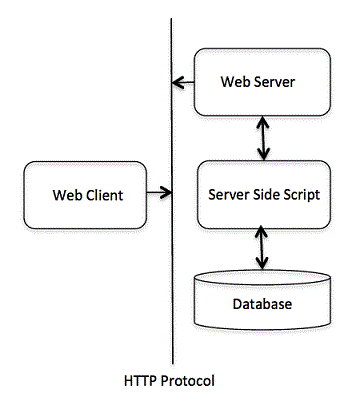
CGI Architecture Diagram
The following simple program shows a simple architecture of CGI −
Web Server Configuration
Before you proceed with CGI Programming, make sure that your Web Server supports CGI and it is configured to handle CGI Programs. All the CGI Programs to be executed by the HTTP server are kept in a pre-configured directory. This directory is called CGI directory and by convention it is named as /var/www/cgi-bin. By convention CGI files will have extension as .cgi, though they are C++ executable.
By default, Apache Web Server is configured to run CGI programs in /var/www/cgi-bin. If you want to specify any other directory to run your CGI scripts, you can modify the following section in the httpd.conf file −
<Directory "/var/www/cgi-bin">
   AllowOverride None
   Options ExecCGI
   Order allow,deny
   Allow from all
</Directory><Directory "/var/www/cgi-bin">
   Options All
</Directory>
Here, I assume that you have Web Server up and running successfully and you are able to run any other CGI program like Perl or Shell etc.
First CGI Program
Consider the following C++ Program content −
#include <iostream>usingnamespace std;intmain(){
   cout <<"Content-type:text/html\r\n\r\n";
   cout <<"<html>\n";
   cout <<"<head>\n";
   cout <<"<title>Hello World - First CGI Program</title>\n";
   cout <<"</head>\n";
   cout <<"<body>\n";
   cout <<"<h2>Hello World! This is my first CGI program</h2>\n";
   cout <<"</body>\n";
   cout <<"</html>\n";return0;}
Compile above code and name the executable as cplusplus.cgi. This file is being kept in /var/www/cgi-bin directory and it has following content. Before running your CGI program make sure you have change mode of file using chmod 755 cplusplus.cgi UNIX command to make file executable.
My First CGI program
The above C++ program is a simple program which is writing its output on STDOUT file i.e. screen. There is one important and extra feature available which is first line printing Content-type:text/html\r\n\r\n. This line is sent back to the browser and specify the content type to be displayed on the browser screen. Now you must have understood the basic concept of CGI and you can write many complicated CGI programs using Python. A C++ CGI program can interact with any other external system, such as RDBMS, to exchange information.
HTTP Header
The line Content-type:text/html\r\n\r\n is a part of HTTP header, which is sent to the browser to understand the content. All the HTTP header will be in the following form −
HTTP Field Name: Field Content

For Example
Content-type: text/html\r\n\r\n
There are few other important HTTP headers, which you will use frequently in your CGI Programming.
Sr.No
Header & Description
1
Content-type:A MIME string defining the format of the file being returned. Example is Content-type:text/html.
2
Expires: DateThe date the information becomes invalid. This should be used by the browser to decide when a page needs to be refreshed. A valid date string should be in the format 01 Jan 1998 12:00:00 GMT.
3
Location: URLThe URL that should be returned instead of the URL requested. You can use this filed to redirect a request to any file.
4
Last-modified: DateThe date of last modification of the resource.
5
Content-length: NThe length, in bytes, of the data being returned. The browser uses this value to report the estimated download time for a file.
6
Set-Cookie: StringSet the cookie passed through the string.
CGI Environment Variables
All the CGI program will have access to the following environment variables. These variables play an important role while writing any CGI program.
Sr.No
Variable Name & Description
1
CONTENT_TYPEThe data type of the content, used when the client is sending attached content to the server. For example file upload etc.
2
CONTENT_LENGTHThe length of the query information that is available only for POST requests.
3
HTTP_COOKIEReturns the set cookies in the form of key & value pair.
4
HTTP_USER_AGENTThe User-Agent request-header field contains information about the user agent originating the request. It is a name of the web browser.
5
PATH_INFOThe path for the CGI script.
6
QUERY_STRINGThe URL-encoded information that is sent with GET method request.
7
REMOTE_ADDRThe IP address of the remote host making the request. This can be useful for logging or for authentication purpose.
8
REMOTE_HOSTThe fully qualified name of the host making the request. If this information is not available then REMOTE_ADDR can be used to get IR address.
9
REQUEST_METHODThe method used to make the request. The most common methods are GET and POST.
10
SCRIPT_FILENAMEThe full path to the CGI script.
11
SCRIPT_NAMEThe name of the CGI script.
12
SERVER_NAMEThe server’s hostname or IP Address.
13
SERVER_SOFTWAREThe name and version of the software the server is running.
Here is small CGI program to list out all the CGI variables.
#include <iostream>#include <stdlib.h>usingnamespace std;const string ENV[24]={"COMSPEC","DOCUMENT_ROOT","GATEWAY_INTERFACE","HTTP_ACCEPT","HTTP_ACCEPT_ENCODING","HTTP_ACCEPT_LANGUAGE","HTTP_CONNECTION","HTTP_HOST","HTTP_USER_AGENT","PATH","QUERY_STRING","REMOTE_ADDR","REMOTE_PORT","REQUEST_METHOD","REQUEST_URI","SCRIPT_FILENAME","SCRIPT_NAME","SERVER_ADDR","SERVER_ADMIN","SERVER_NAME","SERVER_PORT","SERVER_PROTOCOL","SERVER_SIGNATURE","SERVER_SOFTWARE"};intmain(){
   cout <<"Content-type:text/html\r\n\r\n";
   cout <<"<html>\n";
   cout <<"<head>\n";
   cout <<"<title>CGI Environment Variables</title>\n";
   cout <<"</head>\n";
   cout <<"<body>\n";
   cout <<"<table border = \"0\" cellspacing = \"2\">";for(int i =0; i <24; i++){
      cout <<"<tr><td>"<< ENV[ i ]<<"</td><td>";// attempt to retrieve value of environment variablechar*value =getenv( ENV[ i ].c_str());if( value !=0){
         cout << value;}else{
         cout <<"Environment variable does not exist.";}
      cout <<"</td></tr>\n";}

   cout <<"</table><\n";
   cout <<"</body>\n";
   cout <<"</html>\n";return0;}
C++ CGI Library
For real examples, you would need to do many operations by your CGI program. There is a CGI library written for C++ program which you can download from ftp://ftp.gnu.org/gnu/cgicc/ and follow the steps to install the library −
You must have come across many situations when you need to pass some information from your browser to web server and ultimately to your CGI Program. Most frequently browser uses two methods to pass this information to web server. These methods are GET Method and POST Method.
Passing Information Using GET Method
The GET method sends the encoded user information appended to the page request. The page and the encoded information are separated by the ? character as follows −
The GET method is the default method to pass information from browser to web server and it produces a long string that appears in your browser’s Location:box. Never use the GET method if you have password or other sensitive information to pass to the server. The GET method has size limitation and you can pass upto 1024 characters in a request string.
When using GET method, information is passed using QUERY_STRING http header and will be accessible in your CGI Program through QUERY_STRING environment variable.
You can pass information by simply concatenating key and value pairs alongwith any URL or you can use HTML <FORM> tags to pass information using GET method.
Below is a program to generate cpp_get.cgi CGI program to handle input given by web browser. We are going to use C++ CGI library which makes it very easy to access passed information −
#include <iostream>#include <vector>  #include <string>  #include <stdio.h>  #include <stdlib.h> #include <cgicc/CgiDefs.h> #include <cgicc/Cgicc.h> #include <cgicc/HTTPHTMLHeader.h> #include <cgicc/HTMLClasses.h>  usingnamespace std;usingnamespace cgicc;intmain(){
   Cgicc formData;

   cout <<"Content-type:text/html\r\n\r\n";
   cout <<"<html>\n";
   cout <<"<head>\n";
   cout <<"<title>Using GET and POST Methods</title>\n";
   cout <<"</head>\n";
   cout <<"<body>\n";

   form_iterator fi = formData.getElement("first_name");if(!fi->isEmpty()&& fi !=(*formData).end()){
      cout <<"First name: "<<**fi << endl;}else{
      cout <<"No text entered for first name"<< endl;}

   cout <<"<br/>\n";
   fi = formData.getElement("last_name");if(!fi->isEmpty()&&fi !=(*formData).end()){
      cout <<"Last name: "<<**fi << endl;}else{
      cout <<"No text entered for last name"<< endl;}

   cout <<"<br/>\n";
   cout <<"</body>\n";
   cout <<"</html>\n";return0;}
Here is a simple example which passes two values using HTML FORM and submit button. We are going to use same CGI script cpp_get.cgi to handle this input.
<form action ="/cgi-bin/cpp_get.cgi" method ="get">
   First Name:<input type ="text" name ="first_name"><br />

   Last Name:<input type ="text" name ="last_name"/><input type ="submit" value ="Submit"/></form>
Here is the actual output of the above form. You enter First and Last Name and then click submit button to see the result.First Name: Last Name:
Passing Information Using POST Method
A generally more reliable method of passing information to a CGI program is the POST method. This packages the information in exactly the same way as GET methods, but instead of sending it as a text string after a ? in the URL it sends it as a separate message. This message comes into the CGI script in the form of the standard input.
The same cpp_get.cgi program will handle POST method as well. Let us take same example as above, which passes two values using HTML FORM and submit button but this time with POST method as follows −
<form action ="/cgi-bin/cpp_get.cgi" method ="post">
   First Name:<input type ="text" name ="first_name"><br />
   Last Name:<input type ="text" name ="last_name"/><input type ="submit" value ="Submit"/></form>
Here is the actual output of the above form. You enter First and Last Name and then click submit button to see the result.First Name: Last Name:
Passing Checkbox Data to CGI Program
Checkboxes are used when more than one option is required to be selected.
Here is example HTML code for a form with two checkboxes −
<form action ="/cgi-bin/cpp_checkbox.cgi" method ="POST" target ="_blank"><input type ="checkbox" name ="maths" value ="on"/> Maths
   <input type ="checkbox" name ="physics" value ="on"/> Physics
   <input type ="submit" value ="Select Subject"/></form>
The result of this code is the following form − Maths Physics
Below is C++ program, which will generate cpp_checkbox.cgi script to handle input given by web browser through checkbox button.
Radio Buttons are used when only one option is required to be selected.
Here is example HTML code for a form with two radio button −
<form action ="/cgi-bin/cpp_radiobutton.cgi" method ="post" target ="_blank"><input type ="radio" name ="subject" value ="maths" checked ="checked"/> Maths
   <input type ="radio" name ="subject" value ="physics"/> Physics
   <input type ="submit" value ="Select Subject"/></form>
The result of this code is the following form − Maths Physics
Below is C++ program, which will generate cpp_radiobutton.cgi script to handle input given by web browser through radio buttons.
TEXTAREA element is used when multiline text has to be passed to the CGI Program.
Here is example HTML code for a form with a TEXTAREA box −
<form action ="/cgi-bin/cpp_textarea.cgi" method ="post" target ="_blank"><textarea name ="textcontent" cols ="40" rows ="4">
      Type your text here...</textarea><input type ="submit" value ="Submit"/></form>
The result of this code is the following form −
Below is C++ program, which will generate cpp_textarea.cgi script to handle input given by web browser through text area.
Drop down Box is used when we have many options available but only one or two will be selected.
Here is example HTML code for a form with one drop down box −
<form action ="/cgi-bin/cpp_dropdown.cgi" method ="post" target ="_blank"><select name ="dropdown"><option value ="Maths" selected>Maths</option><option value ="Physics">Physics</option></select><input type ="submit" value ="Submit"/></form>
The result of this code is the following form − Maths Physics
Below is C++ program, which will generate cpp_dropdown.cgi script to handle input given by web browser through drop down box.
HTTP protocol is a stateless protocol. But for a commercial website it is required to maintain session information among different pages. For example one user registration ends after completing many pages. But how to maintain user’s session information across all the web pages.
In many situations, using cookies is the most efficient method of remembering and tracking preferences, purchases, commissions, and other information required for better visitor experience or site statistics.
How It Works
Your server sends some data to the visitor’s browser in the form of a cookie. The browser may accept the cookie. If it does, it is stored as a plain text record on the visitor’s hard drive. Now, when the visitor arrives at another page on your site, the cookie is available for retrieval. Once retrieved, your server knows/remembers what was stored.
Cookies are a plain text data record of 5 variable-length fields −
Expires − This shows date the cookie will expire. If this is blank, the cookie will expire when the visitor quits the browser.
Domain − This shows domain name of your site.
Path − This shows path to the directory or web page that set the cookie. This may be blank if you want to retrieve the cookie from any directory or page.
Secure − If this field contains the word “secure” then the cookie may only be retrieved with a secure server. If this field is blank, no such restriction exists.
Name = Value − Cookies are set and retrieved in the form of key and value pairs.
Setting up Cookies
It is very easy to send cookies to browser. These cookies will be sent along with HTTP Header before the Content-type filed. Assuming you want to set UserID and Password as cookies. So cookies setting will be done as follows
From this example, you must have understood how to set cookies. We use Set-Cookie HTTP header to set cookies.
Here, it is optional to set cookies attributes like Expires, Domain, and Path. It is notable that cookies are set before sending magic line “Content-type:text/html\r\n\r\n.
Compile above program to produce setcookies.cgi, and try to set cookies using following link. It will set four cookies at your computer −
To upload a file the HTML form must have the enctype attribute set to multipart/form-data. The input tag with the file type will create a “Browse” button.
<html><body><form enctype ="multipart/form-data" action ="/cgi-bin/cpp_uploadfile.cgi"
         method ="post"><p>File:<input type ="file" name ="userfile"/></p><p><input type ="submit" value ="Upload"/></p></form></body></html>
The result of this code is the following form −
File:
Note − Above example has been disabled intentionally to stop people uploading files on our server. But you can try above code with your server.
Here is the script cpp_uploadfile.cpp to handle file upload −
#include <iostream>#include <vector>  #include <string>  #include <stdio.h>  #include <stdlib.h> #include <cgicc/CgiDefs.h> #include <cgicc/Cgicc.h> #include <cgicc/HTTPHTMLHeader.h> #include <cgicc/HTMLClasses.h>usingnamespace std;usingnamespace cgicc;intmain(){
   Cgicc cgi;

   cout <<"Content-type:text/html\r\n\r\n";
   cout <<"<html>\n";
   cout <<"<head>\n";
   cout <<"<title>File Upload in CGI</title>\n";
   cout <<"</head>\n";
   cout <<"<body>\n";// get list of files to be uploaded
   const_file_iterator file = cgi.getFile("userfile");if(file != cgi.getFiles().end()){// send data type at cout.
      cout <<HTTPContentHeader(file->getDataType());// write content at cout.
      file->writeToStream(cout);}
   cout <<"<File uploaded successfully>\n";
   cout <<"</body>\n";
   cout <<"</html>\n";return0;}
The above example is for writing content at cout stream but you can open your file stream and save the content of uploaded file in a file at desired location.
Hope you have enjoyed this tutorial. If yes, please send us your feedback.
Multithreading is a specialized form of multitasking and a multitasking is the feature that allows your computer to run two or more programs concurrently. In general, there are two types of multitasking: process-based and thread-based.
Process-based multitasking handles the concurrent execution of programs. Thread-based multitasking deals with the concurrent execution of pieces of the same program.
A multithreaded program contains two or more parts that can run concurrently. Each part of such a program is called a thread, and each thread defines a separate path of execution.
Before C++ 11, there is no built-in support for multithreaded applications. Instead, it relies entirely upon the operating system to provide this feature.
This tutorial assumes that you are working on Linux OS and we are going to write multi-threaded C++ program using POSIX. POSIX Threads, or Pthreads provides API which are available on many Unix-like POSIX systems such as FreeBSD, NetBSD, GNU/Linux, Mac OS X and Solaris.
Creating Threads
The following routine is used to create a POSIX thread −
Here, pthread_create creates a new thread and makes it executable. This routine can be called any number of times from anywhere within your code. Here is the description of the parameters −
Sr.No
Parameter & Description
1
threadAn opaque, unique identifier for the new thread returned by the subroutine.
2
attrAn opaque attribute object that may be used to set thread attributes. You can specify a thread attributes object, or NULL for the default values.
3
start_routineThe C++ routine that the thread will execute once it is created.
4
argA single argument that may be passed to start_routine. It must be passed by reference as a pointer cast of type void. NULL may be used if no argument is to be passed.
The maximum number of threads that may be created by a process is implementation dependent. Once created, threads are peers, and may create other threads. There is no implied hierarchy or dependency between threads.
Terminating Threads
There is following routine which we use to terminate a POSIX thread −
#include <pthread.h>pthread_exit(status)
Here pthread_exit is used to explicitly exit a thread. Typically, the pthread_exit() routine is called after a thread has completed its work and is no longer required to exist.
If main() finishes before the threads it has created, and exits with pthread_exit(), the other threads will continue to execute. Otherwise, they will be automatically terminated when main() finishes.
Example
This simple example code creates 5 threads with the pthread_create() routine. Each thread prints a “Hello World!” message, and then terminates with a call to pthread_exit().
#include <iostream>#include <cstdlib>#include <pthread.h>usingnamespace std;#define NUM_THREADS 5void*PrintHello(void*threadid){long tid;
   tid =(long)threadid;
   cout <<"Hello World! Thread ID, "<< tid << endl;pthread_exit(NULL);}intmain(){
   pthread_t threads[NUM_THREADS];int rc;int i;for( i =0; i < NUM_THREADS; i++){
      cout <<"main() : creating thread, "<< i << endl;
      rc =pthread_create(&threads[i],NULL, PrintHello,(void*)i);if(rc){
         cout <<"Error:unable to create thread,"<< rc << endl;exit(-1);}}pthread_exit(NULL);}
Compile the following program using -lpthread library as follows −
$gcc test.cpp -lpthread
Now, execute your program which gives the following output −
This example shows how to pass multiple arguments via a structure. You can pass any data type in a thread callback because it points to void as explained in the following example −
When the above code is compiled and executed, it produces the following result −
main() : creating thread, 0
main() : creating thread, 1
main() : creating thread, 2
main() : creating thread, 3
main() : creating thread, 4
Thread ID : 3 Message : This is message
Thread ID : 2 Message : This is message
Thread ID : 0 Message : This is message
Thread ID : 1 Message : This is message
Thread ID : 4 Message : This is message
Joining and Detaching Threads
There are following two routines which we can use to join or detach threads −
The pthread_join() subroutine blocks the calling thread until the specified ‘threadid’ thread terminates. When a thread is created, one of its attributes defines whether it is joinable or detached. Only threads that are created as joinable can be joined. If a thread is created as detached, it can never be joined.
This example demonstrates how to wait for thread completions by using the Pthread join routine.
#include <iostream>#include <cstdlib>#include <pthread.h>#include <unistd.h>usingnamespace std;#define NUM_THREADS 5void*wait(void*t){int i;long tid;

   tid =(long)t;sleep(1);
   cout <<"Sleeping in thread "<< endl;
   cout <<"Thread with id : "<< tid <<"  ...exiting "<< endl;pthread_exit(NULL);}intmain(){int rc;int i;
   pthread_t threads[NUM_THREADS];
   pthread_attr_t attr;void*status;// Initialize and set thread joinablepthread_attr_init(&attr);pthread_attr_setdetachstate(&attr, PTHREAD_CREATE_JOINABLE);for( i =0; i < NUM_THREADS; i++){
      cout <<"main() : creating thread, "<< i << endl;
      rc =pthread_create(&threads[i],&attr, wait,(void*)i );if(rc){
         cout <<"Error:unable to create thread,"<< rc << endl;exit(-1);}}// free attribute and wait for the other threadspthread_attr_destroy(&attr);for( i =0; i < NUM_THREADS; i++){
      rc =pthread_join(threads[i],&status);if(rc){
         cout <<"Error:unable to join,"<< rc << endl;exit(-1);}
      cout <<"Main: completed thread id :"<< i ;
      cout <<"  exiting with status :"<< status << endl;}

   cout <<"Main: program exiting."<< endl;pthread_exit(NULL);}
When the above code is compiled and executed, it produces the following result −
main() : creating thread, 0
main() : creating thread, 1
main() : creating thread, 2
main() : creating thread, 3
main() : creating thread, 4
Sleeping in thread
Thread with id : 0 .... exiting
Sleeping in thread
Thread with id : 1 .... exiting
Sleeping in thread
Thread with id : 2 .... exiting
Sleeping in thread
Thread with id : 3 .... exiting
Sleeping in thread
Thread with id : 4 .... exiting
Main: completed thread id :0  exiting with status :0
Main: completed thread id :1  exiting with status :0
Main: completed thread id :2  exiting with status :0
Main: completed thread id :3  exiting with status :0
Main: completed thread id :4  exiting with status :0
Main: program exiting.
Signals are the interrupts delivered to a process by the operating system which can terminate a program prematurely. You can generate interrupts by pressing Ctrl+C on a UNIX, LINUX, Mac OS X or Windows system.
There are signals which can not be caught by the program but there is a following list of signals which you can catch in your program and can take appropriate actions based on the signal. These signals are defined in C++ header file <csignal>.
Sr.No
Signal & Description
1
SIGABRTAbnormal termination of the program, such as a call to abort.
2
SIGFPEAn erroneous arithmetic operation, such as a divide by zero or an operation resulting in overflow.
3
SIGILLDetection of an illegal instruction.
4
SIGINTReceipt of an interactive attention signal.
5
SIGSEGVAn invalid access to storage.
6
SIGTERMA termination request sent to the program.
The signal() Function
C++ signal-handling library provides function signal to trap unexpected events. Following is the syntax of the signal() function −
void(*signal(int sig,void(*func)(int)))(int);
Keeping it simple, this function receives two arguments: first argument as an integer which represents signal number and second argument as a pointer to the signal-handling function.
Let us write a simple C++ program where we will catch SIGINT signal using signal() function. Whatever signal you want to catch in your program, you must register that signal using signal function and associate it with a signal handler. Examine the following example −
#include <iostream>#include <csignal>usingnamespace std;voidsignalHandler(int signum ){
   cout <<"Interrupt signal ("<< signum <<") received.\n";// cleanup and close up stuff here  // terminate program  exit(signum);}intmain(){// register signal SIGINT and signal handler  signal(SIGINT, signalHandler);while(1){
      cout <<"Going to sleep...."<< endl;sleep(1);}return0;}
When the above code is compiled and executed, it produces the following result −
Going to sleep....
Going to sleep....
Going to sleep....
Now, press Ctrl+c to interrupt the program and you will see that your program will catch the signal and would come out by printing something as follows −
Going to sleep....
Going to sleep....
Going to sleep....
Interrupt signal (2) received.
The raise() Function
You can generate signals by function raise(), which takes an integer signal number as an argument and has the following syntax.
intraise(signal sig);
Here, sig is the signal number to send any of the signals: SIGINT, SIGABRT, SIGFPE, SIGILL, SIGSEGV, SIGTERM, SIGHUP. Following is the example where we raise a signal internally using raise() function as follows −
#include <iostream>#include <csignal>usingnamespace std;voidsignalHandler(int signum ){
   cout <<"Interrupt signal ("<< signum <<") received.\n";// cleanup and close up stuff here  // terminate program  exit(signum);}intmain(){int i =0;// register signal SIGINT and signal handler  signal(SIGINT, signalHandler);while(++i){
      cout <<"Going to sleep...."<< endl;if( i ==3){raise( SIGINT);}sleep(1);}return0;}
When the above code is compiled and executed, it produces the following result and would come out automatically −
Going to sleep....
Going to sleep....
Going to sleep....
Interrupt signal (2) received.
The preprocessors are the directives, which give instructions to the compiler to preprocess the information before actual compilation starts.
All preprocessor directives begin with #, and only white-space characters may appear before a preprocessor directive on a line. Preprocessor directives are not C++ statements, so they do not end in a semicolon (;).
You already have seen a #include directive in all the examples. This macro is used to include a header file into the source file.
There are number of preprocessor directives supported by C++ like #include, #define, #if, #else, #line, etc. Let us see important directives −
The #define Preprocessor
The #define preprocessor directive creates symbolic constants. The symbolic constant is called a macro and the general form of the directive is −
#define macro-name replacement-text
When this line appears in a file, all subsequent occurrences of macro in that file will be replaced by replacement-text before the program is compiled. For example −
#include <iostream>usingnamespace std;#define PI 3.14159intmain(){
   cout <<"Value of PI :"<< PI << endl;return0;}
Now, let us do the preprocessing of this code to see the result assuming we have the source code file. So let us compile it with -E option and redirect the result to test.p. Now, if you check test.p, it will have lots of information and at the bottom, you will find the value replaced as follows −
$gcc -E test.cpp > test.p

...intmain(){
   cout <<"Value of PI :"<<3.14159<< endl;return0;}
Function-Like Macros
You can use #define to define a macro which will take argument as follows −
#include <iostream>usingnamespace std;#define MIN(a,b) (((a)<(b)) ? a : b)intmain(){int i, j;

   i =100;
   j =30;

   cout <<"The minimum is "<<MIN(i, j)<< endl;return0;}
If we compile and run above code, this would produce the following result −
The minimum is 30
Conditional Compilation
There are several directives, which can be used to compile selective portions of your program’s source code. This process is called conditional compilation.
The conditional preprocessor construct is much like the if selection structure. Consider the following preprocessor code −
#ifndef NULL#define NULL 0#endif
You can compile a program for debugging purpose. You can also turn on or off the debugging using a single macro as follows −
#ifdef DEBUG
   cerr <<"Variable x = "<< x << endl;#endif
This causes the cerr statement to be compiled in the program if the symbolic constant DEBUG has been defined before directive #ifdef DEBUG. You can use #if 0 statment to comment out a portion of the program as follows −
#if 0
   code prevented from compiling
#endif
Let us try the following example −
#include <iostream>usingnamespace std;#define DEBUG#define MIN(a,b) (((a)<(b)) ? a : b)intmain(){int i, j;

   i =100;
   j =30;#ifdef DEBUG
   cerr <<"Trace: Inside main function"<< endl;#endif#if 0/* This is commented part */
   cout <<MKSTR(HELLO C++)<< endl;#endif

   cout <<"The minimum is "<<MIN(i, j)<< endl;#ifdef DEBUG
   cerr <<"Trace: Coming out of main function"<< endl;#endifreturn0;}
If we compile and run above code, this would produce the following result −
The minimum is 30
Trace: Inside main function
Trace: Coming out of main function
The # and ## Operators
The # and ## preprocessor operators are available in C++ and ANSI/ISO C. The # operator causes a replacement-text token to be converted to a string surrounded by quotes.
If we compile and run above code, this would produce the following result −
HELLO C++
Let us see how it worked. It is simple to understand that the C++ preprocessor turns the line −
cout <<MKSTR(HELLO C++)<< endl;
Above line will be turned into the following line −
cout <<"HELLO C++"<< endl;
The ## operator is used to concatenate two tokens. Here is an example −
#define CONCAT( x, y ) x ## y
When CONCAT appears in the program, its arguments are concatenated and used to replace the macro. For example, CONCAT(HELLO, C++) is replaced by “HELLO C++” in the program as follows.
#include <iostream>usingnamespace std;#define concat(a, b) a ## bintmain(){int xy =100;

   cout <<concat(x, y);return0;}
If we compile and run above code, this would produce the following result −
100
Let us see how it worked. It is simple to understand that the C++ preprocessor transforms −
cout <<concat(x, y);
Above line will be transformed into the following line −
cout << xy;
Predefined C++ Macros
C++ provides a number of predefined macros mentioned below −
Sr.No
Macro & Description
1
__LINE__This contains the current line number of the program when it is being compiled.
2
__FILE__This contains the current file name of the program when it is being compiled.
3
__DATE__This contains a string of the form month/day/year that is the date of the translation of the source file into object code.
4
__TIME__This contains a string of the form hour:minute:second that is the time at which the program was compiled.
Let us see an example for all the above macros −
#include <iostream>usingnamespace std;intmain(){
   cout <<"Value of __LINE__ : "<<__LINE__<< endl;
   cout <<"Value of __FILE__ : "<<__FILE__<< endl;
   cout <<"Value of __DATE__ : "<<__DATE__<< endl;
   cout <<"Value of __TIME__ : "<<__TIME__<< endl;return0;}
If we compile and run above code, this would produce the following result −
Value of __LINE__ : 6
Value of __FILE__ : test.cpp
Value of __DATE__ : Feb 28 2011
Value of __TIME__ : 18:52:48
Templates are the foundation of generic programming, a programming style that allows writing functions, classes, algorithms, and different code snippets that work with different data types.
A template is a blueprint or formula for creating a generic class or a function. The library containers like iterators and algorithms are examples of generic programming and have been developed using template concepts.
There is a single definition of each container, such as vector, but we can define many different kinds of vectors, for example, vector <int> or vector <string>.The two keywords that are used to define a template are template and typename.
Function Template
Function templates define a blueprint for functions that enables a function to operate on different data types without rewriting the same logic.
Syntax
The syntax for the general form of a template function definition is shown here −
Here the ‘template’ keyword declares the generic function and ‘typename’ keyword specifies the type to be used for the parameter.
Example
Here is the following example of a function template that returns the maximum of two values.
#include <iostream>#include <string>usingnamespace std;template<typenameT>inline T const&Max(T const& a, T const& b){return a < b ? b:a;}intmain(){int i =39;int j =20;
   cout <<"Max(i, j): "<<Max(i, j)<< endl;double f1 =13.5;double f2 =20.7;
   cout <<"Max(f1, f2): "<<Max(f1, f2)<< endl;

   string s1 ="Hello";
   string s2 ="World";
   cout <<"Max(s1, s2): "<<Max(s1, s2)<< endl;return0;}
Output
Max(i, j): 39
Max(f1, f2): 20.7
Max(s1, s2): World
Class Template
Similarly, class templates also define a blueprint for creating classes that can work with any data type.
Syntax
template<classtype>classclass-name {...}
Here, type is the placeholder type name, which will be specified when a class is instantiated. You can define more than one generic data type by using a comma-separated list.
Example
Following is the example of defining class Stack<> and implementing generic methods to push and pop the elements from the stack −
#include <iostream>#include <vector>#include <cstdlib>#include <string>#include <stdexcept>usingnamespace std;template<classT>classStack{private:
      vector<T> elems;// elements public:voidpush(T const&);// push element voidpop();// pop element
      T top()const;// return top element boolempty()const{// return true if empty.return elems.empty();}};template<classT>voidStack<T>::push(T const& elem){// append copy of passed element
   elems.push_back(elem);}template<classT>voidStack<T>::pop(){if(elems.empty()){throwout_of_range("Stack<>::pop(): empty stack");}// remove last element
   elems.pop_back();}template<classT>
T Stack<T>::top()const{if(elems.empty()){throwout_of_range("Stack<>::top(): empty stack");}// return copy of last element return elems.back();}intmain(){try{
      Stack<int>         intStack;// stack of ints
      Stack<string> stringStack;// stack of strings // manipulate int stack
      intStack.push(7);
      cout << intStack.top()<<endl;// manipulate string stack
      stringStack.push("hello");
      cout << stringStack.top()<< std::endl;
      stringStack.pop();
      stringStack.pop();}catch(exception const& ex){
      cerr <<"Exception: "<< ex.what()<<endl;return-1;}}
Output
7
hello
Exception: Stack<>::pop(): empty stack
Template Argument Deduction
Template argument deduction is a feature that automatically deduces (understands) the data type of the argument passed to a function or class template. Instead of explicitly specifying template arguments, the compiler figures them out for you.
Example
Lets see an example of the Template Argument Deduction −
template<typenameT>
T add(T a, T b){return a + b;}intmain(){// The compiler deduces T as intauto result1 =add(5,3);// The compiler deduces T as doubleauto result2 =add(3.14,2.86);}
In this code, we didn’t write add<int>(5,3) or add<double>(3.14, 2.86). The compiler deduces the type based on the arguments you provide.
Function Template Argument Deduction
In C++ Function template argument is a feature that allows the compiler to automatically deduce the types of template parameters based on the arguments passed to the function.
Example
Heres a simple example of a Function template argument deduction.
#include <iostream>// Function templatetemplate<typenameT>voidprintValue(T value){
   std::cout << value << std::endl;}intmain(){// Usage examplesprintValue(42);// T is intprintValue("Hello");// T is const char*printValue(3.14159);// T is doublereturn0;}
Output
42
Hello
3.14159
Class Template Argument Deduction
Class template argument deduction in C++ is a feature that enables the compiler to automatically infer template parameters for class templates from the constructor arguments when creating an object.
Example
Heres a basic implementation of class template deduction.
#include <iostream>template<typenameT>classHolder{public:Holder(T value):data(value){}voidshow()const{ std::cout << data << std::endl;}private:
      T data;};intmain(){
   Holder h1(42);// T deduced as int
   Holder h2(3.14);// T deduced as double
   Holder h3("Hello");// T deduced as const char*

   h1.show();// Output: 42
   h2.show();// Output: 3.14
   h3.show();// Output: Helloreturn0;}
Output
42
3.14
Hello
Benefits of C++ Templates
Code Reusability − Templates enable you to write generic code that works with all data types, thus eliminating the need to write identical code for each required type. This saves development time by reducing code duplication.
Reduced Maintenance − Update a template and see the changes across all instantiations. Which applies better in terms of bug fixing, fixing ones, and seeing the benefits of all the instantiations.
Enhanced Performance − Template instantiations occur at compile time, reducing run time errors. The compiler optimizes the code for specific data types.
Organize the code better − Since templates separate the algorithmic logic from the data type it helps in creating modular code which further is good in terms of development scenario. It helps reduce searching for different implementations of a code.
Consider a situation, when we have two persons with the same name, Zara, in the same class. Whenever we need to differentiate them definitely we would have to use some additional information along with their name, like either the area, if they live in different area or their mothers or fathers name, etc.
Same situation can arise in your C++ applications. For example, you might be writing some code that has a function called xyz() and there is another library available which is also having same function xyz(). Now the compiler has no way of knowing which version of xyz() function you are referring to within your code.
A namespace is designed to overcome this difficulty and is used as additional information to differentiate similar functions, classes, variables etc. with the same name available in different libraries. Using namespace, you can define the context in which names are defined. In essence, a namespace defines a scope.
Defining a Namespace
A namespace definition begins with the keyword namespace followed by the namespace name as follows −
namespace namespace_name {// code declarations}
To call the namespace-enabled version of either function or variable, prepend (::) the namespace name as follows −
name::code;// code could be variable or function.
Let us see how namespace scope the entities including variable and functions −
#include <iostream>usingnamespace std;// first name spacenamespace first_space {voidfunc(){
      cout <<"Inside first_space"<< endl;}}// second name spacenamespace second_space {voidfunc(){
      cout <<"Inside second_space"<< endl;}}intmain(){// Calls function from first name space.
   first_space::func();// Calls function from second name space.
   second_space::func();return0;}
If we compile and run above code, this would produce the following result −
Inside first_space
Inside second_space
The using directive
You can also avoid prepending of namespaces with the using namespace directive. This directive tells the compiler that the subsequent code is making use of names in the specified namespace. The namespace is thus implied for the following code −
#include <iostream>usingnamespace std;// first name spacenamespace first_space {voidfunc(){
      cout <<"Inside first_space"<< endl;}}// second name spacenamespace second_space {voidfunc(){
      cout <<"Inside second_space"<< endl;}}usingnamespace first_space;intmain(){// This calls function from first name space.func();return0;}
If we compile and run above code, this would produce the following result −
Inside first_space
The using directive can also be used to refer to a particular item within a namespace. For example, if the only part of the std namespace that you intend to use is cout, you can refer to it as follows −
using std::cout;
Subsequent code can refer to cout without prepending the namespace, but other items in the std namespace will still need to be explicit as follows −
#include <iostream>using std::cout;intmain(){
   cout <<"std::endl is used with std!"<< std::endl;return0;}
If we compile and run above code, this would produce the following result −
std::endl is used with std!
Names introduced in a using directive obey normal scope rules. The name is visible from the point of the using directive to the end of the scope in which the directive is found. Entities with the same name defined in an outer scope are hidden.
Discontiguous Namespaces
A namespace can be defined in several parts and so a namespace is made up of the sum of its separately defined parts. The separate parts of a namespace can be spread over multiple files.
So, if one part of the namespace requires a name defined in another file, that name must still be declared. Writing a following namespace definition either defines a new namespace or adds new elements to an existing one −
namespace namespace_name {// code declarations}
Nested Namespaces
Namespaces can be nested where you can define one namespace inside another name space as follows −
You can access members of nested namespace by using resolution operators as follows −
// to access members of namespace_name2usingnamespace namespace_name1::namespace_name2;// to access members of namespace:name1usingnamespace namespace_name1;
In the above statements if you are using namespace_name1, then it will make elements of namespace_name2 available in the scope as follows −
#include <iostream>usingnamespace std;// first name spacenamespace first_space {voidfunc(){
      cout <<"Inside first_space"<< endl;}// second name spacenamespace second_space {voidfunc(){
         cout <<"Inside second_space"<< endl;}}}usingnamespace first_space::second_space;intmain(){// This calls function from second name space.func();return0;}
If we compile and run above code, this would produce the following result −