A function prototype in C programming is a declaration that specifies the function’s name, its return type, and the number and data types of its parameters. A function in C is a block of code that performs a specific task.
What is a Function Prototype?
A function prototype allows the compiler to verify that the arguments and the data types of a function match with the ones that are specified in its declaration and its call.
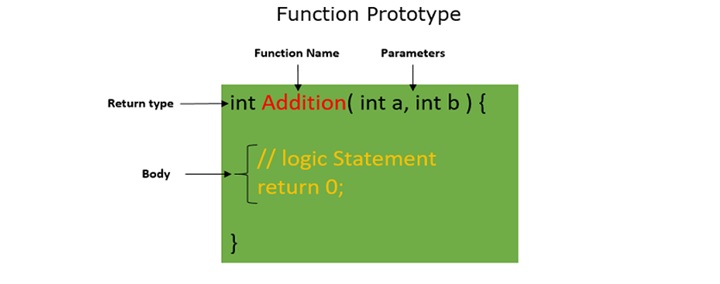
The following image illustrates the syntax and structure of a function prototype −
Ways to Write Function Prototypes in C
There are several different ways to write a function prototype in C. These prototypes are commonly used in C programming to declare functions before their actual definition.
// Example 1: Function declaration without parameters // (does not specify the number and type of parameters)intfunction_name();// Example 2: Function prototype with data types only // (specifies return type, number, and types of parameters)intfunction_name(int,int);// Example 3: Function prototype with parameter names // (valid and commonly used)intfunction_name(int a,int b);// Example 4: Function definition (which itself serves as a prototype)intsum(int a,int b){return a + b;}
Example: Sum of Two Numbers
In this example, we calculate the sum of two numbers using a function prototype −
#include <stdio.h>// function prototypeintsum(int a,int b);intmain(){int a =10, b =20;printf("Sum of a and b is %d\n",sum(a, b));return0;}// function definitionintsum(int x ,int y){return x + y;}
Here is its output −
Sum of a and b is 30
In the above code, the function sum is called before its definition. Since the program contains the prototype of the sum function, it executes without any errors.
What Happens When the Function Prototype is Missing?
When the function prototype is missing in C, the compiler gives the following two errors −
Implicit Declaration Warning − This warning indicates that the compiler cannot find a function with the given name.
Incorrect Return Type Warning − You will get this warning when a functionâs return type is not explicitly specified. By default, the compiler assumes the return type to be int.
Example
This program shows the effect when the function prototype is missing in a C program −
#include <stdio.h>// function definitionintsum(int x ,int y){return x+y;}intmain(){int a =10, b =20;printf("Sum of a and b is %d\n",sum(a, b));return0;}
When you run this code, it will flash the following error −
ERROR!
/tmp/uG7dM1iUzv/main.c: In function 'main':
/tmp/uG7dM1iUzv/main.c:6:36: error: implicit declaration of function 'sum' [-Wimplicit-function-declaration]
    6 |    printf("Sum of a and b is %d\n",sum(a, b));
In the above code, the function sum is called before it is defined and we don’t have a function prototype of sum at the beginning. Hence, this code results in an implicit declaration error.
Benefits of Using Function Prototypes
Following are the benefits of using function prototypes −
Function definition before definition − It allows a function to be called before its definition, but make sure the function prototypes are declared at the beginning. In complex programs, it is common to declare the function prototype at the beginning or in the header of the code, which enables function calls to occur before the functionâs actual implementation.
Type checking − A function prototype allows the compiler to check whether the correct number and types of arguments are passed to the function.
Code clarity − Declaring the function prototypes makes the programmers aware of the functionâs purpose and expected parameters, which helps in understanding the code structure.
In this chapter, we covered in detail the importance of using function prototypes in C programming.
A function in C is a block of organized reusuable code that is performs a single related action. Every C program has at least one function, which is main(), and all the most trivial programs can define additional functions.
When the algorithm of a certain problem involves long and complex logic, it is broken into smaller, independent and reusable blocks. These small blocks of code are known by different names in different programming languages such as a module, a subroutine, a function or a method.
You can divide up your code into separate functions. How you divide up your code among different functions is up to you, but logically the division is such that each function performs a specific task.
A function declaration tells the compiler about a function’s name, return type, and parameters. A function definition provides the actual body of the function.
The C standard library provides numerous built-in functions that your program can call. For example, strcat() to concatenate two strings, memcpy() to copy one memory location to another location, and many more functions.
Modular Programming in C
Functions are designed to perform a specific task that is a part of an entire process. This approach towards software development is called modular programming.
Modular programming takes a top-down approach towards software development. The programming solution has a main routine through which smaller independent modules (functions) are called upon.
Each function is a separate, complete and reusable software component. When called, a function performs a specified task and returns the control back to the calling routine, optionally along with result of its process.
The main advantage of this approach is that the code becomes easy to follow, develop and maintain.
Library Functions in C
C offers a number of library functions included in different header files. For example, the stdio.h header file includes printf() and scanf() functions. Similarly, the math.h header file includes a number of functions such as sin(), pow(), sqrt() and more.
These functions perform a predefined task and can be called upon in any program as per requirement. However, if you don’t find a suitable library function to serve your purpose, you can define one.
Defining a Function in C
In C, it is necessary to provide the forward declaration of the prototype of any function. The prototype of a library function is present in the corresponding header file.
For a user-defined function, its prototype is present in the current program. The definition of a function and its prototype declaration should match.
After all the statements in a function are executed, the flow of the program returns to the calling environment. The function may return some data along with the flow control.
Function Declarations in C
A function declaration tells the compiler about a function name and how to call the function. The actual body of the function can be defined separately.
A function declaration has the following parts −
return_type function_name(parameter list);
For the above defined function max(), the function declaration is as follows −
intmax(int num1,int num2);
Parameter names are not important in function declaration only their type is required, so the following is also a valid declaration −
intmax(int,int);
A function declaration is required when you define a function in one source file and you call that function in another file. In such cases, you should declare the function at the top of the file calling the function.
Parts of a Function in C
The general form of a function definition in C programming language is as follows −
return_type function_name(parameter list){

   body of the function
}
A function definition in C programming consists of a function header and a function body. Here are all the parts of a function −
Return Type − A function may return a value. The return_type is the data type of the value the function returns. Some functions perform the desired operations without returning a value. In this case, the return_type is the keyword void.
Function Name − This is the actual name of the function. The function name and the parameter list together constitute the function signature.
Argument List − An argument (also called parameter) is like a placeholder. When a function is invoked, you pass a value as a parameter. This value is referred to as the actual parameter or argument. The parameter list refers to the type, order, and number of the parameters of a function. Parameters are optional; that is, a function may contain no parameters.
Function Body − The function body contains a collection of statements that defines what the function does.
A function in C should have a return type. The type of the variable returned by the function must be the return type of the function. In the above figure, the add() function returns an int type.
Example: User-defined Function in C
In this program, we have used a user-defined function called max(). This function takes two parameters num1 and num2 and returns the maximum value between the two −
#include <stdio.h>/* function returning the max between two numbers */intmax(int num1,int num2){/* local variable declaration */int result;if(num1 > num2)
      result = num1;else
      result = num2;return result;}intmain(){printf("Comparing two numbers using max() function: \n");printf("Which of the two, 75 or 57, is greater than the other? \n");printf("The answer is: %d",max(75,57));return0;}
Output
When you runt this code, it will produce the following output −
Comparing two numbers using max() function:
Which of the two, 75 or 57, is greater than the other?
The answer is: 75
Calling a Function in C
While creating a C function, you give a definition of what the function has to do. To use a function, you will have to call that function to perform the defined task.
To call a function properly, you need to comply with the declaration of the function prototype. If the function is defined to receive a set of arguments, the same number and type of arguments must be passed.
When a function is defined with arguments, the arguments in front of the function name are called formal arguments. When a function is called, the arguments passed to it are the actual arguments.
When a program calls a function, the program control is transferred to the called function. A called function performs a defined task and when its return statement is executed or when its function-ending closing brace is reached, it returns the program control back to the main program.
Example: Calling a Function
To call a function, you simply need to pass the required parameters along with the function name. If the function returns a value, then you can store the returned value. Take a look at the following example −
#include <stdio.h>/* function declaration */intmax(int num1,int num2);intmain(){/* local variable definition */int a =100;int b =200;int ret;/* calling a function to get max value */
   ret =max(a, b);printf("Max value is : %d\n", ret );return0;}/* function returning the max between two numbers */intmax(int num1,int num2){/* local variable declaration */int result;if(num1 > num2)
      result = num1;else
      result = num2;return result;}
Output
We have kept max() along with main() and compiled the source code. While running the final executable, it would produce the following result −
Max value is : 200
The main() Function in C
A C program is a collection of one or more functions, but one of the functions must be named as main(), which is the entry point of the execution of the program.
From inside the main() function, other functions are called. The main() function can call a library function such as printf(), whose prototype is fetched from the header file (stdio.h) or any other user-defined function present in the code.
In C, the order of definition of the program is not material. In a program, wherever there is main(), it is the entry point irrespective of whether it is the first function or not.
Note: In C, any function can call any other function, any number of times. A function can call itself too. Such a self-calling function is called a recursive function.
Function Arguments
If a function is to use arguments, it must declare variables that accept the values of the arguments. These variables are called the formal parameters of the function.
Formal parameters behave like other local variables inside the function and are created upon entry into the function and destroyed upon exit.
While calling a function, there are two ways in which arguments can be passed to a function −
Sr.No
Call Type & Description
1
Call by valueThis method copies the actual value of an argument into the formal parameter of the function. In this case, changes made to the parameter inside the function have no effect on the argument.
2
Call by referenceThis method copies the address of an argument into the formal parameter. Inside the function, the address is used to access the actual argument used in the call. This means that changes made to the parameter affect the argument.
By default, C uses call by value to pass arguments. In general, it means the code within a function cannot alter the arguments used to call the function.
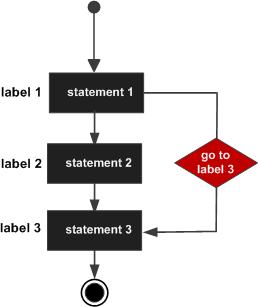
The goto statement is used to transfer the program’s control to a defined label within the same function. It is an unconditional jump statement that can transfer control forward or backward.
The goto keyword is followed by a label. When executed, the program control is redirected to the statement following the label.If the label points to any of the earlier statements in a code, it constitutes a loop. On the other hand, if the label refers to a further step, it is equivalent to a Jump.
goto Statement Syntax
The syntax of goto statement is −
goto label;......
label: statement;
The label is any valid identifier in C. A label must contain alphanumeric characters along with the underscore symbol (_). As in case of any identifier, the same label cannot be specified more than once in a program. It is always followed by a colon (:) symbol. The statement after this colon is executed when goto redirects the program here.
goto Statement Flowchart
The following flowchart represents how the goto statement works −
goto Statement Examples
Example 1
In the following program, the control jumps to a given label which is after the current statement. It prints a given number, before printing the end of the program message. If it is “0”, it jumps over to the printf statement, displaying the message.
#include <stdio.h>intmain(){int n =0;if(n ==0)goto end;printf("The number is: %d", n);

   end:printf("End of program");return0;}
Output
Run the code and check its output −
End of program
Example 2
Here is a program to check if a given number is even or odd. Observe how we used the goto statement in this program −
#include <stdio.h>intmain(){int i =11;if(i %2==0){
      EVEN:printf("The number is even \n");goto END;}else{
      ODD:printf("The number is odd \n");}
   END:printf("End of program");return0;}
Output
Since the given number is 11, it will produce the following output −
The number is odd
End of program
Change the number and check the output for different numbers.
Example 3
If goto appears unconditionally and it jumps backwards, an infinite loop is created.
#include <stdio.h>intmain(){
   START:printf("Hello World \n");printf("How are you? \n");goto START;return0;}
Output
Run the code and check its output −
Hello World
How are you?
.......
.......
The program prints the two strings continuously until forcibly stopped.
Example 4
In this program, we have two goto statements. The second goto statement forms a loop because it makes a backward jump. The other goto statement jumps out of the loop when the condition is reached.
#include <stdio.h>intmain(){int i =0;
   START:
      i++;printf("i: %d\n", i);if(i ==5)goto END;goto START;
   END:printf("End of loop");return0;}
Output
Run the code and check its output −
i: 1
i: 2
i: 3
i: 4
i: 5
End of loop
Example 5
The goto statement is used here to skip all the values of a looping variable that matches with that of others. As a result, all the unique combinations of 1, 2 and 3 are obtained.
#include <stdio.h>intmain(){int i, j, k;for(i =1; i <=3; i++){for(j =1; j <=3; j++){if(i == j)goto label1;for(k =1; k <=3; k++){if(k == j || k == i)goto label2;printf("%d %d %d \n", i,j,k);

            label2:;}
         label1:;}}return0;}
Output
Run the code and check its output −
1 2 3
1 3 2
2 1 3
2 3 1
3 1 2
3 2 1
Avoid Using the goto Statement in C
Note that goto in C is considered unstructured, as it allows the program to jump to any location in the code, it can make the code hard to understand, follow, and maintain. Too many goto statements sending the program control back and forth can make the program logic difficult to understand.
Noted computer scientist dsger Dijkstra recommended that goto be removed from all the programming languages. He observed that if the program control jumps in the middle of a loop, it may yield unpredictable behaviour. The goto statements can be used to create programs that have multiple entry and exit points, which can make it difficult to track the flow of control of the program.
Dijkstra’s strong observations against the use of goto statement have been influential, as many mainstream languages do not support goto statements. However, it is still available in some languages, such as C and C++.
In general, it is best to avoid using goto statements in C. You can instead effectively use if-else statements, loops and loop controls, function and subroutine calls, and try-catch-throw statements. Use goto if and only if these alternatives dont fulfil the needs of your algorithm.
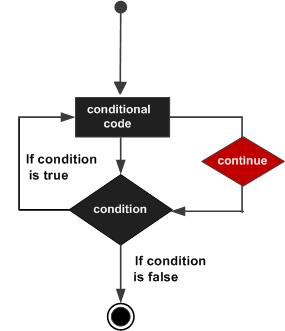
The behaviour of continue statement in C is somewhat opposite to the break statement. Instead of forcing the termination of a loop, it forces the next iteration of the loop to take place, skipping the rest of the statements in the current iteration.
What is Continue Statement in C?
The continue statement is used to skip the execution of the rest of the statement within the loop in the current iteration and transfer it to the next loop iteration. It can be used with all the C language loop constructs (while, do while, and for).
Continue Statement Syntax
The continue statement is used as per the following structure −
while(expr){......if(condition)continue;...}
Continue Statement Flowchart
The following flowchart represents how continue works −
You must use the continue statement inside a loop. If you use a continue statement outside a loop, then it will result in compilation error. Unlike the break statement, continue is not used with the switch-case statement.
Continue Statement with Nested Loops
In case of nested loops, continue will continue the next iteration of the nearest loop. The continue statement is often used with if statements.
Continue Statement Examples
Example: Continue Statement with While Loop
In this program the loop generates 1 to 10 values of the variable “i”. Whenever it is an even number, the next iteration starts, skipping the printf statement. Only the odd numbers are printed.
#include <stdio.h>intmain(){int i =0;while(i <10){
      i++;if(i%2==0)continue;printf("i: %d\n", i);}}
Output
i: 1
i: 3
i: 5
i: 7
i: 9
Example: Continue Statement with For Loop
The following program filters out all the vowels in a string −
#include <stdio.h>#include <string.h>intmain(){char string[]="Welcome to TutorialsPoint C Tutorial";int len =strlen(string);int i;printf("Given string: %s\n", string);printf("after removing the vowels\n");for(i=0; i<len; i++){if(string[i]=='a'|| string[i]=='e'|| string[i]=='i'|| string[i]=='o'|| string[i]=='u')continue;printf("%c", string[i]);}return0;}
Output
Run the code and check its output −
Given string: Welcome to TutorialsPoint C Tutorial
after removing the vowels
Wlcm t TtrlsPnt C Ttrl
Example: Continue Statement with Nested Loops
If a continue statement appears inside an inner loop, the program control jumps to the beginning of the corresponding loop.
In the example below, there are three for loops one inside the other. These loops are controlled by the variables i, j, and k respectively. The innermost loop skips the printf statement if k is equal to either i or j, and goes to its next value of k. The second j loop executes the continue when it equals i. As a result, all the unique combinations of three digits 1, 2 and 3 are displayed.
#include <stdio.h>intmain(){int i, j, k;for(i =1; i <=3; i++){for(j =1; j <=3; j++){if(i == j)continue;for(k=1; k <=3; k++){if(k == j || k == i)continue;printf("%d %d %d \n", i,j,k);}}}return0;}
Output
Run the code and check its output −
1 2 3
1 3 2
2 1 3
2 3 1
3 1 2
3 2 1
Example: Removing Spaces Between Words in a String
The following code detects the blankspaces between the words in a string, and prints each word on a different line.
#include <stdio.h>#include <stdlib.h>#include <string.h>#include <time.h>intmain(){char string[]="Welcome to TutorialsPoint C Tutorial";int len =strlen(string);int i;printf("Given string: %s\n", string);for(i =0; i < len; i++){if(string[i]==' '){printf("\n");continue;}printf("%c", string[i]);}return0;}
Output
On executing this code, you will get the following output −
Given string: Welcome to TutorialsPoint C Tutorial
Welcome
to
TutorialsPoint
C
Tutorial
Example: Finding Prime Factors of a Number
One of the cases where the continue statement proves very effective is in the problem of writing a program to find prime factors of a given number.
The algorithm of this program works like this −
The given number is successively divided by numbers starting with 2. If the number is divisible, the given number is reduced to the division, and the resultant number is checked for divisibility with 2 until it is no longer divisible.
If not by 2, the process is repeated for all the odd numbers starting with 3. The loop runs while the given number reduces to 1.
Heres the program to find the prime factors −
#include <stdio.h>intmain(){int n =64;int i, m =2;printf("Prime factors of %d: \n", n);while(n >1){if(n % m ==0){
         n = n/m;printf("%d ", m);continue;}if(m ==2)
         m++;else
         m = m+2;}return0;}
Output
Here, the given number is 64. So, when you run this code, it will produce the following output −
Prime factors of 64:
2 2 2 2 2 2
Change the number to 45 and then 90. Run the code again. Now you will get the following outputs −
Prime factors of 45:
3 3 5

Prime factors of 90:
2 3 3 5
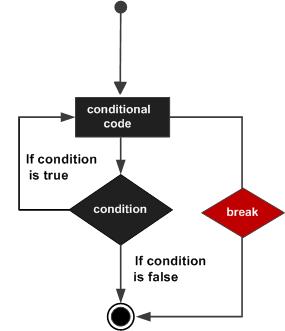
The break statement in C is used in two different contexts. In switch-case, break is placed as the last statement of each case block. The break statement may also be employed in the body of any of the loop constructs (while, dowhile as well as for loops).
When used inside a loop, break causes the loop to be terminated. In the switch-case statement, break takes the control out of the switch scope after executing the corresponding case block.
Flowchart of Break Statement in C
The flowchart of break in loop is as follows −
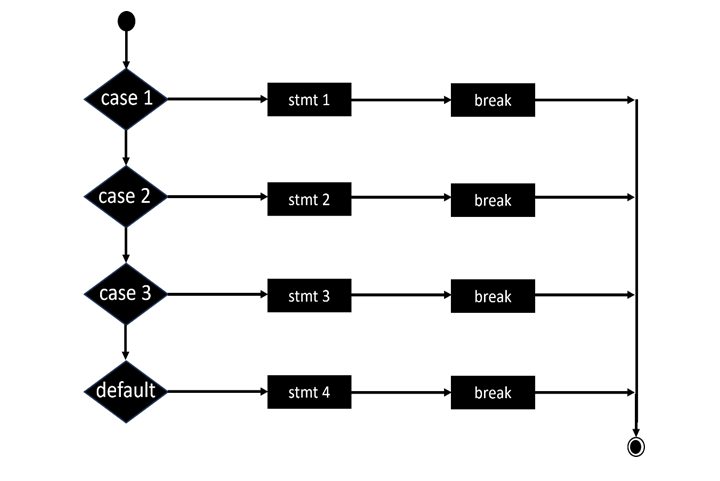
The following flowchart shows how to use break in switch-case −
In both the scenarios, break causes the control to be taken out of the current scope.
Break Statements in While Loops
The break statement is never used unconditionally. It always appears in the True part of an if statement. Otherwise, the loop will terminate in the middle of the first iteration itself.
The following program checks if a given number is prime or not. A prime number is not divisible by any other number except itself and 1.
The while loop increments the divisor by 1 and tries to check if it is divisible. If found divisible, the while loop is terminated.
#include <stdio.h>/*break in while loop*/intmain(){int i =2;int x =121;printf("x: %d\n", x);while(i < x/2){if(x % i ==0)break;
      i++;}if(i >= x/2)printf("%d is prime", x);elseprintf("%d is not prime", x);return0;}
Output
On executing this code, you will get the following output −
x: 121
121 is not prime
Now, change the value of “x” to 25 and run the code again. It will produce the following output −
x: 25
25 is not prime
Break Statements in For Loops
You can use a break statement inside a for loop as well. Usually, a for loop is designed to perform a certain number of iterations. However, sometimes it may be required to abandon the loop if a certain condition is reached.
The following program prints the characters from a given string before a vowel (a, e, I, or u) is detected.
#include <stdio.h>#include <string.h>intmain(){char string[]="Rhythmic";int len =strlen(string);int i;for(i =0; i < len; i++){if(string[i]=='a'|| string[i]=='e'|| string[i]=='i'|| string[i]=='o'|| string[i]=='u')break;printf("%c\n", string[i]);}return0;}
Output
Run the code and check its output −
R
h
y
t
h
m
If break appears in an inner loop of a nested loop construct, it abandons the inner loop and continues the iteration of the outer loop body. For the next iteration, it enters the inner loop again, which may be broken again if the condition is found to be true.
Example of break Statement with Nested for Loops
In the following program, two nested loops are employed to obtain a list of all the prime numbers between 1 to 30. The inner loop breaks out when a number is found to be divisible, setting the flag to 1. After the inner loop, the value of flag is checked. If it is “0”, the number is a prime number.
#include <stdio.h>intmain(){int i, num, n, flag;printf("The prime numbers in between the range 1 to 30:\n");for(num =2; num <=30; num++){
      flag =0;for(i =2; i <= num/2; i++){if(num % i ==0){
            flag++;break;}}if(flag ==0)printf("%d is prime\n",num);}return0;}
Output
2 is prime
3 is prime
5 is prime
7 is prime
11 is prime
13 is prime
17 is prime
19 is prime
23 is prime
29 is prime
Break Statement in an Infinite Loop
An infinite loop is rarely created intentionally. However, in some cases, you may start an infinite loop and break from it when a certain condition is reached.
Example of break Statement with Infinite Loop
In the following program, an infinite for loop is used. On each iteration, a random number between 1 to 100 is generated till a number that is divisible by 5 is obtained.
#include <stdio.h>#include <stdlib.h>#include <time.h>intmain(){int i, num;printf("Program to get the random number from 1 to 100: \n");srand(time(NULL));for(;;){
      num =rand()%100+1;// random number between 1 to 100printf(" %d\n", num);if(num%5==0)break;}}
Output
On running this code, you will get an output like the one shown here −
Program to get the random number from 1 to 100:
6
56
42
90
Break Statements in Switch Case
To transfer the control out of the switch scope, every case block ends with a break statement. If not, the program falls through all the case blocks, which is not desired.
Example of break Statement with switch
In the following code, a series of if-else statements print three different greeting messages based on the value of a “ch” variable (“m”, “a” or “e” for morning, afternoon or evening).
In C language, an infinite loop (or, an endless loop) is a never-ending looping construct that executes a set of statements forever without terminating the loop. It has a true condition that enables a program to run continuously.
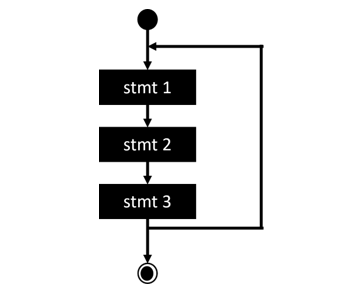
Flowchart of an Infinite Loop
If the flow of the program is unconditionally directed to any previous step, an infinite loop is created, as shown in the following flowchart −
An infinite loop is very rarely created intentionally. In case of embedded headless systems and server applications, the application runs in an infinite loop to listen to the client requests. In other circumstances, infinite loops are mostly created due to inadvertent programming errors.
How to Create an Infinite Loop in C?
To create an infinite loop, you need to use one of the loop constructs (while, do while, or for) with a non-zero value as a test condition. Generally, 1 is used as the test condition, you can use any non-zero value. A non-zero value is considered as true.
Hello WorldHello WorldHello WorldHello WorldHello WorldHello World
Hello WorldHello WorldHello WorldHello WorldHello WorldHello World
Hello WorldHello WorldHello ...
Types of Infinite Loops in C
In C language, infinite while, infinite do while, and infinite for are the three infinite loops. These loops execute the code statement continuously. Let us understand the implementation of infinite loops using all loop constructs.
Infinite While Loop
The while keyword is used to form a counted loop. The loop is scheduled to repeat till the value of some variable successively increments to a predefined value. However, if the programmer forgets to put the increment statement within the loop body, the test condition doesnt arrive at all, hence it becomes endless or infinite.
Example 1
Take a look at the following example −
#include <stdio.h>// infinite while loopintmain(){int i =0;while(i <=10){// i++;printf("i: %d\n", i);}return0;}
Output
Since the increment statement is commented out here, the value of “i” continues to remain “0”, hence the output shows “i: 0” continuously until you forcibly stop the execution.
i: 0
i: 0
i: 0
...
...
Example 2
The parenthesis of while keyword has a Boolean expression that initially evaluates to True, and is eventually expected to become False. Note that any non-zero number is treated as True in C. Hence, the following while loop is an infinite loop:
#include <stdio.h>// infinite while loopintmain(){while(1){printf("Hello World \n");}return0;}
Output
It will keep printing “Hello World” endlessly.
Hello World
Hello World
Hello World
...
...
The syntax of while loop is as follows −
while(condition){......}
Note that the there is no semicolon symbol in front of while, indicating that the following code block (within the curly brackets) is the body of the loop. If we place a semicolon, the compiler treats this as a loop without body, and hence the while condition is never met.
Example 3
In the following code, an increment statement is put inside the loop block, but because of the semicolon in front of while, the loop becomes infinite.
#include <stdio.h>// infinite while loopintmain(){int i =0;while(i <10);{
      i++;printf("Hello World \n");}return0;}
Output
When the program is run, it won't print the message "Hello World". There is no output because the while loop becomes an infinite loop with no body.
Infinite For Loop
The for loop in C is used for performing iteration of the code block for each value of a variable from its initial value to the final value, incrementing it on each iteration.
Take a look at its syntax −
for(initial val; final val; increment){......}
Example 1
Note that all the three clauses of the for statement are optional. Hence, if the middle clause that specifies the final value to be tested is omitted, the loop turns infinite.
#include <stdio.h>// infinite for loopintmain(){int i;for(i=1;; i++){
      i++;printf("Hello World \n");}return0;}
Output
The program keeps printing Hello World endlessly until you stop it forcibly, because it has no effect of incrementing “i” on each turn.
Hello World
Hello World
Hello World
...
...
You can also construct a for loop for decrementing the values of a looping variable. In that case, the initial value should be greater than the final test value, and the third clause in for must be a decrement statement (using the “–” operator).
If the initial value is less than the final value and the third statement is decrement, the loop becomes infinite. The loop still becomes infinite if the initial value is larger but you mistakenly used an increment statement.
Hence, both the for loops result in an infinite loop.
Example 2
Take a look at the following example −
#include <stdio.h>intmain(){// infinite for loopfor(int i =10; i >=1; i++){
    i++;printf("Hello World \n");}}
Output
The program will print a series of “Hello World” in an infinite loop −
Hello World
Hello World
Hello World
...
...
Example 3
Take a look at the following example −
#include <stdio.h>intmain(){// infinite for loopfor(int i =1; i <=10; i--){
    i++;printf("Hello World \n");}}
Output
The program keeps printing “Hello World” in a loop −
Hello World
Hello World
Hello World
...
...
Example 4
If all the three statements in the parenthesis are blank, the loop obviously is an infinite loop, as there is no condition to test.
#include <stdio.h>intmain(){int i;// infinite for loopfor(;;){
      i++;printf("Hello World \n");}}
Output
The program prints “Hello World” in an endless loop −
Hello World
Hello World
Hello World
...
...
Infinite Do While Loop
An infinite loop can also be implemented using the do-while loop construct. You have to use 1 as the test condition with the while.
Example
The following example demonstrates an infinite loop using do while:
Hello World
Hello World
Hello World
Hello World
...
...
How to Break an Infinite Loop in C?
There may be certain situations in programming where you need to start with an unconditional while or for statement, but then you need to provide a way to terminate the loop by placing a conditional break statement.
Example
In the following program, there is no test statement in for, but we used a break statement to make it a finite loop.
#include <stdio.h>intmain(){// infinite while loopfor(int i =1;;){
    i++;printf("Hello World \n");if(i ==5)break;}return0;}
Output
The program prints “Hello World” till the counter variable reaches 5.
Hello World
Hello World
Hello World
Hello World
How to Stop an Infinite Loop Forcefully in C?
When the program enters an infinite loop, it doesnt stop on its own. It has to be forcibly stopped. This is done by pressing “Crtrl + C” or “Ctrl + Break” or any other key combination depending on the operating system.
Example
The following C program enters in an infinite loop −
#include <stdio.h>intmain(){// local variable definitionint a =0;// do loop execution
   LOOP:
      a++;printf("a: %d\n", a);goto LOOP;return0;}
Output
When executed, the above program prints incrementing values of “a” from 1 onwards, but it doesnt stop. It will have to be forcibly stopped by pressing “Ctrl + Break” keys.
a: 1
a: 2
...
...
a: 10
a: 11
...
...
Infinite loops are mostly unintentionally created as a result of programming bug. Even if the looping keyword doesnt specify the termination condition, the loop has to be terminated with the break keyword.
In the programming context, the term “nesting” refers to enclosing a particular programming element inside another similar element. For example, nested loops, nested structures, nested conditional statements, etc.
Nested Loops
When a looping construct in C is employed inside the body of another loop, we call it a nested loop (or, loops within a loop). Where, the loop that encloses the other loop is called the outer loop. The one that is enclosed is called the inner loop.
General Syntax of Nested Loops
The general form of a nested loop is as follows −
Outer loop {
   Inner loop {......}...}
C provides three keywords for loops formation − while, do-while, and for. Nesting can be done on any of these three types of loops. That means you can put a while loop inside a for loop, a for loop inside a do-while loop, or any other combination.
The general behaviour of nested loops is that, for each iteration of the outer loop, the inner loop completes all the iterations.
Nested For Loops
Nested for loops are very common. If both the outer and inner loops are expected to perform three iterations each, the total number of iterations of the innermost statement will be “3 * 3 = 9”.
Example: Nested for Loop
Take a look at the following example −
#include <stdio.h>intmain(){int i, j;// outer loopfor(i =1; i <=3; i++){// inner loopfor(j =1; j <=3; j++){printf("i: %d j: %d\n", i, j);}printf("End of Inner Loop \n");}printf("End of Outer Loop");return0;}
Output
When you run this code, it will produce the following output −
i: 1 j: 1
i: 1 j: 2
i: 1 j: 3
End of Inner Loop

i: 2 j: 1
i: 2 j: 2
i: 2 j: 3
End of Inner Loop

i: 3 j: 1
i: 3 j: 2
i: 3 j: 3
End of Inner Loop

End of Outer loop
Explanation of Nested Loop
Now let’s analyze how the above program works. As the outer loop is encountered, “i” which is the looping variable for the outer loop is initialized to 1. Since the test condition (a <= 3) is true, the program enters the outer loop body.
The program reaches the inner loop, and “j” which is the variable that controls the inner loop is initialized to 1. Since the test condition of the inner loop (j <= 3) is true, the program enters the inner loop. The values of “a” and “b” are printed.
The program reaches the end of the inner loop. Its variable “j” is incremented. The control jumps to step 4 until the condition (j <= 3) is true.
As the test condition becomes false (because “j” becomes 4), the control comes out of the inner loop. The end of the outer loop is encountered. The variable “i” that controls the outer variable is incremented and the control jumps to step 3. Since it is the start of the inner loop, “j” is again set to 1.
The inner loop completes its iteration and ends again. Steps 4 to 8 will be repeated until the test condition of the outer loop (i <= 3) becomes false. At the end of the outer loop, “i” and “j” have become 4 and 4 respectively.
The result shows that, for each value of the outer looping variable, the inner looping variable takes all the values. The total lines printed are “3 * 3 = 9”.
Nesting a While Loop Inside a For Loop
Any type of loop can be nested inside any other type. Let us rewrite the above example by putting a while loop inside the outer for loop.
Example: Nested Loops (while Loop Inside for Loop)
Take a look at the following example −
#include <stdio.h>intmain(){int i, j;// outer for loopfor(i =1; i <=3; i++){// inner while loop
      j =1;while(j <=3){printf("i: %d j: %d\n", i, j);
         j++;}printf("End of Inner While Loop \n");}printf("End of Outer For loop");return0;}
Output
i: 1 j: 1
i: 1 j: 2
i: 1 j: 3
End of Inner While Loop

i: 2 j: 1
i: 2 j: 2
i: 2 j: 3
End of Inner While Loop

i: 3 j: 1
i: 3 j: 2
i: 3 j: 3
End of inner while Loop

End of outer for loop
Programmers use nested loops in a lot of applications. Let us take a look at some more examples of nested loops.
C Nested Loops Examples
Example: Printing Tables
The following program prints the tables of 1 to 10 with the help of two nested for loops.
#include <stdio.h>intmain(){int i, j;printf("Program to Print the Tables of 1 to 10 \n");// outer loopfor(i =1; i <=10; i++){// inner loopfor(j =1; j <=10; j++){printf("%4d", i*j);}printf("\n");}return0;}
The following code prints the increasing number of characters from a string.
#include <stdio.h>#include <string.h>intmain(){int i, j, l;char x[]="TutorialsPoint";
   l =strlen(x);// outer loopfor(i =0; i < l; i++){// inner loopfor(j =0; j <= i; j++){printf("%c", x[j]);}printf("\n");}return0;}
Output
When you run this code, it will produce the following output −
T
Tu
Tut
Tuto
Tutor
Tutori
Tutoria
Tutorial
Tutorials
TutorialsP
TutorialsPo
TutorialsPoi
TutorialsPoin
TutorialsPoint
Example: Printing Two-Dimensional Array
In this program, we will show how you can use nested loops to display a two-dimensional array of integers. The outer loop controls the row number and the inner loop controls the columns.
Loops are one of the most important concepts in programming. They allow developers to execute a block of code multiple times without having to rewrite the same codes. Among the commonly used loops, the for loop and the while loop are the most widely used. Both help in iteration, but they differ in syntax, control, and their specific use-cases.
Read this chapter to learn how the for loop is different from the while loop. We will use real-world examples to show when you should choose a for loop over a while loop and vice versa.
What is “for” Loop?
The for loop is used when the number of iterations is already known in advance. It has three parts in its syntax: initialization, condition, and increment/decrement.
for(initialization; condition; update){// Code to execute}
Example: Print Number from 1 to 5 using For Loop
In this example, we demonstrate the use of a for loop and how we can use it in C programming to print number from 1 to 5 −
#include <stdio.h>intmain(){for(int i =1; i <=5; i++){printf("%d\n", i);}return0;}
What is “while” Loop?
A while loop is useful when the number of iteration is not known in advance. The loop continues until the given condition becomes false. Its syntax is as follows −
while(condition){// code to execute}
Example: Print Number from 1 to 5 using While Loop
The following example demonstrates how to use a while loop in C programming to print the numbers from 1 to 5 −
#include <stdio.h>intmain(){int i =1;while(i <=5){printf("%d\n", i);
      i++;}return0;}
When to Use a “for” Loop?
Programmers use for loops in tasks such as performing a fixed set of operations where the start and end conditions are clearly defined. Here, we have highlighted some scenarios where a for loop can be applied −
Iterating over arrays, strings, or lists
When the code executes a fix number of times
In simple counting problems
In addition, we can use nested for loops in sorting algorithms.
Example: Sum of First 5 Numbers
In this example, we use a for loop to calculate the total of numbers up to 5. If the number exceeds 5, the code will stop and display the output.
#include <stdio.h>intmain(){int sum =0;for(int i =1; i <=5; i++){
      sum += i;}printf("Sum = %d", sum);}
Output
The following is the sum of all the numbers up to 5 −
Sum = 15
When to Use a “while” Loop?
Programmers use while loops in situations where the execution depends on user input, external conditions, or events, and continues until a specific condition is met.
Here are some specific scenarios where you can use a while loop –
When the termination condition depends on the user input
When looping until a certain event occurs
Reading files or streams until the end of function
Waiting for specific state in programs
Example: Take Input Until User Enters 0
In this example, we use a while loop to display the user input until the user enters 0.
The do-while loop is one of the most frequently used types of loops in C. The do and while keywords are used together to form a loop. The do-while is an exit-verified loop where the test condition is checked after executing the loop’s body. Whereas the while loop is an entry-verified. The for loop, on the other hand, is an automatic loop.
Syntax of do while Loop
The syntax of do-while loop in C is −
do{statement(s);}while(condition);
How do while Loop Works?
The loop construct starts with the keword do. It is then followed by a block of statements inside the curly brackets. The while keyword follows the right curly bracket. There is a parenthesis in front of while, in which there should be a Boolean expression.
Now let’s understand how the while loop works. As the C compiler encounters the do keyword, the program control enters and executes the code block marked by the curly brackets. As the end of the code block is reached, the expression in front of the while keyword is evaluated.
If the expression is true, the program control returns back to the top of loop. If the expression is false, the compiler stops going back to the top of loop block, and proceeds to the immediately next statement after the block. Note that there is a semicolon at the end of while statement.
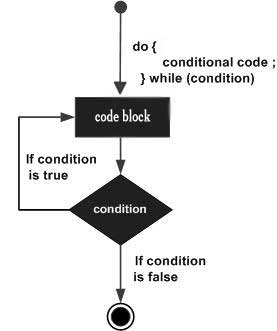
Flowchart of do while Loop
The following flowchart represents how the do-while loop works −
Since the expression that controls the loop is tested after the program runs the looping block for the first time, the do-while loop is called an “exit-verified loop”. Here, the key point to note is that a do-while loop makes sure that the loop gets executed at least once.
The while keyword implies that the compiler continues to execute the ensuing block as long as the expression is true. However, since the condition sits at the end of the looping construct, it is checked after each iteration (rather than before each iteration as in the case of a while loop).
The program performs its first iteration unconditionally, and then tests the condition. If found to be true, the compiler performs the next iteration. As soon as the expression is found to be false, the loop body will be skipped and the first statement after the while loop will be executed.
Let us try to understand the behaviour of the while loop with a few examples.
Example of do while Loop
The following program prints the Hello world message five times.
#include <stdio.h>intmain(){// local variable definitionint a =1;// while loop executiondo{printf("Hello World\n");
      a++;}while(a <=5);printf("End of loop");return0;}
Output
Here, the do-while loop acts as a counted loop. Run the code and check its output −
Hello World
Hello World
Hello World
Hello World
Hello World
End of loop
The variable “a” that controls the number of repetitions is initialized to 1. The program enters the loop unconditionally, prints the message, increments “a” by 1.
As it reaches the end of the loop, the condition in the while statement is tested. Since the condition “a <= 5” is true, the program goes back to the top of the loop and re-enters the loop.
Now “a” is 2, hence the condition is still true, hence the loop repeats again, and continues till the condition turns false. The loop stops repeating, and the program control goes to the step after the block.
Now, change the initial value of “a” to 10 and run the code again. It will produce the following output −
Hello World
End of loop
This is because the program enters the looping block unconditionally. Since the condition before the while keyword is false, hence the block is not repeated for the next time. Hence, the do-while loop takes at least one iteration as the test condition is at the end of the loop. For this reason, do-while loop is called an “exit-verified loop”.
Difference Between while and do while Loops
The loops constructed with while and do-while appear similar. You can easily convert a while loop into a do-while loop and vice versa. However, there are certain key differences between the two.
The obvious syntactic difference is that the do-while construct starts with the do keyword and ends with the while keyword. The while loop doesn’t need the do keyword. Secondly, you find a semicolon in front of while in case of a do-while loop. There is no semicolon in while loops.
Example
The location of the test condition that controls the loop is the major difference between the two. The test condition is at the beginning of a while loop, whereas it is at the end in case of a do-while loop. How does it affect the looping behaviour? Look at the following code −
#include <stdio.h>intmain(){// local variable definitionint a =0, b =0;// while loop executionprintf("Output of while loop: \n");while(a <5){
      a++;printf("a: %d\n", a);}printf("Output of do-while loop: \n");do{
      b++;printf("b: %d\n",b);}while(b <5);return0;}
Output
Initially, “a” and “b” are initialized to “0” and the output of both the loops is same.
Output of while loop:
a: 1
a: 2
a: 3
a: 4
a: 5

Output of do-while loop:
b: 1
b: 2
b: 3
b: 4
b: 5
Now change the initial value of both the variables to 3 and run the code again. There’s no change in the output of both the loops.
Output of while loop:
a: 4
a: 5

Output of do-while loop:
b: 4
b: 5
Now change the initial value of both the variables to 10 and run the code again. Here, you can observe the difference between the two loops −
Output of while loop:

Output of do-while loop:
b: 11
Note that the while loop doesn’t take any iterations, but the do-while executes its body once. This is because the looping condition is verified at the top of the loop block in case of while, and since the condition is false, the program doesn’t enter the loop.
In case of do-while, the program unconditionally enters the loop, increments “b” to 11 and then doesn’t repeat as the condition is false. It shows that the do-while is guaranteed to take at least one repetition irrespective of the initial value of the looping variable.
The do-while loop can be used to construct a conditional loop as well. You can also use break and continue statements inside a do-while loop.
In C, while is one of the keywords with which we can form loops. The while loop is one of the most frequently used types of loops in C. The other looping keywords in C are for and do-while.
The while loop is often called the entry verified loop, whereas the do-while loop is an exit verified loop. The for loop, on the other hand, is an automatic loop.
Syntax of C while Loop
The syntax of constructing a while loop is as follows −
while(expression){statement(s);}
The while keyword is followed by a parenthesis, in which there should be a Boolean expression. Followed by the parenthesis, there is a block of statements inside the curly brackets.
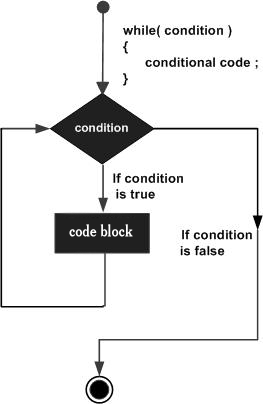
Flowchart of C while Loop
The following flowchart represents how the while loop works −
How while Loop Works in C?
The C compiler evaluates the expression. If the expression is true, the code block that follows, will be executed. If the expression is false, the compiler ignores the block next to the while keyword, and proceeds to the immediately next statement after the block.
Since the expression that controls the loop is tested before the program enters the loop, the while loop is called the entry verified loop. Here, the key point to note is that a while loop might not execute at all if the condition is found to be not true at the very first instance itself.
The while keyword implies that the compiler continues to execute the ensuing block as long as the expression is true. The condition sits at the top of the looping construct. After each iteration, the condition is tested. If found to be true, the compiler performs the next iteration. As soon as the expression is found to be false, the loop body will be skipped and the first statement after the while loop will be executed.
#include <stdio.h>intmain(){// local variable definitionint a =1;// while loop executionwhile(a <=5){printf("Hello World \n");
      a++;}printf("End of loop");return0;}
Output
Here, the while loop acts as a counted loop. Run the code and check its output −
Hello World
Hello World
Hello World
Hello World
Hello World
End of loop
Example Explanation
The variable “a” that controls the number of repetitions is initialized to 1, before the while statement. Since the condition “a <= 5” is true, the program enters the loop, prints the message, increments “a” by 1, and goes back to the top of the loop.
In the next iteration, “a” is 2, hence the condition is still true, hence the loop repeats again, and continues till the condition turns false. The loop stops repeating, and the program control goes to the step after the block.
Now, change the initial value of “a” to 10 and run the code again. Now the output will show the following −
End of loop
This is because the condition before the while keyword is false in the very first iteration itself, hence the block is not repeated.
A “char” variable represents a character corresponding to its ASCII value. Hence, it can be incremented. Hence, we increment the value of the variable from “a” till it reaches “z”.
Using while as Conditional Loop
You can use a while loop as a conditional loop where the loop will be executed till the given condition is satisfied.
Example
In this example, the while loop is used as a conditional loop. The loop continues to repeat till the input received is non-negative.
#include <stdio.h>intmain(){// local variable definition char choice ='a';int x =0;// while loop executionwhile(x >=0){(x %2==0)?printf("%d is Even \n", x):printf("%d is Odd \n", x);printf("\n Enter a positive number: ");scanf("%d",&x);}printf("\n End of loop");return0;}
Output
Run the code and check its output −
0 is Even

Enter a positive number: 12
12 is Even

Enter a positive number: 25
25 is Odd

Enter a positive number: -1

End of loop
While Loop with break and continue
In all the examples above, the while loop is designed to repeat for a number of times, or till a certain condition is found. C has break and continue statements to control the loop. These keywords can be used inside the while loop.
Example
The break statement causes a loop to terminate −
while(expr){......if(condition)break;...}
Example
The continue statement makes a loop repeat from the beginning −
while(expr){......if(condition)continue;...}
More Examples of C while Loop
Example: Printing Lowercase Alphabets
The following program prints all the lowercase alphabets with the help of a while loop.
#include <stdio.h>intmain(){// local variable definitionchar a ='a';// while loop executionwhile(a <='z'){printf("%c", a);
      a++;}printf("\n End of loop");return0;}
Output
Run the code and check its output −
abcdefghijklmnopqrstuvwxyz
End of loop
Example: Equate Two Variables
In the code given below, we have two variables “a” and “b” initialized to 10 and 0, respectively. Inside the loop, “b” is decremented and “a” is incremented on each iteration. The loop is designed to repeat till “a” and “b” are not equal. The loop ends when both reach 5.
#include <stdio.h>intmain(){// local variable definitionint a =10, b =0;// while loop executionwhile(a != b){
      a--;
      b++;printf("a: %d b: %d\n", a,b);}printf("\n End of loop");return0;}
Output
When you run this code, it will produce the following output −
The do-while loop appears similar to the while loop in most cases, although there is a difference in its syntax. The do-while is called the exit verified loop. In some cases, their behaviour is different. Difference between while and do-while loop is explained in the do-while chapter of this tutorial.