A void pointer in C is a type of pointer that is not associated with any data type. A void pointer can hold an address of any type and can be typecasted to any type. They are also called general-purpose or generic pointers.
In C programming, the function malloc() and calloc() return “void *” or generic pointers.
Declaring void Pointer
This is the syntax you would use to declare a void pointer −
void*ptr;
Example of void Pointer
The following example shows how you can use a void pointer in a C program −
#include <stdio.h>intmain(){int a =10;char b ='x';// void pointer holds address of int avoid*ptr =&a;printf("Address of 'a': %d",&a);printf("\nVoid pointer points to: %d", ptr);// it now points to char b
   ptr =&b;printf("\nAddress of 'b': %d",&b);printf("\nVoid pointer points to: %d", ptr);}
Output
Run the code and check its output −
Address of 'a': 853377452
Void pointer points to: 853377452
Address of 'b': 853377451
Void pointer points to: 853377451
An Array of void Pointers
We can declare an array of void pointers and store pointers to different data types.
A void pointer is a pointer that can hold the memory address of any data type in C. Hence, an array of void pointers is an array that can store memory addresses, but these addresses can point to variables of different data types.
You can also store pointers to any user-defined data types such as arrays and structures in a void pointer.
Example
In this example program, we have declared an array of void pointers and stored in it the pointers to variables of different types (int, float, and char *) in each of its subscripts.
#include <stdio.h>intmain(){void*arr[3];int a =100;float b =20.5;char*c ="Hello";

   arr[0]=&a;
   arr[1]=&b;
   arr[2]=&c;printf("Integer: %d\n",*((int*)arr[0]));printf("Float: %f\n",*((float*)arr[1]));printf("String: %s\n",*((char**)arr[2]));return0;}
Output
When you run this code, it will produce the following output −
Integer: 100
Float: 20.500000
String: Hello
Application of void Pointers
Some of the common applications of void pointers are listed below −
The malloc() function is available as a library function in the header file stdlib.h. It dynamically allocates a block of memory during the runtime of a program. Normal declaration of variables causes the memory to be allocated at the compile time.void*malloc(size_t size);
Void pointers are used to implement generic functions. The dynamic allocation functions malloc() and calloc() return “void *” type and this feature allows these functions to be used to allocate memory of any data type.
The most common application of void pointers is in the implementation of data structures such as linked lists, trees, and queues, i.e., dynamic data structures.
Limitations of void Pointer
The void pointer has the following limitations −
Pointer arithmetic is not possible with void pointer due to its concrete size.
A NULL pointer in C is a pointer that doesn’t point to any of the memory locations. The NULL constant is defined in the header files stdio.h, stddef.h as well as stdlib.h.
A pointer is initialized to NULL to avoid the unpredicted behavior of a program or to prevent segmentation fault errors.
Declare and Initialize a NULL Pointer
This is how you would declare and initialize a NULL pointer −
type *ptr =NULL;
Or, you can use this syntax too −
type *ptr =0;
Example of a NULL Pointer
The following example demonstrates how to declare and initialize a NULL pointer −
#include <stdio.h> intmain(){int*p=NULL;//initialize the pointer as null.printf("The value of pointer is %u",p);return0;}
Output
When you run this code, it will produce the following output −
The value of pointer is 0.
Applications of NULL Pointer
Following are some of the applications of a NULL pointer −
To initialize a pointer variable when that pointer variable isn’t assigned any valid memory address yet.
To pass a null pointer to a function argument when we don’t want to pass any valid memory address.
To check for a null pointer before accessing any pointer variable so that we can perform error handling in pointer-related code. For example, dereference a pointer variable only if it’s not NULL.
A NULL pointer is always used to detect the endpoint of trees, linked lists, and other dynamic data structures.
Check Whether a Pointer is NULL
It is always recommended to check whether a pointer is NULL before dereferencing it to fetch the value of its target variable.
Example
Take a look at the following example −
#include <stdio.h> intmain(){int*ptr =NULL;// null pointerif(ptr ==NULL){printf("Pointer is a NULL pointer");}else{printf("Value stored in the address referred by the pointer: %d",*ptr);}return0;}
Output
When you run this code, it will produce the following output −
Pointer is a NULL pointer
Check Memory Allocation Using NULL Pointer
The malloc() and calloc() functions are used to dynamically allocate a block of memory. On success, these functions return the pointer to the allocated block; whereas on failure, they return NULL.
Example
The following example shows how you can use the NULL pointer to check whether memory allocation was successful or not −
Checking if the FILE pointer returned by the fopen() function is NULL is always a recommended approach to avoid runtime errors in file-related processing.
Example
The following example shows how you can use the NULL file pointer to ensure that a file is accessible or not −
#include <stdio.h>#include <string.h>intmain(){

   FILE *fp;char*s;int i, a;float p;

   fp =fopen("file3.txt","r");if(fp ==NULL){puts("Cannot open file");return0;}while(fscanf(fp,"%d %f %s",&a,&p, s)!=EOF)printf("Name: %s Age: %d Percent: %f\n", s, a, p);fclose(fp);return0;}
You should always initialize a pointer variable to NULL when the target variable hasn’t been assigned any valid memory address yet.
The dereference operator is used to access and manipulate the value stored in the variable pointed by the pointer. The dereference or indirection operator (*) acts as a unary operator, and it needs a pointer variable as its operand.
Syntax
Below is the syntax to dereference a pointer −
*pointer_variable;
With the help of the above syntax (dereference pointer), you can get and update the value of any variable that is pointing by the pointer.
How to Dereference a Pointer?
To dereference a pointer, you need to follow the below-given steps:
Create a variable and declare a pointer variable.
Initialize the pointer by assigning the address of the variable.
Now, you can dereference the pointer to get or update the value of the variable.
Example
In this example, we are demonstrating these three steps to deference a pointer −
#include <stdio.h>intmain(){// Create a variable and pointer variableint x =10;int*ptr;// Initialize the pointer by assigning// the address of the variable
  ptr =&x;// Dereference the pointerprintf("Value of x = %d\n",*ptr);return0;}
Output
Run the code and check its output −
Value of x = 10
What is Dereferencing?
The term “dereferencing” refers to accessing the value that is stored in the memory address referred by the pointer. The dereference operator (also called indirection operator) fetches the value of the target variable.
Example
In the above example, if we print “*b“, you get the value of “a“, i.e., 10. Similarly, printing “*y” displays 10.5.
#include <stdio.h>intmain(){int a =10;int*b =&a;float x =10.5;float*y =&x;printf("Address of 'a': %d Value of 'a': %d\n", b,*b);printf("Address of 'x': %d Value of 'x': %f\n", y,*y);return0;}
Output
Run the code and check its output −
Address of 'a': 6422028 Value of 'a': 10
Address of 'x': 6422024 Value of 'x': 10.500000
Manipulating Value by Dereferencing Pointer
The dereference operator also helps in indirectly manipulating the value of a variable referred to by a pointer.
Example
In this example, we change the value of “a” and “x” with the help of the dereference pointer −
#include <stdio.h>intmain(){int a =10;int*b =&a;float x =10.5;float*y =&x;*b =100;*y =100.50;printf("Address of 'a': %d Value of 'a': %d\n", b,*b);printf("Address of 'x': %d Value of 'x': %f\n", y,*y);return0;}
Output
Run the code and check its output −
Address of 'a': 6422028 Value of 'a': 100
Address of 'x': 6422024 Value of 'x': 100.500000
Dereferencing a Double Pointer
Just as you store the address of a normal variable in its pointer, you can have a pointer that stores the address of another pointer as well. A pointer having address of another pointer is known as double pointer or pointer-to-pointer.
Let us declare a pointer to integer type and store the address of an integer variable in it.
int a =10;int*b =&a;
The dereference operator fetches the value via the pointer −
printf("a: %d \n Pointer to 'a' is 'b': %d \n Value at 'b': %d", a, b,*b);
The value of integer variable, its address, and the value obtained by the dereference pointer will be printed as −
a:10
Pointer to 'a' is 'b':6422036
Value at 'b':10
Let us now declare a pointer that can store the address of “b”, which itself is a pointer to the integer type written as “int *”. Let’s assume that the compiler also allocates it the address 3000. Hence, “c” is a pointer to a pointer to int and should be declared as “int **“.
int**c =&b;printf("b: %d \n Pointer to 'b' is 'c': %d \n Value at 'b': %d\n", b, c,*c);
You get the value of b (which is the address of a), the value of c (which is the address of b), and the dereferenced value from c (which is the address of a)
b:6422036
Pointer to 'b' is 'c':6422024
Value at 'b':6422036
Since “c” is a double pointer here, the first asterisk in its declaration points to “b” and the second asterisk in turn points to “a“. We can use the double reference pointer to obtain the value of “a” from “c“.
printf("Value of 'a' from 'c': %d",**c);
This should display the value of a as 10.
Example
Try out the complete code given below −
#include <stdio.h>intmain(){int a =10;int*b =&a;printf("a: %d \n Address: %d \n Value at 'a': %d\n\n", a, b,*b);int**c =&b;printf("b: %d \n Pointer to 'b' is 'c': %d \n Value at 'b': %d\n", b, c,*c);printf("Value of 'a' from 'c': %d",**c);return0;}
Output
When you run this code, it will produce the following output −
a: 10
Address: 6422036
Value at a: 10

b: 6422036
Pointer to 'b' is 'c': 6422024
Value at 'b': 6422036
Value of 'a' from 'c': 10
Dereferencing a Structure Pointer
The keyword “struct” is used to create a derived data type that consists of one or more elements of different types. Like a normal variable, you can declare a structure pointer and store its address.
In C, the indirection operator represented by the arrow symbol () is used to obtain the values of the elements of the struct variable referred to by the struct pointer.
Example
“ptr -> title” returns the value of the title element, the same value returned by “b1.title“. “ptr -> price” is equivalent to “b1.price”, etc.
When you run this code, it will produce the following output −
With -> Operator:
Title: Learn C
Price:  650.50
Number of Pages: 325

With . Operator:
Title: Learn C
Price:  650.50
Number of Pages: 325
Dereferencing a Nested Structure Pointer
Even though C uses the arrow operator () to access the elements of a structure variable, the elements of any internal struct cannot be accessed with it.
Only the elements of the outer struct are accessible with the operator. For subsequent inner struct elements, we need to use the dot (.) operator.
Example
The following example shows how you can dereference a nested struct pointer −
One of the most important features of C is that it provides low-level memory access with the concept of pointers. A pointer is a variable that stores the address of another variable in the memory.
The provision of pointers has many applications such as passing arrays and struct type to a function and dynamic memory allocation, etc. In this chapter, we will explain some important applications of pointers in C.
To Access Array Elements
Array elements can also be accessed through the pointer. You need to declare and initialize a pointer to an array and using it you can access each element by incrementing the pointer variable by 1.
The pointer to an array is the address of its 0th element. When the array pointer is incremented by 1, it points to the next element in the array.
Example
The following example demonstrates how you can traverse an array with the help of its pointer.
#include <stdio.h>intmain(){int arr[]={1,2,3,4,5};int*ptr = arr;for(int i =0; i <=4; i++){printf("arr[%d]: %d\n", i,*ptr);
      ptr++;}return0;}
Output
Run the code and check its output −
arr[0]: 1
arr[1]: 2
arr[2]: 3
arr[3]: 4
arr[4]: 5
For Allocating Memory Dynamically
One of the most important applications of C pointers is to declare memory for the variables dynamically. There are various situations, where static memory allocation cannot solve the problem, such as dealing with large size of arrays, structures having n numbers of students and employees, etc.
Thus, whenever you need to allocate memory dynamically, pointers play an important role in it. C language provides some of the functions to allocate and release the memory dynamically. The functions are:
malloc() function Allocates an array of num elements each of which size in bytes will be size.
calloc() function Allocates an array of num bytes and leaves them uninitialized.
This function is defined in the “stdlib.h” header file. It allocates a block memory of the required size and returns a void pointer.
void*malloc(size)
The size parameter refers to the block of memory in bytes. To allocate the memory required for a specified data type, you need to use the typecasting operator. For example, the following snippet allocates the memory required to store an int type.
int*ptr;
ptr =(int*)malloc(sizeof(int));
Here we need to define a pointer to character without defining how much memory is required and later, based on requirement, we can allocate memory.
Example
In this example, we use the malloc() function to allocate the required memory to store a string (instead of declaring a char array of a fixed size) −
#include <stdio.h>#include <stdlib.h>#include <string.h>intmain(){char*name;
   name =(char*)malloc(strlen("TutorialsPoint"));strcpy(name,"TutorialsPoint");if(name ==NULL){fprintf(stderr,"Error - unable to allocate required memory\n");}else{printf("Name = %s\n", name );}}
Output
When the above code is compiled and executed, it produces the following output −
Name = TutorialsPoint
2. The calloc() Function
The C library function “calloc” (stands for contiguous allocation) allocates the requested memory and returns a pointer to it.
void*calloc(n, size);
Where “n” is the number of elements to be allocated and “size” is the byte size of each element.
The following snippet allocates the memory required to store 10 integer types.
int*ptr;
ptr =(int*)calloc(25,sizeof(int));
3. The realloc() Function
The realloc() function in C is used to dynamically change the memory allocation of a previously allocated memory. You can increase or decrease the size of an allocated memory block by calling the realloc() function.
void*realloc(*ptr, size);
The first parameter “ptr” is the pointer to a memory block previously allocated with malloc, calloc or realloc to be reallocated.
Dynamic memory allocation technique is extensively used in complex linear and non−linear data structures such as linked lists and trees, which are employed in operating system software.
For Passing Arguments as Reference
When a function is called by reference, the address of the actual argument variables passed, instead of their values.
First, it overcomes the limitation of pass by value. Changes to the value inside the called function are done directly at the address stored in the pointer. Hence, we can manipulate the variables in one scope from another.
Second, it also overcomes the limitation of a function in that it can return only one expression. By passing pointers, the effect of processing a function takes place directly at the address. Secondly, more than one value can be returned if we return the pointer of an array or struct variable.
Example
The following function receives the reference of two variables whose values are to be swapped.
/* function definition to swap the values */intswap(int*x,int*y){int z;
   z =*x;/* save the value at address x */*x =*y;/* put y into x */*y = z;/* put z into y */return0;}
Example
The main() function has two variables “a” and “b”, their addresses are passed as arguments to the swap() function.
#include <stdio.h>intswap(int*x,int*y);intmain(){/* local variable definition */int a =10;int b =20;printf("Before swap, value of a : %d\n", a);printf("Before swap, value of b : %d\n", b);/* calling a function to swap the values */swap(&a,&b);printf("After swap, value of a: %d\n", a);printf("After swap, value of b: %d\n", b);return0;}
Output
When executed, it will produce the following output −
Before swap, value of a: 10
Before swap, value of b: 20
After swap, value of a: 20
After swap, value of b: 10
In this program, we have been able to swap the values of two variables out of the scope of a function to which they have been passed, and we could overcome the limitation of the functions ability to pas only one expression.
For Passing an Array to Function
Let us use these characteristics for passing the array by reference. In the main() function, we declare an array and pass its address to the max() function.
The max() function traverses the array using the pointer and returns the largest number in the array, back to the main() function.
Example
Take a look at the following example −
#include <stdio.h>intmax(int*arr,int length);intmain(){int arr[]={10,34,21,78,5};int length =sizeof(arr)/sizeof(int);int maxnum =max(arr, length);printf("max: %d", maxnum);}intmax(int*arr,int length){int max =*arr;for(int i =0; i < length; i++){printf("arr[%d]: %d\n", i,(*arr));if((*arr)>max)
         max =(*arr);
      arr++;}return max;}
The max() function receives the address of the array from the main() function in the pointer “arr”. Each time, when it is incremented, it points to the next element in the original array.
For Returning Multiple Values from a Function
In C language, the functions can have only one return statement to return one value at a time. With the help of C pointers, you can return multiple values from a function by passing arguments as references.
Example
The following example demonstrates how you can return multiple values with the help of C pointers.
#include <stdio.h>// Creating a function to find// addition and subtraction// of two numbersvoidfunAddSub(int a,int b,int* add,int* sub){*add = a + b;*sub = a - b;}intmain(){int num1 =10;int num2 =3;// Variables to store resultsint res1, res2;// Calling function to get add and sub// by passing the address of res1 and res2funAddSub(num1, num2,&res1,&res2);// Printing the resultprintf("Addition is %d and subtraction is %d", res1, res2);return0;}
A pointer is a variable that stores the address of another variable. The name of the pointer variable must be prefixed by the “*” symbol. Just as in the case of a normal variable, we can also declare an “array of pointers”, where each subscript of the array holds the address of an array type.
How to Initialize Array of Pointers in C?
A pointer variable can be initialized at the time of declaration, by assigning it the address of an existing variable. The following snippet shows how you can initialize a pointer −
int x =10;int*y =&x;
By default, all the variables including the pointer variables belong to the “auto storage class”. It means that a pointer variable will store an unpredictable, garbage, random memory address, which can lead to undefined behavior and potential risks to a program, such as segmentation fault errors. Hence, it should be initialized to NULL if we dont have a specific value to store at the time of declaration.
int*ptr =NULL;
A “pointer array” stores the address in each element. The type of the array must match with the type of the target variable.
#include <stdio.h>intmain(){staticint*ptr[5];for(int i =0; i <5; i++){printf("ptr[%d] = %d\n", i, ptr[i]);}return0;}
Output
Run the code and check its output −
ptr[0]= 0
ptr[1]= 0
ptr[2]= 0
ptr[3]= 0
ptr[4]= 0
Initialize Array of Integer Pointers
Here, we declare an array of integer pointers and store the addresses of three integer variables.
Example
#include <stdio.h>intmain(){int a =10, b =20, c =30;int*ptr[3]={&a,&b,&c};for(int i =0; i <3; i++){printf("ptr[%d]: address: %d value: %d\n", i, ptr[i],*ptr[i]);}return0;}
We can store the address of each element of a normal array in the corresponding element of a pointer array.
Example
#include <stdio.h>intmain(){int arr[]={10,20,30};int*ptr[3]={&arr[0],&arr[1],&arr[2]};for(int i =0; i <3; i++){printf("ptr[%d]: address: %d value: %d\n", i, ptr[i],*ptr[i]);}return0;}
When we obtain the base address of an array (in this case “&arr[0]”), we can obtain the addresses of its subsequent elements, knowing that the pointer increments by the size of the data type.
Hence, just with the base address (the name of the array is the same of the address of the 0th element), we can traverse an array.
Example 1
Take a look at the following example −
#include <stdio.h>intmain(){int arr[]={10,20,30};int*ptr=arr;for(int i =0; i <3; i++){printf("ptr[%d]: address: %d value: %d\n", i,ptr+i,*(ptr+i));}return0;}
Example 2: Traversing a 2D Array using a Pointer Array
In this example, we have a 2D array. The address of the 0th element of each row is stored in a pointer array. When traversing, the address stored in each element of the pointer array, that points to the 0th element of the corresponding row, each incremented to fetch the values in each row.
#include <stdio.h>intmain(){// 2d arrayint arr[3][4]={{1,2,3,4},{5,6,7,8},};int ROWS =2, COLS =4;int i, j;// pointerint(*ptr)[4]= arr;// print the element of the array via pointer ptrfor(i =0; i < ROWS; i++){for(j =0; j < COLS; j++){printf("%d ",*(ptr[i]+j));}printf("\n");}return0;}
Output
When you run this code, it will produce the following output −
1 2 3 4
5 6 7 8
Example 3
We dont really need a pointer array here, as we can use the name of this 2D array as its base pointer, and increment it row and column-wise to fetch the elements in the given 2D array −
#include <stdio.h>intmain(){// 2d arrayint arr[3][4]={{1,2,3,4},{5,6,7,8},};int ROWS =2, COLS =4;int i, j;// pointerint*ptr = arr;// print the element of the array via pointer ptrfor(i =0; i < ROWS; i++){for(j =0; j < COLS; j++){printf("%d ",*(ptr + i * COLS + j));}printf("\n");}return0;}
Output
The output resembles that of the previous code −
1  2  3  4
5  6  7  8
Initialize Array of Character Pointers (String)
In C programming, a string is an array of char data type. Since the name of an array also represents the address of its 0th element, a string can be declared as −
char arr[]="Hello";
Using the pointer notation, a string is assigned to a char pointer as −
char*arr ="Hello";
We can then declare an array of char pointers to store multiple strings as follows −
char*arr[3]={"string1","string2","string3",...};
Example
The following example has an array of char pointers that is used to store the names of computer languages −
#include <stdio.h>intmain(){char*langs [10]={"PYTHON","JAVASCRIPT","PHP","NODE JS","HTML","KOTLIN","C++","REACT JS","RUST","VBSCRIPT"};for(int i =0; i <10; i++)printf("%s\n", langs[i]);return0;}
Output
When you run this code, it will produce the following output −
PYTHON
JAVASCRIPT
PHP
NODE JS
HTML
KOTLIN
C++
REACT JS
RUST
VBSCRIPT
In this program, “langs” is a pointer to an array of 10 strings. Therefore, if “langs[0]” points to the address 5000, then “langs + 1” will point to the address 5004 which stores the pointer to the second string.
Hence, we can also use the following variation of the loop to print the array of strings −
for(int i =0; i <10; i++){printf("%s\n",*(langs + i));}
Initialization of Dynamic Array of Pointers
You can use the malloc() function to declare and initialize an array of pointers in a dynamic way.
Example
Take a look at the following example −
#include <stdio.h>intmain(){int*arr =(int*)malloc(sizeof(int)*5);for(int i =0; i <5; i++){
      arr[i]= i;}for(int x =0; x <5; x++){printf("%d %d\n", x, arr[x]);}return0;}
Output
When you run this code, it will produce the following output −
0 0
1 1
2 2
3 3
4 4
You can even ask for user input and assign the values to the elements in the pointer of arrays −
C pointer is the derived data type that is used to store the address of another variable and can also be used to access and manipulate the variable’s data stored at that location. The pointers are considered as derived data types.
With pointers, you can access and modify the data located in the memory, pass the data efficiently between the functions, and create dynamic data structures like linked lists, trees, and graphs.
Pointer Declaration
To declare a pointer, use the dereferencing operator (*) followed by the data type.
Syntax
The general form of a pointer variable declaration is −
type *var-name;
Here, type is the pointer’s base type; it must be a valid C data type and var-name is the name of the pointer variable. The asterisk * used to declare a pointer is the same asterisk used for multiplication. However, in this statement the asterisk is being used to designate a variable as a pointer.
Example of Valid Pointer Variable Declarations
Take a look at some of the valid pointer declarations −
int*ip;/* pointer to an integer */double*dp;/* pointer to a double */float*fp;/* pointer to a float */char*ch /* pointer to a character */
The actual data type of the value of all pointers, whether integer, float, character, or otherwise, is the same, a long hexadecimal number that represents a memory address. The only difference between pointers of different data types is the data type of the variable or constant that the pointer points to.
Pointer Initialization
After declaring a pointer variable, you need to initialize it with the address of another variable using the address of (&) operator. This process is known as referencing a pointer.
Syntax
The following is the syntax to initialize a pointer variable
pointer_variable =&variable;
Example
Here is an example of pointer initialization
int x =10;int*ptr =&x;
Here, x is an integer variable, ptr is an integer pointer. The pointer ptr is being initialized with x.
Referencing and Dereferencing Pointers
A pointer references a location in memory. Obtaining the value stored at that location is known as dereferencing the pointer.
In C, it is important to understand the purpose of the following two operators in the context of pointer mechanism −
The & Operator − It is also known as the “Address-of operator”. It is used for Referencing which means taking the address of an existing variable (using &) to set a pointer variable.
The * Operator − It is also known as the “dereference operator”. Dereferencing a pointer is carried out using the * operator to get the value from the memory address that is pointed by the pointer.
Pointers are used to pass parameters by reference. This is useful if a programmer wants a function’s modifications to a parameter to be visible to the function’s caller. This is also useful for returning multiple values from a function.
Access and Manipulate Values using Pointer
The value of the variable which is pointed by a pointer can be accessed and manipulated by using the pointer variable. You need to use the asterisk (*) sign with the pointer variable to access and manipulate the variable’s value.
Example
In the below example, we are taking an integer variable with its initial value and changing it with the new value.
#include <stdio.h>intmain(){int x =10;// Pointer declaration and initializationint* ptr =& x;// Printing the current valueprintf("Value of x = %d\n",* ptr);// Changing the value* ptr =20;// Printing the updated valueprintf("Value of x = %d\n",* ptr);return0;}
Output
Value of x = 10
Value of x = 20
How to Use Pointers?
To use the pointers in C language, you need to declare a pointer variable, then initialize it with the address of another variable, and then you can use it by dereferencing to get and change the value of the variables pointed by the pointer.
You can use pointers with any type of variable such as integer, float, string, etc. You can also use pointers with derived data types such as array, structure, union, etc.
Example
In the below example, we are using pointers for getting values of different types of variables.
#include <stdio.h>intmain(){int x =10;float y =1.3f;char z ='p';// Pointer declaration and initializationint* ptr_x =& x;float* ptr_y =& y;char* ptr_z =& z;// Printing the valuesprintf("Value of x = %d\n",* ptr_x);printf("Value of y = %f\n",* ptr_y);printf("Value of z = %c\n",* ptr_z);return0;}
Output
Value of x = 10
Value of y = 1.300000
Value of z = p
Size of a Pointer Variable
The memory (or, size) occupied by a pointer variable does not depend on the type of the variable it is pointing to. The size of a pointer depends on the system architecture.
Example
In the below example, we are printing the size of different types of pointers:
#include <stdio.h>intmain(){int x =10;float y =1.3f;char z ='p';// Pointer declaration and initializationint* ptr_x =& x;float* ptr_y =& y;char* ptr_z =& z;// Printing the size of pointer variablesprintf("Size of integer pointer : %lu\n",sizeof(ptr_x));printf("Size of float pointer : %lu\n",sizeof(ptr_y));printf("Size of char pointer : %lu\n",sizeof(ptr_z));return0;}
Output
Size of integer pointer : 8
Size of float pointer : 8
Size of char pointer : 8
Examples of C Pointers
Practice the following examples to learn the concept of pointers
Example 1: Using Pointers in C
The following example shows how you can use the & and * operators to carry out pointer-related opeartions in C −
#include <stdio.h>intmain(){int  var =20;/* actual variable declaration */int*ip;/* pointer variable declaration */

   ip =&var;/* store address of var in pointer variable*/printf("Address of var variable: %p\n",&var);/* address stored in pointer variable */printf("Address stored in ip variable: %p\n", ip);/* access the value using the pointer */printf("Value of *ip variable: %d\n",*ip );return0;}
Output
Execute the code and check its output −
Address of var variable: 0x7ffea76fc63c
Address stored in ip variable: 0x7ffea76fc63c
Value of *ip variable: 20
Example: Print Value and Address of an Integer
We will declare an int variable and display its value and address −
#include <stdio.h>intmain(){int var =100;printf("Variable: %d \t Address: %p", var,&var);return0;}
Output
Run the code and check its output −
Variable: 100 Address: 0x7ffc62a7b844
Example: Integer Pointer
In this example, the address of var is stored in the intptr variable with & operator
#include <stdio.h>intmain(){int var =100;int*intptr =&var;printf("Variable: %d \nAddress of Variable: %p \n\n", var,&var);printf("intptr: %p \nAddress of intptr: %p \n\n", intptr,&intptr);return0;}
Output
Run the code and check its output −
Variable: 100
Address of Variable: 0x7ffdcc25860c

intptr: 0x7ffdcc25860c
Address of intptr: 0x7ffdcc258610
Example 5
Now let’s take an example of a float variable and find its address −
#include <stdio.h>intmain(){float var1 =10.55;printf("var1: %f \n", var1);printf("Address of var1: %d",&var1);}
Output
Run the code and check its output −
var1: 10.550000
Address of var1: 1512452612
We can see that the address of this variable (any type of variable for that matter) is an integer. So, if we try to store it in a pointer variable of “float” type, see what happens −
float var1 =10.55;int*intptr =&var1;
The compiler doesnt accept this, and reports the following error −
initialization of 'int *' from incompatible pointer type
'float *'[-Wincompatible-pointer-types]
Note: The type of a variable and the type of its pointer must be same.
In C, variables have specific data types that define their size and how they store values. Declaring a pointer with a matching type (e.g., float *) enforces “type compatibility” between the pointer and the data it points to.
Different data types occupy different amounts of memory space in C. For example, an “int” typically takes 4 bytes, while a “float” might take 4 or 8 bytes depending on the system. Adding or subtracting integers from pointers moves them in memory based on the size of the data they point to.
Example: Float Pointer
In this example, we declare a variable “floatptr” of “float *” type.
#include <stdio.h>intmain(){float var1 =10.55;float*floatptr =&var1;printf("var1: %f \nAddress of var1: %p \n\n",var1,&var1);printf("floatptr: %p \nAddress of floatptr: %p \n\n", floatptr,&floatptr);printf("var1: %f \nValue at floatptr: %f", var1,*floatptr);return0;}
Output
var1: 10.550000
Address of var1: 0x7ffc6daeb46c

floatptr: 0x7ffc6daeb46c
Address of floatptr: 0x7ffc6daeb470
Pointer to Pointer
We may have a pointer variable that stores the address of another pointer itself.
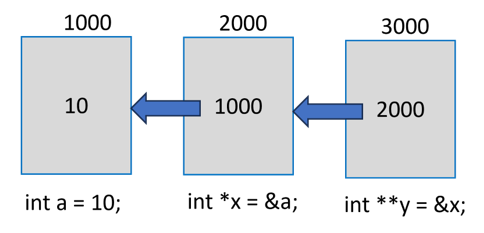
In the above figure, “a” is a normal “int” variable, whose pointer is “x”. In turn, the variable stores the address of “x”.
Note that “y” is declared as “int **” to indicate that it is a pointer to another pointer variable. Obviously, “y” will return the address of “x” and “*y” is the value in “x” (which is the address of “a”).
To obtain the value of “a” from “y”, we need to use the expression “**y”. Usually, “y” will be called as the pointer to a pointer.
Example
Take a look at the following example −
#include <stdio.h>intmain(){int var =10;int*intptr =&var;int**ptrptr =&intptr;printf("var: %d \nAddress of var: %d \n\n",var,&var);printf("inttptr: %d \nAddress of inttptr: %d \n\n", intptr,&intptr);printf("var: %d \nValue at intptr: %d \n\n", var,*intptr);printf("ptrptr: %d \nAddress of ptrtptr: %d \n\n", ptrptr,&ptrptr);printf("intptr: %d \nValue at ptrptr: %d \n\n", intptr,*ptrptr);printf("var: %d \n*intptr: %d \n**ptrptr: %d", var,*intptr,**ptrptr);return0;}
Output
Run the code and check its output −
var: 10
Address of var: 951734452

inttptr: 951734452
Address of inttptr: 951734456

var: 10
Value at intptr: 10

ptrptr: 951734456
Address of ptrtptr: 951734464
intptr: 951734452
Value at ptrptr: 951734452

var: 10
*intptr: 10
**ptrptr: 10
You can have a pointer to an array as well as a derived type defined with struct. Pointers have important applications. They are used while calling a function by passing the reference. Pointers also help in overcoming the limitation of a functions ability to return only a single value. With pointers, you can get the effect of returning multiple values or arrays.
NULL Pointers
It is always a good practice to assign a NULL value to a pointer variable in case you do not have an exact address to be assigned. This is done at the time of variable declaration. A pointer that is assigned NULL is called a null pointer.
The NULL pointer is a constant with a value of “0” defined in several standard libraries.
Example
Consider the following program −
#include <stdio.h>intmain(){int*ptr =NULL;printf("The value of ptr is : %x\n", ptr);return0;}
Output
When the above code is compiled and executed, it produces the following result −
The value of ptr is 0
In most operating systems, programs are not permitted to access memory at address “0” because that memory is reserved by the operating system.
The memory address “0” has a special significance; it signals that the pointer is not intended to point to an accessible memory location. But by convention, if a pointer contains the null (zero) value, it is assumed to point to nothing.
To check for a null pointer, you can use an if statement as follows −
if(ptr)/* succeeds if p is not null */if(!ptr)/* succeeds if p is null */
Address of the Variables
As you know, every variable is a memory location and every memory location has its address defined which can be accessed using the ampersand (&) operator, which denotes an address in memory.
Example
Consider the following example, which prints the address of the variables defined −
#include <stdio.h>intmain(){int var1;char var2[10];printf("Address of var1 variable: %x\n",&var1);printf("Address of var2 variable: %x\n",&var2);return0;}
Output
When the above code is compiled and executed, it will print the address of the variables −
Address of var1 variable: 61e11508
Address of var2 variable: 61e1150e
Pointers in Detail
Pointers have many but easy concepts and they are very important to C programming. The following important pointer concepts should be clear to any C programmer −
Sr.No
Concept & Description
1
Pointer arithmeticThere are four arithmetic operators that can be used in pointers: ++, –, +, –
2
Array of pointersYou can define arrays to hold a number of pointers.
Passing pointers to functions in CPassing an argument by reference or by address enable the passed argument to be changed in the calling function by the called function.
5
Return pointer from functions in CC allows a function to return a pointer to the local variable, static variable, and dynamically allocated memory as well.
The C language identifies a character set that comprises English alphabets upper and lowercase (A to Z as well as “a” to “z”), digits 0 to 9, and certain other symbols called “special characters” with a certain meaning attached to them.
While many of the characters in the special symbol category are defined as operators, certain combinations of characters also have a special meaning attached to them. For example, “\n” is known as the newline character. Such combinations are called escape sequences.
In C language, quotation marks too have a special meaning. Double quotes are used for strings, while characters are enclosed inside single quotes. Read this chapter to learn more about the other special characters used in C programs.
Parentheses ()
Parentheses are especially used to group one or more operands in an expression and control the order of operations in a statement.
A part of the expression embedded inside parentheses has a higher order of precedence.
Example
int a =2, b =3, c =4;int d =(a + b)* c;
Braces { }
Braces are especially used to define blocks of code, such as function bodies and loops. They are also used to initialize arrays and struct variables.
Square brackets are used to declare arrays and access elements of an array with the subscript index.
Example
For example, to define an array of integers and access its third element, you would use square brackets −
int arr[5]={1,2,3,4,5};int third = arr[2];
Asterisk (*)
Apart from its use as a multiplication operator, the asterisk symbol (*) is also used to declare a pointer variable and dereference it to obtain the value of the target variable.
Example
For example, to define a pointer to an integer and access the value it points to, you would use an asterisk −
int num =10;int*ptr =#printf("*d",*ptr);
Ampersand (&)
The ampersand (&) symbol is used as the address-of operator. It returns the address of a variable.
Example
For example, to get the address of an integer variable, you would use an ampersand −
int num =10;int*ptr =#
Comma (,)
The comma is used as a separator between a statement or a function call.
Example
int a =1, b =2, c =3;
Semicolon (;)
As a primary syntax rule in C, the semicolon indicates the end of a statement in a C program.
In C, characters and strings are stored differently. A character array stores a sequence of characters, like text. We use single quotes (‘ ‘) to define a single character (e.g., ‘A’) and double quotes (” “) to define a string or a character array (e.g., “A”, “Hello”).
The main difference is that a single character is stored as its ASCII value, while a string is stored as a sequence of characters ending with a null terminator (\0). In this chapter, we will see single and double quoted character arrays.
Understanding Chracter Arrays in C
A character array is a collection of characters stored in consecutive memory locations, which means each character occupies the next memory slot one after the another. In C, we use character arrays to represent strings, which are enclosed in double quotes and a null terminator (\0) is added at the end of each string to mark its end.
Example of a Character Array
In this example, we declare a character array str[] with 6 elements and print it using %s. Each character is stored one after the other in memory, so the program prints them one by one until it reaches the null terminator \0.
#include <stdio.h>intmain(){char str[]="Hello";// Creating a character array of 6 chractersprintf("%s", str);// Printing the stringreturn0;}
Below you can see the output of the above program, which displays the string stored in the character array.
Hello
Single Quotes in C
Single quotes (‘ ‘) in C are used to represent single character. We can also use them to create a character array by listing characters one by one inside braces {}. Each character is stored internally as its ASCII value.
For example, ‘A’ represents the character A, but in memory it is stored as the number 65, which is the ASCII value of A.
Note that we cannot use single quotes to store multiple characters together like ‘Hi’ because that will cause an error.
Example of Single Quoted Character Array
Below is an example showing a character array using single quotes. Here, we declare a character array arr to store the characters ‘H’, ‘i’, and ‘!’. We then print each character one by one in a loop.
#include <stdio.h>intmain(){char arr[]={'H','i','!'};// Creating a single-quoted character arrayint i;for(i =0; i <3; i++){printf("%c ", arr[i]);// Prints each character}return0;}
Below is the output of the above program, which displays each character of the array one by one.
H i !
Double Quotes in C
Double quotes (” “) in C are used to represent string literals, which are stored as character arrays. A string in C always ends with a null character (\0) so that the program knows where the string ends.
For example, “A” may look like a single character, but in memory, it is stored as two characters: ‘A’ followed by ‘\0’.
Note: Unlike single quotes, double quotes can store multiple characters as a string.
Example of Double Quoted Character Array
Below is an example showing the use of double quotes. Here, we define a string str with the value “Hi”. So, “Hi” is stored as three characters: ‘H’, ‘i’, and the null terminator ‘\0’. That is why the size of the array becomes 3.
#include <stdio.h>intmain(){// storing the string "Hi" in a character array (includes '\0' automatically)char str[]="Hi";printf("String: %s\n", str);printf("Size of str: %lu\n",sizeof(str));return0;}
Following is the output of the above program, which displays the given string and also shows the size of the array (including the null terminator) −
String: Hi
Size of str: 3
Common Mistakes
When working with characters and strings in C, it’s easy to get confused when to use single quotes (‘ ‘) and double quotes (” “). Here are two common mistakes to avoid −
Using double quotes for a single character −
char c ="A";// Wrong: "A" is a string (character array), not a single characterchar c ='A';// Correct: 'A' is a single character
Always use single quotes when you want to store just one character.
Using single quotes for strings −
char str[]='Hello';// Wrong: single quotes can only hold one characterchar str[]="Hello";// Correct: double quotes are used for strings
Always use double quotes when you want to store multiple characters (a string).
Difference between Single and Double Quotes in C
The following table shows the key differences between single quotes and double quotes in C −
Feature
Single Quotes (‘ ‘)
Double Quotes (” “)
Represents
A single character
A sequence of characters (string)
Example
‘A’
“A”
Data Type
char (or integer constant)
char[] (character array)
Memory Size
1 byte (for a single character)
Number of characters + 1 (for \0)
Null Terminator
Not added
Automatically added at the end
Usage
Individual letters, digits, or symbols
Words, sentences, or multiple characters
Stored As
ASCII value of the character
Array of ASCII values with \0 at the end
Conclusion
In this chapter, we learned that single quotes are used to store a single character as its ASCII value, while double quotes store multiple characters as a string ending with a null terminator. We also looked at their differences in character arrays.
In C programming language, a string is an array of character sequences terminated by NULL, it is a one-dimensional array of characters. And, the array of strings is an array of strings (character array).
What is an Array of Strings in C?
Thus, an array of strings can be defined as –
An array of strings is a two-dimensional array of character-type arrays where each character array (string) is null-terminated.
To declare a string, we use the statement −
char string[]={'H','e','l','l','o','\0'};
Or
char string ="Hello";
Declare and Initialize an Array of Strings
To declare an array of strings, you need to declare a two-dimensional array of character types, where the first subscript is the total number of strings and the second subscript is the maximum size of each string.
To initialize an array of strings, you need to provide the multiple strings inside the double quotes separated by the commas.
Syntax
To construct an array of strings, the following syntax is used −
Let us declare and initialize an array of strings to store the names of 10 computer languages, each with the maximum length of 15 characters.
char langs [10][15]={"PYTHON","JAVASCRIPT","PHP","NODE JS","HTML","KOTLIN","C++","REACT JS","RUST","VBSCRIPT"};
Printing An Array of Strings
A string can be printed using the printf() function with %s format specifier. To print each string of an array of strings, you can use the for loop till the number of strings.
Example
In the following example, we are declaring, initializing, and printing an array of string −
#include <stdio.h>intmain(){char langs [10][15]={"PYTHON","JAVASCRIPT","PHP","NODE JS","HTML","KOTLIN","C++","REACT JS","RUST","VBSCRIPT"};for(int i =0; i <10; i++){printf("%s\n", langs[i]);}return0;}
Output
When you run this code, it will produce the following output −
PYTHON
JAVASCRIPT
PHP
NODE JS
HTML
KOTLIN
C++
REACT JS
RUST
VBSCRIPT
Note: The size of each string is not equal to the row size in the declaration of the array. The “\0” symbol signals the termination of the string and the remaining cells in the row are empty. Thus, a substantial part of the memory allocated to the array is unused and thus wasted.
How an Array of Strings is Stored in Memory?
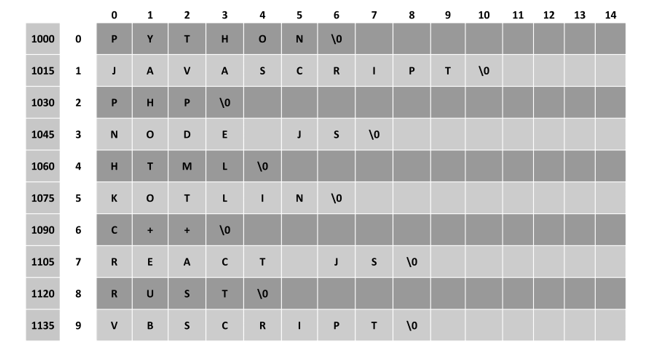
We know that each char type occupies 1 byte in the memory. Hence, this array will be allocated a block of 150 bytes. Although this block is contagious memory locations, each group of 15 bytes constitutes a row.
Assuming that the array is located at the memory address 1000, the logical layout of this array can be shown as in the following figure −
An Array of Strings with Pointers
To use the memory more efficiently, we can use the pointers. Instead of a 2D char array, we declare a 1D array of “char *” type.
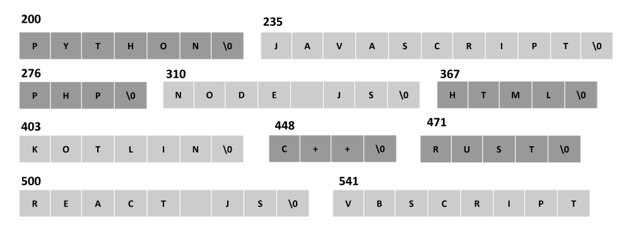
In the 2D array of characters, the strings occupied 150 bytes. As against this, in an array of pointers, the strings occupy far less number of bytes, as each string is randomly allocated memory as shown below −
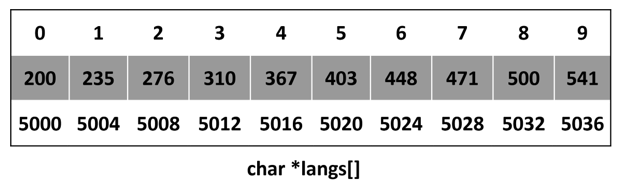
Note: Here, lang[ ] is an array of pointers of individual strings.
Example
We can use a for loop as follows to print the array of strings −
#include <stdio.h>intmain(){char*langs[10]={"PYTHON","JAVASCRIPT","PHP","NODE JS","HTML","KOTLIN","C++","REACT JS","RUST","VBSCRIPT"};for(int i =0; i <10; i++)printf("%s\n", langs[i]);return0;}
Output
When you run this code, it will produce the following output −
PYTHON
JAVASCRIPT
PHP
NODE JS
HTML
KOTLIN
C++
REACT JS
RUST
VBSCRIPT
Here, langs is a pointer to an array of 10 strings. Therefore, if langs[0] points to the address 5000, then “langs + 1” will point to the address 5004 which stores the pointer to the second string.
Hence, we can also use the following variation of the loop to print the array of strings −
for(int i =0; i <10; i++){printf("%s\n",*(langs + i));}
When strings are stored in array, there are a lot use cases. Let study some of the use cases.
Find the String with the Largest Length
In the following example, we store the length of first string and its position (which is “0”) in the variables “l” and “p” respectively. Inside the for loop, we update these variables whenever a string of larger length is found.
Example
Take a look at the following example −
#include <stdio.h>#include <string.h>intmain(){char langs [10][15]={"PYTHON","JAVASCRIPT","PHP","NODE JS","HTML","KOTLIN","C++","REACT JS","RUST","VBSCRIPT"};int l =strlen(langs[0]);int p =0;for(int i =0; i <10; i++){if(strlen(langs[i])>= l){
         l =strlen(langs[i]);
         p = i;}}printf("Language with the longest name: %s Length: %d", langs[p], l);return0;}
Output
When you run this code, it will produce the following output −
Language with longest name: JAVASCRIPT Length:10
Sort a String Array in Ascending Order
We need to use the strcmp() function to compare two strings. If the value of comparison of strings is greater than 0, it means the first argument string appears later than the second in alphabetical order. We then swap these two strings using the strcmp() function.
Example
Take a look at the following example −
#include <stdio.h>#include <string.h>intmain(){char langs [10][15]={"PYTHON","JAVASCRIPT","PHP","NODE JS","HTML","KOTLIN","C++","REACT JS","RUST","VBSCRIPT"};int i, j;char temp[15];for(i =0; i <9; i++){for(j = i +1; j <10; j++){if(strcmp(langs[i], langs[j])>0){strcpy(temp, langs[i]);strcpy(langs[i], langs[j]);strcpy(langs[j], temp);}}}for(i =0; i <10; i++){printf("%s\n", langs[i]);}return0;}
Output
When you run this code, it will produce the following output −
C++
HTML
JAVASCRIPT
KOTLIN
NODE JS
PHP
PYTHON
REACT JS
RUST
VBSCRIPT
In this chapter, we explained how you can declare an array of strings and how you can manipulate it with the help of string functions.
A string in C is a one-dimensional array of char type, with the last character in the array being a “null character” represented by ‘\0’. Thus, a string in C can be defined as a null-terminated sequence of char type values.
Creating a String in C
Let us create a string “Hello”. It comprises five char values. In C, the literal representation of a char type uses single quote symbols such as ‘H’. These five alphabets put inside single quotes, followed by a null character represented by ‘\0’ are assigned to an array of char types. The size of the array is five characters plus the null character six.
Example
char greeting[6]={'H','e','l','l','o','\0'};
Initializing String Without Specifying Size
C lets you initialize an array without declaring the size, in which case the compiler automatically determines the array size.
Example
char greeting[]={'H','e','l','l','o','\0'};
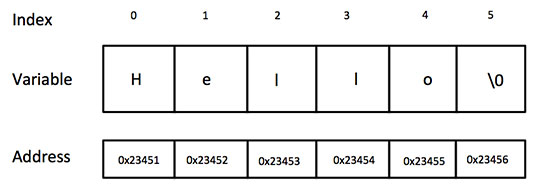
The array created in the memory can be schematically shown as follows −
If the string is not terminated by “\0”, it results in unpredictable behavior.
Note: The length of the string doesnt include the null character. The library function strlen() returns the length of this string as 5.
Loop Through a String
You can loop through a string (character array) to access and manipulate each character of the string using the for loop or any other loop statements.
Example
In the following example, we are printing the characters of the string.
#include <stdio.h>#include <string.h>intmain(){char greeting[]={'H','e','l','l','o','\0'};for(int i =0; i <5; i++){printf("%c", greeting[i]);}return0;}
Output
It will produce the following output −
Hello
Printing a String (Using %s Format Specifier)
C provides a format specifier “%s” which is used to print a string when you’re using functions like printf() or fprintf() functions.
Example
The “%s” specifier tells the function to iterate through the array, until it encounters the null terminator (\0) and printing each character. This effectively prints the entire string represented by the character array without having to use a loop.
You can declare an oversized array and assign less number of characters, to which the C compiler has no issues. However, if the size is less than the characters in the initialization, you may get garbage values in the output.
Instead of constructing a char array of individual char values in single quotation marks, and using “\0” as the last element, C lets you construct a string by enclosing the characters within double quotation marks. This method of initializing a string is more convenient, as the compiler automatically adds “\0” as the last character.
Declaring a null-terminated string causes difficulty if you want to ask the user to input a string. You can accept one character at a time to store in each subscript of an array, with the help of a for loop −
Syntax
for(i =0; i <6; i++){scanf("%c",&greeting[i]);}
greeting[i]='\0';
Example
In the following example, you can input a string using scanf() function, after inputting the specific characters (5 in the following example), we are assigning null (‘\0’) to terminate the string.
printf("Starting typing... ");for(i =0; i <5; i++){scanf("%c",&greeting[i]);}// Assign NULL manually
greeting[i]='\0';// Printing the stringprintf("Value of greeting: %s\n", greeting);
Output
Run the code and check its output −
Starting typing... Hello
Value of greeting: Hello
Example
It is not possible to input “\0” (the null string) because it is a non-printable character. To overcome this, the “%s” format specifier is used in the scanf() statement −
#include <stdio.h>#include <string.h>intmain(){char greeting[10];printf("Enter a string:\n");scanf("%s", greeting);printf("You entered: \n");printf("%s", greeting);return0;}
Output
Run the code and check its output −
Enter a string:
Hello
You entered:
Hello
Note: If the size of the array is less than the length of the input string, then it may result in situations such as garbage, data corruption, etc.
String Input with Whitespace
scanf(“%s”) reads characters until it encounters a whitespace (space, tab, newline, etc.) or EOF. So, if you try to input a string with multiple words (separated by whitespaces), then the C program would accept characters before the first whitespace as the input to the string.
Example
Take a look at the following example −
#include <stdio.h>#include <string.h>intmain(){char greeting[20];printf("Enter a string:\n");scanf("%s", greeting);printf("You entered: \n");printf("%s", greeting);return0;}
Output
Run the code and check its output −
Enter a string:
Hello World!

You entered:
Hello
String Input Using gets() and fgets() Functions
To accept a string input with whitespaces in between, we should use the gets() function. It is called an unformatted console input function, defined in the “stdio.h” header file.
Example: String Input Using gets() Function
Take a look at the following example −
#include <stdio.h>#include <string.h>intmain(){char name[20];printf("Enter a name:\n");gets(name);printf("You entered: \n");printf("%s", name);return0;}
Output
Run the code and check its output −
Enter a name:
Sachin Tendulkar

You entered:
Sachin Tendulkar
In newer versions of C, gets() has been deprecated. It is potentially a dangerous function because it doesnt perform bound checks and may result in buffer overflow.
Instead, it is advised to use the fgets() function.
fgets(char arr[], size, stream);
The fgets() function can be used to accept input from any input stream, such as stdin (keyboard) or FILE (file stream).
Example: String Input Using fgets() Function
The following program uses fgets() and accepts multiword input from the user.
#include <stdio.h>#include <string.h>intmain(){char name[20];printf("Enter a name:\n");fgets(name,sizeof(name),stdin);printf("You entered: \n");printf("%s", name);return0;}
Output
Run the code and check its output −
Enter a name:
Virat Kohli

You entered:
Virat Kohli
Example: String Input Using scanf(“%[^\n]s”)
You may also use scanf(“%[^\n]s”) as an alternative. It reads the characters until a newline character (“\n”) is encountered.