Author: admin

  • Bit Fields in C

    When we declare a struct or a union type, the size of the struct/union type variable depends on the individual size of its elements. Instead of the default memory size, you can set the size the bits to restrict the size. The specified size is called bit fields.

    This is the syntax you would use to declare a bit field −

    struct{
       data_type elem : width;};

    Let’s suppose your C program contains a number of TRUE/FALSE variables grouped in a structure called status, as follows −

    struct{unsignedint widthValidated;unsignedint heightValidated;} status;

    This structure requires 8 bytes of memory space but in actual, we are going to store either “0” or “1” in each of the variables. The C programming language offers a better way to utilize the memory space in such situations.

    If you are using such variables inside a structure, then you can define the width of the variables which tells the C compiler that you are going to use only those many number of bytes. For example, the above structure can be re-written as follows −

    struct{unsignedint widthValidated :1;unsignedint heightValidated :1;} status;

    The above structure requires 4 bytes of memory space for the status variable, but only 2 bits will be used to store the values.

    Example

    If you will use up to 32 variables, each one with a width of 1 bit, then also the status structure will use 4 bytes. However, as soon as you have 33 variables, it will allocate the next slot of the memory and it will start using 8 bytes.

    Let us check the following example to understand the concept −

    #include <stdio.h>/* define simple structure */struct{unsignedint widthValidated;unsignedint heightValidated;} status1;/* define a structure with bit fields */struct{unsignedint widthValidated :1;unsignedint heightValidated :1;} status2;intmain(){printf("Memory size occupied by status1: %d\n",sizeof(status1));printf("Memory size occupied by status2: %d\n",sizeof(status2));return0;}

    Output

    When the above code is compiled and executed, it produces the following Output −

    Memory size occupied by status1: 8
    Memory size occupied by status2: 4
    

    Bit Field Declaration

    The declaration of a bit-field has the following form inside a structure −

    struct{
       type [member_name]: width ;};

    The following table describes the variable elements of a bit field −

    ElementDescription
    typeAn integer type that determines how a bit-field’s value is interpreted.The type may be int, signed int, or unsigned int.
    member_nameThe name of the bit-field.
    widthNumber of bits in the bit-field. “width” must be less than or equal to bit width of specified type.

    The variables defined with a predefined width are called bit fields. A bit field can hold more than a single bit; for example, if you need a variable to store a value from 0 to 7, then you can define a bit field with a width of 3 bits, as follows −

    struct{unsignedint age :3;} Age;

    The above structure definition instructs the C compiler that the variable “Age” is going to use only 3 bits to store the value. If you try to use more than 3 bits, then it will not allow you to do so.

    Example

    Let us try the following example −

    #include <stdio.h>struct{unsignedint age :3;} Age;intmain(){
    
       Age.age =4;printf("Sizeof(Age): %d\n",sizeof(Age));printf("Age.age: %d\n", Age.age);
    
       Age.age =7;printf("Age.age : %d\n", Age.age);
    
       Age.age =8;printf("Age.age : %d\n", Age.age);return0;}

    Output

    When the above code is compiled, it will compile with a warning −

    warning: unsigned conversion from 'int' to 'unsigned char:3' changes value from '8' to '0' [-Woverflow]|
    

    And, when executed, it will produce the following output −

    Sizeof(Age): 4
    Age.age: 4
    Age.age: 7
    Age.age: 0
    

    You can use Bit Fields in situations where the available storage is limited. Bit Fields also prove efficient when devices transmit status or information encoded into multiple bits. Whenever certain encryption programs need to access the bits within a byte, bit fields are used to define the data structure.

  • Unions in C

    Unions in C

    union is a special data type available in C that allows to store different data types in the same memory location. You can define a union with many members, but only one member can contain a value at any given time. Unions provide an efficient way of using the same memory location for multiple purpose.

    All the members of a union share the same memory location. Therefore, if we need to use the same memory location for two or more members, then union is the best data type for that. The largest union member defines the size of the union.

    Defining a Union

    Union variables are created in same manner as structure variables. The keyword union is used to define unions in C language.

    Syntax

    Here is the syntax to define a union in C language −

    union[union tag]{
       member definition;
       member definition;...
       member definition;}[one or more union variables];

    The “union tag” is optional and each member definition is a normal variable definition, such as “int i;” or “float f;” or any other valid variable definition.

    At the end of the union’s definition, before the final semicolon, you can specify one or more union variables.

    Accessing the Union Members

    To access any member of a union, we use the member access operator (.). The member access operator is coded as a period between the union variable name and the union member that we wish to access. You would use the keyword union to define variables of union type.

    Syntax

    Here is the syntax to access the members of a union in C language −

    union_name.member_name;

    Initialization of Union Members

    You can initialize the members of the union by assigning the value to them using the assignment (=) operator.

    Syntax

    Here is the syntax to initialize members of union −

    union_variable.member_name = value;

    Example

    The following code statement shows to initialization of the member “i” of union “data” −

    data.i =10;

    Examples of Union

    Example 1

    The following example shows how to use unions in a program −

    #include <stdio.h>#include <string.h>union Data{int i;float f;char str[20];};intmain(){union Data data;        
       
       data.i =10;
       data.f =220.5;strcpy(data.str,"C Programming");printf("data.i: %d \n", data.i);printf("data.f: %f \n", data.f);printf("data.str: %s \n", data.str);return0;}

    Output

    When the above code is compiled and executed, it produces the following result −

    data.i: 1917853763 
    data.f: 4122360580327794860452759994368.000000 
    data.str: C Programming
    

    Here, we can see that the values of i and f (members of the union) show garbage values because the final value assigned to the variable has occupied the memory location and this is the reason that the value of str member is getting printed very well.

    Example 2

    Now let’s look at the same example once again where we will use one variable at a time which is the main purpose of having unions −

    #include <stdio.h>#include <string.h>union Data{int i;float f;char str[20];};intmain(){union Data data;        
       
       data.i =10;printf("data.i: %d \n", data.i);
       
       data.f =220.5;printf("data.f: %f \n", data.f);strcpy(data.str,"C Programming");printf("data.str: %s \n", data.str);return0;}

    Output

    When the above code is compiled and executed, it produces the following result −

    data.i: 10 
    data.f: 220.500000 
    data.str: C Programming
    

    Here, the values of all the Union members are getting printed very well because one member is being used at a time.

    Size of a Union

    The size of a union is the size of its largest member. For example, if a union contains two members of char and int types. In that case, the size of the union will be the size of int because int is the largest member.

    You can use the sizeof() operator to get the size of a union.

    Example

    In the following example, we are printing the size of a union −

    #include <stdio.h>// Define a unionunion Data {int a;float b;char c[20];};intmain(){union Data data;// Printing the size of the each member of unionprintf("Size of a: %lu bytes\n",sizeof(data.a));printf("Size of b: %lu bytes\n",sizeof(data.b));printf("Size of c: %lu bytes\n",sizeof(data.c));// Printing the size of the unionprintf("Size of union: %lu bytes\n",sizeof(data));return0;}

    Output

    When you compile and execute the code, it will produce the following output −

    Size of a: 4 bytes
    Size of b: 4 bytes
    Size of c: 20 bytes
    Size of union: 20 bytes
    

    Difference between Structure and Union

    Both structures and unions are composite data types in C programming. The most significant difference between a structure and a union is the way they store their data. A structure stores each member in separate memory locations, whereas a union stores all its members in the same memory location.

    Here is a definition of union type called myunion −

    union myunion{int a;double b;char c;};

    The definition of a union is similar to the definition of a structure. A definition of “struct type mystruct” with the same elements looks like this −

    structmystruct{int a;double b;char c;};

    The main difference between a struct and a union is the size of the variables. The compiler allocates the memory to a struct variable, to be able to store the values for all the elements. In mystruct, there are three elements − an int, a double, and char, requiring 13 bytes (4 + 8 + 1). Hence, sizeof(struct mystruct) returns 13.

    On the other hand, for a union type variable, the compiler allocates a chunk of memory of the size enough to accommodate the element of the largest byte size. The myunion type has an int, a double and a char element. Out of the three elements, the size of the double variable is the largest, i.e., 8. Hence, sizeof(union myunion) returns 8.

    Another point to take into consideration is that a union variable can hold the value of only one its elements. When you assign value to one element, the other elements are undefined. If you try to use the other elements, it will result in some garbage.

    Example 1: Memory Occupied by a Union

    In the code below, we define a union type called Data having three members if, and str. A variable of type Data can store an integer, a floating point number, or a string of characters. It means a single variable, i.e., the same memory location, can be used to store multiple types of data. You can use any built-in or user-defined data types inside a union, as per your requirement.

    The memory occupied by a union will be large enough to hold the largest member of the union. For example, in the above example, Data will occupy 20 bytes of memory space because this is the maximum space which can be occupied by a character string.

    The following example displays the total memory size occupied by the above union −

    #include <stdio.h>#include <string.h>union Data{int i;float f;char str[20];};intmain(){union Data data;printf("Memory occupied by Union Data: %d \n",sizeof(data));return0;}

    Output

    When you compile and execute the code, it will produce the following output −

    Memory occupied by Union Data: 20
    

    Example 2: Memory Occupied by a Structure

    Now, let’s create a structure with the same elements and check how much space it occupies in the memory.

    #include <stdio.h>#include <string.h>structData{int i;float f;char str[20];};intmain(){structData data;printf("Memory occupied by Struct Data: %d \n",sizeof(data));return0;}

    Output

    This stucture will occupy 28 bytes (4 + 4 + 20). Run the code and check its output −

    Memory occupied by Struct Data: 28
  • Anonymous Structures and Unions in C

    Anonymous Structures and Unions in C

    The feature of anonymous structures and unions was introduced in C11 standard. The aim was to enhance the flexibility of C and also to discard the need of superfluous naming in certain cases.

    The feature of defining struct and union anonymously has been found to be extremely useful, especially in applications involving the creation of complex data structures, hardware register mappings, etc. This allows for more straightforward and readable code.

    Anonymous Structure

    An anonymous structure is a structure definition without a tag or a typedef. It is usually nested within another struct.

    Syntax for Anonymous Struct

    Here is the syntax of defining an anonymous structure −

    structtype{
       elem1;
       elem2;struct{
          elem3;
          elem4;};};

    Access Members of Anonymous Structure

    Members of an anonymous struct/union can access the parent struct directly, simplifying the notation.

    Example 1

    In the code below, we have defined a structure with the name as employee. Inside it, an anonymous struct is intended to hold date, month and year of birth of the employee. In the example on nested structure, we had an internal dob structure. Now well use anonymous struct.

    #include <stdio.h>structemployee{char name[10];float salary;struct{int d, m, y;};};intmain(){structemployee e1;strcpy(e1.name,"Kiran");
       e1.salary=25000;
       e1.d =12;
       e1.m =5;
       e1.y =1990;printf("Name: %s\n", e1.name);printf("Salary: %f\n", e1.salary);printf("Date of Birth: %d-%d-%d\n", e1.d, e1.m, e1.y);return0;}

    Output

    When you run this code, it will produce the following output −

    Name: Kiran
    Salary: 25000.000000
    Date of Birth: 12-5-1990
    

    Note that the “d”, “m” and “y” elements of inner anonymous struct are accessed directly.

    Example 2

    The outer struct type in the following example is student, which has a nested anonymous struct to store the title and ID of the course.

    #include <stdio.h>structstudent{char name[10];int age;struct{char coursettl[20];int courseid;};};intmain(){structstudent s1;strcpy(s1.name,"Kiran");
       s1.age =27;strcpy(s1.coursettl,"C Programming");
       s1.courseid=1;printf("Name: %s\n", s1.name);printf("age: %d\n", s1.age);printf("Course Title: %s Course ID: %d\n", s1.coursettl, s1.courseid);return0;}

    Output

    When you run this code, it will produce the following output −

    Name: Kiran
    age: 27
    Course Title: C Programming Course ID: 1
    

    Anonymous Union

    An anonymous union is a special type of union that doesn’t have a name. Unlike regular unions, anonymous unions are primarily used to create unnamed members that can be accessed directly without qualifying them with a union name.

    Syntax for Anonymous Union

    Here is the syntax of defining an anonymous union −

    structtype{
       elem1;
       elem2;union{
          elem3;
          elem4;};};

    Access Members of Anonymous Union

    The members of the anonymous union can be accessed directly without using a union name.

    Example

    Anonymous unions do not have a name. The elements share the same memory location.

    Take a look at the following example −

    #include <stdio.h>structmystruct{int var;union{int var1;float var2;char var3;};};intmain(){structmystruct data;
    
       data.var =10; 
       data.var2 =5.55;printf("mystruct.var: %d\n", data.var);printf("anonymous union elements: %d %f %c", data.var1, data.var2, data.var3);return0;}

    Output

    Run the code and check its output −

    mystruct.var: 10
    anonymous union elements: 1085381018 5.550000 
    

    Note: Like a regular union, the uninitialized members of an anonymous union variable also show garbage value.

    Advantages of Anonymous Struct and Union

    One of the main advantages is the ability to access the members directly without any inner struct or union name. This can make the code more readable. Here is a list of some other advantages of using anonymous structures and unions −

    • Memory Efficiency − Like regular unions, anonymous unions allow different data types to share the same memory space, leading to more memory-efficient code, especially useful in low-memory environments.
    • Flexibility − Anonymous structures provide flexibility in how data is represented and accessed, allowing for more dynamic and versatile data structures.
    • Convenience − This feature allows for a compact representation of a variable that can hold different data types.
    • Ease of Initialization − They can be easier to initialize and use, as they do not require the declaration of a union variable.

    Note that anonymous struct or union types were not part of the C standard before C11. Hence, their use in the code may lead to compatibility problems, if the target system uses a compiler compliant with earlier standards.

  • Nested Structures in C

    What is a Nested Structure in C?

    structure within a structure is known as nested structure in C. When one of the elements in the definition of a struct type is of another struct type, then we call it a nested structure in C. Nested structures are defined when one of the elements of a struct type is itself a composite representation of one or more types.

    Nested Structure Declaration

    A nested structure can be declared by using a structure as a member of another structure.

    Syntax

    A general syntax of a nested structure is as follows −

    structstruct1{
       type var1;
       type var2;structstruct2 strvar;}

    Example

    We can think of nested structures in the following situation. If we want to define a struct type representing a “student” with “name” and “age” as its elements and another struct type called “course” that is characterized by “course ID”, “title”, and “credit points”. Here, the “student” structure has an inner course structure.

    structstudent{char*name;int age;structcourse c1;};

    The “student” variable will be stored in the memory as follows −

    NameAgeCourse
    Kiran25001C Programming6

    Accessing Members of a Nested Structure

    The structure’s members can be accessed by using the dot (.) operator. In the case of nested structures, there can be multiple levels of structures. So, you need to use the dot (.) operator for each level of the structure to access the members of the nested structure.

    Syntax

    Below is the syntax to access members of nested structure –

    level1.level2.member_name;

    Here, level1 represents the structure variable of the outer (parent) structure, and level2 represents the structure variable of the inner (child) structure.

    Example

    Consider the following nested structure definition –

    structemployee{char name[10];float salary;structdob{int d, m, y;} d1;}e1;

    Here, e1 is the structure variable of the outer (level 1) structure “employee” and d1 is the structure variable of the inner (level 2) structure “dob”.

    To access the members of the employee structure, use e1.member_name.

    printf("Name: %s\n", e1.name);printf("Salary: %f\n", e1.salary);

    To access the members of the dob structure, use e1.d1.member_name.

    printf("Date of Birth: %d-%d-%d\n", e1.d1.d, e1.d1.m, e1.d1.y);

    The nesting of structures can be performed in two different ways −

    • Defining an inline structure
    • Including the element of a structure already defined

    Let us learn these methods using suitable examples.

    Nested Structure by Defining Inline Structure

    In this method, we shall define an “employee” data type with one of its elements being “date of birth”. C doesnt have a built-in type for “date”. We shall declare the “dob” struct with three “int” types “d”, “m” and “y” inside the “employee” structure and its variable “d1” is one of the elements of the outer type.

    Example

    Take a look at the following example −

    #include <stdio.h>#include <string.h>structemployee{char name[10];float salary;structdob{int d, m, y;} d1;};intmain(){structemployee e1 ={"Kiran",25000,{12,5,1990}};printf("Name: %s\n", e1.name);printf("Salary: %f\n", e1.salary);printf("Date of Birth: %d-%d-%d\n", e1.d1.d, e1.d1.m, e1.d1.y);return0;}

    Output

    When you run this code, it will produce the following output −

    Name: Kiran
    Salary: 25000.000000
    Date of Birth: 12-5-1990
    

    You can see that the variable of “employee” type is initialized with its “date” element having another pair of curly brackets.

    Nested Structure by Defining Separate Structure

    The other approach for using nested structures is to define the inner struct type first, and then use its variable as one of the elements in the outer struct type, which is defined afterwards.

    Here, the “dob” type is defined in the beginning; it has three “int” elements − dm and y. The “employee” struct type is defined afterwards.

    Example 1

    Since “dob” is already defined, we can have an element of its type inside “employee”.

    #include <stdio.h>#include <string.h>structdob{int d, m, y;};structemployee{char name[10];float salary;structdob d1;};intmain(){structemployee e1 ={"Kiran",25000,{12,5,1990}};printf("Name: %s\n", e1.name);printf("Salary: %f\n", e1.salary);printf("Date of Birth: %d-%d-%d\n", e1.d1.d, e1.d1.m, e1.d1.y);return0;}

    Output

    Run the code and check its output −

    Name: Kiran
    Salary: 25000.000000
    Date of Birth: 12-5-1990
    

    Note that the inner struct type should be defined before the outer type. We can also declare a variable of “dob” type and then include it in the initialization of “employee” type variable, as shown below −

    structdob d1 ={12,5,1990};structemployee e1 ={"Kiran",25000, d1};

    Example 2

    In the following code, the nesting of structure goes upto two levels. In other words, the outer struct type “employee” has one element that is a variable of experience struct type. In turn, the experience structure has two elements of another struct type called “date”.

    Hence, the memory allocation for “employee” variable can be understood with the following illustration −

    NameSalaryDesignationfromto
    Kiran25000Clerk12519903132021

    Here is the complete code −

    #include <stdio.h>#include <string.h>structdate{int d, m, y;};structexperience{char designation[10];structdate from;structdate to;};structemployee{char name[10];float salary;structexperience exp;};intmain(){structdate d1 ={12,5,1990};structdate d2 ={31,3,2021};structexperience exp ={"Clerk", d1, d2};structemployee e1 ={"Kiran",25000, exp};printf("Name: %s\n", e1.name);printf("Salary: %f\n", e1.salary);printf("Experience: Designation: %s\n", e1.exp.designation);printf("From:  %d-%d-%d\n", e1.exp.from.d,e1.exp.from.m, e1.exp.from.y);printf("To: %d-%d-%d\n", e1.exp.to.d, e1.exp.to.m, e1.exp.to.y );return0;}

    Output

    When you run this code, it will produce the following output −

    Name: Kiran
    Salary: 25000.000000
    Experience: Designation: Clerk
    From:  12-5-1990
    To: 31-3-2021
    

    Pointer to Nested Structure

    We know that the address of a struct variable can be stored in a pointer variable. Further, C uses the indirection operator (→) to access the elements of a variable that is referenced by a pointer.

    In case of a nested structure, the elements of the inner struct elements are accessed by “ptr → inner_struct_var.element;”

    Example

    In this example, we have declared a pointer ptr to an employee struct variable. the date, month and year elements of inner dob struct variable are accessed as “ptr -> d1.d”, “ptr -> d1.m” and “ptr -> d1.y” expressions.

    #include <stdio.h>#include <string.h>structemployee{char name[10];float salary;structdob{int d, m, y;} d1;};intmain(){structemployee e1 ={"Kiran",25000,{12,5,1990}};structemployee*ptr =&e1;printf("Name: %s\n", ptr -> name);printf("Salary: %f\n", ptr -> salary);printf("Date of Birth: %d-%d-%d\n", ptr -> d1.d, ptr -> d1.m, ptr -> d1.y);return0;}

    Output

    When you run this code, it will produce the following output −

    Name: Kiran
    Salary: 25000.000000
    Date of Birth: 12-5-1990
  • Structure Padding and Packing in C

    What is Structure Padding in C?

    Structure padding in C is the process that is handled by the CPU architecture. Structure Padding adds a certain number of empty bytes within a structure so that the data members are naturally aligned in memory. The alignment requirements are determined by the processor architecture rather than the language itself. Naturally, the alignment requirements change as per the data bus size or other architectural considerations of a certain CPU architecture.

    Understanding Structure Padding with Examples

    Let us define a struct type as follows −

    structstruct1{char x;int y;char z;};

    Example 1

    Let us check the size in bytes required for a variable of this type −

    #include <stdio.h>structstruct1{char a;char b;int c;};intmain(){printf("Size: %d",sizeof(structstruct1));return0;}

    Output

    When you run this code, it will produce the following output −

    Size: 8
    

    The result is contrary to the expectation.

    Considering that a char type needs 1 byte, and an int type needs 4 bytes, one might assume the output should be “1 + 1 + 4 = 6 bytes”.

    Structure Padding

    However, the CPU architecture necessitates altering this structure. Considering that we are using a CPU with 32-bit processor, it reads 4 bytes at a time, which means that 1 word is equal to 4 bytes.

    In one CPU cycle, it accesses the char “a”, then char “b” and the first two bytes of int “c”. In the second cycle, the other two bytes are accessed.

    Even if we want to read only “c”, two CPU cycles are required. For this purpose, the CPU adds two empty bytes before the bytes in which the value of “c” is stored. This mechanism is called as padding.

    Structure Padding

    This now explains the result we obtained above, that of the size of the struct type to be 8 bytes.

    Example 2

    Let us change the sequence of members in the above struct type, and set the type of “b” and the type of “c“.

    #include <stdio.h>structstruct1{char a;int b;char c;};intmain(){printf("size: %d",sizeof(structstruct1));return0;}

    Output

    Run the code and check its output −

    size: 12
    

    Out of the 4 bytes in the first word, the first one is allocated to char “a” followed by three empty bytes.

    The next 4 bytes that form the next word are used to store int “b”. Subsequently, out of the next group of 4, only one is utilized for “c”. However, the struct size is 12.

    What is Structure Packing in C?

    Structure packing, on the other hand, is a mechanism for minimizing the effect of padding, thereby trying and reduce wasted memory space. We can use certain pragma directives and attributes to achieve packing.

    Understanding Structure Packing with Examples

    The padding, forced by the CPU architecture is unavoidable, however there are ways to minimize padding. It can be done with the use of −

    • Using #pragma pack(1) directive
    • Using packed attribute

    Using #pragma pack(1) Directive

    The #pragma pack(1) preprocessor directive forces the compiler to disregard the padding, and align the structure members end to end during the memory allocation process.

    Example

    Let’s add this directive at the top of the code used previously, and see the result −

    #include <stdio.h>#pragma pack(1)structstruct1{char a;int b;char c;};intmain(){printf("size: %d",sizeof(structstruct1));return0;}
    Output

    Run the code and check its output −

    size: 6
    

    We can see the structure padding has been avoided and reduced memory wastage.

    Using __attribute__((packed))

    With GCC, we can use attributes to specify various special properties of structure and union types. The attributes are: aligned, deprecated, packed, transparent_union, unused, and visibility. The syntax of applying these attributes is “__attribute__ ((…))“.

    Example

    Here, we are going to use packed attribute in the definition of our struct type.

    #include <stdio.h>struct__attribute__((packed))struct1{char a;int b;char c;};intmain(){printf("size: %d",sizeof(structstruct1));return0;}
    Output

    Run the code and check its output −

    size: 6
    

    This method also avoids the effect of padding.

  • Enumeration (or enum) in C

    Enumeration (or enum) in C

    C enumeration (enum) is an enumerated data type that consists of a group of integral constants. Enums are useful when you want to assign user-defined names to integral constants. The enum keyword is used to define enums.

    Defining and Declaring an Enum Type

    To declare and define an enumeration (enum) data type, use the enum keyword followed by the enum name and assign all values inside the curly braces.

    Syntax

    This is the syntax you would use to define an enum type −

    enumenum_name{const1, const2,...};

    Enum Variable Declaration

    After declaring an enumeration type, you can also declare its variable to access enumeration members (constants). To declare an enum variable, write the enum keyword followed by the enaum name (enum_name) and then the variable name (var).

    Syntax

    Below is the syntax to declare a variable of enum type −

    enumenum_name var;

    Example

    Let us define an enum type with the name myenum −

    enummyenum{val1, val2, val3, val4};

    Identifier values are unsigned integers and they start from “0”. val1 refers 0, val2 refers 1, and so on.

    A variable of myenum type is declared as follows −

    enummyenum var;

    The possible constant values of myenum type are enumerated inside the curly brackets.

    Change Enum Constants Values

    When we declare an enum type, the first constant of the enum is initialized with 0 by default, the second constant is initialized with 1, and so on. We can also assign any integer value to any constant of enum.

    Example

    In the following example, we are declaring an enum type and assigning different values to the enum constants.

    #include <stdio.h>enumstatus_codes{ OKAY =1, CANCEL =0, ALERT =2};intmain(){// Printing valuesprintf("OKAY = %d\n", OKAY);printf("CANCEL = %d\n", CANCEL);printf("ALERT = %d\n", ALERT);return0;}

    Output

    It will produce the following output −

    OKAY = 1
    CANCEL = 0
    ALERT = 2
    

    Enum in Switch Statements

    C language switch case statement works with integral values. We can use enum type to define constants with (or, without) integral type values to use them in switch case statements.

    Example

    In the following example, the colors in the rainbow are enumerated.

    #include <stdio.h>// Enum declarationenumcolors{ VIOLET, INDIGO, BLUE, GREEN, YELLOW, ORANGE, RED };intmain(){// Enum variable declarationenumcolors color = YELLOW;// switch statement using enumswitch(color){case BLUE:printf("Blue color");break;case GREEN:printf("Green color");break;case RED:printf("Red color");break;default:printf("Color other than RGB");}return0;}

    Output

    Run the code and check its output −

    Color other than RGB
    

    Examples of Enumeration (enum) Type

    Practice the following examples to understand the concept of enumeration (or, enum) type in C programming language.

    Example 1: Enum Constants Get Incrementing Integer Values

    C assigns incrementing integer values to each constant, starting with “0”. When we assign val2 to the above variable,

    var = val2;

    The integer value assigned to val2 is 1. Take a look at the following example −

    #include <stdio.h>enummyenum{val1, val2, val3, val4};intmain(){enummyenum var;
       var = val2;printf("var = %d", var);return0;}

    Output

    It will produce the following output −

    var = 1
    

    Example 2: Enumerating the Weekdays

    Let us declare an enum type weekdays to enumerate the names of the days and assign its value to the enum type variable −

    #include <stdio.h>intmain(){enumweekdays{Sun, Mon, Tue, Wed, Thu, Fri, Sat};printf("Monday = %d\n", Mon);printf("Thursday = %d\n", Thu);printf("Sunday = %d\n", Sun);}

    Output

    It will produce the following output −

    Monday = 1
    Thursday = 4
    Sunday = 0
    

    Example 3: Declaring a Variable of Enum Type

    A typical application of enumerated data types is to assign weekdays to the integer values. In this code, we have declared a variable of weekdays enum type −

    #include <stdio.h>enumweekdays{Sun, Mon, Tue, Wed, Thu, Fri, Sat};intmain(){enumweekdays day;
       day = Wed;printf("Day number of Wed is = %d", day);return0;}

    Output

    When you run this code, it will produce the following output −

    Day number of Wed is = 3
    

    Example 4: Enum Values By Default Start from “0”

    In this code, we define an enum type for names of the month in a calendar year. By default, C assigns the values starting from “0”. For example, in the following C program, Jan gets the value “0”, Feb gets “1”, and so on.

    #include <stdio.h>enummonths{Jan, Feb, Mar, Apr, May, Jun, Jul, 
       Aug, Sep, Oct, Nov, Dec};intmain(){for(int i = Jan; i <= Dec; i++)printf("Month No: %d\n", i);return0;}

    Output

    Run the code and check its output −

    Month No: 0
    Month No: 1
    Month No: 2
    Month No: 3
    Month No: 4
    Month No: 5
    Month No: 6
    Month No: 7
    Month No: 8
    Month No: 9
    Month No: 10
    Month No: 11
    

    Example 5: Starting an Enum from 1

    To start enumeration from 1, assign 1 explicitly to the first value, the compiler will assign incrementing numbers to the subsequent values.

    #include <stdio.h>enummonths{Jan=1, Feb, Mar, Apr, May, Jun, Jul, 
       Aug, Sep, Oct, Nov, Dec};intmain(){for(int i = Jan; i <= Dec; i++)printf("Month No: %d\n", i);return0;}

    Output

    Run the code and check its output −

    Month No: 1
    Month No: 2
    Month No: 3
    Month No: 4
    Month No: 5
    Month No: 6
    Month No: 7
    Month No: 8
    Month No: 9
    Month No: 10
    Month No: 11
    Month No: 12
    

    Example 6: Enumerating HTTP Status Codes

    It is not necessary that the constants in the enum type should have incremental integer values. You can assign each of the constants a different and unique value, which may be in any sequence.

    In the following code, the enum type enumerates HTTP status codes.

    #include <stdio.h>enumstatus{
       OK =200,
       BadRequest =400,
       Unauthorized =401,
       Forbidden =403,
       NotFound =404,
       InternalServerError =500,};intmain(){enumstatus code =  InternalServerError;if(code ==500)printf("Internal Server Error has been encountered");return0;}

    Output

    Run the code and check its output −

    Internal Server Error has been encountered
    

    Example 7: Assigning a Fixed Number to Enum Constants

    You can assign a fixed integer to some of the constants, leaving the compiler to assign values to others. All unassigned names get a value that is “value of previous name plus one”.

    #include <stdio.h>enummyenum{a, b =5, c, d, e =10, f};intmain(){printf("a: %d\n", a);printf("b: %d\n", b);printf("c: %d\n", c);printf("d: %d\n", d);printf("e: %d\n", e);printf("f: %d\n", f);return0;}

    Output

    Run the code and check its output −

    a: 0
    b: 5
    c: 6
    d: 7
    e: 10
    f: 11
    

    Applications of Enums

    We can use enums in C in different cases, some of which are listed below −

    • To store constant values, for example, weekdays, months, directions, colors, etc.
    • Enums are used for using flags, status codes, etc.
    • Enums can be used while using switch-case statements in C.
  • Lookup Tables in C

    Lookup tables (popularly known by the abbreviation LUT) in C are arrays populated with certain pre-computed values. Lookup tables help avoid performing a lot of calculations in a program. Instead of lengthy nested if-else statements or switch statements, one can use Lookup tables to enhance the efficiency of a C program.

    Example 1

    Let us have a look at a simple application of a lookup table. In the following code, we compute the square of a given integer.

    #include <stdio.h>intsquare(int x){return x*x;}intmain(){int num[5]={1,2,3,4,5};for(int i =0; i <=4; i++){printf("No: %d \tSquare(%d): %d\n", i+1, i+1,square(i+1));}return0;}

    Output

    When you run this code, it will produce the following output −

    No: 1 	Square(1): 1
    No: 2 	Square(2): 4
    No: 3 	Square(3): 9
    No: 4 	Square(4): 16
    No: 5 	Square(5): 25
    

    Example 2

    While the above program works satisfactorily, it involves frequent calls to the square() function, for each value of the array index.

    Instead, we can declare an array to store the squares of numbers and access the computed square directly from the index.

    #include <stdio.h>intmain(){int squares[5]={1,4,9,16,25};for(int i =0; i <=4; i++){printf("No: %d \tSquare(%d): %d\n", i+1, i+1, squares[i]);}return0;}

    Output

    Run the code and check its output −

    No: 1 	Square(1): 1
    No: 2 	Square(2): 4
    No: 3 	Square(3): 9
    No: 4 	Square(4): 16
    No: 5 	Square(5): 25
    

    Example 3

    In the example below, we fetch the name of the element corresponding to its atomic number.

    # include <stdio.h>intmain(){int num =3;switch(num){case1:puts("Hydrogen");break;case2:puts("Helium");break;case3:puts("Lithium");break;case4:puts("Beryllium");break;case5:puts("Boron");break;default:puts("error: unknown element!");}return0;}

    Output

    It will produce the following output −

    Lithium
    

    Example 4

    Instead of a lengthy switch statements with a case for each element, we use a lookup table (an array populated with the names of all the elements) to simplify the program −

    #include <stdio.h>staticconstchar*table[]={"Hydrogen","Helium","Lithium","Beryllium","Boron"};intmain(){int num =3;if(num >=1&& num <=5){printf("Name of the element with atomic number %d is %s", num, table[num-1]);}else{puts("error: Atomic number not in the lookup table!");}return0;}

    Output

    Run the code and check its output −

    Name of the element with atomic number 3 is Lithium
    

    Lookup Tables in 7-Segment LED Display

    Lookup tables are extensively used in the design of embedded systems, as they enhance the performance of the application.

    In many devices, the seven-segment LED display is used to show visual output. Eight segments of the unit are illuminated based on a sequence of binary digits. We use a lookup table to convert numbers ranging from 0 to 9 to seven-segment signals to drive a display.

    Example

    The 7-segment binary code for the number is stored as an array element. The hexadecimal code is then converted to binary code that will drive the 7-segment display.

    #include <stdio.h>intmain(){// Array to represent numbers 0-9 in 7-segment display binary encodingintconst nums[]={0x3f,0x06,0x5b,0x4f,0x66,0x6d,0x7d,0x07,0x7f,0x6f};staticint bin[8];int i =0, num =7,  rem;printf("The binary equivalent of 7 is: ");for(i =7; i >=0; i--){
          rem = num %2;
          bin[i]= rem;
          num /=2;}for(i =0; i <=7; i++){printf("%d", bin[i]);if(i ==3)printf(" ");}return0;}

    Output

    Run the code and check its output −

    The binary equivalent of 7 is: 0000 0111
    

    The least significant bits represent segments “a”, “b”, “c” and “d”. The most significant bits are “e”, “f”, “g” and “h”. The segments “a”, “b” and “c” illuminate to display 7, leaving the other segments off.

  • Dot (.) Operator in C

    Dot (.) Operator in C

    The dot (.) operator in C language is also known as “direction selection member“. It is used to select members of structure and union. The dot (.) operator is a binary operator that requires two operands (structure or union name and member name) and it has the highest operator precedence.

    The dot (.) operator is useful when you want to access and manipulate the members (variables) of structure and union.

    Using Dot (.) Operator

    The dot (.) operator selects the members of the structure and union using the structure and union variable name. Here is the syntax of using the dot (.) operator to access members of a structure or union −

    var.member;

    Here, var is a variable of a certain struct or a union type, and member is one of the elements defined while creating the structure or union.

    Example

    A new derived data type is defined with struct keyword using the following syntax −

    structnewtype{
       type elem1;
       type elem2;
       type elem3;......};

    You can then declare a variable of this derived data type as −

    structnewtype var;

    To access a certain member,

    var.elem1;

    Dot Operator with Structure (struct)

    As discussed above, the dot (.) operator is used to access and manipulate the members of a structure.

    Example

    Let us declare a struct type named book and a struct variable. The following example shows how you can use the dot operator (.) to access the members in the book structure.

    Take a look at the example −

    #include <stdio.h>structbook{char title[10];double price;int pages;};intmain(){structbook b1 ={"Learn C",675.50,325};printf("Title: %s\n", b1.title);printf("Price: %lf\n", b1.price);printf("No of Pages: %d\n", b1.pages);printf("size of book struct: %d",sizeof(structbook));return0;}

    Output

    When you run this code, it will produce the following output −

    Title: Learn C
    Price: 675.500000
    No of Pages: 325
    size of book struct: 32
    

    Dot Operator with Union

    The union keyword in C also lets you define a derived data type, very much similar to the struct keyword. However, unlike a struct variable, a variable of union type, only one of its members can contain a value at any given time.

    The dot (.) operator is also used to access and manipulate the members of a union.

    Example

    You can also use the dot operator to access union member elements, as shown in this example −

    #include <stdio.h>union Data {int i;float f;char str[20];};intmain(){union Data data;        
    
       data.i =10;
       data.f =220.5;strcpy( data.str,"C Programming");printf("data.i : %d\n", data.i);printf("data.f : %f\n", data.f);printf("data.str : %s\n", data.str);return0;}

    Output

    When the above code is compiled and executed, it produces the following result −

    data.i : 1917853763
    data.f : 4122360580327794860452759994368.000000
    data.str : C Programming
    

    Dot Operator with Nested Structure

    Nested structures are defined when one of the elements of a struct type is itself a composite representation of one or more types.

    The dot operator can also be used to access the members of nested structures (and union types also). It can be done in the same way as done for the normal structure.

    Suppose we have a nested structure as follows −

    structstruct1{
       var1;
       var2;structstruct2{
          var3;
          var4;} s2;} s1;

    In this case, the members of s1 are accessed as previously (as s1.var1 and s1.var2), and the members of inner struct are accessed as −

    s1.s2.var3;

    Example

    In this example, we have an employee data type with one of its elements being the date of birth (dob). We shall declare the dob struct with three int types “d”, “m” and “y” inside the employee structure and its variable d1 is one of the elements of the outer type.

    #include <stdio.h>structemployee{char name[10];float salary;structdob{int d, m, y;} d1;};intmain(){structemployee e1 ={"Kiran",25000,{12,5,1990}};printf("Name: %s\n", e1.name);printf("Salary: %f\n", e1.salary);printf("Date of Birth: %d-%d-%d\n", e1.d1.d, e1.d1.m, e1.d1.y);return0;}

    Output

    Run the code and check its output −

    Name: Kiran
    Salary: 25000.000000
    Date of Birth: 12-5-1990
    

    Accessing the Members Using the Arrow Operator

    C also has another method to access the members of a struct variable. It can be done with the arrow operator (->) with the help of a pointer to the struct variable.

    A new derived data type is defined with struct keyword as following syntax −

    structnewtype{
       type elem1;
       type elem2;
       type elem3;......};

    You can then declare a variable of this derived data type, and its pointer as −

    structnewtype var;structnewtype*ptr=&var;

    To access a certain member through the pointer, use the syntax

    ptr->elem1;

    Example

    Take a look at the following example −

    #include <stdio.h>structbook{char title[10];double price;int pages;};intmain(){structbook b1 ={"Learn C",675.50,325};structbook*strptr;
       strptr =&b1;printf("Title: %s\n", strptr->title);printf("Price: %lf\n", strptr->price);printf("No of Pages: %d\n", strptr->pages);return0;}

    Output

    When you run this code, it will produce the following output −

    Title: Learn C
    Price: 675.500000
    No of Pages: 325
    

    Points to Note

    It may be noted that −

    • The dot operator (.) is used to access the struct elements via the struct variable.
    • To access the elements via its pointer, we must use the indirection operator (->).

    Accessing the Elements of a Nested Inner Structure

    In case of a nested structure,

    structstruct1{
       var1;
       var2;structstruct2{
          var3;
          var4;} s2;} s1;structstruct1*ptr=&s1;

    To access the elements of the inner structure of a nested structure, we use the following syntax −

    ptr -> s2.var3;

    Example

    Take a look at the following example −

    #include <stdio.h>structemployee{char name[10];float salary;structdob{int d, m, y;} d1;};intmain(){structemployee e1 ={"Kiran",25000,{12,5,1990}};structemployee*ptr =&e1;printf("Name: %s\n", ptr->name);printf("Salary: %f\n", ptr->salary);printf("Date of Birth: %d-%d-%d\n", ptr->d1.d, ptr->d1.m, ptr->d1.y);return0;}

    Output

    Run the code and check its output −

    Name: Kiran
    Salary: 25000.000000
    Date of Birth: 12-5-1990
  • Self-referential Structures in C

    What are Self-referential Structures?

    A self-referential structure is a struct data type in C, where one or more of its elements are pointer to variables of its own type. Self-referential user-defined types are of immense use in C programming. They are extensively used to build complex and dynamic data structures such as linked lists and trees.

    In C programming, an array is allocated the required memory at compile-time and the array size cannot be modified during the runtime. Self-referential structures let you emulate the arrays by handling the size dynamically.

    Self-referential Structure

    File management systems in Operating Systems are built upon dynamically constructed tree structures, which are manipulated by self-referential structures. Self-referential structures are also employed in many complex algorithms.

    Defining a Self-referential Structure

    A general syntax of defining a self-referential structure is as follows −

    strut typename{
       type var1;
       type var2;......structtypename*var3;}

    Let us understand how a self-referential structure is used, with the help of the following example. We define a struct type called mystruct. It has an integer element “a” and “b” is the pointer to mystruct type itself.

    We declare three variables of mystruct type −

    structmystruct x ={10,NULL}, y ={20,NULL}, z ={30,NULL};

    Next, we declare three “mystruct” pointers and assign the references xy and z to them.

    structmystruct* p1,*p2,*p3;
    
    p1 =&x;
    p2 =&y;
    p3 =&z;

    The variables “x”, “y” and “z” are unrelated as they will be located at random locations, unlike the array where all its elements are in adjacent locations.

    Elements Adjacent Locations

    Examples of Self-referential Structure

    Example 1

    To explicitly establish a link between the three variable, we can store the address of “y” in “x” and the address of “z” in “y”. Let us implement this in the following program −

    #include <stdio.h>structmystruct{int a;structmystruct*b;};intmain(){structmystruct x ={10,NULL}, y ={20,NULL}, z ={30,NULL};structmystruct* p1,*p2,*p3;
    
       p1 =&x;
       p2 =&y;
       p3 =&z;
    
       x.b = p2;
       y.b = p3;printf("Address of x: %d a: %d Address of next: %d\n", p1, x.a, x.b);printf("Address of y: %d a: %d Address of next: %d\n", p2, y.a, y.b);printf("Address of z: %d a: %d Address of next: %d\n", p3, z.a, z.b);return0;}

    Output

    Run the code and check its output −

    Address of x: 659042000 a: 10 Address of next: 659042016
    Address of y: 659042016 a: 20 Address of next: 659042032
    Address of z: 659042032 a: 30 Address of next: 0
    

    Example 2

    Let us refine the above program further. Instead of declaring variables and then storing their address in pointers, we shall use the malloc() function to dynamically allocate memory whose address is stored in pointer variables. We then establish links between the three nodes as shown below −

    #include <stdio.h>#include <stdlib.h>structmystruct{int a;structmystruct*b;};intmain(){structmystruct*p1,*p2,*p3;
       
       p1 =(structmystruct*)malloc(sizeof(structmystruct));
       p2 =(structmystruct*)malloc(sizeof(structmystruct));
       p3 =(structmystruct*)malloc(sizeof(structmystruct));
       
       p1 -> a =10; p1->b=NULL;
       p2 -> a =20; p2->b=NULL;
       p3 -> a =30; p3->b=NULL;
       
       p1 -> b = p2; 
       p2 -> b = p3;printf("Add of x: %d a: %d add of next: %d\n", p1, p1->a, p1->b);printf("add of y: %d a: %d add of next: %d\n", p2, p2->a, p2->b);printf("add of z: %d a: %d add of next: %d\n", p3, p3->a, p3->b);return0;}

    Output

    Run the code and check its output −

    Add of x: 10032160 a: 10 add of next: 10032192
    add of y: 10032192 a: 20 add of next: 10032224
    add of z: 10032224 a: 30 add of next: 0
    

    Example 3

    We can reach the next element in the link from its address stored in the earlier element, as “p1 b” points to the address of “p2”. We can use a while loop to display the linked list, as shown in this example −

    #include <stdio.h>#include <stdlib.h>structmystruct{int a;structmystruct*b;};intmain(){structmystruct*p1,*p2,*p3;
    
       p1=(structmystruct*)malloc(sizeof(structmystruct));
       p2=(structmystruct*)malloc(sizeof(structmystruct));
       p3=(structmystruct*)malloc(sizeof(structmystruct));
    
       p1 -> a =10; p1 -> b =NULL;
       p2 -> a =20; p2 -> b =NULL;
       p3 -> a =30; p3 -> b =NULL;
    
       p1 -> b = p2; 
       p2 -> b = p3;while(p1 !=NULL){printf("Add of current: %d a: %d add of next: %d\n", p1, p1->a, p1->b);
          p1 = p1 -> b;}return0;}

    Output

    Run the code and check its output −

    Add of current: 10032160 a: 10 add of next: 10032192
    Add of current: 10032192 a: 20 add of next: 10032224
    Add of current: 10032224 a: 30 add of next: 0
    

    Creating a Linked List with Self-referential Structure

    In the above examples, the dynamically constructed list has three discrete elements linked with pointers. We can use a for loop to set up required number of elements by allocating memory dynamically, and store the address of next element in the previous node.

    Example

    The following example shows how you can create a linked list using a self-referential structure −

    #include <stdio.h>#include <stdlib.h>structmystruct{int a;structmystruct*b;};intmain(){structmystruct*p1,*p2,*start;int i;
    
       p1 =(structmystruct*)malloc(sizeof(structmystruct));
       p1 -> a =10; p1 -> b =NULL;
    
       start = p1;for(i =1; i <=5; i++){
          p2 =(structmystruct*)malloc(sizeof(structmystruct));
          p2 -> a = i*2;
          p2 -> b =NULL;
          p1 -> b = p2;
          p1 = p2;}
       
       p1 = start;while(p1 !=NULL){printf("Add of current: %d a: %d add of next: %d\n", p1, p1 -> a, p1 -> b);
          p1 = p1 -> b;}return0;}

    Output

    Run the code and check its output −

    Add of current: 11408416 a: 10 add of next: 11408448
    Add of current: 11408448 a: 2 add of next: 11408480
    Add of current: 11408480 a: 4 add of next: 11408512
    Add of current: 11408512 a: 6 add of next: 11408544
    Add of current: 11408544 a: 8 add of next: 11408576
    Add of current: 11408576 a: 10 add of next: 0
    

    Creating a Doubly Linked List with Self-referential Structure

    A linked list is traversed from beginning till it reaches NULL. You can also construct a doubly linked list, where the structure has two pointers, each referring to the address of previous and next element.

    Doubly linked list

    The struct definition for this purpose should be as below −

    structnode{int data;int key;structnode*next;structnode*prev;};

    Creating a Tree with Self-referential Structure

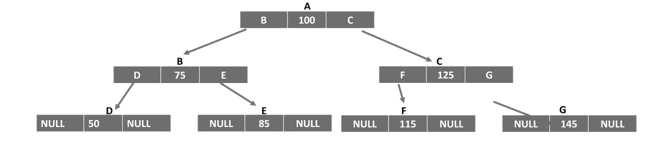
    Self-referential structures are also used to construct non-linear data structures such as trees. A binary search tree is logically represented by the following figure −

    Tree

    The struct definition for the implementing a tree is as follows −

    structnode{int data;structnode*leftChild;structnode*rightChild;};

    To learn these complex data structure in detail, you can visit the DSA tutorial − Data Structures Algorithms

  • Array of Structures in C

    In C programming, the struct keyword is used to define a derived data type. Once defined, you can declare an array of struct variables, just like an array of intfloat or char types is declared. An array of structures has a number of use-cases such as in storing records similar to a database table where you have each row with different data types.

    Usually, a struct type is defined at the beginning of the code so that its type can be used inside any of the functions. You can declare an array of structures and later on fill data in it or you can initialize it at the time of declaration itself.

    Initializing a Struct Array

    Let us define a struct type called book as follows −

    structbook{char title[10];double price;int pages;};

    During the program, you can declare an array and initialize it by giving the values of each element inside curly brackets. Each element in the struct array is a struct value itself. Hence, we have the nested curly brackets as shown below −

    structbook b[3]={{"Learn C",650.50,325},{"C Pointers",175,225},{"C Pearls",250,250}};

    How does the compiler allocate memory for this array? Since we have an array of three elements, of struct whose size is 32 bytes, the array occupies “32 x 3” bytes. Each block of 32 bytes will accommodate a “title”, “price” and “pages” element.

    LEARNC675.50325
    CPOINTERS175225
    CPEARLS250250

    Declaring a Struct Array

    You can also declare an empty struct array. Afterwards, you can either read the data in it with scanf() statements or assign value to each element as shown below −

    structbook b[3];strcpy(b[0].title,"Learn C");
    b[0].price =650.50;
    b[0].pages=325;strcpy(b[1].title,"C Pointers");
    b[1].price =175;
    b[1].pages=225;strcpy(b[2].title,"C Pearls");
    b[2].price =250;250
    b[2].pages=325;

    Reading a Struct Array

    We can also accept data from the user to fill the array.

    Example 1

    In the following code, a for loop is used to accept inputs for the “title”, “price” and “pages” elements of each struct element of the array.

    #include <stdio.h>structbook{char title[10];double price;int pages;};intmain(){structbook b[3];strcpy(b[0].title,"Learn C");
       b[0].price =650.50;
       b[0].pages =325;strcpy(b[1].title,"C Pointers");
       b[1].price =175;
       b[1].pages =225;strcpy(b[2].title,"C Pearls");
       b[2].price =250;
       b[2].pages =325;printf("\nList of Books:\n");for(int i =0; i <3; i++){printf("Title: %s \tPrice: %7.2lf \tPages: %d\n", b[i].title, b[i].price, b[i].pages);}return0;}

    Output

    When you run this code, it will produce the following output −

    List of Books:
    Title: Learn C    Price: 650.50 Pages: 325
    Title: C Pointers Price: 175.00 Pages: 225
    Title: C Pearls   Price: 250.00 Pages: 325
    

    Example 2

    In this example, a struct type called student is defined. Its elements are “name”; marks in physics, chemistry and maths; and the “percentage”.

    An array of three struct student types is declared and the first four elements are populated by user input, with a for loop. Inside the loop itself, the “percent” element of each subscript is computed.

    Finally, an array of students with their names, marks and percentage is printed to show the marklist.

    #include <stdio.h>structstudent{char name[10];int physics, chemistry, maths;double percent;};intmain(){structstudent s[3];strcpy(s[0].name,"Ravi");
       s[0].physics =50;
       s[0].chemistry =60;
       s[0].maths =70;strcpy(s[1].name,"Kiran");
       s[1].physics =55;
       s[1].chemistry =66;
       s[1].maths =77;strcpy(s[2].name,"Anil");
       s[2].physics =45;
       s[2].chemistry =55;
       s[2].maths =65;for(int i =0; i <3; i++){
          s[i].percent =(double)(s[i].physics + s[i].maths + s[i].chemistry)/3;}printf("\nName\tPhysics\tChemistry\t\Maths\tPercent\n");for(int i =0; i <3; i++){printf("%s \t\t%d \t\t%d \t\t%d \t\t%5.2lf\n", s[i].name, s[i].physics, s[i].chemistry, s[i].maths, s[i].percent);}return0;}

    Output

    When you run this code, it will produce the following output −

    Name  Physics Chemistry Maths Percent
    Ravi  50      60        70    60.00
    Kiran 55      66        77    66.00
    Anil  45      55        65    55.00
    

    Sorting a Struct Array

    Let us take another example of struct array. Here, we will have the array of “book” struct type sorted in ascending order of the price by implementing bubble sort technique.

    Note: The elements of one struct variable can be directly assigned to another struct variable by using the assignment operator.

    Example

    Take a look at the example −

    #include <stdio.h>structbook{char title[15];double price;int pages;};intmain(){structbook b[3]={{"Learn C",650.50,325},{"C Pointers",175,225},{"C Pearls",250,250}};int i, j;structbook temp;for(i =0; i <2; i++){for(j = i; j <3; j++){if(b[i].price > b[j].price){
                temp = b[i];
                b[i]= b[j];
                b[j]= temp;}}}printf("\nList of Books in Ascending Order of Price:\n");for(i =0; i <3; i++){printf("Title: %s \tPrice: %7.2lf \tPages: %d\n", b[i].title, b[i].price, b[i].pages);}return0;}

    Output

    When you run this code, it will produce the following output −

    List of Books in Ascending Order of Price:
    Title: C Pointers Price: 175.00 Pages: 225
    Title: C Pearls   Price: 250.00 Pages: 250
    Title: Learn C    Price: 650.50 Pages: 325
    

    Declaring a Pointer to a Struct Array

    We can also declare a pointer to a struct array. C uses the indirection operator () to access the internal elements of struct variables.

    Example

    The following example shows how you can declare a pointer to a struct array −

    #include <stdio.h>structbook{char title[15];double price;int pages;};intmain(){structbook b[3]={{"Learn C",650.50,325},{"C Pointers",175,225},{"C Pearls",250,250}};structbook*ptr = b;for(int i =0; i <3; i++){printf("Title: %s \tPrice: %7.2lf \tPages: %d\n", ptr -> title, ptr -> price, ptr -> pages);
          ptr++;}return0;}

    Output

    When you run this code, it will produce the following output −

    Title: Learn C    Price: 650.50 Pages: 325
    Title: C Pointers Price: 175.00 Pages: 225
    Title: C Pearls   Price: 250.00 Pages: 250